<!DOCTYPE html>
    <html lang="vi" xmlns="http://www.w3.org/1999/xhtml" prefix="og: http://ogp.me/ns#">
    <head>
<title>Cách cài đặt thông báo thời gian bằng giọng nói trên máy Mac</title>
<meta name="description" content="Cách cài đặt thông báo thời gian bằng giọng nói trên máy Mac - Savefile - Tin Tức -...">
<meta name="author" content=".: Nguoicodonvn2008.info - Cõi lòng người cô đơn :.">
<meta name="copyright" content=".: Nguoicodonvn2008.info - Cõi lòng người cô đơn :. [admin@nguoicodonvn2008.info]">
<meta name="robots" content="index, archive, follow, noodp">
<meta name="googlebot" content="index,archive,follow,noodp">
<meta name="msnbot" content="all,index,follow">
<meta name="generator" content="NukeViet v4.5">
<meta http-equiv="Content-Type" content="text/html; charset=utf-8">
<meta property="og:title" content="Cách cài đặt thông báo thời gian bằng giọng nói trên máy Mac">
<meta property="og:type" content="website">
<meta property="og:description" content="Savefile - Tin Tức - https&#x3A;&#x002F;&#x002F;www.nguoicodonvn2008.info&#x002F;vi&#x002F;news&#x002F;savefile&#x002F;kien-thuc-may-tinh&#x002F;cach-cai-dat-thong-bao-thoi-gian-bang-giong-noi-tren-may-mac-3767.html">
<meta property="og:site_name" content=".&#x3A; Nguoicodonvn2008.info - Cõi lòng người cô đơn &#x3A;.">
<meta property="og:url" content="https://www.nguoicodonvn2008.info/vi/news/savefile/kien-thuc-may-tinh/cach-cai-dat-thong-bao-thoi-gian-bang-giong-noi-tren-may-mac-3767.html">
<link rel="shortcut icon" href="https://nguoicodonvn2008.info/favicon.ico">
<link rel="canonical" href="https://www.nguoicodonvn2008.info/vi/news/savefile/kien-thuc-may-tinh/cach-cai-dat-thong-bao-thoi-gian-bang-giong-noi-tren-may-mac-3767.html">
<link rel="alternate" href="https://nguoicodonvn2008.info/vi/news/rss/" title="Tin Tức" type="application/rss+xml">
<link rel="alternate" href="https://nguoicodonvn2008.info/vi/news/rss/karaoke-dual/" title="Tin Tức - Karaoke Dual" type="application/rss+xml">
<link rel="alternate" href="https://nguoicodonvn2008.info/vi/news/rss/nhac-tre/" title="Tin Tức - Nhạc trẻ" type="application/rss+xml">
<link rel="alternate" href="https://nguoicodonvn2008.info/vi/news/rss/tru-tinh/" title="Tin Tức - Trữ tình" type="application/rss+xml">
<link rel="alternate" href="https://nguoicodonvn2008.info/vi/news/rss/nuoc-ngoai/" title="Tin Tức - Nước ngoài" type="application/rss+xml">
<link rel="alternate" href="https://nguoicodonvn2008.info/vi/news/rss/remix/" title="Tin Tức - Remix" type="application/rss+xml">
<link rel="alternate" href="https://nguoicodonvn2008.info/vi/news/rss/tam-su-tinh-yeu/" title="Tin Tức - Tâm sự tình yêu" type="application/rss+xml">
<link rel="alternate" href="https://nguoicodonvn2008.info/vi/news/rss/tho-suu-tam/" title="Tin Tức - Thơ sưu tầm" type="application/rss+xml">
<link rel="alternate" href="https://nguoicodonvn2008.info/vi/news/rss/cuoc-song/" title="Tin Tức - Cuộc sống" type="application/rss+xml">
<link rel="alternate" href="https://nguoicodonvn2008.info/vi/news/rss/phan-mem/" title="Tin Tức - Phần mềm" type="application/rss+xml">
<link rel="alternate" href="https://nguoicodonvn2008.info/vi/news/rss/kien-thuc-may-tinh/" title="Tin Tức - Kiến thức máy tính" type="application/rss+xml">
<link rel="alternate" href="https://nguoicodonvn2008.info/vi/news/rss/hoc-tap/" title="Tin Tức - Học tập" type="application/rss+xml">
<link rel="alternate" href="https://nguoicodonvn2008.info/vi/news/rss/tai-lieu/" title="Tin Tức - Tài liệu" type="application/rss+xml">
<link rel="alternate" href="https://nguoicodonvn2008.info/vi/news/rss/de-thi/" title="Tin Tức - Đề thi" type="application/rss+xml">
<link rel="preload" as="style" href="https://nguoicodonvn2008.info/assets/css/font-awesome.min.css" type="text/css">
<link rel="preload" as="style" href="https://nguoicodonvn2008.info/themes/default/css/bootstrap.non-responsive.css" type="text/css">
<link rel="preload" as="style" href="https://nguoicodonvn2008.info/themes/default/css/style.css" type="text/css">
<link rel="preload" as="style" href="https://nguoicodonvn2008.info/themes/default/css/style.non-responsive.css" type="text/css">
<link rel="preload" as="style" href="https://nguoicodonvn2008.info/themes/default/css/news.css" type="text/css">
<link rel="preload" as="style" href="https://nguoicodonvn2008.info/themes/default/css/custom.css" type="text/css">
<link rel="preload" as="script" href="https://nguoicodonvn2008.info/assets/js/jquery/jquery.min.js" type="text/javascript">
<link rel="preload" as="script" href="https://nguoicodonvn2008.info/assets/js/language/vi.js" type="text/javascript">
<link rel="preload" as="script" href="https://nguoicodonvn2008.info/assets/js/DOMPurify/purify3.js" type="text/javascript">
<link rel="preload" as="script" href="https://nguoicodonvn2008.info/assets/js/global.js" type="text/javascript">
<link rel="preload" as="script" href="https://nguoicodonvn2008.info/assets/js/site.js" type="text/javascript">
<link rel="preload" as="script" href="https://nguoicodonvn2008.info/themes/default/js/news.js" type="text/javascript">
<link rel="preload" as="script" href="https://nguoicodonvn2008.info/themes/default/js/main.js" type="text/javascript">
<link rel="preload" as="script" href="https://nguoicodonvn2008.info/themes/default/js/custom.js" type="text/javascript">
<link rel="preload" as="script" href="https://nguoicodonvn2008.info/themes/default/js/bootstrap.min.js" type="text/javascript">
<link rel="stylesheet" href="https://nguoicodonvn2008.info/assets/css/font-awesome.min.css">
<link rel="stylesheet" href="https://nguoicodonvn2008.info/themes/default/css/bootstrap.non-responsive.css">
<link rel="stylesheet" href="https://nguoicodonvn2008.info/themes/default/css/style.css">
<link rel="stylesheet" href="https://nguoicodonvn2008.info/themes/default/css/style.non-responsive.css">
<link rel="StyleSheet" href="https://nguoicodonvn2008.info/themes/default/css/news.css">
<link rel="stylesheet" href="https://nguoicodonvn2008.info/themes/default/css/custom.css">
<style type="text/css">
	body{background: #fff;}
</style>
    </head>
    <body>
<div id="print">
	<div id="hd_print">
		<h2 class="pull-left">.&#x3A; Nguoicodonvn2008.info - Cõi lòng người cô đơn &#x3A;.</h2>
		<p class="pull-right"><a title=".&#x3A; Nguoicodonvn2008.info - Cõi lòng người cô đơn &#x3A;." href="https://nguoicodonvn2008.info/">https://nguoicodonvn2008.info</a></p>
	</div>
	<div class="clear"></div>
	<hr />
	<div id="content">
		<h1>Cách cài đặt thông báo thời gian bằng giọng nói trên máy Mac</h1>
		<ul class="list-inline">
			<li>Thứ ba - 16/03/2021 00:58</li>
			<li class="hidden-print txtrequired"><em class="fa fa-print">&nbsp;</em><a title="In ra" href="javascript:;" onclick="window.print()">In ra</a></li>
			<li class="hidden-print txtrequired"><em class="fa fa-power-off">&nbsp;</em><a title="Đóng cửa sổ này" href="javascript:;" onclick="window.close()">Đóng cửa sổ này</a></li>
		</ul>
		<div class="clear"></div>
		<div id="hometext">
		</div>
				<div class="imghome">
			<img alt="Cách cài đặt thông báo thời gian bằng giọng nói trên máy Mac" src="https://st.quantrimang.com/photos/image/2021/03/09/thong-bao-thoi-gian-bang-giong-noi-tren-may-mac4.jpg" width="460" class="img-thumbnail" />
		</div>
		<div class="clear"></div>
		<div id="bodytext" class="clearfix">
			<p style="text-align: justify;">Khi làm việc với máy Mac, trong một số tình huống nhất định, bạn muốn xem giờ nhưng lại không thể thoát ra màn hình chính. Trong trường hợp này, bạn hoàn toàn có thể thiết lập để máy Mac của mình thông báo bằng cách đọc to thời gian thực sau mỗi 15 phút, nửa giờ hoặc 1 giờ. Đây là một tính năng ẩn khá thú vị mà bạn có thể tìm thấy trong System Preferences. Cách thiết lập như sau.</p>

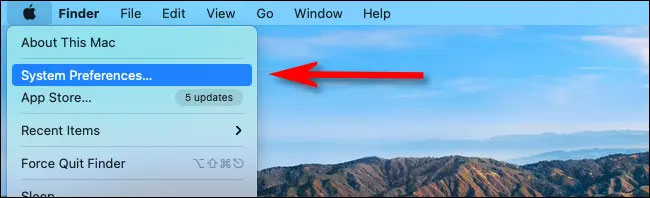
<p style="text-align: justify;">Trước tiên, hãy mở System Preferences trên máy Mac bằng cách nhấp vào biểu tượng Apple ở góc trên bên trái màn hình và bấm vào mục “System Preferences” từ menu xuất hiện.</p>

<p style="text-align: justify;"><img alt="Bấm vào mục “System Preferences”" data-i="0" data-src="https://st.quantrimang.com/photos/image/2021/03/09/thong-bao-thoi-gian-bang-giong-noi-tren-may-mac1.jpg" data-was-processed="true" height="198" src="https://st.quantrimang.com/photos/image/2021/03/09/thong-bao-thoi-gian-bang-giong-noi-tren-may-mac1.jpg" width="650" /></p>

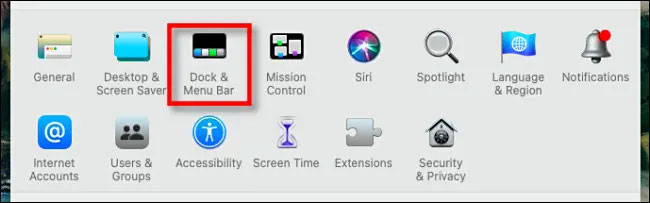
<p style="text-align: justify;">Trên giao diện “System Preferences” trong macOS Catalina hoặc các phiên bản cũ hơn, bạn hãy nhấp vào “Date &amp; Time”. Đối với macOS 11 Big Sur trở lên, hãy nhấp vào “Dock &amp; Menu Bar”.</p>

<p style="text-align: justify;"><img alt="Nhấp vào “Dock &amp; Menu Bar”" data-i="1" data-src="https://st.quantrimang.com/photos/image/2021/03/09/thong-bao-thoi-gian-bang-giong-noi-tren-may-mac2.jpg" data-was-processed="true" height="203" src="https://st.quantrimang.com/photos/image/2021/03/09/thong-bao-thoi-gian-bang-giong-noi-tren-may-mac2.jpg" width="650" /></p>

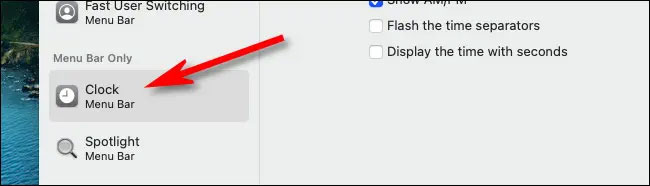
<p style="text-align: justify;">Tiếp theo, nếu bạn đang sử dụng phiên bản macOS Catalina trở xuống, hãy nhấp vào tab “Clock” trong mục tùy chọn “Date &amp; Time”. Trong macOS Big Sur trở lên, bạn cuộn xuống thanh bên “Dock &amp; Menu Bar” và nhấp vào “Clock”.</p>

<p style="text-align: justify;"><img alt="Nhấp vào “Clock”" data-i="2" data-src="https://st.quantrimang.com/photos/image/2021/03/09/thong-bao-thoi-gian-bang-giong-noi-tren-may-mac3.jpg" data-was-processed="true" height="186" src="https://st.quantrimang.com/photos/image/2021/03/09/thong-bao-thoi-gian-bang-giong-noi-tren-may-mac3.jpg" width="650" /></p>

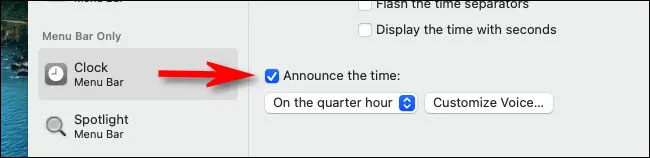
<p style="text-align: justify;">Khi bạn đã ở trong giao diện cái đặt “Clock”, hãy tích vào ô vuông bên trái tùy chọn “Announce the time”. Sau đó, bằng cách nhận vào menu thả xuống, bạn có thể chọn mốc thời gian mà bạn muốn máy Mac của mình đọc to thông báo thời gian. Ba tùy chọn có sẵn đó là on the hour (một giờ), on the half-hour (nửa giờ), hoặc on the quarter-hour (15 phút).</p>

<p style="text-align: justify;"><img alt="Chọn mốc giờ thông báo" data-i="3" data-src="https://st.quantrimang.com/photos/image/2021/03/09/thong-bao-thoi-gian-bang-giong-noi-tren-may-mac4.jpg" data-was-processed="true" height="158" src="https://st.quantrimang.com/photos/image/2021/03/09/thong-bao-thoi-gian-bang-giong-noi-tren-may-mac4.jpg" width="650" /></p>

<p style="text-align: justify;">Ví dụ: nếu bạn chọn “On the quarter-hour”, bạn sẽ nghe thấy thông báo lúc 2:00 chiều, 2:15 chiều, 2:30 chiều và 2:45 chiều. Hệ thống sẽ nói: &quot;It’s two o’clock&quot; hoặc &quot;It’s two forty-five&quot;.</p>

<p style="text-align: justify;">Nếu bạn muốn thay đổi âm giọng nói lớn hơn thời gian, hãy nhấp vào nút “Customize Voice”. Trên màn hình đó, bạn có thể chọn giọng nam hoặc nữ và cũng có thể điều chỉnh tốc độ giọng nói.</p>
		</div>
				<div id="author">
						<p>
				<strong>Nguồn tin:</strong>
				Quantrimang.com
			</p>
		</div>
	</div>
	<div id="footer" class="clearfix">
		<div id="url">
			<strong>URL của bản tin này: </strong><a href="https://www.nguoicodonvn2008.info/vi/news/savefile/kien-thuc-may-tinh/cach-cai-dat-thong-bao-thoi-gian-bang-giong-noi-tren-may-mac-3767.html" title="Cách cài đặt thông báo thời gian bằng giọng nói trên máy Mac">https://www.nguoicodonvn2008.info/vi/news/savefile/kien-thuc-may-tinh/cach-cai-dat-thong-bao-thoi-gian-bang-giong-noi-tren-may-mac-3767.html</a>

		</div>
		<div class="clear"></div>
		<div class="copyright">
			&copy; .&#x3A; Nguoicodonvn2008.info - Cõi lòng người cô đơn &#x3A;.
		</div>
		<div id="contact">
			<a href="mailto:admin@nguoicodonvn2008.info">admin@nguoicodonvn2008.info</a>
		</div>
	</div>
</div>
        <div id="timeoutsess" class="chromeframe">
            Bạn đã không sử dụng Site, <a onclick="timeoutsesscancel();" href="https://nguoicodonvn2008.info/#">Bấm vào đây để duy trì trạng thái đăng nhập</a>. Thời gian chờ: <span id="secField"> 60 </span> giây
        </div>
        <div id="openidResult" class="nv-alert" style="display:none"></div>
        <div id="openidBt" data-result="" data-redirect=""></div>
		</script>
		<div class="car-top">
  <span><img src="https://nguoicodonvn2008.info/themes/default/images/car.png" alt=""></span>
</div>
<script src="https://nguoicodonvn2008.info/assets/js/jquery/jquery.min.js"></script>
<script>var nv_base_siteurl="/",nv_lang_data="vi",nv_lang_interface="vi",nv_name_variable="nv",nv_fc_variable="op",nv_lang_variable="language",nv_module_name="news",nv_func_name="savefile",nv_is_user=0, nv_my_ofs=-4,nv_my_abbr="EDT",nv_cookie_prefix="nv4c_e856T",nv_check_pass_mstime=1738000,nv_area_admin=0,nv_safemode=0,theme_responsive=0,nv_recaptcha_ver=2,nv_recaptcha_sitekey="",nv_recaptcha_type="image",XSSsanitize=1;</script>
<script src="https://nguoicodonvn2008.info/assets/js/language/vi.js"></script>
<script src="https://nguoicodonvn2008.info/assets/js/DOMPurify/purify3.js"></script>
<script src="https://nguoicodonvn2008.info/assets/js/global.js"></script>
<script src="https://nguoicodonvn2008.info/assets/js/site.js"></script>
<script src="https://nguoicodonvn2008.info/themes/default/js/news.js"></script>
<script src="https://nguoicodonvn2008.info/themes/default/js/main.js"></script>
<script src="https://nguoicodonvn2008.info/themes/default/js/custom.js"></script>
<script type="application/ld+json">
        {
            "@context": "https://schema.org",
            "@type": "Organization",
            "url": "https://nguoicodonvn2008.info",
            "logo": "https://nguoicodonvn2008.info/uploads/angel.gif"
        }
        </script>
<script src="https://nguoicodonvn2008.info/themes/default/js/bootstrap.min.js"></script>
<script type="text/javascript">
var $scrolltop = $('.car-top');
$scrolltop.on('click', function () {
    $('html,body').animate({
        scrollTop: 0
    }, 800);
    $(this).addClass("car-run");
    setTimeout(function(){ $scrolltop.removeClass('car-run');}, 1000);
    return false;
});
$(window).on('scroll', function ()
{ 
    if($(window).scrollTop() >= 200)
    {
        $scrolltop.addClass("show");
        $scrolltop.addClass("car-down");
    }
    else
    {
       $scrolltop.removeClass("show");
       setTimeout(function(){ $scrolltop.removeClass('car-down');}, 300);
    }
});
</script>
</body>
</html>