<!DOCTYPE html>
    <html lang="vi" xmlns="http://www.w3.org/1999/xhtml" prefix="og: http://ogp.me/ns#">
    <head>
<title>Cách cài đặt Mathematica trên Raspberry Pi</title>
<meta name="description" content="Cách cài đặt Mathematica trên Raspberry Pi - Savefile - Tin Tức -...">
<meta name="author" content=".: Nguoicodonvn2008.info - Cõi lòng người cô đơn :.">
<meta name="copyright" content=".: Nguoicodonvn2008.info - Cõi lòng người cô đơn :. [admin@nguoicodonvn2008.info]">
<meta name="robots" content="index, archive, follow, noodp">
<meta name="googlebot" content="index,archive,follow,noodp">
<meta name="msnbot" content="all,index,follow">
<meta name="generator" content="NukeViet v4.5">
<meta http-equiv="Content-Type" content="text/html; charset=utf-8">
<meta property="og:title" content="Cách cài đặt Mathematica trên Raspberry Pi">
<meta property="og:type" content="website">
<meta property="og:description" content="Savefile - Tin Tức - https&#x3A;&#x002F;&#x002F;www.nguoicodonvn2008.info&#x002F;vi&#x002F;news&#x002F;savefile&#x002F;kien-thuc-may-tinh&#x002F;cach-cai-dat-mathematica-tren-raspberry-pi-2905.html">
<meta property="og:site_name" content=".&#x3A; Nguoicodonvn2008.info - Cõi lòng người cô đơn &#x3A;.">
<meta property="og:url" content="https://www.nguoicodonvn2008.info/vi/news/savefile/kien-thuc-may-tinh/cach-cai-dat-mathematica-tren-raspberry-pi-2905.html">
<link rel="shortcut icon" href="https://nguoicodonvn2008.info/favicon.ico">
<link rel="canonical" href="https://www.nguoicodonvn2008.info/vi/news/savefile/kien-thuc-may-tinh/cach-cai-dat-mathematica-tren-raspberry-pi-2905.html">
<link rel="alternate" href="https://nguoicodonvn2008.info/vi/news/rss/" title="Tin Tức" type="application/rss+xml">
<link rel="alternate" href="https://nguoicodonvn2008.info/vi/news/rss/karaoke-dual/" title="Tin Tức - Karaoke Dual" type="application/rss+xml">
<link rel="alternate" href="https://nguoicodonvn2008.info/vi/news/rss/nhac-tre/" title="Tin Tức - Nhạc trẻ" type="application/rss+xml">
<link rel="alternate" href="https://nguoicodonvn2008.info/vi/news/rss/tru-tinh/" title="Tin Tức - Trữ tình" type="application/rss+xml">
<link rel="alternate" href="https://nguoicodonvn2008.info/vi/news/rss/nuoc-ngoai/" title="Tin Tức - Nước ngoài" type="application/rss+xml">
<link rel="alternate" href="https://nguoicodonvn2008.info/vi/news/rss/remix/" title="Tin Tức - Remix" type="application/rss+xml">
<link rel="alternate" href="https://nguoicodonvn2008.info/vi/news/rss/tam-su-tinh-yeu/" title="Tin Tức - Tâm sự tình yêu" type="application/rss+xml">
<link rel="alternate" href="https://nguoicodonvn2008.info/vi/news/rss/tho-suu-tam/" title="Tin Tức - Thơ sưu tầm" type="application/rss+xml">
<link rel="alternate" href="https://nguoicodonvn2008.info/vi/news/rss/cuoc-song/" title="Tin Tức - Cuộc sống" type="application/rss+xml">
<link rel="alternate" href="https://nguoicodonvn2008.info/vi/news/rss/phan-mem/" title="Tin Tức - Phần mềm" type="application/rss+xml">
<link rel="alternate" href="https://nguoicodonvn2008.info/vi/news/rss/kien-thuc-may-tinh/" title="Tin Tức - Kiến thức máy tính" type="application/rss+xml">
<link rel="alternate" href="https://nguoicodonvn2008.info/vi/news/rss/hoc-tap/" title="Tin Tức - Học tập" type="application/rss+xml">
<link rel="alternate" href="https://nguoicodonvn2008.info/vi/news/rss/tai-lieu/" title="Tin Tức - Tài liệu" type="application/rss+xml">
<link rel="alternate" href="https://nguoicodonvn2008.info/vi/news/rss/de-thi/" title="Tin Tức - Đề thi" type="application/rss+xml">
<link rel="preload" as="style" href="https://nguoicodonvn2008.info/assets/css/font-awesome.min.css" type="text/css">
<link rel="preload" as="style" href="https://nguoicodonvn2008.info/themes/default/css/bootstrap.non-responsive.css" type="text/css">
<link rel="preload" as="style" href="https://nguoicodonvn2008.info/themes/default/css/style.css" type="text/css">
<link rel="preload" as="style" href="https://nguoicodonvn2008.info/themes/default/css/style.non-responsive.css" type="text/css">
<link rel="preload" as="style" href="https://nguoicodonvn2008.info/themes/default/css/news.css" type="text/css">
<link rel="preload" as="style" href="https://nguoicodonvn2008.info/themes/default/css/custom.css" type="text/css">
<link rel="preload" as="script" href="https://nguoicodonvn2008.info/assets/js/jquery/jquery.min.js" type="text/javascript">
<link rel="preload" as="script" href="https://nguoicodonvn2008.info/assets/js/language/vi.js" type="text/javascript">
<link rel="preload" as="script" href="https://nguoicodonvn2008.info/assets/js/DOMPurify/purify3.js" type="text/javascript">
<link rel="preload" as="script" href="https://nguoicodonvn2008.info/assets/js/global.js" type="text/javascript">
<link rel="preload" as="script" href="https://nguoicodonvn2008.info/assets/js/site.js" type="text/javascript">
<link rel="preload" as="script" href="https://nguoicodonvn2008.info/themes/default/js/news.js" type="text/javascript">
<link rel="preload" as="script" href="https://nguoicodonvn2008.info/themes/default/js/main.js" type="text/javascript">
<link rel="preload" as="script" href="https://nguoicodonvn2008.info/themes/default/js/custom.js" type="text/javascript">
<link rel="preload" as="script" href="https://nguoicodonvn2008.info/themes/default/js/bootstrap.min.js" type="text/javascript">
<link rel="stylesheet" href="https://nguoicodonvn2008.info/assets/css/font-awesome.min.css">
<link rel="stylesheet" href="https://nguoicodonvn2008.info/themes/default/css/bootstrap.non-responsive.css">
<link rel="stylesheet" href="https://nguoicodonvn2008.info/themes/default/css/style.css">
<link rel="stylesheet" href="https://nguoicodonvn2008.info/themes/default/css/style.non-responsive.css">
<link rel="StyleSheet" href="https://nguoicodonvn2008.info/themes/default/css/news.css">
<link rel="stylesheet" href="https://nguoicodonvn2008.info/themes/default/css/custom.css">
<style type="text/css">
	body{background: #fff;}
</style>
    </head>
    <body>
<div id="print">
	<div id="hd_print">
		<h2 class="pull-left">.&#x3A; Nguoicodonvn2008.info - Cõi lòng người cô đơn &#x3A;.</h2>
		<p class="pull-right"><a title=".&#x3A; Nguoicodonvn2008.info - Cõi lòng người cô đơn &#x3A;." href="https://nguoicodonvn2008.info/">https://nguoicodonvn2008.info</a></p>
	</div>
	<div class="clear"></div>
	<hr />
	<div id="content">
		<h1>Cách cài đặt Mathematica trên Raspberry Pi</h1>
		<ul class="list-inline">
			<li>Thứ năm - 15/10/2020 00:46</li>
			<li class="hidden-print txtrequired"><em class="fa fa-print">&nbsp;</em><a title="In ra" href="javascript:;" onclick="window.print()">In ra</a></li>
			<li class="hidden-print txtrequired"><em class="fa fa-power-off">&nbsp;</em><a title="Đóng cửa sổ này" href="javascript:;" onclick="window.close()">Đóng cửa sổ này</a></li>
		</ul>
		<div class="clear"></div>
		<div id="hometext">
		</div>
				<div class="imghome">
			<img alt="Cách cài đặt Mathematica trên Raspberry Pi" src="https://st.quantrimang.com/photos/image/2020/10/14/cai-mathematica-tren-pi-3.jpg" width="460" class="img-thumbnail" />
		</div>
		<div class="clear"></div>
		<div id="bodytext" class="clearfix">
			<p style="text-align: justify;">Mathematica là một công cụ tính toán cực kỳ mạnh mẽ để xử lý dữ liệu và những thứ liên quan đến toán học.</p>

<p style="text-align: justify;">Phần mềm này được cung cấp miễn phí cho bất kỳ&nbsp;Raspberry Pi&nbsp;nào đang chạy Raspbian. Vì vậy, nếu đang phải giải quyết vấn đề nào đó liên quan đến toán học, bạn nên thử phần mềm này.</p>

<p style="text-align: justify;">Trong hướng dẫn này,&nbsp;<strong>Quantrimang.com</strong>&nbsp;sẽ chỉ cho bạn các bước đơn giản để cài đặt Mathematica vào Raspberry Pi.</p>

<p style="text-align: justify;">Trước khi tiếp tục với hướng dẫn này, hãy đảm bảo rằng bạn có ít nhất 1GB dung lượng trống trên thẻ SD.</p>

<h2 style="text-align: justify;">Cài đặt Mathematica vào Raspberry Pi</h2>

<p style="text-align: justify;">1. Trước khi có thể cài đặt Mathematica vào Raspberry Pi, bạn phải cập nhật danh sách gói. Để cập nhật danh sách gói, tất cả những gì bạn cần làm là chạy lệnh sau</p>

<pre id="pre0">
<code>sudo apt update</code></pre>

<p style="text-align: justify;">Việc cập nhật danh sách gói sẽ cho phép bạn cài đặt Mathematica mà không gặp bất kỳ sự cố nào.</p>

<p style="text-align: justify;">2. Bây giờ, để cài đặt Mathematica, bạn cần chạy lệnh dưới đây.</p>

<pre id="pre1">
<code>sudo apt install wolfram-engine</code></pre>

<p style="text-align: justify;">Quá trình cài đặt này sẽ mất một chút thời gian vì Pi cần tải xuống và cài đặt các gói hơn 500mb.</p>

<div style="text-align: justify;">&nbsp;</div>

<h2 style="text-align: justify;">Load Mathematica trên Raspberry Pi</h2>

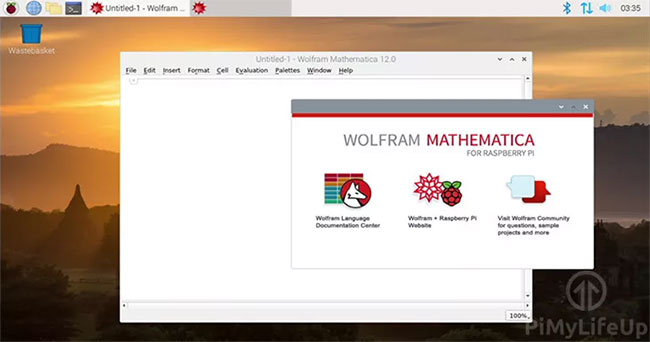
<p style="text-align: justify;">1. Với Mathematica đã được cài đặt trên Pi, bây giờ, bạn có thể khởi chạy nó.</p>

<p style="text-align: justify;">Để mở Mathematica, hãy nhấp vào biểu tượng ở góc trên cùng bên trái của màn hình.</p>

<figure>
<div style="text-align: justify;"><img alt="Mở Mathematica" data-i="0" data-src="https://st.quantrimang.com/photos/image/2020/10/14/cai-mathematica-tren-pi-1.jpg" data-was-processed="true" height="137" src="https://st.quantrimang.com/photos/image/2020/10/14/cai-mathematica-tren-pi-1.jpg" width="650" /></div>

<figcaption>
<div style="text-align: justify;">Mở Mathematica</div>
</figcaption>
</figure>

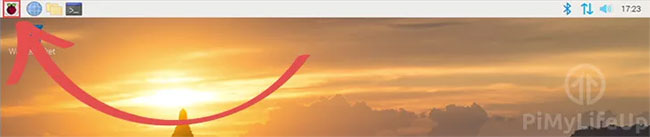
<p style="text-align: justify;">2. Trong menu này, di chuột qua&nbsp;<strong>“Programming”.&nbsp;</strong>Trong menu pop-up, nhấp vào&nbsp;<strong>“Mathematica”.</strong></p>

<figure>
<div style="text-align: justify;"><img alt="Chọn Programming &gt; Mathematica" data-i="1" data-src="https://st.quantrimang.com/photos/image/2020/10/14/cai-mathematica-tren-pi-2.jpg" data-was-processed="true" height="211" src="https://st.quantrimang.com/photos/image/2020/10/14/cai-mathematica-tren-pi-2.jpg" width="650" /></div>

<figcaption>
<div style="text-align: justify;">Chọn Programming &gt; Mathematica</div>
</figcaption>
</figure>

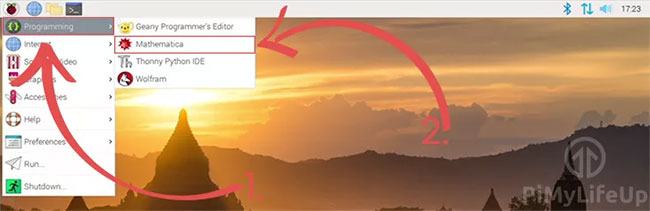
<p style="text-align: justify;">3. Mathematica bây giờ sẽ khởi chạy trên Pi. Bạn sẽ có thể bắt đầu sử dụng nó ngay lập tức để thực hiện các phép tính toán học.</p>

<figure>
<div style="text-align: justify;"><img alt="Mathematica bây giờ sẽ khởi chạy trên Pi" data-i="2" data-src="https://st.quantrimang.com/photos/image/2020/10/14/cai-mathematica-tren-pi-3.jpg" data-was-processed="true" height="342" src="https://st.quantrimang.com/photos/image/2020/10/14/cai-mathematica-tren-pi-3.jpg" width="650" /></div>

<figcaption>
<div style="text-align: justify;">Mathematica bây giờ sẽ khởi chạy trên Pi</div>
</figcaption>
</figure>

<h2 style="text-align: justify;">Thử nghiệm Mathematica trên Pi</h2>

<p style="text-align: justify;">1. Để kiểm tra xem phần mềm có hoạt động như dự kiến ​​hay không, bạn có thể thử nhập một bài toán đơn giản như sau.</p>

<pre id="pre2">
<code>2+2</code></pre>

<p style="text-align: justify;">2. Với phép toán đã nhập, bạn có thể nhấn&nbsp;<strong>SHIFT + ENTER</strong>&nbsp;để cho ra kết quả.</p>

<p style="text-align: justify;">Ngoài ra, bạn có thể nhấp vào&nbsp;<strong>“Evaluation”</strong>&nbsp;trong thanh menu, sau đó nhấp vào&nbsp;<strong>“Evaluate Cells”.</strong></p>

<p style="text-align: justify;">3. Nếu mọi thứ đều hoạt động, kết quả đầu ra trong notebook Mathematica sẽ trông giống như những gì có bên dưới.</p>

<pre id="pre3">
<code>In&#91;1&#93;:= 2 + 2
 Out&#91;1&#93;:= 4</code></pre>

<p style="text-align: justify;">Tại thời điểm này, bạn đã thiết lập xong Mathematica trên Raspberry Pi và thực hiện kiểm tra ban đầu để xem nó hoạt động.</p>

<p style="text-align: justify;">Chúc bạn thực hiện thành công!</p>
		</div>
				<div id="author">
						<p>
				<strong>Nguồn tin:</strong>
				Quantrimang.com
			</p>
		</div>
	</div>
	<div id="footer" class="clearfix">
		<div id="url">
			<strong>URL của bản tin này: </strong><a href="https://www.nguoicodonvn2008.info/vi/news/savefile/kien-thuc-may-tinh/cach-cai-dat-mathematica-tren-raspberry-pi-2905.html" title="Cách cài đặt Mathematica trên Raspberry Pi">https://www.nguoicodonvn2008.info/vi/news/savefile/kien-thuc-may-tinh/cach-cai-dat-mathematica-tren-raspberry-pi-2905.html</a>

		</div>
		<div class="clear"></div>
		<div class="copyright">
			&copy; .&#x3A; Nguoicodonvn2008.info - Cõi lòng người cô đơn &#x3A;.
		</div>
		<div id="contact">
			<a href="mailto:admin@nguoicodonvn2008.info">admin@nguoicodonvn2008.info</a>
		</div>
	</div>
</div>
        <div id="timeoutsess" class="chromeframe">
            Bạn đã không sử dụng Site, <a onclick="timeoutsesscancel();" href="https://nguoicodonvn2008.info/#">Bấm vào đây để duy trì trạng thái đăng nhập</a>. Thời gian chờ: <span id="secField"> 60 </span> giây
        </div>
        <div id="openidResult" class="nv-alert" style="display:none"></div>
        <div id="openidBt" data-result="" data-redirect=""></div>
		</script>
		<div class="car-top">
  <span><img src="https://nguoicodonvn2008.info/themes/default/images/car.png" alt=""></span>
</div>
<script src="https://nguoicodonvn2008.info/assets/js/jquery/jquery.min.js"></script>
<script>var nv_base_siteurl="/",nv_lang_data="vi",nv_lang_interface="vi",nv_name_variable="nv",nv_fc_variable="op",nv_lang_variable="language",nv_module_name="news",nv_func_name="savefile",nv_is_user=0, nv_my_ofs=-4,nv_my_abbr="EDT",nv_cookie_prefix="nv4c_e856T",nv_check_pass_mstime=1738000,nv_area_admin=0,nv_safemode=0,theme_responsive=0,nv_recaptcha_ver=2,nv_recaptcha_sitekey="",nv_recaptcha_type="image",XSSsanitize=1;</script>
<script src="https://nguoicodonvn2008.info/assets/js/language/vi.js"></script>
<script src="https://nguoicodonvn2008.info/assets/js/DOMPurify/purify3.js"></script>
<script src="https://nguoicodonvn2008.info/assets/js/global.js"></script>
<script src="https://nguoicodonvn2008.info/assets/js/site.js"></script>
<script src="https://nguoicodonvn2008.info/themes/default/js/news.js"></script>
<script src="https://nguoicodonvn2008.info/themes/default/js/main.js"></script>
<script src="https://nguoicodonvn2008.info/themes/default/js/custom.js"></script>
<script type="application/ld+json">
        {
            "@context": "https://schema.org",
            "@type": "Organization",
            "url": "https://nguoicodonvn2008.info",
            "logo": "https://nguoicodonvn2008.info/uploads/angel.gif"
        }
        </script>
<script src="https://nguoicodonvn2008.info/themes/default/js/bootstrap.min.js"></script>
<script type="text/javascript">
var $scrolltop = $('.car-top');
$scrolltop.on('click', function () {
    $('html,body').animate({
        scrollTop: 0
    }, 800);
    $(this).addClass("car-run");
    setTimeout(function(){ $scrolltop.removeClass('car-run');}, 1000);
    return false;
});
$(window).on('scroll', function ()
{ 
    if($(window).scrollTop() >= 200)
    {
        $scrolltop.addClass("show");
        $scrolltop.addClass("car-down");
    }
    else
    {
       $scrolltop.removeClass("show");
       setTimeout(function(){ $scrolltop.removeClass('car-down');}, 300);
    }
});
</script>
</body>
</html>