<!DOCTYPE html>
    <html lang="vi" xmlns="http://www.w3.org/1999/xhtml" prefix="og: http://ogp.me/ns#">
    <head>
<title>Cách cài đặt Azure Data Studio trên Linux để quản lý SQL server</title>
<meta name="description" content="Cách cài đặt Azure Data Studio trên Linux để quản lý SQL server - Savefile - Tin Tức -...">
<meta name="author" content=".: Nguoicodonvn2008.info - Cõi lòng người cô đơn :.">
<meta name="copyright" content=".: Nguoicodonvn2008.info - Cõi lòng người cô đơn :. [admin@nguoicodonvn2008.info]">
<meta name="robots" content="index, archive, follow, noodp">
<meta name="googlebot" content="index,archive,follow,noodp">
<meta name="msnbot" content="all,index,follow">
<meta name="generator" content="NukeViet v4.5">
<meta http-equiv="Content-Type" content="text/html; charset=utf-8">
<meta property="og:title" content="Cách cài đặt Azure Data Studio trên Linux để quản lý SQL server">
<meta property="og:type" content="website">
<meta property="og:description" content="Savefile - Tin Tức - https&#x3A;&#x002F;&#x002F;www.nguoicodonvn2008.info&#x002F;vi&#x002F;news&#x002F;savefile&#x002F;kien-thuc-may-tinh&#x002F;cach-cai-dat-azure-data-studio-tren-linux-de-quan-ly-sql-server-5435.html">
<meta property="og:site_name" content=".&#x3A; Nguoicodonvn2008.info - Cõi lòng người cô đơn &#x3A;.">
<meta property="og:url" content="https://www.nguoicodonvn2008.info/vi/news/savefile/kien-thuc-may-tinh/cach-cai-dat-azure-data-studio-tren-linux-de-quan-ly-sql-server-5435.html">
<link rel="shortcut icon" href="https://nguoicodonvn2008.info/favicon.ico">
<link rel="canonical" href="https://www.nguoicodonvn2008.info/vi/news/savefile/kien-thuc-may-tinh/cach-cai-dat-azure-data-studio-tren-linux-de-quan-ly-sql-server-5435.html">
<link rel="alternate" href="https://nguoicodonvn2008.info/vi/news/rss/" title="Tin Tức" type="application/rss+xml">
<link rel="alternate" href="https://nguoicodonvn2008.info/vi/news/rss/karaoke-dual/" title="Tin Tức - Karaoke Dual" type="application/rss+xml">
<link rel="alternate" href="https://nguoicodonvn2008.info/vi/news/rss/nhac-tre/" title="Tin Tức - Nhạc trẻ" type="application/rss+xml">
<link rel="alternate" href="https://nguoicodonvn2008.info/vi/news/rss/tru-tinh/" title="Tin Tức - Trữ tình" type="application/rss+xml">
<link rel="alternate" href="https://nguoicodonvn2008.info/vi/news/rss/nuoc-ngoai/" title="Tin Tức - Nước ngoài" type="application/rss+xml">
<link rel="alternate" href="https://nguoicodonvn2008.info/vi/news/rss/remix/" title="Tin Tức - Remix" type="application/rss+xml">
<link rel="alternate" href="https://nguoicodonvn2008.info/vi/news/rss/tam-su-tinh-yeu/" title="Tin Tức - Tâm sự tình yêu" type="application/rss+xml">
<link rel="alternate" href="https://nguoicodonvn2008.info/vi/news/rss/tho-suu-tam/" title="Tin Tức - Thơ sưu tầm" type="application/rss+xml">
<link rel="alternate" href="https://nguoicodonvn2008.info/vi/news/rss/cuoc-song/" title="Tin Tức - Cuộc sống" type="application/rss+xml">
<link rel="alternate" href="https://nguoicodonvn2008.info/vi/news/rss/phan-mem/" title="Tin Tức - Phần mềm" type="application/rss+xml">
<link rel="alternate" href="https://nguoicodonvn2008.info/vi/news/rss/kien-thuc-may-tinh/" title="Tin Tức - Kiến thức máy tính" type="application/rss+xml">
<link rel="alternate" href="https://nguoicodonvn2008.info/vi/news/rss/hoc-tap/" title="Tin Tức - Học tập" type="application/rss+xml">
<link rel="alternate" href="https://nguoicodonvn2008.info/vi/news/rss/tai-lieu/" title="Tin Tức - Tài liệu" type="application/rss+xml">
<link rel="alternate" href="https://nguoicodonvn2008.info/vi/news/rss/de-thi/" title="Tin Tức - Đề thi" type="application/rss+xml">
<link rel="preload" as="style" href="https://nguoicodonvn2008.info/assets/css/font-awesome.min.css" type="text/css">
<link rel="preload" as="style" href="https://nguoicodonvn2008.info/themes/default/css/bootstrap.non-responsive.css" type="text/css">
<link rel="preload" as="style" href="https://nguoicodonvn2008.info/themes/default/css/style.css" type="text/css">
<link rel="preload" as="style" href="https://nguoicodonvn2008.info/themes/default/css/style.non-responsive.css" type="text/css">
<link rel="preload" as="style" href="https://nguoicodonvn2008.info/themes/default/css/news.css" type="text/css">
<link rel="preload" as="style" href="https://nguoicodonvn2008.info/themes/default/css/custom.css" type="text/css">
<link rel="preload" as="script" href="https://nguoicodonvn2008.info/assets/js/jquery/jquery.min.js" type="text/javascript">
<link rel="preload" as="script" href="https://nguoicodonvn2008.info/assets/js/language/vi.js" type="text/javascript">
<link rel="preload" as="script" href="https://nguoicodonvn2008.info/assets/js/DOMPurify/purify3.js" type="text/javascript">
<link rel="preload" as="script" href="https://nguoicodonvn2008.info/assets/js/global.js" type="text/javascript">
<link rel="preload" as="script" href="https://nguoicodonvn2008.info/assets/js/site.js" type="text/javascript">
<link rel="preload" as="script" href="https://nguoicodonvn2008.info/themes/default/js/news.js" type="text/javascript">
<link rel="preload" as="script" href="https://nguoicodonvn2008.info/themes/default/js/main.js" type="text/javascript">
<link rel="preload" as="script" href="https://nguoicodonvn2008.info/themes/default/js/custom.js" type="text/javascript">
<link rel="preload" as="script" href="https://nguoicodonvn2008.info/themes/default/js/bootstrap.min.js" type="text/javascript">
<link rel="stylesheet" href="https://nguoicodonvn2008.info/assets/css/font-awesome.min.css">
<link rel="stylesheet" href="https://nguoicodonvn2008.info/themes/default/css/bootstrap.non-responsive.css">
<link rel="stylesheet" href="https://nguoicodonvn2008.info/themes/default/css/style.css">
<link rel="stylesheet" href="https://nguoicodonvn2008.info/themes/default/css/style.non-responsive.css">
<link rel="StyleSheet" href="https://nguoicodonvn2008.info/themes/default/css/news.css">
<link rel="stylesheet" href="https://nguoicodonvn2008.info/themes/default/css/custom.css">
<style type="text/css">
	body{background: #fff;}
</style>
    </head>
    <body>
<div id="print">
	<div id="hd_print">
		<h2 class="pull-left">.&#x3A; Nguoicodonvn2008.info - Cõi lòng người cô đơn &#x3A;.</h2>
		<p class="pull-right"><a title=".&#x3A; Nguoicodonvn2008.info - Cõi lòng người cô đơn &#x3A;." href="https://nguoicodonvn2008.info/">https://nguoicodonvn2008.info</a></p>
	</div>
	<div class="clear"></div>
	<hr />
	<div id="content">
		<h1>Cách cài đặt Azure Data Studio trên Linux để quản lý SQL server</h1>
		<ul class="list-inline">
			<li>Thứ tư - 13/04/2022 00:52</li>
			<li class="hidden-print txtrequired"><em class="fa fa-print">&nbsp;</em><a title="In ra" href="javascript:;" onclick="window.print()">In ra</a></li>
			<li class="hidden-print txtrequired"><em class="fa fa-power-off">&nbsp;</em><a title="Đóng cửa sổ này" href="javascript:;" onclick="window.close()">Đóng cửa sổ này</a></li>
		</ul>
		<div class="clear"></div>
		<div id="hometext">
		</div>
				<div class="imghome">
			<img alt="Cách cài đặt Azure Data Studio trên Linux để quản lý SQL server" src="https://st.quantrimang.com/photos/image/2022/04/09/cai-azure-data-studio-tren-linux-1.jpg" width="460" class="img-thumbnail" />
		</div>
		<div class="clear"></div>
		<div id="bodytext" class="clearfix">
			<p style="text-align: justify;">Dữ liệu là một trong những tài sản quý giá nhất đối với hầu hết các doanh nghiệp hiện đại. Thông thường, database (cơ sở dữ liệu) được sử dụng để duy trì dữ liệu, cung cấp trải nghiệm người dùng mượt mà và mang đến thông tin chi tiết về hoạt động.</p>

<p style="text-align: justify;">Sau đây, Quantrimang.com sẽ hướng dẫn bạn cách bắt đầu với Azure Data Studio trên&nbsp;Linux. Bạn có thể sử dụng nó để thiết kế, truy vấn và quản lý dữ liệu của mình hoặc cơ sở dữ liệu SQL server trên đám mây hoặc trên cơ sở cục bộ của bạn.</p>

<h2 style="text-align: justify;">Azure Data Studio là gì?</h2>

<p style="text-align: justify;">Azure Data Studio là một công cụ quản lý cơ sở dữ liệu đa nền tảng có sẵn trên Mac, Windows và Linux. Azure Data Studio có hầu hết các tính năng mà Microsoft SQL Server Management Studio (SSMS) sở hữu, nhưng nhẹ hơn và có thể mở rộng. Tuy nhiên, Azure Data Studio không phải là sự thay thế cho SSMS.</p>

<p style="text-align: justify;">Bạn có thể sử dụng Azure Data Studio cho cả cơ sở dữ liệu dựa trên đám mây và cơ sở dữ liệu cục bộ. Azure Data Studio có dạng mô-đun và sử dụng extension để mở rộng chức năng. Ví dụ, bạn có thể sử dụng nó để kết nối với PostgreSQL.</p>

<p style="text-align: justify;">Azure Data Studio được xây dựng cho kỹ sư phần mềm hoặc nhà phân tích dữ liệu hiện đại. Một số tính năng cốt lõi của nó bao gồm:</p>

<ul>
	<li style="text-align: justify;">Trang tổng quan có thể tùy chỉnh cao để theo dõi cơ sở dữ liệu</li>
	<li style="text-align: justify;">Một cửa sổ terminal tích hợp để tương tác với cơ sở dữ liệu bằng PowerShell, Bash, v.v…</li>
	<li style="text-align: justify;">Hỗ trợ Jupyter Notebooks</li>
	<li style="text-align: justify;">Một trình soạn thảo truy vấn SQL với sự hỗ trợ của IntelliSense</li>
	<li style="text-align: justify;">Azure Data Studio hoàn toàn là nguồn mở và bạn có thể truy cập cơ sở code của nó trên GitHub.</li>
</ul>

<pre id="pre0">
<code>https://github.com/microsoft/azuredatastudio</code></pre>

<h2 style="text-align: justify;">Cài đặt Azure Data Studio trên Linux</h2>

<p style="text-align: justify;">Trước khi bắt đầu cài đặt, hãy tải xuống gói Azure Data Studio tương ứng với bản phân phối bạn hiện đang chạy.</p>

<ul>
	<li style="text-align: justify;">Tải Azure Data Studio (Miễn phí):</li>
</ul>

<div style="text-align: justify;"><span style="color:rgb(192, 57, 43);"><strong>https://docs.microsoft.com/en-us/sql/azure-data-studio/download-azure-data-studio?view=sql-server-ver15#download-azure-data-studio</strong></span></div>

<h3 style="text-align: justify;">Trên các phân phối dựa trên Debian và Ubuntu</h3>

<p style="text-align: justify;">Nếu bạn đang sử dụng bản phân phối dựa trên Debian, chẳng hạn như&nbsp;Ubuntu, hãy tải xuống gói DEB thích hợp và sử dụng lệnh cd sau để điều hướng đến thư mục&nbsp;<strong>Downloads</strong>:</p>

<pre id="pre1">
<code>cd ~/Downloads</code></pre>

<p style="text-align: justify;">Sau đó, cài đặt Azure Data Studio với trình quản lý gói APT.</p>

<pre id="pre2">
<code>sudo apt install ./azuredatastudio-linux-*.deb</code></pre>

<h3 style="text-align: justify;">Trên RHEL, CentOS và Fedora</h3>

<p style="text-align: justify;">Đối với Red Hat Enterprise Linux (RHEL) và các dẫn xuất của nó, hãy tải xuống&nbsp;file RPM, sau đó điều hướng đến thư mục&nbsp;<strong>Downloads</strong>.</p>

<pre id="pre3">
<code>cd ~/Downloads</code></pre>

<p style="text-align: justify;">Cài đặt Azure Data Studio bằng YUM, như sau:</p>

<pre id="pre4">
<code>sudo yum install ./azuredatastudio-linux-1.35.1.rpm</code></pre>

<p style="text-align: justify;">Chạy lệnh bên dưới để tải xuống các dependency bắt buộc:</p>

<pre id="pre5">
<code>sudo yum install libXScrnSaver</code></pre>

<h3 style="text-align: justify;">Trên Arch Linux</h3>

<p style="text-align: justify;">Bạn có thể cài đặt Azure Data Studio trên các bản phân phối dựa trên Arch bằng cách sử dụng Yay:</p>

<pre id="pre6">
<code>yay -S azuredatastudio-bin</code></pre>

<h2 style="text-align: justify;">Khởi động Azure Data Studio</h2>

<figure>
<div style="text-align: justify;"><img alt="Khởi động Azure Data Studio" data-i="0" data-src="https://st.quantrimang.com/photos/image/2022/04/09/cai-azure-data-studio-tren-linux-1.jpg" data-was-processed="true" height="496" src="https://st.quantrimang.com/photos/image/2022/04/09/cai-azure-data-studio-tren-linux-1.jpg" width="650" /></div>

<figcaption>
<div style="text-align: justify;">Khởi động Azure Data Studio</div>
</figcaption>
</figure>

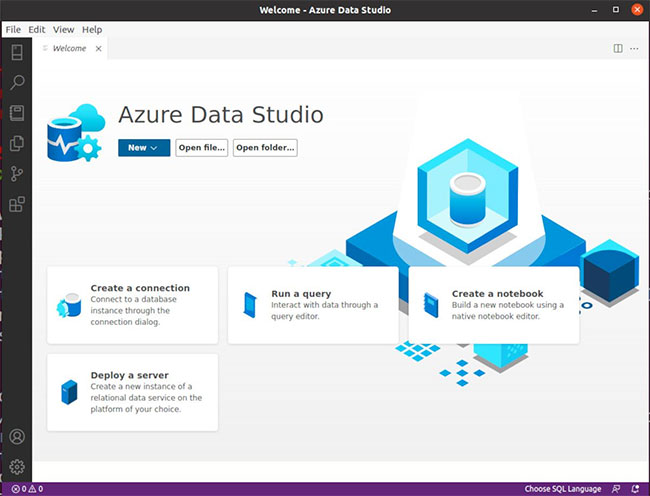
<p style="text-align: justify;">Bạn có thể khởi chạy Azure Data Studio từ menu&nbsp;<strong>Applications</strong>&nbsp;trên hệ thống của mình hoặc từ terminal bằng cách chạy lệnh sau:</p>

<pre id="pre7">
<code>azuredatastudio</code></pre>

<h2 style="text-align: justify;">Kết nối với cơ sở dữ liệu</h2>

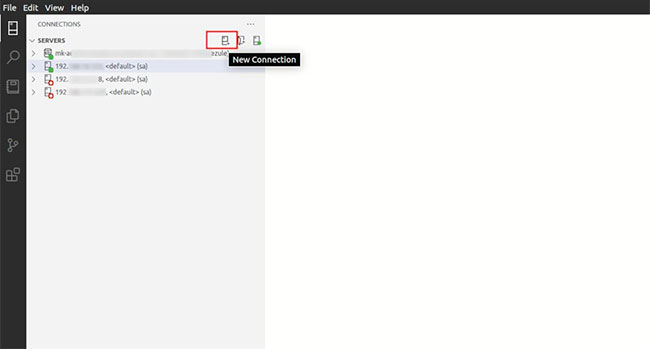
<p style="text-align: justify;">Bạn có thể dễ dàng kết nối với đám mây hoặc cơ sở dữ liệu cục bộ của mình từ trang chính của Azure Data Studio. Nếu bạn đã kết nối với các cơ sở dữ liệu khác trước đây, bạn sẽ tìm thấy chúng ở thanh bên trái.</p>

<p style="text-align: justify;">Dấu chấm màu xanh lục có nghĩa là bạn hiện đang kết nối với cơ sở dữ liệu cụ thể trong khi dấu chấm màu đỏ tượng trưng rằng bạn đã bị ngắt kết nối.</p>

<figure>
<div style="text-align: justify;"><img alt="Hiển thị trạng thái kết nối" data-i="1" data-src="https://st.quantrimang.com/photos/image/2022/04/09/cai-azure-data-studio-tren-linux-2.jpg" data-was-processed="true" height="349" src="https://st.quantrimang.com/photos/image/2022/04/09/cai-azure-data-studio-tren-linux-2.jpg" width="650" /></div>

<figcaption>
<div style="text-align: justify;">Hiển thị trạng thái kết nối</div>
</figcaption>
</figure>

<p style="text-align: justify;">Nhấp vào nút&nbsp;<strong>New Connection</strong>&nbsp;và Azure Data Studio sẽ hiển thị cho bạn màn hình kết nối để nhập thông tin đăng nhập và các chi tiết cơ sở dữ liệu khác.</p>

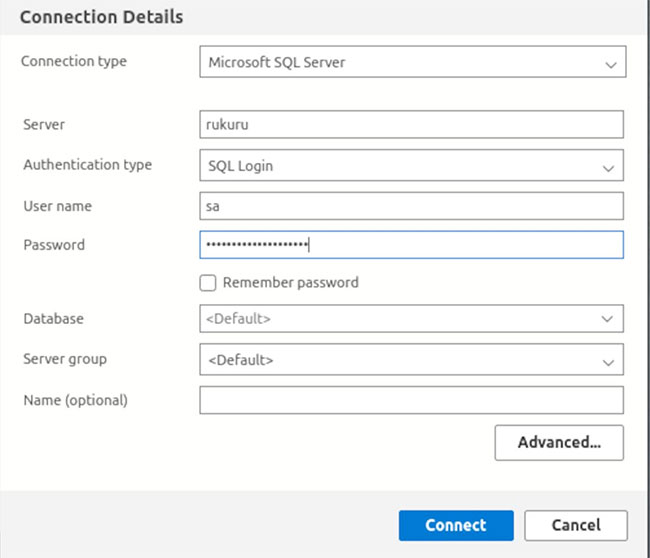
<p style="text-align: justify;">Nhập tên của server bạn muốn kết nối và cung cấp thông tin đăng nhập bắt buộc. Bài viết sẽ sử dụng&nbsp;<strong>SQL Login</strong>&nbsp;ở đây, nhưng bạn cũng có thể sử dụng&nbsp;<strong>Windows Authentication</strong>&nbsp;nếu muốn.</p>

<figure>
<div style="text-align: justify;"><img alt="Chọn loại xác thực" data-i="2" data-src="https://st.quantrimang.com/photos/image/2022/04/09/cai-azure-data-studio-tren-linux-3.jpg" data-was-processed="true" height="558" src="https://st.quantrimang.com/photos/image/2022/04/09/cai-azure-data-studio-tren-linux-3.jpg" width="650" /></div>

<figcaption>
<div style="text-align: justify;">Chọn loại xác thực</div>
</figcaption>
</figure>

<p style="text-align: justify;">Cuối cùng, nhấp vào nút&nbsp;<strong>Connect</strong>&nbsp;để kết nối với cơ sở dữ liệu SQL Server.</p>

<p style="text-align: justify;">Sử dụng nút&nbsp;<strong>Advanced</strong>&nbsp;để truy cập các cấu hình kết nối khác như cổng ưa thích, thời gian chờ kết nối và những cấu hình bảo mật khác để giữ cho dữ liệu của bạn an toàn và bảo mật.</p>

<h2 style="text-align: justify;">Gỡ cài đặt Azure Data Studio</h2>

<p style="text-align: justify;">Trên các bản phân phối dựa trên Debian, bạn có thể gỡ cài đặt Azure Data Studio bằng lệnh apt remove:</p>

<pre id="pre8">
<code>sudo apt remove azuredatastudio</code></pre>

<p style="text-align: justify;">Trên RHEL, Fedora và các bản phân phối tương tự, hãy gỡ cài đặt Azure Data Studio bằng cách chạy lệnh:</p>

<pre id="pre9">
<code>sudo yum remove azuredatastudio</code></pre>

<p style="text-align: justify;">Để gỡ cài đặt Azure Data Studio được tải xuống từ AUR trên Arch Linux:</p>

<pre id="pre10">
<code>sudo yay -R azuredatastudio-bin</code></pre>

<p style="text-align: justify;">Hướng dẫn này đã chỉ cho bạn cách truy cập các phiên bản cơ sở dữ liệu cục bộ và dựa trên đám mây của bạn bằng Azure Data Studio trên Linux. Nó nhẹ, dễ cài đặt và khả dụng trên tất cả các hệ điều hành chính bao gồm macOS, Windows và Linux.</p>

<p style="text-align: justify;">Azure Data Studio cũng hỗ trợ sao lưu và phục hồi cơ sở dữ liệu để khôi phục dữ liệu hoặc khắc phục sự cố. Bạn có thể dễ dàng khôi phục dữ liệu bị hỏng với Azure Data Studio khi cần.</p>
		</div>
				<div id="author">
						<p>
				<strong>Nguồn tin:</strong>
				Quantrimang.com
			</p>
		</div>
	</div>
	<div id="footer" class="clearfix">
		<div id="url">
			<strong>URL của bản tin này: </strong><a href="https://www.nguoicodonvn2008.info/vi/news/savefile/kien-thuc-may-tinh/cach-cai-dat-azure-data-studio-tren-linux-de-quan-ly-sql-server-5435.html" title="Cách cài đặt Azure Data Studio trên Linux để quản lý SQL server">https://www.nguoicodonvn2008.info/vi/news/savefile/kien-thuc-may-tinh/cach-cai-dat-azure-data-studio-tren-linux-de-quan-ly-sql-server-5435.html</a>

		</div>
		<div class="clear"></div>
		<div class="copyright">
			&copy; .&#x3A; Nguoicodonvn2008.info - Cõi lòng người cô đơn &#x3A;.
		</div>
		<div id="contact">
			<a href="mailto:admin@nguoicodonvn2008.info">admin@nguoicodonvn2008.info</a>
		</div>
	</div>
</div>
        <div id="timeoutsess" class="chromeframe">
            Bạn đã không sử dụng Site, <a onclick="timeoutsesscancel();" href="https://nguoicodonvn2008.info/#">Bấm vào đây để duy trì trạng thái đăng nhập</a>. Thời gian chờ: <span id="secField"> 60 </span> giây
        </div>
        <div id="openidResult" class="nv-alert" style="display:none"></div>
        <div id="openidBt" data-result="" data-redirect=""></div>
		</script>
		<div class="car-top">
  <span><img src="https://nguoicodonvn2008.info/themes/default/images/car.png" alt=""></span>
</div>
<script src="https://nguoicodonvn2008.info/assets/js/jquery/jquery.min.js"></script>
<script>var nv_base_siteurl="/",nv_lang_data="vi",nv_lang_interface="vi",nv_name_variable="nv",nv_fc_variable="op",nv_lang_variable="language",nv_module_name="news",nv_func_name="savefile",nv_is_user=0, nv_my_ofs=-4,nv_my_abbr="EDT",nv_cookie_prefix="nv4c_e856T",nv_check_pass_mstime=1738000,nv_area_admin=0,nv_safemode=0,theme_responsive=0,nv_recaptcha_ver=2,nv_recaptcha_sitekey="",nv_recaptcha_type="image",XSSsanitize=1;</script>
<script src="https://nguoicodonvn2008.info/assets/js/language/vi.js"></script>
<script src="https://nguoicodonvn2008.info/assets/js/DOMPurify/purify3.js"></script>
<script src="https://nguoicodonvn2008.info/assets/js/global.js"></script>
<script src="https://nguoicodonvn2008.info/assets/js/site.js"></script>
<script src="https://nguoicodonvn2008.info/themes/default/js/news.js"></script>
<script src="https://nguoicodonvn2008.info/themes/default/js/main.js"></script>
<script src="https://nguoicodonvn2008.info/themes/default/js/custom.js"></script>
<script type="application/ld+json">
        {
            "@context": "https://schema.org",
            "@type": "Organization",
            "url": "https://nguoicodonvn2008.info",
            "logo": "https://nguoicodonvn2008.info/uploads/angel.gif"
        }
        </script>
<script src="https://nguoicodonvn2008.info/themes/default/js/bootstrap.min.js"></script>
<script type="text/javascript">
var $scrolltop = $('.car-top');
$scrolltop.on('click', function () {
    $('html,body').animate({
        scrollTop: 0
    }, 800);
    $(this).addClass("car-run");
    setTimeout(function(){ $scrolltop.removeClass('car-run');}, 1000);
    return false;
});
$(window).on('scroll', function ()
{ 
    if($(window).scrollTop() >= 200)
    {
        $scrolltop.addClass("show");
        $scrolltop.addClass("car-down");
    }
    else
    {
       $scrolltop.removeClass("show");
       setTimeout(function(){ $scrolltop.removeClass('car-down');}, 300);
    }
});
</script>
</body>
</html>