<!DOCTYPE html>
    <html lang="vi" xmlns="http://www.w3.org/1999/xhtml" prefix="og: http://ogp.me/ns#">
    <head>
<title>Cách boot Windows Server 2016 vào Safe Mode</title>
<meta name="description" content="Cách boot Windows Server 2016 vào Safe Mode - Savefile - Tin Tức -...">
<meta name="author" content=".: Nguoicodonvn2008.info - Cõi lòng người cô đơn :.">
<meta name="copyright" content=".: Nguoicodonvn2008.info - Cõi lòng người cô đơn :. [admin@nguoicodonvn2008.info]">
<meta name="robots" content="index, archive, follow, noodp">
<meta name="googlebot" content="index,archive,follow,noodp">
<meta name="msnbot" content="all,index,follow">
<meta name="generator" content="NukeViet v4.5">
<meta http-equiv="Content-Type" content="text/html; charset=utf-8">
<meta property="og:title" content="Cách boot Windows Server 2016 vào Safe Mode">
<meta property="og:type" content="website">
<meta property="og:description" content="Savefile - Tin Tức - https&#x3A;&#x002F;&#x002F;www.nguoicodonvn2008.info&#x002F;vi&#x002F;news&#x002F;savefile&#x002F;kien-thuc-may-tinh&#x002F;cach-boot-windows-server-2016-vao-safe-mode-2436.html">
<meta property="og:site_name" content=".&#x3A; Nguoicodonvn2008.info - Cõi lòng người cô đơn &#x3A;.">
<meta property="og:url" content="https://www.nguoicodonvn2008.info/vi/news/savefile/kien-thuc-may-tinh/cach-boot-windows-server-2016-vao-safe-mode-2436.html">
<link rel="shortcut icon" href="https://nguoicodonvn2008.info/favicon.ico">
<link rel="canonical" href="https://www.nguoicodonvn2008.info/vi/news/savefile/kien-thuc-may-tinh/cach-boot-windows-server-2016-vao-safe-mode-2436.html">
<link rel="alternate" href="https://nguoicodonvn2008.info/vi/news/rss/" title="Tin Tức" type="application/rss+xml">
<link rel="alternate" href="https://nguoicodonvn2008.info/vi/news/rss/karaoke-dual/" title="Tin Tức - Karaoke Dual" type="application/rss+xml">
<link rel="alternate" href="https://nguoicodonvn2008.info/vi/news/rss/nhac-tre/" title="Tin Tức - Nhạc trẻ" type="application/rss+xml">
<link rel="alternate" href="https://nguoicodonvn2008.info/vi/news/rss/tru-tinh/" title="Tin Tức - Trữ tình" type="application/rss+xml">
<link rel="alternate" href="https://nguoicodonvn2008.info/vi/news/rss/nuoc-ngoai/" title="Tin Tức - Nước ngoài" type="application/rss+xml">
<link rel="alternate" href="https://nguoicodonvn2008.info/vi/news/rss/remix/" title="Tin Tức - Remix" type="application/rss+xml">
<link rel="alternate" href="https://nguoicodonvn2008.info/vi/news/rss/tam-su-tinh-yeu/" title="Tin Tức - Tâm sự tình yêu" type="application/rss+xml">
<link rel="alternate" href="https://nguoicodonvn2008.info/vi/news/rss/tho-suu-tam/" title="Tin Tức - Thơ sưu tầm" type="application/rss+xml">
<link rel="alternate" href="https://nguoicodonvn2008.info/vi/news/rss/cuoc-song/" title="Tin Tức - Cuộc sống" type="application/rss+xml">
<link rel="alternate" href="https://nguoicodonvn2008.info/vi/news/rss/phan-mem/" title="Tin Tức - Phần mềm" type="application/rss+xml">
<link rel="alternate" href="https://nguoicodonvn2008.info/vi/news/rss/kien-thuc-may-tinh/" title="Tin Tức - Kiến thức máy tính" type="application/rss+xml">
<link rel="alternate" href="https://nguoicodonvn2008.info/vi/news/rss/hoc-tap/" title="Tin Tức - Học tập" type="application/rss+xml">
<link rel="alternate" href="https://nguoicodonvn2008.info/vi/news/rss/tai-lieu/" title="Tin Tức - Tài liệu" type="application/rss+xml">
<link rel="alternate" href="https://nguoicodonvn2008.info/vi/news/rss/de-thi/" title="Tin Tức - Đề thi" type="application/rss+xml">
<link rel="preload" as="style" href="https://nguoicodonvn2008.info/assets/css/font-awesome.min.css" type="text/css">
<link rel="preload" as="style" href="https://nguoicodonvn2008.info/themes/default/css/bootstrap.non-responsive.css" type="text/css">
<link rel="preload" as="style" href="https://nguoicodonvn2008.info/themes/default/css/style.css" type="text/css">
<link rel="preload" as="style" href="https://nguoicodonvn2008.info/themes/default/css/style.non-responsive.css" type="text/css">
<link rel="preload" as="style" href="https://nguoicodonvn2008.info/themes/default/css/news.css" type="text/css">
<link rel="preload" as="style" href="https://nguoicodonvn2008.info/themes/default/css/custom.css" type="text/css">
<link rel="preload" as="script" href="https://nguoicodonvn2008.info/assets/js/jquery/jquery.min.js" type="text/javascript">
<link rel="preload" as="script" href="https://nguoicodonvn2008.info/assets/js/language/vi.js" type="text/javascript">
<link rel="preload" as="script" href="https://nguoicodonvn2008.info/assets/js/DOMPurify/purify3.js" type="text/javascript">
<link rel="preload" as="script" href="https://nguoicodonvn2008.info/assets/js/global.js" type="text/javascript">
<link rel="preload" as="script" href="https://nguoicodonvn2008.info/assets/js/site.js" type="text/javascript">
<link rel="preload" as="script" href="https://nguoicodonvn2008.info/themes/default/js/news.js" type="text/javascript">
<link rel="preload" as="script" href="https://nguoicodonvn2008.info/themes/default/js/main.js" type="text/javascript">
<link rel="preload" as="script" href="https://nguoicodonvn2008.info/themes/default/js/custom.js" type="text/javascript">
<link rel="preload" as="script" href="https://nguoicodonvn2008.info/themes/default/js/bootstrap.min.js" type="text/javascript">
<link rel="stylesheet" href="https://nguoicodonvn2008.info/assets/css/font-awesome.min.css">
<link rel="stylesheet" href="https://nguoicodonvn2008.info/themes/default/css/bootstrap.non-responsive.css">
<link rel="stylesheet" href="https://nguoicodonvn2008.info/themes/default/css/style.css">
<link rel="stylesheet" href="https://nguoicodonvn2008.info/themes/default/css/style.non-responsive.css">
<link rel="StyleSheet" href="https://nguoicodonvn2008.info/themes/default/css/news.css">
<link rel="stylesheet" href="https://nguoicodonvn2008.info/themes/default/css/custom.css">
<style type="text/css">
	body{background: #fff;}
</style>
    </head>
    <body>
<div id="print">
	<div id="hd_print">
		<h2 class="pull-left">.&#x3A; Nguoicodonvn2008.info - Cõi lòng người cô đơn &#x3A;.</h2>
		<p class="pull-right"><a title=".&#x3A; Nguoicodonvn2008.info - Cõi lòng người cô đơn &#x3A;." href="https://nguoicodonvn2008.info/">https://nguoicodonvn2008.info</a></p>
	</div>
	<div class="clear"></div>
	<hr />
	<div id="content">
		<h1>Cách boot Windows Server 2016 vào Safe Mode</h1>
		<ul class="list-inline">
			<li>Thứ năm - 30/07/2020 00:53</li>
			<li class="hidden-print txtrequired"><em class="fa fa-print">&nbsp;</em><a title="In ra" href="javascript:;" onclick="window.print()">In ra</a></li>
			<li class="hidden-print txtrequired"><em class="fa fa-power-off">&nbsp;</em><a title="Đóng cửa sổ này" href="javascript:;" onclick="window.close()">Đóng cửa sổ này</a></li>
		</ul>
		<div class="clear"></div>
		<div id="hometext">
		</div>
				<div class="imghome">
			<img alt="Cách boot Windows Server 2016 vào Safe Mode" src="https://st.quantrimang.com/photos/image/2020/07/29/boot-windows-server-2016-vao-safe-mode-4.jpg" width="460" class="img-thumbnail" />
		</div>
		<div class="clear"></div>
		<div id="bodytext" class="clearfix">
			<p style="text-align: justify;">Hướng dẫn này giới thiệu 2 phương thức để boot Windows Server 2016 vào&nbsp;Safe Mode:</p>

<ul>
	<li style="text-align: justify;">Boot Windows Server 2016 vào Safe Mode từ bên trong Windows</li>
	<li style="text-align: justify;">Boot Windows Server 2016 vào Safe Mode từ Recovery Environment</li>
</ul>

<p style="text-align: justify;">Dưới đây là các bước chi tiết cho từng phương pháp.</p>

<h2 style="text-align: justify;">1. Boot Windows Server 2016 vào Safe Mode từ bên trong Windows</h2>

<p style="text-align: justify;">Sử dụng phương pháp này nếu bạn có thể boot và đăng nhập vào Windows. Phương pháp này hữu ích nếu bạn cần thực hiện một số tác vụ nhất định từ Safe Mode.</p>

<p style="text-align: justify;">Dưới đây là các bước cần làm:</p>

<p style="text-align: justify;">Nhấn logo&nbsp;<code>Win</code>&nbsp;và phím&nbsp;<code>R</code>&nbsp;để mở lệnh&nbsp;<strong>Run.</strong></p>

<p style="text-align: justify;">Trong&nbsp;<strong>Run</strong>, nhập&nbsp;<strong>MSConfig</strong>&nbsp;và bấm&nbsp;<strong>OK.</strong></p>

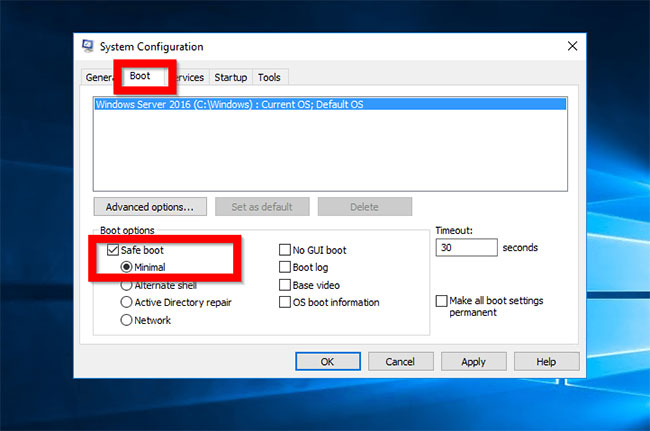
<p style="text-align: justify;">Khi công cụ&nbsp;<strong>Microsoft System Configuration</strong>&nbsp;mở, bấm vào tab&nbsp;<strong>Boot.</strong>&nbsp;Sau đó, trên&nbsp;<strong>Boot</strong><strong>options</strong>, chọn hộp bên cạnh&nbsp;<strong>Safe boot</strong>&nbsp;và tích vào&nbsp;<strong>Minimal</strong>&nbsp;(mặc định). Khi bạn hoàn thành, nhấp vào&nbsp;<strong>Apply &gt; OK</strong>.</p>

<figure>
<div style="text-align: justify;"><img alt="Chọn hộp bên cạnh Safe boot và tích vào Minimal" data-i="0" data-src="https://st.quantrimang.com/photos/image/2020/07/29/boot-windows-server-2016-vao-safe-mode-1.jpg" data-was-processed="true" height="431" src="https://st.quantrimang.com/photos/image/2020/07/29/boot-windows-server-2016-vao-safe-mode-1.jpg" width="650" /></div>

<figcaption>
<div style="text-align: justify;">Chọn hộp bên cạnh Safe boot và tích vào Minimal</div>
</figcaption>
</figure>

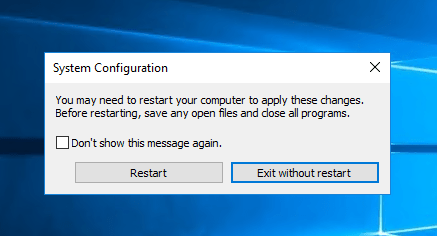
<p style="text-align: justify;">Khởi động lại server.</p>

<figure>
<div style="text-align: justify;"><img alt="Khởi động lại server" data-i="1" data-src="https://st.quantrimang.com/photos/image/2020/07/29/boot-windows-server-2016-vao-safe-mode-2.png" data-was-processed="true" height="236" src="https://st.quantrimang.com/photos/image/2020/07/29/boot-windows-server-2016-vao-safe-mode-2.png" width="437" /></div>

<figcaption>
<div style="text-align: justify;">Khởi động lại server</div>
</figcaption>
</figure>

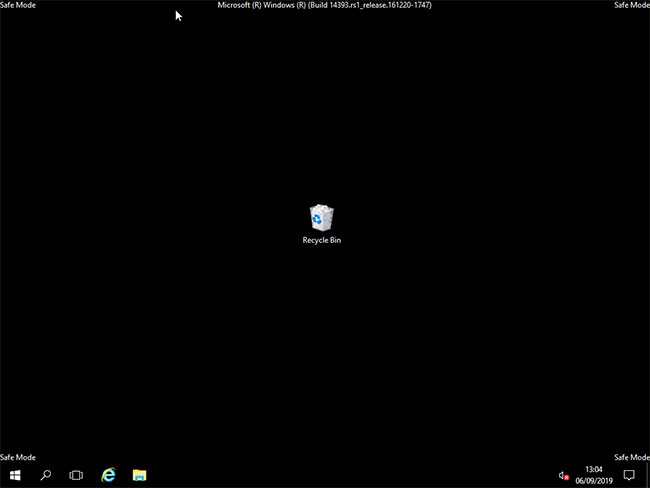
<p style="text-align: justify;">Khi server khởi động lại, hãy đăng nhập, bạn sẽ thấy rằng nó hiện đang ở Safe Mode.</p>

<figure>
<div style="text-align: justify;"><img alt="Server hiện đang ở Safe Mode" data-i="2" data-src="https://st.quantrimang.com/photos/image/2020/07/29/boot-windows-server-2016-vao-safe-mode-3.jpg" data-was-processed="true" height="488" src="https://st.quantrimang.com/photos/image/2020/07/29/boot-windows-server-2016-vao-safe-mode-3.jpg" width="650" /></div>

<figcaption>
<div style="text-align: justify;">Server hiện đang ở Safe Mode</div>
</figcaption>
</figure>

<p style="text-align: justify;">Khi kết thúc với Safe Mode, hãy mở lại&nbsp;<strong>MSConfig</strong>, vào tab&nbsp;<strong>Boot</strong>&nbsp;và bỏ chọn&nbsp;<strong>Safe boot.</strong>Nhấn&nbsp;<strong>OK.</strong>&nbsp;Sau đó khởi động lại server ở chế độ bình thường.</p>

<p style="text-align: justify;"><strong>Cảnh báo!</strong></p>

<p style="text-align: justify;">Nếu bạn không hoàn nguyên cấu hình của mình với tác vụ cuối cùng này, máy tính sẽ tiếp tục khởi động vào Safe Mode!</p>

<div style="text-align: justify;">&nbsp;</div>

<h2 style="text-align: justify;">2. Boot Windows Server 2016 vào Safe Mode từ Recovery Environment</h2>

<p style="text-align: justify;">Phương pháp thứ hai để boot Windows Server 2016 vào Safe Mode là thông qua&nbsp;Recovery Environment. Sử dụng phương pháp này nếu server của bạn bị hỏng và không thể boot.</p>

<p style="text-align: justify;">Dưới đây là các bước cần làm:</p>

<p style="text-align: justify;">Boot Windows Server 2016 vào Recovery Environment.</p>

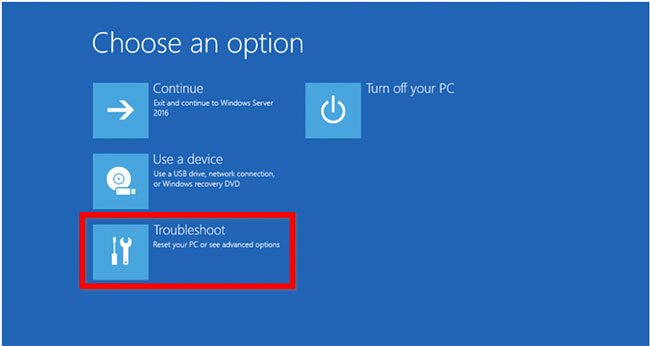
<p style="text-align: justify;">Khi bạn đến màn hình&nbsp;<strong>Choose an option</strong>, bấm&nbsp;<strong>Troubleshoot.</strong>&nbsp;Sau đó tiến hành phần còn lại bên dưới.</p>

<figure>
<div style="text-align: justify;"><img alt="Khi bạn đến màn hình Choose an option, bấm Troubleshoot" data-i="3" data-src="https://st.quantrimang.com/photos/image/2020/07/29/boot-windows-server-2016-vao-safe-mode-4.jpg" data-was-processed="true" height="346" src="https://st.quantrimang.com/photos/image/2020/07/29/boot-windows-server-2016-vao-safe-mode-4.jpg" width="650" /></div>

<figcaption>
<div style="text-align: justify;">Khi bạn đến màn hình Choose an option, bấm Troubleshoot</div>
</figcaption>
</figure>

<p style="text-align: justify;">Ở màn hình&nbsp;<strong>Advanced options</strong>, chọn&nbsp;<strong>Startup Settings.</strong></p>

<p style="text-align: justify;">Khi màn hình&nbsp;<strong>Startup Settings</strong>&nbsp;mở ra, bấm vào&nbsp;<strong>Restart.</strong></p>

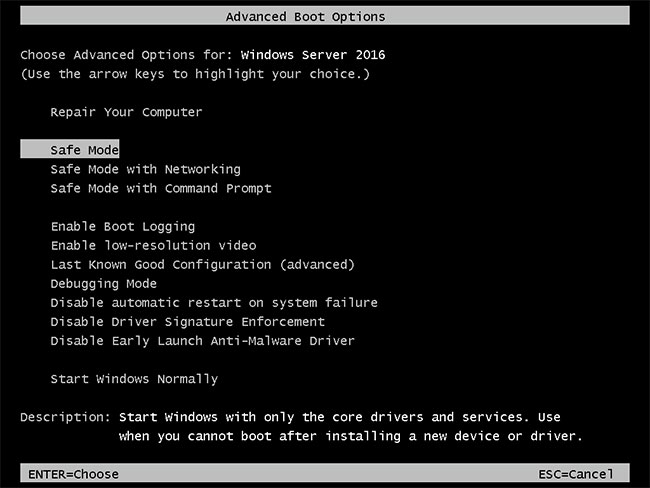
<p style="text-align: justify;">Server sẽ khởi động lại và hiển thị&nbsp;<strong>Advanced Boot Options</strong>.</p>

<figure>
<div style="text-align: justify;"><img alt="Server sẽ khởi động lại và hiển thị Advanced Boot Options" data-i="4" data-src="https://st.quantrimang.com/photos/image/2020/07/29/boot-windows-server-2016-vao-safe-mode-5.jpg" data-was-processed="true" height="488" src="https://st.quantrimang.com/photos/image/2020/07/29/boot-windows-server-2016-vao-safe-mode-5.jpg" width="650" /></div>

<figcaption>
<div style="text-align: justify;">Server sẽ khởi động lại và hiển thị Advanced Boot Options</div>
</figcaption>
</figure>

<p style="text-align: justify;">Sử dụng các phím mũi tên lên/xuống để chọn một tùy chọn&nbsp;<strong>Safe Mode</strong>. Để boot vào tùy chọn đó, bấm&nbsp;<code>Enter</code>&nbsp;trên bàn phím.</p>
		</div>
				<div id="author">
						<p>
				<strong>Nguồn tin:</strong>
				Quantrimang.com
			</p>
		</div>
	</div>
	<div id="footer" class="clearfix">
		<div id="url">
			<strong>URL của bản tin này: </strong><a href="https://www.nguoicodonvn2008.info/vi/news/savefile/kien-thuc-may-tinh/cach-boot-windows-server-2016-vao-safe-mode-2436.html" title="Cách boot Windows Server 2016 vào Safe Mode">https://www.nguoicodonvn2008.info/vi/news/savefile/kien-thuc-may-tinh/cach-boot-windows-server-2016-vao-safe-mode-2436.html</a>

		</div>
		<div class="clear"></div>
		<div class="copyright">
			&copy; .&#x3A; Nguoicodonvn2008.info - Cõi lòng người cô đơn &#x3A;.
		</div>
		<div id="contact">
			<a href="mailto:admin@nguoicodonvn2008.info">admin@nguoicodonvn2008.info</a>
		</div>
	</div>
</div>
        <div id="timeoutsess" class="chromeframe">
            Bạn đã không sử dụng Site, <a onclick="timeoutsesscancel();" href="https://nguoicodonvn2008.info/#">Bấm vào đây để duy trì trạng thái đăng nhập</a>. Thời gian chờ: <span id="secField"> 60 </span> giây
        </div>
        <div id="openidResult" class="nv-alert" style="display:none"></div>
        <div id="openidBt" data-result="" data-redirect=""></div>
		</script>
		<div class="car-top">
  <span><img src="https://nguoicodonvn2008.info/themes/default/images/car.png" alt=""></span>
</div>
<script src="https://nguoicodonvn2008.info/assets/js/jquery/jquery.min.js"></script>
<script>var nv_base_siteurl="/",nv_lang_data="vi",nv_lang_interface="vi",nv_name_variable="nv",nv_fc_variable="op",nv_lang_variable="language",nv_module_name="news",nv_func_name="savefile",nv_is_user=0, nv_my_ofs=-4,nv_my_abbr="EDT",nv_cookie_prefix="nv4c_e856T",nv_check_pass_mstime=1738000,nv_area_admin=0,nv_safemode=0,theme_responsive=0,nv_recaptcha_ver=2,nv_recaptcha_sitekey="",nv_recaptcha_type="image",XSSsanitize=1;</script>
<script src="https://nguoicodonvn2008.info/assets/js/language/vi.js"></script>
<script src="https://nguoicodonvn2008.info/assets/js/DOMPurify/purify3.js"></script>
<script src="https://nguoicodonvn2008.info/assets/js/global.js"></script>
<script src="https://nguoicodonvn2008.info/assets/js/site.js"></script>
<script src="https://nguoicodonvn2008.info/themes/default/js/news.js"></script>
<script src="https://nguoicodonvn2008.info/themes/default/js/main.js"></script>
<script src="https://nguoicodonvn2008.info/themes/default/js/custom.js"></script>
<script type="application/ld+json">
        {
            "@context": "https://schema.org",
            "@type": "Organization",
            "url": "https://nguoicodonvn2008.info",
            "logo": "https://nguoicodonvn2008.info/uploads/angel.gif"
        }
        </script>
<script src="https://nguoicodonvn2008.info/themes/default/js/bootstrap.min.js"></script>
<script type="text/javascript">
var $scrolltop = $('.car-top');
$scrolltop.on('click', function () {
    $('html,body').animate({
        scrollTop: 0
    }, 800);
    $(this).addClass("car-run");
    setTimeout(function(){ $scrolltop.removeClass('car-run');}, 1000);
    return false;
});
$(window).on('scroll', function ()
{ 
    if($(window).scrollTop() >= 200)
    {
        $scrolltop.addClass("show");
        $scrolltop.addClass("car-down");
    }
    else
    {
       $scrolltop.removeClass("show");
       setTimeout(function(){ $scrolltop.removeClass('car-down');}, 300);
    }
});
</script>
</body>
</html>