<!DOCTYPE html>
    <html lang="vi" xmlns="http://www.w3.org/1999/xhtml" prefix="og: http://ogp.me/ns#">
    <head>
<title>Cách biến smartphone Android thành Windows 11</title>
<meta name="description" content="Cách biến smartphone Android thành Windows 11 - Savefile - Tin Tức -...">
<meta name="author" content=".: Nguoicodonvn2008.info - Cõi lòng người cô đơn :.">
<meta name="copyright" content=".: Nguoicodonvn2008.info - Cõi lòng người cô đơn :. [admin@nguoicodonvn2008.info]">
<meta name="robots" content="index, archive, follow, noodp">
<meta name="googlebot" content="index,archive,follow,noodp">
<meta name="msnbot" content="all,index,follow">
<meta name="generator" content="NukeViet v4.5">
<meta http-equiv="Content-Type" content="text/html; charset=utf-8">
<meta property="og:title" content="Cách biến smartphone Android thành Windows 11">
<meta property="og:type" content="website">
<meta property="og:description" content="Savefile - Tin Tức - https&#x3A;&#x002F;&#x002F;www.nguoicodonvn2008.info&#x002F;vi&#x002F;news&#x002F;savefile&#x002F;kien-thuc-may-tinh&#x002F;cach-bien-smartphone-android-thanh-windows-11-11544.html">
<meta property="og:site_name" content=".&#x3A; Nguoicodonvn2008.info - Cõi lòng người cô đơn &#x3A;.">
<meta property="og:url" content="https://www.nguoicodonvn2008.info/vi/news/savefile/kien-thuc-may-tinh/cach-bien-smartphone-android-thanh-windows-11-11544.html">
<link rel="shortcut icon" href="https://nguoicodonvn2008.info/favicon.ico">
<link rel="canonical" href="https://www.nguoicodonvn2008.info/vi/news/savefile/kien-thuc-may-tinh/cach-bien-smartphone-android-thanh-windows-11-11544.html">
<link rel="alternate" href="https://nguoicodonvn2008.info/vi/news/rss/" title="Tin Tức" type="application/rss+xml">
<link rel="alternate" href="https://nguoicodonvn2008.info/vi/news/rss/karaoke-dual/" title="Tin Tức - Karaoke Dual" type="application/rss+xml">
<link rel="alternate" href="https://nguoicodonvn2008.info/vi/news/rss/nhac-tre/" title="Tin Tức - Nhạc trẻ" type="application/rss+xml">
<link rel="alternate" href="https://nguoicodonvn2008.info/vi/news/rss/tru-tinh/" title="Tin Tức - Trữ tình" type="application/rss+xml">
<link rel="alternate" href="https://nguoicodonvn2008.info/vi/news/rss/nuoc-ngoai/" title="Tin Tức - Nước ngoài" type="application/rss+xml">
<link rel="alternate" href="https://nguoicodonvn2008.info/vi/news/rss/remix/" title="Tin Tức - Remix" type="application/rss+xml">
<link rel="alternate" href="https://nguoicodonvn2008.info/vi/news/rss/tam-su-tinh-yeu/" title="Tin Tức - Tâm sự tình yêu" type="application/rss+xml">
<link rel="alternate" href="https://nguoicodonvn2008.info/vi/news/rss/tho-suu-tam/" title="Tin Tức - Thơ sưu tầm" type="application/rss+xml">
<link rel="alternate" href="https://nguoicodonvn2008.info/vi/news/rss/cuoc-song/" title="Tin Tức - Cuộc sống" type="application/rss+xml">
<link rel="alternate" href="https://nguoicodonvn2008.info/vi/news/rss/phan-mem/" title="Tin Tức - Phần mềm" type="application/rss+xml">
<link rel="alternate" href="https://nguoicodonvn2008.info/vi/news/rss/kien-thuc-may-tinh/" title="Tin Tức - Kiến thức máy tính" type="application/rss+xml">
<link rel="alternate" href="https://nguoicodonvn2008.info/vi/news/rss/hoc-tap/" title="Tin Tức - Học tập" type="application/rss+xml">
<link rel="alternate" href="https://nguoicodonvn2008.info/vi/news/rss/tai-lieu/" title="Tin Tức - Tài liệu" type="application/rss+xml">
<link rel="alternate" href="https://nguoicodonvn2008.info/vi/news/rss/de-thi/" title="Tin Tức - Đề thi" type="application/rss+xml">
<link rel="preload" as="style" href="https://nguoicodonvn2008.info/assets/css/font-awesome.min.css" type="text/css">
<link rel="preload" as="style" href="https://nguoicodonvn2008.info/themes/default/css/bootstrap.non-responsive.css" type="text/css">
<link rel="preload" as="style" href="https://nguoicodonvn2008.info/themes/default/css/style.css" type="text/css">
<link rel="preload" as="style" href="https://nguoicodonvn2008.info/themes/default/css/style.non-responsive.css" type="text/css">
<link rel="preload" as="style" href="https://nguoicodonvn2008.info/themes/default/css/news.css" type="text/css">
<link rel="preload" as="style" href="https://nguoicodonvn2008.info/themes/default/css/custom.css" type="text/css">
<link rel="preload" as="script" href="https://nguoicodonvn2008.info/assets/js/jquery/jquery.min.js" type="text/javascript">
<link rel="preload" as="script" href="https://nguoicodonvn2008.info/assets/js/language/vi.js" type="text/javascript">
<link rel="preload" as="script" href="https://nguoicodonvn2008.info/assets/js/DOMPurify/purify3.js" type="text/javascript">
<link rel="preload" as="script" href="https://nguoicodonvn2008.info/assets/js/global.js" type="text/javascript">
<link rel="preload" as="script" href="https://nguoicodonvn2008.info/assets/js/site.js" type="text/javascript">
<link rel="preload" as="script" href="https://nguoicodonvn2008.info/themes/default/js/news.js" type="text/javascript">
<link rel="preload" as="script" href="https://nguoicodonvn2008.info/themes/default/js/main.js" type="text/javascript">
<link rel="preload" as="script" href="https://nguoicodonvn2008.info/themes/default/js/custom.js" type="text/javascript">
<link rel="preload" as="script" href="https://nguoicodonvn2008.info/themes/default/js/bootstrap.min.js" type="text/javascript">
<link rel="stylesheet" href="https://nguoicodonvn2008.info/assets/css/font-awesome.min.css">
<link rel="stylesheet" href="https://nguoicodonvn2008.info/themes/default/css/bootstrap.non-responsive.css">
<link rel="stylesheet" href="https://nguoicodonvn2008.info/themes/default/css/style.css">
<link rel="stylesheet" href="https://nguoicodonvn2008.info/themes/default/css/style.non-responsive.css">
<link rel="StyleSheet" href="https://nguoicodonvn2008.info/themes/default/css/news.css">
<link rel="stylesheet" href="https://nguoicodonvn2008.info/themes/default/css/custom.css">
<style type="text/css">
	body{background: #fff;}
</style>
    </head>
    <body>
<div id="print">
	<div id="hd_print">
		<h2 class="pull-left">.&#x3A; Nguoicodonvn2008.info - Cõi lòng người cô đơn &#x3A;.</h2>
		<p class="pull-right"><a title=".&#x3A; Nguoicodonvn2008.info - Cõi lòng người cô đơn &#x3A;." href="https://nguoicodonvn2008.info/">https://nguoicodonvn2008.info</a></p>
	</div>
	<div class="clear"></div>
	<hr />
	<div id="content">
		<h1>Cách biến smartphone Android thành Windows 11</h1>
		<ul class="list-inline">
			<li>Thứ sáu - 07/11/2025 22:04</li>
			<li class="hidden-print txtrequired"><em class="fa fa-print">&nbsp;</em><a title="In ra" href="javascript:;" onclick="window.print()">In ra</a></li>
			<li class="hidden-print txtrequired"><em class="fa fa-power-off">&nbsp;</em><a title="Đóng cửa sổ này" href="javascript:;" onclick="window.close()">Đóng cửa sổ này</a></li>
		</ul>
		<div class="clear"></div>
		<div id="hometext">
		</div>
				<div class="imghome">
			<img alt="Cách biến smartphone Android thành Windows 11" src="https://st.quantrimang.com/photos/image/2025/11/08/bien-smartphone-android-thanh-windows-11-1.jpg" width="460" class="img-thumbnail" />
		</div>
		<div class="clear"></div>
		<div id="bodytext" class="clearfix">
			<p style="text-align: justify;">Tùy chỉnh là một trong những lý do tuyệt vời nhất để tiếp tục sử dụng Android. Khả năng thay đổi cấu hình smartphone từ mặc định thành hầu hết mọi thứ bạn muốn là vô song, đặc biệt là khi xét đến mức độ hạn chế và giới hạn của iOS.</p>

<div style="text-align: justify;">&nbsp;</div>

<p style="text-align: justify;">Trước đây, nhiều người đã thử&nbsp;sử dụng Windows Live Tiles trên smartphone Android&nbsp;của mình và nó hoạt động rất tốt. Vì vậy, hãy tưởng tượng sự ngạc nhiên khi tìm thấy một launcher Android cho phép chuyển đổi màn hình chính và trải nghiệm ngăn kéo ứng dụng để phù hợp với&nbsp;Windows 11. Đúng vậy; họ đã biến smartphone Android của mình thành desktop, và đó là một trải nghiệm tuyệt vời đến bất ngờ.</p>

<h2 style="text-align: justify;">Launcher này mang Windows 11 đến smartphone Android của bạn!</h2>

<h3 style="text-align: justify;">Nó thậm chí còn có cả thư mục!</h3>

<figure>
<div style="text-align: justify;"><img alt="" data-adbro-processed="true" data-i="0" data-src="https://st.quantrimang.com/photos/image/2025/11/08/bien-smartphone-android-thanh-windows-11-1.jpg" data-was-processed="true" height="1080" src="https://st.quantrimang.com/photos/image/2025/11/08/bien-smartphone-android-thanh-windows-11-1.jpg" width="1920" /></div>
</figure>

<figure>
<div style="text-align: justify;"><img alt="" data-i="1" data-src="https://st.quantrimang.com/photos/image/2025/11/08/bien-smartphone-android-thanh-windows-11-2.jpg" data-was-processed="true" height="1080" src="https://st.quantrimang.com/photos/image/2025/11/08/bien-smartphone-android-thanh-windows-11-2.jpg" width="1920" /></div>
</figure>

<figure>
<div style="text-align: justify;">&nbsp;</div>
</figure>

<figure>
<div style="text-align: justify;">&nbsp;</div>
</figure>

<figure>
<div style="text-align: justify;">&nbsp;</div>
</figure>

<div style="text-align: justify;">&nbsp;</div>

<p style="text-align: justify;">Một vài người đã chạy launcher Windows 11 trên thiết bị Android. Đó là một phần trong trải nghiệm của họ. Vì vậy, họ đã tìm&nbsp;Win 11 Launcher, tải xuống và khởi động nó.</p>

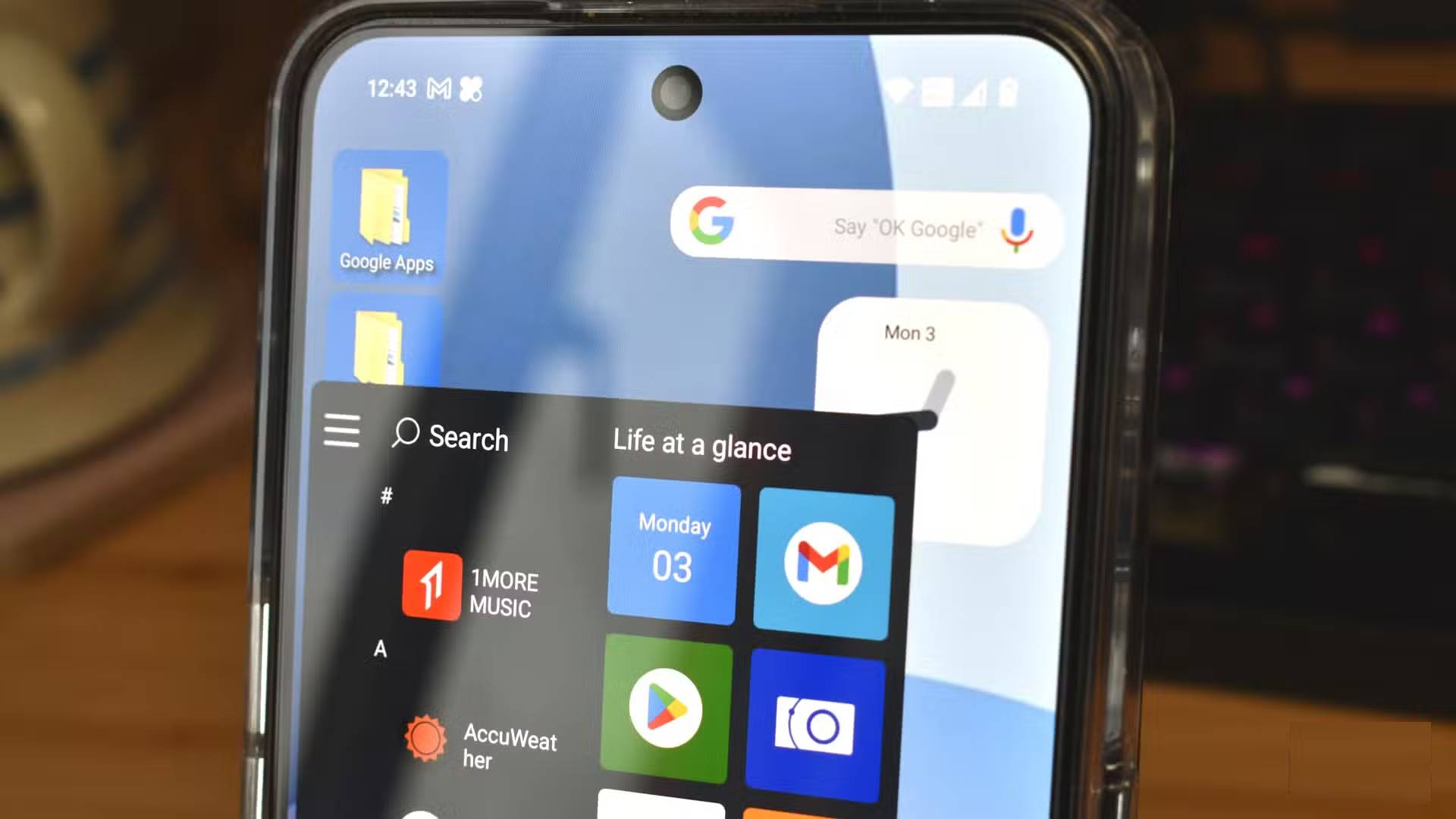
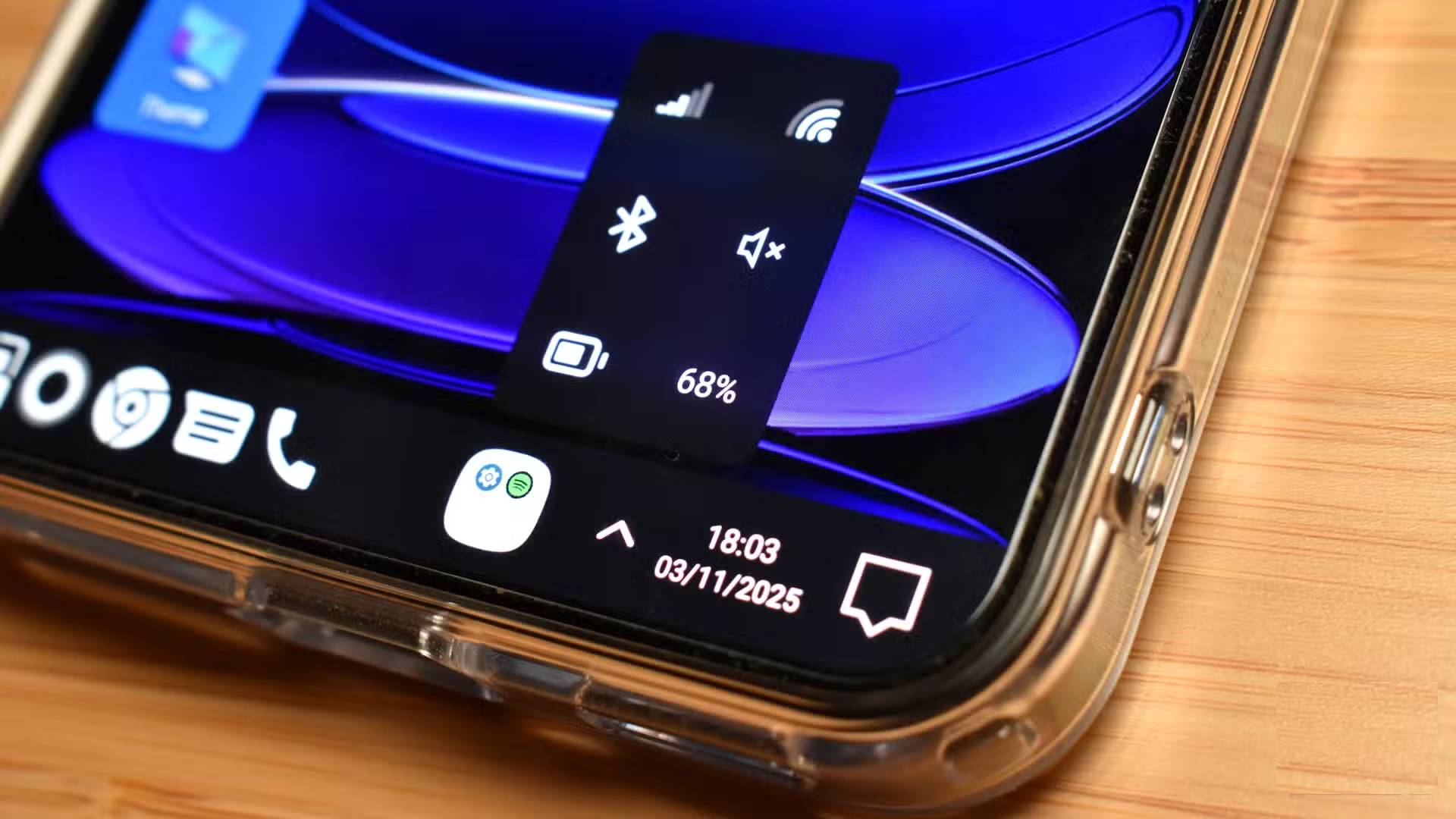
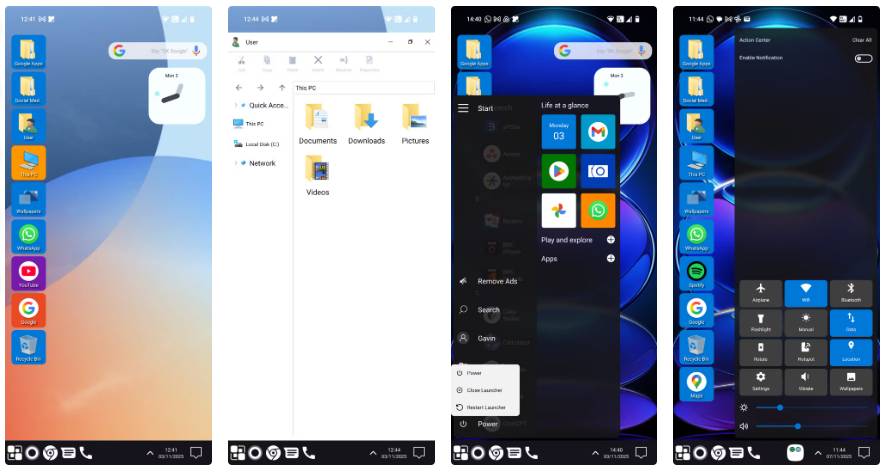
<p style="text-align: justify;">Chiếc Nothing Phone 3 (chạy bản beta Nothing OS 4) ngay lập tức được chuyển đổi thành môi trường giống Windows 11, với một chồng thư mục truy cập nhanh chạy dọc bên trái và một thanh tác vụ quen thuộc ở phía dưới màn hình.</p>

<p style="text-align: justify;">Đây là một sự thay đổi lớn về phong cách, đặc biệt là so với phong cách đơn sắc, tối giản của Nothing OS. Thư mục Google có tất cả các ứng dụng bạn mong đợi, trong khi thư mục Social Media ngay lập tức được lấp đầy bởi một vài ứng dụng bạn đã cài đặt. Điều thú vị là nó gọi WhatsApp là mạng xã hội; dù thực chất đây là một ứng dụng nhắn tin.</p>

<p style="text-align: justify;">Nhiều người thích thiết kế desktop ngay lập tức, nhưng thay đổi thực sự thú vị là việc giới thiệu menu Start theo phong cách Windows. Menu Start này trông giống Windows 10 hơn là Windows 11, nhưng đó chỉ là một điểm trừ nhỏ. Về mặt chức năng, nó hoạt động rất tốt, và bạn có thể cuộn lên xuống như menu Start thực tế, tìm ứng dụng, truy cập Settings, ghim ứng dụng, v.v...</p>

<p style="text-align: justify;">Việc tích hợp Windows 11 Action Center cũng mang lại một chút chân thực. Bạn mở Action Centre bằng cách chạm vào biểu tượng thông báo ở góc dưới bên phải, nơi hiển thị nhiều menu hành động nhanh mà bạn thường vuốt xuống để truy cập trên các thiết bị Android.</p>

<h2 style="text-align: justify;">File Explorer rất hoàn hảo</h2>

<h3 style="text-align: justify;">Vẫn hơi lạ khi thấy File Explorer trên smartphone</h3>

<figure>
<div style="text-align: justify;"><img alt="" data-i="5" data-src="https://st.quantrimang.com/photos/image/2025/11/08/bien-smartphone-android-thanh-windows-11-6.jpg" data-was-processed="true" height="473" src="https://st.quantrimang.com/photos/image/2025/11/08/bien-smartphone-android-thanh-windows-11-6.jpg" width="884" /></div>
</figure>

<p style="text-align: justify;">Về mặt phong cách, cửa sổ File Explorer rất hoàn hảo. Bạn có các mục Quick Access và ổ cục bộ ở bên trái cửa sổ, với cửa sổ chính thay đổi khi bạn di chuyển qua những file và thư mục.</p>

<p style="text-align: justify;">Win 11 Launcher hầu như luôn tự động điền chính xác các thư mục tương ứng, nhưng có một số điểm bất thường do cách Android quản lý một số loại thư mục và file nhất định so với Windows. Vì vậy, khi mở thư mục Pictures trong Win 11 Launcher File Explorer, thư mục Essential Space, Screenshots, Slack và Stardew Valley sẽ hiển thị.</p>

<p style="text-align: justify;">Nhưng không có thư mục nào trong số này chứa thư viện ảnh thực tế, thư viện này sẽ được tìm thấy khi bạn chọn&nbsp;<strong>Local Disk &gt; DCIM &gt; Camera</strong>.</p>

<p style="text-align: justify;">Win 11 Launcher File Explorer cũng có một số tùy chọn mạng tích hợp. Bạn có thể chọn LAN hoặc FPT để truy cập các file mạng của mình. Tuy nhiên, cả hai đều là tính năng cao cấp, vì vậy chưa thể thử nghiệm chúng kỹ lưỡng.</p>

<p style="text-align: justify;">Một tính năng khác thu hút sự chú ý trong File Explorer là thanh chức năng sẽ hoạt động khi bạn nhấn và giữ một file hoặc thư mục. Các tùy chọn Cut, Copy, Paste, v.v... đều có sẵn, đây là một sự chú ý đến từng chi tiết. Ngoài ra còn có một menu drop-down cho phép bạn thay đổi chế độ xem, tương tự như những gì bạn thấy trong Windows 11.</p>

<h2 style="text-align: justify;">Còn quảng cáo thì sao?</h2>

<h3 style="text-align: justify;">Đây là một launcher miễn phí, vì vậy phải có hỗ trợ từ đâu đó!</h3>

<p style="text-align: justify;">Win 11 Launcher miễn phí sử dụng, nhưng nó đi kèm với phiên bản cao cấp mở khóa mọi tính năng. Hơn nữa, như bạn mong đợi, phiên bản cao cấp sẽ loại bỏ quảng cáo, điều này thực sự khá quan trọng đối với một launcher.</p>

<p style="text-align: justify;">Win 11 Launcher là một dự án miễn phí mà nhà phát triển Spark Planet rõ ràng đã đầu tư rất nhiều thời gian vào, và quảng cáo là một cách để đảm bảo họ nhận được sự đền bù cho thời gian của mình. Tuy nhiên, tần suất của một số quảng cáo khá khó chịu, cũng như việc chúng thường chiếm toàn màn hình với bộ đếm ngược.</p>

<p style="text-align: justify;">Tần suất của quảng cáo quá nhiều, có thể khiến bạn phải trả tiền cho phiên bản đầy đủ. Dù không tính thời gian hay đo lường, nhưng có vẻ như quảng cáo sẽ hiển thị sau một số lần nhấp hoặc hành động nhất định. Mở một thư mục, duyệt qua vài ảnh và xóa thông báo, quảng cáo lại xuất hiện. Xem qua một vài chủ đề và thêm một thư mục mới vào desktop, lại một quảng cáo nữa hiện ra.</p>

<p style="text-align: justify;">Như đã nói, việc phải trả phí để phát triển là bình thường, nhưng tần suất quảng cáo xuất hiện khiến nhiều người muốn xóa Win 11 Launcher nhanh hơn cả việc cân nhắc đăng ký gói cao cấp.</p>
		</div>
				<div id="author">
						<p>
				<strong>Nguồn tin:</strong>
				Quantrimang.com:
			</p>
		</div>
	</div>
	<div id="footer" class="clearfix">
		<div id="url">
			<strong>URL của bản tin này: </strong><a href="https://www.nguoicodonvn2008.info/vi/news/savefile/kien-thuc-may-tinh/cach-bien-smartphone-android-thanh-windows-11-11544.html" title="Cách biến smartphone Android thành Windows 11">https://www.nguoicodonvn2008.info/vi/news/savefile/kien-thuc-may-tinh/cach-bien-smartphone-android-thanh-windows-11-11544.html</a>

		</div>
		<div class="clear"></div>
		<div class="copyright">
			&copy; .&#x3A; Nguoicodonvn2008.info - Cõi lòng người cô đơn &#x3A;.
		</div>
		<div id="contact">
			<a href="mailto:admin@nguoicodonvn2008.info">admin@nguoicodonvn2008.info</a>
		</div>
	</div>
</div>
        <div id="timeoutsess" class="chromeframe">
            Bạn đã không sử dụng Site, <a onclick="timeoutsesscancel();" href="https://nguoicodonvn2008.info/#">Bấm vào đây để duy trì trạng thái đăng nhập</a>. Thời gian chờ: <span id="secField"> 60 </span> giây
        </div>
        <div id="openidResult" class="nv-alert" style="display:none"></div>
        <div id="openidBt" data-result="" data-redirect=""></div>
		</script>
		<div class="car-top">
  <span><img src="https://nguoicodonvn2008.info/themes/default/images/car.png" alt=""></span>
</div>
<script src="https://nguoicodonvn2008.info/assets/js/jquery/jquery.min.js"></script>
<script>var nv_base_siteurl="/",nv_lang_data="vi",nv_lang_interface="vi",nv_name_variable="nv",nv_fc_variable="op",nv_lang_variable="language",nv_module_name="news",nv_func_name="savefile",nv_is_user=0, nv_my_ofs=-4,nv_my_abbr="EDT",nv_cookie_prefix="nv4c_e856T",nv_check_pass_mstime=1738000,nv_area_admin=0,nv_safemode=0,theme_responsive=0,nv_recaptcha_ver=2,nv_recaptcha_sitekey="",nv_recaptcha_type="image",XSSsanitize=1;</script>
<script src="https://nguoicodonvn2008.info/assets/js/language/vi.js"></script>
<script src="https://nguoicodonvn2008.info/assets/js/DOMPurify/purify3.js"></script>
<script src="https://nguoicodonvn2008.info/assets/js/global.js"></script>
<script src="https://nguoicodonvn2008.info/assets/js/site.js"></script>
<script src="https://nguoicodonvn2008.info/themes/default/js/news.js"></script>
<script src="https://nguoicodonvn2008.info/themes/default/js/main.js"></script>
<script src="https://nguoicodonvn2008.info/themes/default/js/custom.js"></script>
<script type="application/ld+json">
        {
            "@context": "https://schema.org",
            "@type": "Organization",
            "url": "https://nguoicodonvn2008.info",
            "logo": "https://nguoicodonvn2008.info/uploads/angel.gif"
        }
        </script>
<script src="https://nguoicodonvn2008.info/themes/default/js/bootstrap.min.js"></script>
<script type="text/javascript">
var $scrolltop = $('.car-top');
$scrolltop.on('click', function () {
    $('html,body').animate({
        scrollTop: 0
    }, 800);
    $(this).addClass("car-run");
    setTimeout(function(){ $scrolltop.removeClass('car-run');}, 1000);
    return false;
});
$(window).on('scroll', function ()
{ 
    if($(window).scrollTop() >= 200)
    {
        $scrolltop.addClass("show");
        $scrolltop.addClass("car-down");
    }
    else
    {
       $scrolltop.removeClass("show");
       setTimeout(function(){ $scrolltop.removeClass('car-down');}, 300);
    }
});
</script>
</body>
</html>