<!DOCTYPE html>
    <html lang="vi" xmlns="http://www.w3.org/1999/xhtml" prefix="og: http://ogp.me/ns#">
    <head>
<title>Cách biến PC thành game console đa năng tối ưu</title>
<meta name="description" content="Cách biến PC thành game console đa năng tối ưu - Savefile - Tin Tức -...">
<meta name="author" content=".: Nguoicodonvn2008.info - Cõi lòng người cô đơn :.">
<meta name="copyright" content=".: Nguoicodonvn2008.info - Cõi lòng người cô đơn :. [admin@nguoicodonvn2008.info]">
<meta name="robots" content="index, archive, follow, noodp">
<meta name="googlebot" content="index,archive,follow,noodp">
<meta name="msnbot" content="all,index,follow">
<meta name="generator" content="NukeViet v4.5">
<meta http-equiv="Content-Type" content="text/html; charset=utf-8">
<meta property="og:title" content="Cách biến PC thành game console đa năng tối ưu">
<meta property="og:type" content="website">
<meta property="og:description" content="Savefile - Tin Tức - https&#x3A;&#x002F;&#x002F;www.nguoicodonvn2008.info&#x002F;vi&#x002F;news&#x002F;savefile&#x002F;kien-thuc-may-tinh&#x002F;cach-bien-pc-thanh-game-console-da-nang-toi-uu-10879.html">
<meta property="og:site_name" content=".&#x3A; Nguoicodonvn2008.info - Cõi lòng người cô đơn &#x3A;.">
<meta property="og:url" content="https://www.nguoicodonvn2008.info/vi/news/savefile/kien-thuc-may-tinh/cach-bien-pc-thanh-game-console-da-nang-toi-uu-10879.html">
<link rel="shortcut icon" href="https://nguoicodonvn2008.info/favicon.ico">
<link rel="canonical" href="https://www.nguoicodonvn2008.info/vi/news/savefile/kien-thuc-may-tinh/cach-bien-pc-thanh-game-console-da-nang-toi-uu-10879.html">
<link rel="alternate" href="https://nguoicodonvn2008.info/vi/news/rss/" title="Tin Tức" type="application/rss+xml">
<link rel="alternate" href="https://nguoicodonvn2008.info/vi/news/rss/karaoke-dual/" title="Tin Tức - Karaoke Dual" type="application/rss+xml">
<link rel="alternate" href="https://nguoicodonvn2008.info/vi/news/rss/nhac-tre/" title="Tin Tức - Nhạc trẻ" type="application/rss+xml">
<link rel="alternate" href="https://nguoicodonvn2008.info/vi/news/rss/tru-tinh/" title="Tin Tức - Trữ tình" type="application/rss+xml">
<link rel="alternate" href="https://nguoicodonvn2008.info/vi/news/rss/nuoc-ngoai/" title="Tin Tức - Nước ngoài" type="application/rss+xml">
<link rel="alternate" href="https://nguoicodonvn2008.info/vi/news/rss/remix/" title="Tin Tức - Remix" type="application/rss+xml">
<link rel="alternate" href="https://nguoicodonvn2008.info/vi/news/rss/tam-su-tinh-yeu/" title="Tin Tức - Tâm sự tình yêu" type="application/rss+xml">
<link rel="alternate" href="https://nguoicodonvn2008.info/vi/news/rss/tho-suu-tam/" title="Tin Tức - Thơ sưu tầm" type="application/rss+xml">
<link rel="alternate" href="https://nguoicodonvn2008.info/vi/news/rss/cuoc-song/" title="Tin Tức - Cuộc sống" type="application/rss+xml">
<link rel="alternate" href="https://nguoicodonvn2008.info/vi/news/rss/phan-mem/" title="Tin Tức - Phần mềm" type="application/rss+xml">
<link rel="alternate" href="https://nguoicodonvn2008.info/vi/news/rss/kien-thuc-may-tinh/" title="Tin Tức - Kiến thức máy tính" type="application/rss+xml">
<link rel="alternate" href="https://nguoicodonvn2008.info/vi/news/rss/hoc-tap/" title="Tin Tức - Học tập" type="application/rss+xml">
<link rel="alternate" href="https://nguoicodonvn2008.info/vi/news/rss/tai-lieu/" title="Tin Tức - Tài liệu" type="application/rss+xml">
<link rel="alternate" href="https://nguoicodonvn2008.info/vi/news/rss/de-thi/" title="Tin Tức - Đề thi" type="application/rss+xml">
<link rel="preload" as="style" href="https://nguoicodonvn2008.info/assets/css/font-awesome.min.css" type="text/css">
<link rel="preload" as="style" href="https://nguoicodonvn2008.info/themes/default/css/bootstrap.non-responsive.css" type="text/css">
<link rel="preload" as="style" href="https://nguoicodonvn2008.info/themes/default/css/style.css" type="text/css">
<link rel="preload" as="style" href="https://nguoicodonvn2008.info/themes/default/css/style.non-responsive.css" type="text/css">
<link rel="preload" as="style" href="https://nguoicodonvn2008.info/themes/default/css/news.css" type="text/css">
<link rel="preload" as="style" href="https://nguoicodonvn2008.info/themes/default/css/custom.css" type="text/css">
<link rel="preload" as="script" href="https://nguoicodonvn2008.info/assets/js/jquery/jquery.min.js" type="text/javascript">
<link rel="preload" as="script" href="https://nguoicodonvn2008.info/assets/js/language/vi.js" type="text/javascript">
<link rel="preload" as="script" href="https://nguoicodonvn2008.info/assets/js/DOMPurify/purify3.js" type="text/javascript">
<link rel="preload" as="script" href="https://nguoicodonvn2008.info/assets/js/global.js" type="text/javascript">
<link rel="preload" as="script" href="https://nguoicodonvn2008.info/assets/js/site.js" type="text/javascript">
<link rel="preload" as="script" href="https://nguoicodonvn2008.info/themes/default/js/news.js" type="text/javascript">
<link rel="preload" as="script" href="https://nguoicodonvn2008.info/themes/default/js/main.js" type="text/javascript">
<link rel="preload" as="script" href="https://nguoicodonvn2008.info/themes/default/js/custom.js" type="text/javascript">
<link rel="preload" as="script" href="https://nguoicodonvn2008.info/themes/default/js/bootstrap.min.js" type="text/javascript">
<link rel="stylesheet" href="https://nguoicodonvn2008.info/assets/css/font-awesome.min.css">
<link rel="stylesheet" href="https://nguoicodonvn2008.info/themes/default/css/bootstrap.non-responsive.css">
<link rel="stylesheet" href="https://nguoicodonvn2008.info/themes/default/css/style.css">
<link rel="stylesheet" href="https://nguoicodonvn2008.info/themes/default/css/style.non-responsive.css">
<link rel="StyleSheet" href="https://nguoicodonvn2008.info/themes/default/css/news.css">
<link rel="stylesheet" href="https://nguoicodonvn2008.info/themes/default/css/custom.css">
<style type="text/css">
	body{background: #fff;}
</style>
    </head>
    <body>
<div id="print">
	<div id="hd_print">
		<h2 class="pull-left">.&#x3A; Nguoicodonvn2008.info - Cõi lòng người cô đơn &#x3A;.</h2>
		<p class="pull-right"><a title=".&#x3A; Nguoicodonvn2008.info - Cõi lòng người cô đơn &#x3A;." href="https://nguoicodonvn2008.info/">https://nguoicodonvn2008.info</a></p>
	</div>
	<div class="clear"></div>
	<hr />
	<div id="content">
		<h1>Cách biến PC thành game console đa năng tối ưu</h1>
		<ul class="list-inline">
			<li>Thứ tư - 30/07/2025 23:26</li>
			<li class="hidden-print txtrequired"><em class="fa fa-print">&nbsp;</em><a title="In ra" href="javascript:;" onclick="window.print()">In ra</a></li>
			<li class="hidden-print txtrequired"><em class="fa fa-power-off">&nbsp;</em><a title="Đóng cửa sổ này" href="javascript:;" onclick="window.close()">Đóng cửa sổ này</a></li>
		</ul>
		<div class="clear"></div>
		<div id="hometext">
		</div>
				<div class="imghome">
			<img alt="Cách biến PC thành game console đa năng tối ưu" src="https://st.quantrimang.com/photos/image/2025/07/30/bien-pc-thanh-game-console-da-nang-toi-uu-4.jpg" width="460" class="img-thumbnail" />
		</div>
		<div class="clear"></div>
		<div id="bodytext" class="clearfix">
			<p style="text-align: justify;">Sau khi cảm thấy lạc lõng với hầu hết các game hiện đại, nhiều người quyết định quay trở lại một phần tuổi thơ. Vì vậy, họ đã xây dựng một hệ thống chơi game retro trên&nbsp;&nbsp;PC, mang lại cảm giác quen thuộc.</p>

<div style="text-align: justify;">&nbsp;</div>

<h2 style="text-align: justify;">Xây dựng một console retro với RetroArch</h2>

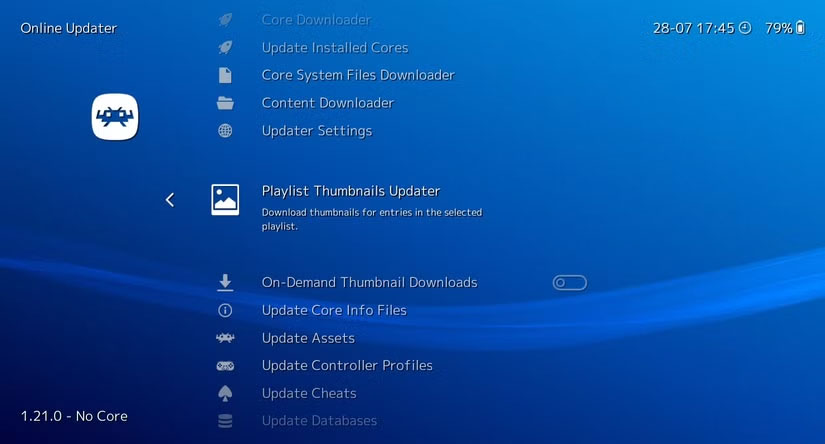
<p style="text-align: justify;">Nhiều người lớn lên cùng PlayStation 2, PSP và Game Boy Advance, và đến tận bây giờ họ vẫn thấy mình quay lại với nhiều game từ những console đó. Thậm chí thỉnh thoảng họ còn&nbsp;giả lập các game Pokémon cũ trên điện thoại Android.</p>

<p style="text-align: justify;">Vấn đề duy nhất là sự tiện lợi. Việc thiết lập các console riêng biệt mỗi khi muốn chơi một game nào đó khá nhanh chóng khiến mọi người cảm thấy mệt mỏi. Giữa việc chuyển đổi đầu vào, xử lý cáp và adapter cũ, hoặc chỉ đơn giản là sự lộn xộn nói chung, đó không hẳn là trải nghiệm tốt nhất. Mọi người muốn một cách gọn gàng, dễ dàng hơn để chơi mọi thứ mình yêu thích mà không phải đánh mất cảm giác retro đó.</p>

<figure>
<div style="text-align: justify;"><img alt="ASUS ROG Ally chạy Super Street Fighter II qua RetroArch" data-i="0" data-src="https://st.quantrimang.com/photos/image/2025/07/30/bien-pc-thanh-game-console-da-nang-toi-uu-1.jpg" data-was-processed="true" height="861" src="https://st.quantrimang.com/photos/image/2025/07/30/bien-pc-thanh-game-console-da-nang-toi-uu-1.jpg" width="1648" /></div>

<figcaption>
<div style="text-align: justify;">ASUS ROG Ally chạy Super Street Fighter II qua RetroArch</div>
</figcaption>
</figure>

<p style="text-align: justify;">Đó là lúc RetroArch xuất hiện! Đây là một trình giả lập miễn phí hỗ trợ rất nhiều hệ thống khác nhau và chạy trên&nbsp;&nbsp;Windows, macOS, Linux, Android, iOS, v.v... Mọi thứ khởi chạy từ một nơi, và nó ngay lập tức khiến PC có cảm giác như đang chơi game retro đúng nghĩa. Khi đã cài đặt xong, bạn sẽ cảm thấy như mình đã tự tạo ra một chiếc console hoàn hảo cho riêng mình.</p>

<h2 style="text-align: justify;">Cài đặt và thiết lập RetroArch</h2>

<p style="text-align: justify;">Để thiết lập RetroArch trên PC, chỉ cần tải xuống cài đặt từ trang web chính thức của&nbsp;RetroArch&nbsp;và cài đặt như bất kỳ ứng dụng nào khác. Khi mở ứng dụng lần đầu tiên, bạn sẽ thấy giao diện người dùng desktop khá tối giản. Ban đầu, giao diện này trông không có gì đặc biệt, nhưng khi bạn bắt đầu load các core và game lên, nó bắt đầu giống một frontend console thực thụ hơn.</p>

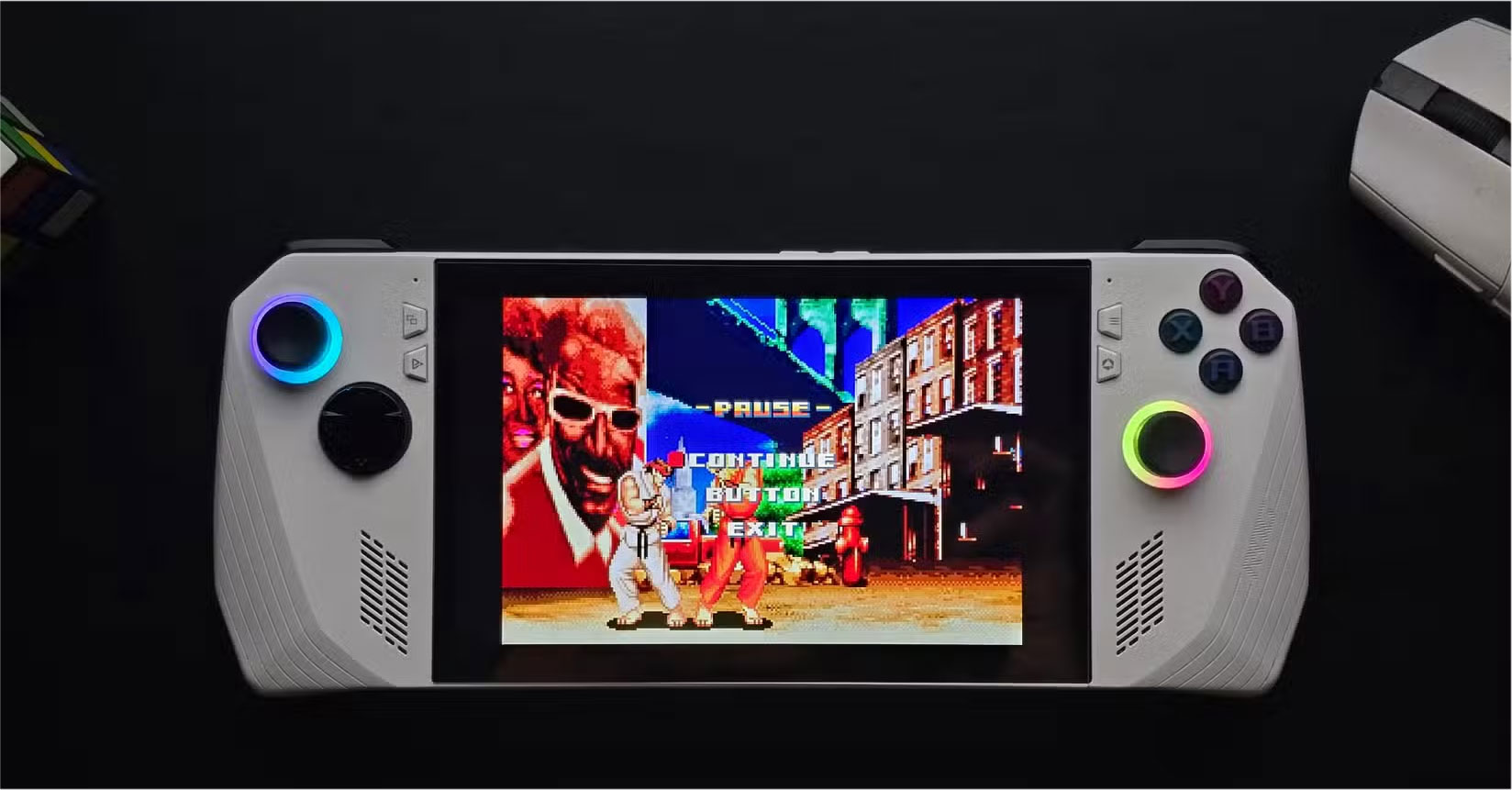
<p style="text-align: justify;">RetroArch thực sự không giả lập bất cứ thứ gì - nó sử dụng các &quot;core&quot; để làm điều đó. Core về cơ bản là một trình giả lập cho một hệ thống cụ thể và bạn có thể tải chúng trực tiếp từ bên trong ứng dụng. Vào&nbsp;<strong>Load Core &gt; Download a Core</strong>&nbsp;và chọn các console bạn muốn giả lập. Sau khi tải xuống một vài console, bạn có thể load chúng thông qua&nbsp;<strong>Main Menu &gt; Load Core</strong>.</p>

<figure>
<div style="text-align: justify;"><img alt="Menu chính của RetroArch với một số tùy chọn như Load Core, Load Content và nhiều tùy chọn khác." data-adbro-processed="true" data-i="1" data-src="https://st.quantrimang.com/photos/image/2025/07/30/bien-pc-thanh-game-console-da-nang-toi-uu-2.jpg" data-was-processed="true" height="429" src="https://st.quantrimang.com/photos/image/2025/07/30/bien-pc-thanh-game-console-da-nang-toi-uu-2.jpg" width="825" /></div>

<figcaption>
<div style="text-align: justify;">Menu chính của RetroArch với một số tùy chọn như Load Core, Load Content và nhiều tùy chọn khác.<br />
Phụ kiện máy tính</div>
</figcaption>
</figure>

<p style="text-align: justify;">Bạn cũng sẽ nhận thấy rằng một số hệ thống có sẵn nhiều core. Ví dụ, GBA có cả mGBA và VBA-M. Nếu bạn không chắc chắn nên chọn core nào, hãy thử load cùng một game trên cả hai và xem core nào hoạt động tốt hơn. Bạn có thể chuyển đổi giữa các core bất cứ lúc nào, vì vậy không có áp lực phải chọn core &quot;phù hợp&quot; ngay từ đầu.</p>

<p style="text-align: justify;">Bạn có thể cắm tay cầm Xbox và nó sẽ hoạt động tự động. Nếu bạn muốn tùy chỉnh các nút điều khiển, hãy vào&nbsp;<strong>Settings &gt; Input</strong>. Bạn có thể ánh xạ lại các nút, thiết lập bố cục tùy chỉnh và thậm chí lưu cấu hình cho các game hoặc hệ thống cụ thể.</p>

<h2 style="text-align: justify;">Thêm các game và file BIOS</h2>

<p style="text-align: justify;">Sau khi RetroArch đã hoạt động, bước tiếp theo là sắp xếp game của bạn. Hãy tạo một thư mục &quot;Retro Games&quot; chuyên dụng trên&nbsp;&nbsp;PC&nbsp;và tạo các thư mục con bên trong cho từng hệ thống, chẳng hạn như GBA, NES, v.v... Việc này giúp việc quản lý dễ dàng hơn, đặc biệt là khi bạn bắt đầu xây dựng thư viện với các loại file khác nhau như ROM hoặc&nbsp;file ISO.</p>

<div style="text-align: justify;">Phụ kiện máy tính</div>

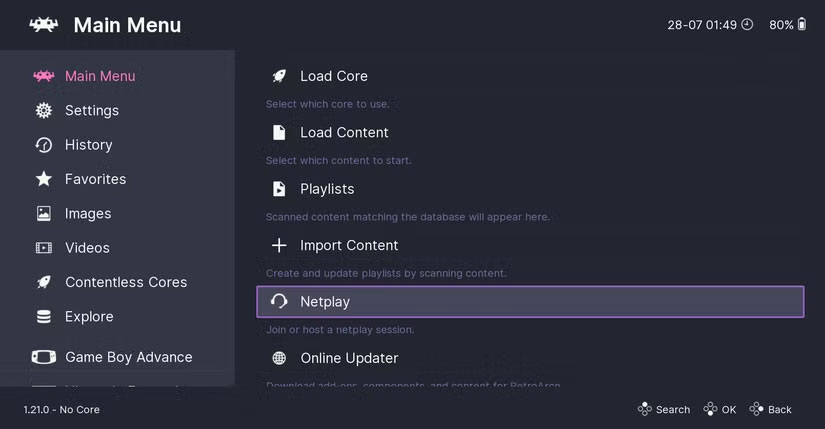
<p style="text-align: justify;">Sau khi sắp xếp game, bạn có thể quét thư viện bằng cách vào&nbsp;<strong>Main Menu &gt; Import Content &gt; Scan Directory</strong>&nbsp;và chọn thư mục chứa ROM. RetroArch sẽ tự động thêm chúng vào danh sách phát của bạn, kèm theo box art và siêu dữ liệu nếu nhận dạng được các file.</p>

<figure>
<div style="text-align: justify;"><img alt="RetroArch mở ra với các tùy chọn nhập nội dung từ thư mục, quét thủ công hoặc file." data-i="2" data-src="https://st.quantrimang.com/photos/image/2025/07/30/bien-pc-thanh-game-console-da-nang-toi-uu-3.jpg" data-was-processed="true" height="429" src="https://st.quantrimang.com/photos/image/2025/07/30/bien-pc-thanh-game-console-da-nang-toi-uu-3.jpg" width="825" /></div>

<figcaption>
<div style="text-align: justify;">RetroArch mở ra với các tùy chọn nhập nội dung từ thư mục, quét thủ công hoặc file.</div>
</figcaption>
</figure>

<p style="text-align: justify;">Đối với hầu hết các hệ thống cũ, tất cả những gì bạn cần là file game. Nhưng đối với một số core, đặc biệt là với các console như PlayStation, bạn cũng sẽ cần file BIOS.&nbsp;BIOS&nbsp;về cơ bản là firmware chạy trên console gốc và một số game sẽ không khởi động được nếu không có nó. Quá trình lấy file BIOS hợp pháp bao gồm việc trích xuất nó từ phần cứng của bạn.</p>

<p style="text-align: justify;">Việc này hơi kỹ thuật và tùy thuộc vào hệ thống, nhưng nhìn chung bao gồm việc chạy một công cụ trên console để trích xuất file BIOS, sau đó chuyển nó sang PC. RetroArch sẽ tìm kiếm những file này trong thư mục hệ thống, nằm trong thư mục cài đặt.</p>

<div style="text-align: justify;">Phụ kiện máy tính</div>

<p style="text-align: justify;">Để chơi game, chỉ cần chọn console bạn muốn giả lập trong menu chính, chọn tựa game và core khi được nhắc, sau đó game sẽ bắt đầu chạy.</p>

<h2 style="text-align: justify;">Làm cho RetroArch giống console hơn</h2>

<p style="text-align: justify;">Trước hết, nếu muốn game của mình trông giống như trên console gốc, bạn có thể sử dụng shader của RetroArch để tạo cảm giác như đang chơi trên TV CRT cũ. Nếu bạn đang sử dụng thiết lập của mình như một console kết nối với TV, giao diện RetroArch mặc định không phù hợp cho trải nghiệm đó.</p>

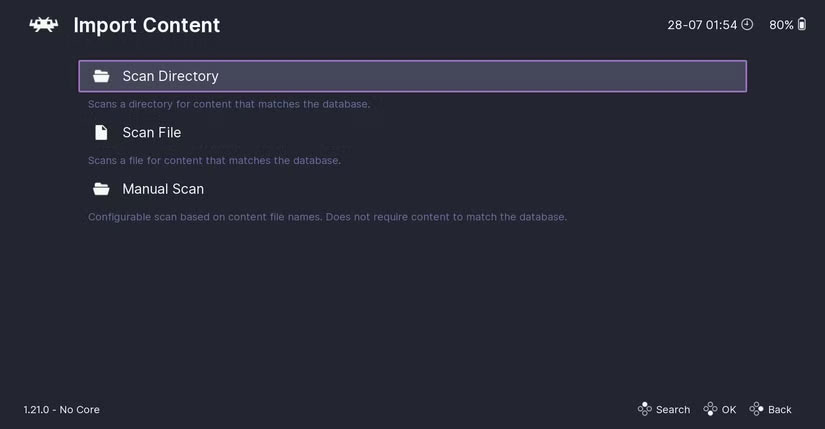
<p style="text-align: justify;">Nó phù hợp hơn với bàn phím và chuột, nhưng không trực quan lắm khi dùng với tay cầm.&nbsp;Bạn cũng có thể muốn có ảnh bìa cho game của mình, đặc biệt nếu bạn định cuộn qua thư viện bằng tay cầm.</p>

<figure>
<div style="text-align: justify;"><img alt="Menu RetroArch Online Updater với tùy chọn tải xuống ảnh thu nhỏ cho game" data-i="3" data-src="https://st.quantrimang.com/photos/image/2025/07/30/bien-pc-thanh-game-console-da-nang-toi-uu-4.jpg" data-was-processed="true" height="444" src="https://st.quantrimang.com/photos/image/2025/07/30/bien-pc-thanh-game-console-da-nang-toi-uu-4.jpg" width="825" /></div>

<figcaption>
<div style="text-align: justify;">Menu RetroArch Online Updater với tùy chọn tải xuống ảnh thu nhỏ cho game</div>
</figcaption>
</figure>

<p style="text-align: justify;">Để tự động thêm ảnh bìa, hãy vào&nbsp;<strong>Main Menu &gt; Online Updater &gt; Thumbnails Updater</strong>&nbsp;và chọn hệ thống bạn muốn áp dụng artwork. Nó sẽ tự động lấy ảnh bìa và siêu dữ liệu game của hầu hết các tựa game nổi tiếng. Chỉ cần đảm bảo game của bạn đã được scan và thêm vào thư viện trước đó, nếu không ảnh bìa có thể không hoạt động bình thường.</p>

<p style="text-align: justify;">Để chuyển sang giao diện giống console hơn, hãy vào&nbsp;<strong>Settings &gt; Drivers &gt; Menu</strong>&nbsp;và đổi driver menu thành&nbsp;<strong>xmb</strong>. Thao tác này sẽ cho bạn bố cục thanh ngang giống như PS3. Với ai lớn lên cùng PlayStation, bố cục này khá quen thuộc, nhưng nó có thể không phù hợp với tất cả mọi người.</p>

<p style="text-align: justify;">Nếu bạn vẫn đang tìm kiếm một giao diện mang hơi hướng hoài cổ hơn, hãy thử dùng&nbsp;EmulationStation. Đây là một giao diện riêng biệt nằm trên RetroArch và cung cấp cho bạn bảng điều khiển với đầy đủ theme, phù hợp với các thiết lập màn hình lớn.</p>

<p style="text-align: justify;">Nếu bạn dùng iPhone và muốn một thứ gì đó đơn giản hơn, cũng có rất nhiều&nbsp;trình giả lập tuyệt vời dành cho iOS. Tuy nhiên, hầu hết mọi người vẫn nên dùng RetroArch vì nó đáp ứng hầu hết mọi nhu cầu.</p>

<div style="text-align: justify;">&nbsp;</div>
		</div>
				<div id="author">
						<p>
				<strong>Nguồn tin:</strong>
				Quantrimang.com:
			</p>
		</div>
	</div>
	<div id="footer" class="clearfix">
		<div id="url">
			<strong>URL của bản tin này: </strong><a href="https://www.nguoicodonvn2008.info/vi/news/savefile/kien-thuc-may-tinh/cach-bien-pc-thanh-game-console-da-nang-toi-uu-10879.html" title="Cách biến PC thành game console đa năng tối ưu">https://www.nguoicodonvn2008.info/vi/news/savefile/kien-thuc-may-tinh/cach-bien-pc-thanh-game-console-da-nang-toi-uu-10879.html</a>

		</div>
		<div class="clear"></div>
		<div class="copyright">
			&copy; .&#x3A; Nguoicodonvn2008.info - Cõi lòng người cô đơn &#x3A;.
		</div>
		<div id="contact">
			<a href="mailto:admin@nguoicodonvn2008.info">admin@nguoicodonvn2008.info</a>
		</div>
	</div>
</div>
        <div id="timeoutsess" class="chromeframe">
            Bạn đã không sử dụng Site, <a onclick="timeoutsesscancel();" href="https://nguoicodonvn2008.info/#">Bấm vào đây để duy trì trạng thái đăng nhập</a>. Thời gian chờ: <span id="secField"> 60 </span> giây
        </div>
        <div id="openidResult" class="nv-alert" style="display:none"></div>
        <div id="openidBt" data-result="" data-redirect=""></div>
		</script>
		<div class="car-top">
  <span><img src="https://nguoicodonvn2008.info/themes/default/images/car.png" alt=""></span>
</div>
<script src="https://nguoicodonvn2008.info/assets/js/jquery/jquery.min.js"></script>
<script>var nv_base_siteurl="/",nv_lang_data="vi",nv_lang_interface="vi",nv_name_variable="nv",nv_fc_variable="op",nv_lang_variable="language",nv_module_name="news",nv_func_name="savefile",nv_is_user=0, nv_my_ofs=-4,nv_my_abbr="EDT",nv_cookie_prefix="nv4c_e856T",nv_check_pass_mstime=1738000,nv_area_admin=0,nv_safemode=0,theme_responsive=0,nv_recaptcha_ver=2,nv_recaptcha_sitekey="",nv_recaptcha_type="image",XSSsanitize=1;</script>
<script src="https://nguoicodonvn2008.info/assets/js/language/vi.js"></script>
<script src="https://nguoicodonvn2008.info/assets/js/DOMPurify/purify3.js"></script>
<script src="https://nguoicodonvn2008.info/assets/js/global.js"></script>
<script src="https://nguoicodonvn2008.info/assets/js/site.js"></script>
<script src="https://nguoicodonvn2008.info/themes/default/js/news.js"></script>
<script src="https://nguoicodonvn2008.info/themes/default/js/main.js"></script>
<script src="https://nguoicodonvn2008.info/themes/default/js/custom.js"></script>
<script type="application/ld+json">
        {
            "@context": "https://schema.org",
            "@type": "Organization",
            "url": "https://nguoicodonvn2008.info",
            "logo": "https://nguoicodonvn2008.info/uploads/angel.gif"
        }
        </script>
<script src="https://nguoicodonvn2008.info/themes/default/js/bootstrap.min.js"></script>
<script type="text/javascript">
var $scrolltop = $('.car-top');
$scrolltop.on('click', function () {
    $('html,body').animate({
        scrollTop: 0
    }, 800);
    $(this).addClass("car-run");
    setTimeout(function(){ $scrolltop.removeClass('car-run');}, 1000);
    return false;
});
$(window).on('scroll', function ()
{ 
    if($(window).scrollTop() >= 200)
    {
        $scrolltop.addClass("show");
        $scrolltop.addClass("car-down");
    }
    else
    {
       $scrolltop.removeClass("show");
       setTimeout(function(){ $scrolltop.removeClass('car-down');}, 300);
    }
});
</script>
</body>
</html>