<!DOCTYPE html>
    <html lang="vi" xmlns="http://www.w3.org/1999/xhtml" prefix="og: http://ogp.me/ns#">
    <head>
<title>Cách bật tính năng tăng âm trầm Bass Boost trên Windows 11</title>
<meta name="description" content="Cách bật tính năng tăng âm trầm Bass Boost trên Windows 11 - Savefile - Tin Tức -...">
<meta name="author" content=".: Nguoicodonvn2008.info - Cõi lòng người cô đơn :.">
<meta name="copyright" content=".: Nguoicodonvn2008.info - Cõi lòng người cô đơn :. [admin@nguoicodonvn2008.info]">
<meta name="robots" content="index, archive, follow, noodp">
<meta name="googlebot" content="index,archive,follow,noodp">
<meta name="msnbot" content="all,index,follow">
<meta name="generator" content="NukeViet v4.5">
<meta http-equiv="Content-Type" content="text/html; charset=utf-8">
<meta property="og:title" content="Cách bật tính năng tăng âm trầm Bass Boost trên Windows 11">
<meta property="og:type" content="website">
<meta property="og:description" content="Savefile - Tin Tức - https&#x3A;&#x002F;&#x002F;www.nguoicodonvn2008.info&#x002F;vi&#x002F;news&#x002F;savefile&#x002F;kien-thuc-may-tinh&#x002F;cach-bat-tinh-nang-tang-am-tram-bass-boost-tren-windows-11-5578.html">
<meta property="og:site_name" content=".&#x3A; Nguoicodonvn2008.info - Cõi lòng người cô đơn &#x3A;.">
<meta property="og:url" content="https://www.nguoicodonvn2008.info/vi/news/savefile/kien-thuc-may-tinh/cach-bat-tinh-nang-tang-am-tram-bass-boost-tren-windows-11-5578.html">
<link rel="shortcut icon" href="https://nguoicodonvn2008.info/favicon.ico">
<link rel="canonical" href="https://www.nguoicodonvn2008.info/vi/news/savefile/kien-thuc-may-tinh/cach-bat-tinh-nang-tang-am-tram-bass-boost-tren-windows-11-5578.html">
<link rel="alternate" href="https://nguoicodonvn2008.info/vi/news/rss/" title="Tin Tức" type="application/rss+xml">
<link rel="alternate" href="https://nguoicodonvn2008.info/vi/news/rss/karaoke-dual/" title="Tin Tức - Karaoke Dual" type="application/rss+xml">
<link rel="alternate" href="https://nguoicodonvn2008.info/vi/news/rss/nhac-tre/" title="Tin Tức - Nhạc trẻ" type="application/rss+xml">
<link rel="alternate" href="https://nguoicodonvn2008.info/vi/news/rss/tru-tinh/" title="Tin Tức - Trữ tình" type="application/rss+xml">
<link rel="alternate" href="https://nguoicodonvn2008.info/vi/news/rss/nuoc-ngoai/" title="Tin Tức - Nước ngoài" type="application/rss+xml">
<link rel="alternate" href="https://nguoicodonvn2008.info/vi/news/rss/remix/" title="Tin Tức - Remix" type="application/rss+xml">
<link rel="alternate" href="https://nguoicodonvn2008.info/vi/news/rss/tam-su-tinh-yeu/" title="Tin Tức - Tâm sự tình yêu" type="application/rss+xml">
<link rel="alternate" href="https://nguoicodonvn2008.info/vi/news/rss/tho-suu-tam/" title="Tin Tức - Thơ sưu tầm" type="application/rss+xml">
<link rel="alternate" href="https://nguoicodonvn2008.info/vi/news/rss/cuoc-song/" title="Tin Tức - Cuộc sống" type="application/rss+xml">
<link rel="alternate" href="https://nguoicodonvn2008.info/vi/news/rss/phan-mem/" title="Tin Tức - Phần mềm" type="application/rss+xml">
<link rel="alternate" href="https://nguoicodonvn2008.info/vi/news/rss/kien-thuc-may-tinh/" title="Tin Tức - Kiến thức máy tính" type="application/rss+xml">
<link rel="alternate" href="https://nguoicodonvn2008.info/vi/news/rss/hoc-tap/" title="Tin Tức - Học tập" type="application/rss+xml">
<link rel="alternate" href="https://nguoicodonvn2008.info/vi/news/rss/tai-lieu/" title="Tin Tức - Tài liệu" type="application/rss+xml">
<link rel="alternate" href="https://nguoicodonvn2008.info/vi/news/rss/de-thi/" title="Tin Tức - Đề thi" type="application/rss+xml">
<link rel="preload" as="style" href="https://nguoicodonvn2008.info/assets/css/font-awesome.min.css" type="text/css">
<link rel="preload" as="style" href="https://nguoicodonvn2008.info/themes/default/css/bootstrap.non-responsive.css" type="text/css">
<link rel="preload" as="style" href="https://nguoicodonvn2008.info/themes/default/css/style.css" type="text/css">
<link rel="preload" as="style" href="https://nguoicodonvn2008.info/themes/default/css/style.non-responsive.css" type="text/css">
<link rel="preload" as="style" href="https://nguoicodonvn2008.info/themes/default/css/news.css" type="text/css">
<link rel="preload" as="style" href="https://nguoicodonvn2008.info/themes/default/css/custom.css" type="text/css">
<link rel="preload" as="script" href="https://nguoicodonvn2008.info/assets/js/jquery/jquery.min.js" type="text/javascript">
<link rel="preload" as="script" href="https://nguoicodonvn2008.info/assets/js/language/vi.js" type="text/javascript">
<link rel="preload" as="script" href="https://nguoicodonvn2008.info/assets/js/DOMPurify/purify3.js" type="text/javascript">
<link rel="preload" as="script" href="https://nguoicodonvn2008.info/assets/js/global.js" type="text/javascript">
<link rel="preload" as="script" href="https://nguoicodonvn2008.info/assets/js/site.js" type="text/javascript">
<link rel="preload" as="script" href="https://nguoicodonvn2008.info/themes/default/js/news.js" type="text/javascript">
<link rel="preload" as="script" href="https://nguoicodonvn2008.info/themes/default/js/main.js" type="text/javascript">
<link rel="preload" as="script" href="https://nguoicodonvn2008.info/themes/default/js/custom.js" type="text/javascript">
<link rel="preload" as="script" href="https://nguoicodonvn2008.info/themes/default/js/bootstrap.min.js" type="text/javascript">
<link rel="stylesheet" href="https://nguoicodonvn2008.info/assets/css/font-awesome.min.css">
<link rel="stylesheet" href="https://nguoicodonvn2008.info/themes/default/css/bootstrap.non-responsive.css">
<link rel="stylesheet" href="https://nguoicodonvn2008.info/themes/default/css/style.css">
<link rel="stylesheet" href="https://nguoicodonvn2008.info/themes/default/css/style.non-responsive.css">
<link rel="StyleSheet" href="https://nguoicodonvn2008.info/themes/default/css/news.css">
<link rel="stylesheet" href="https://nguoicodonvn2008.info/themes/default/css/custom.css">
<style type="text/css">
	body{background: #fff;}
</style>
    </head>
    <body>
<div id="print">
	<div id="hd_print">
		<h2 class="pull-left">.&#x3A; Nguoicodonvn2008.info - Cõi lòng người cô đơn &#x3A;.</h2>
		<p class="pull-right"><a title=".&#x3A; Nguoicodonvn2008.info - Cõi lòng người cô đơn &#x3A;." href="https://nguoicodonvn2008.info/">https://nguoicodonvn2008.info</a></p>
	</div>
	<div class="clear"></div>
	<hr />
	<div id="content">
		<h1>Cách bật tính năng tăng âm trầm Bass Boost trên Windows 11</h1>
		<ul class="list-inline">
			<li>Thứ hai - 09/05/2022 00:43</li>
			<li class="hidden-print txtrequired"><em class="fa fa-print">&nbsp;</em><a title="In ra" href="javascript:;" onclick="window.print()">In ra</a></li>
			<li class="hidden-print txtrequired"><em class="fa fa-power-off">&nbsp;</em><a title="Đóng cửa sổ này" href="javascript:;" onclick="window.close()">Đóng cửa sổ này</a></li>
		</ul>
		<div class="clear"></div>
		<div id="hometext">
		</div>
				<div class="imghome">
			<img alt="Cách bật tính năng tăng âm trầm Bass Boost trên Windows 11" src="https://st.quantrimang.com/photos/image/2022/04/28/bat-tinh-nang-bass-boost-tren-windows2.jpg" width="460" class="img-thumbnail" />
		</div>
		<div class="clear"></div>
		<div id="bodytext" class="clearfix">
			<p style="text-align: justify;">Bass - âm trầm - là dải âm không thể thiếu trong mọi bản nhạc. Đặc biệt nếu bạn thường xuyên nghe những bản nhạc sôi động, mạnh mẽ, hay có niềm đam mê với phim ảnh, bạn chắc hẳn đã biết rõ tầm quan trọng của tiếng bass trong trải nghiệm âm thanh tổng thể.</p>

<p style="text-align: justify;">Vấn đề nằm ở chỗ “khẩu vị” âm thanh của mỗi người không giống nhau. Chẳng hạn với cùng một bản nhạc, trên cùng một thiết lập loa/tai nghe, có thể bạn thấy lượng bass như vậy là vừa đủ, nhưng người khác lại thấy cần phải tăng thêm âm trầm thì sẽ hay hơn. Trong những tình huống như vậy,&nbsp;Windows 10&nbsp;và&nbsp;Windows 11&nbsp;đều cung cấp tùy chọn cho phép bạn tăng thêm lượng âm trầm trên hệ thống để có được trải nghiệm phù hợp hơn.</p>

<p style="text-align: justify;">Tuy nhiên, cần lưu ý rằng tùy chọn tăng âm trầm (Bass Boost) không có sẵn trên tất cả các PC. Nếu máy tính của bạn có phần cứng và trình điều khiển (driver) được hỗ trợ, bạn sẽ thấy tùy chọn này như được mô tả trong các bước bên dưới. Ngoài ra, cho dù bạn đang sử dụng Windows 10 hay Windows 11, cách kích hoạt tính năng này là tương tự.</p>

<h2 style="text-align: justify;">Bật tính năng Bass Boost trên Windows 10, 11</h2>

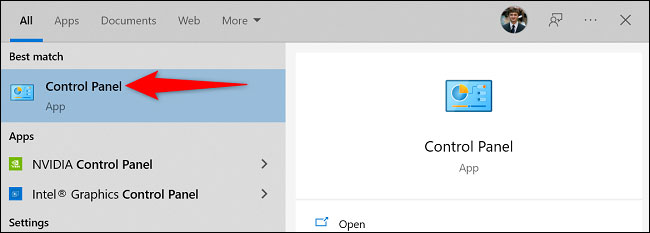
<p style="text-align: justify;">Để tăng âm trầm trên PC Windows, trước tiên, bạn truy cập Control Panel bằng cách mở menu “<strong>Start</strong>”, tìm từ khóa “<strong>Control Panel</strong>” và nhấp vào kết quả trả về tương ứng.</p>

<p style="text-align: justify;"><img alt="Truy cập Control Panel " data-i="0" data-src="https://st.quantrimang.com/photos/image/2022/04/28/bat-tinh-nang-bass-boost-tren-windows1.jpg" data-was-processed="true" height="233" src="https://st.quantrimang.com/photos/image/2022/04/28/bat-tinh-nang-bass-boost-tren-windows1.jpg" width="650" /></p>

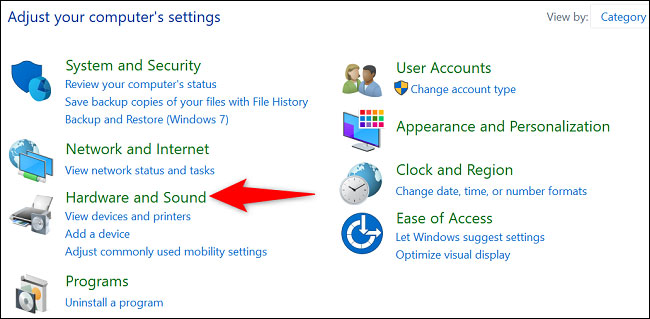
<p style="text-align: justify;">Trên cửa sổ Control Panel, bấm chọn “<strong>Hardware and Sound</strong>”.</p>

<p style="text-align: justify;"><img alt="Bấm chọn “Hardware and Sound”" data-i="1" data-src="https://st.quantrimang.com/photos/image/2022/04/28/bat-tinh-nang-bass-boost-tren-windows2.jpg" data-was-processed="true" height="319" src="https://st.quantrimang.com/photos/image/2022/04/28/bat-tinh-nang-bass-boost-tren-windows2.jpg" width="650" /></p>

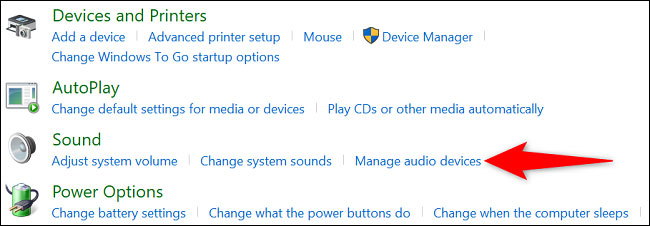
<p style="text-align: justify;">Trên trang tiếp theo, bên dưới phần “<strong>Sound</strong>”, bạn nhấp vào mục “<strong>Manage Audio Devices</strong>”.</p>

<p style="text-align: justify;"><img alt="Nhấp vào mục “Manage Audio Devices”" data-i="2" data-src="https://st.quantrimang.com/photos/image/2022/04/28/bat-tinh-nang-bass-boost-tren-windows3.jpg" data-was-processed="true" height="226" src="https://st.quantrimang.com/photos/image/2022/04/28/bat-tinh-nang-bass-boost-tren-windows3.jpg" width="650" /></p>

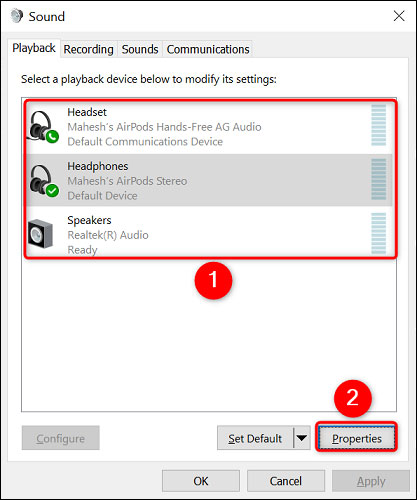
<p style="text-align: justify;">Cửa sổ “<strong>Sound</strong>” sẽ mở ra. Tại đây, chọn tai nghe hoặc loa mà bạn đang sử dụng, sau đó nhấp vào “<strong>Properties</strong>”.</p>

<p style="text-align: justify;"><img alt="Nhấp vào “Properties”" data-i="3" data-src="https://st.quantrimang.com/photos/image/2022/04/28/bat-tinh-nang-bass-boost-tren-windows4.jpg" data-was-processed="true" height="500" src="https://st.quantrimang.com/photos/image/2022/04/28/bat-tinh-nang-bass-boost-tren-windows4.jpg" width="417" /></p>

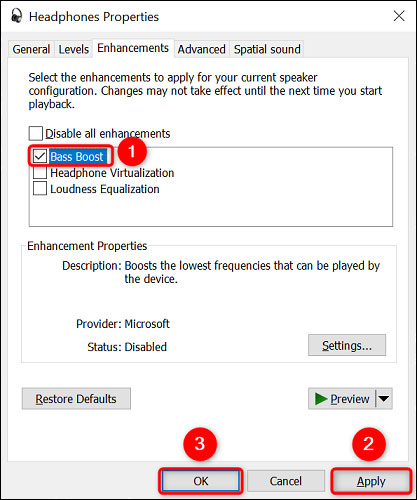
<p style="text-align: justify;">Trên cửa sổ “<strong>Properties</strong>”, mở tab “<strong>Enhancements</strong>”. Sau đó, kích hoạt tùy chọn có tên “<strong>Bass Boost</strong>”.</p>

<p style="text-align: justify;"><img alt="Kích hoạt tùy chọn “Bass Boost”" data-i="4" data-src="https://st.quantrimang.com/photos/image/2022/04/28/bat-tinh-nang-bass-boost-tren-windows5.jpg" data-was-processed="true" height="500" src="https://st.quantrimang.com/photos/image/2022/04/28/bat-tinh-nang-bass-boost-tren-windows5.jpg" width="417" /></p>

<p style="text-align: justify;">Bây giờ, hãy lưu cài đặt của bạn bằng cách nhấp vào “<strong>Apply</strong>”, sau đó là “<strong>OK</strong>” ở dưới cùng.</p>

<p style="text-align: justify;">Tất cả chỉ đơn giản có vậy. Tai nghe hoặc loa được kết nối trên hệ thống giờ đây sẽ tạo ra âm trầm tốt hơn tương đối .</p>

<p style="text-align: justify;">Chúc bạn luôn có được trải nghiệm giải trí tốt nhất với chiếc PC của mình!</p>
		</div>
				<div id="author">
						<p>
				<strong>Nguồn tin:</strong>
				Quantrimang.com
			</p>
		</div>
	</div>
	<div id="footer" class="clearfix">
		<div id="url">
			<strong>URL của bản tin này: </strong><a href="https://www.nguoicodonvn2008.info/vi/news/savefile/kien-thuc-may-tinh/cach-bat-tinh-nang-tang-am-tram-bass-boost-tren-windows-11-5578.html" title="Cách bật tính năng tăng âm trầm Bass Boost trên Windows 11">https://www.nguoicodonvn2008.info/vi/news/savefile/kien-thuc-may-tinh/cach-bat-tinh-nang-tang-am-tram-bass-boost-tren-windows-11-5578.html</a>

		</div>
		<div class="clear"></div>
		<div class="copyright">
			&copy; .&#x3A; Nguoicodonvn2008.info - Cõi lòng người cô đơn &#x3A;.
		</div>
		<div id="contact">
			<a href="mailto:admin@nguoicodonvn2008.info">admin@nguoicodonvn2008.info</a>
		</div>
	</div>
</div>
        <div id="timeoutsess" class="chromeframe">
            Bạn đã không sử dụng Site, <a onclick="timeoutsesscancel();" href="https://nguoicodonvn2008.info/#">Bấm vào đây để duy trì trạng thái đăng nhập</a>. Thời gian chờ: <span id="secField"> 60 </span> giây
        </div>
        <div id="openidResult" class="nv-alert" style="display:none"></div>
        <div id="openidBt" data-result="" data-redirect=""></div>
		</script>
		<div class="car-top">
  <span><img src="https://nguoicodonvn2008.info/themes/default/images/car.png" alt=""></span>
</div>
<script src="https://nguoicodonvn2008.info/assets/js/jquery/jquery.min.js"></script>
<script>var nv_base_siteurl="/",nv_lang_data="vi",nv_lang_interface="vi",nv_name_variable="nv",nv_fc_variable="op",nv_lang_variable="language",nv_module_name="news",nv_func_name="savefile",nv_is_user=0, nv_my_ofs=-4,nv_my_abbr="EDT",nv_cookie_prefix="nv4c_e856T",nv_check_pass_mstime=1738000,nv_area_admin=0,nv_safemode=0,theme_responsive=0,nv_recaptcha_ver=2,nv_recaptcha_sitekey="",nv_recaptcha_type="image",XSSsanitize=1;</script>
<script src="https://nguoicodonvn2008.info/assets/js/language/vi.js"></script>
<script src="https://nguoicodonvn2008.info/assets/js/DOMPurify/purify3.js"></script>
<script src="https://nguoicodonvn2008.info/assets/js/global.js"></script>
<script src="https://nguoicodonvn2008.info/assets/js/site.js"></script>
<script src="https://nguoicodonvn2008.info/themes/default/js/news.js"></script>
<script src="https://nguoicodonvn2008.info/themes/default/js/main.js"></script>
<script src="https://nguoicodonvn2008.info/themes/default/js/custom.js"></script>
<script type="application/ld+json">
        {
            "@context": "https://schema.org",
            "@type": "Organization",
            "url": "https://nguoicodonvn2008.info",
            "logo": "https://nguoicodonvn2008.info/uploads/angel.gif"
        }
        </script>
<script src="https://nguoicodonvn2008.info/themes/default/js/bootstrap.min.js"></script>
<script type="text/javascript">
var $scrolltop = $('.car-top');
$scrolltop.on('click', function () {
    $('html,body').animate({
        scrollTop: 0
    }, 800);
    $(this).addClass("car-run");
    setTimeout(function(){ $scrolltop.removeClass('car-run');}, 1000);
    return false;
});
$(window).on('scroll', function ()
{ 
    if($(window).scrollTop() >= 200)
    {
        $scrolltop.addClass("show");
        $scrolltop.addClass("car-down");
    }
    else
    {
       $scrolltop.removeClass("show");
       setTimeout(function(){ $scrolltop.removeClass('car-down');}, 300);
    }
});
</script>
</body>
</html>