<!DOCTYPE html>
    <html lang="vi" xmlns="http://www.w3.org/1999/xhtml" prefix="og: http://ogp.me/ns#">
    <head>
<title>Cách bật&#x002F;tắt tùy chọn hỏi trước khi đóng nhiều cửa sổ trong Your Phone trên PC Windows 10</title>
<meta name="description" content="Cách bật&#x002F;tắt tùy chọn hỏi trước khi đóng nhiều cửa sổ trong Your Phone trên PC Windows 10 - Savefile - Tin Tức -...">
<meta name="author" content=".: Nguoicodonvn2008.info - Cõi lòng người cô đơn :.">
<meta name="copyright" content=".: Nguoicodonvn2008.info - Cõi lòng người cô đơn :. [admin@nguoicodonvn2008.info]">
<meta name="robots" content="index, archive, follow, noodp">
<meta name="googlebot" content="index,archive,follow,noodp">
<meta name="msnbot" content="all,index,follow">
<meta name="generator" content="NukeViet v4.5">
<meta http-equiv="Content-Type" content="text/html; charset=utf-8">
<meta property="og:title" content="Cách bật&#x002F;tắt tùy chọn hỏi trước khi đóng nhiều cửa sổ trong Your Phone trên PC Windows 10">
<meta property="og:type" content="website">
<meta property="og:description" content="Savefile - Tin Tức -...">
<meta property="og:site_name" content=".&#x3A; Nguoicodonvn2008.info - Cõi lòng người cô đơn &#x3A;.">
<meta property="og:url" content="https://www.nguoicodonvn2008.info/vi/news/savefile/kien-thuc-may-tinh/cach-bat-tat-tuy-chon-hoi-truoc-khi-dong-nhieu-cua-so-trong-your-phone-tren-pc-windows-10-3126.html">
<link rel="shortcut icon" href="https://nguoicodonvn2008.info/favicon.ico">
<link rel="canonical" href="https://www.nguoicodonvn2008.info/vi/news/savefile/kien-thuc-may-tinh/cach-bat-tat-tuy-chon-hoi-truoc-khi-dong-nhieu-cua-so-trong-your-phone-tren-pc-windows-10-3126.html">
<link rel="alternate" href="https://nguoicodonvn2008.info/vi/news/rss/" title="Tin Tức" type="application/rss+xml">
<link rel="alternate" href="https://nguoicodonvn2008.info/vi/news/rss/karaoke-dual/" title="Tin Tức - Karaoke Dual" type="application/rss+xml">
<link rel="alternate" href="https://nguoicodonvn2008.info/vi/news/rss/nhac-tre/" title="Tin Tức - Nhạc trẻ" type="application/rss+xml">
<link rel="alternate" href="https://nguoicodonvn2008.info/vi/news/rss/tru-tinh/" title="Tin Tức - Trữ tình" type="application/rss+xml">
<link rel="alternate" href="https://nguoicodonvn2008.info/vi/news/rss/nuoc-ngoai/" title="Tin Tức - Nước ngoài" type="application/rss+xml">
<link rel="alternate" href="https://nguoicodonvn2008.info/vi/news/rss/remix/" title="Tin Tức - Remix" type="application/rss+xml">
<link rel="alternate" href="https://nguoicodonvn2008.info/vi/news/rss/tam-su-tinh-yeu/" title="Tin Tức - Tâm sự tình yêu" type="application/rss+xml">
<link rel="alternate" href="https://nguoicodonvn2008.info/vi/news/rss/tho-suu-tam/" title="Tin Tức - Thơ sưu tầm" type="application/rss+xml">
<link rel="alternate" href="https://nguoicodonvn2008.info/vi/news/rss/cuoc-song/" title="Tin Tức - Cuộc sống" type="application/rss+xml">
<link rel="alternate" href="https://nguoicodonvn2008.info/vi/news/rss/phan-mem/" title="Tin Tức - Phần mềm" type="application/rss+xml">
<link rel="alternate" href="https://nguoicodonvn2008.info/vi/news/rss/kien-thuc-may-tinh/" title="Tin Tức - Kiến thức máy tính" type="application/rss+xml">
<link rel="alternate" href="https://nguoicodonvn2008.info/vi/news/rss/hoc-tap/" title="Tin Tức - Học tập" type="application/rss+xml">
<link rel="alternate" href="https://nguoicodonvn2008.info/vi/news/rss/tai-lieu/" title="Tin Tức - Tài liệu" type="application/rss+xml">
<link rel="alternate" href="https://nguoicodonvn2008.info/vi/news/rss/de-thi/" title="Tin Tức - Đề thi" type="application/rss+xml">
<link rel="preload" as="style" href="https://nguoicodonvn2008.info/assets/css/font-awesome.min.css" type="text/css">
<link rel="preload" as="style" href="https://nguoicodonvn2008.info/themes/default/css/bootstrap.non-responsive.css" type="text/css">
<link rel="preload" as="style" href="https://nguoicodonvn2008.info/themes/default/css/style.css" type="text/css">
<link rel="preload" as="style" href="https://nguoicodonvn2008.info/themes/default/css/style.non-responsive.css" type="text/css">
<link rel="preload" as="style" href="https://nguoicodonvn2008.info/themes/default/css/news.css" type="text/css">
<link rel="preload" as="style" href="https://nguoicodonvn2008.info/themes/default/css/custom.css" type="text/css">
<link rel="preload" as="script" href="https://nguoicodonvn2008.info/assets/js/jquery/jquery.min.js" type="text/javascript">
<link rel="preload" as="script" href="https://nguoicodonvn2008.info/assets/js/language/vi.js" type="text/javascript">
<link rel="preload" as="script" href="https://nguoicodonvn2008.info/assets/js/DOMPurify/purify3.js" type="text/javascript">
<link rel="preload" as="script" href="https://nguoicodonvn2008.info/assets/js/global.js" type="text/javascript">
<link rel="preload" as="script" href="https://nguoicodonvn2008.info/assets/js/site.js" type="text/javascript">
<link rel="preload" as="script" href="https://nguoicodonvn2008.info/themes/default/js/news.js" type="text/javascript">
<link rel="preload" as="script" href="https://nguoicodonvn2008.info/themes/default/js/main.js" type="text/javascript">
<link rel="preload" as="script" href="https://nguoicodonvn2008.info/themes/default/js/custom.js" type="text/javascript">
<link rel="preload" as="script" href="https://nguoicodonvn2008.info/themes/default/js/bootstrap.min.js" type="text/javascript">
<link rel="stylesheet" href="https://nguoicodonvn2008.info/assets/css/font-awesome.min.css">
<link rel="stylesheet" href="https://nguoicodonvn2008.info/themes/default/css/bootstrap.non-responsive.css">
<link rel="stylesheet" href="https://nguoicodonvn2008.info/themes/default/css/style.css">
<link rel="stylesheet" href="https://nguoicodonvn2008.info/themes/default/css/style.non-responsive.css">
<link rel="StyleSheet" href="https://nguoicodonvn2008.info/themes/default/css/news.css">
<link rel="stylesheet" href="https://nguoicodonvn2008.info/themes/default/css/custom.css">
<style type="text/css">
	body{background: #fff;}
</style>
    </head>
    <body>
<div id="print">
	<div id="hd_print">
		<h2 class="pull-left">.&#x3A; Nguoicodonvn2008.info - Cõi lòng người cô đơn &#x3A;.</h2>
		<p class="pull-right"><a title=".&#x3A; Nguoicodonvn2008.info - Cõi lòng người cô đơn &#x3A;." href="https://nguoicodonvn2008.info/">https://nguoicodonvn2008.info</a></p>
	</div>
	<div class="clear"></div>
	<hr />
	<div id="content">
		<h1>Cách bật&#x002F;tắt tùy chọn hỏi trước khi đóng nhiều cửa sổ trong Your Phone trên PC Windows 10</h1>
		<ul class="list-inline">
			<li>Thứ hai - 23/11/2020 23:54</li>
			<li class="hidden-print txtrequired"><em class="fa fa-print">&nbsp;</em><a title="In ra" href="javascript:;" onclick="window.print()">In ra</a></li>
			<li class="hidden-print txtrequired"><em class="fa fa-power-off">&nbsp;</em><a title="Đóng cửa sổ này" href="javascript:;" onclick="window.close()">Đóng cửa sổ này</a></li>
		</ul>
		<div class="clear"></div>
		<div id="hometext">
		</div>
				<div class="imghome">
			<img alt="Cách bật&#x002F;tắt tùy chọn hỏi trước khi đóng nhiều cửa sổ trong Your Phone trên PC Windows 10" src="https://st.quantrimang.com/photos/image/2020/11/23/hoi-truoc-khi-dong-nhieu-cua-so-trong-your-phone-1.png" width="460" class="img-thumbnail" />
		</div>
		<div class="clear"></div>
		<div id="bodytext" class="clearfix">
			<p style="text-align: justify;">Bạn có thể khai thác sức mạnh của ứng dụng&nbsp;<strong>Your Phone</strong>&nbsp;với tích hợp&nbsp;<strong>Link to Windows</strong>&nbsp;trên một số thiết bị Samsung nhất định để truy cập ngay vào các ứng dụng di động của điện thoại trực tiếp từ PC chạy Windows 10.</p>

<div style="text-align: justify;">&nbsp;</div>

<p style="text-align: justify;">Với&nbsp;ứng dụng Your Phone, bạn có thể truy cập ngay vào các ứng dụng Android được cài đặt trên thiết bị di động của mình ngay trên PC. Sử dụng kết nối WiFi, Apps cho phép bạn duyệt, chơi, đặt hàng, trò chuyện, v.v... - tất cả trong khi sử dụng bàn phím và màn hình lớn của PC. Bạn có thể thêm các ứng dụng Android của mình làm ứng dụng yêu thích trên PC, ghim chúng vào menu Start và thanh tác vụ rồi mở chúng trong các cửa sổ riêng biệt để sử dụng song song với những ứng dụng trên PC - giúp bạn luôn làm việc hiệu quả.</p>

<p style="text-align: justify;">Bắt đầu với ứng dụng Your Phone phiên bản 1.20111.105.0, cài đặt Multiple windows mới đã được thêm vào, cho phép bạn bật hoặc tắt để cảnh báo bạn trước khi đóng nhiều cửa sổ khi thoát ứng dụng Your Phone.</p>

<p style="text-align: justify;">Hướng dẫn này sẽ chỉ cho bạn cách bật hoặc tắt tùy chọn hỏi trước khi đóng nhiều cửa sổ trong ứng dụng Your Phone trên Windows 10.</p>

<h2 style="text-align: justify;">Tắt tùy chọn hỏi trước khi đóng nhiều cửa sổ từ phần cảnh báo</h2>

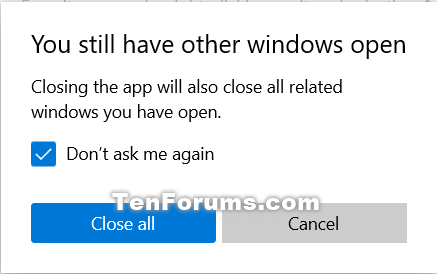
<p style="text-align: justify;">1. Khi bạn mở nhiều cửa sổ (ví dụ: ứng dụng từ điện thoại Android và ứng dụng Your Phone) từ ứng dụng Your Phone, hãy đóng ứng dụng Your Phone.</p>

<p style="text-align: justify;">2. Chọn hộp&nbsp;<strong>Don&#039;t ask me again</strong>&nbsp;trong hộp thoại cảnh báo&nbsp;<strong>You still have other windows open</strong>&nbsp;và nhấp vào&nbsp;<strong>Close all.</strong></p>

<figure>
<div style="text-align: justify;"><img alt="Tắt tùy chọn hỏi trước khi đóng nhiều cửa sổ từ phần cảnh báo" data-i="0" data-src="https://st.quantrimang.com/photos/image/2020/11/23/hoi-truoc-khi-dong-nhieu-cua-so-trong-your-phone-1.png" data-was-processed="true" height="274" src="https://st.quantrimang.com/photos/image/2020/11/23/hoi-truoc-khi-dong-nhieu-cua-so-trong-your-phone-1.png" width="437" /></div>

<figcaption>
<div style="text-align: justify;">Tắt tùy chọn hỏi trước khi đóng nhiều cửa sổ từ phần cảnh báo</div>
</figcaption>
</figure>

<div style="text-align: justify;">&nbsp;</div>

<h2 style="text-align: justify;">Bật hoặc tắt tùy chọn hỏi trước khi đóng nhiều cửa sổ trong phần Settings của ứng dụng Your Phone</h2>

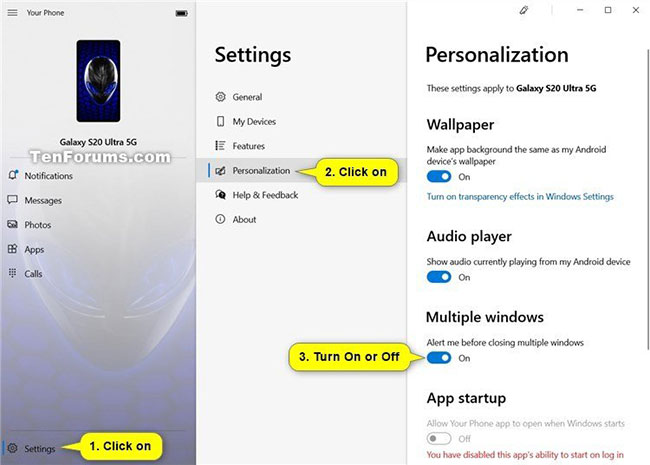
<p style="text-align: justify;">1. Mở ứng dụng&nbsp;<strong>Your Phone.</strong></p>

<p style="text-align: justify;">2. Nhấp vào biểu tượng&nbsp;<strong>Settings</strong>&nbsp;(bánh răng) ở cuối bảng điều khiển bên trái.</p>

<p style="text-align: justify;">3. Nhấp vào&nbsp;<strong>Personalization</strong>&nbsp;trong bảng điều khiển&nbsp;<strong>Settings</strong>&nbsp;ở giữa.</p>

<p style="text-align: justify;">4. Trong&nbsp;<strong>Multiple windows</strong>&nbsp;thuộc bảng điều khiển&nbsp;<strong>Personalization</strong>&nbsp;ở bên phải, bật (mặc định) hoặc tắt&nbsp;<strong>Alert me before closing multiple windows</strong>, tùy thuộc vào những gì bạn muốn.</p>

<p style="text-align: justify;">5. Bây giờ, bạn có thể đóng ứng dụng Your Phone nếu muốn.</p>

<figure>
<div style="text-align: justify;"><img alt="Bật hoặc tắt tùy chọn hỏi trước khi đóng nhiều cửa sổ trong phần Settings của ứng dụng Your Phone" data-i="1" data-src="https://st.quantrimang.com/photos/image/2020/11/23/hoi-truoc-khi-dong-nhieu-cua-so-trong-your-phone-2.jpg" data-was-processed="true" height="465" src="https://st.quantrimang.com/photos/image/2020/11/23/hoi-truoc-khi-dong-nhieu-cua-so-trong-your-phone-2.jpg" width="650" /></div>

<figcaption>
<div style="text-align: justify;">Bật hoặc tắt tùy chọn hỏi trước khi đóng nhiều cửa sổ trong phần Settings của ứng dụng Your Phone</div>
</figcaption>
</figure>
		</div>
				<div id="author">
						<p>
				<strong>Nguồn tin:</strong>
				Quantrimang.com
			</p>
		</div>
	</div>
	<div id="footer" class="clearfix">
		<div id="url">
			<strong>URL của bản tin này: </strong><a href="https://www.nguoicodonvn2008.info/vi/news/savefile/kien-thuc-may-tinh/cach-bat-tat-tuy-chon-hoi-truoc-khi-dong-nhieu-cua-so-trong-your-phone-tren-pc-windows-10-3126.html" title="Cách bật&#x002F;tắt tùy chọn hỏi trước khi đóng nhiều cửa sổ trong Your Phone trên PC Windows 10">https://www.nguoicodonvn2008.info/vi/news/savefile/kien-thuc-may-tinh/cach-bat-tat-tuy-chon-hoi-truoc-khi-dong-nhieu-cua-so-trong-your-phone-tren-pc-windows-10-3126.html</a>

		</div>
		<div class="clear"></div>
		<div class="copyright">
			&copy; .&#x3A; Nguoicodonvn2008.info - Cõi lòng người cô đơn &#x3A;.
		</div>
		<div id="contact">
			<a href="mailto:admin@nguoicodonvn2008.info">admin@nguoicodonvn2008.info</a>
		</div>
	</div>
</div>
        <div id="timeoutsess" class="chromeframe">
            Bạn đã không sử dụng Site, <a onclick="timeoutsesscancel();" href="https://nguoicodonvn2008.info/#">Bấm vào đây để duy trì trạng thái đăng nhập</a>. Thời gian chờ: <span id="secField"> 60 </span> giây
        </div>
        <div id="openidResult" class="nv-alert" style="display:none"></div>
        <div id="openidBt" data-result="" data-redirect=""></div>
		</script>
		<div class="car-top">
  <span><img src="https://nguoicodonvn2008.info/themes/default/images/car.png" alt=""></span>
</div>
<div id="run_cronjobs" style="visibility:hidden;display:none;"><img alt="cron" src="/index.php?second=cronjobs&amp;p=r2MhI0La" width="1" height="1" /></div>
<script src="https://nguoicodonvn2008.info/assets/js/jquery/jquery.min.js"></script>
<script>var nv_base_siteurl="/",nv_lang_data="vi",nv_lang_interface="vi",nv_name_variable="nv",nv_fc_variable="op",nv_lang_variable="language",nv_module_name="news",nv_func_name="savefile",nv_is_user=0, nv_my_ofs=-4,nv_my_abbr="EDT",nv_cookie_prefix="nv4c_e856T",nv_check_pass_mstime=1738000,nv_area_admin=0,nv_safemode=0,theme_responsive=0,nv_recaptcha_ver=2,nv_recaptcha_sitekey="",nv_recaptcha_type="image",XSSsanitize=1;</script>
<script src="https://nguoicodonvn2008.info/assets/js/language/vi.js"></script>
<script src="https://nguoicodonvn2008.info/assets/js/DOMPurify/purify3.js"></script>
<script src="https://nguoicodonvn2008.info/assets/js/global.js"></script>
<script src="https://nguoicodonvn2008.info/assets/js/site.js"></script>
<script src="https://nguoicodonvn2008.info/themes/default/js/news.js"></script>
<script src="https://nguoicodonvn2008.info/themes/default/js/main.js"></script>
<script src="https://nguoicodonvn2008.info/themes/default/js/custom.js"></script>
<script type="application/ld+json">
        {
            "@context": "https://schema.org",
            "@type": "Organization",
            "url": "https://nguoicodonvn2008.info",
            "logo": "https://nguoicodonvn2008.info/uploads/angel.gif"
        }
        </script>
<script src="https://nguoicodonvn2008.info/themes/default/js/bootstrap.min.js"></script>
<script type="text/javascript">
var $scrolltop = $('.car-top');
$scrolltop.on('click', function () {
    $('html,body').animate({
        scrollTop: 0
    }, 800);
    $(this).addClass("car-run");
    setTimeout(function(){ $scrolltop.removeClass('car-run');}, 1000);
    return false;
});
$(window).on('scroll', function ()
{ 
    if($(window).scrollTop() >= 200)
    {
        $scrolltop.addClass("show");
        $scrolltop.addClass("car-down");
    }
    else
    {
       $scrolltop.removeClass("show");
       setTimeout(function(){ $scrolltop.removeClass('car-down');}, 300);
    }
});
</script>
</body>
</html>