<!DOCTYPE html>
    <html lang="vi" xmlns="http://www.w3.org/1999/xhtml" prefix="og: http://ogp.me/ns#">
    <head>
<title>Cách bật&#x002F;tắt tính năng Tự động phát trên YouTube Music</title>
<meta name="description" content="Cách bật&#x002F;tắt tính năng Tự động phát trên YouTube Music - Savefile - Tin Tức -...">
<meta name="author" content=".: Nguoicodonvn2008.info - Cõi lòng người cô đơn :.">
<meta name="copyright" content=".: Nguoicodonvn2008.info - Cõi lòng người cô đơn :. [admin@nguoicodonvn2008.info]">
<meta name="robots" content="index, archive, follow, noodp">
<meta name="googlebot" content="index,archive,follow,noodp">
<meta name="msnbot" content="all,index,follow">
<meta name="generator" content="NukeViet v4.5">
<meta http-equiv="Content-Type" content="text/html; charset=utf-8">
<meta property="og:title" content="Cách bật&#x002F;tắt tính năng Tự động phát trên YouTube Music">
<meta property="og:type" content="website">
<meta property="og:description" content="Savefile - Tin Tức - https&#x3A;&#x002F;&#x002F;www.nguoicodonvn2008.info&#x002F;vi&#x002F;news&#x002F;savefile&#x002F;kien-thuc-may-tinh&#x002F;cach-bat-tat-tinh-nang-tu-dong-phat-tren-youtube-music-7446.html">
<meta property="og:site_name" content=".&#x3A; Nguoicodonvn2008.info - Cõi lòng người cô đơn &#x3A;.">
<meta property="og:url" content="https://www.nguoicodonvn2008.info/vi/news/savefile/kien-thuc-may-tinh/cach-bat-tat-tinh-nang-tu-dong-phat-tren-youtube-music-7446.html">
<link rel="shortcut icon" href="https://nguoicodonvn2008.info/favicon.ico">
<link rel="canonical" href="https://www.nguoicodonvn2008.info/vi/news/savefile/kien-thuc-may-tinh/cach-bat-tat-tinh-nang-tu-dong-phat-tren-youtube-music-7446.html">
<link rel="alternate" href="https://nguoicodonvn2008.info/vi/news/rss/" title="Tin Tức" type="application/rss+xml">
<link rel="alternate" href="https://nguoicodonvn2008.info/vi/news/rss/karaoke-dual/" title="Tin Tức - Karaoke Dual" type="application/rss+xml">
<link rel="alternate" href="https://nguoicodonvn2008.info/vi/news/rss/nhac-tre/" title="Tin Tức - Nhạc trẻ" type="application/rss+xml">
<link rel="alternate" href="https://nguoicodonvn2008.info/vi/news/rss/tru-tinh/" title="Tin Tức - Trữ tình" type="application/rss+xml">
<link rel="alternate" href="https://nguoicodonvn2008.info/vi/news/rss/nuoc-ngoai/" title="Tin Tức - Nước ngoài" type="application/rss+xml">
<link rel="alternate" href="https://nguoicodonvn2008.info/vi/news/rss/remix/" title="Tin Tức - Remix" type="application/rss+xml">
<link rel="alternate" href="https://nguoicodonvn2008.info/vi/news/rss/tam-su-tinh-yeu/" title="Tin Tức - Tâm sự tình yêu" type="application/rss+xml">
<link rel="alternate" href="https://nguoicodonvn2008.info/vi/news/rss/tho-suu-tam/" title="Tin Tức - Thơ sưu tầm" type="application/rss+xml">
<link rel="alternate" href="https://nguoicodonvn2008.info/vi/news/rss/cuoc-song/" title="Tin Tức - Cuộc sống" type="application/rss+xml">
<link rel="alternate" href="https://nguoicodonvn2008.info/vi/news/rss/phan-mem/" title="Tin Tức - Phần mềm" type="application/rss+xml">
<link rel="alternate" href="https://nguoicodonvn2008.info/vi/news/rss/kien-thuc-may-tinh/" title="Tin Tức - Kiến thức máy tính" type="application/rss+xml">
<link rel="alternate" href="https://nguoicodonvn2008.info/vi/news/rss/hoc-tap/" title="Tin Tức - Học tập" type="application/rss+xml">
<link rel="alternate" href="https://nguoicodonvn2008.info/vi/news/rss/tai-lieu/" title="Tin Tức - Tài liệu" type="application/rss+xml">
<link rel="alternate" href="https://nguoicodonvn2008.info/vi/news/rss/de-thi/" title="Tin Tức - Đề thi" type="application/rss+xml">
<link rel="preload" as="style" href="https://nguoicodonvn2008.info/assets/css/font-awesome.min.css" type="text/css">
<link rel="preload" as="style" href="https://nguoicodonvn2008.info/themes/default/css/bootstrap.non-responsive.css" type="text/css">
<link rel="preload" as="style" href="https://nguoicodonvn2008.info/themes/default/css/style.css" type="text/css">
<link rel="preload" as="style" href="https://nguoicodonvn2008.info/themes/default/css/style.non-responsive.css" type="text/css">
<link rel="preload" as="style" href="https://nguoicodonvn2008.info/themes/default/css/news.css" type="text/css">
<link rel="preload" as="style" href="https://nguoicodonvn2008.info/themes/default/css/custom.css" type="text/css">
<link rel="preload" as="script" href="https://nguoicodonvn2008.info/assets/js/jquery/jquery.min.js" type="text/javascript">
<link rel="preload" as="script" href="https://nguoicodonvn2008.info/assets/js/language/vi.js" type="text/javascript">
<link rel="preload" as="script" href="https://nguoicodonvn2008.info/assets/js/DOMPurify/purify3.js" type="text/javascript">
<link rel="preload" as="script" href="https://nguoicodonvn2008.info/assets/js/global.js" type="text/javascript">
<link rel="preload" as="script" href="https://nguoicodonvn2008.info/assets/js/site.js" type="text/javascript">
<link rel="preload" as="script" href="https://nguoicodonvn2008.info/themes/default/js/news.js" type="text/javascript">
<link rel="preload" as="script" href="https://nguoicodonvn2008.info/themes/default/js/main.js" type="text/javascript">
<link rel="preload" as="script" href="https://nguoicodonvn2008.info/themes/default/js/custom.js" type="text/javascript">
<link rel="preload" as="script" href="https://nguoicodonvn2008.info/themes/default/js/bootstrap.min.js" type="text/javascript">
<link rel="stylesheet" href="https://nguoicodonvn2008.info/assets/css/font-awesome.min.css">
<link rel="stylesheet" href="https://nguoicodonvn2008.info/themes/default/css/bootstrap.non-responsive.css">
<link rel="stylesheet" href="https://nguoicodonvn2008.info/themes/default/css/style.css">
<link rel="stylesheet" href="https://nguoicodonvn2008.info/themes/default/css/style.non-responsive.css">
<link rel="StyleSheet" href="https://nguoicodonvn2008.info/themes/default/css/news.css">
<link rel="stylesheet" href="https://nguoicodonvn2008.info/themes/default/css/custom.css">
<style type="text/css">
	body{background: #fff;}
</style>
    </head>
    <body>
<div id="print">
	<div id="hd_print">
		<h2 class="pull-left">.&#x3A; Nguoicodonvn2008.info - Cõi lòng người cô đơn &#x3A;.</h2>
		<p class="pull-right"><a title=".&#x3A; Nguoicodonvn2008.info - Cõi lòng người cô đơn &#x3A;." href="https://nguoicodonvn2008.info/">https://nguoicodonvn2008.info</a></p>
	</div>
	<div class="clear"></div>
	<hr />
	<div id="content">
		<h1>Cách bật&#x002F;tắt tính năng Tự động phát trên YouTube Music</h1>
		<ul class="list-inline">
			<li>Thứ ba - 22/08/2023 09:43</li>
			<li class="hidden-print txtrequired"><em class="fa fa-print">&nbsp;</em><a title="In ra" href="javascript:;" onclick="window.print()">In ra</a></li>
			<li class="hidden-print txtrequired"><em class="fa fa-power-off">&nbsp;</em><a title="Đóng cửa sổ này" href="javascript:;" onclick="window.close()">Đóng cửa sổ này</a></li>
		</ul>
		<div class="clear"></div>
		<div id="hometext">
		</div>
				<div class="imghome">
			<img alt="Cách bật&#x002F;tắt tính năng Tự động phát trên YouTube Music" src="https://st.quantrimang.com/photos/image/2023/08/21/tu-dong-phat-tren-youtube-music-2.jpg" width="460" class="img-thumbnail" />
		</div>
		<div class="clear"></div>
		<div id="bodytext" class="clearfix">
			<p style="text-align: justify;">Tìm danh sách phát hoặc album phù hợp với tâm trạng của bạn phần nào là một kỹ năng. Mọi người tự hào về khả năng chọn nhạc hoàn hảo cho mọi thời điểm. Vì vậy, khi một ứng dụng phát trực tuyến như&nbsp;YouTube Music&nbsp;tự động bắt đầu phát nội dung khác sau khi phiên của bạn kết thúc, điều đó có thể vừa đáng báo động vừa gây khó chịu.</p>

<p style="text-align: justify;">Điều này là nhờ một tính năng được gọi là Tự động phát. Và trong khi một số người không quan tâm đến điều đó, thì YouTube Music giúp bạn dễ dàng bật hoặc tắt tính năng này để phù hợp với sở thích của mình. Bạn có thể sử dụng hoặc loại bỏ tính năng tự động phát trên cả ứng dụng dành cho thiết bị di động và máy tính. Cùng tìm hiểu cách thực hiện cụ thể qua bài viết sau đây nhé!</p>

<h2 style="text-align: justify;">Cách bật/tắt tính năng Tự động phát trên YouTube Music (mobile)</h2>

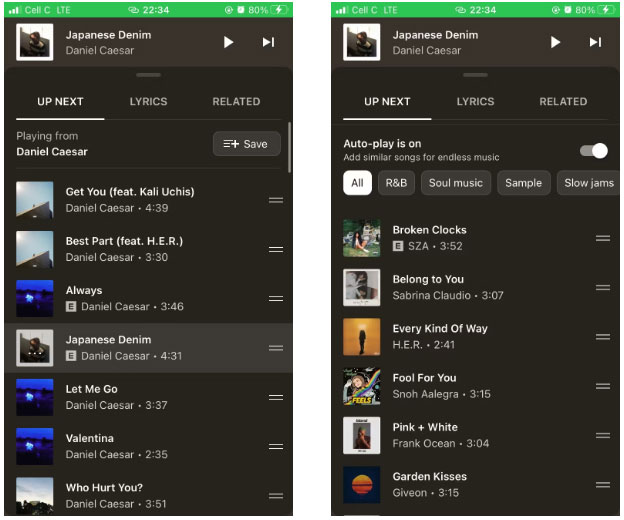
<p style="text-align: justify;">Dù yêu hay ghét tính năng tự động phát của YouTube Music, bạn đều có thể bật hoặc tắt tính năng này một cách dễ dàng trong ứng dụng dành cho thiết bị di động. Thực hiện theo các bước dưới đây để bắt đầu.</p>

<ol>
	<li style="text-align: justify;">Mở ứng dụng YouTube Music trên điện thoại của bạn.</li>
	<li style="text-align: justify;">Phát một bài hát để hiển thị trình phát nhạc.</li>
	<li style="text-align: justify;">Vuốt lên để mở rộng các tab ở cuối màn hình.</li>
	<li style="text-align: justify;">Nhấn vào tab&nbsp;<strong>Up Next</strong>&nbsp;nếu nó chưa được chọn và điều hướng đến cuối danh sách phát hoặc album để tìm phần tự động phát. Bạn sẽ thấy ghi chú&nbsp;<strong>Auto-play is on</strong>&nbsp;hoặc&nbsp;<strong>Auto-play is off</strong>. Bật hoặc tắt tính năng tự động phát.</li>
</ol>

<figure>
<div style="text-align: justify;"><img alt="Tính năng tự động phát được bật trên ứng dụng dành cho thiết bị di động" data-i="0" data-src="https://st.quantrimang.com/photos/image/2023/08/21/tu-dong-phat-tren-youtube-music-1.jpg" data-was-processed="true" height="520" src="https://st.quantrimang.com/photos/image/2023/08/21/tu-dong-phat-tren-youtube-music-1.jpg" width="624" /></div>

<figcaption>
<div style="text-align: justify;">Tính năng tự động phát được bật trên ứng dụng dành cho thiết bị di động</div>
</figcaption>
</figure>

<p style="text-align: justify;">Nếu bạn bật tự động phát, một danh sách các bài hát sẽ xuất hiện ngay lập tức. Duyệt qua danh sách để kiểm tra. Bạn có thể sắp xếp lại các bài hát bằng cách kéo biểu tượng hai vạch bên cạnh mỗi bài hát và thả bài hát vào nơi bạn thích.</p>

<p style="text-align: justify;"><strong>Mẹo</strong>: Tính năng tự động phát của YouTube Music là một phần trong đề xuất cá nhân của dịch vụ. Nếu bạn không thích các đề xuất cá nhân trên YouTube Music, thì rất có thể bạn cũng không thích chúng trên YouTube. Reset hoặc dừng các đề xuất của YouTube để kiểm soát những gì bạn nhìn thấy trên ứng dụng và cách bạn trải nghiệm ứng dụng đó.</p>

<h2 style="text-align: justify;">Cách bật/tắt tính năng Tự động phát trên YouTube Music (máy tính)</h2>

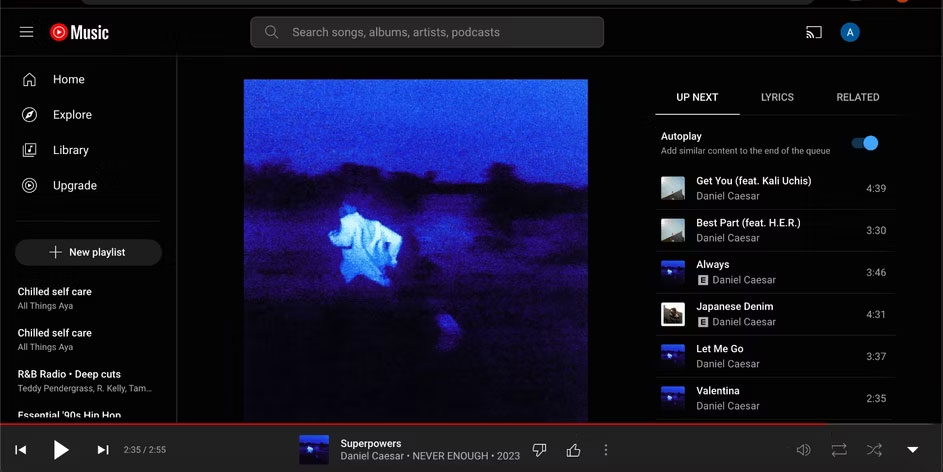
<p style="text-align: justify;">Nếu&nbsp;nghe YouTube Music trên desktop, bạn cũng có thể dễ dàng quản lý tính năng tự động phát trên máy tính của mình. Hãy làm theo các bước bên dưới để bật hoặc tắt tính năng tự động phát trên nền tảng YouTube Music dành cho desktop.</p>

<ol>
	<li style="text-align: justify;">Mở YouTube Music trong trình duyệt của bạn.</li>
	<li style="text-align: justify;">Mở rộng trình phát bằng cách nhấp vào mũi tên hướng lên ở góc dưới cùng bên phải.</li>
	<li style="text-align: justify;">Đảm bảo tab&nbsp;<strong>Up Next</strong>&nbsp;được chọn và bật hoặc tắt&nbsp;<strong>Autoplay.</strong></li>
</ol>

<figure>
<div style="text-align: justify;"><img alt="Tính năng tự động phát được bật trên nền tảng desktop của YouTube Music" data-i="1" data-src="https://st.quantrimang.com/photos/image/2023/08/21/tu-dong-phat-tren-youtube-music-2.jpg" data-was-processed="true" height="472" src="https://st.quantrimang.com/photos/image/2023/08/21/tu-dong-phat-tren-youtube-music-2.jpg" width="943" /></div>

<figcaption>
<div style="text-align: justify;">Tính năng tự động phát được bật trên nền tảng desktop của YouTube Music</div>
</figcaption>
</figure>

<div style="text-align: justify;">&nbsp;</div>
		</div>
				<div id="author">
						<p>
				<strong>Nguồn tin:</strong>
				Quantrimang.com
			</p>
		</div>
	</div>
	<div id="footer" class="clearfix">
		<div id="url">
			<strong>URL của bản tin này: </strong><a href="https://www.nguoicodonvn2008.info/vi/news/savefile/kien-thuc-may-tinh/cach-bat-tat-tinh-nang-tu-dong-phat-tren-youtube-music-7446.html" title="Cách bật&#x002F;tắt tính năng Tự động phát trên YouTube Music">https://www.nguoicodonvn2008.info/vi/news/savefile/kien-thuc-may-tinh/cach-bat-tat-tinh-nang-tu-dong-phat-tren-youtube-music-7446.html</a>

		</div>
		<div class="clear"></div>
		<div class="copyright">
			&copy; .&#x3A; Nguoicodonvn2008.info - Cõi lòng người cô đơn &#x3A;.
		</div>
		<div id="contact">
			<a href="mailto:admin@nguoicodonvn2008.info">admin@nguoicodonvn2008.info</a>
		</div>
	</div>
</div>
        <div id="timeoutsess" class="chromeframe">
            Bạn đã không sử dụng Site, <a onclick="timeoutsesscancel();" href="https://nguoicodonvn2008.info/#">Bấm vào đây để duy trì trạng thái đăng nhập</a>. Thời gian chờ: <span id="secField"> 60 </span> giây
        </div>
        <div id="openidResult" class="nv-alert" style="display:none"></div>
        <div id="openidBt" data-result="" data-redirect=""></div>
		</script>
		<div class="car-top">
  <span><img src="https://nguoicodonvn2008.info/themes/default/images/car.png" alt=""></span>
</div>
<script src="https://nguoicodonvn2008.info/assets/js/jquery/jquery.min.js"></script>
<script>var nv_base_siteurl="/",nv_lang_data="vi",nv_lang_interface="vi",nv_name_variable="nv",nv_fc_variable="op",nv_lang_variable="language",nv_module_name="news",nv_func_name="savefile",nv_is_user=0, nv_my_ofs=-4,nv_my_abbr="EDT",nv_cookie_prefix="nv4c_e856T",nv_check_pass_mstime=1738000,nv_area_admin=0,nv_safemode=0,theme_responsive=0,nv_recaptcha_ver=2,nv_recaptcha_sitekey="",nv_recaptcha_type="image",XSSsanitize=1;</script>
<script src="https://nguoicodonvn2008.info/assets/js/language/vi.js"></script>
<script src="https://nguoicodonvn2008.info/assets/js/DOMPurify/purify3.js"></script>
<script src="https://nguoicodonvn2008.info/assets/js/global.js"></script>
<script src="https://nguoicodonvn2008.info/assets/js/site.js"></script>
<script src="https://nguoicodonvn2008.info/themes/default/js/news.js"></script>
<script src="https://nguoicodonvn2008.info/themes/default/js/main.js"></script>
<script src="https://nguoicodonvn2008.info/themes/default/js/custom.js"></script>
<script type="application/ld+json">
        {
            "@context": "https://schema.org",
            "@type": "Organization",
            "url": "https://nguoicodonvn2008.info",
            "logo": "https://nguoicodonvn2008.info/uploads/angel.gif"
        }
        </script>
<script src="https://nguoicodonvn2008.info/themes/default/js/bootstrap.min.js"></script>
<script type="text/javascript">
var $scrolltop = $('.car-top');
$scrolltop.on('click', function () {
    $('html,body').animate({
        scrollTop: 0
    }, 800);
    $(this).addClass("car-run");
    setTimeout(function(){ $scrolltop.removeClass('car-run');}, 1000);
    return false;
});
$(window).on('scroll', function ()
{ 
    if($(window).scrollTop() >= 200)
    {
        $scrolltop.addClass("show");
        $scrolltop.addClass("car-down");
    }
    else
    {
       $scrolltop.removeClass("show");
       setTimeout(function(){ $scrolltop.removeClass('car-down');}, 300);
    }
});
</script>
</body>
</html>