<!DOCTYPE html>
    <html lang="vi" xmlns="http://www.w3.org/1999/xhtml" prefix="og: http://ogp.me/ns#">
    <head>
<title>Cách bật&#x002F;tắt Mono Audio trên Windows 10</title>
<meta name="description" content="Cách bật&#x002F;tắt Mono Audio trên Windows 10 - Savefile - Tin Tức -...">
<meta name="author" content=".: Nguoicodonvn2008.info - Cõi lòng người cô đơn :.">
<meta name="copyright" content=".: Nguoicodonvn2008.info - Cõi lòng người cô đơn :. [admin@nguoicodonvn2008.info]">
<meta name="robots" content="index, archive, follow, noodp">
<meta name="googlebot" content="index,archive,follow,noodp">
<meta name="msnbot" content="all,index,follow">
<meta name="generator" content="NukeViet v4.5">
<meta http-equiv="Content-Type" content="text/html; charset=utf-8">
<meta property="og:title" content="Cách bật&#x002F;tắt Mono Audio trên Windows 10">
<meta property="og:type" content="website">
<meta property="og:description" content="Savefile - Tin Tức - https&#x3A;&#x002F;&#x002F;www.nguoicodonvn2008.info&#x002F;vi&#x002F;news&#x002F;savefile&#x002F;kien-thuc-may-tinh&#x002F;cach-bat-tat-mono-audio-tren-windows-10-2729.html">
<meta property="og:site_name" content=".&#x3A; Nguoicodonvn2008.info - Cõi lòng người cô đơn &#x3A;.">
<meta property="og:url" content="https://www.nguoicodonvn2008.info/vi/news/savefile/kien-thuc-may-tinh/cach-bat-tat-mono-audio-tren-windows-10-2729.html">
<link rel="shortcut icon" href="https://nguoicodonvn2008.info/favicon.ico">
<link rel="canonical" href="https://www.nguoicodonvn2008.info/vi/news/savefile/kien-thuc-may-tinh/cach-bat-tat-mono-audio-tren-windows-10-2729.html">
<link rel="alternate" href="https://nguoicodonvn2008.info/vi/news/rss/" title="Tin Tức" type="application/rss+xml">
<link rel="alternate" href="https://nguoicodonvn2008.info/vi/news/rss/karaoke-dual/" title="Tin Tức - Karaoke Dual" type="application/rss+xml">
<link rel="alternate" href="https://nguoicodonvn2008.info/vi/news/rss/nhac-tre/" title="Tin Tức - Nhạc trẻ" type="application/rss+xml">
<link rel="alternate" href="https://nguoicodonvn2008.info/vi/news/rss/tru-tinh/" title="Tin Tức - Trữ tình" type="application/rss+xml">
<link rel="alternate" href="https://nguoicodonvn2008.info/vi/news/rss/nuoc-ngoai/" title="Tin Tức - Nước ngoài" type="application/rss+xml">
<link rel="alternate" href="https://nguoicodonvn2008.info/vi/news/rss/remix/" title="Tin Tức - Remix" type="application/rss+xml">
<link rel="alternate" href="https://nguoicodonvn2008.info/vi/news/rss/tam-su-tinh-yeu/" title="Tin Tức - Tâm sự tình yêu" type="application/rss+xml">
<link rel="alternate" href="https://nguoicodonvn2008.info/vi/news/rss/tho-suu-tam/" title="Tin Tức - Thơ sưu tầm" type="application/rss+xml">
<link rel="alternate" href="https://nguoicodonvn2008.info/vi/news/rss/cuoc-song/" title="Tin Tức - Cuộc sống" type="application/rss+xml">
<link rel="alternate" href="https://nguoicodonvn2008.info/vi/news/rss/phan-mem/" title="Tin Tức - Phần mềm" type="application/rss+xml">
<link rel="alternate" href="https://nguoicodonvn2008.info/vi/news/rss/kien-thuc-may-tinh/" title="Tin Tức - Kiến thức máy tính" type="application/rss+xml">
<link rel="alternate" href="https://nguoicodonvn2008.info/vi/news/rss/hoc-tap/" title="Tin Tức - Học tập" type="application/rss+xml">
<link rel="alternate" href="https://nguoicodonvn2008.info/vi/news/rss/tai-lieu/" title="Tin Tức - Tài liệu" type="application/rss+xml">
<link rel="alternate" href="https://nguoicodonvn2008.info/vi/news/rss/de-thi/" title="Tin Tức - Đề thi" type="application/rss+xml">
<link rel="preload" as="style" href="https://nguoicodonvn2008.info/assets/css/font-awesome.min.css" type="text/css">
<link rel="preload" as="style" href="https://nguoicodonvn2008.info/themes/default/css/bootstrap.non-responsive.css" type="text/css">
<link rel="preload" as="style" href="https://nguoicodonvn2008.info/themes/default/css/style.css" type="text/css">
<link rel="preload" as="style" href="https://nguoicodonvn2008.info/themes/default/css/style.non-responsive.css" type="text/css">
<link rel="preload" as="style" href="https://nguoicodonvn2008.info/themes/default/css/news.css" type="text/css">
<link rel="preload" as="style" href="https://nguoicodonvn2008.info/themes/default/css/custom.css" type="text/css">
<link rel="preload" as="script" href="https://nguoicodonvn2008.info/assets/js/jquery/jquery.min.js" type="text/javascript">
<link rel="preload" as="script" href="https://nguoicodonvn2008.info/assets/js/language/vi.js" type="text/javascript">
<link rel="preload" as="script" href="https://nguoicodonvn2008.info/assets/js/DOMPurify/purify3.js" type="text/javascript">
<link rel="preload" as="script" href="https://nguoicodonvn2008.info/assets/js/global.js" type="text/javascript">
<link rel="preload" as="script" href="https://nguoicodonvn2008.info/assets/js/site.js" type="text/javascript">
<link rel="preload" as="script" href="https://nguoicodonvn2008.info/themes/default/js/news.js" type="text/javascript">
<link rel="preload" as="script" href="https://nguoicodonvn2008.info/themes/default/js/main.js" type="text/javascript">
<link rel="preload" as="script" href="https://nguoicodonvn2008.info/themes/default/js/custom.js" type="text/javascript">
<link rel="preload" as="script" href="https://nguoicodonvn2008.info/themes/default/js/bootstrap.min.js" type="text/javascript">
<link rel="stylesheet" href="https://nguoicodonvn2008.info/assets/css/font-awesome.min.css">
<link rel="stylesheet" href="https://nguoicodonvn2008.info/themes/default/css/bootstrap.non-responsive.css">
<link rel="stylesheet" href="https://nguoicodonvn2008.info/themes/default/css/style.css">
<link rel="stylesheet" href="https://nguoicodonvn2008.info/themes/default/css/style.non-responsive.css">
<link rel="StyleSheet" href="https://nguoicodonvn2008.info/themes/default/css/news.css">
<link rel="stylesheet" href="https://nguoicodonvn2008.info/themes/default/css/custom.css">
<style type="text/css">
	body{background: #fff;}
</style>
    </head>
    <body>
<div id="print">
	<div id="hd_print">
		<h2 class="pull-left">.&#x3A; Nguoicodonvn2008.info - Cõi lòng người cô đơn &#x3A;.</h2>
		<p class="pull-right"><a title=".&#x3A; Nguoicodonvn2008.info - Cõi lòng người cô đơn &#x3A;." href="https://nguoicodonvn2008.info/">https://nguoicodonvn2008.info</a></p>
	</div>
	<div class="clear"></div>
	<hr />
	<div id="content">
		<h1>Cách bật&#x002F;tắt Mono Audio trên Windows 10</h1>
		<ul class="list-inline">
			<li>Thứ tư - 16/09/2020 00:59</li>
			<li class="hidden-print txtrequired"><em class="fa fa-print">&nbsp;</em><a title="In ra" href="javascript:;" onclick="window.print()">In ra</a></li>
			<li class="hidden-print txtrequired"><em class="fa fa-power-off">&nbsp;</em><a title="Đóng cửa sổ này" href="javascript:;" onclick="window.close()">Đóng cửa sổ này</a></li>
		</ul>
		<div class="clear"></div>
		<div id="hometext">
		</div>
				<div class="imghome">
			<img alt="Cách bật&#x002F;tắt Mono Audio trên Windows 10" src="https://st.quantrimang.com/photos/image/2020/09/15/raspberry-pi-imager-1.jpg" width="460" class="img-thumbnail" />
		</div>
		<div class="clear"></div>
		<div id="bodytext" class="clearfix">
			<p>Raspberry Pi Foundation gần đây đã phát hành một ứng dụng mới để ghi thẻ SD cho Raspberry Pi. Chương trình mới, được gọi là Raspberry Pi Imager, ra mắt vào ngày 5 tháng 3 năm 2020.</p>

<h2>Raspberry Pi Imager hoạt động như thế nào?</h2>

<p>Raspberry Pi Imager giúp quá trình tạo image dễ dàng hơn nhiều. Nó tập trung tất cả các công cụ và phần mềm tạo image phổ biến nhất mà bạn cần vào một gói. Bạn thậm chí không cần NOOBS để cài đặt Raspbian. Raspberry Pi Imager bao gồm Raspbian cũng như một vài hệ điều hành khác. Nếu nội dung nào đó không được liệt kê, bạn có thể sử dụng công cụ tùy chỉnh để thêm image của riêng mình.</p>
&nbsp;

<h2>Cách cài đặt Raspberry Pi Imager</h2>

<p>Raspberry Pi Imager được cài đặt miễn phí từ trang web chính thức của Raspberry Pi. Nó có sẵn cho các hệ thống macOS, Windows và&nbsp;Ubuntu.</p>

<p>1.&nbsp;Truy cập trang tải xuống Raspberry Pi.:<span style="color:rgb(192, 57, 43);"><strong>&nbsp;https://www.raspberrypi.org/downloads/</strong></span></p>

<p>2. Tải xuống trình cài đặt Raspberry Pi Imager cho hệ điều hành của bạn.</p>

<p>3. Chạy trình cài đặt và làm theo lời nhắc để hoàn tất thiết lập.</p>

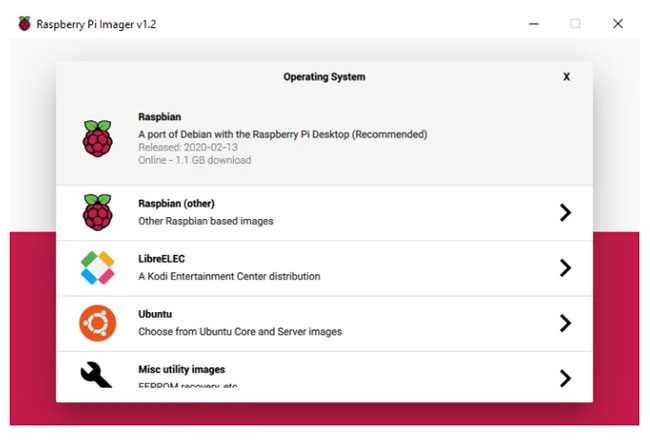
<h2>Ghi image Raspberry Pi Imager tích hợp sẵn</h2>

<figure data-inimage-loaded="true"><br />
<img alt="Ghi image Raspberry Pi Imager tích hợp sẵn" data-i="1" data-src="https://st.quantrimang.com/photos/image/2020/09/15/raspberry-pi-imager-1.jpg" data-was-processed="true" height="440" src="https://st.quantrimang.com/photos/image/2020/09/15/raspberry-pi-imager-1.jpg" width="650" />
<figcaption>Ghi image Raspberry Pi Imager tích hợp sẵn</figcaption>
</figure>

<p>Bạn có thể sử dụng Raspberry Pi Imager để ghi image vào thẻ SD cho Raspberry Pi. Raspberry Pi Imager đi kèm với một số hệ điều hành để bạn lựa chọn, vì vậy bạn không phải tải xuống bất cứ thứ gì riêng lẻ. Nếu bạn muốn cài đặt image tùy chỉnh, bạn có thể làm theo hướng dẫn ở bước tiếp theo.</p>

<p>1. Khởi chạy Raspberry Pi Imager.</p>

<p>2. Nhấp vào&nbsp;<strong>Choose OS</strong>. Tính năng này phần nào thay thế NOOBS, cung cấp một vài hệ điều hành cơ bản như Raspbian.</p>

<p>3. Chọn một hệ điều hành từ danh sách.</p>

<p>4. Nhấp vào&nbsp;<strong>Choose SD card</strong>.</p>

<p>5. Chọn từ danh sách thẻ SD bạn muốn ghi vào.</p>

<p>6. Nhấp vào&nbsp;<strong>Write</strong>&nbsp;để bắt đầu quá trình ghi image.</p>
&nbsp;

<h2>Ghi một image tùy chỉnh</h2>

<figure><img alt="Ghi một image tùy chỉnh" data-i="2" data-src="https://st.quantrimang.com/photos/image/2020/09/15/raspberry-pi-imager-2.jpg" data-was-processed="true" height="434" src="https://st.quantrimang.com/photos/image/2020/09/15/raspberry-pi-imager-2.jpg" width="650" />
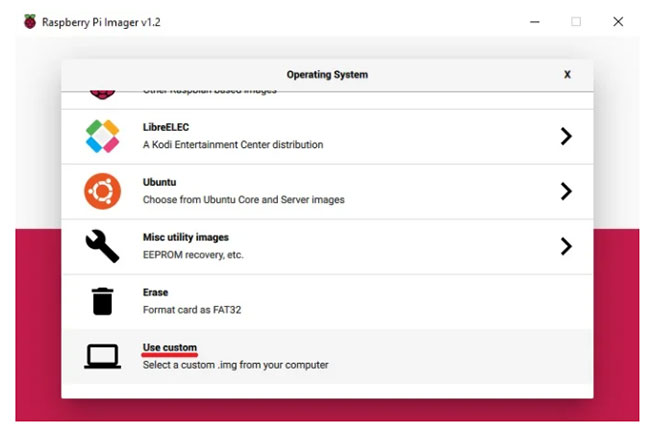
<figcaption>Ghi một image tùy chỉnh</figcaption>
</figure>

<p>Các file image Raspberry Pi tùy chỉnh (như .zip, .img, .tar, .gz, v.v...) có thể được ghi bằng Raspberry Pi imager. Bạn phải tải xuống file image từ nguồn của bên thứ ba. Ví dụ, để cài đặt RetroPie, bạn cần file image từ trang tải xuống trên trang web RetroPie.</p>

<p>1. Khởi chạy Raspberry Pi Imager.</p>

<p>2. Nhấp vào&nbsp;<strong>Choose OS</strong>.</p>

<p>3. Chọn&nbsp;<strong>Use custom</strong>&nbsp;để ghi một image không được liệt kê.</p>

<p>4. Nhấp vào&nbsp;<strong>Choose SD card</strong>.</p>

<p>5. Chọn từ danh sách thẻ SD bạn muốn ghi vào.</p>

<p>6. Nhấp vào&nbsp;<strong>Write</strong>&nbsp;để bắt đầu quá trình ghi image.</p>

<h2>Những hệ điều hành được bao gồm</h2>

<p>Raspberry Pi Imager đi kèm với một số ít hệ điều hành. Nó không thay thế NOOBS, nhưng cung cấp một vài hệ điều hành để bạn lựa chọn. Bạn thậm chí có thể&nbsp;cài đặt LibreELEC, một bản phân phối Linux mã nguồn mở cho Kodi.</p>

<p>Những hệ điều hành có sẵn bao gồm</p>

<ul>
	<li>Raspbian</li>
	<li>LibreELEC</li>
	<li>Ubuntu</li>
</ul>

<h2>Các công cụ bổ sung</h2>

<p>Ngoài hệ điều hành, có một số công cụ có sẵn với Raspberry Pi Imager trong tùy chọn&nbsp;<strong>Choose OS</strong>. Các công cụ này bao gồm:</p>

<ul>
	<li>EEPROM Recovery - Chỉ dành cho Raspberry Pi 4</li>
	<li>Erase tool - Công cụ này được sử dụng để định dạng thẻ SD thành FAT32.</li>
</ul>
&nbsp;

<h2>Những lựa chọn thay thế Raspberry Pi Imager</h2>

<p>Nếu vì lý do nào đó mà bạn không muốn hoặc không thể sử dụng Raspberry Pi Imager, bạn có thể chọn sử dụng một ứng dụng thay thế. Dưới đây là một số tùy chọn được nhiều người tin dùng trong nhiều năm qua.</p>

<ul>
	<li><a href="https://quantrimang.com/url?q=aHR0cHM6Ly93d3cuYmFsZW5hLmlvL2V0Y2hlci8%3D" rel="nofollow noopener" target="_blank" title="Tải balenaEtcher">balenaEtcher</a>&nbsp;- Ứng dụng chạy trên hệ điều hành Windows, MacOS và Ubuntu.</li>
	<li><a href="https://quantrimang.com/url?q=aHR0cHM6Ly9zb3VyY2Vmb3JnZS5uZXQvcHJvamVjdHMvd2luMzJkaXNraW1hZ2VyLw%3D%3D" rel="nofollow noopener" target="_blank" title="Tải Win32 Disk Imager">Win32 Disk Imager</a>&nbsp;- Phần mềm tạo image được thiết kế cho các máy Windows.</li>
</ul>
		</div>
				<div id="author">
						<p>
				<strong>Nguồn tin:</strong>
				Quantrimang.com
			</p>
		</div>
	</div>
	<div id="footer" class="clearfix">
		<div id="url">
			<strong>URL của bản tin này: </strong><a href="https://www.nguoicodonvn2008.info/vi/news/savefile/kien-thuc-may-tinh/cach-bat-tat-mono-audio-tren-windows-10-2729.html" title="Cách bật&#x002F;tắt Mono Audio trên Windows 10">https://www.nguoicodonvn2008.info/vi/news/savefile/kien-thuc-may-tinh/cach-bat-tat-mono-audio-tren-windows-10-2729.html</a>

		</div>
		<div class="clear"></div>
		<div class="copyright">
			&copy; .&#x3A; Nguoicodonvn2008.info - Cõi lòng người cô đơn &#x3A;.
		</div>
		<div id="contact">
			<a href="mailto:admin@nguoicodonvn2008.info">admin@nguoicodonvn2008.info</a>
		</div>
	</div>
</div>
        <div id="timeoutsess" class="chromeframe">
            Bạn đã không sử dụng Site, <a onclick="timeoutsesscancel();" href="https://nguoicodonvn2008.info/#">Bấm vào đây để duy trì trạng thái đăng nhập</a>. Thời gian chờ: <span id="secField"> 60 </span> giây
        </div>
        <div id="openidResult" class="nv-alert" style="display:none"></div>
        <div id="openidBt" data-result="" data-redirect=""></div>
		</script>
		<div class="car-top">
  <span><img src="https://nguoicodonvn2008.info/themes/default/images/car.png" alt=""></span>
</div>
<script src="https://nguoicodonvn2008.info/assets/js/jquery/jquery.min.js"></script>
<script>var nv_base_siteurl="/",nv_lang_data="vi",nv_lang_interface="vi",nv_name_variable="nv",nv_fc_variable="op",nv_lang_variable="language",nv_module_name="news",nv_func_name="savefile",nv_is_user=0, nv_my_ofs=-4,nv_my_abbr="EDT",nv_cookie_prefix="nv4c_e856T",nv_check_pass_mstime=1738000,nv_area_admin=0,nv_safemode=0,theme_responsive=0,nv_recaptcha_ver=2,nv_recaptcha_sitekey="",nv_recaptcha_type="image",XSSsanitize=1;</script>
<script src="https://nguoicodonvn2008.info/assets/js/language/vi.js"></script>
<script src="https://nguoicodonvn2008.info/assets/js/DOMPurify/purify3.js"></script>
<script src="https://nguoicodonvn2008.info/assets/js/global.js"></script>
<script src="https://nguoicodonvn2008.info/assets/js/site.js"></script>
<script src="https://nguoicodonvn2008.info/themes/default/js/news.js"></script>
<script src="https://nguoicodonvn2008.info/themes/default/js/main.js"></script>
<script src="https://nguoicodonvn2008.info/themes/default/js/custom.js"></script>
<script type="application/ld+json">
        {
            "@context": "https://schema.org",
            "@type": "Organization",
            "url": "https://nguoicodonvn2008.info",
            "logo": "https://nguoicodonvn2008.info/uploads/angel.gif"
        }
        </script>
<script src="https://nguoicodonvn2008.info/themes/default/js/bootstrap.min.js"></script>
<script type="text/javascript">
var $scrolltop = $('.car-top');
$scrolltop.on('click', function () {
    $('html,body').animate({
        scrollTop: 0
    }, 800);
    $(this).addClass("car-run");
    setTimeout(function(){ $scrolltop.removeClass('car-run');}, 1000);
    return false;
});
$(window).on('scroll', function ()
{ 
    if($(window).scrollTop() >= 200)
    {
        $scrolltop.addClass("show");
        $scrolltop.addClass("car-down");
    }
    else
    {
       $scrolltop.removeClass("show");
       setTimeout(function(){ $scrolltop.removeClass('car-down');}, 300);
    }
});
</script>
</body>
</html>