<!DOCTYPE html>
    <html lang="vi" xmlns="http://www.w3.org/1999/xhtml" prefix="og: http://ogp.me/ns#">
    <head>
<title>Cách bật micro trong Windows 10</title>
<meta name="description" content="Cách bật micro trong Windows 10 - Savefile - Tin Tức - https&#x3A;&#x002F;&#x002F;www.nguoicodonvn2008.info&#x002F;vi&#x002F;news&#x002F;savefile&#x002F;kien-thuc-may-tinh&#x002F;cach-bat-micro-trong-windows-10-2650.html">
<meta name="author" content=".: Nguoicodonvn2008.info - Cõi lòng người cô đơn :.">
<meta name="copyright" content=".: Nguoicodonvn2008.info - Cõi lòng người cô đơn :. [admin@nguoicodonvn2008.info]">
<meta name="robots" content="index, archive, follow, noodp">
<meta name="googlebot" content="index,archive,follow,noodp">
<meta name="msnbot" content="all,index,follow">
<meta name="generator" content="NukeViet v4.5">
<meta http-equiv="Content-Type" content="text/html; charset=utf-8">
<meta property="og:title" content="Cách bật micro trong Windows 10">
<meta property="og:type" content="website">
<meta property="og:description" content="Savefile - Tin Tức - https&#x3A;&#x002F;&#x002F;www.nguoicodonvn2008.info&#x002F;vi&#x002F;news&#x002F;savefile&#x002F;kien-thuc-may-tinh&#x002F;cach-bat-micro-trong-windows-10-2650.html">
<meta property="og:site_name" content=".&#x3A; Nguoicodonvn2008.info - Cõi lòng người cô đơn &#x3A;.">
<meta property="og:url" content="https://www.nguoicodonvn2008.info/vi/news/savefile/kien-thuc-may-tinh/cach-bat-micro-trong-windows-10-2650.html">
<link rel="shortcut icon" href="https://nguoicodonvn2008.info/favicon.ico">
<link rel="canonical" href="https://www.nguoicodonvn2008.info/vi/news/savefile/kien-thuc-may-tinh/cach-bat-micro-trong-windows-10-2650.html">
<link rel="alternate" href="https://nguoicodonvn2008.info/vi/news/rss/" title="Tin Tức" type="application/rss+xml">
<link rel="alternate" href="https://nguoicodonvn2008.info/vi/news/rss/karaoke-dual/" title="Tin Tức - Karaoke Dual" type="application/rss+xml">
<link rel="alternate" href="https://nguoicodonvn2008.info/vi/news/rss/nhac-tre/" title="Tin Tức - Nhạc trẻ" type="application/rss+xml">
<link rel="alternate" href="https://nguoicodonvn2008.info/vi/news/rss/tru-tinh/" title="Tin Tức - Trữ tình" type="application/rss+xml">
<link rel="alternate" href="https://nguoicodonvn2008.info/vi/news/rss/nuoc-ngoai/" title="Tin Tức - Nước ngoài" type="application/rss+xml">
<link rel="alternate" href="https://nguoicodonvn2008.info/vi/news/rss/remix/" title="Tin Tức - Remix" type="application/rss+xml">
<link rel="alternate" href="https://nguoicodonvn2008.info/vi/news/rss/tam-su-tinh-yeu/" title="Tin Tức - Tâm sự tình yêu" type="application/rss+xml">
<link rel="alternate" href="https://nguoicodonvn2008.info/vi/news/rss/tho-suu-tam/" title="Tin Tức - Thơ sưu tầm" type="application/rss+xml">
<link rel="alternate" href="https://nguoicodonvn2008.info/vi/news/rss/cuoc-song/" title="Tin Tức - Cuộc sống" type="application/rss+xml">
<link rel="alternate" href="https://nguoicodonvn2008.info/vi/news/rss/phan-mem/" title="Tin Tức - Phần mềm" type="application/rss+xml">
<link rel="alternate" href="https://nguoicodonvn2008.info/vi/news/rss/kien-thuc-may-tinh/" title="Tin Tức - Kiến thức máy tính" type="application/rss+xml">
<link rel="alternate" href="https://nguoicodonvn2008.info/vi/news/rss/hoc-tap/" title="Tin Tức - Học tập" type="application/rss+xml">
<link rel="alternate" href="https://nguoicodonvn2008.info/vi/news/rss/tai-lieu/" title="Tin Tức - Tài liệu" type="application/rss+xml">
<link rel="alternate" href="https://nguoicodonvn2008.info/vi/news/rss/de-thi/" title="Tin Tức - Đề thi" type="application/rss+xml">
<link rel="preload" as="style" href="https://nguoicodonvn2008.info/assets/css/font-awesome.min.css" type="text/css">
<link rel="preload" as="style" href="https://nguoicodonvn2008.info/themes/default/css/bootstrap.non-responsive.css" type="text/css">
<link rel="preload" as="style" href="https://nguoicodonvn2008.info/themes/default/css/style.css" type="text/css">
<link rel="preload" as="style" href="https://nguoicodonvn2008.info/themes/default/css/style.non-responsive.css" type="text/css">
<link rel="preload" as="style" href="https://nguoicodonvn2008.info/themes/default/css/news.css" type="text/css">
<link rel="preload" as="style" href="https://nguoicodonvn2008.info/themes/default/css/custom.css" type="text/css">
<link rel="preload" as="script" href="https://nguoicodonvn2008.info/assets/js/jquery/jquery.min.js" type="text/javascript">
<link rel="preload" as="script" href="https://nguoicodonvn2008.info/assets/js/language/vi.js" type="text/javascript">
<link rel="preload" as="script" href="https://nguoicodonvn2008.info/assets/js/DOMPurify/purify3.js" type="text/javascript">
<link rel="preload" as="script" href="https://nguoicodonvn2008.info/assets/js/global.js" type="text/javascript">
<link rel="preload" as="script" href="https://nguoicodonvn2008.info/assets/js/site.js" type="text/javascript">
<link rel="preload" as="script" href="https://nguoicodonvn2008.info/themes/default/js/news.js" type="text/javascript">
<link rel="preload" as="script" href="https://nguoicodonvn2008.info/themes/default/js/main.js" type="text/javascript">
<link rel="preload" as="script" href="https://nguoicodonvn2008.info/themes/default/js/custom.js" type="text/javascript">
<link rel="preload" as="script" href="https://nguoicodonvn2008.info/themes/default/js/bootstrap.min.js" type="text/javascript">
<link rel="stylesheet" href="https://nguoicodonvn2008.info/assets/css/font-awesome.min.css">
<link rel="stylesheet" href="https://nguoicodonvn2008.info/themes/default/css/bootstrap.non-responsive.css">
<link rel="stylesheet" href="https://nguoicodonvn2008.info/themes/default/css/style.css">
<link rel="stylesheet" href="https://nguoicodonvn2008.info/themes/default/css/style.non-responsive.css">
<link rel="StyleSheet" href="https://nguoicodonvn2008.info/themes/default/css/news.css">
<link rel="stylesheet" href="https://nguoicodonvn2008.info/themes/default/css/custom.css">
<style type="text/css">
	body{background: #fff;}
</style>
    </head>
    <body>
<div id="print">
	<div id="hd_print">
		<h2 class="pull-left">.&#x3A; Nguoicodonvn2008.info - Cõi lòng người cô đơn &#x3A;.</h2>
		<p class="pull-right"><a title=".&#x3A; Nguoicodonvn2008.info - Cõi lòng người cô đơn &#x3A;." href="https://nguoicodonvn2008.info/">https://nguoicodonvn2008.info</a></p>
	</div>
	<div class="clear"></div>
	<hr />
	<div id="content">
		<h1>Cách bật micro trong Windows 10</h1>
		<ul class="list-inline">
			<li>Thứ bảy - 05/09/2020 00:55</li>
			<li class="hidden-print txtrequired"><em class="fa fa-print">&nbsp;</em><a title="In ra" href="javascript:;" onclick="window.print()">In ra</a></li>
			<li class="hidden-print txtrequired"><em class="fa fa-power-off">&nbsp;</em><a title="Đóng cửa sổ này" href="javascript:;" onclick="window.close()">Đóng cửa sổ này</a></li>
		</ul>
		<div class="clear"></div>
		<div id="hometext">
		</div>
				<div class="imghome">
			<img alt="Cách bật micro trong Windows 10" src="https://st.quantrimang.com/photos/image/2020/09/05/bat-micro-1.jpg" width="460" class="img-thumbnail" />
		</div>
		<div class="clear"></div>
		<div id="bodytext" class="clearfix">
			<p style="text-align: justify;">Sau khi cài đặt Windows 10, micro có thể bị tắt. Nếu điều này xảy ra, có một số cách bạn có thể khắc phục sự cố trước khi đi ra ngoài và mua card âm thanh mới.</p>

<p style="text-align: justify;">Bản nâng cấp miễn phí Windows 10 có sẵn cho mọi người, nhưng lại tắt micro trong PC. Với những người dùng muốn khắc phục sự cố, hãy xem xét các giải pháp sau.</p>

<h2 style="text-align: justify;">Làm cách nào để bật lại micro trên Windows 10?</h2>

<div style="text-align: justify;">&nbsp;</div>

<h3 style="text-align: justify;">1. Sử dụng phần mềm của bên thứ ba</h3>

<p style="text-align: justify;">Có thể có trường hợp sự cố với micro xảy ra do một số loại vấn đề với driver micro. Để khắc phục điều này, bài viết khuyên bạn nên sử dụng DriverFix.</p>

<figure data-inimage-loaded="true">
<div style="text-align: justify;"><br />
<img alt="Dùng DriverFix để tìm các driver thiết bị thiếu và lỗi thời" data-i="0" data-src="https://st.quantrimang.com/photos/image/2020/09/05/bat-micro-1.jpg" data-was-processed="true" height="400" src="https://st.quantrimang.com/photos/image/2020/09/05/bat-micro-1.jpg" width="518" /></div>

<figcaption>
<div style="text-align: justify;">Dùng DriverFix để tìm các driver thiết bị thiếu và lỗi thời</div>
</figcaption>
</figure>

<p style="text-align: justify;">Công cụ này sẽ dễ dàng quét PC để tìm các driver thiết bị thiếu và lỗi thời, sau đó tự động cập nhật chúng.</p>

<p style="text-align: justify;">Bạn có thể yên tâm rằng bạn sẽ nhận được phiên bản mới nhất của driver, tất cả những gì bạn cần đảm bảo là thiết bị được kết nối với Internet. Hãy sử dụng bản cập nhật driver tốt nhất để đảm bảo micro sẽ hoạt động tốt.</p>

<ul>
	<li style="text-align: justify;">Tải DriverFix&nbsp;:&nbsp;<strong>https://driverfix.com/</strong></li>
</ul>

<h3 style="text-align: justify;">2. Bật micro từ Device Manager</h3>

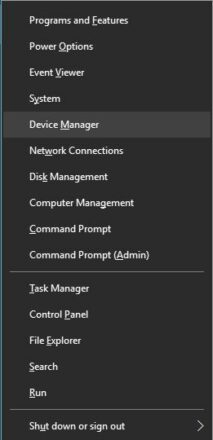
<p style="text-align: justify;"><strong>B1:</strong>&nbsp;Truy cập menu Winx bằng cách nhấn đồng thời phím&nbsp;<strong>Windows + X</strong>.</p>

<p style="text-align: justify;"><strong>B2:</strong>&nbsp;Chọn&nbsp;<strong>Device Manager</strong>&nbsp;từ danh sách.</p>

<figure>
<div style="text-align: justify;"><img alt="Chọn Device Manager từ danh sách" data-i="1" data-src="https://st.quantrimang.com/photos/image/2020/09/05/bat-micro-2.jpg" data-was-processed="true" height="440" src="https://st.quantrimang.com/photos/image/2020/09/05/bat-micro-2.jpg" width="213" /></div>

<figcaption>
<div style="text-align: justify;">Chọn Device Manager từ danh sách</div>
</figcaption>
</figure>

<p style="text-align: justify;"><strong>B3:</strong>&nbsp;Nhấp vào&nbsp;<strong>Sound Video and Game Controllers</strong>.</p>

<p style="text-align: justify;"><strong>B4:</strong>&nbsp;Nhấp vào card âm thanh hiện được cài đặt trên PC.</p>

<p style="text-align: justify;"><strong>B5:</strong>&nbsp;Nhấp chuột phải và chọn&nbsp;<strong>Enable.</strong></p>

<p style="text-align: justify;"><strong>B6:</strong>&nbsp;Khởi động lại máy tính&nbsp;để kết thúc quá trình.</p>

<p style="text-align: justify;"><strong>Lưu ý</strong>: Nếu có biểu tượng cảnh báo màu vàng bên cạnh tên của trình điều khiển âm thanh (sound controller), thì driver cho trình điều khiển đó đã bị hỏng hoặc bị gỡ cài đặt.</p>

<div style="text-align: justify;">&nbsp;</div>

<h3 style="text-align: justify;">3. Bật micro từ Sound Settings</h3>

<p style="text-align: justify;"><strong>B1:</strong>&nbsp;Ở góc dưới cùng bên phải của menu Windows, nhấp chuột phải vào biểu tượng&nbsp;<strong>Sound Settings.</strong></p>

<p style="text-align: justify;"><strong>B2:</strong>&nbsp;Cuộn lên và chọn&nbsp;<strong>Recording Devices.</strong></p>

<p style="text-align: justify;"><strong>B3:</strong>&nbsp;Nhấp vào&nbsp;<strong>Recording.</strong></p>

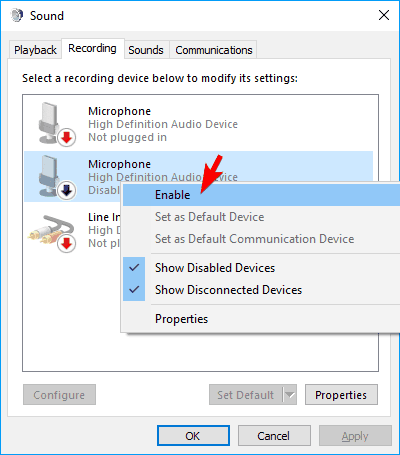
<p style="text-align: justify;"><strong>B4:</strong>&nbsp;Nếu có các thiết bị được liệt kê, hãy nhấp chuột phải vào thiết bị mong muốn.</p>

<p style="text-align: justify;"><strong>B5:</strong>&nbsp;Chọn&nbsp;<strong>Enable.</strong></p>

<figure>
<div style="text-align: justify;"><img alt="Chọn Enable" data-i="2" data-src="https://st.quantrimang.com/photos/image/2020/09/05/bat-micro-3.png" data-was-processed="true" height="455" src="https://st.quantrimang.com/photos/image/2020/09/05/bat-micro-3.png" width="400" /></div>

<figcaption>
<div style="text-align: justify;">Chọn Enable</div>
</figcaption>
</figure>

<p style="text-align: justify;"><strong>B6:</strong>&nbsp;Nhấp chuột phải vào bất kỳ đâu trên màn hình và chọn&nbsp;<strong>Show Disabled Devices</strong>.</p>

<p style="text-align: justify;"><strong>B7:</strong>&nbsp;Chọn micro từ danh sách đã tạo.</p>

<p style="text-align: justify;"><strong>B8:</strong>&nbsp;Nhấp vào&nbsp;<strong>Properties.</strong></p>

<p style="text-align: justify;"><strong>B9:</strong>&nbsp;Trong&nbsp;<strong>Device Usage</strong>, chọn&nbsp;<strong>Use this Device (Enable)</strong>.</p>

<p style="text-align: justify;"><strong>B10:</strong>&nbsp;Nhấp vào&nbsp;<strong>Apply &gt; OK</strong>.</p>

<h3 style="text-align: justify;">4. Bật micro từ Windows Settings</h3>

<p style="text-align: justify;"><strong>B1:</strong>&nbsp;Truy cập Windows Settings&nbsp;bằng cách nhấn đồng thời phím&nbsp;<strong>Windows</strong>&nbsp;và<strong>&nbsp;I</strong>.</p>

<p style="text-align: justify;"><strong>B2:</strong>&nbsp;Nhấp vào&nbsp;<strong>Privacy.</strong></p>

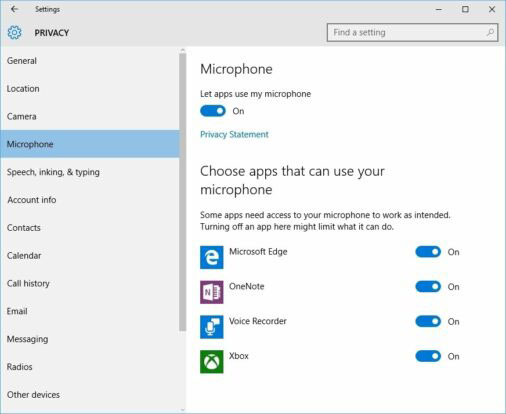
<p style="text-align: justify;"><strong>B3:</strong>&nbsp;Trên menu bên trái, chọn&nbsp;<strong>Microphone.</strong></p>

<figure>
<div style="text-align: justify;"><img alt="Chọn Microphone trên menu bên trái" data-i="3" data-src="https://st.quantrimang.com/photos/image/2020/09/05/bat-micro-4.jpg" data-was-processed="true" height="414" src="https://st.quantrimang.com/photos/image/2020/09/05/bat-micro-4.jpg" width="506" /></div>

<figcaption>
<div style="text-align: justify;">Chọn Microphone trên menu bên trái</div>
</figcaption>
</figure>

<p style="text-align: justify;"><strong>B4:</strong>&nbsp;Trong&nbsp;<strong>Let apps use my microphone</strong>, hãy đảm bảo rằng chỉ báo được đặt thành&nbsp;<strong>On.</strong></p>

<p style="text-align: justify;">Nếu các giải pháp này không giải quyết được các vấn đề với micro, thì phần cứng của máy tính có thể bị hỏng.</p>

<p style="text-align: justify;">Những vấn đề phần cứng có thể được giải quyết bằng cách mua các thành phần bên ngoài hoặc cài đặt thành phần bên trong mới. Việc giải quyết các vấn đề về âm thanh có thể cần một vài lần khởi động và cài đặt lại.</p>

<p style="text-align: justify;">Đảm bảo sử dụng hết tất cả các phương án có thể trước khi mua phần cứng mới để tránh mất tiền oan nhé!</p>
		</div>
				<div id="author">
						<p>
				<strong>Nguồn tin:</strong>
				Quantrimang.com
			</p>
		</div>
	</div>
	<div id="footer" class="clearfix">
		<div id="url">
			<strong>URL của bản tin này: </strong><a href="https://www.nguoicodonvn2008.info/vi/news/savefile/kien-thuc-may-tinh/cach-bat-micro-trong-windows-10-2650.html" title="Cách bật micro trong Windows 10">https://www.nguoicodonvn2008.info/vi/news/savefile/kien-thuc-may-tinh/cach-bat-micro-trong-windows-10-2650.html</a>

		</div>
		<div class="clear"></div>
		<div class="copyright">
			&copy; .&#x3A; Nguoicodonvn2008.info - Cõi lòng người cô đơn &#x3A;.
		</div>
		<div id="contact">
			<a href="mailto:admin@nguoicodonvn2008.info">admin@nguoicodonvn2008.info</a>
		</div>
	</div>
</div>
        <div id="timeoutsess" class="chromeframe">
            Bạn đã không sử dụng Site, <a onclick="timeoutsesscancel();" href="https://nguoicodonvn2008.info/#">Bấm vào đây để duy trì trạng thái đăng nhập</a>. Thời gian chờ: <span id="secField"> 60 </span> giây
        </div>
        <div id="openidResult" class="nv-alert" style="display:none"></div>
        <div id="openidBt" data-result="" data-redirect=""></div>
		</script>
		<div class="car-top">
  <span><img src="https://nguoicodonvn2008.info/themes/default/images/car.png" alt=""></span>
</div>
<script src="https://nguoicodonvn2008.info/assets/js/jquery/jquery.min.js"></script>
<script>var nv_base_siteurl="/",nv_lang_data="vi",nv_lang_interface="vi",nv_name_variable="nv",nv_fc_variable="op",nv_lang_variable="language",nv_module_name="news",nv_func_name="savefile",nv_is_user=0, nv_my_ofs=-4,nv_my_abbr="EDT",nv_cookie_prefix="nv4c_e856T",nv_check_pass_mstime=1738000,nv_area_admin=0,nv_safemode=0,theme_responsive=0,nv_recaptcha_ver=2,nv_recaptcha_sitekey="",nv_recaptcha_type="image",XSSsanitize=1;</script>
<script src="https://nguoicodonvn2008.info/assets/js/language/vi.js"></script>
<script src="https://nguoicodonvn2008.info/assets/js/DOMPurify/purify3.js"></script>
<script src="https://nguoicodonvn2008.info/assets/js/global.js"></script>
<script src="https://nguoicodonvn2008.info/assets/js/site.js"></script>
<script src="https://nguoicodonvn2008.info/themes/default/js/news.js"></script>
<script src="https://nguoicodonvn2008.info/themes/default/js/main.js"></script>
<script src="https://nguoicodonvn2008.info/themes/default/js/custom.js"></script>
<script type="application/ld+json">
        {
            "@context": "https://schema.org",
            "@type": "Organization",
            "url": "https://nguoicodonvn2008.info",
            "logo": "https://nguoicodonvn2008.info/uploads/angel.gif"
        }
        </script>
<script src="https://nguoicodonvn2008.info/themes/default/js/bootstrap.min.js"></script>
<script type="text/javascript">
var $scrolltop = $('.car-top');
$scrolltop.on('click', function () {
    $('html,body').animate({
        scrollTop: 0
    }, 800);
    $(this).addClass("car-run");
    setTimeout(function(){ $scrolltop.removeClass('car-run');}, 1000);
    return false;
});
$(window).on('scroll', function ()
{ 
    if($(window).scrollTop() >= 200)
    {
        $scrolltop.addClass("show");
        $scrolltop.addClass("car-down");
    }
    else
    {
       $scrolltop.removeClass("show");
       setTimeout(function(){ $scrolltop.removeClass('car-down');}, 300);
    }
});
</script>
</body>
</html>