<!DOCTYPE html>
    <html lang="vi" xmlns="http://www.w3.org/1999/xhtml" prefix="og: http://ogp.me/ns#">
    <head>
<title>Cách bật 120 FPS trên Wuthering Waves</title>
<meta name="description" content="Cách bật 120 FPS trên Wuthering Waves - Savefile - Tin Tức -...">
<meta name="author" content=".: Nguoicodonvn2008.info - Cõi lòng người cô đơn :.">
<meta name="copyright" content=".: Nguoicodonvn2008.info - Cõi lòng người cô đơn :. [admin@nguoicodonvn2008.info]">
<meta name="robots" content="index, archive, follow, noodp">
<meta name="googlebot" content="index,archive,follow,noodp">
<meta name="msnbot" content="all,index,follow">
<meta name="generator" content="NukeViet v4.5">
<meta http-equiv="Content-Type" content="text/html; charset=utf-8">
<meta property="og:title" content="Cách bật 120 FPS trên Wuthering Waves">
<meta property="og:type" content="website">
<meta property="og:description" content="Savefile - Tin Tức - https&#x3A;&#x002F;&#x002F;www.nguoicodonvn2008.info&#x002F;vi&#x002F;news&#x002F;savefile&#x002F;kien-thuc-may-tinh&#x002F;cach-bat-120-fps-tren-wuthering-waves-8399.html">
<meta property="og:site_name" content=".&#x3A; Nguoicodonvn2008.info - Cõi lòng người cô đơn &#x3A;.">
<meta property="og:url" content="https://www.nguoicodonvn2008.info/vi/news/savefile/kien-thuc-may-tinh/cach-bat-120-fps-tren-wuthering-waves-8399.html">
<link rel="shortcut icon" href="https://nguoicodonvn2008.info/favicon.ico">
<link rel="canonical" href="https://www.nguoicodonvn2008.info/vi/news/savefile/kien-thuc-may-tinh/cach-bat-120-fps-tren-wuthering-waves-8399.html">
<link rel="alternate" href="https://nguoicodonvn2008.info/vi/news/rss/" title="Tin Tức" type="application/rss+xml">
<link rel="alternate" href="https://nguoicodonvn2008.info/vi/news/rss/karaoke-dual/" title="Tin Tức - Karaoke Dual" type="application/rss+xml">
<link rel="alternate" href="https://nguoicodonvn2008.info/vi/news/rss/nhac-tre/" title="Tin Tức - Nhạc trẻ" type="application/rss+xml">
<link rel="alternate" href="https://nguoicodonvn2008.info/vi/news/rss/tru-tinh/" title="Tin Tức - Trữ tình" type="application/rss+xml">
<link rel="alternate" href="https://nguoicodonvn2008.info/vi/news/rss/nuoc-ngoai/" title="Tin Tức - Nước ngoài" type="application/rss+xml">
<link rel="alternate" href="https://nguoicodonvn2008.info/vi/news/rss/remix/" title="Tin Tức - Remix" type="application/rss+xml">
<link rel="alternate" href="https://nguoicodonvn2008.info/vi/news/rss/tam-su-tinh-yeu/" title="Tin Tức - Tâm sự tình yêu" type="application/rss+xml">
<link rel="alternate" href="https://nguoicodonvn2008.info/vi/news/rss/tho-suu-tam/" title="Tin Tức - Thơ sưu tầm" type="application/rss+xml">
<link rel="alternate" href="https://nguoicodonvn2008.info/vi/news/rss/cuoc-song/" title="Tin Tức - Cuộc sống" type="application/rss+xml">
<link rel="alternate" href="https://nguoicodonvn2008.info/vi/news/rss/phan-mem/" title="Tin Tức - Phần mềm" type="application/rss+xml">
<link rel="alternate" href="https://nguoicodonvn2008.info/vi/news/rss/kien-thuc-may-tinh/" title="Tin Tức - Kiến thức máy tính" type="application/rss+xml">
<link rel="alternate" href="https://nguoicodonvn2008.info/vi/news/rss/hoc-tap/" title="Tin Tức - Học tập" type="application/rss+xml">
<link rel="alternate" href="https://nguoicodonvn2008.info/vi/news/rss/tai-lieu/" title="Tin Tức - Tài liệu" type="application/rss+xml">
<link rel="alternate" href="https://nguoicodonvn2008.info/vi/news/rss/de-thi/" title="Tin Tức - Đề thi" type="application/rss+xml">
<link rel="preload" as="style" href="https://nguoicodonvn2008.info/assets/css/font-awesome.min.css" type="text/css">
<link rel="preload" as="style" href="https://nguoicodonvn2008.info/themes/default/css/bootstrap.non-responsive.css" type="text/css">
<link rel="preload" as="style" href="https://nguoicodonvn2008.info/themes/default/css/style.css" type="text/css">
<link rel="preload" as="style" href="https://nguoicodonvn2008.info/themes/default/css/style.non-responsive.css" type="text/css">
<link rel="preload" as="style" href="https://nguoicodonvn2008.info/themes/default/css/news.css" type="text/css">
<link rel="preload" as="style" href="https://nguoicodonvn2008.info/themes/default/css/custom.css" type="text/css">
<link rel="preload" as="script" href="https://nguoicodonvn2008.info/assets/js/jquery/jquery.min.js" type="text/javascript">
<link rel="preload" as="script" href="https://nguoicodonvn2008.info/assets/js/language/vi.js" type="text/javascript">
<link rel="preload" as="script" href="https://nguoicodonvn2008.info/assets/js/DOMPurify/purify3.js" type="text/javascript">
<link rel="preload" as="script" href="https://nguoicodonvn2008.info/assets/js/global.js" type="text/javascript">
<link rel="preload" as="script" href="https://nguoicodonvn2008.info/assets/js/site.js" type="text/javascript">
<link rel="preload" as="script" href="https://nguoicodonvn2008.info/themes/default/js/news.js" type="text/javascript">
<link rel="preload" as="script" href="https://nguoicodonvn2008.info/themes/default/js/main.js" type="text/javascript">
<link rel="preload" as="script" href="https://nguoicodonvn2008.info/themes/default/js/custom.js" type="text/javascript">
<link rel="preload" as="script" href="https://nguoicodonvn2008.info/themes/default/js/bootstrap.min.js" type="text/javascript">
<link rel="stylesheet" href="https://nguoicodonvn2008.info/assets/css/font-awesome.min.css">
<link rel="stylesheet" href="https://nguoicodonvn2008.info/themes/default/css/bootstrap.non-responsive.css">
<link rel="stylesheet" href="https://nguoicodonvn2008.info/themes/default/css/style.css">
<link rel="stylesheet" href="https://nguoicodonvn2008.info/themes/default/css/style.non-responsive.css">
<link rel="StyleSheet" href="https://nguoicodonvn2008.info/themes/default/css/news.css">
<link rel="stylesheet" href="https://nguoicodonvn2008.info/themes/default/css/custom.css">
<style type="text/css">
	body{background: #fff;}
</style>
    </head>
    <body>
<div id="print">
	<div id="hd_print">
		<h2 class="pull-left">.&#x3A; Nguoicodonvn2008.info - Cõi lòng người cô đơn &#x3A;.</h2>
		<p class="pull-right"><a title=".&#x3A; Nguoicodonvn2008.info - Cõi lòng người cô đơn &#x3A;." href="https://nguoicodonvn2008.info/">https://nguoicodonvn2008.info</a></p>
	</div>
	<div class="clear"></div>
	<hr />
	<div id="content">
		<h1>Cách bật 120 FPS trên Wuthering Waves</h1>
		<ul class="list-inline">
			<li>Thứ sáu - 24/05/2024 23:57</li>
			<li class="hidden-print txtrequired"><em class="fa fa-print">&nbsp;</em><a title="In ra" href="javascript:;" onclick="window.print()">In ra</a></li>
			<li class="hidden-print txtrequired"><em class="fa fa-power-off">&nbsp;</em><a title="Đóng cửa sổ này" href="javascript:;" onclick="window.close()">Đóng cửa sổ này</a></li>
		</ul>
		<div class="clear"></div>
		<div id="hometext">
		</div>
				<div class="imghome">
			<img alt="Cách bật 120 FPS trên Wuthering Waves" src="https://st.quantrimang.com/photos/image/2024/05/24/Wuthering-Waves-120FPS-4.jpg" width="460" class="img-thumbnail" />
		</div>
		<div class="clear"></div>
		<div id="bodytext" class="clearfix">
			<p style="text-align: justify;">Với một tựa game mobile sở hữu đồ họa đỉnh cao như Wuthering Waves, đa số người chơi sử dụng smartphone cấu hình thấp sẽ chỉ mong được 30FPS để trải nghiệm nhân vật, kỹ năng, thế giới và cốt truyện trong game là vừa đủ.</p>

<p style="text-align: justify;">Còn với những ai có smartphone cấu hình khá hơn thì 60FPS là lý tưởng để thoát khỏi cảm giác giật lag và đến với sự mượt mà. Nhưng với những flagship, bạn còn có thể tăng tốc độ khung hình/ giây lên 120 theo hướng dẫn ở dưới đây.</p>

<h2 style="text-align: justify;">Cách bật 120 FPS trên Wuthering Waves</h2>

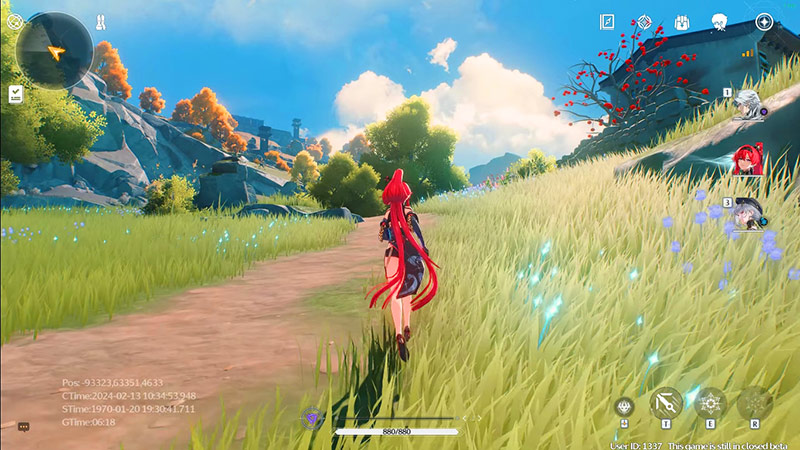
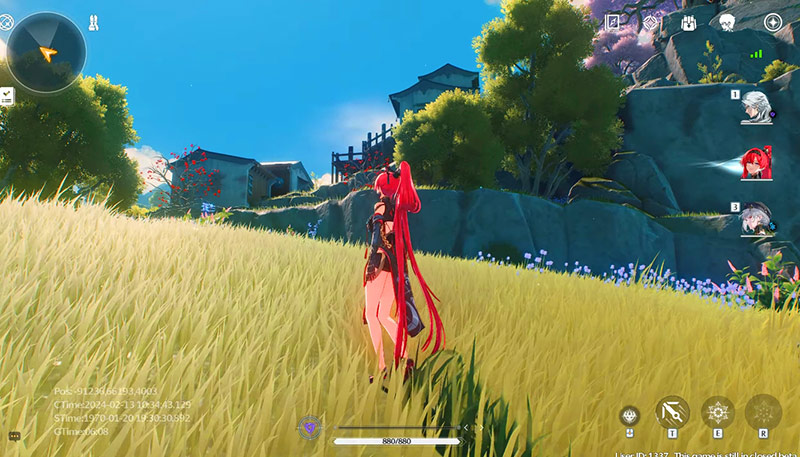
<p style="text-align: justify;">Bạn hoàn toàn có thể bật 120 FPS trên Wuthering Waves, nhưng bạn sẽ phải cần có một phần mềm bên cạnh và dĩ nhiên chỉ mới được bật trên bản PC mà thôi. Ban đầu thì Wuthering Waves có hỗ trợ bật 120 FPS, nhưng sau bản beta test gần đây, tính năng này đã bị loại bỏ (hoặc vô hiệu hóa) trên tất cả các nền tảng.</p>

<figure>
<div style="text-align: justify;"><img alt="wuthering waves 120fps" data-i="0" data-src="https://st.quantrimang.com/photos/image/2024/05/24/Wuthering-Waves-120FPS-1.jpg" data-was-processed="true" height="439" src="https://st.quantrimang.com/photos/image/2024/05/24/Wuthering-Waves-120FPS-1.jpg" width="800" /></div>
</figure>

<figure>
<div style="text-align: justify;"><img alt="bật 120fps wuthering waves" data-i="1" data-src="https://st.quantrimang.com/photos/image/2024/05/24/Wuthering-Waves-120FPS-2.jpg" data-was-processed="true" height="367" src="https://st.quantrimang.com/photos/image/2024/05/24/Wuthering-Waves-120FPS-2.jpg" width="640" /></div>
</figure>

<figure>
<div style="text-align: justify;"><img alt="wuthering waves 120fps" data-i="2" data-src="https://st.quantrimang.com/photos/image/2024/05/24/Wuthering-Waves-120FPS-3.jpg" data-was-processed="true" height="457" src="https://st.quantrimang.com/photos/image/2024/05/24/Wuthering-Waves-120FPS-3.jpg" width="800" /></div>
</figure>

<figure>
<div style="text-align: justify;"><img alt="cach bat 120 fps wuthering waves" data-i="3" data-src="https://st.quantrimang.com/photos/image/2024/05/24/Wuthering-Waves-120FPS-4.jpg" data-was-processed="true" height="450" src="https://st.quantrimang.com/photos/image/2024/05/24/Wuthering-Waves-120FPS-4.jpg" width="800" /></div>
</figure>

<p style="text-align: justify;">Giờ bạn kiểm tra trong phiên bản PC và Mobile, tốc độ khung hình tối đa sẽ chỉ là 60 FPS. Tuy nhiên tính năng này có thể sẽ thay đổi trong tương lai, để tăng lên 120 FPS,&nbsp;<strong>bạn sẽ phải sử dụng đến Lossless Scaling</strong>, bạn có thể&nbsp;<strong>tải về theo link ở dưới đây</strong>:</p>
<iframe allow="autoplay" allowtransparency="true" aria-label="Advertisement" data-google-container-id="a!2" data-google-query-id="CKvln8z0p4YDFQSZ6QUdC14Mcg" data-load-complete="true" frameborder="0" height="0" hspace="0" id="aswift_1" marginheight="0" marginwidth="0" name="aswift_1" sandbox="allow-scripts allow-same-origin allow-forms allow-presentation" scrolling="no" tabindex="0" title="Advertisement" vspace="0" width="694"></iframe>

<pre id="pre0">
<code>https://store.steampowered.com/app/993090/Lossless_Scaling/</code></pre>

<p style="text-align: justify;">Đây là một phần mềm hữu ích giúp cải thiện hiệu năng cho nhiều tựa game. Khi đã tải về trên Steam bạn hãy để phần mềm này chạy nền.</p>

<p style="text-align: justify;">&nbsp;</p>

<div style="text-align: justify;"><br />
<img alt="wuthering waves 120fps" data-adbro-processed="true" data-i="4" data-src="https://st.quantrimang.com/photos/image/2024/05/24/Wuthering-Waves-120FPS-7.jpg" data-was-processed="true" height="360" src="https://st.quantrimang.com/photos/image/2024/05/24/Wuthering-Waves-120FPS-7.jpg" width="640" /></div>

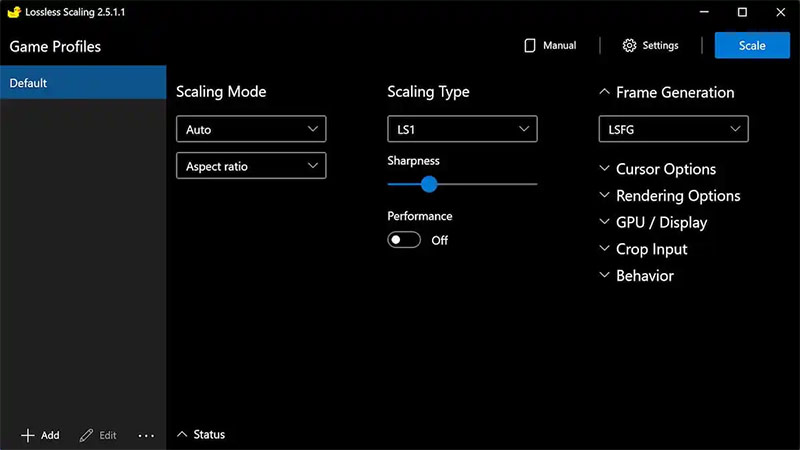
<p style="text-align: justify;">Để bật 120FPS trên Wuthering Waves, bạn hãy chạy Lossless Scaling trên nền và tạo cấu hình mới cho Wuthering Waves. Sử dụng loại LS1 Scaling Type và LSFG 2.0 for Frame Generation. Bây giờ, bạn hãy khởi động Wuthering Waves nhưng vẫn giữ Lossless Scaling chạy nền.</p>

<p style="text-align: justify;">Khi game load xong, hãy mở Lossless Scaling, nhấp vào tùy chọn Scale màu xanh lớn ở trên cùng góc bên phải và chọn cửa sổ Wuthering Waves. Giờ đây, bạn có thể chơi Wuthering Waves với tốc độ khung hình cao hơn nhiều. Bạn cũng có thể bật tùy chọn Draw FPS để xem trực tiếp tốc độ khung hình trong game.</p>

<p style="text-align: justify;">Cách bật rất đơn giản, chỉ qua vài thao tác, bạn đã có thể trải nghiệm được tốc độ khung hình 120 FPS. Hãy cứ sử dụng Lossless Scaling cho Wuthering Waves cho đến khi nhà phát triển game chính thức cập nhật tùy chọn bật 120 FPS trong game.</p>
		</div>
				<div id="author">
						<p>
				<strong>Nguồn tin:</strong>
				Quantrimang.com:
			</p>
		</div>
	</div>
	<div id="footer" class="clearfix">
		<div id="url">
			<strong>URL của bản tin này: </strong><a href="https://www.nguoicodonvn2008.info/vi/news/savefile/kien-thuc-may-tinh/cach-bat-120-fps-tren-wuthering-waves-8399.html" title="Cách bật 120 FPS trên Wuthering Waves">https://www.nguoicodonvn2008.info/vi/news/savefile/kien-thuc-may-tinh/cach-bat-120-fps-tren-wuthering-waves-8399.html</a>

		</div>
		<div class="clear"></div>
		<div class="copyright">
			&copy; .&#x3A; Nguoicodonvn2008.info - Cõi lòng người cô đơn &#x3A;.
		</div>
		<div id="contact">
			<a href="mailto:admin@nguoicodonvn2008.info">admin@nguoicodonvn2008.info</a>
		</div>
	</div>
</div>
        <div id="timeoutsess" class="chromeframe">
            Bạn đã không sử dụng Site, <a onclick="timeoutsesscancel();" href="https://nguoicodonvn2008.info/#">Bấm vào đây để duy trì trạng thái đăng nhập</a>. Thời gian chờ: <span id="secField"> 60 </span> giây
        </div>
        <div id="openidResult" class="nv-alert" style="display:none"></div>
        <div id="openidBt" data-result="" data-redirect=""></div>
		</script>
		<div class="car-top">
  <span><img src="https://nguoicodonvn2008.info/themes/default/images/car.png" alt=""></span>
</div>
<script src="https://nguoicodonvn2008.info/assets/js/jquery/jquery.min.js"></script>
<script>var nv_base_siteurl="/",nv_lang_data="vi",nv_lang_interface="vi",nv_name_variable="nv",nv_fc_variable="op",nv_lang_variable="language",nv_module_name="news",nv_func_name="savefile",nv_is_user=0, nv_my_ofs=-4,nv_my_abbr="EDT",nv_cookie_prefix="nv4c_e856T",nv_check_pass_mstime=1738000,nv_area_admin=0,nv_safemode=0,theme_responsive=0,nv_recaptcha_ver=2,nv_recaptcha_sitekey="",nv_recaptcha_type="image",XSSsanitize=1;</script>
<script src="https://nguoicodonvn2008.info/assets/js/language/vi.js"></script>
<script src="https://nguoicodonvn2008.info/assets/js/DOMPurify/purify3.js"></script>
<script src="https://nguoicodonvn2008.info/assets/js/global.js"></script>
<script src="https://nguoicodonvn2008.info/assets/js/site.js"></script>
<script src="https://nguoicodonvn2008.info/themes/default/js/news.js"></script>
<script src="https://nguoicodonvn2008.info/themes/default/js/main.js"></script>
<script src="https://nguoicodonvn2008.info/themes/default/js/custom.js"></script>
<script type="application/ld+json">
        {
            "@context": "https://schema.org",
            "@type": "Organization",
            "url": "https://nguoicodonvn2008.info",
            "logo": "https://nguoicodonvn2008.info/uploads/angel.gif"
        }
        </script>
<script src="https://nguoicodonvn2008.info/themes/default/js/bootstrap.min.js"></script>
<script type="text/javascript">
var $scrolltop = $('.car-top');
$scrolltop.on('click', function () {
    $('html,body').animate({
        scrollTop: 0
    }, 800);
    $(this).addClass("car-run");
    setTimeout(function(){ $scrolltop.removeClass('car-run');}, 1000);
    return false;
});
$(window).on('scroll', function ()
{ 
    if($(window).scrollTop() >= 200)
    {
        $scrolltop.addClass("show");
        $scrolltop.addClass("car-down");
    }
    else
    {
       $scrolltop.removeClass("show");
       setTimeout(function(){ $scrolltop.removeClass('car-down');}, 300);
    }
});
</script>
</body>
</html>