<!DOCTYPE html>
    <html lang="vi" xmlns="http://www.w3.org/1999/xhtml" prefix="og: http://ogp.me/ns#">
    <head>
<title>Cách ẩn tệp và thư mục trên Chromebook</title>
<meta name="description" content="Cách ẩn tệp và thư mục trên Chromebook - Savefile - Tin Tức -...">
<meta name="author" content=".: Nguoicodonvn2008.info - Cõi lòng người cô đơn :.">
<meta name="copyright" content=".: Nguoicodonvn2008.info - Cõi lòng người cô đơn :. [admin@nguoicodonvn2008.info]">
<meta name="robots" content="index, archive, follow, noodp">
<meta name="googlebot" content="index,archive,follow,noodp">
<meta name="msnbot" content="all,index,follow">
<meta name="generator" content="NukeViet v4.5">
<meta http-equiv="Content-Type" content="text/html; charset=utf-8">
<meta property="og:title" content="Cách ẩn tệp và thư mục trên Chromebook">
<meta property="og:type" content="website">
<meta property="og:description" content="Savefile - Tin Tức - https&#x3A;&#x002F;&#x002F;www.nguoicodonvn2008.info&#x002F;vi&#x002F;news&#x002F;savefile&#x002F;kien-thuc-may-tinh&#x002F;cach-an-tep-va-thu-muc-tren-chromebook-5039.html">
<meta property="og:site_name" content=".&#x3A; Nguoicodonvn2008.info - Cõi lòng người cô đơn &#x3A;.">
<meta property="og:url" content="https://www.nguoicodonvn2008.info/vi/news/savefile/kien-thuc-may-tinh/cach-an-tep-va-thu-muc-tren-chromebook-5039.html">
<link rel="shortcut icon" href="https://nguoicodonvn2008.info/favicon.ico">
<link rel="canonical" href="https://www.nguoicodonvn2008.info/vi/news/savefile/kien-thuc-may-tinh/cach-an-tep-va-thu-muc-tren-chromebook-5039.html">
<link rel="alternate" href="https://nguoicodonvn2008.info/vi/news/rss/" title="Tin Tức" type="application/rss+xml">
<link rel="alternate" href="https://nguoicodonvn2008.info/vi/news/rss/karaoke-dual/" title="Tin Tức - Karaoke Dual" type="application/rss+xml">
<link rel="alternate" href="https://nguoicodonvn2008.info/vi/news/rss/nhac-tre/" title="Tin Tức - Nhạc trẻ" type="application/rss+xml">
<link rel="alternate" href="https://nguoicodonvn2008.info/vi/news/rss/tru-tinh/" title="Tin Tức - Trữ tình" type="application/rss+xml">
<link rel="alternate" href="https://nguoicodonvn2008.info/vi/news/rss/nuoc-ngoai/" title="Tin Tức - Nước ngoài" type="application/rss+xml">
<link rel="alternate" href="https://nguoicodonvn2008.info/vi/news/rss/remix/" title="Tin Tức - Remix" type="application/rss+xml">
<link rel="alternate" href="https://nguoicodonvn2008.info/vi/news/rss/tam-su-tinh-yeu/" title="Tin Tức - Tâm sự tình yêu" type="application/rss+xml">
<link rel="alternate" href="https://nguoicodonvn2008.info/vi/news/rss/tho-suu-tam/" title="Tin Tức - Thơ sưu tầm" type="application/rss+xml">
<link rel="alternate" href="https://nguoicodonvn2008.info/vi/news/rss/cuoc-song/" title="Tin Tức - Cuộc sống" type="application/rss+xml">
<link rel="alternate" href="https://nguoicodonvn2008.info/vi/news/rss/phan-mem/" title="Tin Tức - Phần mềm" type="application/rss+xml">
<link rel="alternate" href="https://nguoicodonvn2008.info/vi/news/rss/kien-thuc-may-tinh/" title="Tin Tức - Kiến thức máy tính" type="application/rss+xml">
<link rel="alternate" href="https://nguoicodonvn2008.info/vi/news/rss/hoc-tap/" title="Tin Tức - Học tập" type="application/rss+xml">
<link rel="alternate" href="https://nguoicodonvn2008.info/vi/news/rss/tai-lieu/" title="Tin Tức - Tài liệu" type="application/rss+xml">
<link rel="alternate" href="https://nguoicodonvn2008.info/vi/news/rss/de-thi/" title="Tin Tức - Đề thi" type="application/rss+xml">
<link rel="preload" as="style" href="https://nguoicodonvn2008.info/assets/css/font-awesome.min.css" type="text/css">
<link rel="preload" as="style" href="https://nguoicodonvn2008.info/themes/default/css/bootstrap.non-responsive.css" type="text/css">
<link rel="preload" as="style" href="https://nguoicodonvn2008.info/themes/default/css/style.css" type="text/css">
<link rel="preload" as="style" href="https://nguoicodonvn2008.info/themes/default/css/style.non-responsive.css" type="text/css">
<link rel="preload" as="style" href="https://nguoicodonvn2008.info/themes/default/css/news.css" type="text/css">
<link rel="preload" as="style" href="https://nguoicodonvn2008.info/themes/default/css/custom.css" type="text/css">
<link rel="preload" as="script" href="https://nguoicodonvn2008.info/assets/js/jquery/jquery.min.js" type="text/javascript">
<link rel="preload" as="script" href="https://nguoicodonvn2008.info/assets/js/language/vi.js" type="text/javascript">
<link rel="preload" as="script" href="https://nguoicodonvn2008.info/assets/js/DOMPurify/purify3.js" type="text/javascript">
<link rel="preload" as="script" href="https://nguoicodonvn2008.info/assets/js/global.js" type="text/javascript">
<link rel="preload" as="script" href="https://nguoicodonvn2008.info/assets/js/site.js" type="text/javascript">
<link rel="preload" as="script" href="https://nguoicodonvn2008.info/themes/default/js/news.js" type="text/javascript">
<link rel="preload" as="script" href="https://nguoicodonvn2008.info/themes/default/js/main.js" type="text/javascript">
<link rel="preload" as="script" href="https://nguoicodonvn2008.info/themes/default/js/custom.js" type="text/javascript">
<link rel="preload" as="script" href="https://nguoicodonvn2008.info/themes/default/js/bootstrap.min.js" type="text/javascript">
<link rel="stylesheet" href="https://nguoicodonvn2008.info/assets/css/font-awesome.min.css">
<link rel="stylesheet" href="https://nguoicodonvn2008.info/themes/default/css/bootstrap.non-responsive.css">
<link rel="stylesheet" href="https://nguoicodonvn2008.info/themes/default/css/style.css">
<link rel="stylesheet" href="https://nguoicodonvn2008.info/themes/default/css/style.non-responsive.css">
<link rel="StyleSheet" href="https://nguoicodonvn2008.info/themes/default/css/news.css">
<link rel="stylesheet" href="https://nguoicodonvn2008.info/themes/default/css/custom.css">
<style type="text/css">
	body{background: #fff;}
</style>
    </head>
    <body>
<div id="print">
	<div id="hd_print">
		<h2 class="pull-left">.&#x3A; Nguoicodonvn2008.info - Cõi lòng người cô đơn &#x3A;.</h2>
		<p class="pull-right"><a title=".&#x3A; Nguoicodonvn2008.info - Cõi lòng người cô đơn &#x3A;." href="https://nguoicodonvn2008.info/">https://nguoicodonvn2008.info</a></p>
	</div>
	<div class="clear"></div>
	<hr />
	<div id="content">
		<h1>Cách ẩn tệp và thư mục trên Chromebook</h1>
		<ul class="list-inline">
			<li>Thứ hai - 17/01/2022 23:26</li>
			<li class="hidden-print txtrequired"><em class="fa fa-print">&nbsp;</em><a title="In ra" href="javascript:;" onclick="window.print()">In ra</a></li>
			<li class="hidden-print txtrequired"><em class="fa fa-power-off">&nbsp;</em><a title="Đóng cửa sổ này" href="javascript:;" onclick="window.close()">Đóng cửa sổ này</a></li>
		</ul>
		<div class="clear"></div>
		<div id="hometext">
		</div>
				<div class="imghome">
			<img alt="Cách ẩn tệp và thư mục trên Chromebook" src="https://st.quantrimang.com/photos/image/2022/01/14/an-tep-va-thu-muc-tren-chromebook1.png" width="460" class="img-thumbnail" />
		</div>
		<div class="clear"></div>
		<div id="bodytext" class="clearfix">
			<p style="text-align: justify;">Đôi khi trong quá trình sử dụng máy tính, có những loại dữ liệu nhạy cảm, quan trọng trên hệ thống mà bạn không muốn ai khác tiếp cận - dù là vô tình hay cố ý - mà chưa được sự đồng ý của mình. Đáng tiếc, Chrome OS không hỗ trợ tính năng cho phép bạn ẩn tệp và thư mục trực tiếp, thay vào đó bạn sẽ phải thực hiện một “mẹo” nhỏ, nhưng cũng không có gì phức tạp. Quy trình cụ thể như sau.</p>

<h2 style="text-align: justify;">Cách ẩn tệp và thư mục trên Chromebook</h2>

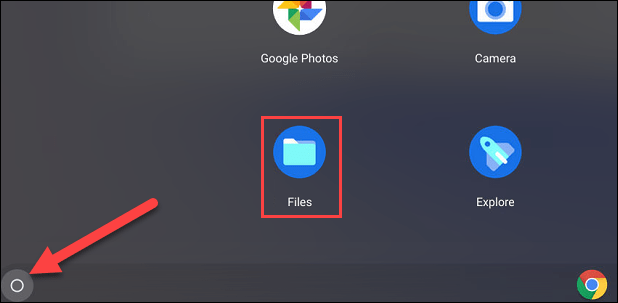
<p style="text-align: justify;">Trước tiên, hãy nhấp vào biểu tượng “<strong>App Launcher</strong>” ở góc dưới cùng bên trái màn hình để xem tất cả các ứng dụng hiện có trên Chromebook của bạn. Tại đây, hãy mở ứng dụng “<strong>Files</strong>”.</p>

<p style="text-align: justify;"><img alt="Nhấp vào biểu tượng “App Launcher”" data-i="0" data-inimage-loaded="true" data-src="https://st.quantrimang.com/photos/image/2022/01/14/an-tep-va-thu-muc-tren-chromebook1.png" data-was-processed="true" height="303" src="https://st.quantrimang.com/photos/image/2022/01/14/an-tep-va-thu-muc-tren-chromebook1.png" width="618" /></p>

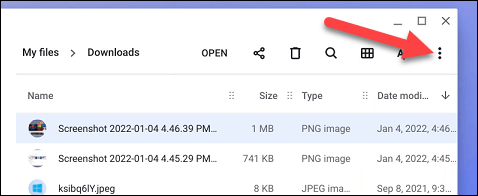
<p style="text-align: justify;">Tiếp theo, tìm tệp hoặc thư mục bạn muốn ẩn và nhấp vào biểu tượng ba dấu chấm dọc ở trên cùng bên phải cửa sổ để mở menu tùy chọn.</p>

<p style="text-align: justify;"><img alt="Nhấp vào biểu tượng ba dấu chấm dọc" data-i="1" data-src="https://st.quantrimang.com/photos/image/2022/01/14/an-tep-va-thu-muc-tren-chromebook2.png" data-was-processed="true" height="196" src="https://st.quantrimang.com/photos/image/2022/01/14/an-tep-va-thu-muc-tren-chromebook2.png" width="478" /></p>

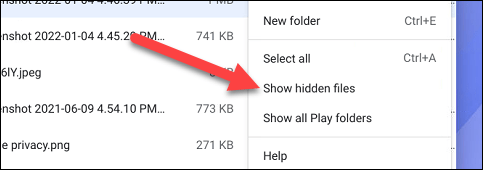
<p style="text-align: justify;">Trong menu hiện ra, bạn nhấp vào tùy chọn “<strong>Show Hidden Files</strong>”.</p>

<p style="text-align: justify;"><img alt="Nhấp vào tùy chọn “Show Hidden Files”" data-i="2" data-src="https://st.quantrimang.com/photos/image/2022/01/14/an-tep-va-thu-muc-tren-chromebook3.png" data-was-processed="true" height="170" src="https://st.quantrimang.com/photos/image/2022/01/14/an-tep-va-thu-muc-tren-chromebook3.png" width="483" /></p>

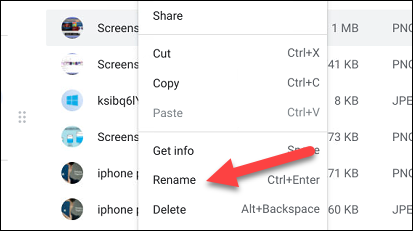
<p style="text-align: justify;">Tiếp theo, nhấp chuột phải vào tệp hoặc thư mục bạn muốn ẩn và chọn “<strong>Rename</strong>” từ menu ngữ cảnh hiện ra.</p>

<p style="text-align: justify;"><img alt="Chọn “Rename”" data-i="3" data-src="https://st.quantrimang.com/photos/image/2022/01/14/an-tep-va-thu-muc-tren-chromebook4.png" data-was-processed="true" height="231" src="https://st.quantrimang.com/photos/image/2022/01/14/an-tep-va-thu-muc-tren-chromebook4.png" width="413" /></p>

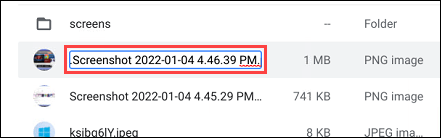
<p style="text-align: justify;">Bây giờ, bạn chỉ cần thêm một dấu chấm vào đầu tên của tệp/thư mục đã chọn và nhấn Enter.</p>

<p style="text-align: justify;"><img alt="Thêm một dấu chấm vào đầu tên đên của tệp/thư mục " data-i="4" data-src="https://st.quantrimang.com/photos/image/2022/01/14/an-tep-va-thu-muc-tren-chromebook5.png" data-was-processed="true" height="138" src="https://st.quantrimang.com/photos/image/2022/01/14/an-tep-va-thu-muc-tren-chromebook5.png" width="441" /></p>

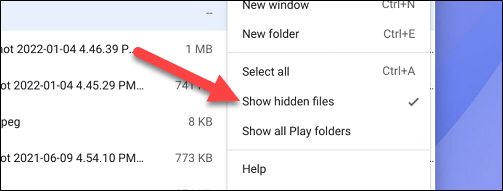
<p style="text-align: justify;">Sau đó, hãy nhấp lại vào biểu tượng menu ba chấm và lần này bạn bỏ tích tùy chọn “<strong>Show Hidden Files</strong>”.</p>

<p style="text-align: justify;"><img alt="Bỏ tích tùy chọn “Show Hidden Files”" data-i="5" data-src="https://st.quantrimang.com/photos/image/2022/01/14/an-tep-va-thu-muc-tren-chromebook6.png" data-was-processed="true" height="191" src="https://st.quantrimang.com/photos/image/2022/01/14/an-tep-va-thu-muc-tren-chromebook6.png" width="503" /></p>

<p style="text-align: justify;">Xong, các tệp hoặc thư mục mà bạn đã đổi tên sẽ biến mất khỏi danh sách tệp.</p>

<h2 style="text-align: justify;">Cách xem các tệp và thư mục đã ẩn trên Chromebook</h2>

<p style="text-align: justify;">Bạn đã ẩn một số tệp và thư mục,vậy làm thế nào để bạn nhìn thấy lại chúng?</p>

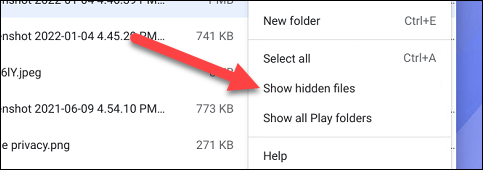
<p style="text-align: justify;">Trước tiên, hãy điều hướng đến thư mục chứa các tệp mà bạn đã ẩn và nhấp vào biểu tượng menu ba chấm ở trên cùng bên phải.</p>

<p style="text-align: justify;">Bấm vào tùy chọn “<strong>Show Hidden Files</strong>”.</p>

<p style="text-align: justify;"><img alt="Bấm vào tùy chọn “Show Hidden Files”" data-i="6" data-src="https://st.quantrimang.com/photos/image/2022/01/14/an-tep-va-thu-muc-tren-chromebook7.png" data-was-processed="true" height="170" src="https://st.quantrimang.com/photos/image/2022/01/14/an-tep-va-thu-muc-tren-chromebook7.png" width="483" /></p>

<p style="text-align: justify;">Các tệp mà bạn đã ẩn bằng mẹo đổi tên phía trên sẽ được hiển thị đầy đủ.</p>
		</div>
				<div id="author">
						<p>
				<strong>Nguồn tin:</strong>
				Quantrimang.com
			</p>
		</div>
	</div>
	<div id="footer" class="clearfix">
		<div id="url">
			<strong>URL của bản tin này: </strong><a href="https://www.nguoicodonvn2008.info/vi/news/savefile/kien-thuc-may-tinh/cach-an-tep-va-thu-muc-tren-chromebook-5039.html" title="Cách ẩn tệp và thư mục trên Chromebook">https://www.nguoicodonvn2008.info/vi/news/savefile/kien-thuc-may-tinh/cach-an-tep-va-thu-muc-tren-chromebook-5039.html</a>

		</div>
		<div class="clear"></div>
		<div class="copyright">
			&copy; .&#x3A; Nguoicodonvn2008.info - Cõi lòng người cô đơn &#x3A;.
		</div>
		<div id="contact">
			<a href="mailto:admin@nguoicodonvn2008.info">admin@nguoicodonvn2008.info</a>
		</div>
	</div>
</div>
        <div id="timeoutsess" class="chromeframe">
            Bạn đã không sử dụng Site, <a onclick="timeoutsesscancel();" href="https://nguoicodonvn2008.info/#">Bấm vào đây để duy trì trạng thái đăng nhập</a>. Thời gian chờ: <span id="secField"> 60 </span> giây
        </div>
        <div id="openidResult" class="nv-alert" style="display:none"></div>
        <div id="openidBt" data-result="" data-redirect=""></div>
		</script>
		<div class="car-top">
  <span><img src="https://nguoicodonvn2008.info/themes/default/images/car.png" alt=""></span>
</div>
<script src="https://nguoicodonvn2008.info/assets/js/jquery/jquery.min.js"></script>
<script>var nv_base_siteurl="/",nv_lang_data="vi",nv_lang_interface="vi",nv_name_variable="nv",nv_fc_variable="op",nv_lang_variable="language",nv_module_name="news",nv_func_name="savefile",nv_is_user=0, nv_my_ofs=-4,nv_my_abbr="EDT",nv_cookie_prefix="nv4c_e856T",nv_check_pass_mstime=1738000,nv_area_admin=0,nv_safemode=0,theme_responsive=0,nv_recaptcha_ver=2,nv_recaptcha_sitekey="",nv_recaptcha_type="image",XSSsanitize=1;</script>
<script src="https://nguoicodonvn2008.info/assets/js/language/vi.js"></script>
<script src="https://nguoicodonvn2008.info/assets/js/DOMPurify/purify3.js"></script>
<script src="https://nguoicodonvn2008.info/assets/js/global.js"></script>
<script src="https://nguoicodonvn2008.info/assets/js/site.js"></script>
<script src="https://nguoicodonvn2008.info/themes/default/js/news.js"></script>
<script src="https://nguoicodonvn2008.info/themes/default/js/main.js"></script>
<script src="https://nguoicodonvn2008.info/themes/default/js/custom.js"></script>
<script type="application/ld+json">
        {
            "@context": "https://schema.org",
            "@type": "Organization",
            "url": "https://nguoicodonvn2008.info",
            "logo": "https://nguoicodonvn2008.info/uploads/angel.gif"
        }
        </script>
<script src="https://nguoicodonvn2008.info/themes/default/js/bootstrap.min.js"></script>
<script type="text/javascript">
var $scrolltop = $('.car-top');
$scrolltop.on('click', function () {
    $('html,body').animate({
        scrollTop: 0
    }, 800);
    $(this).addClass("car-run");
    setTimeout(function(){ $scrolltop.removeClass('car-run');}, 1000);
    return false;
});
$(window).on('scroll', function ()
{ 
    if($(window).scrollTop() >= 200)
    {
        $scrolltop.addClass("show");
        $scrolltop.addClass("car-down");
    }
    else
    {
       $scrolltop.removeClass("show");
       setTimeout(function(){ $scrolltop.removeClass('car-down');}, 300);
    }
});
</script>
</body>
</html>