<!DOCTYPE html>
    <html lang="vi" xmlns="http://www.w3.org/1999/xhtml" prefix="og: http://ogp.me/ns#">
    <head>
<title>Cách ẩn OneDrive khỏi File Explorer trong Windows 10</title>
<meta name="description" content="Cách ẩn OneDrive khỏi File Explorer trong Windows 10 - Savefile - Tin Tức -...">
<meta name="author" content=".: Nguoicodonvn2008.info - Cõi lòng người cô đơn :.">
<meta name="copyright" content=".: Nguoicodonvn2008.info - Cõi lòng người cô đơn :. [admin@nguoicodonvn2008.info]">
<meta name="robots" content="index, archive, follow, noodp">
<meta name="googlebot" content="index,archive,follow,noodp">
<meta name="msnbot" content="all,index,follow">
<meta name="generator" content="NukeViet v4.5">
<meta http-equiv="Content-Type" content="text/html; charset=utf-8">
<meta property="og:title" content="Cách ẩn OneDrive khỏi File Explorer trong Windows 10">
<meta property="og:type" content="website">
<meta property="og:description" content="Savefile - Tin Tức - https&#x3A;&#x002F;&#x002F;www.nguoicodonvn2008.info&#x002F;vi&#x002F;news&#x002F;savefile&#x002F;kien-thuc-may-tinh&#x002F;cach-an-onedrive-khoi-file-explorer-trong-windows-10-2054.html">
<meta property="og:site_name" content=".&#x3A; Nguoicodonvn2008.info - Cõi lòng người cô đơn &#x3A;.">
<meta property="og:url" content="https://www.nguoicodonvn2008.info/vi/news/savefile/kien-thuc-may-tinh/cach-an-onedrive-khoi-file-explorer-trong-windows-10-2054.html">
<link rel="shortcut icon" href="https://nguoicodonvn2008.info/favicon.ico">
<link rel="canonical" href="https://www.nguoicodonvn2008.info/vi/news/savefile/kien-thuc-may-tinh/cach-an-onedrive-khoi-file-explorer-trong-windows-10-2054.html">
<link rel="alternate" href="https://nguoicodonvn2008.info/vi/news/rss/" title="Tin Tức" type="application/rss+xml">
<link rel="alternate" href="https://nguoicodonvn2008.info/vi/news/rss/karaoke-dual/" title="Tin Tức - Karaoke Dual" type="application/rss+xml">
<link rel="alternate" href="https://nguoicodonvn2008.info/vi/news/rss/nhac-tre/" title="Tin Tức - Nhạc trẻ" type="application/rss+xml">
<link rel="alternate" href="https://nguoicodonvn2008.info/vi/news/rss/tru-tinh/" title="Tin Tức - Trữ tình" type="application/rss+xml">
<link rel="alternate" href="https://nguoicodonvn2008.info/vi/news/rss/nuoc-ngoai/" title="Tin Tức - Nước ngoài" type="application/rss+xml">
<link rel="alternate" href="https://nguoicodonvn2008.info/vi/news/rss/remix/" title="Tin Tức - Remix" type="application/rss+xml">
<link rel="alternate" href="https://nguoicodonvn2008.info/vi/news/rss/tam-su-tinh-yeu/" title="Tin Tức - Tâm sự tình yêu" type="application/rss+xml">
<link rel="alternate" href="https://nguoicodonvn2008.info/vi/news/rss/tho-suu-tam/" title="Tin Tức - Thơ sưu tầm" type="application/rss+xml">
<link rel="alternate" href="https://nguoicodonvn2008.info/vi/news/rss/cuoc-song/" title="Tin Tức - Cuộc sống" type="application/rss+xml">
<link rel="alternate" href="https://nguoicodonvn2008.info/vi/news/rss/phan-mem/" title="Tin Tức - Phần mềm" type="application/rss+xml">
<link rel="alternate" href="https://nguoicodonvn2008.info/vi/news/rss/kien-thuc-may-tinh/" title="Tin Tức - Kiến thức máy tính" type="application/rss+xml">
<link rel="alternate" href="https://nguoicodonvn2008.info/vi/news/rss/hoc-tap/" title="Tin Tức - Học tập" type="application/rss+xml">
<link rel="alternate" href="https://nguoicodonvn2008.info/vi/news/rss/tai-lieu/" title="Tin Tức - Tài liệu" type="application/rss+xml">
<link rel="alternate" href="https://nguoicodonvn2008.info/vi/news/rss/de-thi/" title="Tin Tức - Đề thi" type="application/rss+xml">
<link rel="preload" as="style" href="https://nguoicodonvn2008.info/assets/css/font-awesome.min.css" type="text/css">
<link rel="preload" as="style" href="https://nguoicodonvn2008.info/themes/default/css/bootstrap.non-responsive.css" type="text/css">
<link rel="preload" as="style" href="https://nguoicodonvn2008.info/themes/default/css/style.css" type="text/css">
<link rel="preload" as="style" href="https://nguoicodonvn2008.info/themes/default/css/style.non-responsive.css" type="text/css">
<link rel="preload" as="style" href="https://nguoicodonvn2008.info/themes/default/css/news.css" type="text/css">
<link rel="preload" as="style" href="https://nguoicodonvn2008.info/themes/default/css/custom.css" type="text/css">
<link rel="preload" as="script" href="https://nguoicodonvn2008.info/assets/js/jquery/jquery.min.js" type="text/javascript">
<link rel="preload" as="script" href="https://nguoicodonvn2008.info/assets/js/language/vi.js" type="text/javascript">
<link rel="preload" as="script" href="https://nguoicodonvn2008.info/assets/js/DOMPurify/purify3.js" type="text/javascript">
<link rel="preload" as="script" href="https://nguoicodonvn2008.info/assets/js/global.js" type="text/javascript">
<link rel="preload" as="script" href="https://nguoicodonvn2008.info/assets/js/site.js" type="text/javascript">
<link rel="preload" as="script" href="https://nguoicodonvn2008.info/themes/default/js/news.js" type="text/javascript">
<link rel="preload" as="script" href="https://nguoicodonvn2008.info/themes/default/js/main.js" type="text/javascript">
<link rel="preload" as="script" href="https://nguoicodonvn2008.info/themes/default/js/custom.js" type="text/javascript">
<link rel="preload" as="script" href="https://nguoicodonvn2008.info/themes/default/js/bootstrap.min.js" type="text/javascript">
<link rel="stylesheet" href="https://nguoicodonvn2008.info/assets/css/font-awesome.min.css">
<link rel="stylesheet" href="https://nguoicodonvn2008.info/themes/default/css/bootstrap.non-responsive.css">
<link rel="stylesheet" href="https://nguoicodonvn2008.info/themes/default/css/style.css">
<link rel="stylesheet" href="https://nguoicodonvn2008.info/themes/default/css/style.non-responsive.css">
<link rel="StyleSheet" href="https://nguoicodonvn2008.info/themes/default/css/news.css">
<link rel="stylesheet" href="https://nguoicodonvn2008.info/themes/default/css/custom.css">
<style type="text/css">
	body{background: #fff;}
</style>
    </head>
    <body>
<div id="print">
	<div id="hd_print">
		<h2 class="pull-left">.&#x3A; Nguoicodonvn2008.info - Cõi lòng người cô đơn &#x3A;.</h2>
		<p class="pull-right"><a title=".&#x3A; Nguoicodonvn2008.info - Cõi lòng người cô đơn &#x3A;." href="https://nguoicodonvn2008.info/">https://nguoicodonvn2008.info</a></p>
	</div>
	<div class="clear"></div>
	<hr />
	<div id="content">
		<h1>Cách ẩn OneDrive khỏi File Explorer trong Windows 10</h1>
		<ul class="list-inline">
			<li>Thứ ba - 19/05/2020 01:03</li>
			<li class="hidden-print txtrequired"><em class="fa fa-print">&nbsp;</em><a title="In ra" href="javascript:;" onclick="window.print()">In ra</a></li>
			<li class="hidden-print txtrequired"><em class="fa fa-power-off">&nbsp;</em><a title="Đóng cửa sổ này" href="javascript:;" onclick="window.close()">Đóng cửa sổ này</a></li>
		</ul>
		<div class="clear"></div>
		<div id="hometext">
		</div>
				<div class="imghome">
			<img alt="Cách ẩn OneDrive khỏi File Explorer trong Windows 10" src="https://st.quantrimang.com/photos/image/2020/05/18/an-onedrive-khoi-file-explorer-4.jpg" width="460" class="img-thumbnail" />
		</div>
		<div class="clear"></div>
		<div id="bodytext" class="clearfix">
			<p style="text-align: justify;">OneDrive&nbsp;là nền tảng lưu trữ đám mây quan trọng nhất của Microsoft. Nó rất gọn gàng, tích hợp với Windows 10, Microsoft Office và Outlook để cho phép bạn chỉnh sửa và di chuyển các tài liệu trên đám mây một cách liền mạch.</p>

<p style="text-align: justify;">Nhưng nếu bạn không sử dụng OneDrive, thì shortcut vĩnh viễn của nó trong File Explorer là điều không cần thiết. May mắn thay, một chút mày mò trong Registry Editor sẽ cho phép bạn ẩn OneDrive khỏi File Explorer trong Windows 10. Đọc bài viết sau để biết cách thực hiện</p>

<p style="text-align: justify;"><strong>Lưu ý</strong>: Bạn nên sao lưu Registry trước khi thực hiện bất kỳ chỉnh sửa nào trong đó.</p>

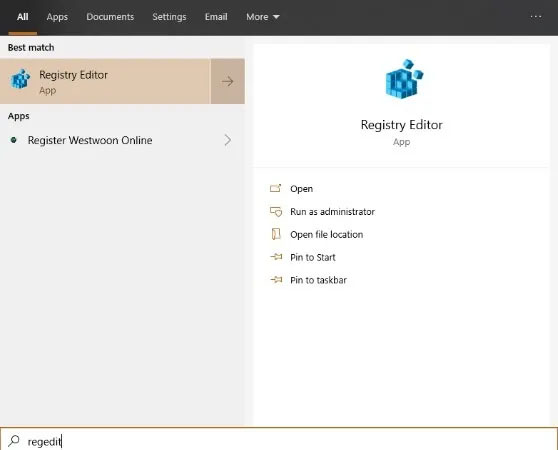
<p style="text-align: justify;">Đầu tiên, hãy&nbsp;mở Registry Editor&nbsp;bằng cách nhấn phím&nbsp;<code>Win</code>, nhập&nbsp;<strong>regedit</strong>&nbsp;vào hộp tìm kiếm trong menu Start, sau đó nhấp vào&nbsp;<strong>Registry Editor</strong>&nbsp;trong các kết quả tìm kiếm.</p>

<figure>
<div style="text-align: justify;"><img alt="Mở Registry Editor" data-i="0" data-src="https://st.quantrimang.com/photos/image/2020/05/18/an-onedrive-khoi-file-explorer-1.jpg" data-was-processed="true" height="450" src="https://st.quantrimang.com/photos/image/2020/05/18/an-onedrive-khoi-file-explorer-1.jpg" width="558" /></div>

<figcaption>
<div style="text-align: justify;">Mở Registry Editor</div>
</figcaption>
</figure>

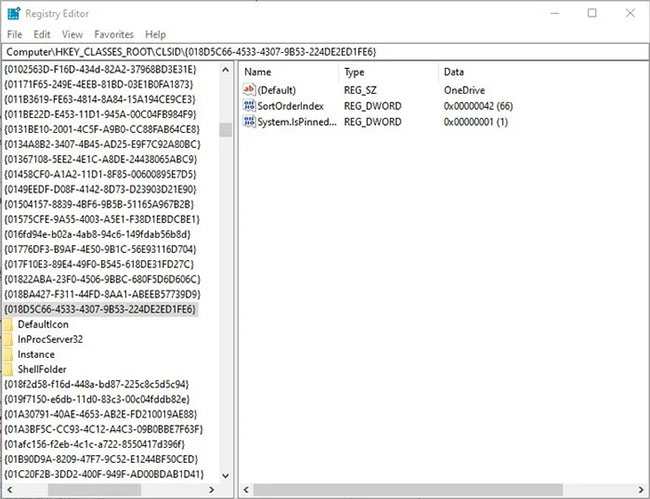
<p style="text-align: justify;">Khi đã vào&nbsp;<strong>Registry</strong>&nbsp;<strong>Editor</strong>, hãy điều hướng đến:</p>

<pre id="pre0">
<code>HKEY_CLASSES_ROOT\CLSID\{018D5C66-4533-4307-9B53-224DE2ED1FE6}</code></pre>

<p style="text-align: justify;">Tiếp theo, nhấp đúp vào giá trị registry ở bên phải có tên là&nbsp;<strong>System.IsPinnedToNameSpaceTree.</strong></p>

<figure>
<div style="text-align: justify;"><img alt="Nhấp đúp vào giá trị registry ở bên phải có tên là System.IsPinnedToNameSpaceTree" data-i="1" data-src="https://st.quantrimang.com/photos/image/2020/05/18/an-onedrive-khoi-file-explorer-2.jpg" data-was-processed="true" height="499" src="https://st.quantrimang.com/photos/image/2020/05/18/an-onedrive-khoi-file-explorer-2.jpg" width="650" /></div>

<figcaption>
<div style="text-align: justify;">Nhấp đúp vào giá trị registry ở bên phải có tên là System.IsPinnedToNameSpaceTree</div>
</figcaption>
</figure>

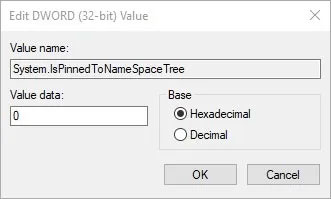
<p style="text-align: justify;">Trong cửa sổ&nbsp;<strong>Edit DWORD</strong>, thay đổi số trong hộp&nbsp;<strong>Value data</strong>&nbsp;thành&nbsp;<strong>0</strong>, sau đó bấm&nbsp;<strong>OK.</strong></p>

<figure>
<div style="text-align: justify;"><img alt="Đổi Value data thành 0" data-i="2" data-src="https://st.quantrimang.com/photos/image/2020/05/18/an-onedrive-khoi-file-explorer-3.jpg" data-was-processed="true" height="199" src="https://st.quantrimang.com/photos/image/2020/05/18/an-onedrive-khoi-file-explorer-3.jpg" width="331" /></div>

<figcaption>
<div style="text-align: justify;">Đổi Value data thành 0</div>
</figcaption>
</figure>

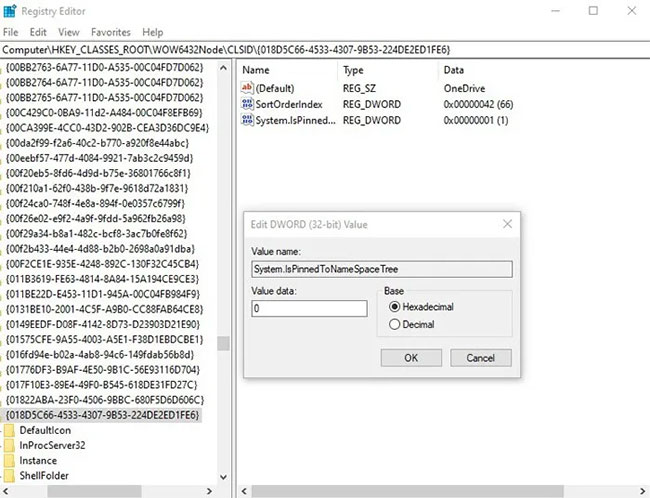
<p style="text-align: justify;">Người dùng Windows 10 64-bit cần chỉnh sửa một key registry khác.</p>

<p style="text-align: justify;">Đi đến:</p>

<pre id="pre1">
<code>HKEY_CLASSES_ROOT\Wow6432Node\CLSID\{018D5C66-4533-4307-9B53-224DE2ED1FE6}</code></pre>

<p style="text-align: justify;">… và thực hiện tương tự như trước đây, nhấp đúp vào&nbsp;<strong>System.IsPinnedToNameSpaceTree</strong>&nbsp;ở bên phải và thay đổi giá trị thành&nbsp;<strong>0</strong>.</p>

<figure>
<div style="text-align: justify;"><img alt="Nhấp đúp vào System.IsPinnedToNameSpaceTree ở bên phải và thay đổi giá trị thành 0" data-i="3" data-src="https://st.quantrimang.com/photos/image/2020/05/18/an-onedrive-khoi-file-explorer-4.jpg" data-was-processed="true" height="498" src="https://st.quantrimang.com/photos/image/2020/05/18/an-onedrive-khoi-file-explorer-4.jpg" width="650" /></div>

<figcaption>
<div style="text-align: justify;">Nhấp đúp vào System.IsPinnedToNameSpaceTree ở bên phải và thay đổi giá trị thành 0</div>
</figcaption>
</figure>

<p style="text-align: justify;">Bấm&nbsp;<strong>OK</strong>&nbsp;là bạn đã hoàn thành. OneDrive đã được ẩn khỏi File Explorer.</p>
		</div>
				<div id="author">
						<p>
				<strong>Nguồn tin:</strong>
				Quantrimang.com
			</p>
		</div>
	</div>
	<div id="footer" class="clearfix">
		<div id="url">
			<strong>URL của bản tin này: </strong><a href="https://www.nguoicodonvn2008.info/vi/news/savefile/kien-thuc-may-tinh/cach-an-onedrive-khoi-file-explorer-trong-windows-10-2054.html" title="Cách ẩn OneDrive khỏi File Explorer trong Windows 10">https://www.nguoicodonvn2008.info/vi/news/savefile/kien-thuc-may-tinh/cach-an-onedrive-khoi-file-explorer-trong-windows-10-2054.html</a>

		</div>
		<div class="clear"></div>
		<div class="copyright">
			&copy; .&#x3A; Nguoicodonvn2008.info - Cõi lòng người cô đơn &#x3A;.
		</div>
		<div id="contact">
			<a href="mailto:admin@nguoicodonvn2008.info">admin@nguoicodonvn2008.info</a>
		</div>
	</div>
</div>
        <div id="timeoutsess" class="chromeframe">
            Bạn đã không sử dụng Site, <a onclick="timeoutsesscancel();" href="https://nguoicodonvn2008.info/#">Bấm vào đây để duy trì trạng thái đăng nhập</a>. Thời gian chờ: <span id="secField"> 60 </span> giây
        </div>
        <div id="openidResult" class="nv-alert" style="display:none"></div>
        <div id="openidBt" data-result="" data-redirect=""></div>
		</script>
		<div class="car-top">
  <span><img src="https://nguoicodonvn2008.info/themes/default/images/car.png" alt=""></span>
</div>
<script src="https://nguoicodonvn2008.info/assets/js/jquery/jquery.min.js"></script>
<script>var nv_base_siteurl="/",nv_lang_data="vi",nv_lang_interface="vi",nv_name_variable="nv",nv_fc_variable="op",nv_lang_variable="language",nv_module_name="news",nv_func_name="savefile",nv_is_user=0, nv_my_ofs=-4,nv_my_abbr="EDT",nv_cookie_prefix="nv4c_e856T",nv_check_pass_mstime=1738000,nv_area_admin=0,nv_safemode=0,theme_responsive=0,nv_recaptcha_ver=2,nv_recaptcha_sitekey="",nv_recaptcha_type="image",XSSsanitize=1;</script>
<script src="https://nguoicodonvn2008.info/assets/js/language/vi.js"></script>
<script src="https://nguoicodonvn2008.info/assets/js/DOMPurify/purify3.js"></script>
<script src="https://nguoicodonvn2008.info/assets/js/global.js"></script>
<script src="https://nguoicodonvn2008.info/assets/js/site.js"></script>
<script src="https://nguoicodonvn2008.info/themes/default/js/news.js"></script>
<script src="https://nguoicodonvn2008.info/themes/default/js/main.js"></script>
<script src="https://nguoicodonvn2008.info/themes/default/js/custom.js"></script>
<script type="application/ld+json">
        {
            "@context": "https://schema.org",
            "@type": "Organization",
            "url": "https://nguoicodonvn2008.info",
            "logo": "https://nguoicodonvn2008.info/uploads/angel.gif"
        }
        </script>
<script src="https://nguoicodonvn2008.info/themes/default/js/bootstrap.min.js"></script>
<script type="text/javascript">
var $scrolltop = $('.car-top');
$scrolltop.on('click', function () {
    $('html,body').animate({
        scrollTop: 0
    }, 800);
    $(this).addClass("car-run");
    setTimeout(function(){ $scrolltop.removeClass('car-run');}, 1000);
    return false;
});
$(window).on('scroll', function ()
{ 
    if($(window).scrollTop() >= 200)
    {
        $scrolltop.addClass("show");
        $scrolltop.addClass("car-down");
    }
    else
    {
       $scrolltop.removeClass("show");
       setTimeout(function(){ $scrolltop.removeClass('car-down');}, 300);
    }
});
</script>
</body>
</html>