<!DOCTYPE html>
    <html lang="vi" xmlns="http://www.w3.org/1999/xhtml" prefix="og: http://ogp.me/ns#">
    <head>
<title>Các bước vô hiệu hóa hoặc gỡ bỏ hoàn toàn ứng dụng Onedrive trên Windows 10</title>
<meta name="description" content="Các bước vô hiệu hóa hoặc gỡ bỏ hoàn toàn ứng dụng Onedrive trên Windows 10 - Savefile - Tin Tức -...">
<meta name="author" content=".: Nguoicodonvn2008.info - Cõi lòng người cô đơn :.">
<meta name="copyright" content=".: Nguoicodonvn2008.info - Cõi lòng người cô đơn :. [admin@nguoicodonvn2008.info]">
<meta name="robots" content="index, archive, follow, noodp">
<meta name="googlebot" content="index,archive,follow,noodp">
<meta name="msnbot" content="all,index,follow">
<meta name="generator" content="NukeViet v4.5">
<meta http-equiv="Content-Type" content="text/html; charset=utf-8">
<meta property="og:title" content="Các bước vô hiệu hóa hoặc gỡ bỏ hoàn toàn ứng dụng Onedrive trên Windows 10">
<meta property="og:type" content="website">
<meta property="og:description" content="Savefile - Tin Tức -...">
<meta property="og:site_name" content=".&#x3A; Nguoicodonvn2008.info - Cõi lòng người cô đơn &#x3A;.">
<meta property="og:url" content="https://www.nguoicodonvn2008.info/vi/news/savefile/kien-thuc-may-tinh/cac-buoc-vo-hieu-hoa-hoac-go-bo-hoan-toan-ung-dung-onedrive-tren-windows-10-2899.html">
<link rel="shortcut icon" href="https://nguoicodonvn2008.info/favicon.ico">
<link rel="canonical" href="https://www.nguoicodonvn2008.info/vi/news/savefile/kien-thuc-may-tinh/cac-buoc-vo-hieu-hoa-hoac-go-bo-hoan-toan-ung-dung-onedrive-tren-windows-10-2899.html">
<link rel="alternate" href="https://nguoicodonvn2008.info/vi/news/rss/" title="Tin Tức" type="application/rss+xml">
<link rel="alternate" href="https://nguoicodonvn2008.info/vi/news/rss/karaoke-dual/" title="Tin Tức - Karaoke Dual" type="application/rss+xml">
<link rel="alternate" href="https://nguoicodonvn2008.info/vi/news/rss/nhac-tre/" title="Tin Tức - Nhạc trẻ" type="application/rss+xml">
<link rel="alternate" href="https://nguoicodonvn2008.info/vi/news/rss/tru-tinh/" title="Tin Tức - Trữ tình" type="application/rss+xml">
<link rel="alternate" href="https://nguoicodonvn2008.info/vi/news/rss/nuoc-ngoai/" title="Tin Tức - Nước ngoài" type="application/rss+xml">
<link rel="alternate" href="https://nguoicodonvn2008.info/vi/news/rss/remix/" title="Tin Tức - Remix" type="application/rss+xml">
<link rel="alternate" href="https://nguoicodonvn2008.info/vi/news/rss/tam-su-tinh-yeu/" title="Tin Tức - Tâm sự tình yêu" type="application/rss+xml">
<link rel="alternate" href="https://nguoicodonvn2008.info/vi/news/rss/tho-suu-tam/" title="Tin Tức - Thơ sưu tầm" type="application/rss+xml">
<link rel="alternate" href="https://nguoicodonvn2008.info/vi/news/rss/cuoc-song/" title="Tin Tức - Cuộc sống" type="application/rss+xml">
<link rel="alternate" href="https://nguoicodonvn2008.info/vi/news/rss/phan-mem/" title="Tin Tức - Phần mềm" type="application/rss+xml">
<link rel="alternate" href="https://nguoicodonvn2008.info/vi/news/rss/kien-thuc-may-tinh/" title="Tin Tức - Kiến thức máy tính" type="application/rss+xml">
<link rel="alternate" href="https://nguoicodonvn2008.info/vi/news/rss/hoc-tap/" title="Tin Tức - Học tập" type="application/rss+xml">
<link rel="alternate" href="https://nguoicodonvn2008.info/vi/news/rss/tai-lieu/" title="Tin Tức - Tài liệu" type="application/rss+xml">
<link rel="alternate" href="https://nguoicodonvn2008.info/vi/news/rss/de-thi/" title="Tin Tức - Đề thi" type="application/rss+xml">
<link rel="preload" as="style" href="https://nguoicodonvn2008.info/assets/css/font-awesome.min.css" type="text/css">
<link rel="preload" as="style" href="https://nguoicodonvn2008.info/themes/default/css/bootstrap.non-responsive.css" type="text/css">
<link rel="preload" as="style" href="https://nguoicodonvn2008.info/themes/default/css/style.css" type="text/css">
<link rel="preload" as="style" href="https://nguoicodonvn2008.info/themes/default/css/style.non-responsive.css" type="text/css">
<link rel="preload" as="style" href="https://nguoicodonvn2008.info/themes/default/css/news.css" type="text/css">
<link rel="preload" as="style" href="https://nguoicodonvn2008.info/themes/default/css/custom.css" type="text/css">
<link rel="preload" as="script" href="https://nguoicodonvn2008.info/assets/js/jquery/jquery.min.js" type="text/javascript">
<link rel="preload" as="script" href="https://nguoicodonvn2008.info/assets/js/language/vi.js" type="text/javascript">
<link rel="preload" as="script" href="https://nguoicodonvn2008.info/assets/js/DOMPurify/purify3.js" type="text/javascript">
<link rel="preload" as="script" href="https://nguoicodonvn2008.info/assets/js/global.js" type="text/javascript">
<link rel="preload" as="script" href="https://nguoicodonvn2008.info/assets/js/site.js" type="text/javascript">
<link rel="preload" as="script" href="https://nguoicodonvn2008.info/themes/default/js/news.js" type="text/javascript">
<link rel="preload" as="script" href="https://nguoicodonvn2008.info/themes/default/js/main.js" type="text/javascript">
<link rel="preload" as="script" href="https://nguoicodonvn2008.info/themes/default/js/custom.js" type="text/javascript">
<link rel="preload" as="script" href="https://nguoicodonvn2008.info/themes/default/js/bootstrap.min.js" type="text/javascript">
<link rel="stylesheet" href="https://nguoicodonvn2008.info/assets/css/font-awesome.min.css">
<link rel="stylesheet" href="https://nguoicodonvn2008.info/themes/default/css/bootstrap.non-responsive.css">
<link rel="stylesheet" href="https://nguoicodonvn2008.info/themes/default/css/style.css">
<link rel="stylesheet" href="https://nguoicodonvn2008.info/themes/default/css/style.non-responsive.css">
<link rel="StyleSheet" href="https://nguoicodonvn2008.info/themes/default/css/news.css">
<link rel="stylesheet" href="https://nguoicodonvn2008.info/themes/default/css/custom.css">
<style type="text/css">
	body{background: #fff;}
</style>
    </head>
    <body>
<div id="print">
	<div id="hd_print">
		<h2 class="pull-left">.&#x3A; Nguoicodonvn2008.info - Cõi lòng người cô đơn &#x3A;.</h2>
		<p class="pull-right"><a title=".&#x3A; Nguoicodonvn2008.info - Cõi lòng người cô đơn &#x3A;." href="https://nguoicodonvn2008.info/">https://nguoicodonvn2008.info</a></p>
	</div>
	<div class="clear"></div>
	<hr />
	<div id="content">
		<h1>Các bước vô hiệu hóa hoặc gỡ bỏ hoàn toàn ứng dụng Onedrive trên Windows 10</h1>
		<ul class="list-inline">
			<li>Thứ tư - 14/10/2020 00:59</li>
			<li class="hidden-print txtrequired"><em class="fa fa-print">&nbsp;</em><a title="In ra" href="javascript:;" onclick="window.print()">In ra</a></li>
			<li class="hidden-print txtrequired"><em class="fa fa-power-off">&nbsp;</em><a title="Đóng cửa sổ này" href="javascript:;" onclick="window.close()">Đóng cửa sổ này</a></li>
		</ul>
		<div class="clear"></div>
		<div id="hometext">
		</div>
				<div class="imghome">
			<img alt="Các bước vô hiệu hóa hoặc gỡ bỏ hoàn toàn ứng dụng Onedrive trên Windows 10" src="https://st.quantrimang.com/photos/image/2016/02/25/onedrive.jpg" width="460" class="img-thumbnail" />
		</div>
		<div class="clear"></div>
		<div id="bodytext" class="clearfix">
			<p style="text-align: justify;">OneDrive là một giải pháp lưu trữ đám mây của Microsoft, cho phép người dùng có thể lưu trữ tất cả dữ liệu trên đám mây và truy cập dữ liệu trực tiếp trên đám mây từ máy tính mà không cần phải cài đặt bất cứ chương trình nào khác. Trên hệ điều hành Windows 10, OneDrive được tích hợp sâu hơn.</p>

<p style="text-align: justify;">Tuy nhiên, việc tích hợp sâu tính năng này trên Windows 10 không những khiến máy hoạt động chậm mà còn làm tốn dung lượng bộ nhớ để lưu dữ liệu tạm của đám mây trên máy tính. Do đó nếu không cần thiết, bạn có thể vô hiệu hóa hoặc gỡ bỏ hoàn toàn OneDrive trên máy tính Windows 10 của mình.</p>

<p style="text-align: justify;"><img alt="OneDrive" data-i="0" data-src="https://st.quantrimang.com/photos/image/2016/02/25/onedrive.jpg" data-was-processed="true" height="257" src="https://st.quantrimang.com/photos/image/2016/02/25/onedrive.jpg" title="OneDrive" width="600" /></p>

<h2 style="text-align: justify;">Tại sao lại xóa OneDrive khỏi Windows?</h2>

<p style="text-align: justify;">Giải pháp đám mây của Microsoft lưu trữ ảnh, video và tài liệu mà không gặp bất kỳ sự cố nào. Nó cung cấp nhiều nâng cấp khác nhau đối với giới hạn lưu trữ (đôi khi miễn phí) và có thể được truy cập từ mọi thiết bị. Vậy tại sao bạn cảm thấy thôi thúc muốn thoát khỏi OneDrive?</p>

<p style="text-align: justify;">Có lẽ bạn là người yêu thích một hệ thống khác, chẳng hạn như Dropbox, Box hoặc Google Drive. Nếu bạn đã đầu tư nhiều thời gian vào các dịch vụ đó trong nhiều năm, bạn sẽ thực sự sẽ thấy miễn cưỡng khi phải chuyển đổi.</p>

<p style="text-align: justify;">Mặt khác, có thể bạn đã dành đủ thời gian với OneDrive để biết rằng bạn không thích nó. Bạn thậm chí có thể không nhận ra rằng mình có OneDrive.</p>

<p style="text-align: justify;">Dù trong trường hợp nào, bạn vẫn có thể vô hiệu hóa OneDrive trên máy tính. Chỉ cần đảm bảo rằng bạn đã thực hiện các biện pháp đảm bảo trước. Nếu bạn định từ bỏ OneDrive, hãy dành thời gian để di chuyển dữ liệu bạn cần sang giải pháp đám mây ưa thích mới trước.</p>

<h2 style="text-align: justify;">Làm cách nào để vô hiệu hóa và xóa OneDrive trên Windows 10?</h2>

<p style="text-align: justify;">Việc vô hiệu hóa&nbsp;OneDrive trong Windows 10&nbsp;rất đơn giản.</p>

<p style="text-align: justify;">1. Tìm biểu tượng đám mây&nbsp;<strong>OneDrive</strong>&nbsp;màu trắng hoặc xanh lam trong&nbsp;<strong>System Tray</strong>&nbsp;(khay hệ thống).</p>

<p style="text-align: justify;">2. Nhấp chuột phải và chọn&nbsp;<strong>Settings</strong>&nbsp;(hoặc nhấp chuột trái và chọn&nbsp;<strong>Help &amp; Settings</strong>).</p>

<p style="text-align: justify;">3. Xem tab&nbsp;<strong>Account.</strong></p>

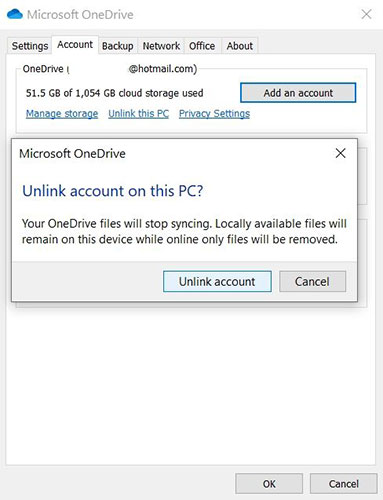
<p style="text-align: justify;">4. Trong phần&nbsp;<strong>OneDrive</strong>, bấm&nbsp;<strong>Unlink this PC</strong>.</p>

<p style="text-align: justify;">5. Trong hộp xác nhận, nhấp vào&nbsp;<strong>Unlink account.</strong></p>

<figure>
<div style="text-align: justify;"><img alt="Vô hiệu hóa OneDrive trong Windows 10" data-i="1" data-src="https://st.quantrimang.com/photos/image/2020/10/14/go-bo-onedrive-1.jpg" data-was-processed="true" height="500" src="https://st.quantrimang.com/photos/image/2020/10/14/go-bo-onedrive-1.jpg" width="383" /></div>

<figcaption>
<div style="text-align: justify;">Vô hiệu hóa OneDrive trong Windows 10</div>
</figcaption>
</figure>

<p style="text-align: justify;">Khi OneDrive bị vô hiệu hóa, bạn có thể tiến hành gỡ cài đặt OneDrive.</p>

<p style="text-align: justify;">1. Nhấn phím&nbsp;<strong>Win + I</strong>&nbsp;để&nbsp;mở Settings.</p>

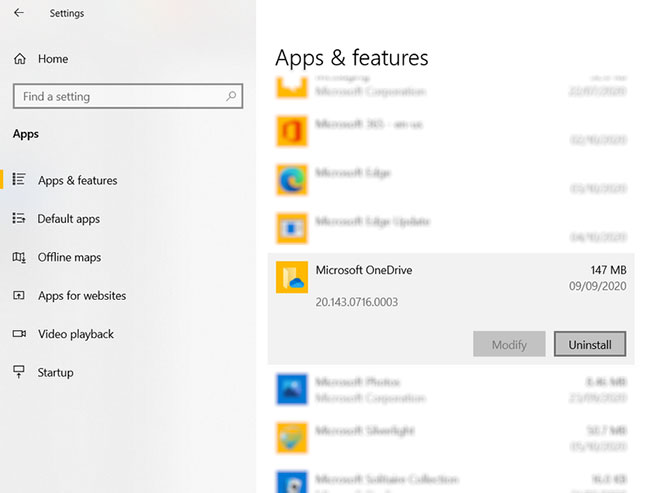
<p style="text-align: justify;">2. Trong&nbsp;<strong>Settings</strong>, đi tới&nbsp;<strong>Apps &gt; Apps &amp; features</strong>.</p>

<p style="text-align: justify;">3. Cuộn xuống&nbsp;<strong>Microsoft OneDrive.</strong></p>

<p style="text-align: justify;">4. Chọn&nbsp;<strong>Microsoft OneDrive.</strong></p>

<p style="text-align: justify;">5. Nhấp vào&nbsp;<strong>Uninstall.</strong></p>

<figure>
<div style="text-align: justify;"><img alt="Gỡ cài đặt OneDrive" data-i="2" data-src="https://st.quantrimang.com/photos/image/2020/10/14/go-bo-onedrive-2.jpg" data-was-processed="true" height="493" src="https://st.quantrimang.com/photos/image/2020/10/14/go-bo-onedrive-2.jpg" width="650" /></div>

<figcaption>
<div style="text-align: justify;">Gỡ cài đặt OneDrive</div>
</figcaption>
</figure>

<p style="text-align: justify;">Điều quan trọng cần lưu ý là các file và thư mục được đồng bộ với OneDrive sẽ vẫn không bị ảnh hưởng. Bạn vẫn có thể truy cập chúng trong trình duyệt của mình hoặc qua bất kỳ thiết bị nào khác được kết nối với tài khoản đám mây.</p>
		</div>
				<div id="author">
						<p>
				<strong>Nguồn tin:</strong>
				Quantrimang.com
			</p>
		</div>
	</div>
	<div id="footer" class="clearfix">
		<div id="url">
			<strong>URL của bản tin này: </strong><a href="https://www.nguoicodonvn2008.info/vi/news/savefile/kien-thuc-may-tinh/cac-buoc-vo-hieu-hoa-hoac-go-bo-hoan-toan-ung-dung-onedrive-tren-windows-10-2899.html" title="Các bước vô hiệu hóa hoặc gỡ bỏ hoàn toàn ứng dụng Onedrive trên Windows 10">https://www.nguoicodonvn2008.info/vi/news/savefile/kien-thuc-may-tinh/cac-buoc-vo-hieu-hoa-hoac-go-bo-hoan-toan-ung-dung-onedrive-tren-windows-10-2899.html</a>

		</div>
		<div class="clear"></div>
		<div class="copyright">
			&copy; .&#x3A; Nguoicodonvn2008.info - Cõi lòng người cô đơn &#x3A;.
		</div>
		<div id="contact">
			<a href="mailto:admin@nguoicodonvn2008.info">admin@nguoicodonvn2008.info</a>
		</div>
	</div>
</div>
        <div id="timeoutsess" class="chromeframe">
            Bạn đã không sử dụng Site, <a onclick="timeoutsesscancel();" href="https://nguoicodonvn2008.info/#">Bấm vào đây để duy trì trạng thái đăng nhập</a>. Thời gian chờ: <span id="secField"> 60 </span> giây
        </div>
        <div id="openidResult" class="nv-alert" style="display:none"></div>
        <div id="openidBt" data-result="" data-redirect=""></div>
		</script>
		<div class="car-top">
  <span><img src="https://nguoicodonvn2008.info/themes/default/images/car.png" alt=""></span>
</div>
<script src="https://nguoicodonvn2008.info/assets/js/jquery/jquery.min.js"></script>
<script>var nv_base_siteurl="/",nv_lang_data="vi",nv_lang_interface="vi",nv_name_variable="nv",nv_fc_variable="op",nv_lang_variable="language",nv_module_name="news",nv_func_name="savefile",nv_is_user=0, nv_my_ofs=-4,nv_my_abbr="EDT",nv_cookie_prefix="nv4c_e856T",nv_check_pass_mstime=1738000,nv_area_admin=0,nv_safemode=0,theme_responsive=0,nv_recaptcha_ver=2,nv_recaptcha_sitekey="",nv_recaptcha_type="image",XSSsanitize=1;</script>
<script src="https://nguoicodonvn2008.info/assets/js/language/vi.js"></script>
<script src="https://nguoicodonvn2008.info/assets/js/DOMPurify/purify3.js"></script>
<script src="https://nguoicodonvn2008.info/assets/js/global.js"></script>
<script src="https://nguoicodonvn2008.info/assets/js/site.js"></script>
<script src="https://nguoicodonvn2008.info/themes/default/js/news.js"></script>
<script src="https://nguoicodonvn2008.info/themes/default/js/main.js"></script>
<script src="https://nguoicodonvn2008.info/themes/default/js/custom.js"></script>
<script type="application/ld+json">
        {
            "@context": "https://schema.org",
            "@type": "Organization",
            "url": "https://nguoicodonvn2008.info",
            "logo": "https://nguoicodonvn2008.info/uploads/angel.gif"
        }
        </script>
<script src="https://nguoicodonvn2008.info/themes/default/js/bootstrap.min.js"></script>
<script type="text/javascript">
var $scrolltop = $('.car-top');
$scrolltop.on('click', function () {
    $('html,body').animate({
        scrollTop: 0
    }, 800);
    $(this).addClass("car-run");
    setTimeout(function(){ $scrolltop.removeClass('car-run');}, 1000);
    return false;
});
$(window).on('scroll', function ()
{ 
    if($(window).scrollTop() >= 200)
    {
        $scrolltop.addClass("show");
        $scrolltop.addClass("car-down");
    }
    else
    {
       $scrolltop.removeClass("show");
       setTimeout(function(){ $scrolltop.removeClass('car-down');}, 300);
    }
});
</script>
</body>
</html>