<!DOCTYPE html>
    <html lang="vi" xmlns="http://www.w3.org/1999/xhtml" prefix="og: http://ogp.me/ns#">
    <head>
<title>Bật&#x002F;tắt Touchpad Edge Scrolling trên desktop Debian GNOME</title>
<meta name="description" content="Bật&#x002F;tắt Touchpad Edge Scrolling trên desktop Debian GNOME - Savefile - Tin Tức -...">
<meta name="author" content=".: Nguoicodonvn2008.info - Cõi lòng người cô đơn :.">
<meta name="copyright" content=".: Nguoicodonvn2008.info - Cõi lòng người cô đơn :. [admin@nguoicodonvn2008.info]">
<meta name="robots" content="index, archive, follow, noodp">
<meta name="googlebot" content="index,archive,follow,noodp">
<meta name="msnbot" content="all,index,follow">
<meta name="generator" content="NukeViet v4.5">
<meta http-equiv="Content-Type" content="text/html; charset=utf-8">
<meta property="og:title" content="Bật&#x002F;tắt Touchpad Edge Scrolling trên desktop Debian GNOME">
<meta property="og:type" content="website">
<meta property="og:description" content="Savefile - Tin Tức - https&#x3A;&#x002F;&#x002F;www.nguoicodonvn2008.info&#x002F;vi&#x002F;news&#x002F;savefile&#x002F;kien-thuc-may-tinh&#x002F;bat-tat-touchpad-edge-scrolling-tren-desktop-debian-gnome-2822.html">
<meta property="og:site_name" content=".&#x3A; Nguoicodonvn2008.info - Cõi lòng người cô đơn &#x3A;.">
<meta property="og:url" content="https://www.nguoicodonvn2008.info/vi/news/savefile/kien-thuc-may-tinh/bat-tat-touchpad-edge-scrolling-tren-desktop-debian-gnome-2822.html">
<link rel="shortcut icon" href="https://nguoicodonvn2008.info/favicon.ico">
<link rel="canonical" href="https://www.nguoicodonvn2008.info/vi/news/savefile/kien-thuc-may-tinh/bat-tat-touchpad-edge-scrolling-tren-desktop-debian-gnome-2822.html">
<link rel="alternate" href="https://nguoicodonvn2008.info/vi/news/rss/" title="Tin Tức" type="application/rss+xml">
<link rel="alternate" href="https://nguoicodonvn2008.info/vi/news/rss/karaoke-dual/" title="Tin Tức - Karaoke Dual" type="application/rss+xml">
<link rel="alternate" href="https://nguoicodonvn2008.info/vi/news/rss/nhac-tre/" title="Tin Tức - Nhạc trẻ" type="application/rss+xml">
<link rel="alternate" href="https://nguoicodonvn2008.info/vi/news/rss/tru-tinh/" title="Tin Tức - Trữ tình" type="application/rss+xml">
<link rel="alternate" href="https://nguoicodonvn2008.info/vi/news/rss/nuoc-ngoai/" title="Tin Tức - Nước ngoài" type="application/rss+xml">
<link rel="alternate" href="https://nguoicodonvn2008.info/vi/news/rss/remix/" title="Tin Tức - Remix" type="application/rss+xml">
<link rel="alternate" href="https://nguoicodonvn2008.info/vi/news/rss/tam-su-tinh-yeu/" title="Tin Tức - Tâm sự tình yêu" type="application/rss+xml">
<link rel="alternate" href="https://nguoicodonvn2008.info/vi/news/rss/tho-suu-tam/" title="Tin Tức - Thơ sưu tầm" type="application/rss+xml">
<link rel="alternate" href="https://nguoicodonvn2008.info/vi/news/rss/cuoc-song/" title="Tin Tức - Cuộc sống" type="application/rss+xml">
<link rel="alternate" href="https://nguoicodonvn2008.info/vi/news/rss/phan-mem/" title="Tin Tức - Phần mềm" type="application/rss+xml">
<link rel="alternate" href="https://nguoicodonvn2008.info/vi/news/rss/kien-thuc-may-tinh/" title="Tin Tức - Kiến thức máy tính" type="application/rss+xml">
<link rel="alternate" href="https://nguoicodonvn2008.info/vi/news/rss/hoc-tap/" title="Tin Tức - Học tập" type="application/rss+xml">
<link rel="alternate" href="https://nguoicodonvn2008.info/vi/news/rss/tai-lieu/" title="Tin Tức - Tài liệu" type="application/rss+xml">
<link rel="alternate" href="https://nguoicodonvn2008.info/vi/news/rss/de-thi/" title="Tin Tức - Đề thi" type="application/rss+xml">
<link rel="preload" as="style" href="https://nguoicodonvn2008.info/assets/css/font-awesome.min.css" type="text/css">
<link rel="preload" as="style" href="https://nguoicodonvn2008.info/themes/default/css/bootstrap.non-responsive.css" type="text/css">
<link rel="preload" as="style" href="https://nguoicodonvn2008.info/themes/default/css/style.css" type="text/css">
<link rel="preload" as="style" href="https://nguoicodonvn2008.info/themes/default/css/style.non-responsive.css" type="text/css">
<link rel="preload" as="style" href="https://nguoicodonvn2008.info/themes/default/css/news.css" type="text/css">
<link rel="preload" as="style" href="https://nguoicodonvn2008.info/themes/default/css/custom.css" type="text/css">
<link rel="preload" as="script" href="https://nguoicodonvn2008.info/assets/js/jquery/jquery.min.js" type="text/javascript">
<link rel="preload" as="script" href="https://nguoicodonvn2008.info/assets/js/language/vi.js" type="text/javascript">
<link rel="preload" as="script" href="https://nguoicodonvn2008.info/assets/js/DOMPurify/purify3.js" type="text/javascript">
<link rel="preload" as="script" href="https://nguoicodonvn2008.info/assets/js/global.js" type="text/javascript">
<link rel="preload" as="script" href="https://nguoicodonvn2008.info/assets/js/site.js" type="text/javascript">
<link rel="preload" as="script" href="https://nguoicodonvn2008.info/themes/default/js/news.js" type="text/javascript">
<link rel="preload" as="script" href="https://nguoicodonvn2008.info/themes/default/js/main.js" type="text/javascript">
<link rel="preload" as="script" href="https://nguoicodonvn2008.info/themes/default/js/custom.js" type="text/javascript">
<link rel="preload" as="script" href="https://nguoicodonvn2008.info/themes/default/js/bootstrap.min.js" type="text/javascript">
<link rel="stylesheet" href="https://nguoicodonvn2008.info/assets/css/font-awesome.min.css">
<link rel="stylesheet" href="https://nguoicodonvn2008.info/themes/default/css/bootstrap.non-responsive.css">
<link rel="stylesheet" href="https://nguoicodonvn2008.info/themes/default/css/style.css">
<link rel="stylesheet" href="https://nguoicodonvn2008.info/themes/default/css/style.non-responsive.css">
<link rel="StyleSheet" href="https://nguoicodonvn2008.info/themes/default/css/news.css">
<link rel="stylesheet" href="https://nguoicodonvn2008.info/themes/default/css/custom.css">
<style type="text/css">
	body{background: #fff;}
</style>
    </head>
    <body>
<div id="print">
	<div id="hd_print">
		<h2 class="pull-left">.&#x3A; Nguoicodonvn2008.info - Cõi lòng người cô đơn &#x3A;.</h2>
		<p class="pull-right"><a title=".&#x3A; Nguoicodonvn2008.info - Cõi lòng người cô đơn &#x3A;." href="https://nguoicodonvn2008.info/">https://nguoicodonvn2008.info</a></p>
	</div>
	<div class="clear"></div>
	<hr />
	<div id="content">
		<h1>Bật&#x002F;tắt Touchpad Edge Scrolling trên desktop Debian GNOME</h1>
		<ul class="list-inline">
			<li>Thứ sáu - 02/10/2020 00:29</li>
			<li class="hidden-print txtrequired"><em class="fa fa-print">&nbsp;</em><a title="In ra" href="javascript:;" onclick="window.print()">In ra</a></li>
			<li class="hidden-print txtrequired"><em class="fa fa-power-off">&nbsp;</em><a title="Đóng cửa sổ này" href="javascript:;" onclick="window.close()">Đóng cửa sổ này</a></li>
		</ul>
		<div class="clear"></div>
		<div id="hometext">
		</div>
				<div class="imghome">
			<img alt="Bật&#x002F;tắt Touchpad Edge Scrolling trên desktop Debian GNOME" src="https://st.quantrimang.com/photos/image/2020/09/29/edge-scrolling-4.jpg" width="460" class="img-thumbnail" />
		</div>
		<div class="clear"></div>
		<div id="bodytext" class="clearfix">
			<h2 style="text-align: justify;">Edge Scrolling là gì?</h2>

<p style="text-align: justify;">Trong khi sử dụng chuột có bánh xe ở giữa, bạn có thể cuộn lên và xuống dễ dàng trên các trang web dài, tài liệu và bất kỳ nơi nào có tùy chọn cuộn. Trên laptop, có một tùy chọn để cuộn lên và xuống bằng cách sử dụng cạnh bên phải của touchpad, gọi là Edge Scrolling.</p>

<p style="text-align: justify;">Mặc dù tính năng Edge Scrolling này hoạt động tốt đối với một số người, nhưng nhiều người khác có thể thấy phiền toái thực sự, vì nó gây rối với chế độ xem hiện tại, nếu vô tình chạm hoặc vuốt lên xuống ở phía bên phải của touchpad.</p>

<p style="text-align: justify;">Để phù hợp với nhu cầu của tất cả người dùng, Debian đã làm cho tùy chọn này có thể tùy chỉnh. Bạn có thể bật/tắt tính năng này thông qua tiện ích Settings trên giao diện người dùng đồ họa Debian.</p>

<p style="text-align: justify;">Trong bài viết này,&nbsp;<strong>Quantrimang.com</strong>&nbsp;sẽ giải thích cách bật/tắt Edge Scrolling cho laptop Debian. Bạn có thể làm tương tự theo các bước được mô tả trong bài viết này trên hệ thống&nbsp;Debian 10 Buster.</p>

<div style="text-align: justify;">&nbsp;</div>

<h2 style="text-align: justify;">Sử dụng tiện ích Settings để bật/tắt tính năng Edge Scrolling</h2>

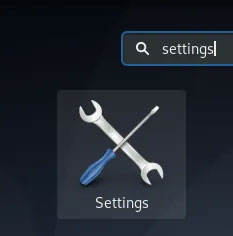
<p style="text-align: justify;">Tiện ích Debian Settings cho phép bạn thực hiện nhiều thay đổi và cấu hình quản trị đối với hệ thống. Một trong số đó là tùy chỉnh cách hoạt động của chuột và touchpad.</p>

<p style="text-align: justify;">Bạn có thể truy cập&nbsp;<strong>Settings</strong>&nbsp;thông qua tìm kiếm&nbsp;<strong>Application Launcher</strong>&nbsp;như sau:</p>

<figure>
<div style="text-align: justify;"><img alt="Truy cập Settings thông qua tìm kiếm Application Launcher" data-i="0" data-src="https://st.quantrimang.com/photos/image/2020/09/29/edge-scrolling-1.jpg" data-was-processed="true" height="236" src="https://st.quantrimang.com/photos/image/2020/09/29/edge-scrolling-1.jpg" width="233" /></div>

<figcaption>
<div style="text-align: justify;">Truy cập Settings thông qua tìm kiếm Application Launcher</div>
</figcaption>
</figure>

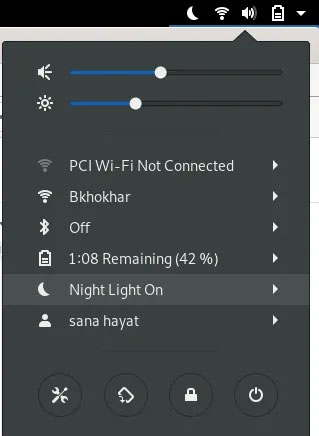
<p style="text-align: justify;">Hoặc, bấm vào mũi tên hướng xuống nằm ở góc trên cùng bên phải của màn hình Debian, sau đó bấm vào biểu tượng cài đặt từ chế độ xem sau:</p>

<figure>
<div style="text-align: justify;"><img alt="Bấm vào biểu tượng cài đặt" data-i="1" data-src="https://st.quantrimang.com/photos/image/2020/09/29/edge-scrolling-2.jpg" data-was-processed="true" height="436" src="https://st.quantrimang.com/photos/image/2020/09/29/edge-scrolling-2.jpg" width="319" /></div>

<figcaption>
<div style="text-align: justify;">Bấm vào biểu tượng cài đặt</div>
</figcaption>
</figure>

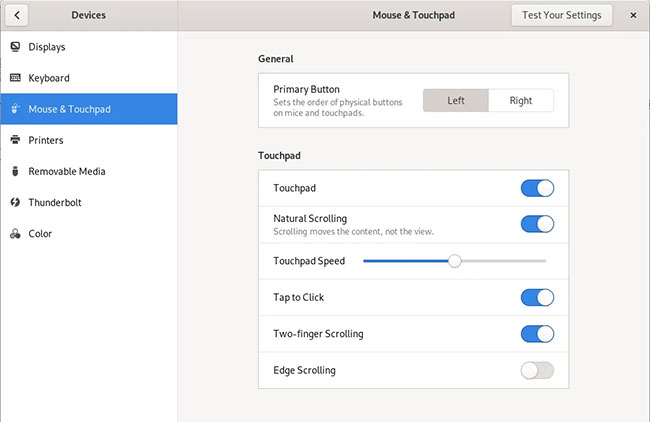
<p style="text-align: justify;">Tiện ích Settings mở ra trong giao diện bạn đã sử dụng trước đó. Bạn cần nhấp vào tab&nbsp;<strong>Devices</strong>, sau đó nhấp vào&nbsp;<strong>Mouse &amp; Touchpad</strong>&nbsp;để thực hiện các cấu hình cần thiết.</p>

<p style="text-align: justify;">Đây là giao diện&nbsp;<strong>Mouse &amp; Touchpad</strong>:</p>

<figure>
<div style="text-align: justify;"><img alt="Giao diện Mouse &amp; Touchpad" data-i="2" data-src="https://st.quantrimang.com/photos/image/2020/09/29/edge-scrolling-3.jpg" data-was-processed="true" height="422" src="https://st.quantrimang.com/photos/image/2020/09/29/edge-scrolling-3.jpg" width="650" /></div>

<figcaption>
<div style="text-align: justify;">Giao diện Mouse &amp; Touchpad</div>
</figcaption>
</figure>

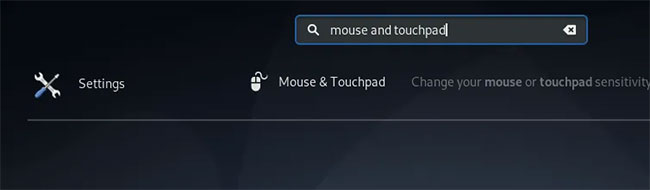
<p style="text-align: justify;">Ngoài ra, bạn có thể khởi chạy trực tiếp chế độ xem này bằng cách nhập các từ khóa&nbsp;<strong>mouse and touchpad</strong>&nbsp;có liên quan vào Application Launcher, như sau:</p>

<figure>
<div style="text-align: justify;"><img alt="Nhập các từ khóa mouse and touchpad có liên quan vào Application Launcher" data-i="3" data-src="https://st.quantrimang.com/photos/image/2020/09/29/edge-scrolling-4.jpg" data-was-processed="true" height="190" src="https://st.quantrimang.com/photos/image/2020/09/29/edge-scrolling-4.jpg" width="650" /></div>

<figcaption>
<div style="text-align: justify;">Nhập các từ khóa mouse and touchpad có liên quan vào Application Launcher</div>
</figcaption>
</figure>

<p style="text-align: justify;">Trong cài đặt&nbsp;<strong>Mouse &amp; Touchpad</strong>, hãy cố gắng xác định vị trí nút&nbsp;<strong>Edge Scrolling</strong>&nbsp;trong phần&nbsp;<strong>Touchpad.</strong>&nbsp;Theo mặc định, nút này được bật trên Debian, nghĩa là tính năng Edge Scrolling được kích hoạt trên touchpad.</p>

<p style="text-align: justify;">Chỉ cần tắt nút này để vô hiệu hóa tính năng Edge Scrolling hoặc bật nó lên để kích hoạt tính năng này. Ngay sau khi bạn làm điều đó, các cài đặt mới sẽ có hiệu lực ngay lập tức. Một số người thấy tính năng này hữu ích, nhưng nhiều người khác lại cho rằng nó phiền toái. Vì vậy, bất kể sở thích cá nhân của bạn là gì, bạn có thể sử dụng nút này trong tiện ích&nbsp;<strong>Settings</strong>&nbsp;để tắt hoặc bật tính năng tùy ý.</p>
		</div>
				<div id="author">
						<p>
				<strong>Nguồn tin:</strong>
				Quantrimang.com
			</p>
		</div>
	</div>
	<div id="footer" class="clearfix">
		<div id="url">
			<strong>URL của bản tin này: </strong><a href="https://www.nguoicodonvn2008.info/vi/news/savefile/kien-thuc-may-tinh/bat-tat-touchpad-edge-scrolling-tren-desktop-debian-gnome-2822.html" title="Bật&#x002F;tắt Touchpad Edge Scrolling trên desktop Debian GNOME">https://www.nguoicodonvn2008.info/vi/news/savefile/kien-thuc-may-tinh/bat-tat-touchpad-edge-scrolling-tren-desktop-debian-gnome-2822.html</a>

		</div>
		<div class="clear"></div>
		<div class="copyright">
			&copy; .&#x3A; Nguoicodonvn2008.info - Cõi lòng người cô đơn &#x3A;.
		</div>
		<div id="contact">
			<a href="mailto:admin@nguoicodonvn2008.info">admin@nguoicodonvn2008.info</a>
		</div>
	</div>
</div>
        <div id="timeoutsess" class="chromeframe">
            Bạn đã không sử dụng Site, <a onclick="timeoutsesscancel();" href="https://nguoicodonvn2008.info/#">Bấm vào đây để duy trì trạng thái đăng nhập</a>. Thời gian chờ: <span id="secField"> 60 </span> giây
        </div>
        <div id="openidResult" class="nv-alert" style="display:none"></div>
        <div id="openidBt" data-result="" data-redirect=""></div>
		</script>
		<div class="car-top">
  <span><img src="https://nguoicodonvn2008.info/themes/default/images/car.png" alt=""></span>
</div>
<div id="run_cronjobs" style="visibility:hidden;display:none;"><img alt="cron" src="/index.php?second=cronjobs&amp;p=a11l9T90" width="1" height="1" /></div>
<script src="https://nguoicodonvn2008.info/assets/js/jquery/jquery.min.js"></script>
<script>var nv_base_siteurl="/",nv_lang_data="vi",nv_lang_interface="vi",nv_name_variable="nv",nv_fc_variable="op",nv_lang_variable="language",nv_module_name="news",nv_func_name="savefile",nv_is_user=0, nv_my_ofs=-4,nv_my_abbr="EDT",nv_cookie_prefix="nv4c_e856T",nv_check_pass_mstime=1738000,nv_area_admin=0,nv_safemode=0,theme_responsive=0,nv_recaptcha_ver=2,nv_recaptcha_sitekey="",nv_recaptcha_type="image",XSSsanitize=1;</script>
<script src="https://nguoicodonvn2008.info/assets/js/language/vi.js"></script>
<script src="https://nguoicodonvn2008.info/assets/js/DOMPurify/purify3.js"></script>
<script src="https://nguoicodonvn2008.info/assets/js/global.js"></script>
<script src="https://nguoicodonvn2008.info/assets/js/site.js"></script>
<script src="https://nguoicodonvn2008.info/themes/default/js/news.js"></script>
<script src="https://nguoicodonvn2008.info/themes/default/js/main.js"></script>
<script src="https://nguoicodonvn2008.info/themes/default/js/custom.js"></script>
<script type="application/ld+json">
        {
            "@context": "https://schema.org",
            "@type": "Organization",
            "url": "https://nguoicodonvn2008.info",
            "logo": "https://nguoicodonvn2008.info/uploads/angel.gif"
        }
        </script>
<script src="https://nguoicodonvn2008.info/themes/default/js/bootstrap.min.js"></script>
<script type="text/javascript">
var $scrolltop = $('.car-top');
$scrolltop.on('click', function () {
    $('html,body').animate({
        scrollTop: 0
    }, 800);
    $(this).addClass("car-run");
    setTimeout(function(){ $scrolltop.removeClass('car-run');}, 1000);
    return false;
});
$(window).on('scroll', function ()
{ 
    if($(window).scrollTop() >= 200)
    {
        $scrolltop.addClass("show");
        $scrolltop.addClass("car-down");
    }
    else
    {
       $scrolltop.removeClass("show");
       setTimeout(function(){ $scrolltop.removeClass('car-down');}, 300);
    }
});
</script>
</body>
</html>