<!DOCTYPE html>
    <html lang="vi" xmlns="http://www.w3.org/1999/xhtml" prefix="og: http://ogp.me/ns#">
    <head>
<title>Bạn có biết mình có thể làm việc hiệu quả ra sao với Windows 11 không?</title>
<meta name="description" content="Bạn có biết mình có thể làm việc hiệu quả ra sao với Windows 11 không? - Savefile - Tin Tức -...">
<meta name="author" content=".: Nguoicodonvn2008.info - Cõi lòng người cô đơn :.">
<meta name="copyright" content=".: Nguoicodonvn2008.info - Cõi lòng người cô đơn :. [admin@nguoicodonvn2008.info]">
<meta name="robots" content="index, archive, follow, noodp">
<meta name="googlebot" content="index,archive,follow,noodp">
<meta name="msnbot" content="all,index,follow">
<meta name="generator" content="NukeViet v4.5">
<meta http-equiv="Content-Type" content="text/html; charset=utf-8">
<meta property="og:title" content="Bạn có biết mình có thể làm việc hiệu quả ra sao với Windows 11 không?">
<meta property="og:type" content="website">
<meta property="og:description" content="Savefile - Tin Tức -...">
<meta property="og:site_name" content=".&#x3A; Nguoicodonvn2008.info - Cõi lòng người cô đơn &#x3A;.">
<meta property="og:url" content="https://www.nguoicodonvn2008.info/vi/news/savefile/kien-thuc-may-tinh/ban-co-biet-minh-co-the-lam-viec-hieu-qua-ra-sao-voi-windows-11-khong-10571.html">
<link rel="shortcut icon" href="https://nguoicodonvn2008.info/favicon.ico">
<link rel="canonical" href="https://www.nguoicodonvn2008.info/vi/news/savefile/kien-thuc-may-tinh/ban-co-biet-minh-co-the-lam-viec-hieu-qua-ra-sao-voi-windows-11-khong-10571.html">
<link rel="alternate" href="https://nguoicodonvn2008.info/vi/news/rss/" title="Tin Tức" type="application/rss+xml">
<link rel="alternate" href="https://nguoicodonvn2008.info/vi/news/rss/karaoke-dual/" title="Tin Tức - Karaoke Dual" type="application/rss+xml">
<link rel="alternate" href="https://nguoicodonvn2008.info/vi/news/rss/nhac-tre/" title="Tin Tức - Nhạc trẻ" type="application/rss+xml">
<link rel="alternate" href="https://nguoicodonvn2008.info/vi/news/rss/tru-tinh/" title="Tin Tức - Trữ tình" type="application/rss+xml">
<link rel="alternate" href="https://nguoicodonvn2008.info/vi/news/rss/nuoc-ngoai/" title="Tin Tức - Nước ngoài" type="application/rss+xml">
<link rel="alternate" href="https://nguoicodonvn2008.info/vi/news/rss/remix/" title="Tin Tức - Remix" type="application/rss+xml">
<link rel="alternate" href="https://nguoicodonvn2008.info/vi/news/rss/tam-su-tinh-yeu/" title="Tin Tức - Tâm sự tình yêu" type="application/rss+xml">
<link rel="alternate" href="https://nguoicodonvn2008.info/vi/news/rss/tho-suu-tam/" title="Tin Tức - Thơ sưu tầm" type="application/rss+xml">
<link rel="alternate" href="https://nguoicodonvn2008.info/vi/news/rss/cuoc-song/" title="Tin Tức - Cuộc sống" type="application/rss+xml">
<link rel="alternate" href="https://nguoicodonvn2008.info/vi/news/rss/phan-mem/" title="Tin Tức - Phần mềm" type="application/rss+xml">
<link rel="alternate" href="https://nguoicodonvn2008.info/vi/news/rss/kien-thuc-may-tinh/" title="Tin Tức - Kiến thức máy tính" type="application/rss+xml">
<link rel="alternate" href="https://nguoicodonvn2008.info/vi/news/rss/hoc-tap/" title="Tin Tức - Học tập" type="application/rss+xml">
<link rel="alternate" href="https://nguoicodonvn2008.info/vi/news/rss/tai-lieu/" title="Tin Tức - Tài liệu" type="application/rss+xml">
<link rel="alternate" href="https://nguoicodonvn2008.info/vi/news/rss/de-thi/" title="Tin Tức - Đề thi" type="application/rss+xml">
<link rel="preload" as="style" href="https://nguoicodonvn2008.info/assets/css/font-awesome.min.css" type="text/css">
<link rel="preload" as="style" href="https://nguoicodonvn2008.info/themes/default/css/bootstrap.non-responsive.css" type="text/css">
<link rel="preload" as="style" href="https://nguoicodonvn2008.info/themes/default/css/style.css" type="text/css">
<link rel="preload" as="style" href="https://nguoicodonvn2008.info/themes/default/css/style.non-responsive.css" type="text/css">
<link rel="preload" as="style" href="https://nguoicodonvn2008.info/themes/default/css/news.css" type="text/css">
<link rel="preload" as="style" href="https://nguoicodonvn2008.info/themes/default/css/custom.css" type="text/css">
<link rel="preload" as="script" href="https://nguoicodonvn2008.info/assets/js/jquery/jquery.min.js" type="text/javascript">
<link rel="preload" as="script" href="https://nguoicodonvn2008.info/assets/js/language/vi.js" type="text/javascript">
<link rel="preload" as="script" href="https://nguoicodonvn2008.info/assets/js/DOMPurify/purify3.js" type="text/javascript">
<link rel="preload" as="script" href="https://nguoicodonvn2008.info/assets/js/global.js" type="text/javascript">
<link rel="preload" as="script" href="https://nguoicodonvn2008.info/assets/js/site.js" type="text/javascript">
<link rel="preload" as="script" href="https://nguoicodonvn2008.info/themes/default/js/news.js" type="text/javascript">
<link rel="preload" as="script" href="https://nguoicodonvn2008.info/themes/default/js/main.js" type="text/javascript">
<link rel="preload" as="script" href="https://nguoicodonvn2008.info/themes/default/js/custom.js" type="text/javascript">
<link rel="preload" as="script" href="https://nguoicodonvn2008.info/themes/default/js/bootstrap.min.js" type="text/javascript">
<link rel="stylesheet" href="https://nguoicodonvn2008.info/assets/css/font-awesome.min.css">
<link rel="stylesheet" href="https://nguoicodonvn2008.info/themes/default/css/bootstrap.non-responsive.css">
<link rel="stylesheet" href="https://nguoicodonvn2008.info/themes/default/css/style.css">
<link rel="stylesheet" href="https://nguoicodonvn2008.info/themes/default/css/style.non-responsive.css">
<link rel="StyleSheet" href="https://nguoicodonvn2008.info/themes/default/css/news.css">
<link rel="stylesheet" href="https://nguoicodonvn2008.info/themes/default/css/custom.css">
<style type="text/css">
	body{background: #fff;}
</style>
    </head>
    <body>
<div id="print">
	<div id="hd_print">
		<h2 class="pull-left">.&#x3A; Nguoicodonvn2008.info - Cõi lòng người cô đơn &#x3A;.</h2>
		<p class="pull-right"><a title=".&#x3A; Nguoicodonvn2008.info - Cõi lòng người cô đơn &#x3A;." href="https://nguoicodonvn2008.info/">https://nguoicodonvn2008.info</a></p>
	</div>
	<div class="clear"></div>
	<hr />
	<div id="content">
		<h1>Bạn có biết mình có thể làm việc hiệu quả ra sao với Windows 11 không?</h1>
		<ul class="list-inline">
			<li>Thứ bảy - 14/06/2025 00:36</li>
			<li class="hidden-print txtrequired"><em class="fa fa-print">&nbsp;</em><a title="In ra" href="javascript:;" onclick="window.print()">In ra</a></li>
			<li class="hidden-print txtrequired"><em class="fa fa-power-off">&nbsp;</em><a title="Đóng cửa sổ này" href="javascript:;" onclick="window.close()">Đóng cửa sổ này</a></li>
		</ul>
		<div class="clear"></div>
		<div id="hometext">
		</div>
				<div class="imghome">
			<img alt="Bạn có biết mình có thể làm việc hiệu quả ra sao với Windows 11 không?" src="https://st.quantrimang.com/photos/image/2025/06/13/lam-viec-hieu-qua-voi-windows-11-4.jpg" width="460" class="img-thumbnail" />
		</div>
		<div class="clear"></div>
		<div id="bodytext" class="clearfix">
			<p style="text-align: justify;">Điều lớn nhất giết chết các phiên làm việc hiệu quả là sự xao nhãng. Tuy nhiên, đó không phải là kiểu mất tập trung khi có người bước vào phòng bạn. Thay vào đó, đó là những thông báo liên tục từ các ứng dụng, email và tin nhắn khiến bạn mất tập trung vào công việc. Đó là lý do tại sao nhiều người bắt đầu tích cực sử dụng các công cụ tích hợp sẵn của&nbsp;Windows 11&nbsp;để loại bỏ những thứ gây phiền nhiễu này!</p>

<h2 style="text-align: justify;">3. Focus Sessions giúp bạn tập trung vào nhiệm vụ</h2>

<p style="text-align: justify;">Focus Sessions là một tiện ích trong ứng dụng Windows Clock, sử dụng&nbsp;kỹ thuật Pomodoro&nbsp;để chia nhỏ công việc của bạn thành các khoảng thời gian tập trung với các khoảng nghỉ ngắn ở giữa. Đây là một cách đơn giản để đưa ra vạch đích cho não bộ và rèn luyện bản thân tập trung vào nhiệm vụ.</p>

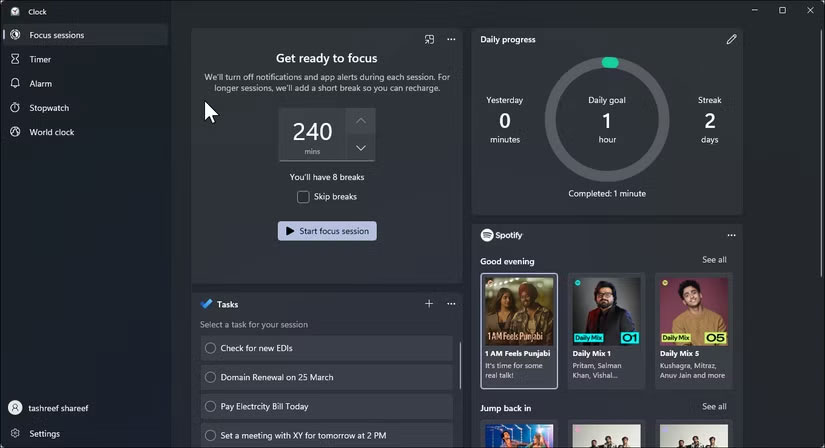
<p style="text-align: justify;">Để bắt đầu, hãy nhấp vào nút&nbsp;<strong>Start</strong>, nhập&nbsp;<strong>Clock</strong>&nbsp;và mở ứng dụng từ kết quả tìm kiếm. Đi tới tab&nbsp;<strong>Focus Sessions</strong>, nơi bạn có thể đặt thời lượng mình muốn cho mỗi phiên kéo dài. Mặc định là 30 phút, nhưng có thể đặt thành 60 phút để làm việc sâu hơn. Bạn có thể kéo dài tối đa 240 phút, với tối đa 8 lần nghỉ trong suốt quá trình.</p>

<figure>
<div style="text-align: justify;"><img alt="Màn hình chính của Focus Sessions Windows 11" data-i="0" data-src="https://st.quantrimang.com/photos/image/2025/06/13/lam-viec-hieu-qua-voi-windows-11-1.jpg" data-was-processed="true" height="448" src="https://st.quantrimang.com/photos/image/2025/06/13/lam-viec-hieu-qua-voi-windows-11-1.jpg" width="825" /></div>

<figcaption>
<div style="text-align: justify;">Màn hình chính của Focus Sessions Windows 11</div>
</figcaption>
</figure>

<p style="text-align: justify;">Khi bạn đã sẵn sàng, hãy nhấp vào&nbsp;<strong>Start focus session</strong>. Thao tác này sẽ khởi chạy bộ đếm thời gian trên màn hình, theo dõi thời gian làm việc còn lại của bạn và tự động bật Do Not Disturb, chặn các thông báo không cần thiết để bạn có thể tập trung cho đến giờ nghỉ tiếp theo.</p>

<p style="text-align: justify;">Bạn không phải lúc nào cũng phải mở ứng dụng Clock để chạy Focus Sessions. Chỉ cần nhấn&nbsp;<strong>Win + N</strong>&nbsp;để mở bảng thông báo, sau đó nhấn vào Focus ở cuối để bắt đầu phiên ngay lập tức. Theo mặc định, thao tác này sẽ khởi chạy khối tập trung 30 phút với thời gian nghỉ 5 phút.</p>

<h2 style="text-align: justify;">2. Tắt tiếng thông báo bằng Do Not Disturb</h2>

<p style="text-align: justify;">Một trong những công cụ năng suất hữu ích nhất nhưng ít được sử dụng trong Windows 11 là tính năng Do Not Disturb. Mặc dù bạn có thể đã sử dụng tính năng này trên điện thoại trong các cuộc họp hoặc vào ban đêm, nhưng tính năng này cũng hiệu quả như nhau trong việc tắt tiếng thông báo trên máy tính và duy trì sự tập trung trong những phiên làm việc.</p>

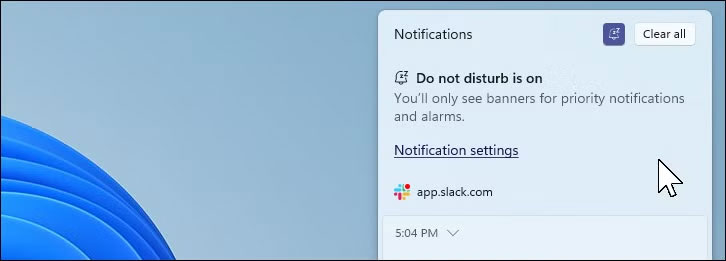
<p style="text-align: justify;">Windows 11 bao gồm nút chuyển đổi Do Not Disturb chuyên dụng để truy cập nhanh. Để bật Do Not Disturb trên Windows 11, hãy nhấp vào đồng hồ trên thanh tác vụ hoặc nhấn&nbsp;<strong>Win + N</strong>&nbsp;để mở bảng thông báo, sau đó nhấp vào biểu tượng chuông ở góc trên bên phải để bật Do Not Disturb. Một thông báo nhỏ sẽ xác nhận khi Do Not Disturb đang hoạt động.</p>

<figure>
<div style="text-align: justify;"><img alt="Windows 11 DND đang hoạt động" data-i="1" data-src="https://st.quantrimang.com/photos/image/2025/06/13/lam-viec-hieu-qua-voi-windows-11-2.jpg" data-was-processed="true" height="261" src="https://st.quantrimang.com/photos/image/2025/06/13/lam-viec-hieu-qua-voi-windows-11-2.jpg" width="726" /></div>

<figcaption>
<div style="text-align: justify;">Windows 11 DND đang hoạt động</div>
</figcaption>
</figure>

<p style="text-align: justify;">Sau khi bật, Windows sẽ ngừng hiển thị thông báo pop-up để giúp bạn tập trung. Tuy nhiên, bạn sẽ không bỏ lỡ bất kỳ thông tin quan trọng nào - tất cả thông báo vẫn được lưu trữ trong bảng thông báo để bạn có thể kiểm tra bất cứ khi nào mình muốn.</p>

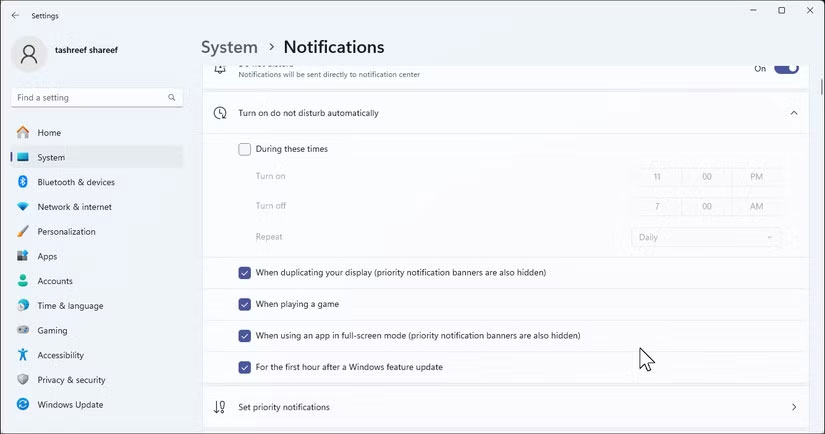
<p style="text-align: justify;">Bạn cũng có thể tùy chỉnh thông báo ưu tiên để cho phép cảnh báo từ các ứng dụng, cuộc gọi hoặc lời nhắc cụ thể ngay cả khi DND đang bật. Để thiết lập, hãy vào&nbsp;<strong>Start &gt; Settings &gt; System &gt; Notifications</strong>&nbsp;và nhấp vào&nbsp;<strong>Set priority notifications</strong>. Từ đó, chọn&nbsp;<strong>Add apps</strong>&nbsp;để chọn ứng dụng nào có thể phá vỡ sự im lặng, bao gồm các cuộc gọi và lời nhắc từ những ứng dụng giao tiếp mà bạn tin tưởng.</p>

<figure>
<div style="text-align: justify;"><img alt="Cài đặt thông báo của Windows 11" data-i="2" data-src="https://st.quantrimang.com/photos/image/2025/06/13/lam-viec-hieu-qua-voi-windows-11-3.jpg" data-was-processed="true" height="434" src="https://st.quantrimang.com/photos/image/2025/06/13/lam-viec-hieu-qua-voi-windows-11-3.jpg" width="825" /></div>

<figcaption>
<div style="text-align: justify;">Cài đặt thông báo của Windows 11</div>
</figcaption>
</figure>

<p style="text-align: justify;">Có một hạn chế: Windows không cho phép bạn đặt thời gian kết thúc tự động cho DND, yêu cầu bạn phải tắt thủ công. Tuy nhiên, bạn có thể lên lịch để DND tự động kích hoạt trong những thời điểm cụ thể như giờ làm việc, do đó bạn không phải tự bật và tắt hàng ngày.</p>

<h2 style="text-align: justify;">1. Tối ưu hóa cài đặt nguồn cho hiệu suất hoặc tuổi thọ pin</h2>

<p style="text-align: justify;">Năng suất bị ảnh hưởng khi máy tính xách tay của bạn chạy chậm hoặc hết pin giữa chừng khi đang làm việc. Đây là một lĩnh vực mà nhiều người không thường nghĩ đến và đó là lý do tại sao việc chọn đúng chế độ nguồn dựa trên nơi và cách bạn làm việc lại quan trọng.</p>

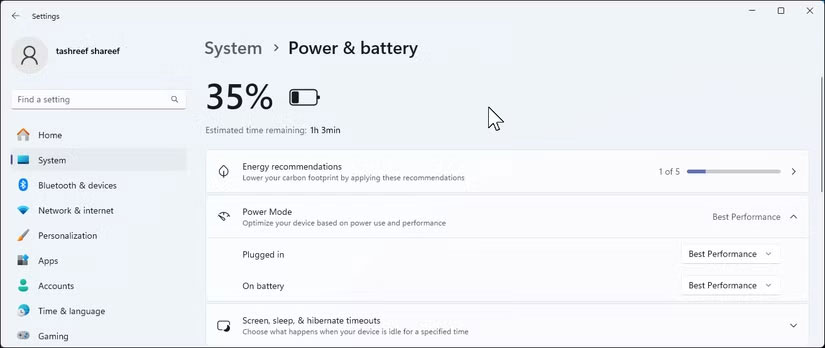
<p style="text-align: justify;">Windows 11 cung cấp 3 chế độ năng lượng tích hợp: Best Performance, Balanced và Best Power Efficiency. Theo mặc định, chế độ này sử dụng&nbsp;<strong>Balanced</strong>&nbsp;để cung cấp đủ năng lượng trong khi vẫn giữ mức tiêu thụ năng lượng ở mức thấp. Trái với quan niệm phổ biến, chế độ Balanced thực sự khá năng động. Chế độ này tự động điều chỉnh hiệu suất máy tính dựa trên những gì bạn đang làm. Chế độ này có thể tăng tốc&nbsp;CPU&nbsp;khi bạn đang chạy các tác vụ nặng và tiết kiệm năng lượng khi làm việc nhẹ hơn.</p>

<p style="text-align: justify;">Tuy nhiên, nếu bạn định làm việc xa bộ sạc, hãy chuyển sang&nbsp;<strong>Best Power Efficiency</strong>&nbsp;để tối đa hóa thời lượng pin. Để thay đổi chế độ năng lượng, hãy vào&nbsp;<strong>Settings &gt; System &gt; Power &amp; battery</strong>, sau đó sử dụng menu drop-down Power mode trong mục&nbsp;<strong>On battery</strong>&nbsp;để chọn&nbsp;<strong>Best Power Efficiency</strong>.</p>

<figure>
<div style="text-align: justify;"><img alt="Power &amp; battery trên Windows 11" data-i="3" data-src="https://st.quantrimang.com/photos/image/2025/06/13/lam-viec-hieu-qua-voi-windows-11-4.jpg" data-was-processed="true" height="348" src="https://st.quantrimang.com/photos/image/2025/06/13/lam-viec-hieu-qua-voi-windows-11-4.jpg" width="825" /></div>

<figcaption>
<div style="text-align: justify;">Power &amp; battery trên Windows 11</div>
</figcaption>
</figure>

<p style="text-align: justify;">Ngoài ra, đừng quên&nbsp;<strong>Energy Saver</strong>&nbsp;cho những lúc pin yếu. Để bật chế độ này, hãy nhấp vào biểu tượng mạng, âm lượng và pin trên thanh tác vụ, sau đó bật hoặc tắt&nbsp;<strong>Energy Saver</strong>&nbsp;trong bảng Quick Settings (cuộn nếu cần).</p>

<p style="text-align: justify;">Những công cụ Windows 11 đơn giản này sẽ tạo nên sự khác biệt thực sự trong cách bạn làm việc. Khi có thể tập trung trong giờ làm việc, bạn sẽ hoàn thành công việc nhanh hơn và có nhiều thời gian hơn cho những điều thực sự quan trọng: Dành thời gian cho gia đình, chăm sóc sức khỏe hoặc chỉ đơn giản là thư giãn mà không cảm thấy tội lỗi về những công việc còn dang dở.</p>
		</div>
				<div id="author">
						<p>
				<strong>Nguồn tin:</strong>
				Quantrimang.com:
			</p>
		</div>
	</div>
	<div id="footer" class="clearfix">
		<div id="url">
			<strong>URL của bản tin này: </strong><a href="https://www.nguoicodonvn2008.info/vi/news/savefile/kien-thuc-may-tinh/ban-co-biet-minh-co-the-lam-viec-hieu-qua-ra-sao-voi-windows-11-khong-10571.html" title="Bạn có biết mình có thể làm việc hiệu quả ra sao với Windows 11 không?">https://www.nguoicodonvn2008.info/vi/news/savefile/kien-thuc-may-tinh/ban-co-biet-minh-co-the-lam-viec-hieu-qua-ra-sao-voi-windows-11-khong-10571.html</a>

		</div>
		<div class="clear"></div>
		<div class="copyright">
			&copy; .&#x3A; Nguoicodonvn2008.info - Cõi lòng người cô đơn &#x3A;.
		</div>
		<div id="contact">
			<a href="mailto:admin@nguoicodonvn2008.info">admin@nguoicodonvn2008.info</a>
		</div>
	</div>
</div>
        <div id="timeoutsess" class="chromeframe">
            Bạn đã không sử dụng Site, <a onclick="timeoutsesscancel();" href="https://nguoicodonvn2008.info/#">Bấm vào đây để duy trì trạng thái đăng nhập</a>. Thời gian chờ: <span id="secField"> 60 </span> giây
        </div>
        <div id="openidResult" class="nv-alert" style="display:none"></div>
        <div id="openidBt" data-result="" data-redirect=""></div>
		</script>
		<div class="car-top">
  <span><img src="https://nguoicodonvn2008.info/themes/default/images/car.png" alt=""></span>
</div>
<script src="https://nguoicodonvn2008.info/assets/js/jquery/jquery.min.js"></script>
<script>var nv_base_siteurl="/",nv_lang_data="vi",nv_lang_interface="vi",nv_name_variable="nv",nv_fc_variable="op",nv_lang_variable="language",nv_module_name="news",nv_func_name="savefile",nv_is_user=0, nv_my_ofs=-4,nv_my_abbr="EDT",nv_cookie_prefix="nv4c_e856T",nv_check_pass_mstime=1738000,nv_area_admin=0,nv_safemode=0,theme_responsive=0,nv_recaptcha_ver=2,nv_recaptcha_sitekey="",nv_recaptcha_type="image",XSSsanitize=1;</script>
<script src="https://nguoicodonvn2008.info/assets/js/language/vi.js"></script>
<script src="https://nguoicodonvn2008.info/assets/js/DOMPurify/purify3.js"></script>
<script src="https://nguoicodonvn2008.info/assets/js/global.js"></script>
<script src="https://nguoicodonvn2008.info/assets/js/site.js"></script>
<script src="https://nguoicodonvn2008.info/themes/default/js/news.js"></script>
<script src="https://nguoicodonvn2008.info/themes/default/js/main.js"></script>
<script src="https://nguoicodonvn2008.info/themes/default/js/custom.js"></script>
<script type="application/ld+json">
        {
            "@context": "https://schema.org",
            "@type": "Organization",
            "url": "https://nguoicodonvn2008.info",
            "logo": "https://nguoicodonvn2008.info/uploads/angel.gif"
        }
        </script>
<script src="https://nguoicodonvn2008.info/themes/default/js/bootstrap.min.js"></script>
<script type="text/javascript">
var $scrolltop = $('.car-top');
$scrolltop.on('click', function () {
    $('html,body').animate({
        scrollTop: 0
    }, 800);
    $(this).addClass("car-run");
    setTimeout(function(){ $scrolltop.removeClass('car-run');}, 1000);
    return false;
});
$(window).on('scroll', function ()
{ 
    if($(window).scrollTop() >= 200)
    {
        $scrolltop.addClass("show");
        $scrolltop.addClass("car-down");
    }
    else
    {
       $scrolltop.removeClass("show");
       setTimeout(function(){ $scrolltop.removeClass('car-down');}, 300);
    }
});
</script>
</body>
</html>