<!DOCTYPE html>
    <html lang="vi" xmlns="http://www.w3.org/1999/xhtml" prefix="og: http://ogp.me/ns#">
    <head>
<title>Bài 30&#x3A; Flex trong Bootstrap 5</title>
<meta name="description" content="Bài 30&#x3A; Flex trong Bootstrap 5 - Savefile - Tin Tức - https&#x3A;&#x002F;&#x002F;www.nguoicodonvn2008.info&#x002F;vi&#x002F;news&#x002F;savefile&#x002F;kien-thuc-may-tinh&#x002F;bai-30-flex-trong-bootstrap-5-6427.html">
<meta name="author" content=".: Nguoicodonvn2008.info - Cõi lòng người cô đơn :.">
<meta name="copyright" content=".: Nguoicodonvn2008.info - Cõi lòng người cô đơn :. [admin@nguoicodonvn2008.info]">
<meta name="robots" content="index, archive, follow, noodp">
<meta name="googlebot" content="index,archive,follow,noodp">
<meta name="msnbot" content="all,index,follow">
<meta name="generator" content="NukeViet v4.5">
<meta http-equiv="Content-Type" content="text/html; charset=utf-8">
<meta property="og:title" content="Bài 30&#x3A; Flex trong Bootstrap 5">
<meta property="og:type" content="website">
<meta property="og:description" content="Savefile - Tin Tức - https&#x3A;&#x002F;&#x002F;www.nguoicodonvn2008.info&#x002F;vi&#x002F;news&#x002F;savefile&#x002F;kien-thuc-may-tinh&#x002F;bai-30-flex-trong-bootstrap-5-6427.html">
<meta property="og:site_name" content=".&#x3A; Nguoicodonvn2008.info - Cõi lòng người cô đơn &#x3A;.">
<meta property="og:url" content="https://www.nguoicodonvn2008.info/vi/news/savefile/kien-thuc-may-tinh/bai-30-flex-trong-bootstrap-5-6427.html">
<link rel="shortcut icon" href="https://nguoicodonvn2008.info/favicon.ico">
<link rel="canonical" href="https://www.nguoicodonvn2008.info/vi/news/savefile/kien-thuc-may-tinh/bai-30-flex-trong-bootstrap-5-6427.html">
<link rel="alternate" href="https://nguoicodonvn2008.info/vi/news/rss/" title="Tin Tức" type="application/rss+xml">
<link rel="alternate" href="https://nguoicodonvn2008.info/vi/news/rss/karaoke-dual/" title="Tin Tức - Karaoke Dual" type="application/rss+xml">
<link rel="alternate" href="https://nguoicodonvn2008.info/vi/news/rss/nhac-tre/" title="Tin Tức - Nhạc trẻ" type="application/rss+xml">
<link rel="alternate" href="https://nguoicodonvn2008.info/vi/news/rss/tru-tinh/" title="Tin Tức - Trữ tình" type="application/rss+xml">
<link rel="alternate" href="https://nguoicodonvn2008.info/vi/news/rss/nuoc-ngoai/" title="Tin Tức - Nước ngoài" type="application/rss+xml">
<link rel="alternate" href="https://nguoicodonvn2008.info/vi/news/rss/remix/" title="Tin Tức - Remix" type="application/rss+xml">
<link rel="alternate" href="https://nguoicodonvn2008.info/vi/news/rss/tam-su-tinh-yeu/" title="Tin Tức - Tâm sự tình yêu" type="application/rss+xml">
<link rel="alternate" href="https://nguoicodonvn2008.info/vi/news/rss/tho-suu-tam/" title="Tin Tức - Thơ sưu tầm" type="application/rss+xml">
<link rel="alternate" href="https://nguoicodonvn2008.info/vi/news/rss/cuoc-song/" title="Tin Tức - Cuộc sống" type="application/rss+xml">
<link rel="alternate" href="https://nguoicodonvn2008.info/vi/news/rss/phan-mem/" title="Tin Tức - Phần mềm" type="application/rss+xml">
<link rel="alternate" href="https://nguoicodonvn2008.info/vi/news/rss/kien-thuc-may-tinh/" title="Tin Tức - Kiến thức máy tính" type="application/rss+xml">
<link rel="alternate" href="https://nguoicodonvn2008.info/vi/news/rss/hoc-tap/" title="Tin Tức - Học tập" type="application/rss+xml">
<link rel="alternate" href="https://nguoicodonvn2008.info/vi/news/rss/tai-lieu/" title="Tin Tức - Tài liệu" type="application/rss+xml">
<link rel="alternate" href="https://nguoicodonvn2008.info/vi/news/rss/de-thi/" title="Tin Tức - Đề thi" type="application/rss+xml">
<link rel="preload" as="style" href="https://nguoicodonvn2008.info/assets/css/font-awesome.min.css" type="text/css">
<link rel="preload" as="style" href="https://nguoicodonvn2008.info/themes/default/css/bootstrap.non-responsive.css" type="text/css">
<link rel="preload" as="style" href="https://nguoicodonvn2008.info/themes/default/css/style.css" type="text/css">
<link rel="preload" as="style" href="https://nguoicodonvn2008.info/themes/default/css/style.non-responsive.css" type="text/css">
<link rel="preload" as="style" href="https://nguoicodonvn2008.info/themes/default/css/news.css" type="text/css">
<link rel="preload" as="style" href="https://nguoicodonvn2008.info/themes/default/css/custom.css" type="text/css">
<link rel="preload" as="script" href="https://nguoicodonvn2008.info/assets/js/jquery/jquery.min.js" type="text/javascript">
<link rel="preload" as="script" href="https://nguoicodonvn2008.info/assets/js/language/vi.js" type="text/javascript">
<link rel="preload" as="script" href="https://nguoicodonvn2008.info/assets/js/DOMPurify/purify3.js" type="text/javascript">
<link rel="preload" as="script" href="https://nguoicodonvn2008.info/assets/js/global.js" type="text/javascript">
<link rel="preload" as="script" href="https://nguoicodonvn2008.info/assets/js/site.js" type="text/javascript">
<link rel="preload" as="script" href="https://nguoicodonvn2008.info/themes/default/js/news.js" type="text/javascript">
<link rel="preload" as="script" href="https://nguoicodonvn2008.info/themes/default/js/main.js" type="text/javascript">
<link rel="preload" as="script" href="https://nguoicodonvn2008.info/themes/default/js/custom.js" type="text/javascript">
<link rel="preload" as="script" href="https://nguoicodonvn2008.info/themes/default/js/bootstrap.min.js" type="text/javascript">
<link rel="stylesheet" href="https://nguoicodonvn2008.info/assets/css/font-awesome.min.css">
<link rel="stylesheet" href="https://nguoicodonvn2008.info/themes/default/css/bootstrap.non-responsive.css">
<link rel="stylesheet" href="https://nguoicodonvn2008.info/themes/default/css/style.css">
<link rel="stylesheet" href="https://nguoicodonvn2008.info/themes/default/css/style.non-responsive.css">
<link rel="StyleSheet" href="https://nguoicodonvn2008.info/themes/default/css/news.css">
<link rel="stylesheet" href="https://nguoicodonvn2008.info/themes/default/css/custom.css">
<style type="text/css">
	body{background: #fff;}
</style>
    </head>
    <body>
<div id="print">
	<div id="hd_print">
		<h2 class="pull-left">.&#x3A; Nguoicodonvn2008.info - Cõi lòng người cô đơn &#x3A;.</h2>
		<p class="pull-right"><a title=".&#x3A; Nguoicodonvn2008.info - Cõi lòng người cô đơn &#x3A;." href="https://nguoicodonvn2008.info/">https://nguoicodonvn2008.info</a></p>
	</div>
	<div class="clear"></div>
	<hr />
	<div id="content">
		<h1>Bài 30&#x3A; Flex trong Bootstrap 5</h1>
		<ul class="list-inline">
			<li>Thứ tư - 07/12/2022 23:51</li>
			<li class="hidden-print txtrequired"><em class="fa fa-print">&nbsp;</em><a title="In ra" href="javascript:;" onclick="window.print()">In ra</a></li>
			<li class="hidden-print txtrequired"><em class="fa fa-power-off">&nbsp;</em><a title="Đóng cửa sổ này" href="javascript:;" onclick="window.close()">Đóng cửa sổ này</a></li>
		</ul>
		<div class="clear"></div>
		<div id="hometext">
		</div>
				<div class="imghome">
			<img alt="Bài 30&#x3A; Flex trong Bootstrap 5" src="https://st.quantrimang.com/photos/image/2022/12/08/Bootstrap-flexbox-1.jpg" width="460" class="img-thumbnail" />
		</div>
		<div class="clear"></div>
		<div id="bodytext" class="clearfix">
			<p style="text-align: justify;">Điểm khác biệt lớn nhất giữa Bootstrap 3 và Bootstrap 4 &amp; 5 là&nbsp;<strong>Bootstrap 5 hiện dùng flexbox, thay cho các float để xử lý bố cục</strong>.</p>

<p style="text-align: justify;"><strong>Flexible Box Layout Module</strong>&nbsp;khiến dễ thiết kế cấu trúc bố cục đáp ứng linh hoạt mà không cần phải dùng tới float hay xác định vị trí.</p>

<p style="text-align: justify;"><strong>Lưu ý:&nbsp;</strong>Flexbox không được hỗ trợ trong IE 9 trở về trước. Nếu cần hỗ trợ IE8-9, dùng Bootstrap 3. Nó là phiên bản Bootstrap ổn định nhất và nó vẫn được hỗ trợ để sửa các lỗi quan trọng và thay đổi trong tài liệu hướng dẫn. Tuy nhiên, nó sẽ không được bổ sung tính năng mới.</p>

<p style="text-align: justify;">Để tạo container flexbox và chuyển thư mục con trực tiếp vào các mục&nbsp;<strong>flex</strong>, dùng class&nbsp;<strong>d-flex</strong>:</p>

<pre id="pre0" style="text-align: justify;">
&lt;div class=&quot;d-flex p-3 bg-secondary text-white&quot;&gt;
&lt;div class=&quot;p-2 bg-info&quot;&gt;Flex item 1&lt;/div&gt;
&lt;div class=&quot;p-2 bg-warning&quot;&gt;Flex item 2&lt;/div&gt;
&lt;div class=&quot;p-2 bg-primary&quot;&gt;Flex item 3&lt;/div&gt;
&lt;/div&gt;</pre>

<p style="text-align: justify;">Ví dụ:</p>

<pre id="pre1" style="text-align: justify;">
&lt;!DOCTYPE html&gt;
&lt;html lang=&quot;en&quot;&gt;
&lt;head&gt;
  &lt;title&gt;Bootstrap Example&lt;/title&gt;
  &lt;meta charset=&quot;utf-8&quot;&gt;
  &lt;meta name=&quot;viewport&quot; content=&quot;width=device-width, initial-scale=1&quot;&gt;
  &lt;link href=&quot;https://cdn.jsdelivr.net/npm/bootstrap@5.2.3/dist/css/bootstrap.min.css&quot; rel=&quot;stylesheet&quot;&gt;
  &lt;script src=&quot;https://cdn.jsdelivr.net/npm/bootstrap@5.2.3/dist/js/bootstrap.bundle.min.js&quot;&gt;&lt;/script&gt;
&lt;/head&gt;
&lt;body&gt; 

&lt;div class=&quot;container mt-3&quot;&gt;
  &lt;div class=&quot;d-flex p-3 bg-secondary text-white&quot;&gt;  
    &lt;div class=&quot;p-2 bg-info&quot;&gt;Quantrimang&lt;/div&gt;
    &lt;div class=&quot;p-2 bg-warning&quot;&gt;VnDoc&lt;/div&gt;
    &lt;div class=&quot;p-2 bg-primary&quot;&gt;Downloadvn&lt;/div&gt;
  &lt;/div&gt;
&lt;/div&gt;

&lt;/body&gt;
&lt;/html&gt;
</pre>

<p style="text-align: justify;"><img alt="Flexbox " data-i="0" data-src="https://st.quantrimang.com/photos/image/2022/12/08/Bootstrap-flexbox-1.jpg" data-was-processed="true" height="69" src="https://st.quantrimang.com/photos/image/2022/12/08/Bootstrap-flexbox-1.jpg" width="512" /></p>

<p style="text-align: justify;">Để tạo một flexbox container inline, dùng class&nbsp;<code>d-inline-flex</code>:</p>

<pre id="pre2" style="text-align: justify;">
&lt;div class=&quot;d-inline-flex p-3 bg-secondary text-white&quot;&gt;
&lt;div class=&quot;p-2 bg-info&quot;&gt;Flex item 1&lt;/div&gt;
&lt;div class=&quot;p-2 bg-warning&quot;&gt;Flex item 2&lt;/div&gt;
&lt;div class=&quot;p-2 bg-primary&quot;&gt;Flex item 3&lt;/div&gt;
&lt;/div&gt;</pre>

<p style="text-align: justify;">Ví dụ:</p>

<pre id="pre3" style="text-align: justify;">
&lt;!DOCTYPE html&gt;
&lt;html lang=&quot;en&quot;&gt;
&lt;head&gt;
  &lt;title&gt;Bootstrap Example&lt;/title&gt;
  &lt;meta charset=&quot;utf-8&quot;&gt;
  &lt;meta name=&quot;viewport&quot; content=&quot;width=device-width, initial-scale=1&quot;&gt;
  &lt;link href=&quot;https://cdn.jsdelivr.net/npm/bootstrap@5.2.3/dist/css/bootstrap.min.css&quot; rel=&quot;stylesheet&quot;&gt;
  &lt;script src=&quot;https://cdn.jsdelivr.net/npm/bootstrap@5.2.3/dist/js/bootstrap.bundle.min.js&quot;&gt;&lt;/script&gt;
&lt;/head&gt;
&lt;body&gt; 

&lt;div class=&quot;container mt-3&quot;&gt;
  &lt;h2&gt;Inline Flex&lt;/h2&gt;
  &lt;div class=&quot;d-inline-flex p-3 bg-secondary text-white&quot;&gt;  
    &lt;div class=&quot;p-2 bg-info&quot;&gt;Quantrimang&lt;/div&gt;
    &lt;div class=&quot;p-2 bg-warning&quot;&gt;VnDoc&lt;/div&gt;
    &lt;div class=&quot;p-2 bg-primary&quot;&gt;Downloadvn&lt;/div&gt;
  &lt;/div&gt;
&lt;/div&gt;

&lt;/body&gt;
&lt;/html&gt;
</pre>

<p style="text-align: justify;"><img alt="Bootstrap Inline Flexbox" data-i="1" data-src="https://st.quantrimang.com/photos/image/2022/12/08/Bootstrap-inline-flexbox.jpg" data-was-processed="true" height="75" src="https://st.quantrimang.com/photos/image/2022/12/08/Bootstrap-inline-flexbox.jpg" width="303" /></p>

<h2 style="text-align: justify;">Hướng ngang</h2>

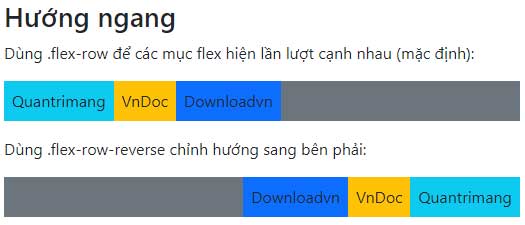
<p style="text-align: justify;">Dùng&nbsp;<code>.flex-row</code>&nbsp;để hiện các mục flex theo chiều ngang (lần lượt). Đây là mặc định.</p>

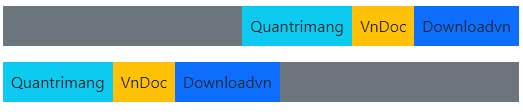
<p style="text-align: justify;"><strong>Mẹo:</strong>&nbsp;Dùng&nbsp;<code>.flex-row-reverse</code>&nbsp;để căn phải hướng theo chiều ngang:</p>

<pre id="pre4" style="text-align: justify;">
&lt;div class=&quot;d-flex flex-row bg-secondary&quot;&gt;
&lt;div class=&quot;p-2 bg-info&quot;&gt;Flex item 1&lt;/div&gt;
&lt;div class=&quot;p-2 bg-warning&quot;&gt;Flex item 2&lt;/div&gt;
&lt;div class=&quot;p-2 bg-primary&quot;&gt;Flex item 3&lt;/div&gt;
&lt;/div&gt;

&lt;div class=&quot;d-flex flex-row-reverse bg-secondary&quot;&gt;
&lt;div class=&quot;p-2 bg-info&quot;&gt;Flex item 1&lt;/div&gt;
&lt;div class=&quot;p-2 bg-warning&quot;&gt;Flex item 2&lt;/div&gt;
&lt;div class=&quot;p-2 bg-primary&quot;&gt;Flex item 3&lt;/div&gt;
&lt;/div&gt;</pre>

<p style="text-align: justify;">Ví dụ:</p>

<pre id="pre5" style="text-align: justify;">
&lt;!DOCTYPE html&gt;
&lt;html lang=&quot;en&quot;&gt;
&lt;head&gt;
  &lt;title&gt;Bootstrap Example&lt;/title&gt;
  &lt;meta charset=&quot;utf-8&quot;&gt;
  &lt;meta name=&quot;viewport&quot; content=&quot;width=device-width, initial-scale=1&quot;&gt;
  &lt;link href=&quot;https://cdn.jsdelivr.net/npm/bootstrap@5.2.3/dist/css/bootstrap.min.css&quot; rel=&quot;stylesheet&quot;&gt;
  &lt;script src=&quot;https://cdn.jsdelivr.net/npm/bootstrap@5.2.3/dist/js/bootstrap.bundle.min.js&quot;&gt;&lt;/script&gt;
&lt;/head&gt;
&lt;body&gt; 

&lt;div class=&quot;container mt-3&quot;&gt;
  &lt;h2&gt;Hướng ngang&lt;/h2&gt;
  &lt;p&gt;Dùng .flex-row để các mục flex hiện lần lượt cạnh nhau (mặc định):&lt;/p&gt;
  &lt;div class=&quot;d-flex flex-row bg-secondary mb-3&quot;&gt;
    &lt;div class=&quot;p-2 bg-info&quot;&gt;Quantrimang&lt;/div&gt;
    &lt;div class=&quot;p-2 bg-warning&quot;&gt;VnDoc&lt;/div&gt;
    &lt;div class=&quot;p-2 bg-primary&quot;&gt;Downloadvn&lt;/div&gt;
  &lt;/div&gt;
  &lt;p&gt;Dùng .flex-row-reverse chỉnh hướng sang bên phải:&lt;/p&gt;
  &lt;div class=&quot;d-flex flex-row-reverse bg-secondary&quot;&gt;
    &lt;div class=&quot;p-2 bg-info&quot;&gt;Quantrimang&lt;/div&gt;
    &lt;div class=&quot;p-2 bg-warning&quot;&gt;VnDoc&lt;/div&gt;
    &lt;div class=&quot;p-2 bg-primary&quot;&gt;Downloadvn&lt;/div&gt;
  &lt;/div&gt;
&lt;/div&gt;

&lt;/body&gt;
&lt;/html&gt;
</pre>

<p style="text-align: justify;"><img alt="Căn chỉnh hướng sang ngang" data-i="2" data-src="https://st.quantrimang.com/photos/image/2022/12/08/Bootstrap-flexbox-3.jpg" data-was-processed="true" height="225" src="https://st.quantrimang.com/photos/image/2022/12/08/Bootstrap-flexbox-3.jpg" width="525" /></p>

<h2 style="text-align: justify;">Hướng dọc</h2>

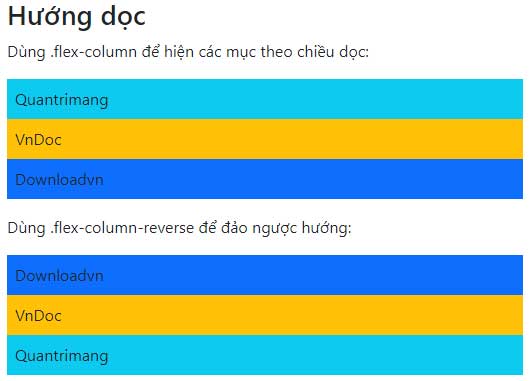
<p style="text-align: justify;">Dùng&nbsp;<code>.flex-column</code>&nbsp;để hiện các mục flex theo chiều dọc (ở phía trên của nhau) hoặc&nbsp;<code>.flex-column-reverse</code>&nbsp;để đảo ngược hướng dọc:</p>

<pre id="pre6" style="text-align: justify;">
&lt;div class=&quot;d-flex flex-column&quot;&gt;
&lt;div class=&quot;p-2 bg-info&quot;&gt;Flex item 1&lt;/div&gt;
&lt;div class=&quot;p-2 bg-warning&quot;&gt;Flex item 2&lt;/div&gt;
&lt;div class=&quot;p-2 bg-primary&quot;&gt;Flex item 3&lt;/div&gt;
&lt;/div&gt;

&lt;div class=&quot;d-flex flex-column-reverse&quot;&gt;
&lt;div class=&quot;p-2 bg-info&quot;&gt;Flex item 1&lt;/div&gt;
&lt;div class=&quot;p-2 bg-warning&quot;&gt;Flex item 2&lt;/div&gt;
&lt;div class=&quot;p-2 bg-primary&quot;&gt;Flex item 3&lt;/div&gt;
&lt;/div&gt;</pre>

<p style="text-align: justify;">Ví dụ:</p>

<pre id="pre7" style="text-align: justify;">
&lt;!DOCTYPE html&gt;
&lt;html lang=&quot;en&quot;&gt;
&lt;head&gt;
  &lt;title&gt;Bootstrap Example&lt;/title&gt;
  &lt;meta charset=&quot;utf-8&quot;&gt;
  &lt;meta name=&quot;viewport&quot; content=&quot;width=device-width, initial-scale=1&quot;&gt;
  &lt;link href=&quot;https://cdn.jsdelivr.net/npm/bootstrap@5.2.3/dist/css/bootstrap.min.css&quot; rel=&quot;stylesheet&quot;&gt;
  &lt;script src=&quot;https://cdn.jsdelivr.net/npm/bootstrap@5.2.3/dist/js/bootstrap.bundle.min.js&quot;&gt;&lt;/script&gt;
&lt;/head&gt;
&lt;body&gt; 

&lt;div class=&quot;container mt-3&quot;&gt;
  &lt;h2&gt;Hướng dọc&lt;/h2&gt;
  &lt;p&gt;Dùng .flex-column để hiện các mục theo chiều dọc:&lt;/p&gt;
  &lt;div class=&quot;d-flex flex-column mb-3&quot;&gt;
    &lt;div class=&quot;p-2 bg-info&quot;&gt;Quantrimang&lt;/div&gt;
    &lt;div class=&quot;p-2 bg-warning&quot;&gt;VnDoc&lt;/div&gt;
    &lt;div class=&quot;p-2 bg-primary&quot;&gt;Downloadvn&lt;/div&gt;
  &lt;/div&gt;
  &lt;p&gt;Dùng .flex-column-reverse để đảo ngược hướng:&lt;/p&gt;
  &lt;div class=&quot;d-flex flex-column-reverse&quot;&gt;
    &lt;div class=&quot;p-2 bg-info&quot;&gt;Quantrimang&lt;/div&gt;
    &lt;div class=&quot;p-2 bg-warning&quot;&gt;VnDoc&lt;/div&gt;
    &lt;div class=&quot;p-2 bg-primary&quot;&gt;Downloadvn&lt;/div&gt;
  &lt;/div&gt;
&lt;/div&gt;

&lt;/body&gt;
&lt;/html&gt;
</pre>

<p style="text-align: justify;"><img alt="Hướng dọc mục flex" data-i="3" data-src="https://st.quantrimang.com/photos/image/2022/12/08/Bootstrap-flexbox-4.jpg" data-was-processed="true" height="381" src="https://st.quantrimang.com/photos/image/2022/12/08/Bootstrap-flexbox-4.jpg" width="530" /></p>

<h2 style="text-align: justify;">Căn chỉnh nội dung</h2>

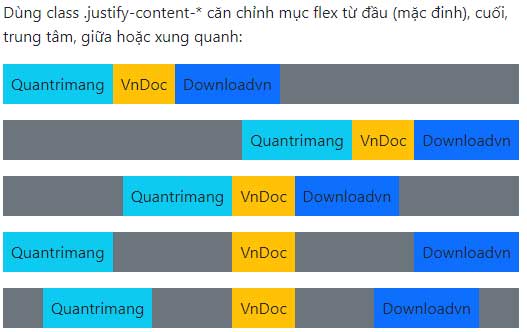
<p style="text-align: justify;">Dùng class .justify-content-* để thay đổi căn lề của các mục. Class hợp lệ là&nbsp;<code>start</code>&nbsp;(mặc định),&nbsp;<code>end</code>,&nbsp;<code>center</code>,&nbsp;<code>between</code>&nbsp;hoặc&nbsp;<code>around</code>:</p>

<pre id="pre8" style="text-align: justify;">
&lt;div class=&quot;d-flex justify-content-start&quot;&gt;...&lt;/div&gt;
&lt;div class=&quot;d-flex justify-content-end&quot;&gt;...&lt;/div&gt;
&lt;div class=&quot;d-flex justify-content-center&quot;&gt;...&lt;/div&gt;
&lt;div class=&quot;d-flex justify-content-between&quot;&gt;...&lt;/div&gt;
&lt;div class=&quot;d-flex justify-content-around&quot;&gt;...&lt;/div&gt;</pre>

<p style="text-align: justify;">Ví dụ:</p>

<pre id="pre9" style="text-align: justify;">
&lt;!DOCTYPE html&gt;
&lt;html lang=&quot;en&quot;&gt;
&lt;head&gt;
  &lt;title&gt;Bootstrap Example&lt;/title&gt;
  &lt;meta charset=&quot;utf-8&quot;&gt;
  &lt;meta name=&quot;viewport&quot; content=&quot;width=device-width, initial-scale=1&quot;&gt;
  &lt;link href=&quot;https://cdn.jsdelivr.net/npm/bootstrap@5.2.3/dist/css/bootstrap.min.css&quot; rel=&quot;stylesheet&quot;&gt;
  &lt;script src=&quot;https://cdn.jsdelivr.net/npm/bootstrap@5.2.3/dist/js/bootstrap.bundle.min.js&quot;&gt;&lt;/script&gt;
&lt;/head&gt;
&lt;body&gt; 

&lt;div class=&quot;container mt-3&quot;&gt;
  &lt;p&gt;Dùng class .justify-content-* căn chỉnh mục flex từ đầu (mặc đinh), cuối, trung tâm, giữa hoặc xung quanh:&lt;/p&gt;
  &lt;div class=&quot;d-flex justify-content-start bg-secondary mb-3&quot;&gt;
    &lt;div class=&quot;p-2 bg-info&quot;&gt;Quantrimang&lt;/div&gt;
    &lt;div class=&quot;p-2 bg-warning&quot;&gt;VnDoc&lt;/div&gt;
    &lt;div class=&quot;p-2 bg-primary&quot;&gt;Downloadvn&lt;/div&gt;
  &lt;/div&gt;
  &lt;div class=&quot;d-flex justify-content-end bg-secondary mb-3&quot;&gt;
     &lt;div class=&quot;p-2 bg-info&quot;&gt;Quantrimang&lt;/div&gt;
    &lt;div class=&quot;p-2 bg-warning&quot;&gt;VnDoc&lt;/div&gt;
    &lt;div class=&quot;p-2 bg-primary&quot;&gt;Downloadvn&lt;/div&gt;
  &lt;/div&gt;
  &lt;div class=&quot;d-flex justify-content-center bg-secondary mb-3&quot;&gt;
        &lt;div class=&quot;p-2 bg-info&quot;&gt;Quantrimang&lt;/div&gt;
    &lt;div class=&quot;p-2 bg-warning&quot;&gt;VnDoc&lt;/div&gt;
    &lt;div class=&quot;p-2 bg-primary&quot;&gt;Downloadvn&lt;/div&gt;
  &lt;/div&gt;
  &lt;div class=&quot;d-flex justify-content-between bg-secondary mb-3&quot;&gt;
   &lt;div class=&quot;p-2 bg-info&quot;&gt;Quantrimang&lt;/div&gt;
    &lt;div class=&quot;p-2 bg-warning&quot;&gt;VnDoc&lt;/div&gt;
    &lt;div class=&quot;p-2 bg-primary&quot;&gt;Downloadvn&lt;/div&gt;
  &lt;/div&gt;
  &lt;div class=&quot;d-flex justify-content-around bg-secondary mb-3&quot;&gt;
    &lt;div class=&quot;p-2 bg-info&quot;&gt;Quantrimang&lt;/div&gt;
    &lt;div class=&quot;p-2 bg-warning&quot;&gt;VnDoc&lt;/div&gt;
    &lt;div class=&quot;p-2 bg-primary&quot;&gt;Downloadvn&lt;/div&gt;
  &lt;/div&gt;
&lt;/div&gt;

&lt;/body&gt;
&lt;/html&gt;
</pre>

<p style="text-align: justify;"><img alt="Căn chỉnh nội dung" data-i="4" data-src="https://st.quantrimang.com/photos/image/2022/12/08/Bootstrap-flexbox-5.jpg" data-was-processed="true" height="332" src="https://st.quantrimang.com/photos/image/2022/12/08/Bootstrap-flexbox-5.jpg" width="527" /></p>

<h2 style="text-align: justify;">Chiều rộng bằng nhau</h2>

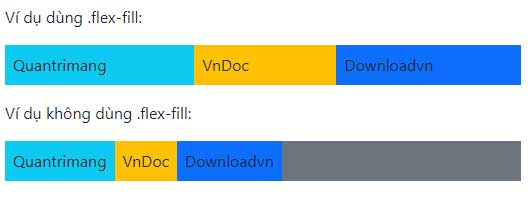
<p style="text-align: justify;">Dùng&nbsp;<code>.flex-fill</code>&nbsp;trên các mục flex để buộc chúng có cùng chiều rộng:</p>

<pre id="pre10" style="text-align: justify;">
&lt;div class=&quot;d-flex&quot;&gt;
&lt;div class=&quot;p-2 bg-info flex-fill&quot;&gt;Flex item 1&lt;/div&gt;
&lt;div class=&quot;p-2 bg-warning flex-fill&quot;&gt;Flex item 2&lt;/div&gt;
&lt;div class=&quot;p-2 bg-primary flex-fill&quot;&gt;Flex item 3&lt;/div&gt;
&lt;/div&gt;</pre>

<p style="text-align: justify;">Ví dụ:</p>

<pre id="pre11" style="text-align: justify;">
&lt;!DOCTYPE html&gt;
&lt;html lang=&quot;en&quot;&gt;
&lt;head&gt;
  &lt;title&gt;Bootstrap Example&lt;/title&gt;
  &lt;meta charset=&quot;utf-8&quot;&gt;
  &lt;meta name=&quot;viewport&quot; content=&quot;width=device-width, initial-scale=1&quot;&gt;
  &lt;link href=&quot;https://cdn.jsdelivr.net/npm/bootstrap@5.2.3/dist/css/bootstrap.min.css&quot; rel=&quot;stylesheet&quot;&gt;
  &lt;script src=&quot;https://cdn.jsdelivr.net/npm/bootstrap@5.2.3/dist/js/bootstrap.bundle.min.js&quot;&gt;&lt;/script&gt;
&lt;/head&gt;
&lt;body&gt; 

&lt;div class=&quot;container mt-3&quot;&gt;
&lt;p&gt;Ví dụ dùng .flex-fill:&lt;/p&gt;
  &lt;div class=&quot;d-flex mb-3&quot;&gt;
    &lt;div class=&quot;p-2 flex-fill bg-info&quot;&gt;Quantrimang&lt;/div&gt;
    &lt;div class=&quot;p-2 flex-fill bg-warning&quot;&gt;VnDoc&lt;/div&gt;
    &lt;div class=&quot;p-2 flex-fill bg-primary&quot;&gt;Downloadvn&lt;/div&gt;
  &lt;/div&gt;
  &lt;p&gt;Ví dụ không dùng .flex-fill:&lt;/p&gt;
  &lt;div class=&quot;d-flex mb-3 bg-secondary&quot;&gt;
    &lt;div class=&quot;p-2 bg-info&quot;&gt;Quantrimang&lt;/div&gt;
    &lt;div class=&quot;p-2 bg-warning&quot;&gt;VnDoc&lt;/div&gt;
    &lt;div class=&quot;p-2 bg-primary&quot;&gt;Downloadvn&lt;/div&gt;
  &lt;/div&gt;
&lt;/div&gt;

&lt;/body&gt;
&lt;/html&gt;
</pre>

<p style="text-align: justify;"><img alt=" Chiều rộng bằng nhau" data-i="5" data-src="https://st.quantrimang.com/photos/image/2022/12/08/Bootstrap-flexbox-7.jpg" data-was-processed="true" height="201" src="https://st.quantrimang.com/photos/image/2022/12/08/Bootstrap-flexbox-7.jpg" width="530" /></p>

<h2 style="text-align: justify;">Grow</h2>

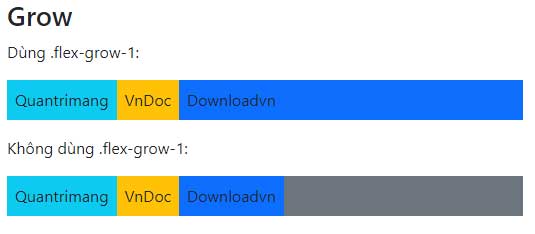
<p style="text-align: justify;">Dùng&nbsp;<code>.flex-grow-1</code>&nbsp;trên một mục flex để nó nằm ở phần còn lại của không giang. Ở ví dụ bên dưới, hai mục flex đầu tiên nằm ở phần không gian cần thiết dành cho chung, mục cuối cùng chiếm phần không gian còn lại:</p>

<pre id="pre12" style="text-align: justify;">
&lt;div class=&quot;d-flex&quot;&gt;
&lt;div class=&quot;p-2 bg-info&quot;&gt;Flex item 1&lt;/div&gt;
&lt;div class=&quot;p-2 bg-warning&quot;&gt;Flex item 2&lt;/div&gt;
&lt;div class=&quot;p-2 bg-primary flex-grow-1&quot;&gt;Flex item 3&lt;/div&gt;
&lt;/div&gt;</pre>

<p style="text-align: justify;">Ví dụ:</p>

<pre id="pre13" style="text-align: justify;">
&lt;!DOCTYPE html&gt;
&lt;html lang=&quot;en&quot;&gt;
&lt;head&gt;
  &lt;title&gt;Bootstrap Example&lt;/title&gt;
  &lt;meta charset=&quot;utf-8&quot;&gt;
  &lt;meta name=&quot;viewport&quot; content=&quot;width=device-width, initial-scale=1&quot;&gt;
  &lt;link href=&quot;https://cdn.jsdelivr.net/npm/bootstrap@5.2.3/dist/css/bootstrap.min.css&quot; rel=&quot;stylesheet&quot;&gt;
  &lt;script src=&quot;https://cdn.jsdelivr.net/npm/bootstrap@5.2.3/dist/js/bootstrap.bundle.min.js&quot;&gt;&lt;/script&gt;
&lt;/head&gt;
&lt;body&gt; 

&lt;div class=&quot;container mt-3&quot;&gt;
  &lt;h2&gt;Grow&lt;/h2&gt;
  &lt;p&gt;Dùng .flex-grow-1:&lt;/p&gt;
  &lt;div class=&quot;d-flex mb-3&quot;&gt;
    &lt;div class=&quot;p-2 bg-info&quot;&gt;Quantrimang&lt;/div&gt;
    &lt;div class=&quot;p-2 bg-warning&quot;&gt;VnDoc&lt;/div&gt;
    &lt;div class=&quot;p-2 flex-grow-1 bg-primary&quot;&gt;Downloadvn&lt;/div&gt;
  &lt;/div&gt;
  &lt;p&gt;Không dùng .flex-grow-1:&lt;/p&gt;
  &lt;div class=&quot;d-flex mb-3 bg-secondary&quot;&gt;
    &lt;div class=&quot;p-2 bg-info&quot;&gt;Quantrimang&lt;/div&gt;
    &lt;div class=&quot;p-2 bg-warning&quot;&gt;VnDoc&lt;/div&gt;
    &lt;div class=&quot;p-2 bg-primary&quot;&gt;Downloadvn&lt;/div&gt;
  &lt;/div&gt;
&lt;/div&gt;

&lt;/body&gt;
&lt;/html&gt;
</pre>

<p style="text-align: justify;"><img alt="Flexbox trong Bootstrap" data-i="6" data-src="https://st.quantrimang.com/photos/image/2022/12/08/Bootstrap-flexbox-8.jpg" data-was-processed="true" height="234" src="https://st.quantrimang.com/photos/image/2022/12/08/Bootstrap-flexbox-8.jpg" width="535" /></p>

<p style="text-align: justify;"><strong>Mẹo:</strong>&nbsp;Dùng&nbsp;<code>.flex-shrink-1</code>&nbsp;trên một mục flex để làm nó co lại nếu cần.</p>

<h2 style="text-align: justify;">Thứ tự</h2>

<p style="text-align: justify;">Thay đổi thứ tự hình ảnh của một mục flex cụ thể bằng class&nbsp;<code>.order</code>. Các class hợp lệ từ 0 tới 5, nơi số thấp nhất được ưu tiên cao nhất (order-1 hiện trước order-2…)</p>

<pre id="pre14" style="text-align: justify;">
&lt;div class=&quot;d-flex bg-secondary&quot;&gt;
&lt;div class=&quot;p-2 bg-info order-3&quot;&gt;Flex item 1&lt;/div&gt;
&lt;div class=&quot;p-2 bg-warning order-2&quot;&gt;Flex item 2&lt;/div&gt;
&lt;div class=&quot;p-2 bg-primary order-1&quot;&gt;Flex item 3&lt;/div&gt;
&lt;/div&gt;</pre>

<p style="text-align: justify;">Ví dụ:</p>

<pre id="pre15" style="text-align: justify;">
&lt;!DOCTYPE html&gt;
&lt;html lang=&quot;en&quot;&gt;
&lt;head&gt;
  &lt;title&gt;Bootstrap Example&lt;/title&gt;
  &lt;meta charset=&quot;utf-8&quot;&gt;
  &lt;meta name=&quot;viewport&quot; content=&quot;width=device-width, initial-scale=1&quot;&gt;
  &lt;link href=&quot;https://cdn.jsdelivr.net/npm/bootstrap@5.2.3/dist/css/bootstrap.min.css&quot; rel=&quot;stylesheet&quot;&gt;
  &lt;script src=&quot;https://cdn.jsdelivr.net/npm/bootstrap@5.2.3/dist/js/bootstrap.bundle.min.js&quot;&gt;&lt;/script&gt;
&lt;/head&gt;
&lt;body&gt; 

&lt;div class=&quot;container mt-3&quot;&gt;
  &lt;div class=&quot;d-flex mb-3&quot;&gt;
    &lt;div class=&quot;p-2 order-3 bg-info&quot;&gt;Quantrimang 1&lt;/div&gt;
    &lt;div class=&quot;p-2 order-2 bg-warning&quot;&gt;Quantrimang 2&lt;/div&gt;
    &lt;div class=&quot;p-2 order-1 bg-primary&quot;&gt;Quantrimang 3&lt;/div&gt;
  &lt;/div&gt;
&lt;/div&gt;

&lt;/body&gt;
&lt;/html&gt;
</pre>

<p style="text-align: justify;"><img alt="Sắp xếp thứ tự các mục flex" data-i="7" data-src="https://st.quantrimang.com/photos/image/2022/12/08/Bootstrap-flexbox-9.jpg" data-was-processed="true" height="47" src="https://st.quantrimang.com/photos/image/2022/12/08/Bootstrap-flexbox-9.jpg" width="373" /></p>

<h2 style="text-align: justify;">Tự động căn chỉnh lề</h2>

<p style="text-align: justify;">Dễ dàng thêm lề tự động vào các mục flex bằng .ms-auto (đẩy mục về bên phải) hoặc dùng .me-auto (đẩy mục về bên trái):</p>

<pre id="pre16" style="text-align: justify;">
&lt;div class=&quot;d-flex bg-secondary&quot;&gt;
&lt;div class=&quot;p-2 ms-auto bg-info&quot;&gt;Flex item 1&lt;/div&gt;
&lt;div class=&quot;p-2 bg-warning&quot;&gt;Flex item 2&lt;/div&gt;
&lt;div class=&quot;p-2 bg-primary&quot;&gt;Flex item 3&lt;/div&gt;
&lt;/div&gt;

&lt;div class=&quot;d-flex bg-secondary&quot;&gt;
&lt;div class=&quot;p-2 bg-info&quot;&gt;Flex item 1&lt;/div&gt;
&lt;div class=&quot;p-2 bg-warning&quot;&gt;Flex item 2&lt;/div&gt;
&lt;div class=&quot;p-2 me-auto bg-primary&quot;&gt;Flex item 3&lt;/div&gt;
&lt;/div&gt;</pre>

<p style="text-align: justify;">Ví dụ:</p>

<pre id="pre17" style="text-align: justify;">
&lt;!DOCTYPE html&gt;
&lt;html lang=&quot;en&quot;&gt;
&lt;head&gt;
  &lt;title&gt;Bootstrap Example&lt;/title&gt;
  &lt;meta charset=&quot;utf-8&quot;&gt;
  &lt;meta name=&quot;viewport&quot; content=&quot;width=device-width, initial-scale=1&quot;&gt;
  &lt;link href=&quot;https://cdn.jsdelivr.net/npm/bootstrap@5.2.3/dist/css/bootstrap.min.css&quot; rel=&quot;stylesheet&quot;&gt;
  &lt;script src=&quot;https://cdn.jsdelivr.net/npm/bootstrap@5.2.3/dist/js/bootstrap.bundle.min.js&quot;&gt;&lt;/script&gt;
&lt;/head&gt;
&lt;body&gt; 

&lt;div class=&quot;container mt-3&quot;&gt;

  &lt;div class=&quot;d-flex mb-3 bg-secondary&quot;&gt;
    &lt;div class=&quot;p-2 ms-auto bg-info&quot;&gt;Quantrimang&lt;/div&gt;
    &lt;div class=&quot;p-2 bg-warning&quot;&gt;VnDoc&lt;/div&gt;
    &lt;div class=&quot;p-2 bg-primary&quot;&gt;Downloadvn&lt;/div&gt;
  &lt;/div&gt;
  &lt;div class=&quot;d-flex mb-3 bg-secondary&quot;&gt;
    &lt;div class=&quot;p-2  bg-info&quot;&gt;Quantrimang&lt;/div&gt;
    &lt;div class=&quot;p-2 bg-warning&quot;&gt;VnDoc&lt;/div&gt;
    &lt;div class=&quot;p-2 me-auto bg-primary&quot;&gt;Downloadvn&lt;/div&gt;
  &lt;/div&gt;
&lt;/div&gt;

&lt;/body&gt;
&lt;/html&gt;
</pre>

<p style="text-align: justify;"><img alt="Tự động căn chỉnh lề" data-i="8" data-src="https://st.quantrimang.com/photos/image/2022/12/08/Bootstrap-flexbox-10.jpg" data-was-processed="true" height="112" src="https://st.quantrimang.com/photos/image/2022/12/08/Bootstrap-flexbox-10.jpg" width="523" /></p>

<h2 style="text-align: justify;">Wrap</h2>

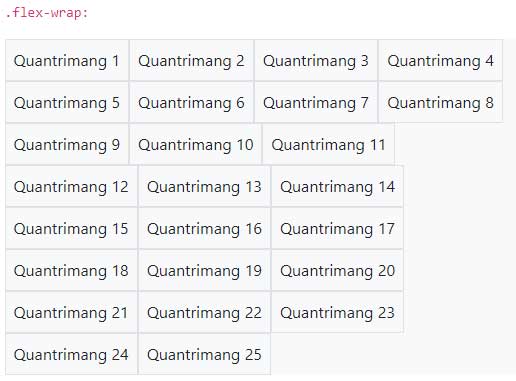
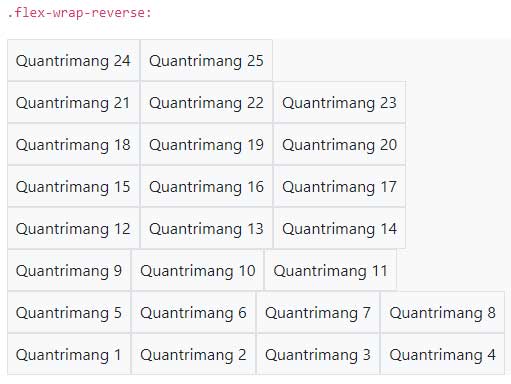
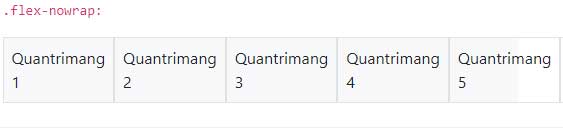
<p style="text-align: justify;">Kiểm các mục flex trong một container flex với&nbsp;<code>.flex-nowrap (default)</code>,&nbsp;<code>.flex-wrap</code>&nbsp;hoặc&nbsp;<code>.flex-wrap-reverse</code>.</p>

<p style="text-align: justify;">Click vào các nút bấm bên dưới để thấy sự khác biệt giwuax 3 class, bằng cách thay đổi “wrap” của các mục flex trong box ví dụ.</p>

<pre id="pre18" style="text-align: justify;">
&lt;div class=&quot;d-flex flex-wrap&quot;&gt;..&lt;/div&gt;

&lt;div class=&quot;d-flex flex-wrap-reverse&quot;&gt;..&lt;/div&gt;

&lt;div class=&quot;d-flex flex-nowrap&quot;&gt;..&lt;/div&gt;</pre>

<p style="text-align: justify;">Ví dụ:</p>

<pre id="pre19" style="text-align: justify;">
&lt;!DOCTYPE html&gt;
&lt;html lang=&quot;en&quot;&gt;
&lt;head&gt;
  &lt;title&gt;Bootstrap Example&lt;/title&gt;
  &lt;meta charset=&quot;utf-8&quot;&gt;
  &lt;meta name=&quot;viewport&quot; content=&quot;width=device-width, initial-scale=1&quot;&gt;
  &lt;link href=&quot;https://cdn.jsdelivr.net/npm/bootstrap@5.2.3/dist/css/bootstrap.min.css&quot; rel=&quot;stylesheet&quot;&gt;
  &lt;script src=&quot;https://cdn.jsdelivr.net/npm/bootstrap@5.2.3/dist/js/bootstrap.bundle.min.js&quot;&gt;&lt;/script&gt;
&lt;/head&gt;
&lt;body&gt; 

&lt;div class=&quot;container mt-3&quot;&gt;
  &lt;h2&gt;Wrap&lt;/h2&gt;
  &lt;p&gt;Kiểm soát cách sắp xếp mục trong một flex container bằng .flex-nowrap (mặc định), .flex-wrap hoặc .flex-wrap-reverse.&lt;/p&gt;
  &lt;p&gt;&lt;code&gt;.flex-wrap:&lt;/code&gt;&lt;/p&gt;
  &lt;div class=&quot;d-flex flex-wrap bg-light&quot;&gt;
    &lt;div class=&quot;p-2 border&quot;&gt;Quantrimang 1&lt;/div&gt;
    &lt;div class=&quot;p-2 border&quot;&gt;Quantrimang 2&lt;/div&gt;
    &lt;div class=&quot;p-2 border&quot;&gt;Quantrimang 3&lt;/div&gt;
    &lt;div class=&quot;p-2 border&quot;&gt;Quantrimang 4&lt;/div&gt;
    &lt;div class=&quot;p-2 border&quot;&gt;Quantrimang 5&lt;/div&gt;
    &lt;div class=&quot;p-2 border&quot;&gt;Quantrimang 6&lt;/div&gt;
    &lt;div class=&quot;p-2 border&quot;&gt;Quantrimang 7&lt;/div&gt;
    &lt;div class=&quot;p-2 border&quot;&gt;Quantrimang 8&lt;/div&gt;
    &lt;div class=&quot;p-2 border&quot;&gt;Quantrimang 9&lt;/div&gt;
    &lt;div class=&quot;p-2 border&quot;&gt;Quantrimang 10&lt;/div&gt;
    &lt;div class=&quot;p-2 border&quot;&gt;Quantrimang 11&lt;/div&gt;
    &lt;div class=&quot;p-2 border&quot;&gt;Quantrimang 12&lt;/div&gt;
    &lt;div class=&quot;p-2 border&quot;&gt;Quantrimang 13 &lt;/div&gt;
    &lt;div class=&quot;p-2 border&quot;&gt;Quantrimang 14&lt;/div&gt;
    &lt;div class=&quot;p-2 border&quot;&gt;Quantrimang 15&lt;/div&gt;
    &lt;div class=&quot;p-2 border&quot;&gt;Quantrimang 16&lt;/div&gt;
    &lt;div class=&quot;p-2 border&quot;&gt;Quantrimang 17&lt;/div&gt;
    &lt;div class=&quot;p-2 border&quot;&gt;Quantrimang 18&lt;/div&gt;
    &lt;div class=&quot;p-2 border&quot;&gt;Quantrimang 19&lt;/div&gt;
    &lt;div class=&quot;p-2 border&quot;&gt;Quantrimang 20&lt;/div&gt;
    &lt;div class=&quot;p-2 border&quot;&gt;Quantrimang 21&lt;/div&gt;
    &lt;div class=&quot;p-2 border&quot;&gt;Quantrimang 22&lt;/div&gt;
    &lt;div class=&quot;p-2 border&quot;&gt;Quantrimang 23&lt;/div&gt;
    &lt;div class=&quot;p-2 border&quot;&gt;Quantrimang 24&lt;/div&gt;
    &lt;div class=&quot;p-2 border&quot;&gt;Quantrimang 25&lt;/div&gt;
  &lt;/div&gt;
  &lt;br&gt;
  &lt;p&gt;&lt;code&gt;.flex-wrap-reverse:&lt;/code&gt;&lt;/p&gt;
  &lt;div class=&quot;d-flex flex-wrap-reverse bg-light&quot;&gt;
    &lt;div class=&quot;p-2 border&quot;&gt;Quantrimang 1&lt;/div&gt;
    &lt;div class=&quot;p-2 border&quot;&gt;Quantrimang 2&lt;/div&gt;
    &lt;div class=&quot;p-2 border&quot;&gt;Quantrimang 3&lt;/div&gt;
    &lt;div class=&quot;p-2 border&quot;&gt;Quantrimang 4&lt;/div&gt;
    &lt;div class=&quot;p-2 border&quot;&gt;Quantrimang 5&lt;/div&gt;
    &lt;div class=&quot;p-2 border&quot;&gt;Quantrimang 6&lt;/div&gt;
    &lt;div class=&quot;p-2 border&quot;&gt;Quantrimang 7&lt;/div&gt;
    &lt;div class=&quot;p-2 border&quot;&gt;Quantrimang 8&lt;/div&gt;
    &lt;div class=&quot;p-2 border&quot;&gt;Quantrimang 9&lt;/div&gt;
    &lt;div class=&quot;p-2 border&quot;&gt;Quantrimang 10&lt;/div&gt;
    &lt;div class=&quot;p-2 border&quot;&gt;Quantrimang 11&lt;/div&gt;
    &lt;div class=&quot;p-2 border&quot;&gt;Quantrimang 12&lt;/div&gt;
    &lt;div class=&quot;p-2 border&quot;&gt;Quantrimang 13 &lt;/div&gt;
    &lt;div class=&quot;p-2 border&quot;&gt;Quantrimang 14&lt;/div&gt;
    &lt;div class=&quot;p-2 border&quot;&gt;Quantrimang 15&lt;/div&gt;
    &lt;div class=&quot;p-2 border&quot;&gt;Quantrimang 16&lt;/div&gt;
    &lt;div class=&quot;p-2 border&quot;&gt;Quantrimang 17&lt;/div&gt;
    &lt;div class=&quot;p-2 border&quot;&gt;Quantrimang 18&lt;/div&gt;
    &lt;div class=&quot;p-2 border&quot;&gt;Quantrimang 19&lt;/div&gt;
    &lt;div class=&quot;p-2 border&quot;&gt;Quantrimang 20&lt;/div&gt;
    &lt;div class=&quot;p-2 border&quot;&gt;Quantrimang 21&lt;/div&gt;
    &lt;div class=&quot;p-2 border&quot;&gt;Quantrimang 22&lt;/div&gt;
    &lt;div class=&quot;p-2 border&quot;&gt;Quantrimang 23&lt;/div&gt;
    &lt;div class=&quot;p-2 border&quot;&gt;Quantrimang 24&lt;/div&gt;
    &lt;div class=&quot;p-2 border&quot;&gt;Quantrimang 25&lt;/div&gt;
  &lt;/div&gt;
  &lt;br&gt;
  &lt;p&gt;&lt;code&gt;.flex-nowrap:&lt;/code&gt;&lt;/p&gt;
  &lt;div class=&quot;d-flex flex-nowrap bg-light&quot;&gt;
    &lt;div class=&quot;p-2 border&quot;&gt;Quantrimang 1&lt;/div&gt;
    &lt;div class=&quot;p-2 border&quot;&gt;Quantrimang 2&lt;/div&gt;
    &lt;div class=&quot;p-2 border&quot;&gt;Quantrimang 3&lt;/div&gt;
    &lt;div class=&quot;p-2 border&quot;&gt;Quantrimang 4&lt;/div&gt;
    &lt;div class=&quot;p-2 border&quot;&gt;Quantrimang 5&lt;/div&gt;
    &lt;div class=&quot;p-2 border&quot;&gt;Quantrimang 6&lt;/div&gt;
    &lt;div class=&quot;p-2 border&quot;&gt;Quantrimang 7&lt;/div&gt;
    &lt;div class=&quot;p-2 border&quot;&gt;Quantrimang 8&lt;/div&gt;
    &lt;div class=&quot;p-2 border&quot;&gt;Quantrimang 9&lt;/div&gt;
    &lt;div class=&quot;p-2 border&quot;&gt;Quantrimang 10&lt;/div&gt;
    &lt;div class=&quot;p-2 border&quot;&gt;Quantrimang 11&lt;/div&gt;
    &lt;div class=&quot;p-2 border&quot;&gt;Quantrimang 12&lt;/div&gt;
    &lt;div class=&quot;p-2 border&quot;&gt;Quantrimang 13 &lt;/div&gt;
    &lt;div class=&quot;p-2 border&quot;&gt;Quantrimang 14&lt;/div&gt;
    &lt;div class=&quot;p-2 border&quot;&gt;Quantrimang 15&lt;/div&gt;
    &lt;div class=&quot;p-2 border&quot;&gt;Quantrimang 16&lt;/div&gt;
    &lt;div class=&quot;p-2 border&quot;&gt;Quantrimang 17&lt;/div&gt;
    &lt;div class=&quot;p-2 border&quot;&gt;Quantrimang 18&lt;/div&gt;
    &lt;div class=&quot;p-2 border&quot;&gt;Quantrimang 19&lt;/div&gt;
    &lt;div class=&quot;p-2 border&quot;&gt;Quantrimang 20&lt;/div&gt;
    &lt;div class=&quot;p-2 border&quot;&gt;Quantrimang 21&lt;/div&gt;
    &lt;div class=&quot;p-2 border&quot;&gt;Quantrimang 22&lt;/div&gt;
    &lt;div class=&quot;p-2 border&quot;&gt;Quantrimang 23&lt;/div&gt;
    &lt;div class=&quot;p-2 border&quot;&gt;Quantrimang 24&lt;/div&gt;
    &lt;div class=&quot;p-2 border&quot;&gt;Quantrimang 25&lt;/div&gt;
    &lt;div class=&quot;p-2 border&quot;&gt;Quantrimang 26&lt;/div&gt;
    &lt;div class=&quot;p-2 border&quot;&gt;Quantrimang 27&lt;/div&gt;
    &lt;div class=&quot;p-2 border&quot;&gt;Quantrimang 28&lt;/div&gt;
    &lt;div class=&quot;p-2 border&quot;&gt;Quantrimang 29&lt;/div&gt;
    &lt;div class=&quot;p-2 border&quot;&gt;Quantrimang 30&lt;/div&gt;
    &lt;div class=&quot;p-2 border&quot;&gt;Quantrimang 31&lt;/div&gt;
    &lt;div class=&quot;p-2 border&quot;&gt;Quantrimang 32&lt;/div&gt;
    &lt;div class=&quot;p-2 border&quot;&gt;Quantrimang 33&lt;/div&gt;
    &lt;div class=&quot;p-2 border&quot;&gt;Quantrimang 34&lt;/div&gt;
    &lt;div class=&quot;p-2 border&quot;&gt;Quantrimang 35&lt;/div&gt;
  &lt;/div&gt;
  &lt;br&gt;
&lt;/div&gt;

&lt;/body&gt;
&lt;/html&gt;
</pre>

<p style="text-align: justify;"><img alt="Flexbox trong Bootstrap" data-i="9" data-src="https://st.quantrimang.com/photos/image/2022/12/08/Bootstrap-flexbox-11.jpg" data-was-processed="true" height="381" src="https://st.quantrimang.com/photos/image/2022/12/08/Bootstrap-flexbox-11.jpg" width="516" /></p>

<p style="text-align: justify;"><img alt="Kiểu Wrap 2" data-i="10" data-src="https://st.quantrimang.com/photos/image/2022/12/08/Bootstrap-flexbox-12.jpg" data-was-processed="true" height="384" src="https://st.quantrimang.com/photos/image/2022/12/08/Bootstrap-flexbox-12.jpg" width="511" /></p>

<p style="text-align: justify;"><img alt="Kiểu Wrap 3" data-i="11" data-src="https://st.quantrimang.com/photos/image/2022/12/08/Bootstrap-flexbox-13.jpg" data-was-processed="true" height="128" src="https://st.quantrimang.com/photos/image/2022/12/08/Bootstrap-flexbox-13.jpg" width="563" /></p>

<h2 style="text-align: justify;">Chỉnh lề nội dung</h2>

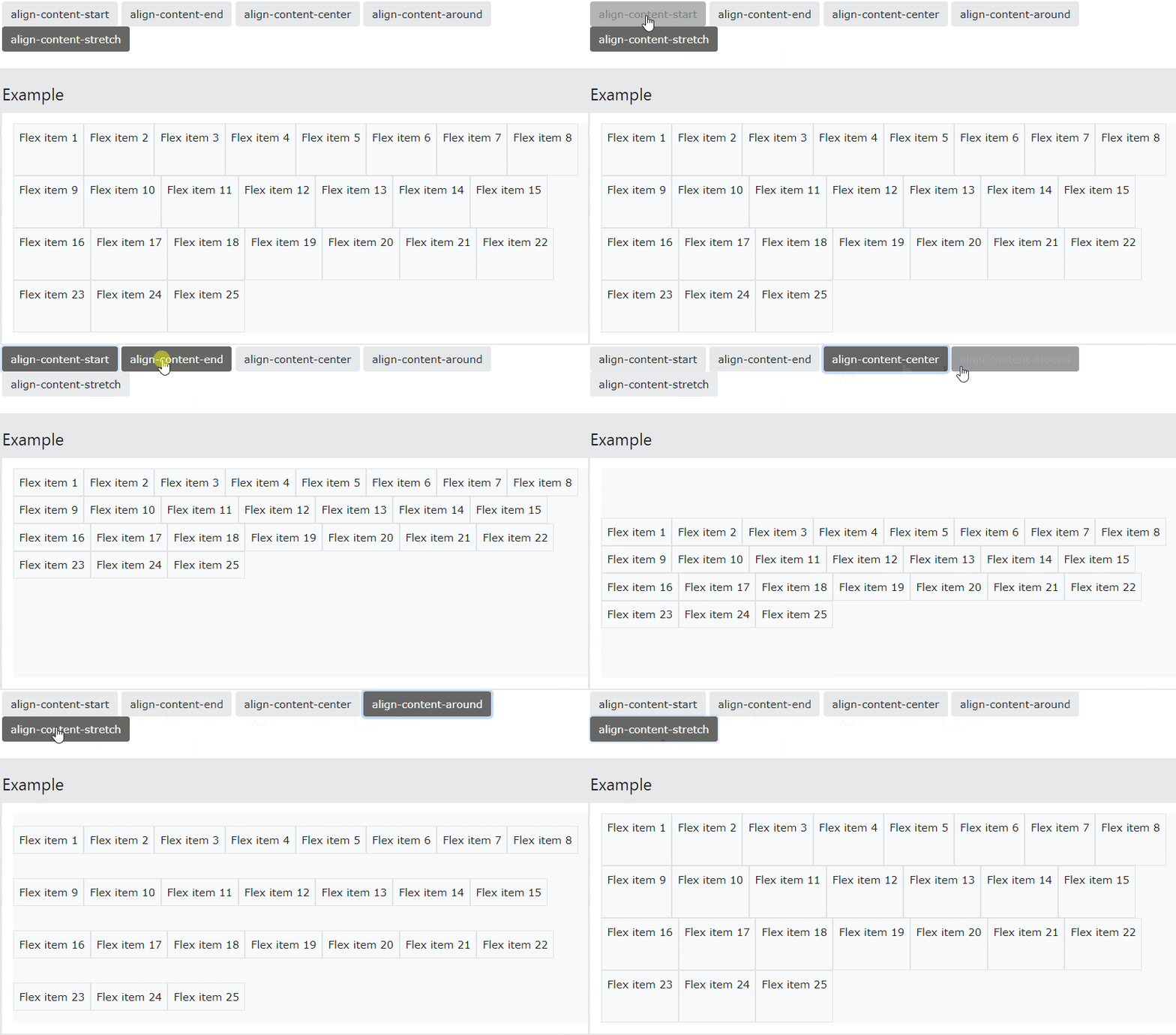
<p style="text-align: justify;">Kiểm soát căn chỉnh theo chiều dọc của các mục flex gathered với&nbsp;<code>.align-content-*</code>. Những class hợp lệ là&nbsp;<code>.align-content-start</code>&nbsp;(default),&nbsp;<code>.align-content-end</code>,&nbsp;<code>.align-content-center</code>,&nbsp;<code>.align-content-between</code>,&nbsp;<code>.align-content-around</code>&nbsp;và&nbsp;<code>.align-content-stretch</code>.</p>

<p style="text-align: justify;">Lưu ý: Những class này không có hiệu ứng trên những hàng mục flex đơn lẻ.</p>

<p style="text-align: justify;">Click vào các nút bấm bên dưới để thấy sự khác biệt giữa 5 class, bằng cách thay đổi căn chỉnh lề theo chiều dọc của các mục flex trong box code mẫu:</p>

<pre id="pre20" style="text-align: justify;">
&lt;div class=&quot;d-flex flex-wrap align-content-start&quot;&gt;..&lt;/div&gt;

&lt;div class=&quot;d-flex flex-wrap align-content-end&quot;&gt;..&lt;/div&gt;

&lt;div class=&quot;d-flex flex-wrap align-content-center&quot;&gt;..&lt;/div&gt;

&lt;div class=&quot;d-flex flex-wrap align-content-around&quot;&gt;..&lt;/div&gt;

&lt;div class=&quot;d-flex flex-wrap align-content-stretch&quot;&gt;..&lt;/div&gt;</pre>

<p style="text-align: justify;"><img alt="Chỉnh lề nội dung" data-i="12" data-src="https://st.quantrimang.com/photos/image/2022/12/08/bootstrap-flex-1.gif" data-was-processed="true" height="382" src="https://st.quantrimang.com/photos/image/2022/12/08/bootstrap-flex-1.gif" width="650" /></p>

<p style="text-align: justify;">Ví dụ:</p>

<pre id="pre21" style="text-align: justify;">
&lt;!DOCTYPE html&gt;
&lt;html lang=&quot;en&quot;&gt;
&lt;head&gt;
  &lt;title&gt;Bootstrap Example&lt;/title&gt;
  &lt;meta charset=&quot;utf-8&quot;&gt;
  &lt;meta name=&quot;viewport&quot; content=&quot;width=device-width, initial-scale=1&quot;&gt;
  &lt;link href=&quot;https://cdn.jsdelivr.net/npm/bootstrap@5.2.3/dist/css/bootstrap.min.css&quot; rel=&quot;stylesheet&quot;&gt;
  &lt;script src=&quot;https://cdn.jsdelivr.net/npm/bootstrap@5.2.3/dist/js/bootstrap.bundle.min.js&quot;&gt;&lt;/script&gt;
&lt;/head&gt;
&lt;body&gt; 

&lt;div class=&quot;container mt-3&quot;&gt;
  &lt;p&gt;.align-content-start (default):&lt;/p&gt;
  &lt;div class=&quot;d-flex flex-wrap align-content-start bg-light&quot; style=&quot;height:300px&quot;&gt;
    &lt;div class=&quot;p-2 border&quot;&gt;Quantrimang 1&lt;/div&gt;
    &lt;div class=&quot;p-2 border&quot;&gt;Quantrimang 2&lt;/div&gt;
    &lt;div class=&quot;p-2 border&quot;&gt;Quantrimang 3&lt;/div&gt;
    &lt;div class=&quot;p-2 border&quot;&gt;Quantrimang 4&lt;/div&gt;
    &lt;div class=&quot;p-2 border&quot;&gt;Quantrimang 5&lt;/div&gt;
    &lt;div class=&quot;p-2 border&quot;&gt;Quantrimang 6&lt;/div&gt;
    &lt;div class=&quot;p-2 border&quot;&gt;Quantrimang 7&lt;/div&gt;
    &lt;div class=&quot;p-2 border&quot;&gt;Quantrimang 8&lt;/div&gt;
    &lt;div class=&quot;p-2 border&quot;&gt;Quantrimang 9&lt;/div&gt;
    &lt;div class=&quot;p-2 border&quot;&gt;Quantrimang 10&lt;/div&gt;
    &lt;div class=&quot;p-2 border&quot;&gt;Quantrimang 11&lt;/div&gt;
    &lt;div class=&quot;p-2 border&quot;&gt;Quantrimang 12&lt;/div&gt;
    &lt;div class=&quot;p-2 border&quot;&gt;Quantrimang 13 &lt;/div&gt;
    &lt;div class=&quot;p-2 border&quot;&gt;Quantrimang 14&lt;/div&gt;
    &lt;div class=&quot;p-2 border&quot;&gt;Quantrimang 15&lt;/div&gt;
    &lt;div class=&quot;p-2 border&quot;&gt;Quantrimang 16&lt;/div&gt;
    &lt;div class=&quot;p-2 border&quot;&gt;Quantrimang 17&lt;/div&gt;
    &lt;div class=&quot;p-2 border&quot;&gt;Quantrimang 18&lt;/div&gt;
    &lt;div class=&quot;p-2 border&quot;&gt;Quantrimang 19&lt;/div&gt;
    &lt;div class=&quot;p-2 border&quot;&gt;Quantrimang 20&lt;/div&gt;
    &lt;div class=&quot;p-2 border&quot;&gt;Quantrimang 21&lt;/div&gt;
    &lt;div class=&quot;p-2 border&quot;&gt;Quantrimang 22&lt;/div&gt;
    &lt;div class=&quot;p-2 border&quot;&gt;Quantrimang 23&lt;/div&gt;
    &lt;div class=&quot;p-2 border&quot;&gt;Quantrimang 24&lt;/div&gt;
    &lt;div class=&quot;p-2 border&quot;&gt;Quantrimang 25&lt;/div&gt;
  &lt;/div&gt;
  &lt;br&gt;
  &lt;p&gt;.align-content-end:&lt;/p&gt;
  &lt;div class=&quot;d-flex flex-wrap align-content-end bg-light&quot; style=&quot;height:300px&quot;&gt;
    &lt;div class=&quot;p-2 border&quot;&gt;Quantrimang 1&lt;/div&gt;
    &lt;div class=&quot;p-2 border&quot;&gt;Quantrimang 2&lt;/div&gt;
    &lt;div class=&quot;p-2 border&quot;&gt;Quantrimang 3&lt;/div&gt;
    &lt;div class=&quot;p-2 border&quot;&gt;Quantrimang 4&lt;/div&gt;
    &lt;div class=&quot;p-2 border&quot;&gt;Quantrimang 5&lt;/div&gt;
    &lt;div class=&quot;p-2 border&quot;&gt;Quantrimang 6&lt;/div&gt;
    &lt;div class=&quot;p-2 border&quot;&gt;Quantrimang 7&lt;/div&gt;
    &lt;div class=&quot;p-2 border&quot;&gt;Quantrimang 8&lt;/div&gt;
    &lt;div class=&quot;p-2 border&quot;&gt;Quantrimang 9&lt;/div&gt;
    &lt;div class=&quot;p-2 border&quot;&gt;Quantrimang 10&lt;/div&gt;
    &lt;div class=&quot;p-2 border&quot;&gt;Quantrimang 11&lt;/div&gt;
    &lt;div class=&quot;p-2 border&quot;&gt;Quantrimang 12&lt;/div&gt;
    &lt;div class=&quot;p-2 border&quot;&gt;Quantrimang 13 &lt;/div&gt;
    &lt;div class=&quot;p-2 border&quot;&gt;Quantrimang 14&lt;/div&gt;
    &lt;div class=&quot;p-2 border&quot;&gt;Quantrimang 15&lt;/div&gt;
    &lt;div class=&quot;p-2 border&quot;&gt;Quantrimang 16&lt;/div&gt;
    &lt;div class=&quot;p-2 border&quot;&gt;Quantrimang 17&lt;/div&gt;
    &lt;div class=&quot;p-2 border&quot;&gt;Quantrimang 18&lt;/div&gt;
    &lt;div class=&quot;p-2 border&quot;&gt;Quantrimang 19&lt;/div&gt;
    &lt;div class=&quot;p-2 border&quot;&gt;Quantrimang 20&lt;/div&gt;
    &lt;div class=&quot;p-2 border&quot;&gt;Quantrimang 21&lt;/div&gt;
    &lt;div class=&quot;p-2 border&quot;&gt;Quantrimang 22&lt;/div&gt;
    &lt;div class=&quot;p-2 border&quot;&gt;Quantrimang 23&lt;/div&gt;
    &lt;div class=&quot;p-2 border&quot;&gt;Quantrimang 24&lt;/div&gt;
    &lt;div class=&quot;p-2 border&quot;&gt;Quantrimang 25&lt;/div&gt;
  &lt;/div&gt;
  &lt;br&gt;
  &lt;p&gt;.align-content-center:&lt;/p&gt;
  &lt;div class=&quot;d-flex flex-wrap align-content-center bg-light&quot; style=&quot;height:300px&quot;&gt;
    &lt;div class=&quot;p-2 border&quot;&gt;Quantrimang 1&lt;/div&gt;
    &lt;div class=&quot;p-2 border&quot;&gt;Quantrimang 2&lt;/div&gt;
    &lt;div class=&quot;p-2 border&quot;&gt;Quantrimang 3&lt;/div&gt;
    &lt;div class=&quot;p-2 border&quot;&gt;Quantrimang 4&lt;/div&gt;
    &lt;div class=&quot;p-2 border&quot;&gt;Quantrimang 5&lt;/div&gt;
    &lt;div class=&quot;p-2 border&quot;&gt;Quantrimang 6&lt;/div&gt;
    &lt;div class=&quot;p-2 border&quot;&gt;Quantrimang 7&lt;/div&gt;
    &lt;div class=&quot;p-2 border&quot;&gt;Quantrimang 8&lt;/div&gt;
    &lt;div class=&quot;p-2 border&quot;&gt;Quantrimang 9&lt;/div&gt;
    &lt;div class=&quot;p-2 border&quot;&gt;Quantrimang 10&lt;/div&gt;
    &lt;div class=&quot;p-2 border&quot;&gt;Quantrimang 11&lt;/div&gt;
    &lt;div class=&quot;p-2 border&quot;&gt;Quantrimang 12&lt;/div&gt;
    &lt;div class=&quot;p-2 border&quot;&gt;Quantrimang 13 &lt;/div&gt;
    &lt;div class=&quot;p-2 border&quot;&gt;Quantrimang 14&lt;/div&gt;
    &lt;div class=&quot;p-2 border&quot;&gt;Quantrimang 15&lt;/div&gt;
    &lt;div class=&quot;p-2 border&quot;&gt;Quantrimang 16&lt;/div&gt;
    &lt;div class=&quot;p-2 border&quot;&gt;Quantrimang 17&lt;/div&gt;
    &lt;div class=&quot;p-2 border&quot;&gt;Quantrimang 18&lt;/div&gt;
    &lt;div class=&quot;p-2 border&quot;&gt;Quantrimang 19&lt;/div&gt;
    &lt;div class=&quot;p-2 border&quot;&gt;Quantrimang 20&lt;/div&gt;
    &lt;div class=&quot;p-2 border&quot;&gt;Quantrimang 21&lt;/div&gt;
    &lt;div class=&quot;p-2 border&quot;&gt;Quantrimang 22&lt;/div&gt;
    &lt;div class=&quot;p-2 border&quot;&gt;Quantrimang 23&lt;/div&gt;
    &lt;div class=&quot;p-2 border&quot;&gt;Quantrimang 24&lt;/div&gt;
    &lt;div class=&quot;p-2 border&quot;&gt;Quantrimang 25&lt;/div&gt;
  &lt;/div&gt;
  &lt;br&gt;
  &lt;p&gt;.align-content-around:&lt;/p&gt;
  &lt;div class=&quot;d-flex flex-wrap align-content-around bg-light&quot; style=&quot;height:300px&quot;&gt;
    &lt;div class=&quot;p-2 border&quot;&gt;Quantrimang 1&lt;/div&gt;
    &lt;div class=&quot;p-2 border&quot;&gt;Quantrimang 2&lt;/div&gt;
    &lt;div class=&quot;p-2 border&quot;&gt;Quantrimang 3&lt;/div&gt;
    &lt;div class=&quot;p-2 border&quot;&gt;Quantrimang 4&lt;/div&gt;
    &lt;div class=&quot;p-2 border&quot;&gt;Quantrimang 5&lt;/div&gt;
    &lt;div class=&quot;p-2 border&quot;&gt;Quantrimang 6&lt;/div&gt;
    &lt;div class=&quot;p-2 border&quot;&gt;Quantrimang 7&lt;/div&gt;
    &lt;div class=&quot;p-2 border&quot;&gt;Quantrimang 8&lt;/div&gt;
    &lt;div class=&quot;p-2 border&quot;&gt;Quantrimang 9&lt;/div&gt;
    &lt;div class=&quot;p-2 border&quot;&gt;Quantrimang 10&lt;/div&gt;
    &lt;div class=&quot;p-2 border&quot;&gt;Quantrimang 11&lt;/div&gt;
    &lt;div class=&quot;p-2 border&quot;&gt;Quantrimang 12&lt;/div&gt;
    &lt;div class=&quot;p-2 border&quot;&gt;Quantrimang 13 &lt;/div&gt;
    &lt;div class=&quot;p-2 border&quot;&gt;Quantrimang 14&lt;/div&gt;
    &lt;div class=&quot;p-2 border&quot;&gt;Quantrimang 15&lt;/div&gt;
    &lt;div class=&quot;p-2 border&quot;&gt;Quantrimang 16&lt;/div&gt;
    &lt;div class=&quot;p-2 border&quot;&gt;Quantrimang 17&lt;/div&gt;
    &lt;div class=&quot;p-2 border&quot;&gt;Quantrimang 18&lt;/div&gt;
    &lt;div class=&quot;p-2 border&quot;&gt;Quantrimang 19&lt;/div&gt;
    &lt;div class=&quot;p-2 border&quot;&gt;Quantrimang 20&lt;/div&gt;
    &lt;div class=&quot;p-2 border&quot;&gt;Quantrimang 21&lt;/div&gt;
    &lt;div class=&quot;p-2 border&quot;&gt;Quantrimang 22&lt;/div&gt;
    &lt;div class=&quot;p-2 border&quot;&gt;Quantrimang 23&lt;/div&gt;
    &lt;div class=&quot;p-2 border&quot;&gt;Quantrimang 24&lt;/div&gt;
    &lt;div class=&quot;p-2 border&quot;&gt;Quantrimang 25&lt;/div&gt;
  &lt;/div&gt;
  &lt;br&gt;
  &lt;p&gt;.align-content-stretch:&lt;/p&gt;
  &lt;div class=&quot;d-flex flex-wrap align-content-stretch bg-light&quot; style=&quot;height:300px&quot;&gt;
    &lt;div class=&quot;p-2 border&quot;&gt;Quantrimang 1&lt;/div&gt;
    &lt;div class=&quot;p-2 border&quot;&gt;Quantrimang 2&lt;/div&gt;
    &lt;div class=&quot;p-2 border&quot;&gt;Quantrimang 3&lt;/div&gt;
    &lt;div class=&quot;p-2 border&quot;&gt;Quantrimang 4&lt;/div&gt;
    &lt;div class=&quot;p-2 border&quot;&gt;Quantrimang 5&lt;/div&gt;
    &lt;div class=&quot;p-2 border&quot;&gt;Quantrimang 6&lt;/div&gt;
    &lt;div class=&quot;p-2 border&quot;&gt;Quantrimang 7&lt;/div&gt;
    &lt;div class=&quot;p-2 border&quot;&gt;Quantrimang 8&lt;/div&gt;
    &lt;div class=&quot;p-2 border&quot;&gt;Quantrimang 9&lt;/div&gt;
    &lt;div class=&quot;p-2 border&quot;&gt;Quantrimang 10&lt;/div&gt;
    &lt;div class=&quot;p-2 border&quot;&gt;Quantrimang 11&lt;/div&gt;
    &lt;div class=&quot;p-2 border&quot;&gt;Quantrimang 12&lt;/div&gt;
    &lt;div class=&quot;p-2 border&quot;&gt;Quantrimang 13 &lt;/div&gt;
    &lt;div class=&quot;p-2 border&quot;&gt;Quantrimang 14&lt;/div&gt;
    &lt;div class=&quot;p-2 border&quot;&gt;Quantrimang 15&lt;/div&gt;
    &lt;div class=&quot;p-2 border&quot;&gt;Quantrimang 16&lt;/div&gt;
    &lt;div class=&quot;p-2 border&quot;&gt;Quantrimang 17&lt;/div&gt;
    &lt;div class=&quot;p-2 border&quot;&gt;Quantrimang 18&lt;/div&gt;
    &lt;div class=&quot;p-2 border&quot;&gt;Quantrimang 19&lt;/div&gt;
    &lt;div class=&quot;p-2 border&quot;&gt;Quantrimang 20&lt;/div&gt;
    &lt;div class=&quot;p-2 border&quot;&gt;Quantrimang 21&lt;/div&gt;
    &lt;div class=&quot;p-2 border&quot;&gt;Quantrimang 22&lt;/div&gt;
    &lt;div class=&quot;p-2 border&quot;&gt;Quantrimang 23&lt;/div&gt;
    &lt;div class=&quot;p-2 border&quot;&gt;Quantrimang 24&lt;/div&gt;
    &lt;div class=&quot;p-2 border&quot;&gt;Quantrimang 25&lt;/div&gt;
  &lt;/div&gt;
  &lt;br&gt;
&lt;/div&gt;

&lt;/body&gt;
&lt;/html&gt;
</pre>

<h2 style="text-align: justify;">Căn chỉnh mục</h2>

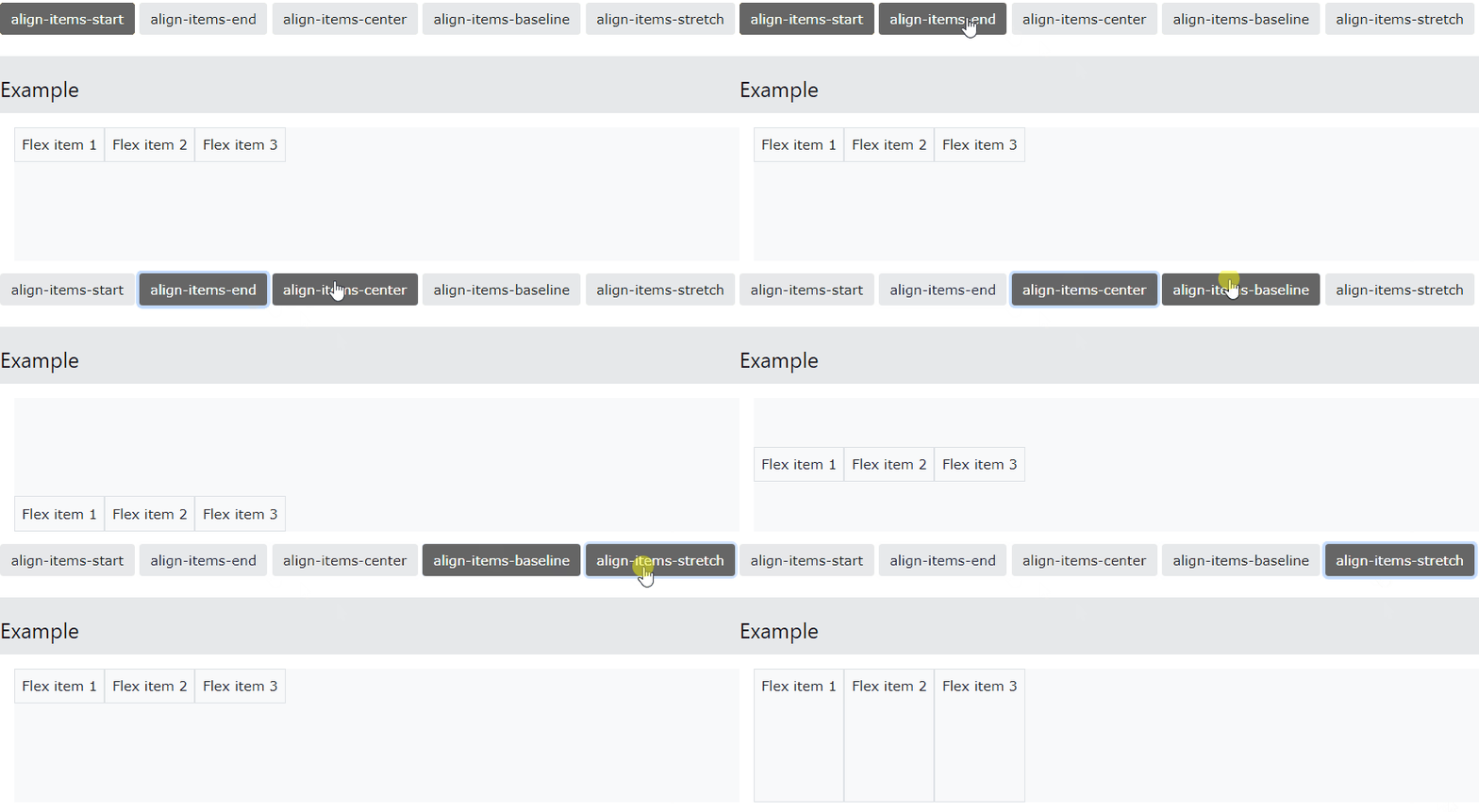
<p style="text-align: justify;">Kiểm soát căn chỉnh mục theo chiều dọc của các hàng mục flex đơn lẻ với class&nbsp;<code>.align-items-*</code>. Class hợp lệ là&nbsp;<code>.align-items-start</code>,&nbsp;<code>.align-items-end</code>,&nbsp;<code>.align-items-center</code>,&nbsp;<code>.align-items-baseline</code>, và&nbsp;<code>.align-items-stretch&nbsp;</code>(mặc định). Code mẫu:</p>

<pre id="pre22" style="text-align: justify;">
&lt;div class=&quot;d-flex align-items-start&quot;&gt;..&lt;/div&gt;

&lt;div class=&quot;d-flex align-items-end&quot;&gt;..&lt;/div&gt;

&lt;div class=&quot;d-flex align-items-center&quot;&gt;..&lt;/div&gt;

&lt;div class=&quot;d-flex align-items-baseline&quot;&gt;..&lt;/div&gt;

&lt;div class=&quot;d-flex align-items-stretch&quot;&gt;..&lt;/div&gt;</pre>

<p style="text-align: justify;"><img alt="Căn chỉnh mục" data-i="13" data-src="https://st.quantrimang.com/photos/image/2022/12/08/bootstrap-flex-2.gif" data-was-processed="true" height="239" src="https://st.quantrimang.com/photos/image/2022/12/08/bootstrap-flex-2.gif" width="650" /></p>

<h2 style="text-align: justify;">Align Self</h2>

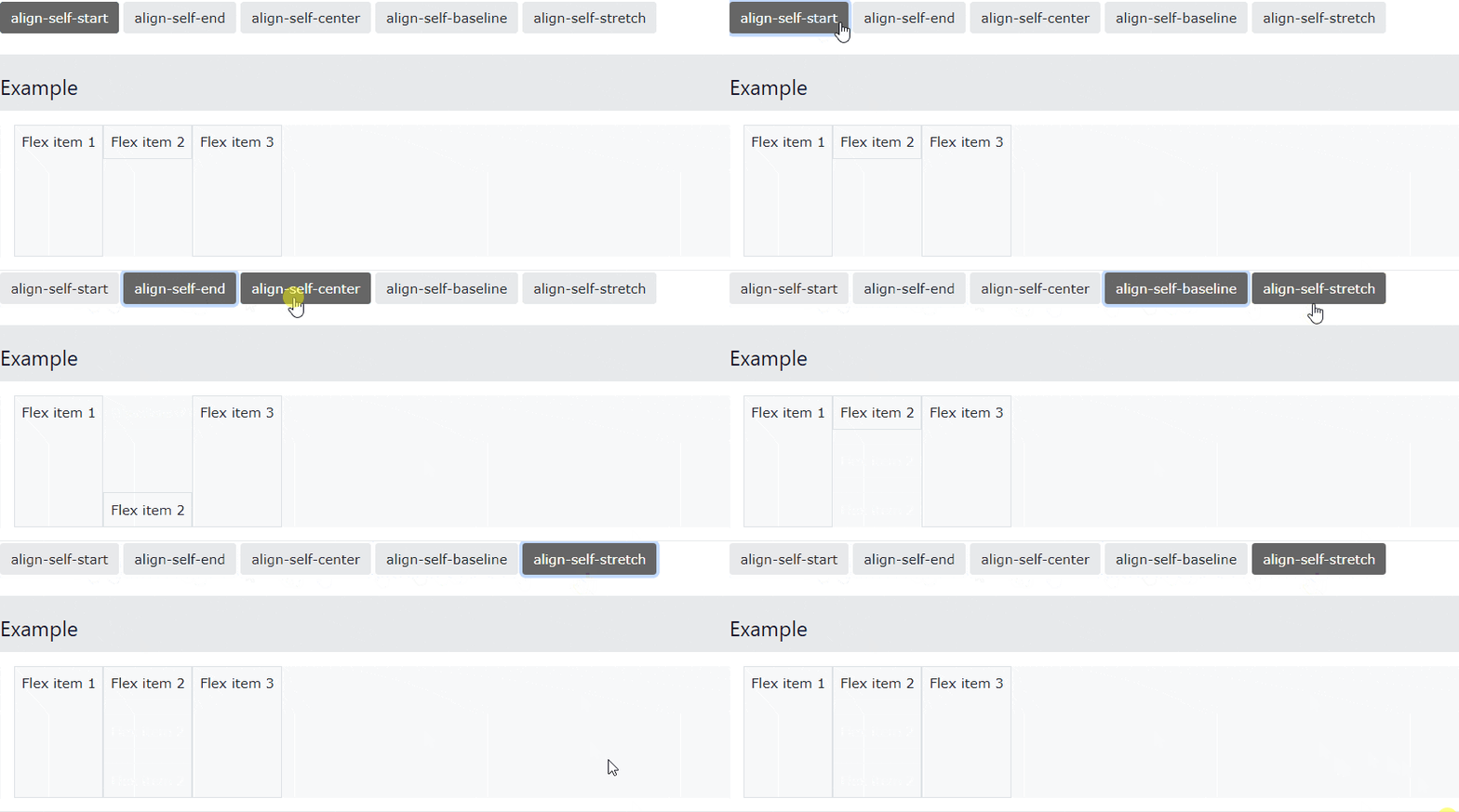
<p style="text-align: justify;">Kiểm soát căn chỉnh dọc của một mục linh hoạt được chỉ định với các lớp&nbsp;<code>.align-self-*</code>. Các lớp hợp lệ là&nbsp;<code>.align-self-start</code>,&nbsp;<code>.align-self-end</code>,&nbsp;<code>.align-self-center</code>, .<code>align-self-baseline</code>&nbsp;và&nbsp;<code>.align-self-stretch</code>&nbsp;(mặc định). Code mẫu:</p>

<pre id="pre23" style="text-align: justify;">
&lt;div class=&quot;d-flex bg-light&quot; style=&quot;height:150px&quot;&gt;
&lt;div class=&quot;p-2 border&quot;&gt;Flex item 1&lt;/div&gt;
&lt;div class=&quot;p-2 border align-self-start&quot;&gt;Flex item 2&lt;/div&gt;
&lt;div class=&quot;p-2 border&quot;&gt;Flex item 3&lt;/div&gt;
&lt;/div&gt;</pre>

<p style="text-align: justify;"><img alt="Align Self" data-i="14" data-src="https://st.quantrimang.com/photos/image/2022/12/08/bootstrap-flex-3.gif" data-was-processed="true" height="242" src="https://st.quantrimang.com/photos/image/2022/12/08/bootstrap-flex-3.gif" width="650" /></p>

<h2 style="text-align: justify;">Class Flex đáp ứng</h2>

<p style="text-align: justify;">Tất cả class flex đều có class đáp ứng bổ sung. Điều đó khiến nó dễ dàng thiết lập một class flex cụ thể trên kích thước màn hình nhất định.</p>

<p style="text-align: justify;">Biểu tượng&nbsp;<code>*</code>&nbsp;có thể được thay thế bằng sm, md, lg, xl hoặc xxl, lần lượt tương ứng với màn hình nhỏ, trung bình, lớn, cực lớn, siêu lớn.</p>

<table border="1" cellpadding="1" cellspacing="1" id="myFilterTable">
	<tbody>
		<tr>
			<th style="text-align: justify;">Class</th>
			<th style="text-align: justify;">Mô tả</th>
		</tr>
		<tr>
			<td style="text-align: justify;">Flex Container</td>
			<td style="text-align: justify;">&nbsp;</td>
		</tr>
		<tr>
			<td style="text-align: justify;"><code>.d-*-flex</code></td>
			<td style="text-align: justify;">Tạo flexbox container cho các màn hình khác nhau</td>
		</tr>
		<tr>
			<td style="text-align: justify;"><code>.d-*-inline-flex</code></td>
			<td style="text-align: justify;">Tạo inline flexbox container cho các màn hình khác nhau</td>
		</tr>
		<tr>
			<td style="text-align: justify;">Direction</td>
			<td style="text-align: justify;">&nbsp;</td>
		</tr>
		<tr>
			<td style="text-align: justify;"><code>.flex-*-row</code></td>
			<td style="text-align: justify;">Hiện các mục flex theo chiều ngang</td>
		</tr>
		<tr>
			<td style="text-align: justify;"><code>.flex-*-row-reverse</code></td>
			<td style="text-align: justify;">Hiện các mục flex theo chiều ngang và căn phải</td>
		</tr>
		<tr>
			<td style="text-align: justify;"><code>.flex-*-column</code></td>
			<td style="text-align: justify;">Hiện các mục felx theo chiều dọc</td>
		</tr>
		<tr>
			<td style="text-align: justify;"><code>.flex-*-column-reverse</code></td>
			<td style="text-align: justify;">Hiện các mục flex theo chiều dọc và đảo ngược vị trí</td>
		</tr>
		<tr>
			<td style="text-align: justify;">Justified Content</td>
			<td style="text-align: justify;">&nbsp;</td>
		</tr>
		<tr>
			<td style="text-align: justify;"><code>.justify-content-*-start</code></td>
			<td style="text-align: justify;">Hiện các mục flex ngay từ đầu (căn trái)</td>
		</tr>
		<tr>
			<td style="text-align: justify;"><code>.justify-content-*-end</code></td>
			<td style="text-align: justify;">Hiện các mục flex ở cuối (căn phải)</td>
		</tr>
		<tr>
			<td style="text-align: justify;"><code>.justify-content-*-center</code></td>
			<td style="text-align: justify;">Hiện các mục flex container ở trung tâm của màn hình</td>
		</tr>
		<tr>
			<td style="text-align: justify;"><code>.justify-content-*-between</code></td>
			<td style="text-align: justify;">Hiện các mục flex nằm ở giữa trên các màn hình khác nhau</td>
		</tr>
		<tr>
			<td style="text-align: justify;"><code>.justify-content-*-around</code></td>
			<td style="text-align: justify;">Hiện các mục flex xung quanh màn hình.</td>
		</tr>
		<tr>
			<td style="text-align: justify;">Fill / Equal Width</td>
			<td style="text-align: justify;">&nbsp;</td>
		</tr>
		<tr>
			<td style="text-align: justify;"><code>.flex-*-fill</code></td>
			<td style="text-align: justify;">Chỉnh cùng chiều rộng cho các mục flex</td>
		</tr>
		<tr>
			<td style="text-align: justify;">Grow</td>
			<td style="text-align: justify;">&nbsp;</td>
		</tr>
		<tr>
			<td style="text-align: justify;"><code>.flex-*-grow-0</code></td>
			<td style="text-align: justify;">Các mục flex không mở rộng trên các màn hình khác nhau</td>
		</tr>
		<tr>
			<td style="text-align: justify;"><code>.flex-*-grow-1</code></td>
			<td style="text-align: justify;">Mở rộng các mục flex</td>
		</tr>
		<tr>
			<td style="text-align: justify;">Shrink</td>
			<td style="text-align: justify;">&nbsp;</td>
		</tr>
		<tr>
			<td style="text-align: justify;"><code>.flex-*-shrink-0</code></td>
			<td style="text-align: justify;">Không thu hẹp các mục flex trên màn hình</td>
		</tr>
		<tr>
			<td style="text-align: justify;"><code>.flex-*-shrink-1</code></td>
			<td style="text-align: justify;">Thu hẹp các mục flex trên màn hình</td>
		</tr>
		<tr>
			<td style="text-align: justify;">Order</td>
			<td style="text-align: justify;">&nbsp;</td>
		</tr>
		<tr>
			<td style="text-align: justify;"><code>.order-*-<em>0-12</em></code></td>
			<td style="text-align: justify;">Thay đổi thứ tự từ 0 tới 5</td>
		</tr>
		<tr>
			<td style="text-align: justify;">Wrap</td>
			<td style="text-align: justify;">&nbsp;</td>
		</tr>
		<tr>
			<td style="text-align: justify;"><code>.flex-*-nowrap</code></td>
			<td style="text-align: justify;">Không &quot;wrap&quot; các mục</td>
		</tr>
		<tr>
			<td style="text-align: justify;"><code>.flex-*-wrap</code></td>
			<td style="text-align: justify;">Đóng gói các mục</td>
		</tr>
		<tr>
			<td style="text-align: justify;"><code>.flex-*-wrap-reverse</code></td>
			<td style="text-align: justify;">Đảo ngược đóng gói các mục trên màn hình</td>
		</tr>
		<tr>
			<td style="text-align: justify;">Align Content</td>
			<td style="text-align: justify;">&nbsp;</td>
		</tr>
		<tr>
			<td style="text-align: justify;"><code>.align-content-*-start</code></td>
			<td style="text-align: justify;">Căn chỉnh các mục đã thu thập từ đầu trên các màn hình khác nhau</td>
		</tr>
		<tr>
			<td style="text-align: justify;"><code>.align-content-*-end</code></td>
			<td style="text-align: justify;">Căn chỉnh các mục đã thu thập ở cuối trên các màn hình khác nhau</td>
		</tr>
		<tr>
			<td style="text-align: justify;"><code>.align-content-*-center</code></td>
			<td style="text-align: justify;">Căn chỉnh các mục đã thu thập ở trung tâm trên các màn hình khác nhau</td>
		</tr>
		<tr>
			<td style="text-align: justify;"><code>.align-content-*-around</code></td>
			<td style="text-align: justify;">Căn chỉnh các mục được thu thập &quot;xung quanh&quot; trên các màn hình khác nhau</td>
		</tr>
		<tr>
			<td style="text-align: justify;"><code>.align-content-*-stretch</code></td>
			<td style="text-align: justify;">Kéo dài các mục đã thu thập trên các màn hình khác nhau</td>
		</tr>
		<tr>
			<td style="text-align: justify;">Align Items</td>
			<td style="text-align: justify;">&nbsp;</td>
		</tr>
		<tr>
			<td style="text-align: justify;"><code>.align-items-*-start</code></td>
			<td style="text-align: justify;">Căn chỉnh các hàng đơn lẻ từ đầu trên các màn hình khác nhau</td>
		</tr>
		<tr>
			<td style="text-align: justify;"><code>.align-items-*-end</code></td>
			<td style="text-align: justify;">Căn chỉnh các hàng đơn ở cuối trên các màn hình khác nhau</td>
		</tr>
		<tr>
			<td style="text-align: justify;"><code>.align-items-*-center</code></td>
			<td style="text-align: justify;">Căn chỉnh các hàng đơn lẻ ở trung tâm trên các màn hình khác nhau</td>
		</tr>
		<tr>
			<td style="text-align: justify;"><code>.align-items-*-baseline</code></td>
			<td style="text-align: justify;">Căn chỉnh các hàng đơn lẻ ở đường cơ sở trên các màn hình khác nhau</td>
		</tr>
		<tr>
			<td style="text-align: justify;"><code>.align-items-*-stretch</code></td>
			<td style="text-align: justify;">Kéo dài các hàng đơn lẻ trên các màn hình khác nhau</td>
		</tr>
		<tr>
			<td style="text-align: justify;">Align Self</td>
			<td style="text-align: justify;">&nbsp;</td>
		</tr>
		<tr>
			<td style="text-align: justify;"><code>.align-self-*-start</code></td>
			<td style="text-align: justify;">Căn chỉnh một mục flex ngay từ đầu trên các màn hình khác nhau</td>
		</tr>
		<tr>
			<td style="text-align: justify;"><code>.align-self-*-end</code></td>
			<td style="text-align: justify;">Căn chỉnh một mục flex ở cuối trên các màn hình khác nhau</td>
		</tr>
		<tr>
			<td style="text-align: justify;"><code>.align-self-*-center</code></td>
			<td style="text-align: justify;">Căn chỉnh một mục flex ở trung tâm trên các màn hình khác nhau</td>
		</tr>
		<tr>
			<td style="text-align: justify;"><code>.align-self-*-baseline</code></td>
			<td style="text-align: justify;">Căn chỉnh một mục flex ở baseline trên các màn hình khác nhau</td>
		</tr>
		<tr>
			<td style="text-align: justify;"><code>.align-self-*-stretch</code></td>
			<td style="text-align: justify;">Kéo dài một mục flex trên các màn hình khác nhau</td>
		</tr>
	</tbody>
</table>

<p style="text-align: justify;">Trên đây là tất cả những điều bạn cần biết về flex trong Bootstrap 5. Hi vọng bài viết hữu ích với các bạn.</p>
		</div>
				<div id="author">
						<p>
				<strong>Nguồn tin:</strong>
				Quantrimang.com
			</p>
		</div>
	</div>
	<div id="footer" class="clearfix">
		<div id="url">
			<strong>URL của bản tin này: </strong><a href="https://www.nguoicodonvn2008.info/vi/news/savefile/kien-thuc-may-tinh/bai-30-flex-trong-bootstrap-5-6427.html" title="Bài 30&#x3A; Flex trong Bootstrap 5">https://www.nguoicodonvn2008.info/vi/news/savefile/kien-thuc-may-tinh/bai-30-flex-trong-bootstrap-5-6427.html</a>

		</div>
		<div class="clear"></div>
		<div class="copyright">
			&copy; .&#x3A; Nguoicodonvn2008.info - Cõi lòng người cô đơn &#x3A;.
		</div>
		<div id="contact">
			<a href="mailto:admin@nguoicodonvn2008.info">admin@nguoicodonvn2008.info</a>
		</div>
	</div>
</div>
        <div id="timeoutsess" class="chromeframe">
            Bạn đã không sử dụng Site, <a onclick="timeoutsesscancel();" href="https://nguoicodonvn2008.info/#">Bấm vào đây để duy trì trạng thái đăng nhập</a>. Thời gian chờ: <span id="secField"> 60 </span> giây
        </div>
        <div id="openidResult" class="nv-alert" style="display:none"></div>
        <div id="openidBt" data-result="" data-redirect=""></div>
		</script>
		<div class="car-top">
  <span><img src="https://nguoicodonvn2008.info/themes/default/images/car.png" alt=""></span>
</div>
<div id="run_cronjobs" style="visibility:hidden;display:none;"><img alt="cron" src="/index.php?second=cronjobs&amp;p=y97NjEa1" width="1" height="1" /></div>
<script src="https://nguoicodonvn2008.info/assets/js/jquery/jquery.min.js"></script>
<script>var nv_base_siteurl="/",nv_lang_data="vi",nv_lang_interface="vi",nv_name_variable="nv",nv_fc_variable="op",nv_lang_variable="language",nv_module_name="news",nv_func_name="savefile",nv_is_user=0, nv_my_ofs=-4,nv_my_abbr="EDT",nv_cookie_prefix="nv4c_e856T",nv_check_pass_mstime=1738000,nv_area_admin=0,nv_safemode=0,theme_responsive=0,nv_recaptcha_ver=2,nv_recaptcha_sitekey="",nv_recaptcha_type="image",XSSsanitize=1;</script>
<script src="https://nguoicodonvn2008.info/assets/js/language/vi.js"></script>
<script src="https://nguoicodonvn2008.info/assets/js/DOMPurify/purify3.js"></script>
<script src="https://nguoicodonvn2008.info/assets/js/global.js"></script>
<script src="https://nguoicodonvn2008.info/assets/js/site.js"></script>
<script src="https://nguoicodonvn2008.info/themes/default/js/news.js"></script>
<script src="https://nguoicodonvn2008.info/themes/default/js/main.js"></script>
<script src="https://nguoicodonvn2008.info/themes/default/js/custom.js"></script>
<script type="application/ld+json">
        {
            "@context": "https://schema.org",
            "@type": "Organization",
            "url": "https://nguoicodonvn2008.info",
            "logo": "https://nguoicodonvn2008.info/uploads/angel.gif"
        }
        </script>
<script src="https://nguoicodonvn2008.info/themes/default/js/bootstrap.min.js"></script>
<script type="text/javascript">
var $scrolltop = $('.car-top');
$scrolltop.on('click', function () {
    $('html,body').animate({
        scrollTop: 0
    }, 800);
    $(this).addClass("car-run");
    setTimeout(function(){ $scrolltop.removeClass('car-run');}, 1000);
    return false;
});
$(window).on('scroll', function ()
{ 
    if($(window).scrollTop() >= 200)
    {
        $scrolltop.addClass("show");
        $scrolltop.addClass("car-down");
    }
    else
    {
       $scrolltop.removeClass("show");
       setTimeout(function(){ $scrolltop.removeClass('car-down');}, 300);
    }
});
</script>
</body>
</html>