<!DOCTYPE html>
    <html lang="vi" xmlns="http://www.w3.org/1999/xhtml" prefix="og: http://ogp.me/ns#">
    <head>
<title>Áp dụng thủ thuật này nếu bạn muốn Windows 11 nhanh chóng, sạch sẽ hơn&#33;</title>
<meta name="description" content="Áp dụng thủ thuật này nếu bạn muốn Windows 11 nhanh chóng, sạch sẽ hơn&#33; - Savefile - Tin Tức -...">
<meta name="author" content=".: Nguoicodonvn2008.info - Cõi lòng người cô đơn :.">
<meta name="copyright" content=".: Nguoicodonvn2008.info - Cõi lòng người cô đơn :. [admin@nguoicodonvn2008.info]">
<meta name="robots" content="index, archive, follow, noodp">
<meta name="googlebot" content="index,archive,follow,noodp">
<meta name="msnbot" content="all,index,follow">
<meta name="generator" content="NukeViet v4.5">
<meta http-equiv="Content-Type" content="text/html; charset=utf-8">
<meta property="og:title" content="Áp dụng thủ thuật này nếu bạn muốn Windows 11 nhanh chóng, sạch sẽ hơn&#33;">
<meta property="og:type" content="website">
<meta property="og:description" content="Savefile - Tin Tức -...">
<meta property="og:site_name" content=".&#x3A; Nguoicodonvn2008.info - Cõi lòng người cô đơn &#x3A;.">
<meta property="og:url" content="https://www.nguoicodonvn2008.info/vi/news/savefile/kien-thuc-may-tinh/ap-dung-thu-thuat-nay-neu-ban-muon-windows-11-nhanh-chong-sach-se-hon-10407.html">
<link rel="shortcut icon" href="https://nguoicodonvn2008.info/favicon.ico">
<link rel="canonical" href="https://www.nguoicodonvn2008.info/vi/news/savefile/kien-thuc-may-tinh/ap-dung-thu-thuat-nay-neu-ban-muon-windows-11-nhanh-chong-sach-se-hon-10407.html">
<link rel="alternate" href="https://nguoicodonvn2008.info/vi/news/rss/" title="Tin Tức" type="application/rss+xml">
<link rel="alternate" href="https://nguoicodonvn2008.info/vi/news/rss/karaoke-dual/" title="Tin Tức - Karaoke Dual" type="application/rss+xml">
<link rel="alternate" href="https://nguoicodonvn2008.info/vi/news/rss/nhac-tre/" title="Tin Tức - Nhạc trẻ" type="application/rss+xml">
<link rel="alternate" href="https://nguoicodonvn2008.info/vi/news/rss/tru-tinh/" title="Tin Tức - Trữ tình" type="application/rss+xml">
<link rel="alternate" href="https://nguoicodonvn2008.info/vi/news/rss/nuoc-ngoai/" title="Tin Tức - Nước ngoài" type="application/rss+xml">
<link rel="alternate" href="https://nguoicodonvn2008.info/vi/news/rss/remix/" title="Tin Tức - Remix" type="application/rss+xml">
<link rel="alternate" href="https://nguoicodonvn2008.info/vi/news/rss/tam-su-tinh-yeu/" title="Tin Tức - Tâm sự tình yêu" type="application/rss+xml">
<link rel="alternate" href="https://nguoicodonvn2008.info/vi/news/rss/tho-suu-tam/" title="Tin Tức - Thơ sưu tầm" type="application/rss+xml">
<link rel="alternate" href="https://nguoicodonvn2008.info/vi/news/rss/cuoc-song/" title="Tin Tức - Cuộc sống" type="application/rss+xml">
<link rel="alternate" href="https://nguoicodonvn2008.info/vi/news/rss/phan-mem/" title="Tin Tức - Phần mềm" type="application/rss+xml">
<link rel="alternate" href="https://nguoicodonvn2008.info/vi/news/rss/kien-thuc-may-tinh/" title="Tin Tức - Kiến thức máy tính" type="application/rss+xml">
<link rel="alternate" href="https://nguoicodonvn2008.info/vi/news/rss/hoc-tap/" title="Tin Tức - Học tập" type="application/rss+xml">
<link rel="alternate" href="https://nguoicodonvn2008.info/vi/news/rss/tai-lieu/" title="Tin Tức - Tài liệu" type="application/rss+xml">
<link rel="alternate" href="https://nguoicodonvn2008.info/vi/news/rss/de-thi/" title="Tin Tức - Đề thi" type="application/rss+xml">
<link rel="preload" as="style" href="https://nguoicodonvn2008.info/assets/css/font-awesome.min.css" type="text/css">
<link rel="preload" as="style" href="https://nguoicodonvn2008.info/themes/default/css/bootstrap.non-responsive.css" type="text/css">
<link rel="preload" as="style" href="https://nguoicodonvn2008.info/themes/default/css/style.css" type="text/css">
<link rel="preload" as="style" href="https://nguoicodonvn2008.info/themes/default/css/style.non-responsive.css" type="text/css">
<link rel="preload" as="style" href="https://nguoicodonvn2008.info/themes/default/css/news.css" type="text/css">
<link rel="preload" as="style" href="https://nguoicodonvn2008.info/themes/default/css/custom.css" type="text/css">
<link rel="preload" as="script" href="https://nguoicodonvn2008.info/assets/js/jquery/jquery.min.js" type="text/javascript">
<link rel="preload" as="script" href="https://nguoicodonvn2008.info/assets/js/language/vi.js" type="text/javascript">
<link rel="preload" as="script" href="https://nguoicodonvn2008.info/assets/js/DOMPurify/purify3.js" type="text/javascript">
<link rel="preload" as="script" href="https://nguoicodonvn2008.info/assets/js/global.js" type="text/javascript">
<link rel="preload" as="script" href="https://nguoicodonvn2008.info/assets/js/site.js" type="text/javascript">
<link rel="preload" as="script" href="https://nguoicodonvn2008.info/themes/default/js/news.js" type="text/javascript">
<link rel="preload" as="script" href="https://nguoicodonvn2008.info/themes/default/js/main.js" type="text/javascript">
<link rel="preload" as="script" href="https://nguoicodonvn2008.info/themes/default/js/custom.js" type="text/javascript">
<link rel="preload" as="script" href="https://nguoicodonvn2008.info/themes/default/js/bootstrap.min.js" type="text/javascript">
<link rel="stylesheet" href="https://nguoicodonvn2008.info/assets/css/font-awesome.min.css">
<link rel="stylesheet" href="https://nguoicodonvn2008.info/themes/default/css/bootstrap.non-responsive.css">
<link rel="stylesheet" href="https://nguoicodonvn2008.info/themes/default/css/style.css">
<link rel="stylesheet" href="https://nguoicodonvn2008.info/themes/default/css/style.non-responsive.css">
<link rel="StyleSheet" href="https://nguoicodonvn2008.info/themes/default/css/news.css">
<link rel="stylesheet" href="https://nguoicodonvn2008.info/themes/default/css/custom.css">
<style type="text/css">
	body{background: #fff;}
</style>
    </head>
    <body>
<div id="print">
	<div id="hd_print">
		<h2 class="pull-left">.&#x3A; Nguoicodonvn2008.info - Cõi lòng người cô đơn &#x3A;.</h2>
		<p class="pull-right"><a title=".&#x3A; Nguoicodonvn2008.info - Cõi lòng người cô đơn &#x3A;." href="https://nguoicodonvn2008.info/">https://nguoicodonvn2008.info</a></p>
	</div>
	<div class="clear"></div>
	<hr />
	<div id="content">
		<h1>Áp dụng thủ thuật này nếu bạn muốn Windows 11 nhanh chóng, sạch sẽ hơn&#33;</h1>
		<ul class="list-inline">
			<li>Thứ hai - 19/05/2025 23:12</li>
			<li class="hidden-print txtrequired"><em class="fa fa-print">&nbsp;</em><a title="In ra" href="javascript:;" onclick="window.print()">In ra</a></li>
			<li class="hidden-print txtrequired"><em class="fa fa-power-off">&nbsp;</em><a title="Đóng cửa sổ này" href="javascript:;" onclick="window.close()">Đóng cửa sổ này</a></li>
		</ul>
		<div class="clear"></div>
		<div id="hometext">
		</div>
				<div class="imghome">
			<img alt="Áp dụng thủ thuật này nếu bạn muốn Windows 11 nhanh chóng, sạch sẽ hơn&#33;" src="https://st.quantrimang.com/photos/image/2025/05/19/thu-thuat-giup-windows-11-nhanh-sach-se-hon-5.jpg" width="460" class="img-thumbnail" />
		</div>
		<div class="clear"></div>
		<div id="bodytext" class="clearfix">
			<p style="text-align: justify;">Bạn đã chán ngấy với&nbsp;bloatware&nbsp;làm chậm Windows chưa? Hiệu suất sẽ tăng thêm rất nhiều khi cài đặt Windows không có bloatware, các ứng dụng bổ sung và những tính năng mà bạn không cần. May mắn thay, cách khắc phục rất đơn giản.</p>

<div style="text-align: justify;">&nbsp;</div>

<h2 style="text-align: justify;">Windows cồng kềnh hơn bạn nghĩ</h2>

<p style="text-align: justify;">Thoạt nhìn, bạn có thể không thấy, nhưng Windows chứa đầy các công cụ và chương trình nhỏ mà bạn có thể không bao giờ sử dụng, đặc biệt là khi chúng ta xét đến laptop. Các nhà sản xuất thường load những bản cài đặt Windows gốc trên laptop với bloatware từ các đối tác của họ để kiếm thêm tiền. Điều này bao gồm các chương trình diệt virus, tiện ích kiểm soát hệ thống, trình duyệt và đủ loại chương trình khác nhau mà bạn không cần.</p>

<p style="text-align: justify;">Trong số tất cả những thứ cồng kềnh này, những gì bạn thực sự cần xem xét là các tiện ích kiểm soát hệ thống mà nhà sản xuất cài đặt để kiểm soát quạt tản nhiệt&nbsp;&nbsp;PC, chế độ nguồn, đèn nền bàn phím và bất kỳ tính năng nào khác. Những công cụ này cũng thường ngốn hiệu suất và sẽ ngốn bộ nhớ của bạn ở chế độ nền. Tùy thuộc vào nhà sản xuất PC, bạn sẽ có thể tìm thấy các tùy chọn của bên thứ ba được tối ưu hóa tốt hơn và không tiêu tốn nhiều tài nguyên ở chế độ nền.</p>

<p style="text-align: justify;">Bất kể thế nào,&nbsp;xóa bloatware&nbsp;là một trong những điều đầu tiên bạn nên làm khi thiết lập PC mới. Rất may là có nhiều cách để bạn có thể dễ dàng xóa sạch cài đặt Windows 11 của mình.</p>

<h2 style="text-align: justify;">Ứng dụng này sẽ cho phép bạn xóa bloatware dễ dàng</h2>

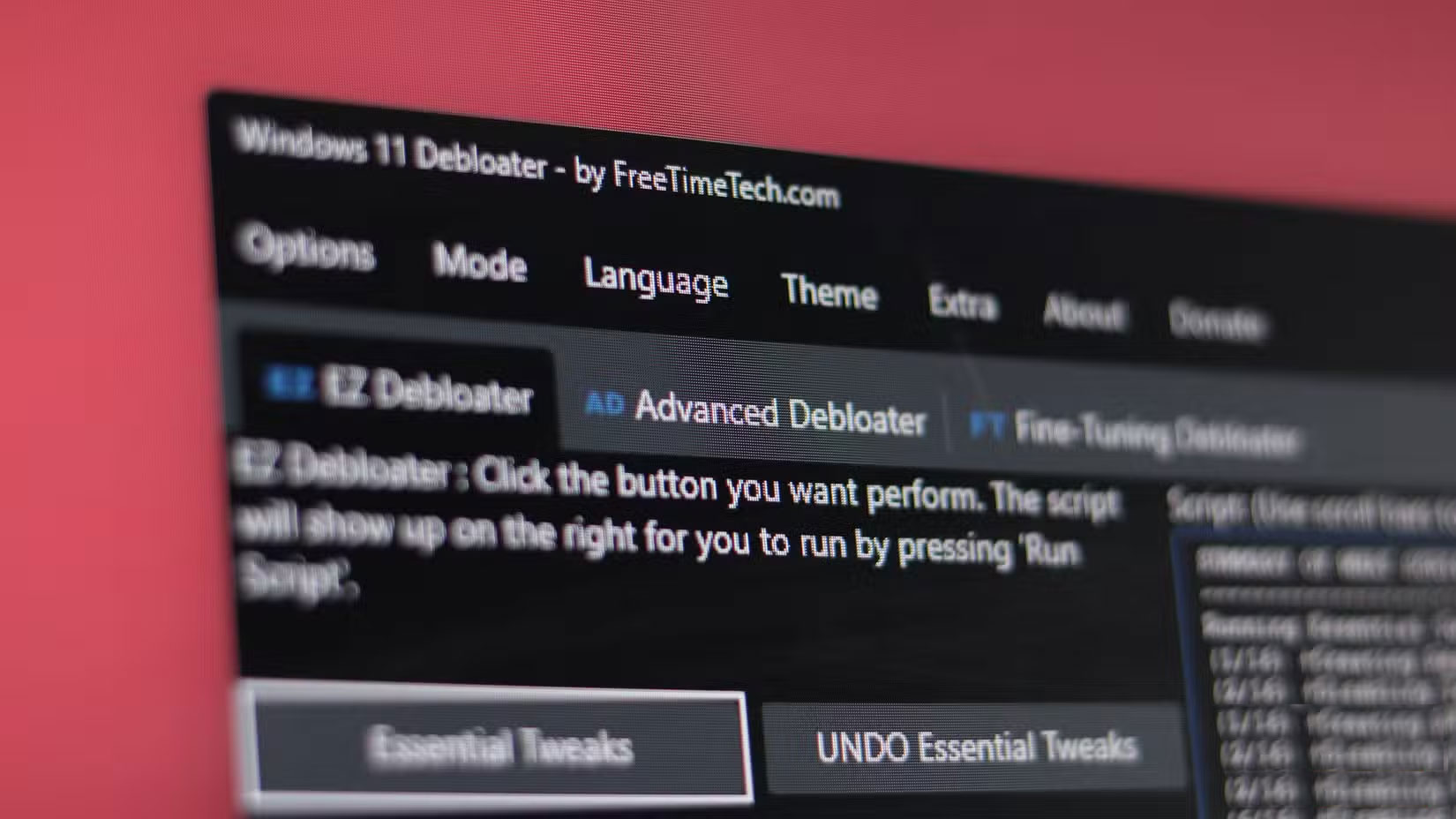
<p style="text-align: justify;">Nếu muốn chạy Windows 11 mà không có bloatware và các yêu cầu phần cứng nghiêm ngặt do Microsoft áp đặt, bạn có thể thử sử dụng&nbsp;Tiny11&nbsp;- một phiên bản Windows được tinh giản mà không có các ứng dụng không cần thiết, bao gồm cả&nbsp;Microsoft Edge. Tuy nhiên, nếu việc cài đặt lại quá rắc rối, thì công cụ&nbsp;Windows 11 Debloater của FreeTimeTech&nbsp;là một giải pháp tuyệt vời.</p>

<p style="text-align: justify;">Công cụ này là tập hợp các script PowerShell vô hiệu hóa hoặc kích hoạt những ứng dụng, tính năng và cải tiến hiệu suất cụ thể của Windows chỉ bằng một cú nhấp chuột. Chương trình sẽ hiển thị tóm tắt về những gì mỗi script sẽ thực hiện trước khi bạn chạy và bạn có thể chỉnh sửa các script theo ý thích nếu muốn thay đổi tùy chỉnh.</p>

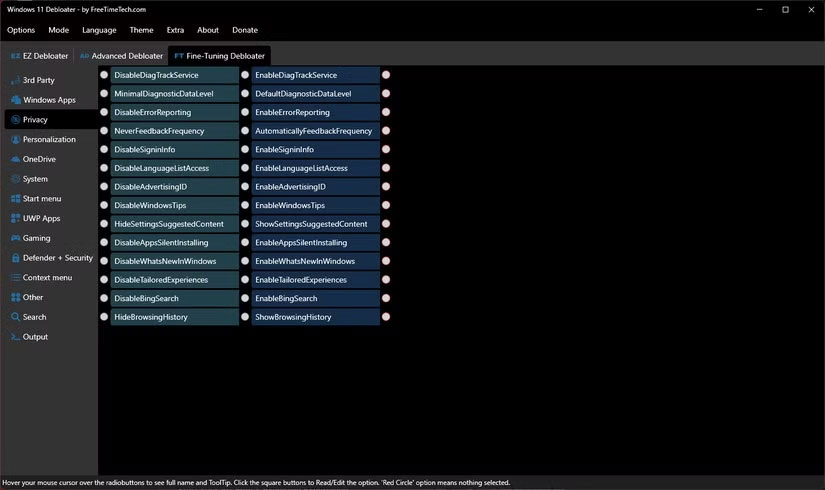
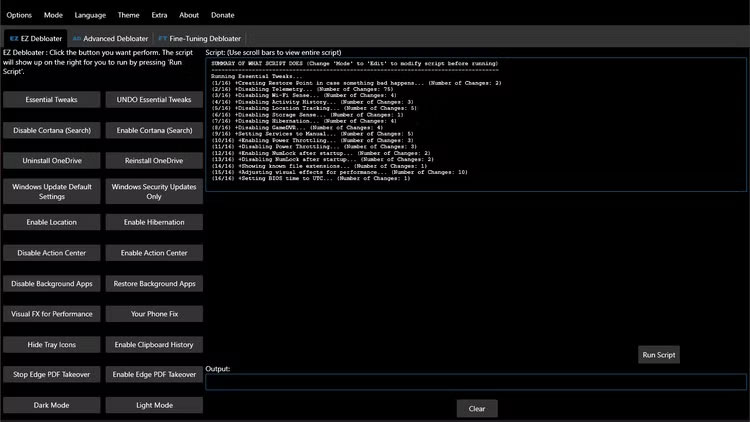
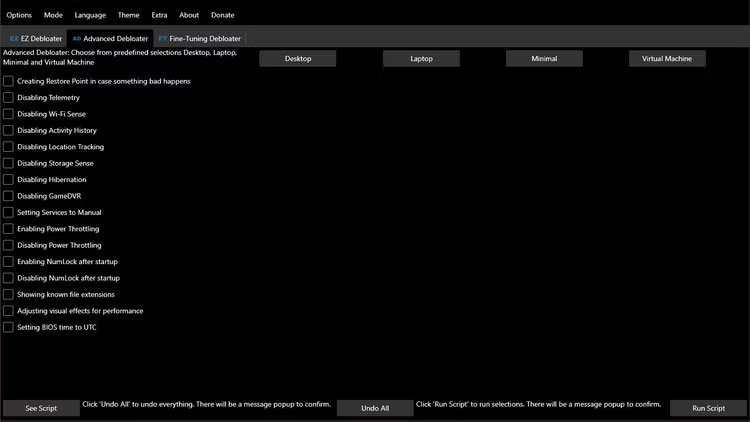
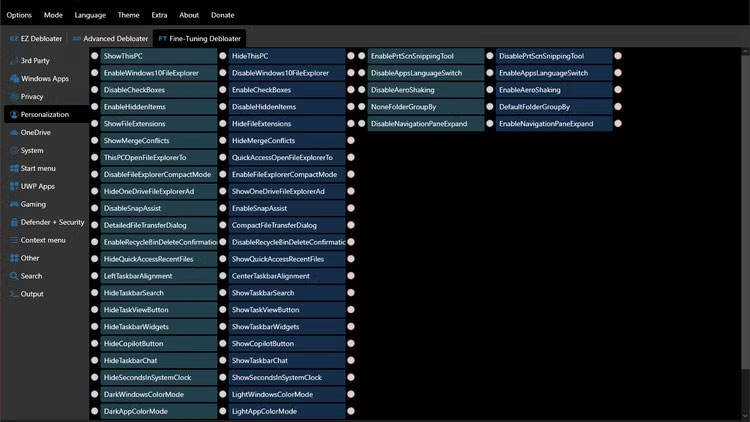
<p style="text-align: justify;">Để dễ sử dụng, Windows 11 Debloater được chia thành 3 phần:</p>

<ul>
	<li style="text-align: justify;"><strong>EZ Debloater</strong>: Bao gồm các nút để điều chỉnh Windows đơn giản như vô hiệu hóa Cortana hoặc OneDrive, ngăn Edge tự động chiếm dụng PDF, bật lịch sử clipboard, v.v...</li>
	<li style="text-align: justify;"><strong>Advanced Debloater</strong>: Bao gồm các tùy chọn để tinh chỉnh cơ bản cho thiết bị của bạn. Bạn cũng nhận được những lựa chọn được xác định trước cho desktop, laptop, cài đặt cho các thay đổi tối thiểu và thậm chí cho&nbsp;máy ảo.</li>
	<li style="text-align: justify;"><strong>Fine-Tuning Debloater</strong>: Như tên gọi của nó, đây là phần mạnh mẽ nhất trong chương trình, với các tùy chọn để cài đặt hoặc gỡ cài đặt nhiều công cụ hệ thống, ứng dụng của bên thứ ba như trình duyệt và công cụ giao tiếp, kiểm soát quyền riêng tư, cài đặt hệ thống Windows, tùy chọn bảo mật, v.v...</li>
</ul>

<figure>
<div style="text-align: justify;"><img alt="" data-i="0" data-src="https://st.quantrimang.com/photos/image/2025/05/19/thu-thuat-giup-windows-11-nhanh-sach-se-hon-1.jpg" data-was-processed="true" height="422" src="https://st.quantrimang.com/photos/image/2025/05/19/thu-thuat-giup-windows-11-nhanh-sach-se-hon-1.jpg" width="750" /></div>
</figure>

<figure>
<div style="text-align: justify;"><img alt="" data-i="1" data-src="https://st.quantrimang.com/photos/image/2025/05/19/thu-thuat-giup-windows-11-nhanh-sach-se-hon-2.jpg" data-was-processed="true" height="422" src="https://st.quantrimang.com/photos/image/2025/05/19/thu-thuat-giup-windows-11-nhanh-sach-se-hon-2.jpg" width="750" /></div>
</figure>

<figure>
<div style="text-align: justify;"><img alt="" data-i="2" data-src="https://st.quantrimang.com/photos/image/2025/05/19/thu-thuat-giup-windows-11-nhanh-sach-se-hon-3.jpg" data-was-processed="true" height="422" src="https://st.quantrimang.com/photos/image/2025/05/19/thu-thuat-giup-windows-11-nhanh-sach-se-hon-3.jpg" width="750" /></div>
</figure>

<p style="text-align: justify;">Điểm tuyệt vời nhất về Windows 11 Debloater là tính dễ sử dụng. Bạn không cần phải biết mọi thứ về Windows để bắt đầu sử dụng nó. Trong phần&nbsp;<strong>Advanced Debloater</strong>, bạn có thể chọn tùy chọn được xác định trước tốt nhất theo nhu cầu của mình hoặc sử dụng&nbsp;<strong>EZ Debloater</strong>&nbsp;để bật hoặc tắt chức năng cụ thể trên PC của bạn. Thậm chí còn có một cài đặt preset debloat chỉ cần một cú nhấp chuột để xóa hầu hết phần mềm bloatware khỏi hệ thống.</p>

<div style="text-align: justify;">&nbsp;</div>

<p style="text-align: justify;"><strong>Fine-Tuning Debloater&nbsp;</strong>có vẻ đáng sợ khi nhìn thoáng qua, chỉ vì số lượng tùy chọn mà nó có. Nếu bạn không chắc chắn về chức năng của một script cụ thể trong chương trình, chỉ cần di chuột qua nút radio trong giây lát và một chú giải công cụ giải thích tùy chọn sẽ xuất hiện.</p>

<p style="text-align: justify;">Sau khi bạn đã chọn tất cả các tùy chọn mong muốn, hãy chuyển đến tiểu mục&nbsp;<strong>Output,</strong>&nbsp;nhấp vào nút&nbsp;<strong>Output PowerShell</strong>&nbsp;để xem script, sau đó nhấp vào nút&nbsp;<strong>Run PowerShell</strong>&nbsp;để chạy script. Bạn cũng có thể tạo các script PowerShell tùy chỉnh ghi nhớ cài đặt của mình và có thể nhanh chóng sao chép chúng trên bất kỳ hệ thống&nbsp;Windows 11&nbsp;nào.</p>

<p style="text-align: justify;">Bạn có thể sử dụng Windows 11 Debloater trên tất cả các hệ thống Windows của mình để gỡ cài đặt OneDrive và vô hiệu hóa nhiều tính năng theo dõi Windows như Telemetry, Wi-Fi Sense, Activity History và Location Tracking. Trên bản cài đặt mới, bạn cũng có thể sử dụng công cụ này để nhanh chóng bật chế độ tối và cài đặt Firefox, Discord, một số runtime Dot Net, PowerToys, Git, Python và một số công cụ phát triển khác mà mình muốn sử dụng.</p>

<figure>
<div style="text-align: justify;"><img alt="Windows 11 Debloater mở trên Windows" data-i="3" data-src="https://st.quantrimang.com/photos/image/2025/05/19/thu-thuat-giup-windows-11-nhanh-sach-se-hon-4.jpg" data-was-processed="true" height="928" src="https://st.quantrimang.com/photos/image/2025/05/19/thu-thuat-giup-windows-11-nhanh-sach-se-hon-4.jpg" width="1650" /></div>

<figcaption>
<div style="text-align: justify;">Windows 11 Debloater mở trên Windows</div>
</figcaption>
</figure>

<p style="text-align: justify;">Nó sẽ không cài đặt mọi thứ bạn cần và bạn vẫn phải thiết lập&nbsp;<a data-google-interstitial="false" data-google-vignette="false" href="https://quantrimang.com/cong-nghe/thu-thuat-giup-windows-11-nhanh-sach-se-hon-209097#">&nbsp;PC</a>&nbsp;theo cách mình thích và cài đặt bất kỳ chương trình nào không có trong script cài đặt. Tuy nhiên, chương trình này là một cách tuyệt vời để nhanh chóng loại bỏ bloatware và cài đặt quyền riêng tư xâm phạm, cũng như cài đặt một bộ ứng dụng khởi động để cài đặt Windows 11 của bạn hoạt động ngay lập tức.</p>

<h2 style="text-align: justify;">Gỡ bỏ phần mềm không cần thiết trên Windows giúp dữ liệu của bạn được an toàn</h2>

<p style="text-align: justify;">Gỡ bỏ phần mềm không cần thiết trên Windows không chỉ giúp tăng tốc máy tính của bạn. Nó còn giúp dữ liệu của bạn được an toàn. Gỡ bỏ các ứng dụng và tính năng không cần thiết được cài đặt sẵn sẽ giúp giảm khả năng phần mềm độc hại khai thác lỗ hổng để xâm nhập vào hệ thống. Windows 11 Debloater cũng có tùy chọn&nbsp;<strong>Windows Security Updates Only</strong>&nbsp;đảm bảo bạn nhận được các bản cập nhật bảo mật mới nhất mà không gây ra bất kỳ sự gián đoạn nào khác cho hệ thống.</p>

<figure>
<div style="text-align: justify;"><img alt="Các tùy chọn về quyền riêng tư của Windows 11 Debloater" data-i="4" data-src="https://st.quantrimang.com/photos/image/2025/05/19/thu-thuat-giup-windows-11-nhanh-sach-se-hon-5.jpg" data-was-processed="true" height="490" src="https://st.quantrimang.com/photos/image/2025/05/19/thu-thuat-giup-windows-11-nhanh-sach-se-hon-5.jpg" width="825" /><br />
Phần mềm bán hàng</div>

<figcaption>
<div style="text-align: justify;">Các tùy chọn về quyền riêng tư của Windows 11 Debloater</div>
</figcaption>
</figure>

<p style="text-align: justify;">Các tính năng của Windows như Telemetry sẽ thu thập dữ liệu người dùng và chia sẻ với bên thứ ba. Mặc dù việc để Windows xâm phạm quyền riêng tư của bạn có những lợi ích, nhưng việc gỡ bỏ các ứng dụng và tính năng không cần thiết là cách dễ nhất để giữ an toàn cho dữ liệu nếu bạn muốn cài đặt Windows an toàn.</p>

<p style="text-align: justify;">Vì vậy, nếu bạn vẫn đang sử dụng phiên bản Windows chậm chạp và cồng kềnh đi kèm với máy tính của mình, thì đã đến lúc kiểm soát và giải phóng toàn bộ hiệu suất bị khóa đó. Bạn sẽ ngạc nhiên với kết quả.</p>
		</div>
				<div id="author">
						<p>
				<strong>Nguồn tin:</strong>
				Quantrimang.com:
			</p>
		</div>
	</div>
	<div id="footer" class="clearfix">
		<div id="url">
			<strong>URL của bản tin này: </strong><a href="https://www.nguoicodonvn2008.info/vi/news/savefile/kien-thuc-may-tinh/ap-dung-thu-thuat-nay-neu-ban-muon-windows-11-nhanh-chong-sach-se-hon-10407.html" title="Áp dụng thủ thuật này nếu bạn muốn Windows 11 nhanh chóng, sạch sẽ hơn&#33;">https://www.nguoicodonvn2008.info/vi/news/savefile/kien-thuc-may-tinh/ap-dung-thu-thuat-nay-neu-ban-muon-windows-11-nhanh-chong-sach-se-hon-10407.html</a>

		</div>
		<div class="clear"></div>
		<div class="copyright">
			&copy; .&#x3A; Nguoicodonvn2008.info - Cõi lòng người cô đơn &#x3A;.
		</div>
		<div id="contact">
			<a href="mailto:admin@nguoicodonvn2008.info">admin@nguoicodonvn2008.info</a>
		</div>
	</div>
</div>
        <div id="timeoutsess" class="chromeframe">
            Bạn đã không sử dụng Site, <a onclick="timeoutsesscancel();" href="https://nguoicodonvn2008.info/#">Bấm vào đây để duy trì trạng thái đăng nhập</a>. Thời gian chờ: <span id="secField"> 60 </span> giây
        </div>
        <div id="openidResult" class="nv-alert" style="display:none"></div>
        <div id="openidBt" data-result="" data-redirect=""></div>
		</script>
		<div class="car-top">
  <span><img src="https://nguoicodonvn2008.info/themes/default/images/car.png" alt=""></span>
</div>
<div id="run_cronjobs" style="visibility:hidden;display:none;"><img alt="cron" src="/index.php?second=cronjobs&amp;p=j3BsPmlq" width="1" height="1" /></div>
<script src="https://nguoicodonvn2008.info/assets/js/jquery/jquery.min.js"></script>
<script>var nv_base_siteurl="/",nv_lang_data="vi",nv_lang_interface="vi",nv_name_variable="nv",nv_fc_variable="op",nv_lang_variable="language",nv_module_name="news",nv_func_name="savefile",nv_is_user=0, nv_my_ofs=-4,nv_my_abbr="EDT",nv_cookie_prefix="nv4c_e856T",nv_check_pass_mstime=1738000,nv_area_admin=0,nv_safemode=0,theme_responsive=0,nv_recaptcha_ver=2,nv_recaptcha_sitekey="",nv_recaptcha_type="image",XSSsanitize=1;</script>
<script src="https://nguoicodonvn2008.info/assets/js/language/vi.js"></script>
<script src="https://nguoicodonvn2008.info/assets/js/DOMPurify/purify3.js"></script>
<script src="https://nguoicodonvn2008.info/assets/js/global.js"></script>
<script src="https://nguoicodonvn2008.info/assets/js/site.js"></script>
<script src="https://nguoicodonvn2008.info/themes/default/js/news.js"></script>
<script src="https://nguoicodonvn2008.info/themes/default/js/main.js"></script>
<script src="https://nguoicodonvn2008.info/themes/default/js/custom.js"></script>
<script type="application/ld+json">
        {
            "@context": "https://schema.org",
            "@type": "Organization",
            "url": "https://nguoicodonvn2008.info",
            "logo": "https://nguoicodonvn2008.info/uploads/angel.gif"
        }
        </script>
<script src="https://nguoicodonvn2008.info/themes/default/js/bootstrap.min.js"></script>
<script type="text/javascript">
var $scrolltop = $('.car-top');
$scrolltop.on('click', function () {
    $('html,body').animate({
        scrollTop: 0
    }, 800);
    $(this).addClass("car-run");
    setTimeout(function(){ $scrolltop.removeClass('car-run');}, 1000);
    return false;
});
$(window).on('scroll', function ()
{ 
    if($(window).scrollTop() >= 200)
    {
        $scrolltop.addClass("show");
        $scrolltop.addClass("car-down");
    }
    else
    {
       $scrolltop.removeClass("show");
       setTimeout(function(){ $scrolltop.removeClass('car-down');}, 300);
    }
});
</script>
</body>
</html>