<!DOCTYPE html>
    <html lang="vi" xmlns="http://www.w3.org/1999/xhtml" prefix="og: http://ogp.me/ns#">
    <head>
<title>AggregatorHost.exe trên Windows là gì? Có an toàn không?</title>
<meta name="description" content="AggregatorHost.exe trên Windows là gì? Có an toàn không? - Savefile - Tin Tức -...">
<meta name="author" content=".: Nguoicodonvn2008.info - Cõi lòng người cô đơn :.">
<meta name="copyright" content=".: Nguoicodonvn2008.info - Cõi lòng người cô đơn :. [admin@nguoicodonvn2008.info]">
<meta name="robots" content="index, archive, follow, noodp">
<meta name="googlebot" content="index,archive,follow,noodp">
<meta name="msnbot" content="all,index,follow">
<meta name="generator" content="NukeViet v4.5">
<meta http-equiv="Content-Type" content="text/html; charset=utf-8">
<meta property="og:title" content="AggregatorHost.exe trên Windows là gì? Có an toàn không?">
<meta property="og:type" content="website">
<meta property="og:description" content="Savefile - Tin Tức - https&#x3A;&#x002F;&#x002F;www.nguoicodonvn2008.info&#x002F;vi&#x002F;news&#x002F;savefile&#x002F;kien-thuc-may-tinh&#x002F;aggregatorhost-exe-tren-windows-la-gi-co-an-toan-khong-7663.html">
<meta property="og:site_name" content=".&#x3A; Nguoicodonvn2008.info - Cõi lòng người cô đơn &#x3A;.">
<meta property="og:url" content="https://www.nguoicodonvn2008.info/vi/news/savefile/kien-thuc-may-tinh/aggregatorhost-exe-tren-windows-la-gi-co-an-toan-khong-7663.html">
<link rel="shortcut icon" href="https://nguoicodonvn2008.info/favicon.ico">
<link rel="canonical" href="https://www.nguoicodonvn2008.info/vi/news/savefile/kien-thuc-may-tinh/aggregatorhost-exe-tren-windows-la-gi-co-an-toan-khong-7663.html">
<link rel="alternate" href="https://nguoicodonvn2008.info/vi/news/rss/" title="Tin Tức" type="application/rss+xml">
<link rel="alternate" href="https://nguoicodonvn2008.info/vi/news/rss/karaoke-dual/" title="Tin Tức - Karaoke Dual" type="application/rss+xml">
<link rel="alternate" href="https://nguoicodonvn2008.info/vi/news/rss/nhac-tre/" title="Tin Tức - Nhạc trẻ" type="application/rss+xml">
<link rel="alternate" href="https://nguoicodonvn2008.info/vi/news/rss/tru-tinh/" title="Tin Tức - Trữ tình" type="application/rss+xml">
<link rel="alternate" href="https://nguoicodonvn2008.info/vi/news/rss/nuoc-ngoai/" title="Tin Tức - Nước ngoài" type="application/rss+xml">
<link rel="alternate" href="https://nguoicodonvn2008.info/vi/news/rss/remix/" title="Tin Tức - Remix" type="application/rss+xml">
<link rel="alternate" href="https://nguoicodonvn2008.info/vi/news/rss/tam-su-tinh-yeu/" title="Tin Tức - Tâm sự tình yêu" type="application/rss+xml">
<link rel="alternate" href="https://nguoicodonvn2008.info/vi/news/rss/tho-suu-tam/" title="Tin Tức - Thơ sưu tầm" type="application/rss+xml">
<link rel="alternate" href="https://nguoicodonvn2008.info/vi/news/rss/cuoc-song/" title="Tin Tức - Cuộc sống" type="application/rss+xml">
<link rel="alternate" href="https://nguoicodonvn2008.info/vi/news/rss/phan-mem/" title="Tin Tức - Phần mềm" type="application/rss+xml">
<link rel="alternate" href="https://nguoicodonvn2008.info/vi/news/rss/kien-thuc-may-tinh/" title="Tin Tức - Kiến thức máy tính" type="application/rss+xml">
<link rel="alternate" href="https://nguoicodonvn2008.info/vi/news/rss/hoc-tap/" title="Tin Tức - Học tập" type="application/rss+xml">
<link rel="alternate" href="https://nguoicodonvn2008.info/vi/news/rss/tai-lieu/" title="Tin Tức - Tài liệu" type="application/rss+xml">
<link rel="alternate" href="https://nguoicodonvn2008.info/vi/news/rss/de-thi/" title="Tin Tức - Đề thi" type="application/rss+xml">
<link rel="preload" as="style" href="https://nguoicodonvn2008.info/assets/css/font-awesome.min.css" type="text/css">
<link rel="preload" as="style" href="https://nguoicodonvn2008.info/themes/default/css/bootstrap.non-responsive.css" type="text/css">
<link rel="preload" as="style" href="https://nguoicodonvn2008.info/themes/default/css/style.css" type="text/css">
<link rel="preload" as="style" href="https://nguoicodonvn2008.info/themes/default/css/style.non-responsive.css" type="text/css">
<link rel="preload" as="style" href="https://nguoicodonvn2008.info/themes/default/css/news.css" type="text/css">
<link rel="preload" as="style" href="https://nguoicodonvn2008.info/themes/default/css/custom.css" type="text/css">
<link rel="preload" as="script" href="https://nguoicodonvn2008.info/assets/js/jquery/jquery.min.js" type="text/javascript">
<link rel="preload" as="script" href="https://nguoicodonvn2008.info/assets/js/language/vi.js" type="text/javascript">
<link rel="preload" as="script" href="https://nguoicodonvn2008.info/assets/js/DOMPurify/purify3.js" type="text/javascript">
<link rel="preload" as="script" href="https://nguoicodonvn2008.info/assets/js/global.js" type="text/javascript">
<link rel="preload" as="script" href="https://nguoicodonvn2008.info/assets/js/site.js" type="text/javascript">
<link rel="preload" as="script" href="https://nguoicodonvn2008.info/themes/default/js/news.js" type="text/javascript">
<link rel="preload" as="script" href="https://nguoicodonvn2008.info/themes/default/js/main.js" type="text/javascript">
<link rel="preload" as="script" href="https://nguoicodonvn2008.info/themes/default/js/custom.js" type="text/javascript">
<link rel="preload" as="script" href="https://nguoicodonvn2008.info/themes/default/js/bootstrap.min.js" type="text/javascript">
<link rel="stylesheet" href="https://nguoicodonvn2008.info/assets/css/font-awesome.min.css">
<link rel="stylesheet" href="https://nguoicodonvn2008.info/themes/default/css/bootstrap.non-responsive.css">
<link rel="stylesheet" href="https://nguoicodonvn2008.info/themes/default/css/style.css">
<link rel="stylesheet" href="https://nguoicodonvn2008.info/themes/default/css/style.non-responsive.css">
<link rel="StyleSheet" href="https://nguoicodonvn2008.info/themes/default/css/news.css">
<link rel="stylesheet" href="https://nguoicodonvn2008.info/themes/default/css/custom.css">
<style type="text/css">
	body{background: #fff;}
</style>
    </head>
    <body>
<div id="print">
	<div id="hd_print">
		<h2 class="pull-left">.&#x3A; Nguoicodonvn2008.info - Cõi lòng người cô đơn &#x3A;.</h2>
		<p class="pull-right"><a title=".&#x3A; Nguoicodonvn2008.info - Cõi lòng người cô đơn &#x3A;." href="https://nguoicodonvn2008.info/">https://nguoicodonvn2008.info</a></p>
	</div>
	<div class="clear"></div>
	<hr />
	<div id="content">
		<h1>AggregatorHost.exe trên Windows là gì? Có an toàn không?</h1>
		<ul class="list-inline">
			<li>Thứ năm - 19/10/2023 09:18</li>
			<li class="hidden-print txtrequired"><em class="fa fa-print">&nbsp;</em><a title="In ra" href="javascript:;" onclick="window.print()">In ra</a></li>
			<li class="hidden-print txtrequired"><em class="fa fa-power-off">&nbsp;</em><a title="Đóng cửa sổ này" href="javascript:;" onclick="window.close()">Đóng cửa sổ này</a></li>
		</ul>
		<div class="clear"></div>
		<div id="hometext">
		</div>
				<div class="imghome">
			<img alt="AggregatorHost.exe trên Windows là gì? Có an toàn không?" src="https://st.quantrimang.com/photos/image/2023/10/19/aggregatorhost-exe-2.jpg" width="460" class="img-thumbnail" />
		</div>
		<div class="clear"></div>
		<div id="bodytext" class="clearfix">
			<p style="text-align: justify;">Trong hệ điều hành Windows của bạn, nhiều file và tiến trình khác nhau chạy lặng lẽ trong nền và hiếm khi thu hút sự chú ý của bạn. Một trong số đó là AggregatorHost.exe, một file mà người dùng Windows thường gặp khi sử dụng máy tính.</p>

<p style="text-align: justify;">Bài viết hôm nay sẽ giải thích AggregatorHost.exe là gì, nó làm nhiệm vụ gì và cách xác định xem đó là một phần hợp pháp trong hệ thống của bạn hay là một mối đe dọa tiềm ẩn.</p>

<h2 style="text-align: justify;">Tiến trình AggregatorHost.exe trong Windows là gì?</h2>

<p style="text-align: justify;"><img alt="Tường lửa Windows" data-i="0" data-src="https://st.quantrimang.com/photos/image/2023/10/19/aggregatorhost-exe-1.jpg" data-was-processed="true" height="433" src="https://st.quantrimang.com/photos/image/2023/10/19/aggregatorhost-exe-1.jpg" width="650" /></p>

<p style="text-align: justify;">AggregatorHost.exe là một tiến trình nền Windows hoạt động kín đáo. Tiến trình này là một phần của Windows Insider Program, được thiết kế để thử nghiệm các tính năng và bản cập nhật sắp ra mắt trước khi chúng được phát hành rộng rãi.</p>

<p style="text-align: justify;">Chức năng chính của tiến trình này là thu thập phản hồi của người dùng và dữ liệu telemetry từ những người tham gia Windows Insider Program, chuyển tiếp thông tin này tới Microsoft để phân tích. Một số người dùng cũng nhận thấy mối liên hệ của nó với những thay đổi trong&nbsp;Windows Defender.</p>

<p style="text-align: justify;">Trong trường hợp bình thường, file này phải nằm trong thư mục&nbsp;<strong>&quot;C:\Windows\System32&quot;</strong>&nbsp;và mang chữ ký số hợp lệ từ Tập đoàn Microsoft.</p>

<p style="text-align: justify;">Mặc dù AggregatorHost.exe là một thành phần hợp pháp nhưng điều quan trọng cần lưu ý là một số chương trình độc hại có thể cố gắng giả dạng AggregatorHost.exe để tránh bị phát hiện trong hệ thống của bạn. Điều này có thể dẫn đến những hậu quả có hại tiềm tàng vì những file mạo danh này có thể chứa phần mềm độc hại có khả năng gây hư hỏng cho hệ thống của bạn.</p>

<h2 style="text-align: justify;">Cách kiểm tra tính xác thực của AggregatorHost.exe trên Windows</h2>

<p style="text-align: justify;">Nếu bạn cho rằng file AggregatorHost.exe trên PC của mình có thể không xác thực thì đây là cách kiểm tra:</p>

<ul>
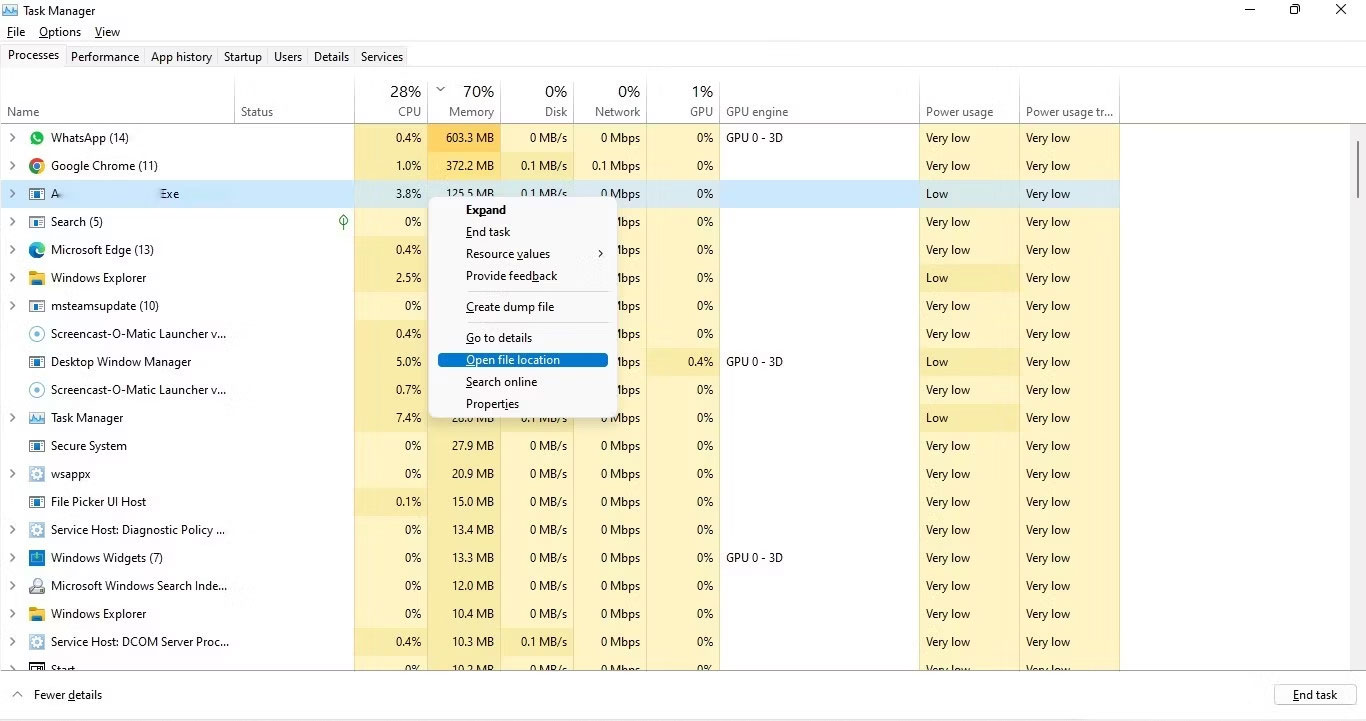
	<li style="text-align: justify;"><strong>Xác minh vị trí</strong>:&nbsp;<a data-type="internal" href="https://quantrimang.com/cong-nghe/khoi-chay-task-manager-trong-windows-11-183057" title="Tổng hợp các cách khởi chạy Task Manager trong Windows 11">Khởi chạy Task Manager</a>&nbsp;bằng cách nhấn các phím&nbsp;<strong>Ctrl + Shift + Esc</strong>&nbsp;cùng nhau. Xác định vị trí tiến trình AggregatorHost.exe trong danh sách và nhấp chuột phải vào nó. Chọn&nbsp;<strong>Open file location</strong>&nbsp;từ menu. File AggregatorHost.exe chuẩn phải được đặt trong thư mục&nbsp;<strong>&quot;C:\Windows\System32&quot;.</strong>&nbsp;Nếu bạn tìm thấy nó ẩn ở đâu đó không xác định, đó có thể là một chương trình độc hại.</li>
</ul>

<figure>
<div style="text-align: justify;"><img alt="Xác định vị trí tiến trình AggregatorHost.exe " data-i="1" data-src="https://st.quantrimang.com/photos/image/2023/10/19/aggregatorhost-exe-2.jpg" data-was-processed="true" height="721" src="https://st.quantrimang.com/photos/image/2023/10/19/aggregatorhost-exe-2.jpg" width="1366" /></div>

<figcaption>
<div style="text-align: justify;">Xác định vị trí tiến trình AggregatorHost.exe</div>
</figcaption>
</figure>

<ul>
	<li style="text-align: justify;"><strong>Kiểm tra thuộc tính file</strong>: Nhấp chuột phải vào file&nbsp;<strong>&quot;AggregatorHost.exe&quot;</strong>&nbsp;và chọn&nbsp;<strong>Properties</strong>&nbsp;từ menu ngữ cảnh. Đi tới tab&nbsp;<strong>Details</strong>&nbsp;hoặc&nbsp;<strong>Version</strong>&nbsp;và tìm thông tin về file, chẳng hạn như phiên bản, bản quyền và tên sản phẩm. Các file hệ thống hợp pháp thường có thông tin chi tiết.</li>
	<li style="text-align: justify;"><strong>Kiểm tra chữ ký số</strong>: Trong hộp thoại&nbsp;<strong>Properties</strong>&nbsp;của file, mở tab&nbsp;<strong>Digital Signatures</strong>&nbsp;(nếu có) hoặc kiểm tra chi tiết của file để xác minh chữ ký số. Một file hợp pháp phải có chữ ký số hợp lệ và đáng tin cậy. Nếu chữ ký số không hợp lệ hoặc không phải từ một nguồn đáng tin cậy, đó có thể là một mối lo ngại.</li>
	<li style="text-align: justify;"><strong>Tìm thông tin nhà xuất bản</strong>: Bạn cũng có thể tìm thông tin về nhà xuất bản hoặc công ty đã tạo file. Các file hệ thống hợp pháp thường được ký bởi các công ty nổi tiếng như Microsoft.</li>
</ul>

<h2 style="text-align: justify;">Khi nào nên vô hiệu hóa AggregatorHost.exe?</h2>

<p style="text-align: justify;">Mặc dù chương trình này thường hoạt động ở chế độ nền mà không bị gián đoạn nhưng đôi khi vẫn có thể phát sinh sự cố. Những vấn đề này thường biểu hiện ở mức sử dụng CPU cao hoặc sự không chắc chắn về tính hợp pháp của tiến trình.</p>

<p style="text-align: justify;">Vô hiệu hóa tiến trình này là một thủ tục đơn giản. Để làm như vậy, hãy truy cập Task Manager và tìm tiến trình được đề cập. Chọn nó, sau đó nhấp vào nút&nbsp;<strong>Disable</strong>&nbsp;và xác nhận hành động của bạn khi được nhắc.</p>

<p style="text-align: justify;">Để khắc phục sự cố do file này gây ra, dưới đây là một số giải pháp bạn có thể thử:</p>

<ul>
	<li style="text-align: justify;"><strong>Chạy quét bằng phần mềm diệt virus</strong>: Nếu bạn nghi ngờ rằng &quot;AggregatorHost.exe&quot; có liên quan đến phần mềm độc hại hoặc hoạt động nguy hiểm khác, hãy quét hệ thống của bạn bằng bất kỳ&nbsp;chương trình diệt virus&nbsp;hoặc phần mềm chống phần mềm độc hại có uy tín nào hiện có và làm theo các đề xuất được cung cấp.</li>
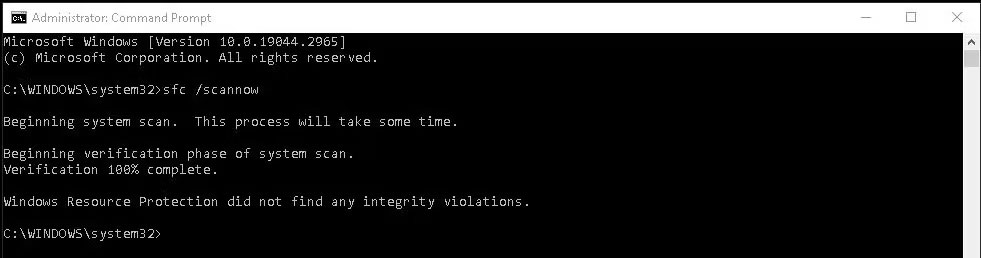
	<li style="text-align: justify;"><strong>Sử dụng System File Checker (SFC)</strong>: Phần mềm độc hại có thể cũng đã gây rối với các file hệ thống, vì vậy điều quan trọng là phải xác định các file bị lỗi và khôi phục chúng. Điều này có thể được thực hiện tốt nhất bằng cách sử dụng System File Checker, công cụ này sẽ kiểm tra tính toàn vẹn cho các file hệ thống của bạn. Nếu xác định được một file có vấn đề, nó sẽ thay thế file đó bằng file tương ứng tốt hơn.</li>
</ul>

<figure>
<div style="text-align: justify;"><img alt="Quét SFC hoàn chỉnh" data-i="2" data-src="https://st.quantrimang.com/photos/image/2023/10/19/aggregatorhost-exe-3.jpg" data-was-processed="true" height="258" src="https://st.quantrimang.com/photos/image/2023/10/19/aggregatorhost-exe-3.jpg" width="981" /></div>

<figcaption>
<div style="text-align: justify;">Quét SFC hoàn chỉnh</div>
</figcaption>
</figure>

<ul>
	<li style="text-align: justify;"><strong>Gỡ cài đặt phần mềm đáng ngờ khác</strong>: Bạn có nhận thấy bất kỳ phần mềm đáng ngờ nào được cài đặt trên hệ thống của mình không? Nếu vậy, có khả năng AggregatorHost.exe được liên kết với nó. Giải pháp tốt nhất trong trường hợp này là tiến hành bất kỳ một trong những&nbsp;cách gỡ cài đặt chương trình trong Windows&nbsp;và loại bỏ nó.</li>
</ul>

<p style="text-align: justify;">Hy vọng các bước này sẽ giúp bạn thoát khỏi tiến trình có hại và khôi phục hệ thống của bạn trở lại trạng thái khỏe mạnh.</p>
		</div>
				<div id="author">
						<p>
				<strong>Nguồn tin:</strong>
				Quantrimang.com
			</p>
		</div>
	</div>
	<div id="footer" class="clearfix">
		<div id="url">
			<strong>URL của bản tin này: </strong><a href="https://www.nguoicodonvn2008.info/vi/news/savefile/kien-thuc-may-tinh/aggregatorhost-exe-tren-windows-la-gi-co-an-toan-khong-7663.html" title="AggregatorHost.exe trên Windows là gì? Có an toàn không?">https://www.nguoicodonvn2008.info/vi/news/savefile/kien-thuc-may-tinh/aggregatorhost-exe-tren-windows-la-gi-co-an-toan-khong-7663.html</a>

		</div>
		<div class="clear"></div>
		<div class="copyright">
			&copy; .&#x3A; Nguoicodonvn2008.info - Cõi lòng người cô đơn &#x3A;.
		</div>
		<div id="contact">
			<a href="mailto:admin@nguoicodonvn2008.info">admin@nguoicodonvn2008.info</a>
		</div>
	</div>
</div>
        <div id="timeoutsess" class="chromeframe">
            Bạn đã không sử dụng Site, <a onclick="timeoutsesscancel();" href="https://nguoicodonvn2008.info/#">Bấm vào đây để duy trì trạng thái đăng nhập</a>. Thời gian chờ: <span id="secField"> 60 </span> giây
        </div>
        <div id="openidResult" class="nv-alert" style="display:none"></div>
        <div id="openidBt" data-result="" data-redirect=""></div>
		</script>
		<div class="car-top">
  <span><img src="https://nguoicodonvn2008.info/themes/default/images/car.png" alt=""></span>
</div>
<script src="https://nguoicodonvn2008.info/assets/js/jquery/jquery.min.js"></script>
<script>var nv_base_siteurl="/",nv_lang_data="vi",nv_lang_interface="vi",nv_name_variable="nv",nv_fc_variable="op",nv_lang_variable="language",nv_module_name="news",nv_func_name="savefile",nv_is_user=0, nv_my_ofs=-4,nv_my_abbr="EDT",nv_cookie_prefix="nv4c_e856T",nv_check_pass_mstime=1738000,nv_area_admin=0,nv_safemode=0,theme_responsive=0,nv_recaptcha_ver=2,nv_recaptcha_sitekey="",nv_recaptcha_type="image",XSSsanitize=1;</script>
<script src="https://nguoicodonvn2008.info/assets/js/language/vi.js"></script>
<script src="https://nguoicodonvn2008.info/assets/js/DOMPurify/purify3.js"></script>
<script src="https://nguoicodonvn2008.info/assets/js/global.js"></script>
<script src="https://nguoicodonvn2008.info/assets/js/site.js"></script>
<script src="https://nguoicodonvn2008.info/themes/default/js/news.js"></script>
<script src="https://nguoicodonvn2008.info/themes/default/js/main.js"></script>
<script src="https://nguoicodonvn2008.info/themes/default/js/custom.js"></script>
<script type="application/ld+json">
        {
            "@context": "https://schema.org",
            "@type": "Organization",
            "url": "https://nguoicodonvn2008.info",
            "logo": "https://nguoicodonvn2008.info/uploads/angel.gif"
        }
        </script>
<script src="https://nguoicodonvn2008.info/themes/default/js/bootstrap.min.js"></script>
<script type="text/javascript">
var $scrolltop = $('.car-top');
$scrolltop.on('click', function () {
    $('html,body').animate({
        scrollTop: 0
    }, 800);
    $(this).addClass("car-run");
    setTimeout(function(){ $scrolltop.removeClass('car-run');}, 1000);
    return false;
});
$(window).on('scroll', function ()
{ 
    if($(window).scrollTop() >= 200)
    {
        $scrolltop.addClass("show");
        $scrolltop.addClass("car-down");
    }
    else
    {
       $scrolltop.removeClass("show");
       setTimeout(function(){ $scrolltop.removeClass('car-down');}, 300);
    }
});
</script>
</body>
</html>