<!DOCTYPE html>
    <html lang="vi" xmlns="http://www.w3.org/1999/xhtml" prefix="og: http://ogp.me/ns#">
    <head>
<title>8 lỗi Microsoft Store thường gặp và cách khắc phục</title>
<meta name="description" content="8 lỗi Microsoft Store thường gặp và cách khắc phục - Savefile - Tin Tức -...">
<meta name="author" content=".: Nguoicodonvn2008.info - Cõi lòng người cô đơn :.">
<meta name="copyright" content=".: Nguoicodonvn2008.info - Cõi lòng người cô đơn :. [admin@nguoicodonvn2008.info]">
<meta name="robots" content="index, archive, follow, noodp">
<meta name="googlebot" content="index,archive,follow,noodp">
<meta name="msnbot" content="all,index,follow">
<meta name="generator" content="NukeViet v4.5">
<meta http-equiv="Content-Type" content="text/html; charset=utf-8">
<meta property="og:title" content="8 lỗi Microsoft Store thường gặp và cách khắc phục">
<meta property="og:type" content="website">
<meta property="og:description" content="Savefile - Tin Tức - https&#x3A;&#x002F;&#x002F;www.nguoicodonvn2008.info&#x002F;vi&#x002F;news&#x002F;savefile&#x002F;kien-thuc-may-tinh&#x002F;8-loi-microsoft-store-thuong-gap-va-cach-khac-phuc-2657.html">
<meta property="og:site_name" content=".&#x3A; Nguoicodonvn2008.info - Cõi lòng người cô đơn &#x3A;.">
<meta property="og:url" content="https://www.nguoicodonvn2008.info/vi/news/savefile/kien-thuc-may-tinh/8-loi-microsoft-store-thuong-gap-va-cach-khac-phuc-2657.html">
<link rel="shortcut icon" href="https://nguoicodonvn2008.info/favicon.ico">
<link rel="canonical" href="https://www.nguoicodonvn2008.info/vi/news/savefile/kien-thuc-may-tinh/8-loi-microsoft-store-thuong-gap-va-cach-khac-phuc-2657.html">
<link rel="alternate" href="https://nguoicodonvn2008.info/vi/news/rss/" title="Tin Tức" type="application/rss+xml">
<link rel="alternate" href="https://nguoicodonvn2008.info/vi/news/rss/karaoke-dual/" title="Tin Tức - Karaoke Dual" type="application/rss+xml">
<link rel="alternate" href="https://nguoicodonvn2008.info/vi/news/rss/nhac-tre/" title="Tin Tức - Nhạc trẻ" type="application/rss+xml">
<link rel="alternate" href="https://nguoicodonvn2008.info/vi/news/rss/tru-tinh/" title="Tin Tức - Trữ tình" type="application/rss+xml">
<link rel="alternate" href="https://nguoicodonvn2008.info/vi/news/rss/nuoc-ngoai/" title="Tin Tức - Nước ngoài" type="application/rss+xml">
<link rel="alternate" href="https://nguoicodonvn2008.info/vi/news/rss/remix/" title="Tin Tức - Remix" type="application/rss+xml">
<link rel="alternate" href="https://nguoicodonvn2008.info/vi/news/rss/tam-su-tinh-yeu/" title="Tin Tức - Tâm sự tình yêu" type="application/rss+xml">
<link rel="alternate" href="https://nguoicodonvn2008.info/vi/news/rss/tho-suu-tam/" title="Tin Tức - Thơ sưu tầm" type="application/rss+xml">
<link rel="alternate" href="https://nguoicodonvn2008.info/vi/news/rss/cuoc-song/" title="Tin Tức - Cuộc sống" type="application/rss+xml">
<link rel="alternate" href="https://nguoicodonvn2008.info/vi/news/rss/phan-mem/" title="Tin Tức - Phần mềm" type="application/rss+xml">
<link rel="alternate" href="https://nguoicodonvn2008.info/vi/news/rss/kien-thuc-may-tinh/" title="Tin Tức - Kiến thức máy tính" type="application/rss+xml">
<link rel="alternate" href="https://nguoicodonvn2008.info/vi/news/rss/hoc-tap/" title="Tin Tức - Học tập" type="application/rss+xml">
<link rel="alternate" href="https://nguoicodonvn2008.info/vi/news/rss/tai-lieu/" title="Tin Tức - Tài liệu" type="application/rss+xml">
<link rel="alternate" href="https://nguoicodonvn2008.info/vi/news/rss/de-thi/" title="Tin Tức - Đề thi" type="application/rss+xml">
<link rel="preload" as="style" href="https://nguoicodonvn2008.info/assets/css/font-awesome.min.css" type="text/css">
<link rel="preload" as="style" href="https://nguoicodonvn2008.info/themes/default/css/bootstrap.non-responsive.css" type="text/css">
<link rel="preload" as="style" href="https://nguoicodonvn2008.info/themes/default/css/style.css" type="text/css">
<link rel="preload" as="style" href="https://nguoicodonvn2008.info/themes/default/css/style.non-responsive.css" type="text/css">
<link rel="preload" as="style" href="https://nguoicodonvn2008.info/themes/default/css/news.css" type="text/css">
<link rel="preload" as="style" href="https://nguoicodonvn2008.info/themes/default/css/custom.css" type="text/css">
<link rel="preload" as="script" href="https://nguoicodonvn2008.info/assets/js/jquery/jquery.min.js" type="text/javascript">
<link rel="preload" as="script" href="https://nguoicodonvn2008.info/assets/js/language/vi.js" type="text/javascript">
<link rel="preload" as="script" href="https://nguoicodonvn2008.info/assets/js/DOMPurify/purify3.js" type="text/javascript">
<link rel="preload" as="script" href="https://nguoicodonvn2008.info/assets/js/global.js" type="text/javascript">
<link rel="preload" as="script" href="https://nguoicodonvn2008.info/assets/js/site.js" type="text/javascript">
<link rel="preload" as="script" href="https://nguoicodonvn2008.info/themes/default/js/news.js" type="text/javascript">
<link rel="preload" as="script" href="https://nguoicodonvn2008.info/themes/default/js/main.js" type="text/javascript">
<link rel="preload" as="script" href="https://nguoicodonvn2008.info/themes/default/js/custom.js" type="text/javascript">
<link rel="preload" as="script" href="https://nguoicodonvn2008.info/themes/default/js/bootstrap.min.js" type="text/javascript">
<link rel="stylesheet" href="https://nguoicodonvn2008.info/assets/css/font-awesome.min.css">
<link rel="stylesheet" href="https://nguoicodonvn2008.info/themes/default/css/bootstrap.non-responsive.css">
<link rel="stylesheet" href="https://nguoicodonvn2008.info/themes/default/css/style.css">
<link rel="stylesheet" href="https://nguoicodonvn2008.info/themes/default/css/style.non-responsive.css">
<link rel="StyleSheet" href="https://nguoicodonvn2008.info/themes/default/css/news.css">
<link rel="stylesheet" href="https://nguoicodonvn2008.info/themes/default/css/custom.css">
<style type="text/css">
	body{background: #fff;}
</style>
    </head>
    <body>
<div id="print">
	<div id="hd_print">
		<h2 class="pull-left">.&#x3A; Nguoicodonvn2008.info - Cõi lòng người cô đơn &#x3A;.</h2>
		<p class="pull-right"><a title=".&#x3A; Nguoicodonvn2008.info - Cõi lòng người cô đơn &#x3A;." href="https://nguoicodonvn2008.info/">https://nguoicodonvn2008.info</a></p>
	</div>
	<div class="clear"></div>
	<hr />
	<div id="content">
		<h1>8 lỗi Microsoft Store thường gặp và cách khắc phục</h1>
		<ul class="list-inline">
			<li>Thứ hai - 07/09/2020 00:52</li>
			<li class="hidden-print txtrequired"><em class="fa fa-print">&nbsp;</em><a title="In ra" href="javascript:;" onclick="window.print()">In ra</a></li>
			<li class="hidden-print txtrequired"><em class="fa fa-power-off">&nbsp;</em><a title="Đóng cửa sổ này" href="javascript:;" onclick="window.close()">Đóng cửa sổ này</a></li>
		</ul>
		<div class="clear"></div>
		<div id="hometext">
		</div>
				<div class="imghome">
			<img alt="8 lỗi Microsoft Store thường gặp và cách khắc phục" src="https://st.quantrimang.com/photos/image/2020/09/03/loi-microsoft-store-thuong-gap-3.jpg" width="460" class="img-thumbnail" />
		</div>
		<div class="clear"></div>
		<div id="bodytext" class="clearfix">
			<p style="text-align: justify;">Microsoft Store, trước đây được gọi là Windows Store, là nơi chính thức để tải xuống game, ứng dụng, phim, v.v... Nó thường xảy ra lỗi, nhiều lỗi trong đó rất khó giải quyết.</p>

<p style="text-align: justify;">Cho dù Store dường như bị “mất tích”, có bộ nhớ cache bị hỏng, quá trình tải xuống bị kẹt hay gặp phải vấn đề nào khác, bài viết sau đây sẽ tổng hợp một số loại giải pháp, hy vọng sẽ khắc phục được sự cố của bạn.</p>

<h2 style="text-align: justify;">1. Microsoft Store không mở</h2>

<p style="text-align: justify;">Nếu Store hoàn toàn không mở, chứ đừng nói đến việc hiển thị thông báo lỗi, điều đầu tiên bạn nên làm là&nbsp;khởi động lại máy tính. Bản sửa lỗi này khá đơn giản, nhưng thường có tác dụng đối với loại sự cố này.</p>

<p style="text-align: justify;">Nếu không, đừng lo lắng! Hãy&nbsp;mở Powershell với quyền admin. Nhập thông tin sau và nhấn&nbsp;<strong>Enter</strong>:</p>

<pre id="pre0">
<code>powershell -ExecutionPolicy Unrestricted Add-AppxPackage -DisableDevelopmentMode -Register $Env:SystemRoot\WinStore\AppxManifest.xml</code></pre>

<figure data-inimage-loaded="true">
<div style="text-align: justify;"><br />
<img alt="Microsoft Store không mở" data-i="1" data-src="https://st.quantrimang.com/photos/image/2020/09/03/loi-microsoft-store-thuong-gap-1.jpg" data-was-processed="true" height="161" src="https://st.quantrimang.com/photos/image/2020/09/03/loi-microsoft-store-thuong-gap-1.jpg" width="650" /></div>

<figcaption>
<div style="text-align: justify;">Microsoft Store không mở</div>
</figcaption>
</figure>

<p style="text-align: justify;">Đóng&nbsp;<strong>PowerShell</strong>&nbsp;và bây giờ, bạn có thể mở Store thành công.</p>

<div style="text-align: justify;">&nbsp;</div>

<h2 style="text-align: justify;">2. Bộ nhớ cache của Microsoft Store có thể bị hỏng</h2>

<p style="text-align: justify;">Điều đầu tiên cần thử là xóa bộ nhớ cache. Nhấn phím&nbsp;<strong>Windows + R</strong>&nbsp;để mở&nbsp;<strong>Run</strong>, nhập&nbsp;<strong>wsreset.exe</strong>&nbsp;và nhấp&nbsp;<strong>OK.</strong>&nbsp;Một cửa sổ Command Prompt trống sẽ mở ra trong khoảng 10 giây. Sau đó, Store sẽ tự mở.</p>

<p style="text-align: justify;">Nếu cách đó không hiệu quả, hãy nhấn lại phím&nbsp;<strong>Windows + R</strong>. Nhập đường dẫn này:</p>

<pre id="pre1">
<code>C:\Users\%USERNAME%\AppData\Local\Packages\Microsoft.WindowsStore_8wekyb3d8bbwe\LocalState</code></pre>

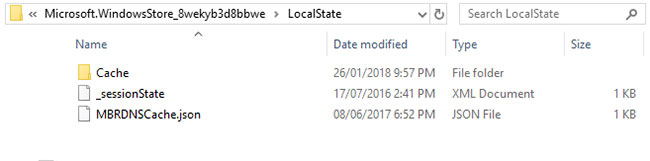
<p style="text-align: justify;">Nếu đã có thư mục&nbsp;<strong>Cache</strong>, hãy đổi tên nó thành&nbsp;<strong>Cache.old.</strong>&nbsp;Sau đó, cho dù nó đã tồn tại hay chưa, hãy tạo một thư mục mới có tên là&nbsp;<strong>Cache.</strong>&nbsp;Cuối cùng, hãy chạy&nbsp;<strong>Troubleshooter</strong>, sau đó nó sẽ phát hiện và giải quyết sự cố.</p>

<h2 style="text-align: justify;">3. Microsoft Store biến mất</h2>

<p style="text-align: justify;">Nếu bạn không thể tìm thấy Store ở bất kỳ đâu trên hệ thống của mình thì bạn cần phải cài đặt lại. Mở Powershell với quyền admin. Nhập thông tin sau và nhấn&nbsp;<strong>Enter</strong>:</p>

<pre id="pre2">
<code>Get-AppXPackage *WindowsStore* -AllUsers | Foreach {Add-AppxPackage -DisableDevelopmentMode -Register &quot;$($_.InstallLocation)\AppXManifest.xml&quot;}</code></pre>

<p style="text-align: justify;">Đóng PowerShell, khởi động lại máy tính và Store bây giờ sẽ hoạt động trở lại.</p>

<div style="text-align: justify;">&nbsp;</div>

<h2 style="text-align: justify;">4. Tải xuống Microsoft Store bị kẹt</h2>

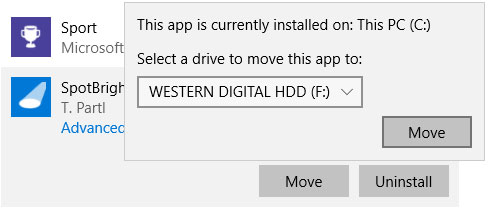
<p style="text-align: justify;">Nếu các ứng dụng của bạn không tải xuống hoặc cập nhật đúng cách, trước tiên, hãy kiểm tra xem bạn có đang cố cài chúng vào ổ cứng ngoài không. Điều này có thể gây ra sự cố, vì vậy tốt hơn nên giữ chúng trên ổ cứng trong. Nhấn phím&nbsp;<strong>Windows + I</strong>&nbsp;để&nbsp;<a href="https://quantrimang.com/6-cach-truy-cap-nhanh-settings-tren-windows-10-130106" title="Tổng hợp một số cách truy cập nhanh ứng dụng Settings trên Windows 10">mở Settings</a>, đi tới&nbsp;<strong>System &gt; Storage</strong>. Trên ổ cứng ngoài, nhấp vào&nbsp;<strong>Apps &amp; features</strong>.</p>

<figure>
<div style="text-align: justify;"><img alt="Nhấp vào Apps &amp; features" data-i="2" data-src="https://st.quantrimang.com/photos/image/2020/09/03/loi-microsoft-store-thuong-gap-2.jpg" data-was-processed="true" height="210" src="https://st.quantrimang.com/photos/image/2020/09/03/loi-microsoft-store-thuong-gap-2.jpg" width="489" /></div>

<figcaption>
<div style="text-align: justify;">Nhấp vào Apps &amp; features</div>
</figcaption>
</figure>

<p style="text-align: justify;">Nhấp vào ứng dụng có vấn đề và nhấp vào&nbsp;<strong>Move.</strong>&nbsp;Chọn ổ đĩa nội bộ của bạn từ menu drop-down và nhấp vào&nbsp;<strong>Move.</strong></p>

<p style="text-align: justify;">Ngoài ra, hãy đảm bảo rằng ổ bạn đang cài đặt chưa đầy. Nếu nó đã đầy, hãy gỡ cài đặt một số ứng dụng hoặc xóa dữ liệu khác để giải phóng dung lượng.</p>

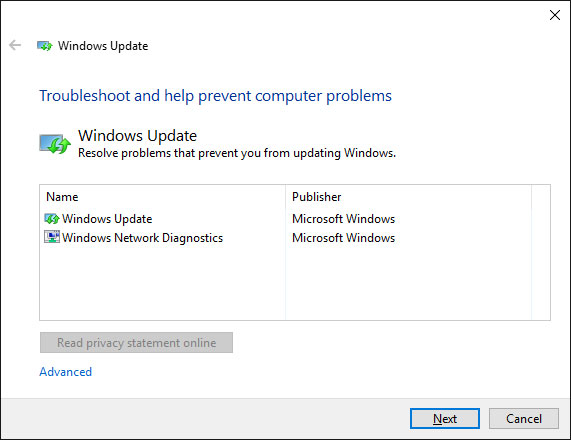
<p style="text-align: justify;">Nếu cách đó không hiệu quả hoặc ứng dụng của bạn đã ở trên ổ cứng trong, hãy thử chạy&nbsp;<strong>Windows Update Troubleshooter</strong>. Để thực hiện việc này, hãy thực hiện tìm kiếm&nbsp;<strong>Find and fix problems with Windows Update</strong>&nbsp;và chọn nó.</p>

<figure>
<div style="text-align: justify;"><img alt="Nhấn Next để trình khắc phục sự cố xử lý vấn đề" data-i="3" data-src="https://st.quantrimang.com/photos/image/2020/09/03/loi-microsoft-store-thuong-gap-3.jpg" data-was-processed="true" height="440" src="https://st.quantrimang.com/photos/image/2020/09/03/loi-microsoft-store-thuong-gap-3.jpg" width="571" /></div>

<figcaption>
<div style="text-align: justify;">Nhấn Next để trình khắc phục sự cố xử lý vấn đề</div>
</figcaption>
</figure>

<p style="text-align: justify;">Nhấn&nbsp;<strong>Next</strong>&nbsp;để trình khắc phục sự cố xử lý vấn đề. Sau khi hoàn tất, hãy mở Store và xem các bản tải xuống của bạn có hoạt động hay không. Nếu cách này vẫn không hoạt động, hãy xem các mẹo để giải quyết sự cố Windows Update.</p>

<h2 style="text-align: justify;">5. Mã lỗi 0x80072EFD</h2>

<p style="text-align: justify;">Lỗi này sẽ xuất hiện khi Store gặp sự cố về mạng. Một vài điều đơn giản cần thử là chạy Windows Update, tắt&nbsp;<a href="https://quantrimang.com/4-phan-mem-diet-virus-mien-phi-tot-nhat-cho-windows-80614" title="11 phần mềm diệt virus hiệu quả nhất cho Windows ">chương trình diệt virus</a>&nbsp;và đảm bảo ngày giờ chính xác trên hệ thống. Nếu điều này không hiệu quả, đã đến lúc đi sâu vào registry.</p>

<p style="text-align: justify;">Nhấn phím&nbsp;<strong>Windows + R</strong>&nbsp;để mở&nbsp;<strong>Run.</strong>&nbsp;Nhập&nbsp;<strong>regedit</strong>&nbsp;và nhấn&nbsp;<strong>Enter.</strong>&nbsp;Nếu bạn không thấy thanh địa chỉ ở đầu cửa sổ, hãy đi tới&nbsp;<strong>View &gt; Address Bar</strong>. Nhập thông tin sau và nhấn&nbsp;<strong>Enter</strong>:</p>

<pre id="pre3">
<code>Computer\HKEY_LOCAL_MACHINE\SOFTWARE\Microsoft\Windows NT\CurrentVersion\NetworkList\Profiles</code></pre>

<figure>
<div style="text-align: justify;"><img alt="Bấm chuột phải vào thư mục Profiles và chọn Permissions" data-i="4" data-src="https://st.quantrimang.com/photos/image/2020/09/03/loi-microsoft-store-thuong-gap-4.jpg" data-was-processed="true" height="440" src="https://st.quantrimang.com/photos/image/2020/09/03/loi-microsoft-store-thuong-gap-4.jpg" width="650" /></div>

<figcaption>
<div style="text-align: justify;">Bấm chuột phải vào thư mục Profiles và chọn Permissions</div>
</figcaption>
</figure>

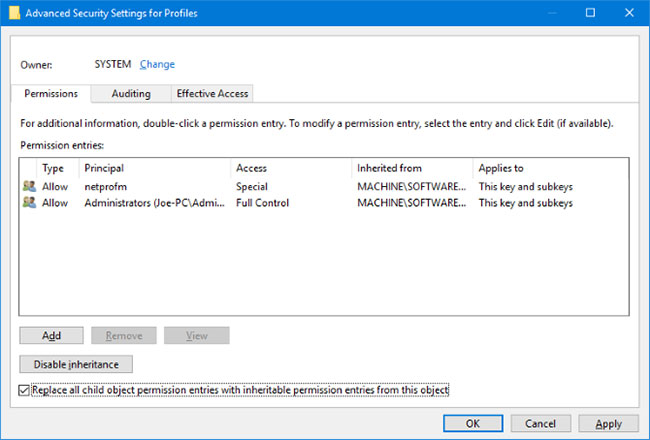
<p style="text-align: justify;">Ở bên trái, bấm chuột phải vào thư mục&nbsp;<strong>Profiles</strong>&nbsp;và chọn&nbsp;<strong>Permissions.</strong>&nbsp;Nhấp vào&nbsp;<strong>Advanced.</strong>&nbsp;Đánh dấu vào&nbsp;<strong>Replace all child object permission entries with inheritable permission entries from this object</strong>, bấm&nbsp;<strong>OK</strong>, sau đó khởi động lại máy tính và load Store.</p>

<h2 style="text-align: justify;">6. Mã lỗi 0x80072EE7</h2>

<p style="text-align: justify;">Mã lỗi cụ thể này tuyên bố rằng máy chủ đã gặp sự cố. Đó là sự cố mạng và có thể xảy ra ngay cả khi Internet của bạn đang hoạt động tốt. Đối với điều này, hãy thử reset lại cài đặt proxy. Để thực hiện việc này, hãy nhấn phím&nbsp;<strong>Windows + R</strong>, nhập&nbsp;<strong>cmd</strong>&nbsp;và nhấn&nbsp;<strong>Enter.</strong>&nbsp;Nhập lệnh này và nhấn<strong>&nbsp;Enter</strong>:</p>

<pre id="pre4">
<code>netsh winhttp reset proxy</code></pre>

<p style="text-align: justify;">Khởi động lại máy tính và mở Store.</p>

<div style="text-align: justify;">&nbsp;</div>

<h2 style="text-align: justify;">7. Mã lỗi 0x8000ffff</h2>

<p style="text-align: justify;">Lỗi này sẽ xuất hiện trong Store và thông báo rằng không thể load trang.&nbsp;</p>

<h2 style="text-align: justify;">8. Mã lỗi 1</h2>

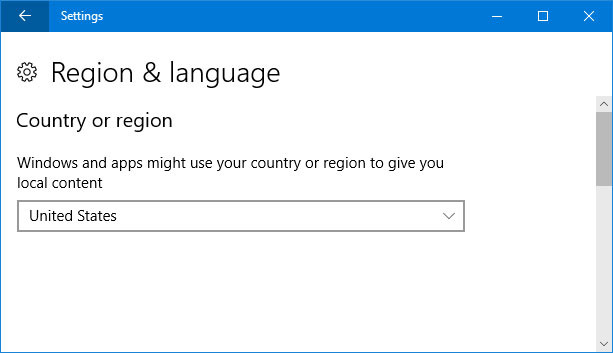
<figure>
<div style="text-align: justify;"><img alt="Thay đổi vùng trên máy tính" data-i="5" data-src="https://st.quantrimang.com/photos/image/2020/09/03/loi-microsoft-store-thuong-gap-5.jpg" data-was-processed="true" height="353" src="https://st.quantrimang.com/photos/image/2020/09/03/loi-microsoft-store-thuong-gap-5.jpg" width="613" /></div>

<figcaption>
<div style="text-align: justify;">Thay đổi vùng trên máy tính</div>
</figcaption>
</figure>

<p style="text-align: justify;">Đây là mã lỗi đầu tiên và sẽ xuất hiện khi bạn cố gắng khởi chạy Store. Giải pháp là thay đổi vùng trên máy tính thành Hoa Kỳ. Để thực hiện việc này, hãy tham khảo bài viết:&nbsp;Cách thay đổi cài đặt vùng trên Windows 10&nbsp;để biết thêm chi tiết.</p>
		</div>
				<div id="author">
						<p>
				<strong>Nguồn tin:</strong>
				Quantrimang.com
			</p>
		</div>
	</div>
	<div id="footer" class="clearfix">
		<div id="url">
			<strong>URL của bản tin này: </strong><a href="https://www.nguoicodonvn2008.info/vi/news/savefile/kien-thuc-may-tinh/8-loi-microsoft-store-thuong-gap-va-cach-khac-phuc-2657.html" title="8 lỗi Microsoft Store thường gặp và cách khắc phục">https://www.nguoicodonvn2008.info/vi/news/savefile/kien-thuc-may-tinh/8-loi-microsoft-store-thuong-gap-va-cach-khac-phuc-2657.html</a>

		</div>
		<div class="clear"></div>
		<div class="copyright">
			&copy; .&#x3A; Nguoicodonvn2008.info - Cõi lòng người cô đơn &#x3A;.
		</div>
		<div id="contact">
			<a href="mailto:admin@nguoicodonvn2008.info">admin@nguoicodonvn2008.info</a>
		</div>
	</div>
</div>
        <div id="timeoutsess" class="chromeframe">
            Bạn đã không sử dụng Site, <a onclick="timeoutsesscancel();" href="https://nguoicodonvn2008.info/#">Bấm vào đây để duy trì trạng thái đăng nhập</a>. Thời gian chờ: <span id="secField"> 60 </span> giây
        </div>
        <div id="openidResult" class="nv-alert" style="display:none"></div>
        <div id="openidBt" data-result="" data-redirect=""></div>
		</script>
		<div class="car-top">
  <span><img src="https://nguoicodonvn2008.info/themes/default/images/car.png" alt=""></span>
</div>
<script src="https://nguoicodonvn2008.info/assets/js/jquery/jquery.min.js"></script>
<script>var nv_base_siteurl="/",nv_lang_data="vi",nv_lang_interface="vi",nv_name_variable="nv",nv_fc_variable="op",nv_lang_variable="language",nv_module_name="news",nv_func_name="savefile",nv_is_user=0, nv_my_ofs=-4,nv_my_abbr="EDT",nv_cookie_prefix="nv4c_e856T",nv_check_pass_mstime=1738000,nv_area_admin=0,nv_safemode=0,theme_responsive=0,nv_recaptcha_ver=2,nv_recaptcha_sitekey="",nv_recaptcha_type="image",XSSsanitize=1;</script>
<script src="https://nguoicodonvn2008.info/assets/js/language/vi.js"></script>
<script src="https://nguoicodonvn2008.info/assets/js/DOMPurify/purify3.js"></script>
<script src="https://nguoicodonvn2008.info/assets/js/global.js"></script>
<script src="https://nguoicodonvn2008.info/assets/js/site.js"></script>
<script src="https://nguoicodonvn2008.info/themes/default/js/news.js"></script>
<script src="https://nguoicodonvn2008.info/themes/default/js/main.js"></script>
<script src="https://nguoicodonvn2008.info/themes/default/js/custom.js"></script>
<script type="application/ld+json">
        {
            "@context": "https://schema.org",
            "@type": "Organization",
            "url": "https://nguoicodonvn2008.info",
            "logo": "https://nguoicodonvn2008.info/uploads/angel.gif"
        }
        </script>
<script src="https://nguoicodonvn2008.info/themes/default/js/bootstrap.min.js"></script>
<script type="text/javascript">
var $scrolltop = $('.car-top');
$scrolltop.on('click', function () {
    $('html,body').animate({
        scrollTop: 0
    }, 800);
    $(this).addClass("car-run");
    setTimeout(function(){ $scrolltop.removeClass('car-run');}, 1000);
    return false;
});
$(window).on('scroll', function ()
{ 
    if($(window).scrollTop() >= 200)
    {
        $scrolltop.addClass("show");
        $scrolltop.addClass("car-down");
    }
    else
    {
       $scrolltop.removeClass("show");
       setTimeout(function(){ $scrolltop.removeClass('car-down');}, 300);
    }
});
</script>
</body>
</html>