<!DOCTYPE html>
    <html lang="vi" xmlns="http://www.w3.org/1999/xhtml" prefix="og: http://ogp.me/ns#">
    <head>
<title>6 lý do tại sao Windows 11 tốt hơn macOS</title>
<meta name="description" content="6 lý do tại sao Windows 11 tốt hơn macOS - Savefile - Tin Tức -...">
<meta name="author" content=".: Nguoicodonvn2008.info - Cõi lòng người cô đơn :.">
<meta name="copyright" content=".: Nguoicodonvn2008.info - Cõi lòng người cô đơn :. [admin@nguoicodonvn2008.info]">
<meta name="robots" content="index, archive, follow, noodp">
<meta name="googlebot" content="index,archive,follow,noodp">
<meta name="msnbot" content="all,index,follow">
<meta name="generator" content="NukeViet v4.5">
<meta http-equiv="Content-Type" content="text/html; charset=utf-8">
<meta property="og:title" content="6 lý do tại sao Windows 11 tốt hơn macOS">
<meta property="og:type" content="website">
<meta property="og:description" content="Savefile - Tin Tức - https&#x3A;&#x002F;&#x002F;www.nguoicodonvn2008.info&#x002F;vi&#x002F;news&#x002F;savefile&#x002F;kien-thuc-may-tinh&#x002F;6-ly-do-tai-sao-windows-11-tot-hon-macos-7019.html">
<meta property="og:site_name" content=".&#x3A; Nguoicodonvn2008.info - Cõi lòng người cô đơn &#x3A;.">
<meta property="og:url" content="https://www.nguoicodonvn2008.info/vi/news/savefile/kien-thuc-may-tinh/6-ly-do-tai-sao-windows-11-tot-hon-macos-7019.html">
<link rel="shortcut icon" href="https://nguoicodonvn2008.info/favicon.ico">
<link rel="canonical" href="https://www.nguoicodonvn2008.info/vi/news/savefile/kien-thuc-may-tinh/6-ly-do-tai-sao-windows-11-tot-hon-macos-7019.html">
<link rel="alternate" href="https://nguoicodonvn2008.info/vi/news/rss/" title="Tin Tức" type="application/rss+xml">
<link rel="alternate" href="https://nguoicodonvn2008.info/vi/news/rss/karaoke-dual/" title="Tin Tức - Karaoke Dual" type="application/rss+xml">
<link rel="alternate" href="https://nguoicodonvn2008.info/vi/news/rss/nhac-tre/" title="Tin Tức - Nhạc trẻ" type="application/rss+xml">
<link rel="alternate" href="https://nguoicodonvn2008.info/vi/news/rss/tru-tinh/" title="Tin Tức - Trữ tình" type="application/rss+xml">
<link rel="alternate" href="https://nguoicodonvn2008.info/vi/news/rss/nuoc-ngoai/" title="Tin Tức - Nước ngoài" type="application/rss+xml">
<link rel="alternate" href="https://nguoicodonvn2008.info/vi/news/rss/remix/" title="Tin Tức - Remix" type="application/rss+xml">
<link rel="alternate" href="https://nguoicodonvn2008.info/vi/news/rss/tam-su-tinh-yeu/" title="Tin Tức - Tâm sự tình yêu" type="application/rss+xml">
<link rel="alternate" href="https://nguoicodonvn2008.info/vi/news/rss/tho-suu-tam/" title="Tin Tức - Thơ sưu tầm" type="application/rss+xml">
<link rel="alternate" href="https://nguoicodonvn2008.info/vi/news/rss/cuoc-song/" title="Tin Tức - Cuộc sống" type="application/rss+xml">
<link rel="alternate" href="https://nguoicodonvn2008.info/vi/news/rss/phan-mem/" title="Tin Tức - Phần mềm" type="application/rss+xml">
<link rel="alternate" href="https://nguoicodonvn2008.info/vi/news/rss/kien-thuc-may-tinh/" title="Tin Tức - Kiến thức máy tính" type="application/rss+xml">
<link rel="alternate" href="https://nguoicodonvn2008.info/vi/news/rss/hoc-tap/" title="Tin Tức - Học tập" type="application/rss+xml">
<link rel="alternate" href="https://nguoicodonvn2008.info/vi/news/rss/tai-lieu/" title="Tin Tức - Tài liệu" type="application/rss+xml">
<link rel="alternate" href="https://nguoicodonvn2008.info/vi/news/rss/de-thi/" title="Tin Tức - Đề thi" type="application/rss+xml">
<link rel="preload" as="style" href="https://nguoicodonvn2008.info/assets/css/font-awesome.min.css" type="text/css">
<link rel="preload" as="style" href="https://nguoicodonvn2008.info/themes/default/css/bootstrap.non-responsive.css" type="text/css">
<link rel="preload" as="style" href="https://nguoicodonvn2008.info/themes/default/css/style.css" type="text/css">
<link rel="preload" as="style" href="https://nguoicodonvn2008.info/themes/default/css/style.non-responsive.css" type="text/css">
<link rel="preload" as="style" href="https://nguoicodonvn2008.info/themes/default/css/news.css" type="text/css">
<link rel="preload" as="style" href="https://nguoicodonvn2008.info/themes/default/css/custom.css" type="text/css">
<link rel="preload" as="script" href="https://nguoicodonvn2008.info/assets/js/jquery/jquery.min.js" type="text/javascript">
<link rel="preload" as="script" href="https://nguoicodonvn2008.info/assets/js/language/vi.js" type="text/javascript">
<link rel="preload" as="script" href="https://nguoicodonvn2008.info/assets/js/DOMPurify/purify3.js" type="text/javascript">
<link rel="preload" as="script" href="https://nguoicodonvn2008.info/assets/js/global.js" type="text/javascript">
<link rel="preload" as="script" href="https://nguoicodonvn2008.info/assets/js/site.js" type="text/javascript">
<link rel="preload" as="script" href="https://nguoicodonvn2008.info/themes/default/js/news.js" type="text/javascript">
<link rel="preload" as="script" href="https://nguoicodonvn2008.info/themes/default/js/main.js" type="text/javascript">
<link rel="preload" as="script" href="https://nguoicodonvn2008.info/themes/default/js/custom.js" type="text/javascript">
<link rel="preload" as="script" href="https://nguoicodonvn2008.info/themes/default/js/bootstrap.min.js" type="text/javascript">
<link rel="stylesheet" href="https://nguoicodonvn2008.info/assets/css/font-awesome.min.css">
<link rel="stylesheet" href="https://nguoicodonvn2008.info/themes/default/css/bootstrap.non-responsive.css">
<link rel="stylesheet" href="https://nguoicodonvn2008.info/themes/default/css/style.css">
<link rel="stylesheet" href="https://nguoicodonvn2008.info/themes/default/css/style.non-responsive.css">
<link rel="StyleSheet" href="https://nguoicodonvn2008.info/themes/default/css/news.css">
<link rel="stylesheet" href="https://nguoicodonvn2008.info/themes/default/css/custom.css">
<style type="text/css">
	body{background: #fff;}
</style>
    </head>
    <body>
<div id="print">
	<div id="hd_print">
		<h2 class="pull-left">.&#x3A; Nguoicodonvn2008.info - Cõi lòng người cô đơn &#x3A;.</h2>
		<p class="pull-right"><a title=".&#x3A; Nguoicodonvn2008.info - Cõi lòng người cô đơn &#x3A;." href="https://nguoicodonvn2008.info/">https://nguoicodonvn2008.info</a></p>
	</div>
	<div class="clear"></div>
	<hr />
	<div id="content">
		<h1>6 lý do tại sao Windows 11 tốt hơn macOS</h1>
		<ul class="list-inline">
			<li>Thứ bảy - 22/04/2023 00:15</li>
			<li class="hidden-print txtrequired"><em class="fa fa-print">&nbsp;</em><a title="In ra" href="javascript:;" onclick="window.print()">In ra</a></li>
			<li class="hidden-print txtrequired"><em class="fa fa-power-off">&nbsp;</em><a title="Đóng cửa sổ này" href="javascript:;" onclick="window.close()">Đóng cửa sổ này</a></li>
		</ul>
		<div class="clear"></div>
		<div id="hometext">
		</div>
				<div class="imghome">
			<img alt="6 lý do tại sao Windows 11 tốt hơn macOS" src="https://st.quantrimang.com/photos/image/2023/04/20/windows-11-tot-hon-macos-5.jpg" width="460" class="img-thumbnail" />
		</div>
		<div class="clear"></div>
		<div id="bodytext" class="clearfix">
			<p style="text-align: justify;">Liệu Windows có tốt hơn macOS hay không từ lâu đã là một vấn đề gây tranh cãi hay gắt giữa những người đam mê công nghệ. Và cuộc tranh luận vẫn đang tiếp diễn, khi mọi người so sánh Windows 11 với các phiên bản macOS mới nhất.</p>

<p style="text-align: justify;">Bài viết này sẽ tổng hợp danh sách các tác vụ mà Windows 11 xử lý tốt hơn macOS.</p>

<h2 style="text-align: justify;">1. Windows 11 cung cấp khả năng đa nhiệm tốt hơn macOS</h2>

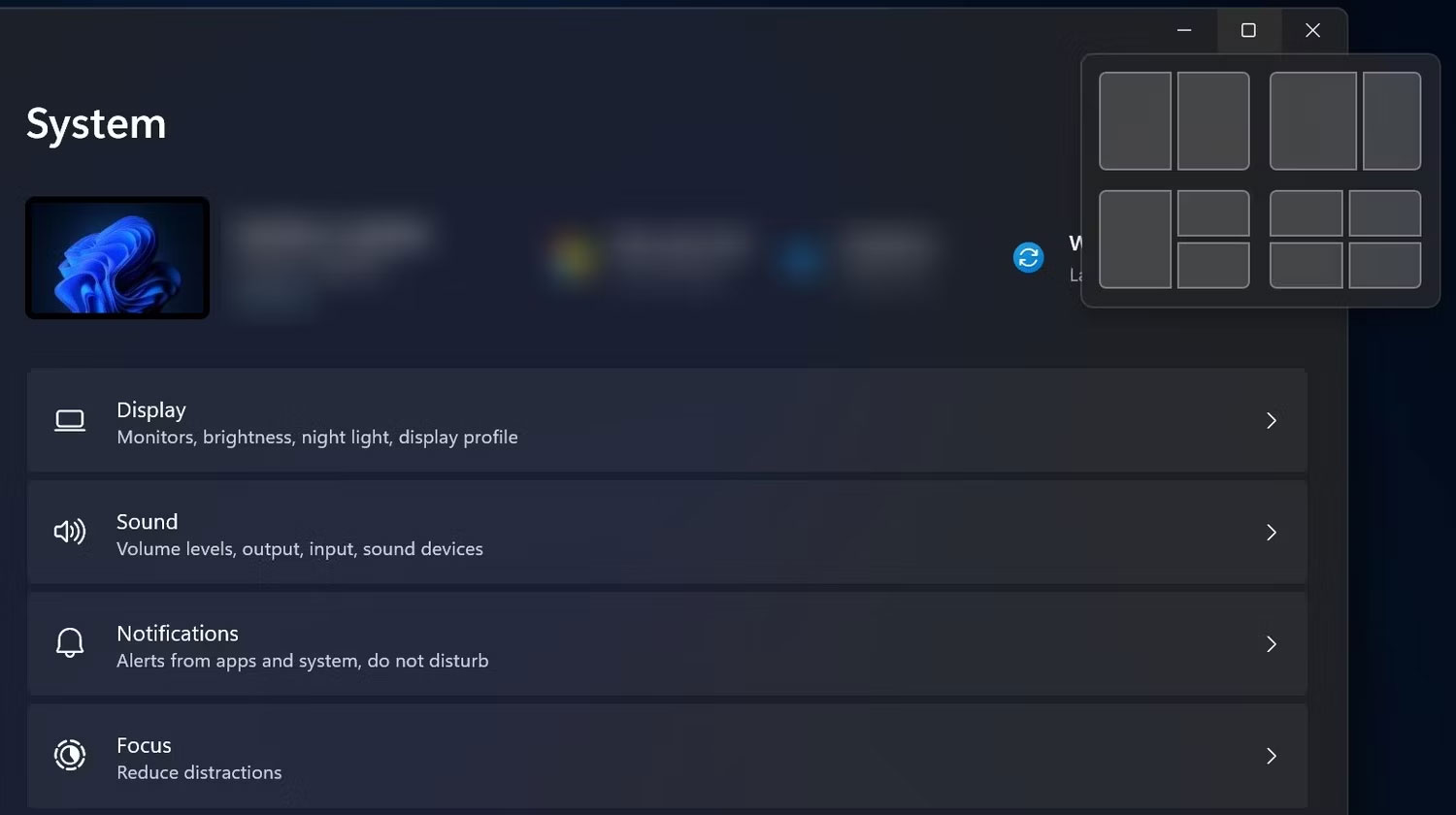
<p style="text-align: justify;">Windows 11 có tính năng &quot;Snap layouts&quot; để hỗ trợ bạn căn chỉnh nhiều cửa sổ ứng dụng bằng cách cung cấp nhiều tùy chọn bố cục. Tùy thuộc vào kích thước màn hình, Windows 11 cho phép bạn chọn tối đa 6 bố cục khác nhau để căn chỉnh các cửa sổ. Tuy nhiên, trên macOS, bạn chỉ có thể xem hai ứng dụng cạnh nhau. Ngoài ra, việc đặt hai ứng dụng cạnh nhau trên macOS đòi hỏi nhiều nỗ lực hơn so với trong Windows 11.</p>

<figure>
<div style="text-align: justify;"><img alt="Snap layouts trong Windows 11" data-i="0" data-src="https://st.quantrimang.com/photos/image/2023/04/20/windows-11-tot-hon-macos-1.jpg" data-was-processed="true" height="840" src="https://st.quantrimang.com/photos/image/2023/04/20/windows-11-tot-hon-macos-1.jpg" width="1500" /></div>

<figcaption>
<div style="text-align: justify;">Snap layouts trong Windows 11</div>
</figcaption>
</figure>

<p style="text-align: justify;">Trên macOS, bạn có thể kéo một cửa sổ sang phải và cửa sổ kia sang trái. Nếu muốn xem nhiều hơn hai cửa sổ đang hoạt động, bạn có thể thực hiện bằng cách thay đổi kích thước của chúng. Một số ứng dụng của bên thứ ba có thể giúp thực hiện nhanh việc này trên macOS dễ dàng hơn một chút, nhưng hầu hết đều phải trả phí.</p>

<p style="text-align: justify;">Mặt khác, bạn có thể cài đặt PowerToys trên Windows 11 để có được các tính năng đa nhiệm nâng cao và hoàn toàn miễn phí ngoài 6 tùy chọn bố cục. Bạn có thể tìm hiểu cách sử dụng PowerToys để làm được nhiều việc hơn trên Windows 10 và 11.</p>

<h2 style="text-align: justify;">2. Taskbar trong Windows 11 tốt hơn trải nghiệm Dock trên macOS</h2>

<figure>
<div style="text-align: justify;"><img alt="Menu ngữ cảnh Dock trong macOS" data-i="1" data-src="https://st.quantrimang.com/photos/image/2023/04/20/windows-11-tot-hon-macos-2.jpg" data-was-processed="true" height="758" src="https://st.quantrimang.com/photos/image/2023/04/20/windows-11-tot-hon-macos-2.jpg" width="1500" /></div>

<figcaption>
<div style="text-align: justify;">Menu ngữ cảnh Dock trong macOS</div>
</figcaption>
</figure>

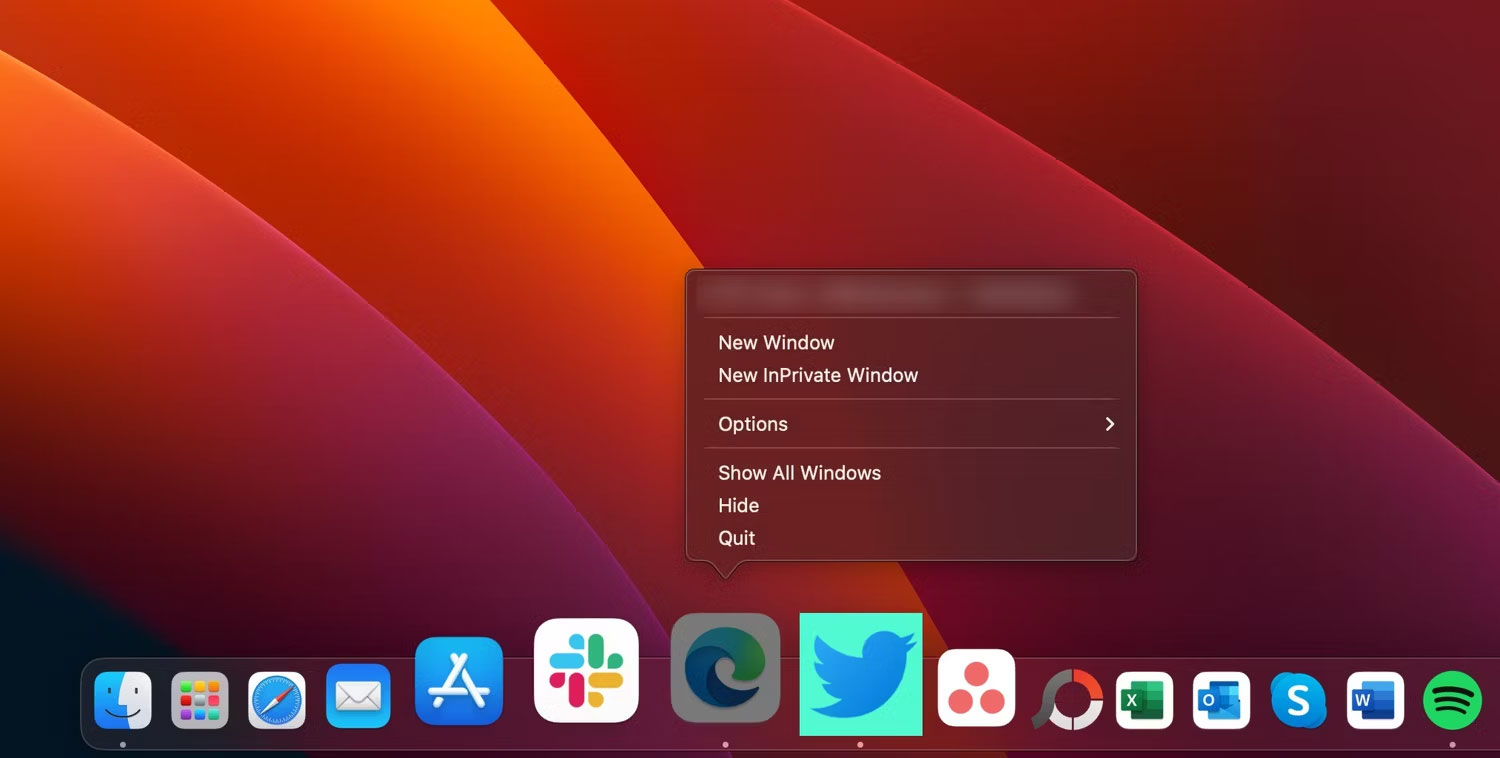
<p style="text-align: justify;">Taskbar trong Windows 11 tốt hơn trải nghiệm Dock của macOS theo nhiều cách. Ví dụ, Taskbar có khả năng tùy biến cao so với Dock. Bạn có thể thay đổi màu sắc, mức độ trong suốt và căn chỉnh các biểu tượng ứng dụng trong đó.</p>

<p style="text-align: justify;">Ngoài ra, trừ khi Taskbar chứa quá nhiều biểu tượng ứng dụng, bạn sẽ có những khoảng trống hữu ích có thể nhấp để chuyển trực tiếp đến Task Manager và cài đặt Taskbar. Bạn không thể làm điều đó trong macOS.</p>

<p style="text-align: justify;">Ngoài ra, bạn có thể xem trước hình thu nhỏ của các ứng dụng đã mở bằng cách di chuột qua biểu tượng ứng dụng trên Taskbar. Bản xem trước cũng cung cấp cho bạn các tùy chọn điều khiển hữu ích. Ví dụ, bản xem trước hình thu nhỏ của ứng dụng trình phát nhạc sẽ bao gồm các tùy chọn như&nbsp;<strong>Play, Pause</strong>&nbsp;và&nbsp;<strong>Skip.</strong>&nbsp;Bản xem trước của ứng dụng không được hỗ trợ trong Dock macOS.</p>

<h2 style="text-align: justify;">3. Windows 11 có hỗ trợ ứng dụng tốt hơn</h2>

<p style="text-align: justify;">Windows là hệ điều hành dành cho desktop phổ biến nhất và đây là lý do tại sao hầu hết các nhà phát triển đưa ứng dụng của họ lên hệ điều hành này trước tiên. Do đó, Windows 11 gặt hái được những lợi ích của một thư viện lớn các chương trình Windows. Nhờ hỗ trợ ứng dụng tốt hơn, bạn thậm chí có thể thay đổi giao diện của Windows 11 và làm được nhiều hơn thế.</p>

<p style="text-align: justify;">Nếu chuyển từ Windows sang macOS, bạn cũng có thể phải trả tiền cho một số ứng dụng mà bạn đang sử dụng miễn phí trên hệ điều hành desktop của Microsoft. Đây có thể là một vấn đề đối với nhiều người.</p>

<h2 style="text-align: justify;">4.&nbsp;<a href="https://quantrimang.com/lang-cong-nghe/microsoft-mang-ung-dung-android-len-windows-11-o-31-quoc-gia-192767" title="Microsoft mang ứng dụng Android lên Windows 11 ở 31 quốc gia">Windows 11 có thể chạy ứng dụng Android</a></h2>

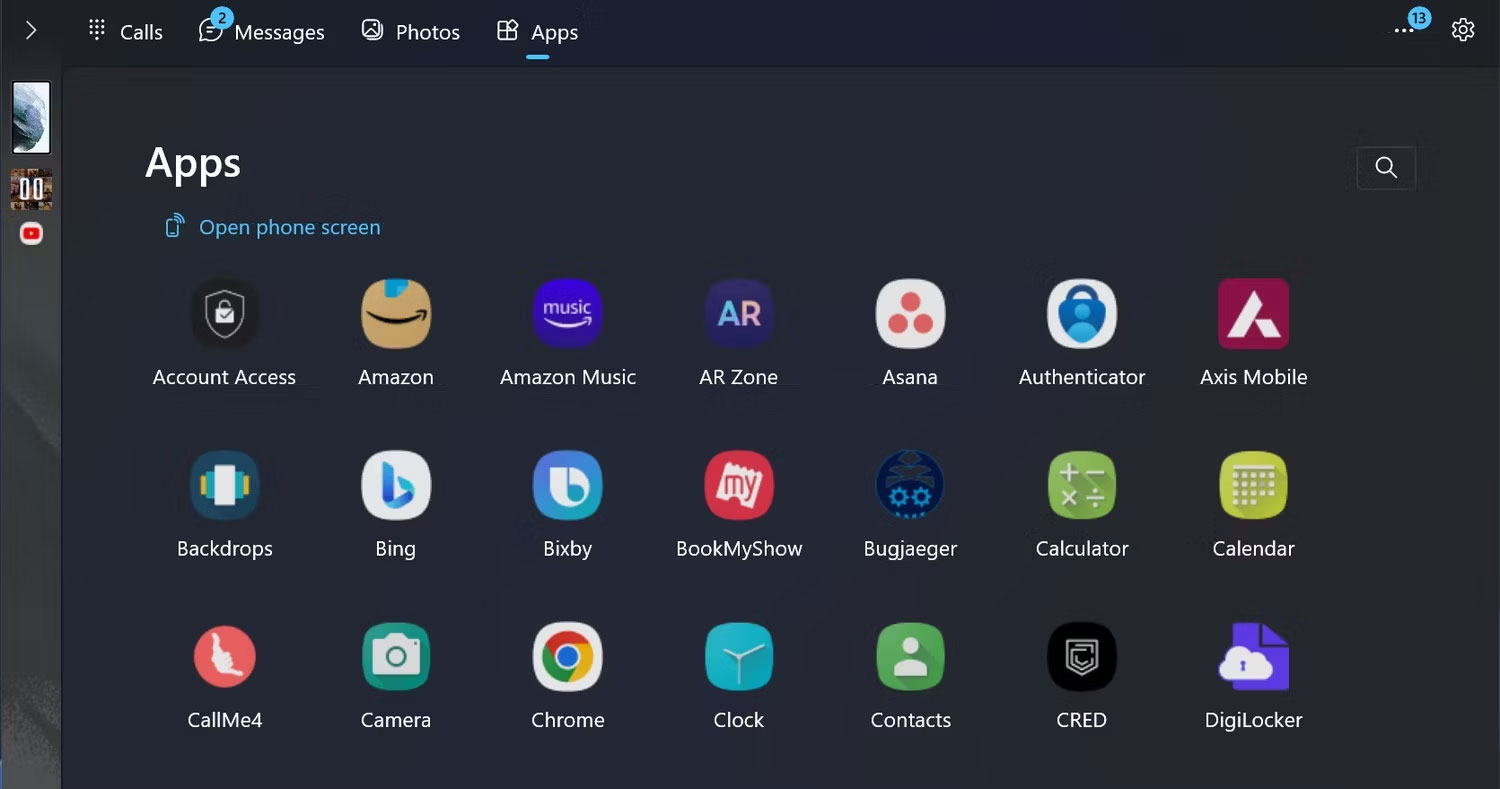
<p style="text-align: justify;">Bạn có thể sử dụng nhiều ứng dụng Android trên PC chạy Windows 11 của mình thông qua Amazon Appstore. Tuy nhiên, theo cách này, bạn không thể truy cập mọi ứng dụng Android có sẵn trên Google Play Store.</p>

<p style="text-align: justify;">Mặt khác, nếu sở hữu điện thoại Samsung Galaxy Android cao cấp hoặc tầm trung, bạn có thể chạy các ứng dụng Android của điện thoại trên PC chạy Windows 11 thông qua phần mềm Phone Link. Tóm lại, bạn có thể&nbsp;<a href="https://quantrimang.com/lang-cong-nghe/ung-android-se-chay-muot-ma-hon-tren-windows-11-192674" title="Các ứng dụng Android sẽ chạy mượt mà hơn trên Windows 11">chạy các ứng dụng Android trong Windows 11 một cách thoải mái</a>&nbsp;nếu đáp ứng các tiêu chí đã nêu.</p>

<figure>
<div style="text-align: justify;"><img alt="Các ứng dụng Android trong ứng dụng Phone Link" data-i="2" data-src="https://st.quantrimang.com/photos/image/2023/04/20/windows-11-tot-hon-macos-3.jpg" data-was-processed="true" height="789" src="https://st.quantrimang.com/photos/image/2023/04/20/windows-11-tot-hon-macos-3.jpg" width="1500" /></div>

<figcaption>
<div style="text-align: justify;">Các ứng dụng Android trong ứng dụng Phone Link</div>
</figcaption>
</figure>

<p style="text-align: justify;">Bạn không thể chạy ứng dụng Android trên máy Mac cũng như không thể chạy ứng dụng iOS trên Windows 11. Thiết bị iPhone và Windows 11 không thể hoạt động chặt chẽ với nhau như Android và Windows 11, vì Apple cấp quyền truy cập có kiểm soát vào phần mềm và dịch vụ của mình cho bên thứ ba .</p>

<h2 style="text-align: justify;">5. Windows 11 có thể kết nối với cả Android và iOS</h2>

<p style="text-align: justify;">Người dùng Windows 11 có thể kết nối thiết bị iOS của họ thông qua Phone Link cho iPhone. Bằng cách đồng bộ iPhone của bạn với Windows 11, bạn có thể xem thông báo trên thiết bị di động, cập nhật cho mình những tin nhắn mới nhất và nhận hoặc thực hiện cuộc gọi điện thoại ngay từ PC. Bạn có thể làm tất cả những điều đó nếu có điện thoại Android.</p>

<p style="text-align: justify;">Tuy nhiên, có một số đặc quyền bổ sung nếu bạn có điện thoại Samsung Galaxy được hỗ trợ. Ví dụ, bạn có thể truy cập các ứng dụng dành cho thiết bị di động của mình trên PC. Không chỉ vậy, người dùng Samsung Galaxy cũng có thể ghim các ứng dụng điện thoại của họ vào Taskbar Windows 11. macOS chỉ có thể kết nối với iPhone chứ không phải Android.</p>

<h2 style="text-align: justify;">6. Lịch sử clipboard Windows 11 lưu giữ bản ghi của 25 mục cuối cùng đã cắt hoặc sao chép</h2>

<figure>
<div style="text-align: justify;"><img alt="Lịch sử clipboard của macOS" data-i="3" data-src="https://st.quantrimang.com/photos/image/2023/04/20/windows-11-tot-hon-macos-4.jpg" data-was-processed="true" height="850" src="https://st.quantrimang.com/photos/image/2023/04/20/windows-11-tot-hon-macos-4.jpg" width="1500" /></div>

<figcaption>
<div style="text-align: justify;">Lịch sử clipboard của macOS</div>
</figcaption>
</figure>

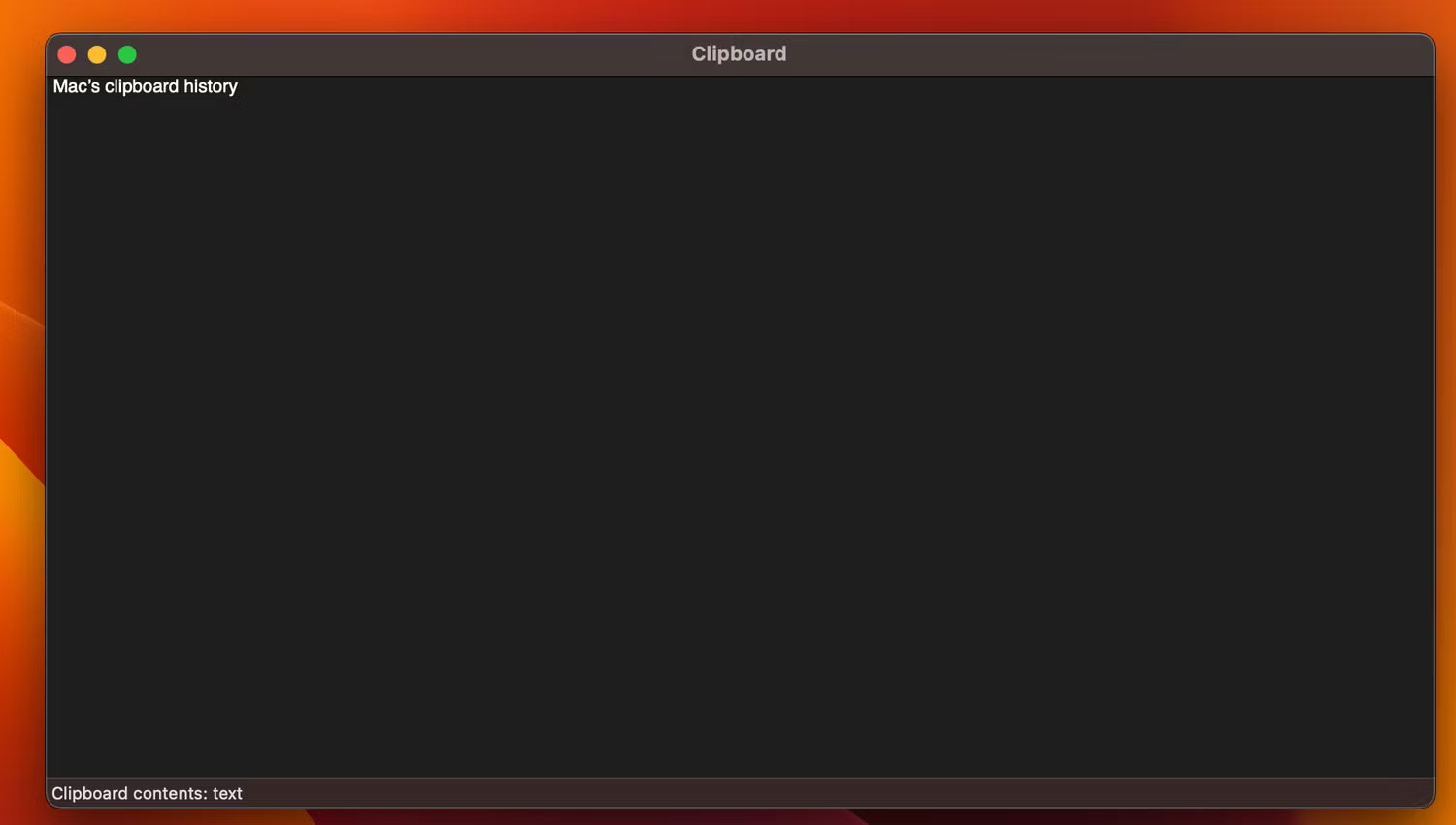
<p style="text-align: justify;">Khi bạn sao chép nội dung nào đó trên macOS, lịch sử clipboard sẽ lưu trữ nội dung đó. Nhưng lịch sử clipboard của macOS gần như không hoạt động như tùy chọn trong Windows 11.</p>

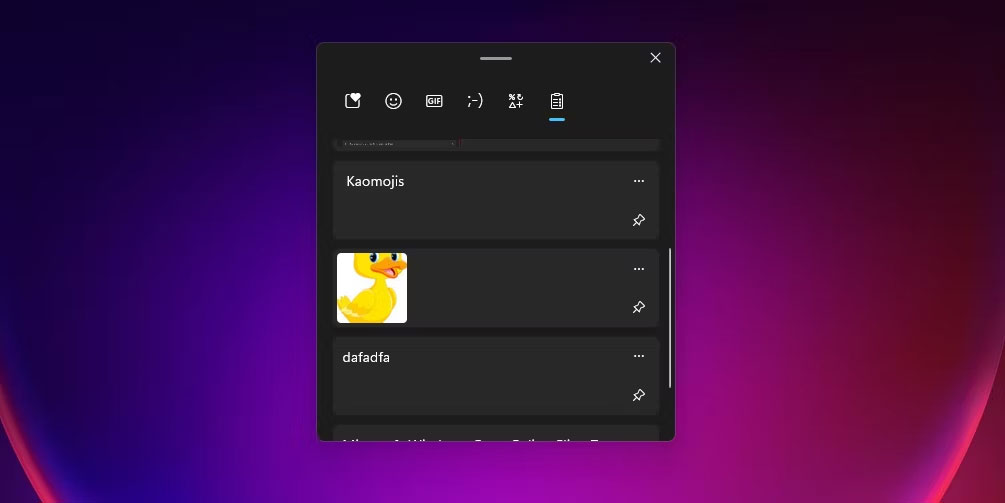
<p style="text-align: justify;">Lịch sử clipboard trong Windows 11 sẽ lưu trữ văn bản và hình ảnh đã sao chép để sử dụng sau này. Nó sẽ hiển thị 25 mục cuối cùng mà bạn đã cắt hoặc sao chép. Khi bạn đang đọc một nội dung nào đó và muốn sao chép những dòng quan trọng, bạn có thể thực hiện ngay trong một lần thay vì tiếp tục quay lại bài viết để sao chép rồi dán vào bất cứ nơi nào cần thiết. Clipboard của macOS sẽ chỉ hiển thị mục văn bản cuối cùng mà bạn đã sao chép.</p>

<figure>
<div style="text-align: justify;"><img alt="Tab lịch sử clipboard trong Windows 11" data-i="4" data-src="https://st.quantrimang.com/photos/image/2023/04/20/windows-11-tot-hon-macos-5.jpg" data-was-processed="true" height="503" src="https://st.quantrimang.com/photos/image/2023/04/20/windows-11-tot-hon-macos-5.jpg" width="1005" /></div>

<figcaption>
<div style="text-align: justify;">Tab lịch sử clipboard trong Windows 11</div>
</figcaption>
</figure>

<p style="text-align: justify;">Bạn có thể truy cập lịch sử clipboard trong Windows 11 bằng cách nhấn&nbsp;<strong>Win + V</strong>&nbsp;trên bàn phím. Xin nhắc lại, chức năng này không được bật theo mặc định nhưng bạn có thể bật lịch sử clipboard trên Windows 11 bằng cách thực hiện theo một số bước đơn giản.</p>

<h2 style="text-align: justify;">Các ưu điểm khác của việc sử dụng Windows 11 trên macOS</h2>

<p style="text-align: justify;">Mặc dù Windows 11 có các yêu cầu nghiêm ngặt về phần cứng, nhưng nó vẫn có thể chạy trên nhiều loại thiết bị với những thông số kỹ thuật khác nhau. Bạn có thể mua một chiếc PC chạy Windows 11 với giá rẻ hoặc chấp nhận trả một mức giá đắt đỏ để mua PC chất lượng cao với thông số kỹ thuật mạnh mẽ. Ngoài ra, Windows là hệ điều hành desktop tốt nhất để chơi game trên PC.</p>

<p style="text-align: justify;">Windows 11 vượt trội hơn macOS ở mọi tính năng đã thảo luận ở trên. Tuy nhiên, bạn có thể không cần sử dụng hết tất cả những lợi ích đó, tùy thuộc vào những gì bạn sẽ thực hiện trên máy tính của mình. Nếu có thể, hãy thử sử dụng cả hai hệ điều hành để tìm ra cái nào phù hợp với nhu cầu của bạn và cái nào bạn yêu thích nhất.</p>
		</div>
				<div id="author">
						<p>
				<strong>Nguồn tin:</strong>
				Quantrimang.com
			</p>
		</div>
	</div>
	<div id="footer" class="clearfix">
		<div id="url">
			<strong>URL của bản tin này: </strong><a href="https://www.nguoicodonvn2008.info/vi/news/savefile/kien-thuc-may-tinh/6-ly-do-tai-sao-windows-11-tot-hon-macos-7019.html" title="6 lý do tại sao Windows 11 tốt hơn macOS">https://www.nguoicodonvn2008.info/vi/news/savefile/kien-thuc-may-tinh/6-ly-do-tai-sao-windows-11-tot-hon-macos-7019.html</a>

		</div>
		<div class="clear"></div>
		<div class="copyright">
			&copy; .&#x3A; Nguoicodonvn2008.info - Cõi lòng người cô đơn &#x3A;.
		</div>
		<div id="contact">
			<a href="mailto:admin@nguoicodonvn2008.info">admin@nguoicodonvn2008.info</a>
		</div>
	</div>
</div>
        <div id="timeoutsess" class="chromeframe">
            Bạn đã không sử dụng Site, <a onclick="timeoutsesscancel();" href="https://nguoicodonvn2008.info/#">Bấm vào đây để duy trì trạng thái đăng nhập</a>. Thời gian chờ: <span id="secField"> 60 </span> giây
        </div>
        <div id="openidResult" class="nv-alert" style="display:none"></div>
        <div id="openidBt" data-result="" data-redirect=""></div>
		</script>
		<div class="car-top">
  <span><img src="https://nguoicodonvn2008.info/themes/default/images/car.png" alt=""></span>
</div>
<div id="run_cronjobs" style="visibility:hidden;display:none;"><img alt="cron" src="/index.php?second=cronjobs&amp;p=f0nC2Rye" width="1" height="1" /></div>
<script src="https://nguoicodonvn2008.info/assets/js/jquery/jquery.min.js"></script>
<script>var nv_base_siteurl="/",nv_lang_data="vi",nv_lang_interface="vi",nv_name_variable="nv",nv_fc_variable="op",nv_lang_variable="language",nv_module_name="news",nv_func_name="savefile",nv_is_user=0, nv_my_ofs=-4,nv_my_abbr="EDT",nv_cookie_prefix="nv4c_e856T",nv_check_pass_mstime=1738000,nv_area_admin=0,nv_safemode=0,theme_responsive=0,nv_recaptcha_ver=2,nv_recaptcha_sitekey="",nv_recaptcha_type="image",XSSsanitize=1;</script>
<script src="https://nguoicodonvn2008.info/assets/js/language/vi.js"></script>
<script src="https://nguoicodonvn2008.info/assets/js/DOMPurify/purify3.js"></script>
<script src="https://nguoicodonvn2008.info/assets/js/global.js"></script>
<script src="https://nguoicodonvn2008.info/assets/js/site.js"></script>
<script src="https://nguoicodonvn2008.info/themes/default/js/news.js"></script>
<script src="https://nguoicodonvn2008.info/themes/default/js/main.js"></script>
<script src="https://nguoicodonvn2008.info/themes/default/js/custom.js"></script>
<script type="application/ld+json">
        {
            "@context": "https://schema.org",
            "@type": "Organization",
            "url": "https://nguoicodonvn2008.info",
            "logo": "https://nguoicodonvn2008.info/uploads/angel.gif"
        }
        </script>
<script src="https://nguoicodonvn2008.info/themes/default/js/bootstrap.min.js"></script>
<script type="text/javascript">
var $scrolltop = $('.car-top');
$scrolltop.on('click', function () {
    $('html,body').animate({
        scrollTop: 0
    }, 800);
    $(this).addClass("car-run");
    setTimeout(function(){ $scrolltop.removeClass('car-run');}, 1000);
    return false;
});
$(window).on('scroll', function ()
{ 
    if($(window).scrollTop() >= 200)
    {
        $scrolltop.addClass("show");
        $scrolltop.addClass("car-down");
    }
    else
    {
       $scrolltop.removeClass("show");
       setTimeout(function(){ $scrolltop.removeClass('car-down');}, 300);
    }
});
</script>
</body>
</html>