<!DOCTYPE html>
    <html lang="vi" xmlns="http://www.w3.org/1999/xhtml" prefix="og: http://ogp.me/ns#">
    <head>
<title>6 lý do nên chuyển sang Microsoft Edge thay vì dùng Google Chrome</title>
<meta name="description" content="6 lý do nên chuyển sang Microsoft Edge thay vì dùng Google Chrome - Savefile - Tin Tức -...">
<meta name="author" content=".: Nguoicodonvn2008.info - Cõi lòng người cô đơn :.">
<meta name="copyright" content=".: Nguoicodonvn2008.info - Cõi lòng người cô đơn :. [admin@nguoicodonvn2008.info]">
<meta name="robots" content="index, archive, follow, noodp">
<meta name="googlebot" content="index,archive,follow,noodp">
<meta name="msnbot" content="all,index,follow">
<meta name="generator" content="NukeViet v4.5">
<meta http-equiv="Content-Type" content="text/html; charset=utf-8">
<meta property="og:title" content="6 lý do nên chuyển sang Microsoft Edge thay vì dùng Google Chrome">
<meta property="og:type" content="website">
<meta property="og:description" content="Savefile - Tin Tức - https&#x3A;&#x002F;&#x002F;www.nguoicodonvn2008.info&#x002F;vi&#x002F;news&#x002F;savefile&#x002F;kien-thuc-may-tinh&#x002F;6-ly-do-nen-chuyen-sang-microsoft-edge-thay-vi-dung-google-chrome-7905.html">
<meta property="og:site_name" content=".&#x3A; Nguoicodonvn2008.info - Cõi lòng người cô đơn &#x3A;.">
<meta property="og:url" content="https://www.nguoicodonvn2008.info/vi/news/savefile/kien-thuc-may-tinh/6-ly-do-nen-chuyen-sang-microsoft-edge-thay-vi-dung-google-chrome-7905.html">
<link rel="shortcut icon" href="https://nguoicodonvn2008.info/favicon.ico">
<link rel="canonical" href="https://www.nguoicodonvn2008.info/vi/news/savefile/kien-thuc-may-tinh/6-ly-do-nen-chuyen-sang-microsoft-edge-thay-vi-dung-google-chrome-7905.html">
<link rel="alternate" href="https://nguoicodonvn2008.info/vi/news/rss/" title="Tin Tức" type="application/rss+xml">
<link rel="alternate" href="https://nguoicodonvn2008.info/vi/news/rss/karaoke-dual/" title="Tin Tức - Karaoke Dual" type="application/rss+xml">
<link rel="alternate" href="https://nguoicodonvn2008.info/vi/news/rss/nhac-tre/" title="Tin Tức - Nhạc trẻ" type="application/rss+xml">
<link rel="alternate" href="https://nguoicodonvn2008.info/vi/news/rss/tru-tinh/" title="Tin Tức - Trữ tình" type="application/rss+xml">
<link rel="alternate" href="https://nguoicodonvn2008.info/vi/news/rss/nuoc-ngoai/" title="Tin Tức - Nước ngoài" type="application/rss+xml">
<link rel="alternate" href="https://nguoicodonvn2008.info/vi/news/rss/remix/" title="Tin Tức - Remix" type="application/rss+xml">
<link rel="alternate" href="https://nguoicodonvn2008.info/vi/news/rss/tam-su-tinh-yeu/" title="Tin Tức - Tâm sự tình yêu" type="application/rss+xml">
<link rel="alternate" href="https://nguoicodonvn2008.info/vi/news/rss/tho-suu-tam/" title="Tin Tức - Thơ sưu tầm" type="application/rss+xml">
<link rel="alternate" href="https://nguoicodonvn2008.info/vi/news/rss/cuoc-song/" title="Tin Tức - Cuộc sống" type="application/rss+xml">
<link rel="alternate" href="https://nguoicodonvn2008.info/vi/news/rss/phan-mem/" title="Tin Tức - Phần mềm" type="application/rss+xml">
<link rel="alternate" href="https://nguoicodonvn2008.info/vi/news/rss/kien-thuc-may-tinh/" title="Tin Tức - Kiến thức máy tính" type="application/rss+xml">
<link rel="alternate" href="https://nguoicodonvn2008.info/vi/news/rss/hoc-tap/" title="Tin Tức - Học tập" type="application/rss+xml">
<link rel="alternate" href="https://nguoicodonvn2008.info/vi/news/rss/tai-lieu/" title="Tin Tức - Tài liệu" type="application/rss+xml">
<link rel="alternate" href="https://nguoicodonvn2008.info/vi/news/rss/de-thi/" title="Tin Tức - Đề thi" type="application/rss+xml">
<link rel="preload" as="style" href="https://nguoicodonvn2008.info/assets/css/font-awesome.min.css" type="text/css">
<link rel="preload" as="style" href="https://nguoicodonvn2008.info/themes/default/css/bootstrap.non-responsive.css" type="text/css">
<link rel="preload" as="style" href="https://nguoicodonvn2008.info/themes/default/css/style.css" type="text/css">
<link rel="preload" as="style" href="https://nguoicodonvn2008.info/themes/default/css/style.non-responsive.css" type="text/css">
<link rel="preload" as="style" href="https://nguoicodonvn2008.info/themes/default/css/news.css" type="text/css">
<link rel="preload" as="style" href="https://nguoicodonvn2008.info/themes/default/css/custom.css" type="text/css">
<link rel="preload" as="script" href="https://nguoicodonvn2008.info/assets/js/jquery/jquery.min.js" type="text/javascript">
<link rel="preload" as="script" href="https://nguoicodonvn2008.info/assets/js/language/vi.js" type="text/javascript">
<link rel="preload" as="script" href="https://nguoicodonvn2008.info/assets/js/DOMPurify/purify3.js" type="text/javascript">
<link rel="preload" as="script" href="https://nguoicodonvn2008.info/assets/js/global.js" type="text/javascript">
<link rel="preload" as="script" href="https://nguoicodonvn2008.info/assets/js/site.js" type="text/javascript">
<link rel="preload" as="script" href="https://nguoicodonvn2008.info/themes/default/js/news.js" type="text/javascript">
<link rel="preload" as="script" href="https://nguoicodonvn2008.info/themes/default/js/main.js" type="text/javascript">
<link rel="preload" as="script" href="https://nguoicodonvn2008.info/themes/default/js/custom.js" type="text/javascript">
<link rel="preload" as="script" href="https://nguoicodonvn2008.info/themes/default/js/bootstrap.min.js" type="text/javascript">
<link rel="stylesheet" href="https://nguoicodonvn2008.info/assets/css/font-awesome.min.css">
<link rel="stylesheet" href="https://nguoicodonvn2008.info/themes/default/css/bootstrap.non-responsive.css">
<link rel="stylesheet" href="https://nguoicodonvn2008.info/themes/default/css/style.css">
<link rel="stylesheet" href="https://nguoicodonvn2008.info/themes/default/css/style.non-responsive.css">
<link rel="StyleSheet" href="https://nguoicodonvn2008.info/themes/default/css/news.css">
<link rel="stylesheet" href="https://nguoicodonvn2008.info/themes/default/css/custom.css">
<style type="text/css">
	body{background: #fff;}
</style>
    </head>
    <body>
<div id="print">
	<div id="hd_print">
		<h2 class="pull-left">.&#x3A; Nguoicodonvn2008.info - Cõi lòng người cô đơn &#x3A;.</h2>
		<p class="pull-right"><a title=".&#x3A; Nguoicodonvn2008.info - Cõi lòng người cô đơn &#x3A;." href="https://nguoicodonvn2008.info/">https://nguoicodonvn2008.info</a></p>
	</div>
	<div class="clear"></div>
	<hr />
	<div id="content">
		<h1>6 lý do nên chuyển sang Microsoft Edge thay vì dùng Google Chrome</h1>
		<ul class="list-inline">
			<li>Thứ ba - 02/01/2024 09:02</li>
			<li class="hidden-print txtrequired"><em class="fa fa-print">&nbsp;</em><a title="In ra" href="javascript:;" onclick="window.print()">In ra</a></li>
			<li class="hidden-print txtrequired"><em class="fa fa-power-off">&nbsp;</em><a title="Đóng cửa sổ này" href="javascript:;" onclick="window.close()">Đóng cửa sổ này</a></li>
		</ul>
		<div class="clear"></div>
		<div id="hometext">
		</div>
				<div class="imghome">
			<img alt="6 lý do nên chuyển sang Microsoft Edge thay vì dùng Google Chrome" src="https://st.quantrimang.com/photos/image/2024/01/02/ly-do-ban-nen-dung-thu-microsoft-edge-6.jpg" width="460" class="img-thumbnail" />
		</div>
		<div class="clear"></div>
		<div id="bodytext" class="clearfix">
			<p style="text-align: justify;">Google Chrome vẫn là trình duyệt phổ biến nhất thế giới nhưng đã đến lúc chuyển sang Microsoft Edge. Vì sao ư? Có 6 tính năng của Microsoft Edge sẽ khiến bạn từ bỏ Chrome một lần và mãi mãi. Cùng tìm hiểu chi tiết qua bài viết sau đây nhé!</p>

<h2 style="text-align: justify;">1. Tab dọc</h2>

<figure>
<div style="text-align: justify;"><img alt="Tab dọc của Microsoft Edge" data-i="0" data-src="https://st.quantrimang.com/photos/image/2024/01/02/ly-do-ban-nen-dung-thu-microsoft-edge-1.jpg" data-was-processed="true" height="728" src="https://st.quantrimang.com/photos/image/2024/01/02/ly-do-ban-nen-dung-thu-microsoft-edge-1.jpg" width="1366" /></div>

<figcaption>
<div style="text-align: justify;">Tab dọc của Microsoft Edge</div>
</figcaption>
</figure>

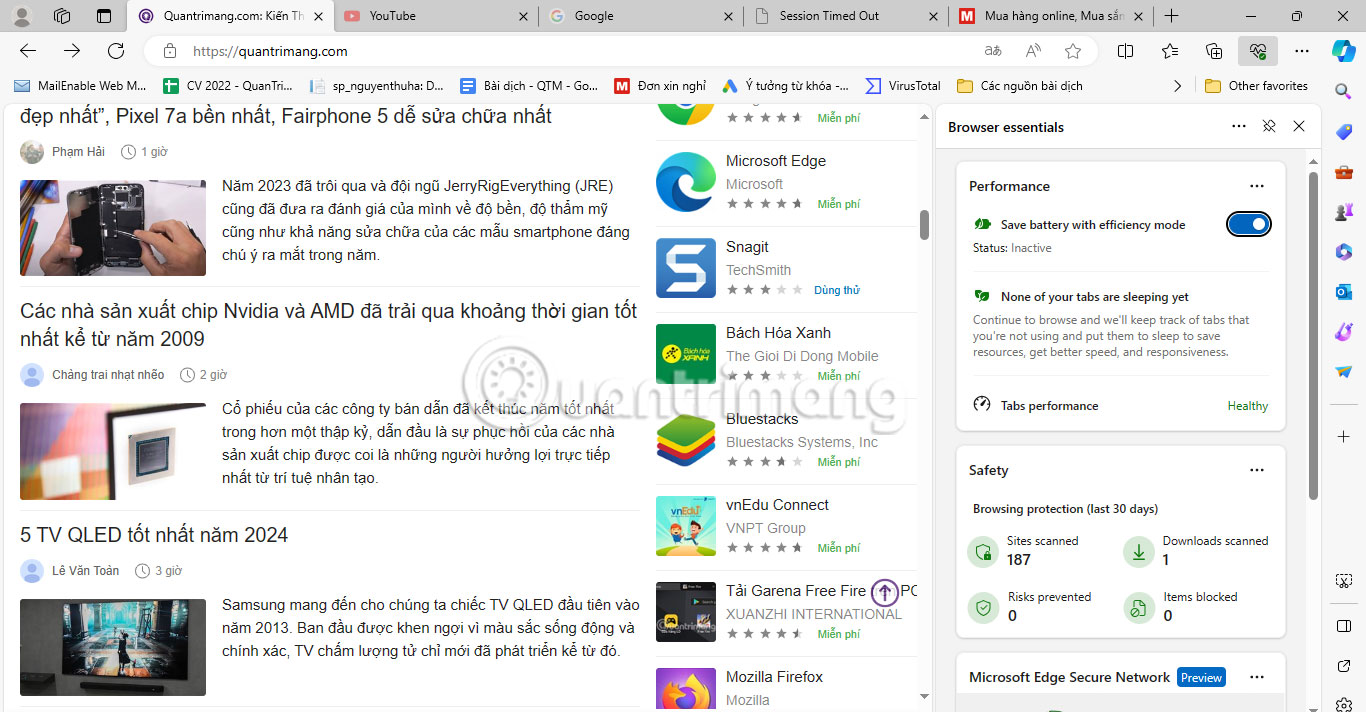
<p style="text-align: justify;">Được công bố lần đầu tiên vào năm 2021, các tab dọc của Microsoft Edge là một trong những tính năng tốt nhất để quản lý tab chuyên nghiệp. Đúng như tên gọi, tính năng này sắp xếp các tab theo chiều dọc chồng lên nhau thay vì sử dụng màn hình ngang tiêu chuẩn.</p>

<div style="text-align: justify;"><iframe allowtransparency="true" data-google-container-id="a!2" data-google-query-id="CIfilJTvvoMDFRSb6QUdOY4KdA" data-load-complete="true" frameborder="0" height="0" hspace="0" id="aswift_1" marginheight="0" marginwidth="0" name="aswift_1" sandbox="" scrolling="no" vspace="0" width="694"></iframe></div>

<p style="text-align: justify;">Tab dọc là một trong những thủ thuật trình duyệt tốt nhất để duyệt web hiệu quả. Màn hình dọc cho phép bạn xem trước nhiều tab hơn và bạn có thể dễ dàng thay đổi kích thước thanh tab. Bạn có thể sử dụng phím tắt&nbsp;<strong>Ctrl + Shift + Plus</strong>&nbsp;để bật tab dọc. Nếu bạn đang tìm kiếm một sự kết hợp hiệu quả hơn thì các tab dọc sẽ hoạt động tốt với các nhóm tab của Microsoft Edge.</p>

<h2 style="text-align: justify;">2. Collections</h2>

<figure>
<div style="text-align: justify;"><img alt="Collections trong Microsoft Edge" data-adbro-processed="true" data-i="1" data-src="https://st.quantrimang.com/photos/image/2024/01/02/ly-do-ban-nen-dung-thu-microsoft-edge-2.jpg" data-was-processed="true" height="656" src="https://st.quantrimang.com/photos/image/2024/01/02/ly-do-ban-nen-dung-thu-microsoft-edge-2.jpg" width="1366" /></div>

<figcaption>
<div style="text-align: justify;">Collections trong Microsoft Edge</div>
</figcaption>
</figure>

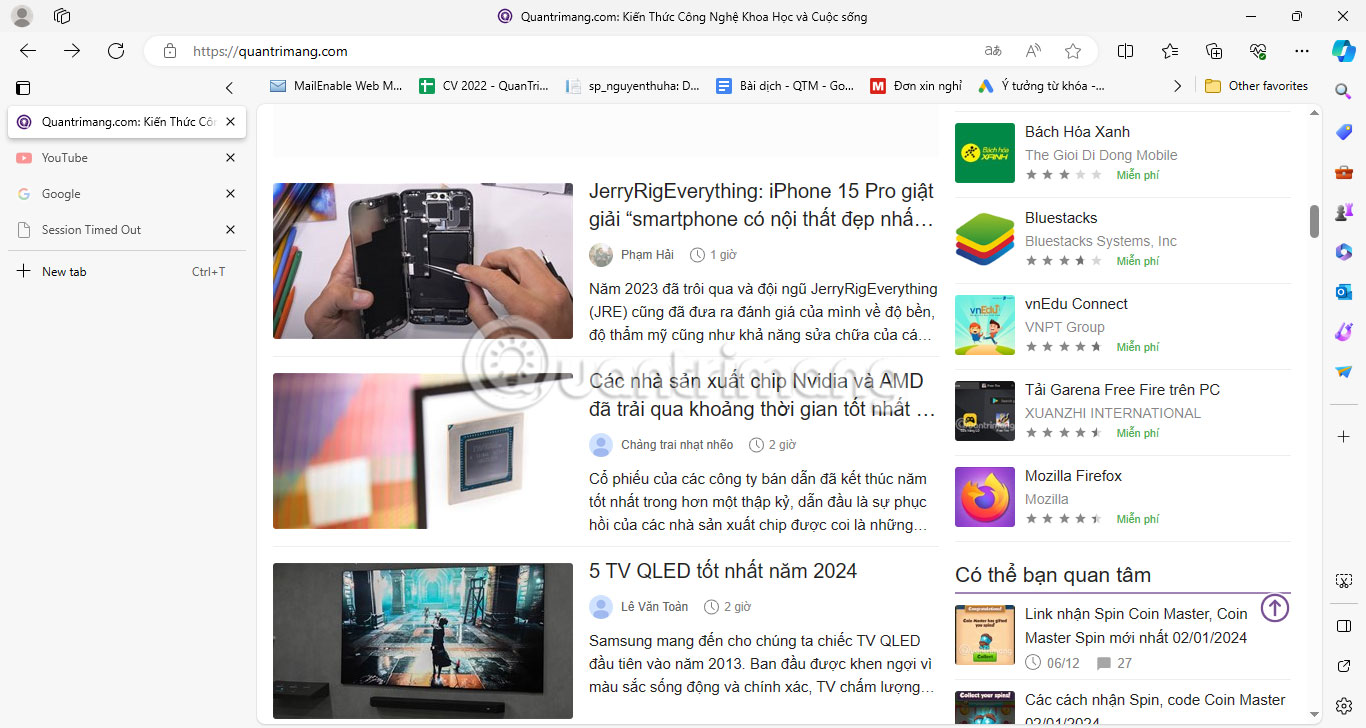
<p style="text-align: justify;">Collections của Edge cung cấp một cách dễ dàng hơn để truy cập và lưu các ý tưởng quan trọng khi duyệt. Với Collections, bạn có thể nhóm những trang web khác nhau thành các danh mục và thậm chí lưu văn bản trang web. Hơn thế nữa, bạn cũng có thể thêm ghi chú ngắn vào Collections, biến Collections trở thành một công cụ mạnh mẽ kết hợp ghi chú với quản lý tab.</p>

<p style="text-align: justify;">Collections mang lại trải nghiệm được cải thiện khi sử dụng Bookmarks, đây là lý do tuyệt vời khiến bạn có thể cân nhắc từ bỏ Chrome và chuyển sang Edge. Để cho phép truy cập nhanh hơn vào các liên kết đã lưu, Edge có một số shortcut tiện dụng cho Collections. Ví dụ, bạn có thể mở tất cả các liên kết trong Collections trong tab mới hoặc cửa sổ mới. Ngoài ra còn có một shortcut để sao chép tất cả các mục từ Collections vào clipboard để chia sẻ giữa các ứng dụng dễ dàng hơn.</p>

<div style="text-align: justify;"><iframe allowtransparency="true" data-google-container-id="a!3" data-google-query-id="CPDHlJTvvoMDFXqE6QUdx-gIdQ" data-load-complete="true" frameborder="0" height="0" hspace="0" id="aswift_2" marginheight="0" marginwidth="0" name="aswift_2" sandbox="" scrolling="no" vspace="0" width="694"></iframe></div>

<h2 style="text-align: justify;">3. Immersive Reader</h2>

<figure>
<div style="text-align: justify;"><img alt="Immersive Reader trong Microsoft Edge" data-i="2" data-src="https://st.quantrimang.com/photos/image/2024/01/02/ly-do-ban-nen-dung-thu-microsoft-edge-3.jpg" data-was-processed="true" height="730" src="https://st.quantrimang.com/photos/image/2024/01/02/ly-do-ban-nen-dung-thu-microsoft-edge-3.jpg" width="1366" /></div>

<figcaption>
<div style="text-align: justify;">Immersive Reader trong Microsoft Edge</div>
</figcaption>
</figure>

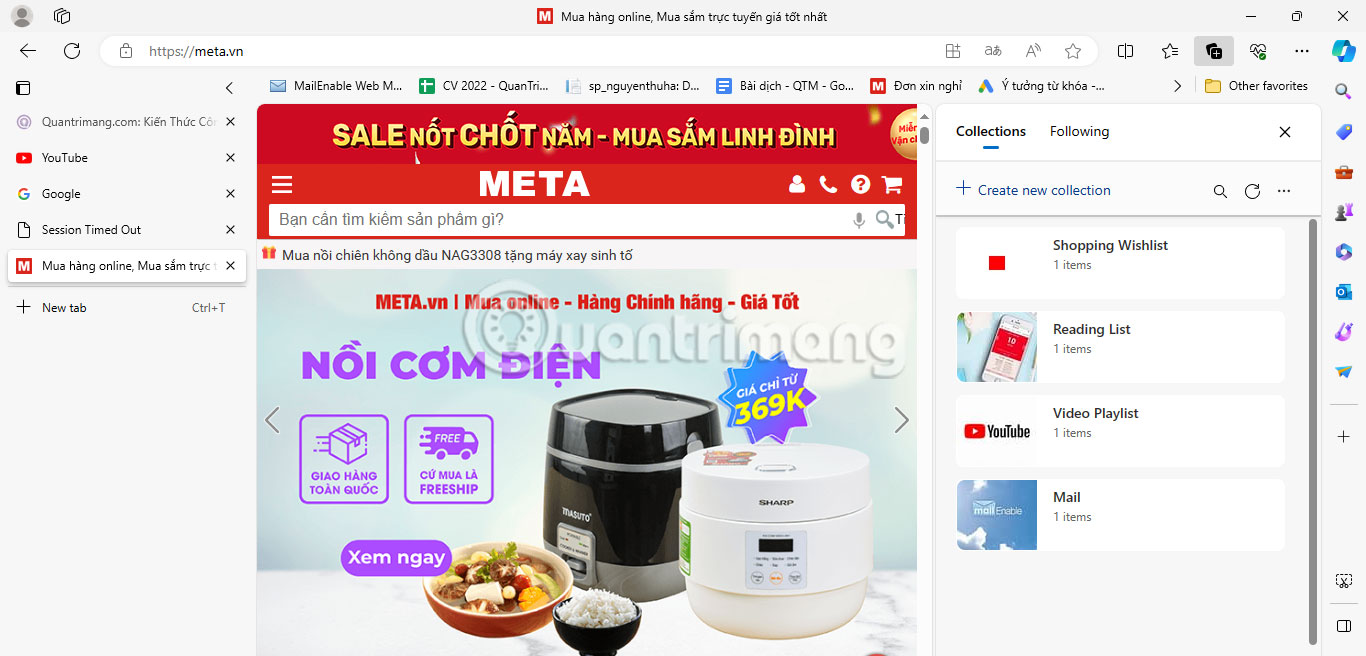
<p style="text-align: justify;">Immersive Reader là chế độ xem trang web được đơn giản hóa, loại bỏ các cửa sổ pop-up và những tác nhân gây phiền nhiễu tương tự để giúp bạn tập trung vào nội dung đang đọc. Ban đầu được thiết kế dành cho những độc giả mắc chứng khó đọc và khó viết, Immersive Reader thực hiện rất tốt nhiệm vụ làm cho nội dung web trở nên dễ đọc.</p>

<p style="text-align: justify;">Phím tắt Edge Immersive Reader là&nbsp;<strong>F9</strong>. Bạn cũng có thể thêm&nbsp;<strong>read:</strong>&nbsp;trước bất kỳ URL nào để xem trang ở chế độ Immersive Reader (tức là&nbsp;<em>read:https://quantrimang.com</em>). Có một số tùy chọn dễ đọc mà bạn có thể khám phá bằng cách nhấp vào nút&nbsp;<strong>Text preferences</strong>. Tại đây, bạn có thể thay đổi khoảng cách và kích thước văn bản, chọn phông chữ mới và truy cập các dark theme để xem dễ dàng hơn vào ban đêm. Ngoài ra còn có tính năng&nbsp;<strong>Read Aloud</strong>, nơi bạn có thể nghe các trang web được đọc ở tốc độ tùy chỉnh bằng những giọng nói khác nhau.</p>

<h2 style="text-align: justify;">4. Web Capture</h2>

<figure>
<div style="text-align: justify;"><img alt="Web Capture trong Microsoft Edge" data-i="3" data-src="https://st.quantrimang.com/photos/image/2024/01/02/ly-do-ban-nen-dung-thu-microsoft-edge-4.jpg" data-was-processed="true" height="768" src="https://st.quantrimang.com/photos/image/2024/01/02/ly-do-ban-nen-dung-thu-microsoft-edge-4.jpg" width="1366" /></div>

<figcaption>
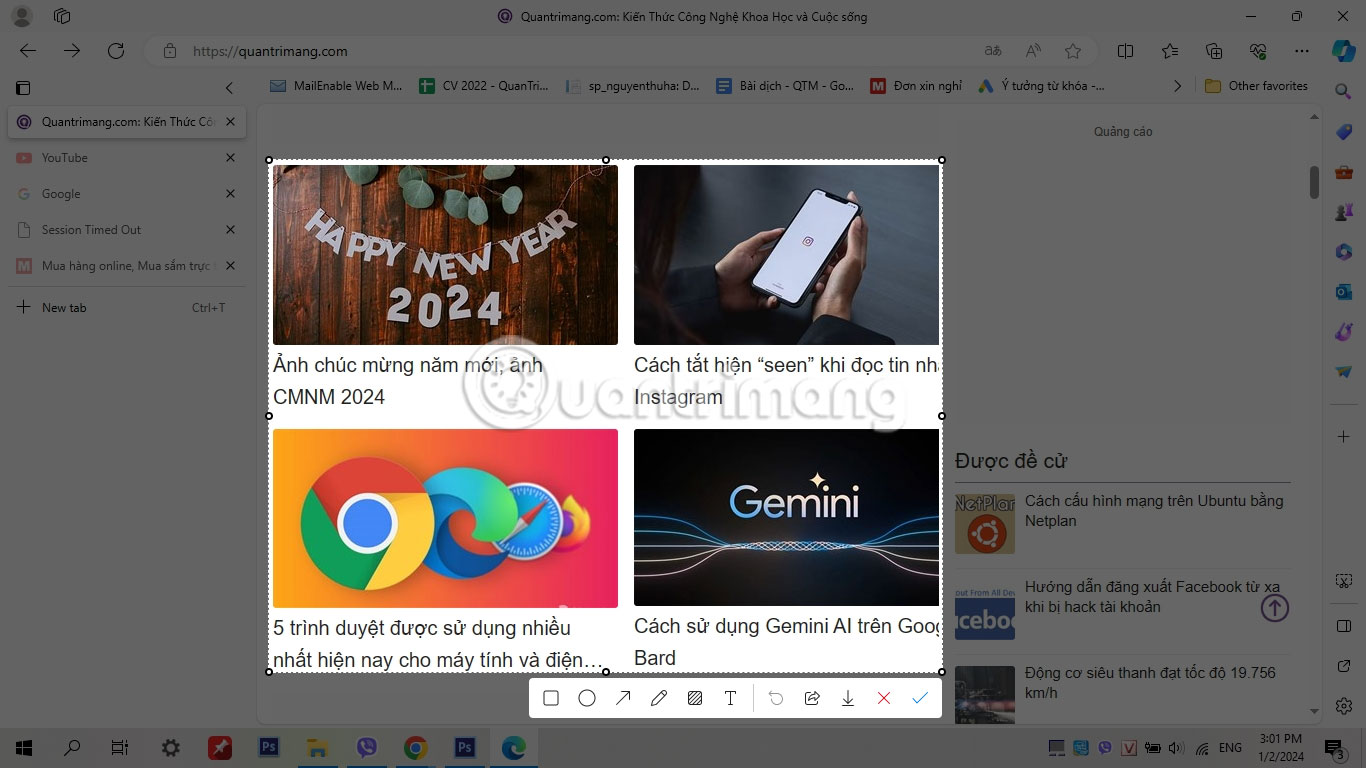
<div style="text-align: justify;">Web Capture trong Microsoft Edge</div>
</figcaption>
</figure>

<div style="text-align: justify;"><iframe allowtransparency="true" data-google-container-id="a!4" data-google-query-id="COK0wqXvvoMDFXOG6QUd6MoBXA" data-load-complete="true" frameborder="0" height="0" hspace="0" id="aswift_3" marginheight="0" marginwidth="0" name="aswift_3" sandbox="" scrolling="no" vspace="0" width="694"></iframe></div>

<p style="text-align: justify;">Web Capture cung cấp một cách dễ dàng để thu thập thông tin từ web mà không cần sử dụng ứng dụng hoặc tiện ích mở rộng của bên thứ ba. Nó cung cấp hai tùy chọn chụp: Chụp theo khu vực hoặc chụp toàn bộ trang. Tùy chọn thứ hai là một tính năng rất hữu ích mà hầu hết các ứng dụng của bên thứ ba không thể xử lý được.</p>

<p style="text-align: justify;">Bạn có thể kích hoạt tính năng Web Capture của Edge bất kỳ lúc nào bằng cách sử dụng phím tắt&nbsp;<strong>Ctrl + Shift + S</strong>. Ngoài việc chụp văn bản và hình ảnh, bạn cũng có thể chú thích ảnh chụp màn hình bằng các công cụ vẽ PDF của Edge. Sau đó, sau khi chụp ảnh, bạn có thể sao chép nó vào clipboard hoặc chia sẻ nó với người khác.</p>

<h2 style="text-align: justify;">5. Trình đọc PDF của Edge</h2>

<figure>
<div style="text-align: justify;"><img alt="Trình đọc và chỉnh sửa PDF của Microsoft Edge" data-i="4" data-src="https://st.quantrimang.com/photos/image/2024/01/02/ly-do-ban-nen-dung-thu-microsoft-edge-5.jpg" data-was-processed="true" height="720" src="https://st.quantrimang.com/photos/image/2024/01/02/ly-do-ban-nen-dung-thu-microsoft-edge-5.jpg" width="1366" /></div>

<figcaption>
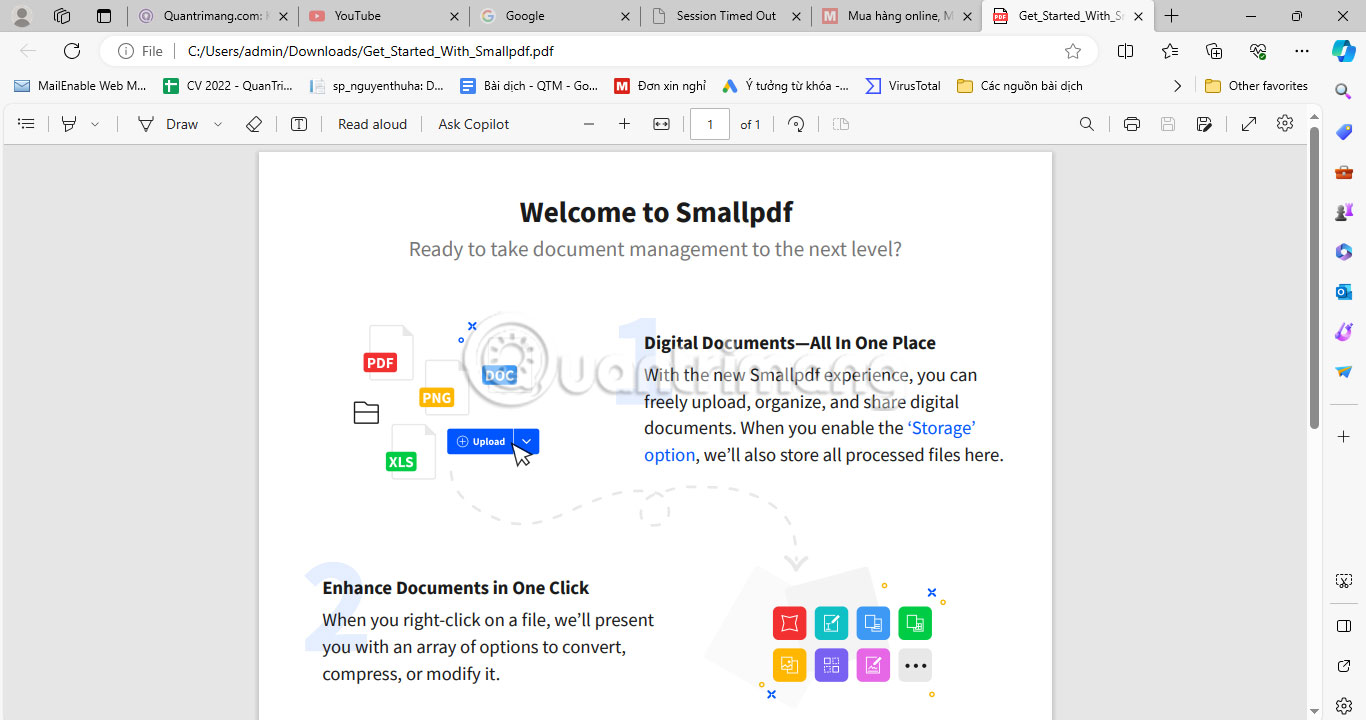
<div style="text-align: justify;">Trình đọc và chỉnh sửa PDF của Microsoft Edge</div>
</figcaption>
</figure>

<p style="text-align: justify;">Một lý do bạn nên sử dụng Microsoft Edge là vì trình đọc PDF tích hợp sẵn của nó. Trình đọc PDF của Edge có một số công cụ ấn tượng để xem và chỉnh sửa tài liệu, chẳng hạn như điền biểu mẫu cơ bản, phần mục lục và các tính năng chú thích.</p>

<p style="text-align: justify;">Trình đọc PDF cũng bao gồm các công cụ vẽ tương tự như những công cụ được sử dụng trong Web Capture. Nhưng có một số tính năng bổ sung, bao gồm đánh dấu và thêm hộp văn bản, cung cấp một cách thông minh để ghi chú trên&nbsp;file PDF. Để sử dụng trình đọc PDF của Edge cho tất cả các file, trước tiên bạn cần&nbsp;thay đổi trình đọc PDF mặc định trên Windows.</p>

<h2 style="text-align: justify;">6. Browser Essentials</h2>

<figure>
<div style="text-align: justify;"><img alt="Màn hình Browser Essentials trên Edge " data-i="5" data-src="https://st.quantrimang.com/photos/image/2024/01/02/ly-do-ban-nen-dung-thu-microsoft-edge-6.jpg" data-was-processed="true" height="712" src="https://st.quantrimang.com/photos/image/2024/01/02/ly-do-ban-nen-dung-thu-microsoft-edge-6.jpg" width="1366" /></div>

<figcaption>
<div style="text-align: justify;">Màn hình Browser Essentials trên Edge</div>
</figcaption>
</figure>

<div style="text-align: justify;"><iframe allowtransparency="true" data-google-container-id="a!5" data-google-query-id="CNyGyKbvvoMDFQvCfAodUEIL1w" data-load-complete="true" frameborder="0" height="0" hspace="0" id="aswift_4" marginheight="0" marginwidth="0" name="aswift_4" sandbox="" scrolling="no" vspace="0" width="694"></iframe></div>

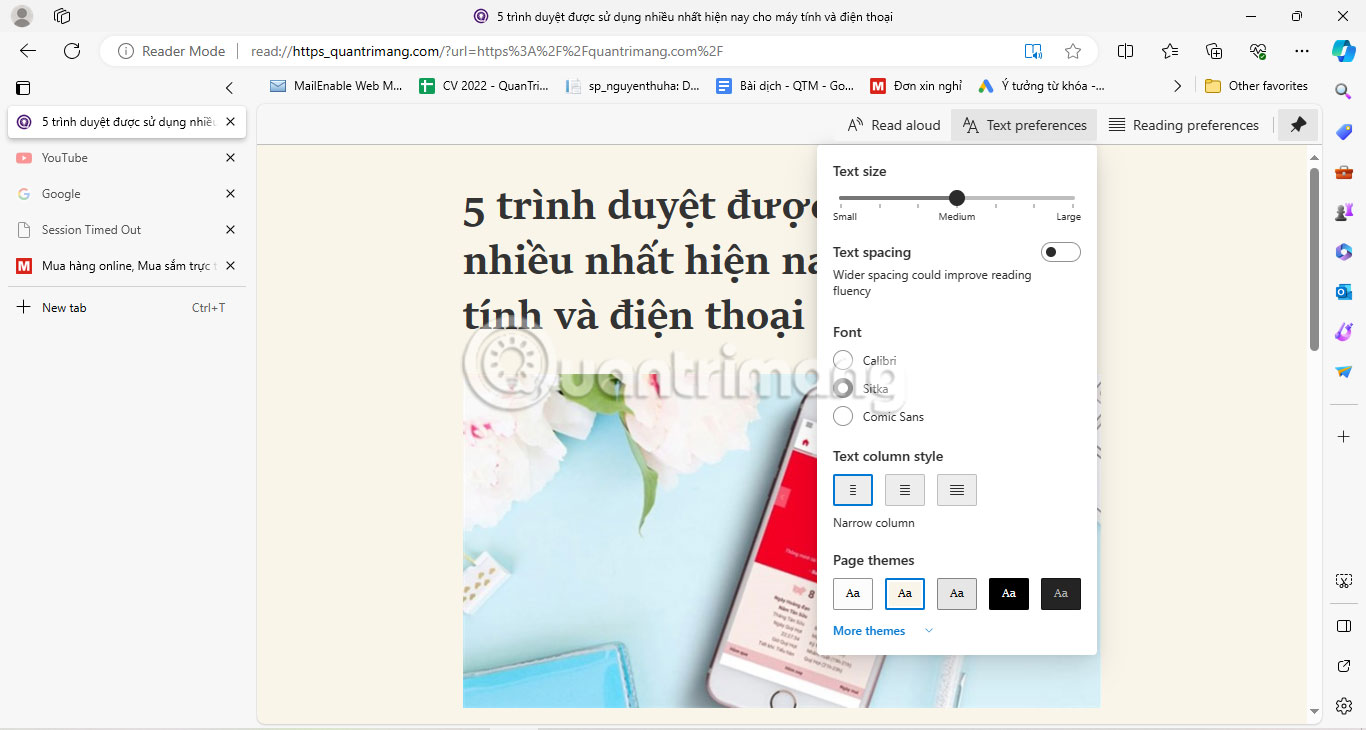
<p style="text-align: justify;">Microsoft Edge nổi tiếng với các tùy chọn quyền riêng tư, chẳng hạn như bảo vệ theo dõi, các chế độ bảo mật cân bằng và nghiêm ngặt, đồng thời trung tâm Browser Essentials của Edge được xây dựng để giúp bạn an toàn và cải thiện hiệu suất trình duyệt.</p>

<p style="text-align: justify;">Tab Browser Essentials Safety đặc biệt hữu ích, cung cấp cái nhìn tổng quan về tất cả các trang web đã được quét và mọi rủi ro tiềm ẩn đã được phát hiện. Bạn cũng có thể xem mức sử dụng bộ nhớ của mình trong tab Performance và bật chế độ Efficiency để giúp tiết kiệm tài nguyên trong khi duyệt.</p>
		</div>
				<div id="author">
						<p>
				<strong>Nguồn tin:</strong>
				Quantrimang.com
			</p>
		</div>
	</div>
	<div id="footer" class="clearfix">
		<div id="url">
			<strong>URL của bản tin này: </strong><a href="https://www.nguoicodonvn2008.info/vi/news/savefile/kien-thuc-may-tinh/6-ly-do-nen-chuyen-sang-microsoft-edge-thay-vi-dung-google-chrome-7905.html" title="6 lý do nên chuyển sang Microsoft Edge thay vì dùng Google Chrome">https://www.nguoicodonvn2008.info/vi/news/savefile/kien-thuc-may-tinh/6-ly-do-nen-chuyen-sang-microsoft-edge-thay-vi-dung-google-chrome-7905.html</a>

		</div>
		<div class="clear"></div>
		<div class="copyright">
			&copy; .&#x3A; Nguoicodonvn2008.info - Cõi lòng người cô đơn &#x3A;.
		</div>
		<div id="contact">
			<a href="mailto:admin@nguoicodonvn2008.info">admin@nguoicodonvn2008.info</a>
		</div>
	</div>
</div>
        <div id="timeoutsess" class="chromeframe">
            Bạn đã không sử dụng Site, <a onclick="timeoutsesscancel();" href="https://nguoicodonvn2008.info/#">Bấm vào đây để duy trì trạng thái đăng nhập</a>. Thời gian chờ: <span id="secField"> 60 </span> giây
        </div>
        <div id="openidResult" class="nv-alert" style="display:none"></div>
        <div id="openidBt" data-result="" data-redirect=""></div>
		</script>
		<div class="car-top">
  <span><img src="https://nguoicodonvn2008.info/themes/default/images/car.png" alt=""></span>
</div>
<script src="https://nguoicodonvn2008.info/assets/js/jquery/jquery.min.js"></script>
<script>var nv_base_siteurl="/",nv_lang_data="vi",nv_lang_interface="vi",nv_name_variable="nv",nv_fc_variable="op",nv_lang_variable="language",nv_module_name="news",nv_func_name="savefile",nv_is_user=0, nv_my_ofs=-4,nv_my_abbr="EDT",nv_cookie_prefix="nv4c_e856T",nv_check_pass_mstime=1738000,nv_area_admin=0,nv_safemode=0,theme_responsive=0,nv_recaptcha_ver=2,nv_recaptcha_sitekey="",nv_recaptcha_type="image",XSSsanitize=1;</script>
<script src="https://nguoicodonvn2008.info/assets/js/language/vi.js"></script>
<script src="https://nguoicodonvn2008.info/assets/js/DOMPurify/purify3.js"></script>
<script src="https://nguoicodonvn2008.info/assets/js/global.js"></script>
<script src="https://nguoicodonvn2008.info/assets/js/site.js"></script>
<script src="https://nguoicodonvn2008.info/themes/default/js/news.js"></script>
<script src="https://nguoicodonvn2008.info/themes/default/js/main.js"></script>
<script src="https://nguoicodonvn2008.info/themes/default/js/custom.js"></script>
<script type="application/ld+json">
        {
            "@context": "https://schema.org",
            "@type": "Organization",
            "url": "https://nguoicodonvn2008.info",
            "logo": "https://nguoicodonvn2008.info/uploads/angel.gif"
        }
        </script>
<script src="https://nguoicodonvn2008.info/themes/default/js/bootstrap.min.js"></script>
<script type="text/javascript">
var $scrolltop = $('.car-top');
$scrolltop.on('click', function () {
    $('html,body').animate({
        scrollTop: 0
    }, 800);
    $(this).addClass("car-run");
    setTimeout(function(){ $scrolltop.removeClass('car-run');}, 1000);
    return false;
});
$(window).on('scroll', function ()
{ 
    if($(window).scrollTop() >= 200)
    {
        $scrolltop.addClass("show");
        $scrolltop.addClass("car-down");
    }
    else
    {
       $scrolltop.removeClass("show");
       setTimeout(function(){ $scrolltop.removeClass('car-down');}, 300);
    }
});
</script>
</body>
</html>