<!DOCTYPE html>
    <html lang="vi" xmlns="http://www.w3.org/1999/xhtml" prefix="og: http://ogp.me/ns#">
    <head>
<title>6 cách mở công cụ Programs and Features trên Windows</title>
<meta name="description" content="6 cách mở công cụ Programs and Features trên Windows - Savefile - Tin Tức -...">
<meta name="author" content=".: Nguoicodonvn2008.info - Cõi lòng người cô đơn :.">
<meta name="copyright" content=".: Nguoicodonvn2008.info - Cõi lòng người cô đơn :. [admin@nguoicodonvn2008.info]">
<meta name="robots" content="index, archive, follow, noodp">
<meta name="googlebot" content="index,archive,follow,noodp">
<meta name="msnbot" content="all,index,follow">
<meta name="generator" content="NukeViet v4.5">
<meta http-equiv="Content-Type" content="text/html; charset=utf-8">
<meta property="og:title" content="6 cách mở công cụ Programs and Features trên Windows">
<meta property="og:type" content="website">
<meta property="og:description" content="Savefile - Tin Tức - https&#x3A;&#x002F;&#x002F;www.nguoicodonvn2008.info&#x002F;vi&#x002F;news&#x002F;savefile&#x002F;kien-thuc-may-tinh&#x002F;6-cach-mo-cong-cu-programs-and-features-tren-windows-11905.html">
<meta property="og:site_name" content=".&#x3A; Nguoicodonvn2008.info - Cõi lòng người cô đơn &#x3A;.">
<meta property="og:url" content="https://www.nguoicodonvn2008.info/vi/news/savefile/kien-thuc-may-tinh/6-cach-mo-cong-cu-programs-and-features-tren-windows-11905.html">
<link rel="shortcut icon" href="https://nguoicodonvn2008.info/favicon.ico">
<link rel="canonical" href="https://www.nguoicodonvn2008.info/vi/news/savefile/kien-thuc-may-tinh/6-cach-mo-cong-cu-programs-and-features-tren-windows-11905.html">
<link rel="alternate" href="https://nguoicodonvn2008.info/vi/news/rss/" title="Tin Tức" type="application/rss+xml">
<link rel="alternate" href="https://nguoicodonvn2008.info/vi/news/rss/karaoke-dual/" title="Tin Tức - Karaoke Dual" type="application/rss+xml">
<link rel="alternate" href="https://nguoicodonvn2008.info/vi/news/rss/nhac-tre/" title="Tin Tức - Nhạc trẻ" type="application/rss+xml">
<link rel="alternate" href="https://nguoicodonvn2008.info/vi/news/rss/tru-tinh/" title="Tin Tức - Trữ tình" type="application/rss+xml">
<link rel="alternate" href="https://nguoicodonvn2008.info/vi/news/rss/nuoc-ngoai/" title="Tin Tức - Nước ngoài" type="application/rss+xml">
<link rel="alternate" href="https://nguoicodonvn2008.info/vi/news/rss/remix/" title="Tin Tức - Remix" type="application/rss+xml">
<link rel="alternate" href="https://nguoicodonvn2008.info/vi/news/rss/tam-su-tinh-yeu/" title="Tin Tức - Tâm sự tình yêu" type="application/rss+xml">
<link rel="alternate" href="https://nguoicodonvn2008.info/vi/news/rss/tho-suu-tam/" title="Tin Tức - Thơ sưu tầm" type="application/rss+xml">
<link rel="alternate" href="https://nguoicodonvn2008.info/vi/news/rss/cuoc-song/" title="Tin Tức - Cuộc sống" type="application/rss+xml">
<link rel="alternate" href="https://nguoicodonvn2008.info/vi/news/rss/phan-mem/" title="Tin Tức - Phần mềm" type="application/rss+xml">
<link rel="alternate" href="https://nguoicodonvn2008.info/vi/news/rss/kien-thuc-may-tinh/" title="Tin Tức - Kiến thức máy tính" type="application/rss+xml">
<link rel="alternate" href="https://nguoicodonvn2008.info/vi/news/rss/hoc-tap/" title="Tin Tức - Học tập" type="application/rss+xml">
<link rel="alternate" href="https://nguoicodonvn2008.info/vi/news/rss/tai-lieu/" title="Tin Tức - Tài liệu" type="application/rss+xml">
<link rel="alternate" href="https://nguoicodonvn2008.info/vi/news/rss/de-thi/" title="Tin Tức - Đề thi" type="application/rss+xml">
<link rel="preload" as="style" href="https://nguoicodonvn2008.info/assets/css/font-awesome.min.css" type="text/css">
<link rel="preload" as="style" href="https://nguoicodonvn2008.info/themes/default/css/bootstrap.non-responsive.css" type="text/css">
<link rel="preload" as="style" href="https://nguoicodonvn2008.info/themes/default/css/style.css" type="text/css">
<link rel="preload" as="style" href="https://nguoicodonvn2008.info/themes/default/css/style.non-responsive.css" type="text/css">
<link rel="preload" as="style" href="https://nguoicodonvn2008.info/themes/default/css/news.css" type="text/css">
<link rel="preload" as="style" href="https://nguoicodonvn2008.info/themes/default/css/custom.css" type="text/css">
<link rel="preload" as="script" href="https://nguoicodonvn2008.info/assets/js/jquery/jquery.min.js" type="text/javascript">
<link rel="preload" as="script" href="https://nguoicodonvn2008.info/assets/js/language/vi.js" type="text/javascript">
<link rel="preload" as="script" href="https://nguoicodonvn2008.info/assets/js/DOMPurify/purify3.js" type="text/javascript">
<link rel="preload" as="script" href="https://nguoicodonvn2008.info/assets/js/global.js" type="text/javascript">
<link rel="preload" as="script" href="https://nguoicodonvn2008.info/assets/js/site.js" type="text/javascript">
<link rel="preload" as="script" href="https://nguoicodonvn2008.info/themes/default/js/news.js" type="text/javascript">
<link rel="preload" as="script" href="https://nguoicodonvn2008.info/themes/default/js/main.js" type="text/javascript">
<link rel="preload" as="script" href="https://nguoicodonvn2008.info/themes/default/js/custom.js" type="text/javascript">
<link rel="preload" as="script" href="https://nguoicodonvn2008.info/themes/default/js/bootstrap.min.js" type="text/javascript">
<link rel="stylesheet" href="https://nguoicodonvn2008.info/assets/css/font-awesome.min.css">
<link rel="stylesheet" href="https://nguoicodonvn2008.info/themes/default/css/bootstrap.non-responsive.css">
<link rel="stylesheet" href="https://nguoicodonvn2008.info/themes/default/css/style.css">
<link rel="stylesheet" href="https://nguoicodonvn2008.info/themes/default/css/style.non-responsive.css">
<link rel="StyleSheet" href="https://nguoicodonvn2008.info/themes/default/css/news.css">
<link rel="stylesheet" href="https://nguoicodonvn2008.info/themes/default/css/custom.css">
<style type="text/css">
	body{background: #fff;}
</style>
    </head>
    <body>
<div id="print">
	<div id="hd_print">
		<h2 class="pull-left">.&#x3A; Nguoicodonvn2008.info - Cõi lòng người cô đơn &#x3A;.</h2>
		<p class="pull-right"><a title=".&#x3A; Nguoicodonvn2008.info - Cõi lòng người cô đơn &#x3A;." href="https://nguoicodonvn2008.info/">https://nguoicodonvn2008.info</a></p>
	</div>
	<div class="clear"></div>
	<hr />
	<div id="content">
		<h1>6 cách mở công cụ Programs and Features trên Windows</h1>
		<ul class="list-inline">
			<li>Thứ tư - 17/12/2025 22:09</li>
			<li class="hidden-print txtrequired"><em class="fa fa-print">&nbsp;</em><a title="In ra" href="javascript:;" onclick="window.print()">In ra</a></li>
			<li class="hidden-print txtrequired"><em class="fa fa-power-off">&nbsp;</em><a title="Đóng cửa sổ này" href="javascript:;" onclick="window.close()">Đóng cửa sổ này</a></li>
		</ul>
		<div class="clear"></div>
		<div id="hometext">
		</div>
				<div class="imghome">
			<img alt="6 cách mở công cụ Programs and Features trên Windows" src="https://st.quantrimang.com/photos/image/2025/12/18/cach-mo-cong-cu-programs-and-features-12.png" width="460" class="img-thumbnail" />
		</div>
		<div class="clear"></div>
		<div id="bodytext" class="clearfix">
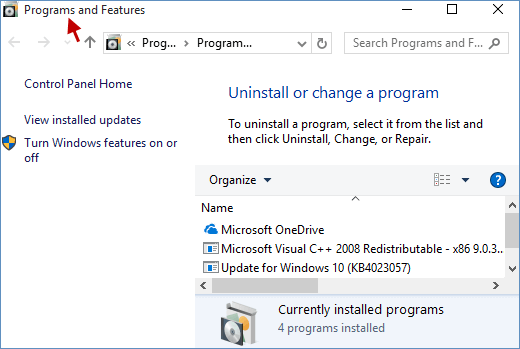
			<p style="text-align: justify;">Mục Programs and Features trong Windows là trung tâm tập trung liệt kê tất cả các chương trình và ứng dụng đã cài đặt trên máy tính. Người dùng thường truy cập mục này để sửa chữa, sửa đổi hoặc gỡ cài đặt phần mềm. Dưới đây là 6 phương pháp để mở Programs and Features trong Windows để thuận tiện cho bạn trong quá trình sử dụng!</p>

<div style="text-align: justify;">&nbsp;</div>

<figure>
<div style="text-align: justify;"><img alt="Mở Programs and Features" data-adbro-processed="true" data-i="0" data-src="https://st.quantrimang.com/photos/image/2025/12/18/cach-mo-cong-cu-programs-and-features-1.png" data-was-processed="true" height="349" src="https://st.quantrimang.com/photos/image/2025/12/18/cach-mo-cong-cu-programs-and-features-1.png" width="520" /></div>

<figcaption>
<div style="text-align: justify;">Mở Programs and Features</div>
</figcaption>
</figure>

<h2 style="text-align: justify;">Phương pháp 1: Mở Programs and Features thông qua menu ngữ cảnh Windows</h2>

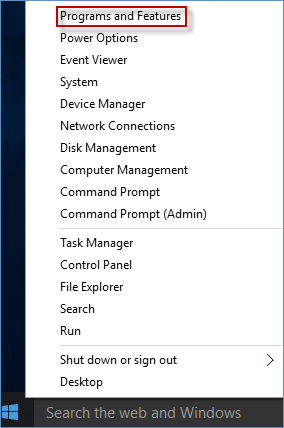
<p style="text-align: justify;">Nhấn đồng thời phím&nbsp;<strong>Win + X&nbsp;</strong>hoặc nhấp chuột phải vào biểu tượng&nbsp;<strong>Windows</strong>&nbsp;để hiển thị menu ngữ cảnh, trong đó có&nbsp;<strong>Programs and Features</strong>. Nhấp vào&nbsp;<strong>Programs and Features</strong>&nbsp;để mở.</p>

<figure>
<div style="text-align: justify;"><img alt="Nhấp chuột phải vào biểu tượng Windows để hiển thị Programs and Features" data-i="1" data-src="https://st.quantrimang.com/photos/image/2025/12/18/cach-mo-cong-cu-programs-and-features-2.png" data-was-processed="true" height="428" src="https://st.quantrimang.com/photos/image/2025/12/18/cach-mo-cong-cu-programs-and-features-2.png" width="284" /></div>

<figcaption>
<div style="text-align: justify;">Nhấp chuột phải vào biểu tượng Windows để hiển thị Programs and Features</div>
</figcaption>
</figure>

<h2 style="text-align: justify;">Phương pháp 2: Tìm kiếm Programs and Features</h2>

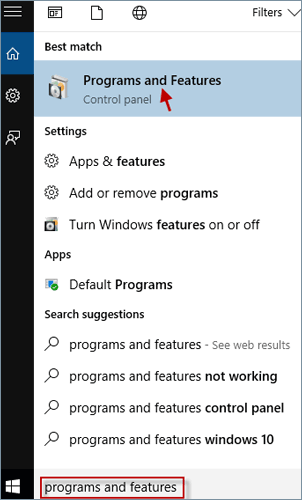
<p style="text-align: justify;">Nhập&nbsp;<strong>&quot;Programs and Features&quot;&nbsp;</strong>vào trường Search và chọn&nbsp;<strong>Programs and Features&nbsp;</strong>từ kết quả phù hợp nhất.</p>

<figure>
<div style="text-align: justify;"><img alt="Tìm kiếm Programs and Features" data-i="2" data-src="https://st.quantrimang.com/photos/image/2025/12/18/cach-mo-cong-cu-programs-and-features-3.png" data-was-processed="true" height="500" src="https://st.quantrimang.com/photos/image/2025/12/18/cach-mo-cong-cu-programs-and-features-3.png" width="302" /></div>

<figcaption>
<div style="text-align: justify;">Tìm kiếm Programs and Features</div>
</figcaption>
</figure>

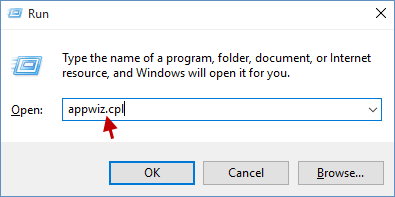
<h2 style="text-align: justify;">Phương pháp 3: Truy cập Programs and Features thông qua hộp thoại Run</h2>

<p style="text-align: justify;"><a data-type="internal" href="https://quantrimang.com/cong-nghe/cach-mo-hop-thoai-run-trong-windows-187019" title="7 cách mở hộp thoại Run trong Windows">Mở hộp thoại Run</a>&nbsp;bằng cách nhấn phím&nbsp;<strong>Win + R</strong>, nhập&nbsp;<strong>appwiz.cpl</strong>&nbsp;và nhấp&nbsp;<strong>OK.</strong></p>

<figure>
<div style="text-align: justify;"><img alt="Mở hộp thoại Run" data-i="3" data-src="https://st.quantrimang.com/photos/image/2025/12/18/cach-mo-cong-cu-programs-and-features-4.png" data-was-processed="true" height="197" src="https://st.quantrimang.com/photos/image/2025/12/18/cach-mo-cong-cu-programs-and-features-4.png" width="395" /></div>

<figcaption>
<div style="text-align: justify;">Mở hộp thoại Run</div>
</figcaption>
</figure>

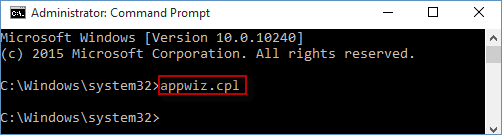
<h2 style="text-align: justify;">Phương pháp 4: Mở Programs and Features bằng Command Prompt</h2>

<p style="text-align: justify;">Bước 1:&nbsp;Mở Command Prompt với quyền admin.</p>

<p style="text-align: justify;">Bước 2: Trong cửa sổ Command Prompt, nhập&nbsp;<strong>appwiz.cpl</strong>&nbsp;và nhấn&nbsp;<strong>Enter</strong>.</p>

<figure>
<div style="text-align: justify;"><img alt="Mở Programs and Features bằng Command Prompt" data-i="4" data-src="https://st.quantrimang.com/photos/image/2025/12/18/cach-mo-cong-cu-programs-and-features-5.png" data-was-processed="true" height="135" src="https://st.quantrimang.com/photos/image/2025/12/18/cach-mo-cong-cu-programs-and-features-5.png" width="502" /></div>

<figcaption>
<div style="text-align: justify;">Mở Programs and Features bằng Command Prompt</div>
</figcaption>
</figure>

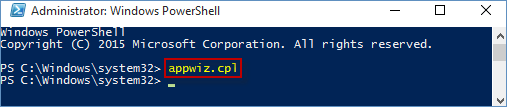
<h2 style="text-align: justify;">Phương pháp 5: Khởi chạy Programs and Features thông qua Windows PowerShell</h2>

<p style="text-align: justify;">Bước 1:&nbsp;Chạy PowerShell với quyền admin.</p>

<p style="text-align: justify;">Bước 2: Gõ&nbsp;<strong>appwiz.cpl</strong>&nbsp;và nhấn&nbsp;<strong>Enter</strong>&nbsp;để mở Programs and Features.</p>

<figure>
<div style="text-align: justify;"><img alt="Khởi chạy Programs and Features thông qua Windows PowerShell" data-i="5" data-src="https://st.quantrimang.com/photos/image/2025/12/18/cach-mo-cong-cu-programs-and-features-6.png" data-was-processed="true" height="107" src="https://st.quantrimang.com/photos/image/2025/12/18/cach-mo-cong-cu-programs-and-features-6.png" width="507" /></div>

<figcaption>
<div style="text-align: justify;">Khởi chạy Programs and Features thông qua Windows PowerShell</div>
</figcaption>
</figure>

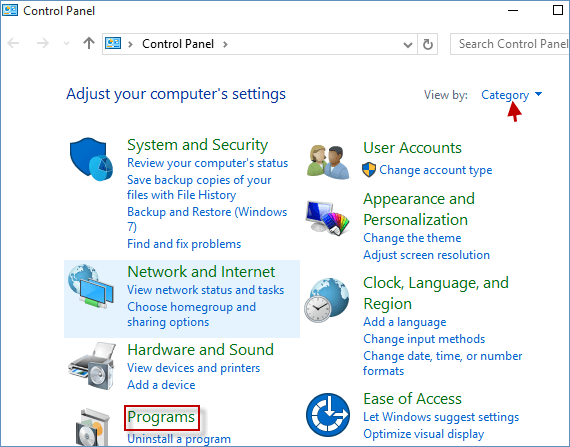
<h2 style="text-align: justify;">Phương pháp 6: Mở Programs and Features từ Control Panel</h2>

<p style="text-align: justify;">Bước 1:&nbsp;Mở Control Panel.</p>

<p style="text-align: justify;">Bước 2: Nếu&nbsp;<strong>View by</strong>&nbsp;được đặt thành&nbsp;<strong>Category</strong>, hãy nhấp vào liên kết&nbsp;<strong>Programs</strong>.</p>

<figure>
<div style="text-align: justify;"><img alt="Nhấp vào liên kết Programs" data-i="6" data-src="https://st.quantrimang.com/photos/image/2025/12/18/cach-mo-cong-cu-programs-and-features-7.png" data-was-processed="true" height="447" src="https://st.quantrimang.com/photos/image/2025/12/18/cach-mo-cong-cu-programs-and-features-7.png" width="570" /></div>

<figcaption>
<div style="text-align: justify;">Nhấp vào liên kết Programs</div>
</figcaption>
</figure>

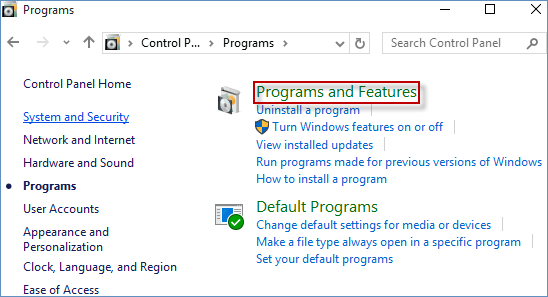
<p style="text-align: justify;">Bước 3: Sau đó, nhấp vào liên kết&nbsp;<strong>Programs and Features</strong>.</p>

<figure>
<div style="text-align: justify;"><img alt="Nhấp vào liên kết Programs and Features" data-i="7" data-src="https://st.quantrimang.com/photos/image/2025/12/18/cach-mo-cong-cu-programs-and-features-8.png" data-was-processed="true" height="297" src="https://st.quantrimang.com/photos/image/2025/12/18/cach-mo-cong-cu-programs-and-features-8.png" width="548" /></div>

<figcaption>
<div style="text-align: justify;">Nhấp vào liên kết Programs and Features</div>
</figcaption>
</figure>

<p style="text-align: justify;"><strong>Lưu ý</strong>: Nếu&nbsp;<strong>View by</strong>&nbsp;được đặt thành&nbsp;<strong>Large icons</strong>&nbsp;hoặc&nbsp;<strong>Small icons</strong>, hãy nhấp trực tiếp vào liên kết&nbsp;<strong>Programs and Features</strong>.</p>

<p style="text-align: justify;">Để truy cập thường xuyên vào các file hoặc thư mục cụ thể trong Programs and Features, hãy cân nhắc tạo desktop shortcut để tối ưu hóa quy trình làm việc của bạn. Cách tạo shortcut cho Programs and Features trên desktop như sau:</p>

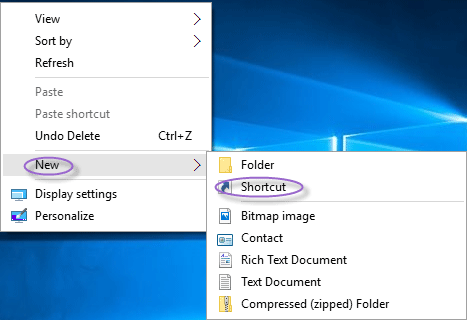
<p style="text-align: justify;">Bước 1: Nhấp chuột phải vào vùng trống trên desktop, chọn&nbsp;<strong>New</strong>, rồi chọn&nbsp;<strong>Shortcut</strong>.</p>

<figure>
<div style="text-align: justify;"><img alt="Tạo shortcut mới" data-i="8" data-src="https://st.quantrimang.com/photos/image/2025/12/18/cach-mo-cong-cu-programs-and-features-9.png" data-was-processed="true" height="320" src="https://st.quantrimang.com/photos/image/2025/12/18/cach-mo-cong-cu-programs-and-features-9.png" width="467" /></div>

<figcaption>
<div style="text-align: justify;">Tạo shortcut mới</div>
</figcaption>
</figure>

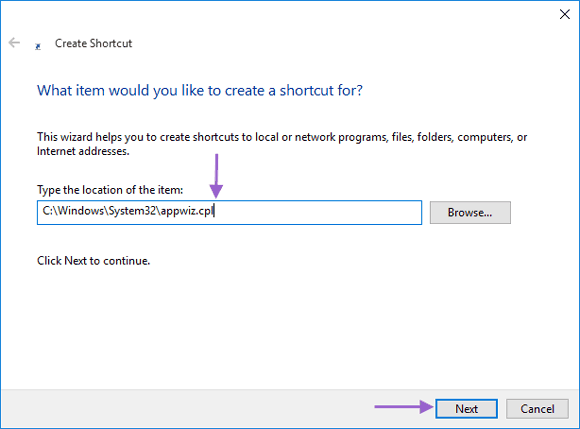
<p style="text-align: justify;">Bước 2: Nhập&nbsp;<strong>C:\Windows\System32\appwiz.cpl</strong>&nbsp;vào trường vị trí và nhấp&nbsp;<strong>Next</strong>.</p>

<figure>
<div style="text-align: justify;"><img alt="Nhập vị trí" data-i="9" data-src="https://st.quantrimang.com/photos/image/2025/12/18/cach-mo-cong-cu-programs-and-features-10.png" data-was-processed="true" height="429" src="https://st.quantrimang.com/photos/image/2025/12/18/cach-mo-cong-cu-programs-and-features-10.png" width="580" /></div>

<figcaption>
<div style="text-align: justify;">Nhập vị trí</div>
</figcaption>
</figure>

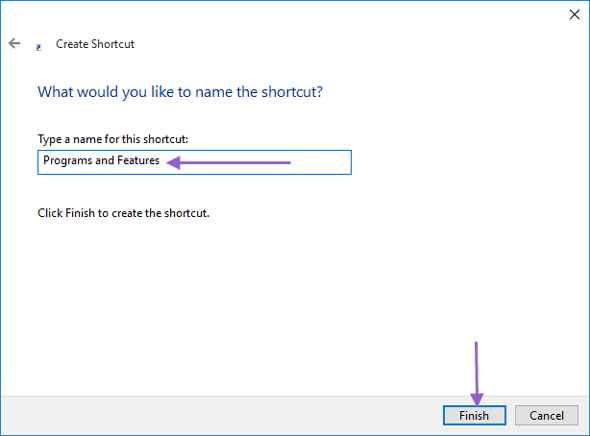
<p style="text-align: justify;">Bước 3: Đặt tên cho shortcut là&nbsp;<strong>Programs and Features</strong>&nbsp;và nhấp vào&nbsp;<strong>Finish</strong>.</p>

<figure>
<div style="text-align: justify;"><img alt="Đặt tên cho shortcut" data-i="10" data-src="https://st.quantrimang.com/photos/image/2025/12/18/cach-mo-cong-cu-programs-and-features-11.png" data-was-processed="true" height="436" src="https://st.quantrimang.com/photos/image/2025/12/18/cach-mo-cong-cu-programs-and-features-11.png" width="590" /></div>

<figcaption>
<div style="text-align: justify;">Đặt tên cho shortcut</div>
</figcaption>
</figure>

<p style="text-align: justify;"><strong>Lưu ý</strong>: Bạn có thể tùy chỉnh tên shortcut theo ý muốn.</p>

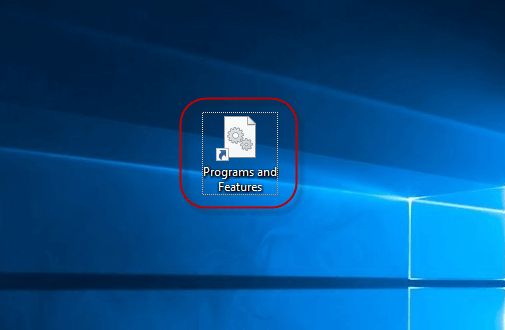
<p style="text-align: justify;">Bước 4: Shortcut&nbsp;<strong>Programs and Features</strong>&nbsp;sẽ xuất hiện trên desktop của bạn, xác nhận việc tạo thành công.</p>

<figure>
<div style="text-align: justify;"><img alt="Shortcut Programs and Features" data-i="11" data-src="https://st.quantrimang.com/photos/image/2025/12/18/cach-mo-cong-cu-programs-and-features-12.png" data-was-processed="true" height="330" src="https://st.quantrimang.com/photos/image/2025/12/18/cach-mo-cong-cu-programs-and-features-12.png" width="505" /></div>

<figcaption>
<div style="text-align: justify;">Shortcut Programs and Features</div>
</figcaption>
</figure>

<div style="text-align: justify;">&nbsp;</div>
		</div>
				<div id="author">
						<p>
				<strong>Nguồn tin:</strong>
				Quantrimang.com:
			</p>
		</div>
	</div>
	<div id="footer" class="clearfix">
		<div id="url">
			<strong>URL của bản tin này: </strong><a href="https://www.nguoicodonvn2008.info/vi/news/savefile/kien-thuc-may-tinh/6-cach-mo-cong-cu-programs-and-features-tren-windows-11905.html" title="6 cách mở công cụ Programs and Features trên Windows">https://www.nguoicodonvn2008.info/vi/news/savefile/kien-thuc-may-tinh/6-cach-mo-cong-cu-programs-and-features-tren-windows-11905.html</a>

		</div>
		<div class="clear"></div>
		<div class="copyright">
			&copy; .&#x3A; Nguoicodonvn2008.info - Cõi lòng người cô đơn &#x3A;.
		</div>
		<div id="contact">
			<a href="mailto:admin@nguoicodonvn2008.info">admin@nguoicodonvn2008.info</a>
		</div>
	</div>
</div>
        <div id="timeoutsess" class="chromeframe">
            Bạn đã không sử dụng Site, <a onclick="timeoutsesscancel();" href="https://nguoicodonvn2008.info/#">Bấm vào đây để duy trì trạng thái đăng nhập</a>. Thời gian chờ: <span id="secField"> 60 </span> giây
        </div>
        <div id="openidResult" class="nv-alert" style="display:none"></div>
        <div id="openidBt" data-result="" data-redirect=""></div>
		</script>
		<div class="car-top">
  <span><img src="https://nguoicodonvn2008.info/themes/default/images/car.png" alt=""></span>
</div>
<script src="https://nguoicodonvn2008.info/assets/js/jquery/jquery.min.js"></script>
<script>var nv_base_siteurl="/",nv_lang_data="vi",nv_lang_interface="vi",nv_name_variable="nv",nv_fc_variable="op",nv_lang_variable="language",nv_module_name="news",nv_func_name="savefile",nv_is_user=0, nv_my_ofs=-4,nv_my_abbr="EDT",nv_cookie_prefix="nv4c_e856T",nv_check_pass_mstime=1738000,nv_area_admin=0,nv_safemode=0,theme_responsive=0,nv_recaptcha_ver=2,nv_recaptcha_sitekey="",nv_recaptcha_type="image",XSSsanitize=1;</script>
<script src="https://nguoicodonvn2008.info/assets/js/language/vi.js"></script>
<script src="https://nguoicodonvn2008.info/assets/js/DOMPurify/purify3.js"></script>
<script src="https://nguoicodonvn2008.info/assets/js/global.js"></script>
<script src="https://nguoicodonvn2008.info/assets/js/site.js"></script>
<script src="https://nguoicodonvn2008.info/themes/default/js/news.js"></script>
<script src="https://nguoicodonvn2008.info/themes/default/js/main.js"></script>
<script src="https://nguoicodonvn2008.info/themes/default/js/custom.js"></script>
<script type="application/ld+json">
        {
            "@context": "https://schema.org",
            "@type": "Organization",
            "url": "https://nguoicodonvn2008.info",
            "logo": "https://nguoicodonvn2008.info/uploads/angel.gif"
        }
        </script>
<script src="https://nguoicodonvn2008.info/themes/default/js/bootstrap.min.js"></script>
<script type="text/javascript">
var $scrolltop = $('.car-top');
$scrolltop.on('click', function () {
    $('html,body').animate({
        scrollTop: 0
    }, 800);
    $(this).addClass("car-run");
    setTimeout(function(){ $scrolltop.removeClass('car-run');}, 1000);
    return false;
});
$(window).on('scroll', function ()
{ 
    if($(window).scrollTop() >= 200)
    {
        $scrolltop.addClass("show");
        $scrolltop.addClass("car-down");
    }
    else
    {
       $scrolltop.removeClass("show");
       setTimeout(function(){ $scrolltop.removeClass('car-down');}, 300);
    }
});
</script>
</body>
</html>