<!DOCTYPE html>
    <html lang="vi" xmlns="http://www.w3.org/1999/xhtml" prefix="og: http://ogp.me/ns#">
    <head>
<title>6 cách khắc phục lỗi “This site can’t provide a secure connection”</title>
<meta name="description" content="6 cách khắc phục lỗi “This site can’t provide a secure connection” - Savefile - Tin Tức -...">
<meta name="author" content=".: Nguoicodonvn2008.info - Cõi lòng người cô đơn :.">
<meta name="copyright" content=".: Nguoicodonvn2008.info - Cõi lòng người cô đơn :. [admin@nguoicodonvn2008.info]">
<meta name="robots" content="index, archive, follow, noodp">
<meta name="googlebot" content="index,archive,follow,noodp">
<meta name="msnbot" content="all,index,follow">
<meta name="generator" content="NukeViet v4.5">
<meta http-equiv="Content-Type" content="text/html; charset=utf-8">
<meta property="og:title" content="6 cách khắc phục lỗi “This site can’t provide a secure connection”">
<meta property="og:type" content="website">
<meta property="og:description" content="Savefile - Tin Tức - https&#x3A;&#x002F;&#x002F;www.nguoicodonvn2008.info&#x002F;vi&#x002F;news&#x002F;savefile&#x002F;kien-thuc-may-tinh&#x002F;6-cach-khac-phuc-loi-this-site-can-t-provide-a-secure-connection-9461.html">
<meta property="og:site_name" content=".&#x3A; Nguoicodonvn2008.info - Cõi lòng người cô đơn &#x3A;.">
<meta property="og:url" content="https://www.nguoicodonvn2008.info/vi/news/savefile/kien-thuc-may-tinh/6-cach-khac-phuc-loi-this-site-can-t-provide-a-secure-connection-9461.html">
<link rel="shortcut icon" href="https://nguoicodonvn2008.info/favicon.ico">
<link rel="canonical" href="https://www.nguoicodonvn2008.info/vi/news/savefile/kien-thuc-may-tinh/6-cach-khac-phuc-loi-this-site-can-t-provide-a-secure-connection-9461.html">
<link rel="alternate" href="https://nguoicodonvn2008.info/vi/news/rss/" title="Tin Tức" type="application/rss+xml">
<link rel="alternate" href="https://nguoicodonvn2008.info/vi/news/rss/karaoke-dual/" title="Tin Tức - Karaoke Dual" type="application/rss+xml">
<link rel="alternate" href="https://nguoicodonvn2008.info/vi/news/rss/nhac-tre/" title="Tin Tức - Nhạc trẻ" type="application/rss+xml">
<link rel="alternate" href="https://nguoicodonvn2008.info/vi/news/rss/tru-tinh/" title="Tin Tức - Trữ tình" type="application/rss+xml">
<link rel="alternate" href="https://nguoicodonvn2008.info/vi/news/rss/nuoc-ngoai/" title="Tin Tức - Nước ngoài" type="application/rss+xml">
<link rel="alternate" href="https://nguoicodonvn2008.info/vi/news/rss/remix/" title="Tin Tức - Remix" type="application/rss+xml">
<link rel="alternate" href="https://nguoicodonvn2008.info/vi/news/rss/tam-su-tinh-yeu/" title="Tin Tức - Tâm sự tình yêu" type="application/rss+xml">
<link rel="alternate" href="https://nguoicodonvn2008.info/vi/news/rss/tho-suu-tam/" title="Tin Tức - Thơ sưu tầm" type="application/rss+xml">
<link rel="alternate" href="https://nguoicodonvn2008.info/vi/news/rss/cuoc-song/" title="Tin Tức - Cuộc sống" type="application/rss+xml">
<link rel="alternate" href="https://nguoicodonvn2008.info/vi/news/rss/phan-mem/" title="Tin Tức - Phần mềm" type="application/rss+xml">
<link rel="alternate" href="https://nguoicodonvn2008.info/vi/news/rss/kien-thuc-may-tinh/" title="Tin Tức - Kiến thức máy tính" type="application/rss+xml">
<link rel="alternate" href="https://nguoicodonvn2008.info/vi/news/rss/hoc-tap/" title="Tin Tức - Học tập" type="application/rss+xml">
<link rel="alternate" href="https://nguoicodonvn2008.info/vi/news/rss/tai-lieu/" title="Tin Tức - Tài liệu" type="application/rss+xml">
<link rel="alternate" href="https://nguoicodonvn2008.info/vi/news/rss/de-thi/" title="Tin Tức - Đề thi" type="application/rss+xml">
<link rel="preload" as="style" href="https://nguoicodonvn2008.info/assets/css/font-awesome.min.css" type="text/css">
<link rel="preload" as="style" href="https://nguoicodonvn2008.info/themes/default/css/bootstrap.non-responsive.css" type="text/css">
<link rel="preload" as="style" href="https://nguoicodonvn2008.info/themes/default/css/style.css" type="text/css">
<link rel="preload" as="style" href="https://nguoicodonvn2008.info/themes/default/css/style.non-responsive.css" type="text/css">
<link rel="preload" as="style" href="https://nguoicodonvn2008.info/themes/default/css/news.css" type="text/css">
<link rel="preload" as="style" href="https://nguoicodonvn2008.info/themes/default/css/custom.css" type="text/css">
<link rel="preload" as="script" href="https://nguoicodonvn2008.info/assets/js/jquery/jquery.min.js" type="text/javascript">
<link rel="preload" as="script" href="https://nguoicodonvn2008.info/assets/js/language/vi.js" type="text/javascript">
<link rel="preload" as="script" href="https://nguoicodonvn2008.info/assets/js/DOMPurify/purify3.js" type="text/javascript">
<link rel="preload" as="script" href="https://nguoicodonvn2008.info/assets/js/global.js" type="text/javascript">
<link rel="preload" as="script" href="https://nguoicodonvn2008.info/assets/js/site.js" type="text/javascript">
<link rel="preload" as="script" href="https://nguoicodonvn2008.info/themes/default/js/news.js" type="text/javascript">
<link rel="preload" as="script" href="https://nguoicodonvn2008.info/themes/default/js/main.js" type="text/javascript">
<link rel="preload" as="script" href="https://nguoicodonvn2008.info/themes/default/js/custom.js" type="text/javascript">
<link rel="preload" as="script" href="https://nguoicodonvn2008.info/themes/default/js/bootstrap.min.js" type="text/javascript">
<link rel="stylesheet" href="https://nguoicodonvn2008.info/assets/css/font-awesome.min.css">
<link rel="stylesheet" href="https://nguoicodonvn2008.info/themes/default/css/bootstrap.non-responsive.css">
<link rel="stylesheet" href="https://nguoicodonvn2008.info/themes/default/css/style.css">
<link rel="stylesheet" href="https://nguoicodonvn2008.info/themes/default/css/style.non-responsive.css">
<link rel="StyleSheet" href="https://nguoicodonvn2008.info/themes/default/css/news.css">
<link rel="stylesheet" href="https://nguoicodonvn2008.info/themes/default/css/custom.css">
<style type="text/css">
	body{background: #fff;}
</style>
    </head>
    <body>
<div id="print">
	<div id="hd_print">
		<h2 class="pull-left">.&#x3A; Nguoicodonvn2008.info - Cõi lòng người cô đơn &#x3A;.</h2>
		<p class="pull-right"><a title=".&#x3A; Nguoicodonvn2008.info - Cõi lòng người cô đơn &#x3A;." href="https://nguoicodonvn2008.info/">https://nguoicodonvn2008.info</a></p>
	</div>
	<div class="clear"></div>
	<hr />
	<div id="content">
		<h1>6 cách khắc phục lỗi “This site can’t provide a secure connection”</h1>
		<ul class="list-inline">
			<li>Thứ sáu - 29/11/2024 22:00</li>
			<li class="hidden-print txtrequired"><em class="fa fa-print">&nbsp;</em><a title="In ra" href="javascript:;" onclick="window.print()">In ra</a></li>
			<li class="hidden-print txtrequired"><em class="fa fa-power-off">&nbsp;</em><a title="Đóng cửa sổ này" href="javascript:;" onclick="window.close()">Đóng cửa sổ này</a></li>
		</ul>
		<div class="clear"></div>
		<div id="hometext">
		</div>
				<div class="imghome">
			<img alt="6 cách khắc phục lỗi “This site can’t provide a secure connection”" src="https://st.quantrimang.com/photos/image/2024/11/29/sua-loi-this-site-can-t-provide-a-secure-connection-8.jpg" width="460" class="img-thumbnail" />
		</div>
		<div class="clear"></div>
		<div id="bodytext" class="clearfix">
			<p style="text-align: justify;">Lỗi này thường khó xác định. Nguyên nhân có thể khác nhau, từ cấu hình sai&nbsp;Secure Sockets Layer (SSL)&nbsp;đến cài đặt ngày và giờ không chính xác. Tuy nhiên, có những cách đơn giản để khắc phục lỗi này, cho dù bạn là chủ sở hữu trang web hay khách truy cập.</p>

<h2 style="text-align: justify;">&nbsp;</h2>

<h2 id="mcetoc_1idrjk28939" style="text-align: justify;">Lỗi &quot;This site can’t provide a secure connection&quot; là gì?</h2>

<p style="text-align: justify;">Lỗi &quot;This site can’t provide a secure connection&quot; xuất hiện khi một trang web không tuân thủ giao thức&nbsp;HTTPS. Lỗi này thường xảy ra do không có chứng chỉ SSL trên trang web, không tự động sử dụng HTTPS, có chứng chỉ SSL đã hết hạn hoặc không hợp lệ hoặc cache SSL đã lỗi thời trong trình duyệt.</p>

<h2 id="mcetoc_1idrjk2893a" style="text-align: justify;">Nguyên nhân gây ra lỗi &quot;This site can’t provide a secure connection&quot;</h2>

<p style="text-align: justify;">Có 6 lý do phổ biến khiến trình duyệt hiển thị lỗi này.</p>

<h3 id="mcetoc_1idrjk2893b" style="text-align: justify;">Không cài đặt chứng chỉ SSL</h3>

<p style="text-align: justify;">Thông báo lỗi có thể xuất hiện vì trang web không cài đặt chứng chỉ SSL. Điều này có nghĩa là bạn đang truy cập trang web thông qua kết nối HTTP và máy chủ đích gửi tất cả các yêu cầu và phản hồi dưới dạng plain text.</p>

<div style="text-align: justify;">&nbsp;</div>

<p style="text-align: justify;">Dữ liệu không được mã hóa và có thể bị bên thứ ba chặn lại để thu thập thông tin được truyền giữa máy chủ trang web và trình duyệt. Điều này có thể khiến trang web có nguy cơ bị tấn công mạng như phần mềm độc hại và&nbsp;man-in-the-middle.</p>

<h3 id="mcetoc_1idrjk2893c" style="text-align: justify;">HTTPS không bị bắt buộc trên trang web</h3>

<p style="text-align: justify;">Sự cố có thể xảy ra khi bạn đã cài đặt chứng chỉ SSL nhưng không bật tùy chọn bắt buộc dùng HTTPS. Bằng cách này, khách truy cập sẽ truy cập phiên bản HTTP của trang web thay vì URL an toàn.</p>

<h3 id="mcetoc_1idrjk2893d" style="text-align: justify;">Chứng chỉ SSL không hợp lệ hoặc đã hết hạn</h3>

<p style="text-align: justify;">Bạn có thể gặp lỗi này khi trang web sử dụng chứng chỉ SSL không hợp lệ hoặc đã hết hạn. Điều này có nghĩa là trang web hiện đang chạy trên kết nối HTTP.</p>

<h3 id="mcetoc_1idrjk2893e" style="text-align: justify;">Cache SSL lỗi thời trong trình duyệt</h3>

<p style="text-align: justify;">Cache SSL lỗi thời hoặc bị hỏng trong trình duyệt có thể góp phần gây ra lỗi trang web. Thông thường, điều này có thể xảy ra khi bạn đang phát triển các trang web hoặc sau khi cài đặt chứng chỉ SSL mới.</p>

<h3 id="mcetoc_1idrjk2893f" style="text-align: justify;">Giao thức QUIC được bật</h3>

<p style="text-align: justify;">Giao thức Quick UDP Internet Connections (QUIC) được bật theo mặc định trên trình duyệt&nbsp;Google Chrome. Giao thức này được sử dụng để giảm thời gian kết nối, cải thiện khả năng kiểm soát tắc nghẽn, khả năng mở rộng truyền tải và ghép kênh mà không bị Head-of-line blocking.</p>

<p style="text-align: justify;">Tuy nhiên, trong một số trường hợp, nó có thể gây ra sự cố SSL, chẳng hạn như sự cố “This site can’t provide a secure connection”.</p>

<h3 id="mcetoc_1idrjk2893g" style="text-align: justify;">Cài đặt ngày và giờ không chính xác</h3>

<p style="text-align: justify;">Cấu hình ngày và giờ không đúng trên máy tính có thể khiến trình duyệt Google Chrome chặn trang web. Thông tin không chính xác có thể gây ra sự cố trong quá trình xác thực chứng chỉ trang web. Do đó, lỗi xảy ra.</p>

<h2 id="mcetoc_1idrjk2893h" style="text-align: justify;">6 cách khắc phục lỗi “This site can’t provide a secure connection”</h2>

<p style="text-align: justify;">Trước khi bắt đầu, bạn nên kiểm tra kết nối Internet, tắt tiện ích mở rộng Chrome và tắt tính năng quét SSL trên phần mềm diệt virus và tường lửa của mình. Nếu sự cố vẫn tiếp diễn, sau đây là 6 phương pháp khắc phục sự cố bạn có thể thử.</p>

<h3 id="mcetoc_1idrjk2893i" style="text-align: justify;">1. Cài đặt chứng chỉ SSL</h3>

<p style="text-align: justify;">Cài đặt chứng chỉ SSL là một trong những cách hiệu quả nhất để khắc phục thông báo lỗi Can’t Provide a Secure Connection nếu bạn là chủ sở hữu trang web. Tùy thuộc vào nhà cung cấp dịch vụ web hosting, cách cấu hình lớp bảo mật bổ sung có thể khác nhau.</p>

<div style="text-align: justify;">&nbsp;</div>

<p style="text-align: justify;">Tại Hostinger, bạn có thể cài đặt chứng chỉ SSL trên hPanel:</p>

<ul>
	<li style="text-align: justify;">Đi tới phần&nbsp;<strong>SSL</strong>&nbsp;và nhấp vào nút&nbsp;<strong>Install free SSL</strong>.</li>
</ul>

<figure>
<div style="text-align: justify;"><img alt="" data-i="0" data-src="https://st.quantrimang.com/photos/image/2024/11/29/sua-loi-this-site-can-t-provide-a-secure-connection-1.jpg" data-was-processed="true" height="129" src="https://st.quantrimang.com/photos/image/2024/11/29/sua-loi-this-site-can-t-provide-a-secure-connection-1.jpg" width="1024" /></div>
</figure>

<ul>
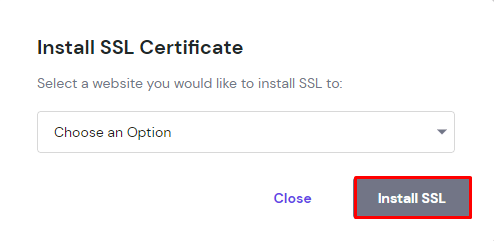
	<li style="text-align: justify;">Chọn domain và nhấp vào&nbsp;<strong>Install SSL</strong>.</li>
</ul>

<figure>
<div style="text-align: justify;"><img alt="" data-i="1" data-src="https://st.quantrimang.com/photos/image/2024/11/29/sua-loi-this-site-can-t-provide-a-secure-connection-2.jpg" data-was-processed="true" height="241" src="https://st.quantrimang.com/photos/image/2024/11/29/sua-loi-this-site-can-t-provide-a-secure-connection-2.jpg" width="494" /></div>
</figure>

<ul>
	<li style="text-align: justify;">Khi địa chỉ trang web hiển thị dấu kiểm màu xanh lá cây và trạng thái&nbsp;<strong>Active</strong>, SSL đã được cài đặt thành công. Nếu không, hãy đảm bảo domain đang trỏ đến máy chủ tên Hostinger.</li>
</ul>

<p style="text-align: justify;">Phương pháp này sẽ giải quyết vấn đề Can’t Provide a Secure Connection trên trang web của bạn.</p>

<h3 id="mcetoc_1idrjk2893j" style="text-align: justify;">2. Buộc kết nối HTTPS</h3>

<p style="text-align: justify;">Bằng cách buộc HTTPS, khách truy cập sẽ tự động được chuyển hướng đến URL an toàn sau khi họ load trang web của bạn.</p>

<p style="text-align: justify;">Nếu bạn là người dùng Hostinger, hãy làm theo các hướng dẫn sau để buộc kết nối HTTPS trên trang web của bạn:</p>

<ul>
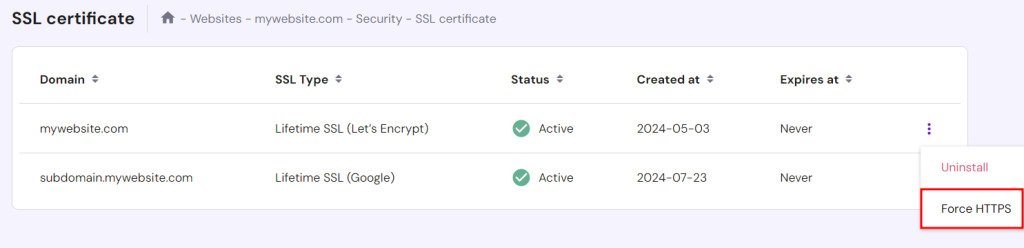
	<li style="text-align: justify;">Truy cập&nbsp;<strong>Security →</strong>&nbsp;<strong>SSL</strong>&nbsp;từ bảng điều khiển hPanel.</li>
	<li style="text-align: justify;">Nhấp vào nút ba chấm bên cạnh domain có vấn đề và chọn&nbsp;<strong>Force HTTPS</strong>.</li>
</ul>

<figure>
<div style="text-align: justify;"><img alt="" data-i="2" data-src="https://st.quantrimang.com/photos/image/2024/11/29/sua-loi-this-site-can-t-provide-a-secure-connection-3.jpg" data-was-processed="true" height="248" src="https://st.quantrimang.com/photos/image/2024/11/29/sua-loi-this-site-can-t-provide-a-secure-connection-3.jpg" width="1024" /></div>
</figure>

<p style="text-align: justify;">Điều này sẽ cho phép bạn mở trang web. Nếu sự cố vẫn tiếp diễn, hãy thử phương pháp tiếp theo.</p>

<h3 id="mcetoc_1idrjk2893k" style="text-align: justify;">3. Cài đặt lại chứng chỉ SSL</h3>

<p style="text-align: justify;">Cài đặt SSL không hợp lệ hoặc bị hỏng có thể khiến trang web của bạn hiển thị Can’t Provide a Secure Connection. Cách tốt nhất để giải quyết là cài đặt lại chứng chỉ SSL.</p>

<p style="text-align: justify;">Sau đây là cách thực hiện trên hPanel:</p>

<ul>
	<li style="text-align: justify;">Truy cập&nbsp;<strong>Security →</strong>&nbsp;<strong>SSL</strong>&nbsp;từ bảng điều khiển hPanel.</li>
	<li style="text-align: justify;">Nhấp vào nút ba chấm bên cạnh domain có vấn đề và chọn&nbsp;<strong>Reinstall</strong>.</li>
</ul>

<figure>
<div style="text-align: justify;"><img alt="" data-i="3" data-src="https://st.quantrimang.com/photos/image/2024/11/29/sua-loi-this-site-can-t-provide-a-secure-connection-4.jpg" data-was-processed="true" height="134" src="https://st.quantrimang.com/photos/image/2024/11/29/sua-loi-this-site-can-t-provide-a-secure-connection-4.jpg" width="1024" /></div>
</figure>

<h3 id="mcetoc_1idrjk2893l" style="text-align: justify;">4. Reset cache SSL và xóa cache trình duyệt</h3>

<p style="text-align: justify;">Nếu các giải pháp trên không hiệu quả, hãy thử reset cache SSL trên máy tính và xóa lịch sử trình duyệt. Thao tác này sẽ cho phép bạn bắt đầu kết nối mới.</p>

<div style="text-align: justify;">&nbsp;</div>

<p style="text-align: justify;">Làm theo các hướng dẫn sau để reset cache SSL trên Windows:</p>

<ul>
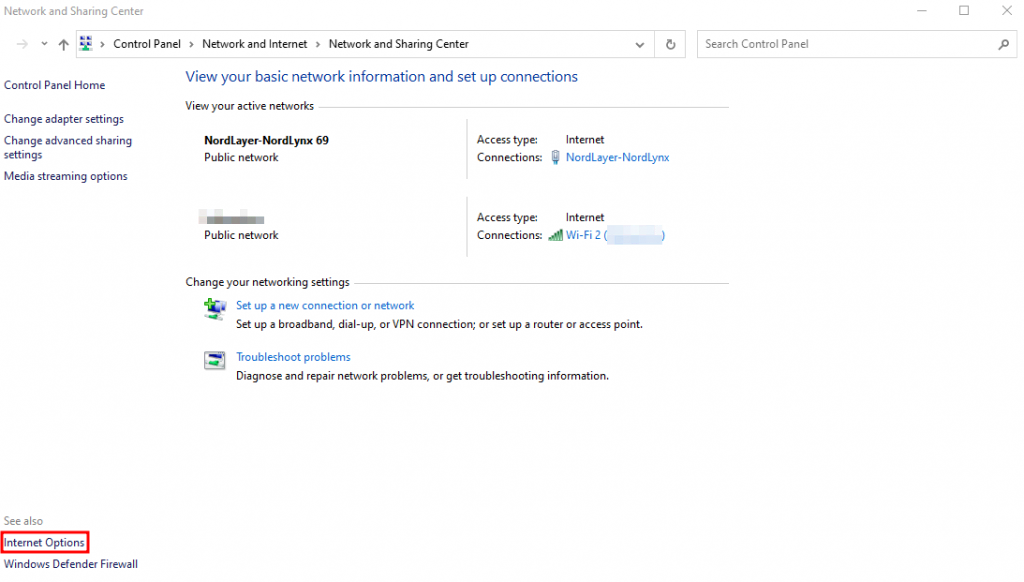
	<li style="text-align: justify;">Nhập&nbsp;<strong>Control Panel</strong>&nbsp;trên tab&nbsp;<strong>Windows search</strong>.</li>
	<li style="text-align: justify;">Trên bảng điều khiển&nbsp;<strong>Network and Internet</strong>, chọn&nbsp;<strong>View network status and tasks</strong>, rồi nhấp vào&nbsp;<strong>Internet Options</strong>.</li>
</ul>

<figure>
<div style="text-align: justify;"><img alt="" data-i="4" data-src="https://st.quantrimang.com/photos/image/2024/11/29/sua-loi-this-site-can-t-provide-a-secure-connection-5.jpg" data-was-processed="true" height="582" src="https://st.quantrimang.com/photos/image/2024/11/29/sua-loi-this-site-can-t-provide-a-secure-connection-5.jpg" width="1024" /></div>
</figure>

<ul>
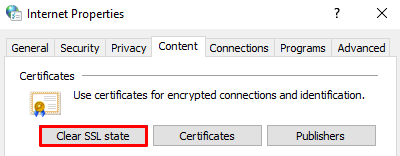
	<li style="text-align: justify;">Khi hộp&nbsp;<strong>Internet Properties</strong>&nbsp;mở ra, hãy chọn tab&nbsp;<strong>Content</strong>&nbsp;và nhấp vào&nbsp;<strong>Clear SSL state</strong>.</li>
</ul>

<figure>
<div style="text-align: justify;"><img alt="" data-i="5" data-src="https://st.quantrimang.com/photos/image/2024/11/29/sua-loi-this-site-can-t-provide-a-secure-connection-6.jpg" data-was-processed="true" height="156" src="https://st.quantrimang.com/photos/image/2024/11/29/sua-loi-this-site-can-t-provide-a-secure-connection-6.jpg" width="400" /></div>
</figure>

<p style="text-align: justify;">Để xóa dữ liệu trên trình duyệt Google Chrome, hãy nhấp vào ba dấu chấm ở góc trên bên phải màn hình →&nbsp;<strong>More tools</strong>&nbsp;→&nbsp;<strong>Clear browsing data</strong>.</p>

<h3 id="mcetoc_1idrjk2893m" style="text-align: justify;">5. Tắt hỗ trợ giao thức QUIC</h3>

<p style="text-align: justify;">Một giải pháp phổ biến khác là tắt hỗ trợ giao thức QUIC trên trình duyệt Google Chrome.</p>

<p style="text-align: justify;">Thực hiện theo các bước sau để thực hiện:</p>

<ul>
	<li style="text-align: justify;">Nhập&nbsp;<em>chrome://flags/#enable-quic</em>&nbsp;trên thanh địa chỉ.</li>
	<li style="text-align: justify;">Tìm tùy chọn&nbsp;<strong>Experimental QUIC protocol</strong>, thường được đặt ở đầu trang.</li>
	<li style="text-align: justify;">Nhấp vào hộp drop-down và chọn&nbsp;<strong>Disabled</strong>.</li>
</ul>

<figure>
<div style="text-align: justify;"><img alt="" data-i="6" data-src="https://st.quantrimang.com/photos/image/2024/11/29/sua-loi-this-site-can-t-provide-a-secure-connection-7.jpg" data-was-processed="true" height="123" src="https://st.quantrimang.com/photos/image/2024/11/29/sua-loi-this-site-can-t-provide-a-secure-connection-7.jpg" width="715" /></div>
</figure>

<ul>
	<li style="text-align: justify;">Khởi chạy lại trình duyệt để các thay đổi có hiệu lực.</li>
</ul>

<p style="text-align: justify;">Nếu tắt giao thức không giải quyết được vấn đề, hãy tiến hành phương pháp tiếp theo.</p>

<h3 id="mcetoc_1idrjk2893n" style="text-align: justify;">6. Kiểm tra cài đặt ngày và giờ</h3>

<p style="text-align: justify;">Tính hợp lệ của chứng chỉ là yếu tố quan trọng trong quy trình xác thực. Trước khi truy cập trang web, trình duyệt sẽ kiểm tra ngày ký và ngày hết hạn của chứng chỉ SSL bằng cách sử dụng cài đặt ngày và giờ của hệ thống.</p>

<p style="text-align: justify;">Nếu sai, chứng chỉ có thể không còn hiệu lực nữa. Do đó, điều chỉnh cài đặt là một trong những cách hiệu quả nhất để khách truy cập trang web khắc phục thông báo lỗi Can’t Provide a Secure Connection.</p>

<p style="text-align: justify;">Thực hiện theo các hướng dẫn sau để đặt ngày và múi giờ chính xác trên các hệ điều hành khác nhau, chẳng hạn như Windows và macOS.</p>

<p style="text-align: justify;"><strong>Windows</strong></p>

<ul>
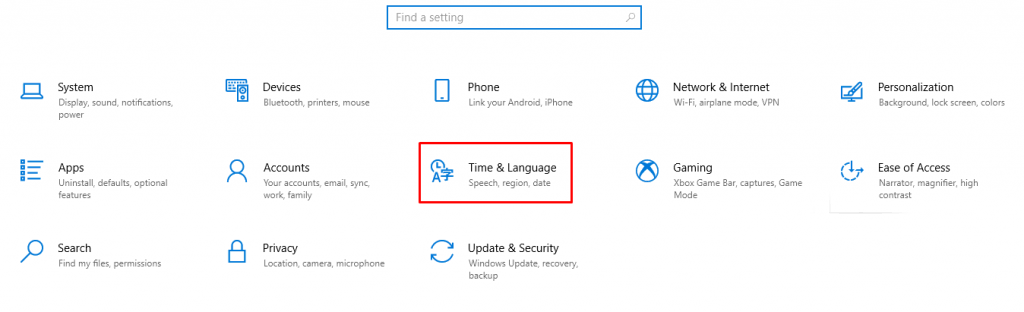
	<li style="text-align: justify;">Nhấp vào nút&nbsp;<strong>Windows Start</strong>&nbsp;và chọn&nbsp;<strong>Settings</strong>.</li>
	<li style="text-align: justify;">Chọn&nbsp;<strong>Time &amp; Language</strong>.</li>
</ul>

<figure>
<div style="text-align: justify;"><img alt="" data-i="7" data-src="https://st.quantrimang.com/photos/image/2024/11/29/sua-loi-this-site-can-t-provide-a-secure-connection-8.jpg" data-was-processed="true" height="312" src="https://st.quantrimang.com/photos/image/2024/11/29/sua-loi-this-site-can-t-provide-a-secure-connection-8.jpg" width="1024" /></div>
</figure>

<ul>
	<li style="text-align: justify;">Bật nút&nbsp;<strong>Set time automatically</strong>. Thực hiện tương tự đối với tùy chọn&nbsp;<strong>Set time zone automatically</strong>.</li>
	<li style="text-align: justify;">Xác minh các thay đổi và đảm bảo các cài đặt là chính xác.</li>
</ul>

<p style="text-align: justify;"><strong>macOS</strong></p>

<ul>
	<li style="text-align: justify;">Chọn nút menu&nbsp;<strong>Apple</strong>&nbsp;và nhấp vào&nbsp;<strong>System Settings</strong>.</li>
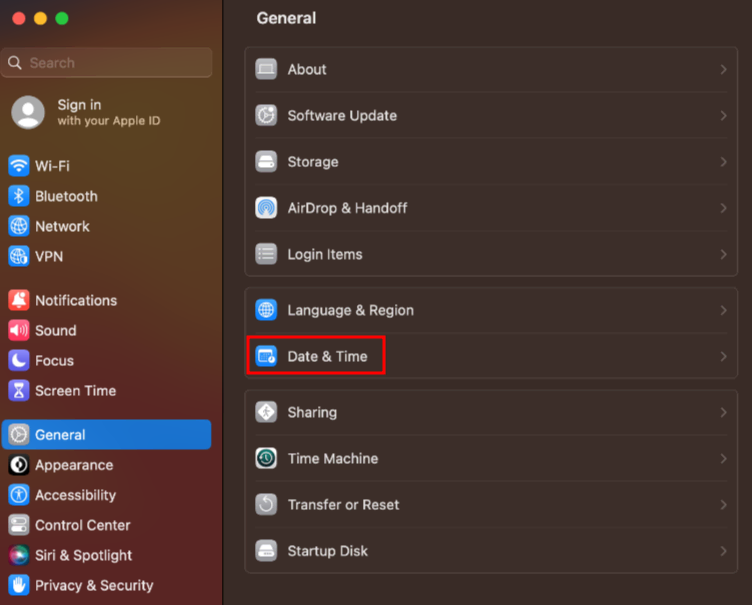
	<li style="text-align: justify;">Chọn&nbsp;<strong>General</strong>&nbsp;trong thanh bên và cuộn xuống để tìm&nbsp;<strong>Date &amp; Time</strong>.</li>
</ul>

<figure>
<div style="text-align: justify;"><img alt="" data-adbro-processed="true" data-i="8" data-src="https://st.quantrimang.com/photos/image/2024/11/29/sua-loi-this-site-can-t-provide-a-secure-connection-9.jpg" data-was-processed="true" height="605" src="https://st.quantrimang.com/photos/image/2024/11/29/sua-loi-this-site-can-t-provide-a-secure-connection-9.jpg" width="752" /></div>
</figure>

<ul>
	<li style="text-align: justify;">Để đặt ngày và giờ tự động, hãy bật tùy chọn&nbsp;<strong>Set time and date automatically</strong>. Để đặt thủ công, hãy tắt tùy chọn, rồi chèn ngày và giờ hiện tại.</li>
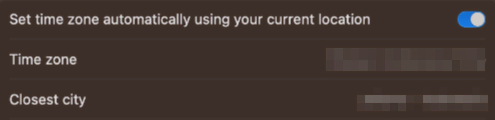
	<li style="text-align: justify;">Để đặt múi giờ tự động, hãy bật&nbsp;<strong>Set time zone automatically using your current location</strong>. Để đặt thủ công, hãy tắt tùy chọn, nhập thành phố gần nhất và chọn tên đầy đủ của thành phố đó từ danh sách.</li>
</ul>

<figure>
<div style="text-align: justify;"><img alt="" data-i="9" data-src="https://st.quantrimang.com/photos/image/2024/11/29/sua-loi-this-site-can-t-provide-a-secure-connection-10.jpg" data-was-processed="true" height="120" src="https://st.quantrimang.com/photos/image/2024/11/29/sua-loi-this-site-can-t-provide-a-secure-connection-10.jpg" width="495" /></div>
</figure>

<div style="text-align: justify;">&nbsp;</div>
		</div>
				<div id="author">
						<p>
				<strong>Nguồn tin:</strong>
				Quantrimang.com:
			</p>
		</div>
	</div>
	<div id="footer" class="clearfix">
		<div id="url">
			<strong>URL của bản tin này: </strong><a href="https://www.nguoicodonvn2008.info/vi/news/savefile/kien-thuc-may-tinh/6-cach-khac-phuc-loi-this-site-can-t-provide-a-secure-connection-9461.html" title="6 cách khắc phục lỗi “This site can’t provide a secure connection”">https://www.nguoicodonvn2008.info/vi/news/savefile/kien-thuc-may-tinh/6-cach-khac-phuc-loi-this-site-can-t-provide-a-secure-connection-9461.html</a>

		</div>
		<div class="clear"></div>
		<div class="copyright">
			&copy; .&#x3A; Nguoicodonvn2008.info - Cõi lòng người cô đơn &#x3A;.
		</div>
		<div id="contact">
			<a href="mailto:admin@nguoicodonvn2008.info">admin@nguoicodonvn2008.info</a>
		</div>
	</div>
</div>
        <div id="timeoutsess" class="chromeframe">
            Bạn đã không sử dụng Site, <a onclick="timeoutsesscancel();" href="https://nguoicodonvn2008.info/#">Bấm vào đây để duy trì trạng thái đăng nhập</a>. Thời gian chờ: <span id="secField"> 60 </span> giây
        </div>
        <div id="openidResult" class="nv-alert" style="display:none"></div>
        <div id="openidBt" data-result="" data-redirect=""></div>
		</script>
		<div class="car-top">
  <span><img src="https://nguoicodonvn2008.info/themes/default/images/car.png" alt=""></span>
</div>
<script src="https://nguoicodonvn2008.info/assets/js/jquery/jquery.min.js"></script>
<script>var nv_base_siteurl="/",nv_lang_data="vi",nv_lang_interface="vi",nv_name_variable="nv",nv_fc_variable="op",nv_lang_variable="language",nv_module_name="news",nv_func_name="savefile",nv_is_user=0, nv_my_ofs=-4,nv_my_abbr="EDT",nv_cookie_prefix="nv4c_e856T",nv_check_pass_mstime=1738000,nv_area_admin=0,nv_safemode=0,theme_responsive=0,nv_recaptcha_ver=2,nv_recaptcha_sitekey="",nv_recaptcha_type="image",XSSsanitize=1;</script>
<script src="https://nguoicodonvn2008.info/assets/js/language/vi.js"></script>
<script src="https://nguoicodonvn2008.info/assets/js/DOMPurify/purify3.js"></script>
<script src="https://nguoicodonvn2008.info/assets/js/global.js"></script>
<script src="https://nguoicodonvn2008.info/assets/js/site.js"></script>
<script src="https://nguoicodonvn2008.info/themes/default/js/news.js"></script>
<script src="https://nguoicodonvn2008.info/themes/default/js/main.js"></script>
<script src="https://nguoicodonvn2008.info/themes/default/js/custom.js"></script>
<script type="application/ld+json">
        {
            "@context": "https://schema.org",
            "@type": "Organization",
            "url": "https://nguoicodonvn2008.info",
            "logo": "https://nguoicodonvn2008.info/uploads/angel.gif"
        }
        </script>
<script src="https://nguoicodonvn2008.info/themes/default/js/bootstrap.min.js"></script>
<script type="text/javascript">
var $scrolltop = $('.car-top');
$scrolltop.on('click', function () {
    $('html,body').animate({
        scrollTop: 0
    }, 800);
    $(this).addClass("car-run");
    setTimeout(function(){ $scrolltop.removeClass('car-run');}, 1000);
    return false;
});
$(window).on('scroll', function ()
{ 
    if($(window).scrollTop() >= 200)
    {
        $scrolltop.addClass("show");
        $scrolltop.addClass("car-down");
    }
    else
    {
       $scrolltop.removeClass("show");
       setTimeout(function(){ $scrolltop.removeClass('car-down');}, 300);
    }
});
</script>
</body>
</html>