<!DOCTYPE html>
    <html lang="vi" xmlns="http://www.w3.org/1999/xhtml" prefix="og: http://ogp.me/ns#">
    <head>
<title>5 tính năng PowerToys không thể thiếu khi sử dụng Windows</title>
<meta name="description" content="5 tính năng PowerToys không thể thiếu khi sử dụng Windows - Savefile - Tin Tức -...">
<meta name="author" content=".: Nguoicodonvn2008.info - Cõi lòng người cô đơn :.">
<meta name="copyright" content=".: Nguoicodonvn2008.info - Cõi lòng người cô đơn :. [admin@nguoicodonvn2008.info]">
<meta name="robots" content="index, archive, follow, noodp">
<meta name="googlebot" content="index,archive,follow,noodp">
<meta name="msnbot" content="all,index,follow">
<meta name="generator" content="NukeViet v4.5">
<meta http-equiv="Content-Type" content="text/html; charset=utf-8">
<meta property="og:title" content="5 tính năng PowerToys không thể thiếu khi sử dụng Windows">
<meta property="og:type" content="website">
<meta property="og:description" content="Savefile - Tin Tức - https&#x3A;&#x002F;&#x002F;www.nguoicodonvn2008.info&#x002F;vi&#x002F;news&#x002F;savefile&#x002F;kien-thuc-may-tinh&#x002F;5-tinh-nang-powertoys-khong-the-thieu-khi-su-dung-windows-11034.html">
<meta property="og:site_name" content=".&#x3A; Nguoicodonvn2008.info - Cõi lòng người cô đơn &#x3A;.">
<meta property="og:url" content="https://www.nguoicodonvn2008.info/vi/news/savefile/kien-thuc-may-tinh/5-tinh-nang-powertoys-khong-the-thieu-khi-su-dung-windows-11034.html">
<link rel="shortcut icon" href="https://nguoicodonvn2008.info/favicon.ico">
<link rel="canonical" href="https://www.nguoicodonvn2008.info/vi/news/savefile/kien-thuc-may-tinh/5-tinh-nang-powertoys-khong-the-thieu-khi-su-dung-windows-11034.html">
<link rel="alternate" href="https://nguoicodonvn2008.info/vi/news/rss/" title="Tin Tức" type="application/rss+xml">
<link rel="alternate" href="https://nguoicodonvn2008.info/vi/news/rss/karaoke-dual/" title="Tin Tức - Karaoke Dual" type="application/rss+xml">
<link rel="alternate" href="https://nguoicodonvn2008.info/vi/news/rss/nhac-tre/" title="Tin Tức - Nhạc trẻ" type="application/rss+xml">
<link rel="alternate" href="https://nguoicodonvn2008.info/vi/news/rss/tru-tinh/" title="Tin Tức - Trữ tình" type="application/rss+xml">
<link rel="alternate" href="https://nguoicodonvn2008.info/vi/news/rss/nuoc-ngoai/" title="Tin Tức - Nước ngoài" type="application/rss+xml">
<link rel="alternate" href="https://nguoicodonvn2008.info/vi/news/rss/remix/" title="Tin Tức - Remix" type="application/rss+xml">
<link rel="alternate" href="https://nguoicodonvn2008.info/vi/news/rss/tam-su-tinh-yeu/" title="Tin Tức - Tâm sự tình yêu" type="application/rss+xml">
<link rel="alternate" href="https://nguoicodonvn2008.info/vi/news/rss/tho-suu-tam/" title="Tin Tức - Thơ sưu tầm" type="application/rss+xml">
<link rel="alternate" href="https://nguoicodonvn2008.info/vi/news/rss/cuoc-song/" title="Tin Tức - Cuộc sống" type="application/rss+xml">
<link rel="alternate" href="https://nguoicodonvn2008.info/vi/news/rss/phan-mem/" title="Tin Tức - Phần mềm" type="application/rss+xml">
<link rel="alternate" href="https://nguoicodonvn2008.info/vi/news/rss/kien-thuc-may-tinh/" title="Tin Tức - Kiến thức máy tính" type="application/rss+xml">
<link rel="alternate" href="https://nguoicodonvn2008.info/vi/news/rss/hoc-tap/" title="Tin Tức - Học tập" type="application/rss+xml">
<link rel="alternate" href="https://nguoicodonvn2008.info/vi/news/rss/tai-lieu/" title="Tin Tức - Tài liệu" type="application/rss+xml">
<link rel="alternate" href="https://nguoicodonvn2008.info/vi/news/rss/de-thi/" title="Tin Tức - Đề thi" type="application/rss+xml">
<link rel="preload" as="style" href="https://nguoicodonvn2008.info/assets/css/font-awesome.min.css" type="text/css">
<link rel="preload" as="style" href="https://nguoicodonvn2008.info/themes/default/css/bootstrap.non-responsive.css" type="text/css">
<link rel="preload" as="style" href="https://nguoicodonvn2008.info/themes/default/css/style.css" type="text/css">
<link rel="preload" as="style" href="https://nguoicodonvn2008.info/themes/default/css/style.non-responsive.css" type="text/css">
<link rel="preload" as="style" href="https://nguoicodonvn2008.info/themes/default/css/news.css" type="text/css">
<link rel="preload" as="style" href="https://nguoicodonvn2008.info/themes/default/css/custom.css" type="text/css">
<link rel="preload" as="script" href="https://nguoicodonvn2008.info/assets/js/jquery/jquery.min.js" type="text/javascript">
<link rel="preload" as="script" href="https://nguoicodonvn2008.info/assets/js/language/vi.js" type="text/javascript">
<link rel="preload" as="script" href="https://nguoicodonvn2008.info/assets/js/DOMPurify/purify3.js" type="text/javascript">
<link rel="preload" as="script" href="https://nguoicodonvn2008.info/assets/js/global.js" type="text/javascript">
<link rel="preload" as="script" href="https://nguoicodonvn2008.info/assets/js/site.js" type="text/javascript">
<link rel="preload" as="script" href="https://nguoicodonvn2008.info/themes/default/js/news.js" type="text/javascript">
<link rel="preload" as="script" href="https://nguoicodonvn2008.info/themes/default/js/main.js" type="text/javascript">
<link rel="preload" as="script" href="https://nguoicodonvn2008.info/themes/default/js/custom.js" type="text/javascript">
<link rel="preload" as="script" href="https://nguoicodonvn2008.info/themes/default/js/bootstrap.min.js" type="text/javascript">
<link rel="stylesheet" href="https://nguoicodonvn2008.info/assets/css/font-awesome.min.css">
<link rel="stylesheet" href="https://nguoicodonvn2008.info/themes/default/css/bootstrap.non-responsive.css">
<link rel="stylesheet" href="https://nguoicodonvn2008.info/themes/default/css/style.css">
<link rel="stylesheet" href="https://nguoicodonvn2008.info/themes/default/css/style.non-responsive.css">
<link rel="StyleSheet" href="https://nguoicodonvn2008.info/themes/default/css/news.css">
<link rel="stylesheet" href="https://nguoicodonvn2008.info/themes/default/css/custom.css">
<style type="text/css">
	body{background: #fff;}
</style>
    </head>
    <body>
<div id="print">
	<div id="hd_print">
		<h2 class="pull-left">.&#x3A; Nguoicodonvn2008.info - Cõi lòng người cô đơn &#x3A;.</h2>
		<p class="pull-right"><a title=".&#x3A; Nguoicodonvn2008.info - Cõi lòng người cô đơn &#x3A;." href="https://nguoicodonvn2008.info/">https://nguoicodonvn2008.info</a></p>
	</div>
	<div class="clear"></div>
	<hr />
	<div id="content">
		<h1>5 tính năng PowerToys không thể thiếu khi sử dụng Windows</h1>
		<ul class="list-inline">
			<li>Thứ tư - 27/08/2025 23:31</li>
			<li class="hidden-print txtrequired"><em class="fa fa-print">&nbsp;</em><a title="In ra" href="javascript:;" onclick="window.print()">In ra</a></li>
			<li class="hidden-print txtrequired"><em class="fa fa-power-off">&nbsp;</em><a title="Đóng cửa sổ này" href="javascript:;" onclick="window.close()">Đóng cửa sổ này</a></li>
		</ul>
		<div class="clear"></div>
		<div id="hometext">
		</div>
				<div class="imghome">
			<img alt="5 tính năng PowerToys không thể thiếu khi sử dụng Windows" src="https://st.quantrimang.com/photos/image/2025/08/27/tinh-nang-powertoys-khong-the-thieu-khi-dung-windows-1.jpg" width="460" class="img-thumbnail" />
		</div>
		<div class="clear"></div>
		<div id="bodytext" class="clearfix">
			<p style="text-align: justify;">Windows 11&nbsp;rất mạnh mẽ, nhưng đôi khi nó có thể hơi cứng nhắc. PowerToys là một ứng dụng thay đổi tất cả những điều đó và cung cấp một số tính năng tăng cường năng suất. Trong số đó, một số tính năng nổi bật là những thứ thực sự đột phá.</p>

<div style="text-align: justify;">&nbsp;</div>

<h2 style="text-align: justify;">5. FancyZones</h2>

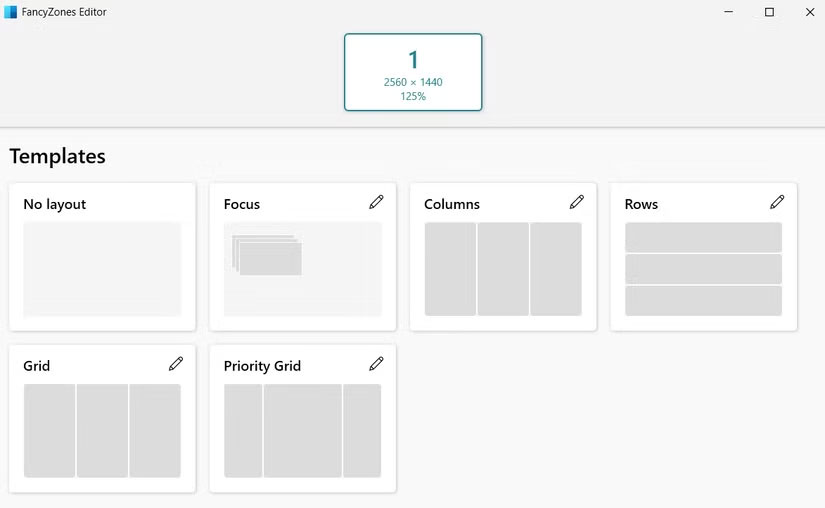
<p style="text-align: justify;">Đối với bất kỳ ai thích đa nhiệm trên Windows 11,&nbsp;Snap Layouts&nbsp;là một công cụ hữu ích để nhanh chóng sắp xếp các ứng dụng thành 2 hoặc 4 phần. Nhưng một khi bạn đã dùng thử FancyZones, tính năng tích hợp này có vẻ quá cơ bản.</p>

<p style="text-align: justify;">FancyZones cho phép bạn tạo bố cục lưới tùy chỉnh thay vì gắn chặt vào các cài đặt preset hạn chế của Microsoft. Ví dụ, bạn có thể thiết lập 3 cột dọc với một cửa sổ rộng ở phía dưới. Nó thậm chí còn cung cấp chế độ chồng các cửa sổ, cho phép bạn kiểm soát gần như toàn bộ giao diện desktop của mình.</p>

<figure>
<div style="text-align: justify;"><img alt="Cửa sổ FancyZones Editor trên Windows 11" data-adbro-processed="true" data-i="0" data-src="https://st.quantrimang.com/photos/image/2025/08/27/tinh-nang-powertoys-khong-the-thieu-khi-dung-windows-1.jpg" data-was-processed="true" height="508" src="https://st.quantrimang.com/photos/image/2025/08/27/tinh-nang-powertoys-khong-the-thieu-khi-dung-windows-1.jpg" width="825" /></div>

<figcaption>
<div style="text-align: justify;">Cửa sổ FancyZones Editor trên Windows 11</div>
</figcaption>
</figure>

<h2 style="text-align: justify;">4. Keyboard Manager</h2>

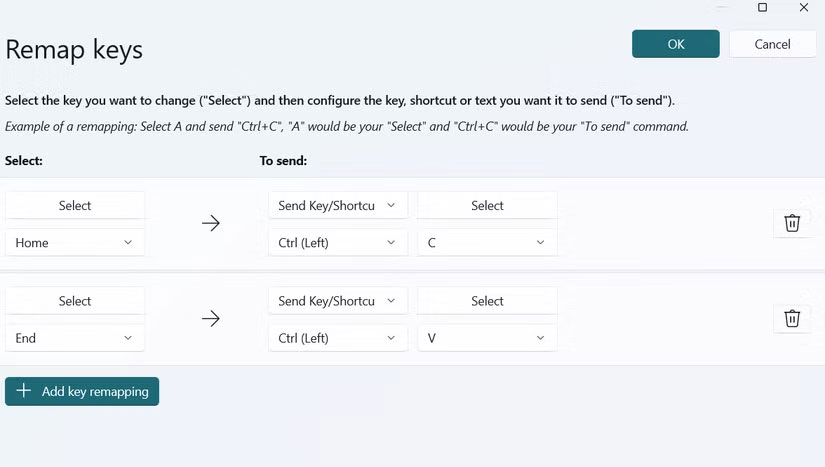
<p style="text-align: justify;">Nếu bạn từng mong muốn bàn phím của mình hoạt động theo cách mình muốn thay vì theo cách nó được thiết kế, Keyboard Manager trong PowerToys sẽ giúp bạn thực hiện điều đó. Nó cho phép bạn ánh xạ lại từng phím hoặc toàn bộ shortcut để bàn phím thích ứng với quy trình làm việc của bạn thay vì ngược lại.</p>

<figure>
<div style="text-align: justify;"><img alt="Ánh xạ lại các phím trong PowerToys cho PC" data-i="1" data-src="https://st.quantrimang.com/photos/image/2025/08/27/tinh-nang-powertoys-khong-the-thieu-khi-dung-windows-2.jpg" data-was-processed="true" height="467" src="https://st.quantrimang.com/photos/image/2025/08/27/tinh-nang-powertoys-khong-the-thieu-khi-dung-windows-2.jpg" width="825" /></div>

<figcaption>
<div style="text-align: justify;">Ánh xạ lại các phím trong PowerToys cho&nbsp;&nbsp;PC<br />
Máy tính bộ</div>
</figcaption>
</figure>

<p style="text-align: justify;">Bạn cũng có thể tùy chỉnh các phím tắt mặc định của Windows. Nếu các phím tắt mặc định để chụp ảnh màn hình khiến bạn cảm thấy khó sử dụng, hoặc phím tắt chuyển đổi desktop không tiện lợi, bạn có thể gán các tổ hợp phím mới nhanh và dễ sử dụng hơn.</p>

<h2 style="text-align: justify;">3. Peek</h2>

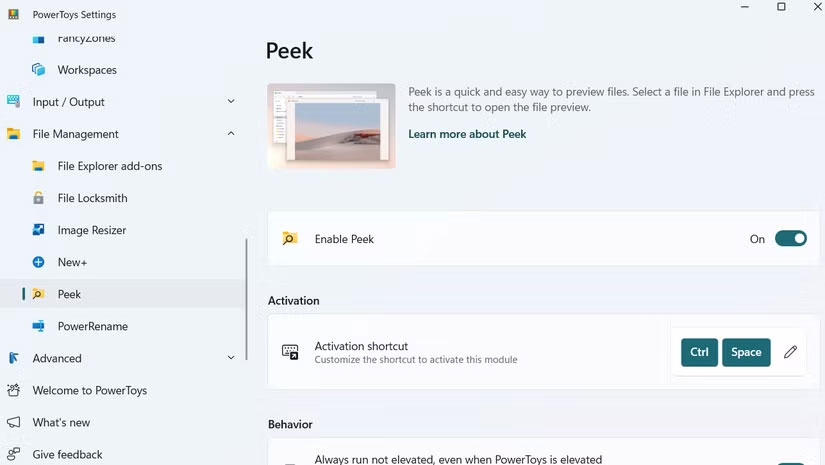
<p style="text-align: justify;">Ngay cả khi là một fan cuồng của Windows, bạn cũng phải thừa nhận rằng macOS làm tốt hơn ở một số tính năng. Một ví dụ là tính năng Quick Look, cho phép bạn xem trước các file như hình ảnh, tài liệu và video mà không cần mở chúng trong những ứng dụng mặc định.</p>

<p style="text-align: justify;">Windows không có tính năng tương đương tích hợp sẵn, nhưng PowerToys mang đến chức năng này với tính năng Peek. Sau khi bật, bạn có thể chọn bất kỳ file nào trong File Explorer và nhấn&nbsp;<strong>Ctrl + Space</strong>&nbsp;để xem trước ngay lập tức. Và nếu phím tắt mặc định không tiện lợi, bạn cũng có thể thay đổi.</p>

<figure>
<div style="text-align: justify;"><img alt="Cài đặt tính năng Peek của PowerToys" data-i="2" data-src="https://st.quantrimang.com/photos/image/2025/08/27/tinh-nang-powertoys-khong-the-thieu-khi-dung-windows-3.jpg" data-was-processed="true" height="465" src="https://st.quantrimang.com/photos/image/2025/08/27/tinh-nang-powertoys-khong-the-thieu-khi-dung-windows-3.jpg" width="825" /></div>

<figcaption>
<div style="text-align: justify;">Cài đặt tính năng Peek của PowerToys</div>
</figcaption>
</figure>

<h2 style="text-align: justify;">2. PowerToys Run</h2>

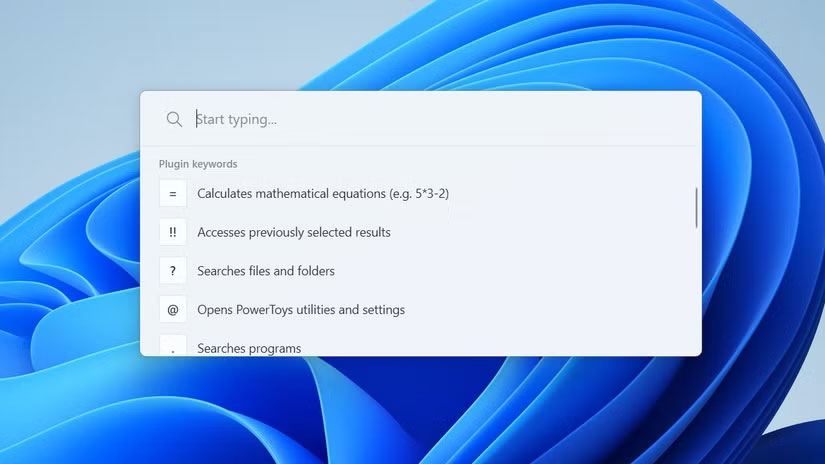
<p style="text-align: justify;">Tìm kiếm trên Windows cho phép bạn mở ứng dụng, tìm file và chạy lệnh, nhưng thường có cảm giác chậm và bị hạn chế. PowerToys Run biến trải nghiệm này trở nên nhanh và mạnh mẽ hơn rất nhiều.</p>

<p style="text-align: justify;">Khi bạn nhấn&nbsp;<strong>Alt + Space</strong>, PowerToys Run sẽ hiển thị một thanh tìm kiếm gọn gàng, đơn giản ở giữa màn hình. Từ đó, bạn có thể khởi chạy ứng dụng, mở thư mục, chạy lệnh hệ thống và thậm chí thực hiện các phép tính nhanh.</p>

<figure>
<div style="text-align: justify;"><img alt="Tính năng PowerToys Run trên desktop" data-i="3" data-src="https://st.quantrimang.com/photos/image/2025/08/27/tinh-nang-powertoys-khong-the-thieu-khi-dung-windows-4.jpg" data-was-processed="true" height="464" src="https://st.quantrimang.com/photos/image/2025/08/27/tinh-nang-powertoys-khong-the-thieu-khi-dung-windows-4.jpg" width="825" /></div>

<figcaption>
<div style="text-align: justify;">Tính năng PowerToys Run trên desktop</div>
</figcaption>
</figure>

<h2 style="text-align: justify;">1. Workspaces</h2>

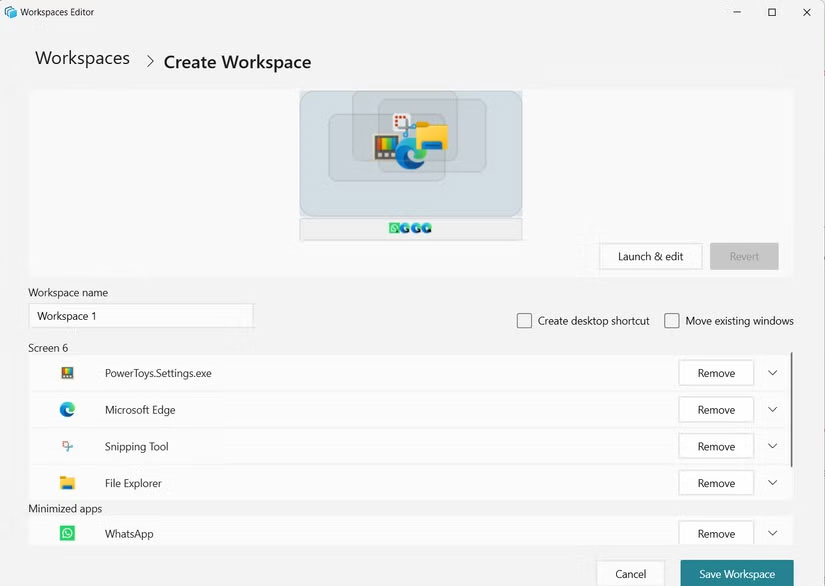
<p style="text-align: justify;">Bất kể bạn sử dụng&nbsp;&nbsp;máy tính&nbsp;để làm gì, điều đầu tiên bạn thường làm sau khi bật máy là khởi chạy các ứng dụng cần thiết hàng ngày. Đó có thể là trình duyệt, ứng dụng trò chuyện như&nbsp;<a data-type="internal" href="https://quantrimang.com/download/whatsapp-179162" title="WhatsApp">WhatsApp</a>&nbsp;hoặc một bộ công cụ năng suất. Tin tốt là bạn không cần phải mở chúng thủ công mỗi lần.</p>

<p style="text-align: justify;">Tính năng Workspaces trong PowerToys cho phép bạn nhóm các ứng dụng và khởi chạy chúng cùng nhau. Thay vì mở từng chương trình một, bạn có thể bắt đầu toàn bộ quy trình làm việc bằng cách nhấp đúp vào một shortcut.</p>

<figure>
<div style="text-align: justify;"><img alt="Cửa sổ trình soạn thảo Workspaces của PowerToys" data-i="4" data-src="https://st.quantrimang.com/photos/image/2025/08/27/tinh-nang-powertoys-khong-the-thieu-khi-dung-windows-5.jpg" data-was-processed="true" height="586" src="https://st.quantrimang.com/photos/image/2025/08/27/tinh-nang-powertoys-khong-the-thieu-khi-dung-windows-5.jpg" width="825" /></div>

<figcaption>
<div style="text-align: justify;">Cửa sổ trình soạn thảo Workspaces của PowerToys</div>
</figcaption>
</figure>

<div style="text-align: justify;">&nbsp;</div>
		</div>
				<div id="author">
						<p>
				<strong>Nguồn tin:</strong>
				Quantrimang.com:
			</p>
		</div>
	</div>
	<div id="footer" class="clearfix">
		<div id="url">
			<strong>URL của bản tin này: </strong><a href="https://www.nguoicodonvn2008.info/vi/news/savefile/kien-thuc-may-tinh/5-tinh-nang-powertoys-khong-the-thieu-khi-su-dung-windows-11034.html" title="5 tính năng PowerToys không thể thiếu khi sử dụng Windows">https://www.nguoicodonvn2008.info/vi/news/savefile/kien-thuc-may-tinh/5-tinh-nang-powertoys-khong-the-thieu-khi-su-dung-windows-11034.html</a>

		</div>
		<div class="clear"></div>
		<div class="copyright">
			&copy; .&#x3A; Nguoicodonvn2008.info - Cõi lòng người cô đơn &#x3A;.
		</div>
		<div id="contact">
			<a href="mailto:admin@nguoicodonvn2008.info">admin@nguoicodonvn2008.info</a>
		</div>
	</div>
</div>
        <div id="timeoutsess" class="chromeframe">
            Bạn đã không sử dụng Site, <a onclick="timeoutsesscancel();" href="https://nguoicodonvn2008.info/#">Bấm vào đây để duy trì trạng thái đăng nhập</a>. Thời gian chờ: <span id="secField"> 60 </span> giây
        </div>
        <div id="openidResult" class="nv-alert" style="display:none"></div>
        <div id="openidBt" data-result="" data-redirect=""></div>
		</script>
		<div class="car-top">
  <span><img src="https://nguoicodonvn2008.info/themes/default/images/car.png" alt=""></span>
</div>
<script src="https://nguoicodonvn2008.info/assets/js/jquery/jquery.min.js"></script>
<script>var nv_base_siteurl="/",nv_lang_data="vi",nv_lang_interface="vi",nv_name_variable="nv",nv_fc_variable="op",nv_lang_variable="language",nv_module_name="news",nv_func_name="savefile",nv_is_user=0, nv_my_ofs=-4,nv_my_abbr="EDT",nv_cookie_prefix="nv4c_e856T",nv_check_pass_mstime=1738000,nv_area_admin=0,nv_safemode=0,theme_responsive=0,nv_recaptcha_ver=2,nv_recaptcha_sitekey="",nv_recaptcha_type="image",XSSsanitize=1;</script>
<script src="https://nguoicodonvn2008.info/assets/js/language/vi.js"></script>
<script src="https://nguoicodonvn2008.info/assets/js/DOMPurify/purify3.js"></script>
<script src="https://nguoicodonvn2008.info/assets/js/global.js"></script>
<script src="https://nguoicodonvn2008.info/assets/js/site.js"></script>
<script src="https://nguoicodonvn2008.info/themes/default/js/news.js"></script>
<script src="https://nguoicodonvn2008.info/themes/default/js/main.js"></script>
<script src="https://nguoicodonvn2008.info/themes/default/js/custom.js"></script>
<script type="application/ld+json">
        {
            "@context": "https://schema.org",
            "@type": "Organization",
            "url": "https://nguoicodonvn2008.info",
            "logo": "https://nguoicodonvn2008.info/uploads/angel.gif"
        }
        </script>
<script src="https://nguoicodonvn2008.info/themes/default/js/bootstrap.min.js"></script>
<script type="text/javascript">
var $scrolltop = $('.car-top');
$scrolltop.on('click', function () {
    $('html,body').animate({
        scrollTop: 0
    }, 800);
    $(this).addClass("car-run");
    setTimeout(function(){ $scrolltop.removeClass('car-run');}, 1000);
    return false;
});
$(window).on('scroll', function ()
{ 
    if($(window).scrollTop() >= 200)
    {
        $scrolltop.addClass("show");
        $scrolltop.addClass("car-down");
    }
    else
    {
       $scrolltop.removeClass("show");
       setTimeout(function(){ $scrolltop.removeClass('car-down');}, 300);
    }
});
</script>
</body>
</html>