<!DOCTYPE html>
    <html lang="vi" xmlns="http://www.w3.org/1999/xhtml" prefix="og: http://ogp.me/ns#">
    <head>
<title>4 lý do nên giữ một Linux Live USB tiện dụng bên mình</title>
<meta name="description" content="4 lý do nên giữ một Linux Live USB tiện dụng bên mình - Savefile - Tin Tức -...">
<meta name="author" content=".: Nguoicodonvn2008.info - Cõi lòng người cô đơn :.">
<meta name="copyright" content=".: Nguoicodonvn2008.info - Cõi lòng người cô đơn :. [admin@nguoicodonvn2008.info]">
<meta name="robots" content="index, archive, follow, noodp">
<meta name="googlebot" content="index,archive,follow,noodp">
<meta name="msnbot" content="all,index,follow">
<meta name="generator" content="NukeViet v4.5">
<meta http-equiv="Content-Type" content="text/html; charset=utf-8">
<meta property="og:title" content="4 lý do nên giữ một Linux Live USB tiện dụng bên mình">
<meta property="og:type" content="website">
<meta property="og:description" content="Savefile - Tin Tức - https&#x3A;&#x002F;&#x002F;www.nguoicodonvn2008.info&#x002F;vi&#x002F;news&#x002F;savefile&#x002F;kien-thuc-may-tinh&#x002F;4-ly-do-nen-giu-mot-linux-live-usb-tien-dung-ben-minh-9400.html">
<meta property="og:site_name" content=".&#x3A; Nguoicodonvn2008.info - Cõi lòng người cô đơn &#x3A;.">
<meta property="og:url" content="https://www.nguoicodonvn2008.info/vi/news/savefile/kien-thuc-may-tinh/4-ly-do-nen-giu-mot-linux-live-usb-tien-dung-ben-minh-9400.html">
<link rel="shortcut icon" href="https://nguoicodonvn2008.info/favicon.ico">
<link rel="canonical" href="https://www.nguoicodonvn2008.info/vi/news/savefile/kien-thuc-may-tinh/4-ly-do-nen-giu-mot-linux-live-usb-tien-dung-ben-minh-9400.html">
<link rel="alternate" href="https://nguoicodonvn2008.info/vi/news/rss/" title="Tin Tức" type="application/rss+xml">
<link rel="alternate" href="https://nguoicodonvn2008.info/vi/news/rss/karaoke-dual/" title="Tin Tức - Karaoke Dual" type="application/rss+xml">
<link rel="alternate" href="https://nguoicodonvn2008.info/vi/news/rss/nhac-tre/" title="Tin Tức - Nhạc trẻ" type="application/rss+xml">
<link rel="alternate" href="https://nguoicodonvn2008.info/vi/news/rss/tru-tinh/" title="Tin Tức - Trữ tình" type="application/rss+xml">
<link rel="alternate" href="https://nguoicodonvn2008.info/vi/news/rss/nuoc-ngoai/" title="Tin Tức - Nước ngoài" type="application/rss+xml">
<link rel="alternate" href="https://nguoicodonvn2008.info/vi/news/rss/remix/" title="Tin Tức - Remix" type="application/rss+xml">
<link rel="alternate" href="https://nguoicodonvn2008.info/vi/news/rss/tam-su-tinh-yeu/" title="Tin Tức - Tâm sự tình yêu" type="application/rss+xml">
<link rel="alternate" href="https://nguoicodonvn2008.info/vi/news/rss/tho-suu-tam/" title="Tin Tức - Thơ sưu tầm" type="application/rss+xml">
<link rel="alternate" href="https://nguoicodonvn2008.info/vi/news/rss/cuoc-song/" title="Tin Tức - Cuộc sống" type="application/rss+xml">
<link rel="alternate" href="https://nguoicodonvn2008.info/vi/news/rss/phan-mem/" title="Tin Tức - Phần mềm" type="application/rss+xml">
<link rel="alternate" href="https://nguoicodonvn2008.info/vi/news/rss/kien-thuc-may-tinh/" title="Tin Tức - Kiến thức máy tính" type="application/rss+xml">
<link rel="alternate" href="https://nguoicodonvn2008.info/vi/news/rss/hoc-tap/" title="Tin Tức - Học tập" type="application/rss+xml">
<link rel="alternate" href="https://nguoicodonvn2008.info/vi/news/rss/tai-lieu/" title="Tin Tức - Tài liệu" type="application/rss+xml">
<link rel="alternate" href="https://nguoicodonvn2008.info/vi/news/rss/de-thi/" title="Tin Tức - Đề thi" type="application/rss+xml">
<link rel="preload" as="style" href="https://nguoicodonvn2008.info/assets/css/font-awesome.min.css" type="text/css">
<link rel="preload" as="style" href="https://nguoicodonvn2008.info/themes/default/css/bootstrap.non-responsive.css" type="text/css">
<link rel="preload" as="style" href="https://nguoicodonvn2008.info/themes/default/css/style.css" type="text/css">
<link rel="preload" as="style" href="https://nguoicodonvn2008.info/themes/default/css/style.non-responsive.css" type="text/css">
<link rel="preload" as="style" href="https://nguoicodonvn2008.info/themes/default/css/news.css" type="text/css">
<link rel="preload" as="style" href="https://nguoicodonvn2008.info/themes/default/css/custom.css" type="text/css">
<link rel="preload" as="script" href="https://nguoicodonvn2008.info/assets/js/jquery/jquery.min.js" type="text/javascript">
<link rel="preload" as="script" href="https://nguoicodonvn2008.info/assets/js/language/vi.js" type="text/javascript">
<link rel="preload" as="script" href="https://nguoicodonvn2008.info/assets/js/DOMPurify/purify3.js" type="text/javascript">
<link rel="preload" as="script" href="https://nguoicodonvn2008.info/assets/js/global.js" type="text/javascript">
<link rel="preload" as="script" href="https://nguoicodonvn2008.info/assets/js/site.js" type="text/javascript">
<link rel="preload" as="script" href="https://nguoicodonvn2008.info/themes/default/js/news.js" type="text/javascript">
<link rel="preload" as="script" href="https://nguoicodonvn2008.info/themes/default/js/main.js" type="text/javascript">
<link rel="preload" as="script" href="https://nguoicodonvn2008.info/themes/default/js/custom.js" type="text/javascript">
<link rel="preload" as="script" href="https://nguoicodonvn2008.info/themes/default/js/bootstrap.min.js" type="text/javascript">
<link rel="stylesheet" href="https://nguoicodonvn2008.info/assets/css/font-awesome.min.css">
<link rel="stylesheet" href="https://nguoicodonvn2008.info/themes/default/css/bootstrap.non-responsive.css">
<link rel="stylesheet" href="https://nguoicodonvn2008.info/themes/default/css/style.css">
<link rel="stylesheet" href="https://nguoicodonvn2008.info/themes/default/css/style.non-responsive.css">
<link rel="StyleSheet" href="https://nguoicodonvn2008.info/themes/default/css/news.css">
<link rel="stylesheet" href="https://nguoicodonvn2008.info/themes/default/css/custom.css">
<style type="text/css">
	body{background: #fff;}
</style>
    </head>
    <body>
<div id="print">
	<div id="hd_print">
		<h2 class="pull-left">.&#x3A; Nguoicodonvn2008.info - Cõi lòng người cô đơn &#x3A;.</h2>
		<p class="pull-right"><a title=".&#x3A; Nguoicodonvn2008.info - Cõi lòng người cô đơn &#x3A;." href="https://nguoicodonvn2008.info/">https://nguoicodonvn2008.info</a></p>
	</div>
	<div class="clear"></div>
	<hr />
	<div id="content">
		<h1>4 lý do nên giữ một Linux Live USB tiện dụng bên mình</h1>
		<ul class="list-inline">
			<li>Thứ tư - 20/11/2024 23:29</li>
			<li class="hidden-print txtrequired"><em class="fa fa-print">&nbsp;</em><a title="In ra" href="javascript:;" onclick="window.print()">In ra</a></li>
			<li class="hidden-print txtrequired"><em class="fa fa-power-off">&nbsp;</em><a title="Đóng cửa sổ này" href="javascript:;" onclick="window.close()">Đóng cửa sổ này</a></li>
		</ul>
		<div class="clear"></div>
		<div id="hometext">
		</div>
				<div class="imghome">
			<img alt="4 lý do nên giữ một Linux Live USB tiện dụng bên mình" src="https://st.quantrimang.com/photos/image/2024/11/20/ly-do-nen-co-mot-linux-live-usb-tien-dung-4.png" width="460" class="img-thumbnail" />
		</div>
		<div class="clear"></div>
		<div id="bodytext" class="clearfix">
			<p>Linux Live USB là một trong những công cụ cứu hộ tốt nhất mà mọi người dùng máy tính nên có. Nó không chỉ có thể giúp khôi phục máy tính của bạn khi gặp sự cố mà còn có một số lợi ích và công dụng đáng kể khác. Ngoài ra, nó còn hoàn toàn miễn phí!</p>

<h2>1. Sao lưu hệ điều hành</h2>

<figure><img alt="" data-i="0" data-src="https://st.quantrimang.com/photos/image/2024/11/20/ly-do-nen-co-mot-linux-live-usb-tien-dung-1.png" data-was-processed="true" height="1100" src="https://st.quantrimang.com/photos/image/2024/11/20/ly-do-nen-co-mot-linux-live-usb-tien-dung-1.png" width="1650" /></figure>
<iframe allow="autoplay" allowtransparency="true" aria-label="Advertisement" data-google-container-id="a!2" data-google-query-id="CO3Avv3K7IkDFb6I6QUdnoglCw" data-load-complete="true" frameborder="0" height="174" hspace="0" id="aswift_1" marginheight="0" marginwidth="0" name="aswift_1" sandbox="allow-scripts allow-same-origin allow-forms allow-presentation allow-popups" scrolling="no" tabindex="0" title="Advertisement" vspace="0" width="694"></iframe>

<p>Linux Live USB là ổ flash USB portable chứa hệ điều hành (OS) Linux. Từ &quot;live&quot; ở đây có nghĩa là USB này có khả năng boot và chạy OS trực tiếp mà không cần cài đặt trên ổ cứng máy tính. Ngoài ra, nó chạy trên RAM máy tính, vì vậy không sử dụng ổ cứng ở đây.</p>

<p>Linux là một hệ điều hành mã nguồn mở với nhiều tùy chọn để lựa chọn, đó là lý do tại sao nó là lựa chọn được ưa chuộng ở đây.&nbsp;Khi thảo luận về hệ điều hành dự phòng, hãy tưởng tượng PC Windows của bạn hiển thị &quot;màn hình xanh chết chóc&quot; và từ chối khởi động, kết quả là bạn bị kẹt với một máy tính không sử dụng được. Nhưng nếu có Linux Live USB, bạn có thể cắm USB và khởi động hệ điều hành đầy đủ chức năng từ đó, giúp bạn thoát khỏi tình trạng bế tắc. Sau khi khởi động, bạn có thể tiếp tục duyệt Internet, kiểm tra email hoặc truy cập các file trên ổ cứng, giúp bạn tránh khỏi thời gian chết trong khi tìm cách sửa hệ điều hành chính của mình.</p>

<h2>2. Phục hồi dữ liệu trong trường hợp hệ điều hành bị lỗi</h2>

<figure><img alt="" data-adbro-processed="true" data-i="1" data-src="https://st.quantrimang.com/photos/image/2024/11/20/ly-do-nen-co-mot-linux-live-usb-tien-dung-2.png" data-was-processed="true" height="472" src="https://st.quantrimang.com/photos/image/2024/11/20/ly-do-nen-co-mot-linux-live-usb-tien-dung-2.png" width="825" /></figure>

<p>Nếu bạn có các file quan trọng trên ổ cứng và Windows bị hỏng, bạn không thể truy cập các file đó nữa. Đây chính là lúc Linux trên USB trở nên hữu ích. Bạn chỉ cần cắm USB vào máy tính, khởi động máy và sau đó bạn có thể truy cập các file được lưu trữ trên ổ cứng. Điều này có nghĩa là dữ liệu có giá trị của bạn không bị mất và bạn có thể sao chép dữ liệu đó vào ổ cứng ngoài hoặc thậm chí upload lên bộ nhớ đám mây.</p>
<iframe allow="autoplay" allowtransparency="true" aria-label="Advertisement" data-google-container-id="a!3" data-google-query-id="COTPvv3K7IkDFTKG6QUdsrIKgg" data-load-complete="true" frameborder="0" height="174" hspace="0" id="aswift_2" marginheight="0" marginwidth="0" name="aswift_2" sandbox="allow-scripts allow-same-origin allow-forms allow-presentation allow-popups" scrolling="no" tabindex="0" title="Advertisement" vspace="0" width="694"></iframe>

<h2>3. Hệ điều hành di động</h2>

<figure><img alt="Desktop Linux Mint với ứng dụng lịch và trình duyệt file" data-i="2" data-src="https://st.quantrimang.com/photos/image/2024/11/20/ly-do-nen-co-mot-linux-live-usb-tien-dung-3.png" data-was-processed="true" height="928" src="https://st.quantrimang.com/photos/image/2024/11/20/ly-do-nen-co-mot-linux-live-usb-tien-dung-3.png" width="1650" />
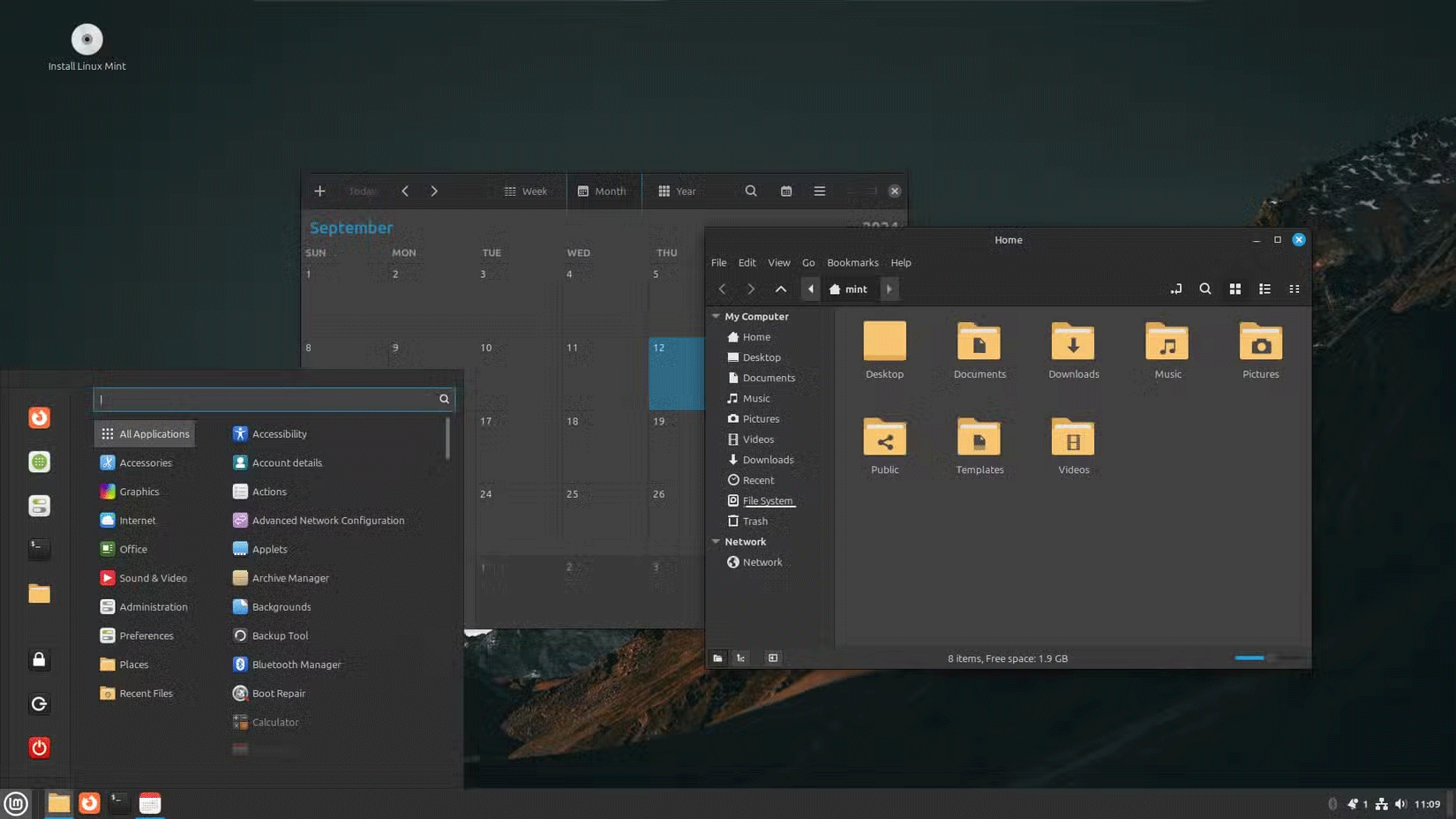
<figcaption>Desktop Linux Mint với ứng dụng lịch và trình duyệt file</figcaption>
</figure>

<p>Linux Live USB cũng có thể hoạt động như một hệ điều hành di động mà bạn có thể mang theo trong túi và rất dễ tạo hệ điều hành di động của riêng bạn, miễn là bạn thực hiện đúng. Để sử dụng hệ điều hành, bạn cần cắm USB vào máy tính và bạn sẽ có một hệ điều hành đầy đủ chức năng trong vài phút, với tất cả các công cụ, cài đặt và ứng dụng của bạn sẵn sàng để sử dụng ở bất cứ đâu.</p>

<p>Ở đây, có hai tùy chọn để lựa chọn. Linux Live USB có thể là tạm thời hoặc liên tục:</p>

<ul>
	<li>Ở chế độ tạm thời, mọi thay đổi được thực hiện đối với hệ điều hành sẽ bị xóa ngay khi bạn rút USB.</li>
	<li>Ở chế độ liên tục, các thay đổi được thực hiện đối với hệ điều hành, chẳng hạn như những ứng dụng đã cài đặt và thông tin đăng nhập trình duyệt, sẽ được lưu và bạn có thể tiếp tục làm việc từ đó mà không cần phải cài đặt lại ứng dụng hoặc đăng nhập vào các trang web từ đầu.</li>
</ul>

<p>Ưu điểm là bạn không phụ thuộc vào hệ điều hành của máy chủ và có một môi trường quen thuộc để làm việc ở bất cứ đâu bạn đến.&nbsp; Ngoài ra, Live USB hoạt động trên hầu hết mọi phần cứng máy tính, dù là của Microsoft hay Apple.</p>
<iframe allow="autoplay" allowtransparency="true" aria-label="Advertisement" data-google-container-id="a!4" data-google-query-id="CLLsvv3K7IkDFTmH6QUd3245nw" data-load-complete="true" frameborder="0" height="174" hspace="0" id="aswift_3" marginheight="0" marginwidth="0" name="aswift_3" sandbox="allow-scripts allow-same-origin allow-forms allow-presentation allow-popups" scrolling="no" tabindex="0" title="Advertisement" vspace="0" width="694"></iframe>

<h2>4. Duyệt web an toàn và quyền riêng tư tốt hơn</h2>

<figure><img alt="" data-i="3" data-src="https://st.quantrimang.com/photos/image/2024/11/20/ly-do-nen-co-mot-linux-live-usb-tien-dung-4.png" data-was-processed="true" height="1100" src="https://st.quantrimang.com/photos/image/2024/11/20/ly-do-nen-co-mot-linux-live-usb-tien-dung-4.png" width="1650" /></figure>

<p>Live USB cũng giúp bạn an toàn trước mọi phần mềm keylogger hoặc malware có trong hệ điều hành chính. Đây là những mối đe dọa nghiêm trọng, đặc biệt là khi xử lý các file quan trọng và nhạy cảm. Bằng cách khởi động từ USB, bạn sẽ có được một hệ điều hành mới, sạch sẽ, không có phần mềm độc hại và virus. Đồng thời, bạn cũng có được quyền riêng tư tốt hơn trên Internet. Khi bạn tắt phiên live, tất cả dữ liệu lịch sử duyệt web và cookie sẽ bị xóa, hạn chế trình theo dõi web.</p>

<p>Ngay cả khi sử dụng máy tính dùng chung, bạn cũng không có nguy cơ vô tình làm lộ file cá nhân, mật khẩu hoặc thông tin nhạy cảm. Điều này cũng hữu ích khi&nbsp;<a data-type="internal" href="https://quantrimang.com/cong-nghe/day-la-cach-ngan-hacker-danh-cap-du-lieu-cua-ban-khi-su-dung-wifi-cong-cong-126666" title="Đây là cách ngăn hacker đánh cắp dữ liệu của bạn khi sử dụng Wifi công cộng">sử dụng Wi-Fi công cộng</a>&nbsp;(tại sân bay và quán cà phê), nơi bạn có thể gặp rủi ro&nbsp;<a data-type="internal" href="https://quantrimang.com/cong-nghe/packet-sniffer-la-gi-118706" title="Packet Sniffer là gì?">packet sniffing</a>&nbsp;và&nbsp;<a data-type="internal" href="https://quantrimang.com/cong-nghe/tim-hieu-ve-tan-cong-man-in-the-middle-gia-mao-arp-cache-66482" title="Tìm hiểu về tấn công Man-in-the-Middle – Giả mạo ARP Cache">tấn công Man-in-the-Middle</a></p>
&nbsp;
		</div>
				<div id="author">
						<p>
				<strong>Nguồn tin:</strong>
				Quantrimang.com:
			</p>
		</div>
	</div>
	<div id="footer" class="clearfix">
		<div id="url">
			<strong>URL của bản tin này: </strong><a href="https://www.nguoicodonvn2008.info/vi/news/savefile/kien-thuc-may-tinh/4-ly-do-nen-giu-mot-linux-live-usb-tien-dung-ben-minh-9400.html" title="4 lý do nên giữ một Linux Live USB tiện dụng bên mình">https://www.nguoicodonvn2008.info/vi/news/savefile/kien-thuc-may-tinh/4-ly-do-nen-giu-mot-linux-live-usb-tien-dung-ben-minh-9400.html</a>

		</div>
		<div class="clear"></div>
		<div class="copyright">
			&copy; .&#x3A; Nguoicodonvn2008.info - Cõi lòng người cô đơn &#x3A;.
		</div>
		<div id="contact">
			<a href="mailto:admin@nguoicodonvn2008.info">admin@nguoicodonvn2008.info</a>
		</div>
	</div>
</div>
        <div id="timeoutsess" class="chromeframe">
            Bạn đã không sử dụng Site, <a onclick="timeoutsesscancel();" href="https://nguoicodonvn2008.info/#">Bấm vào đây để duy trì trạng thái đăng nhập</a>. Thời gian chờ: <span id="secField"> 60 </span> giây
        </div>
        <div id="openidResult" class="nv-alert" style="display:none"></div>
        <div id="openidBt" data-result="" data-redirect=""></div>
		</script>
		<div class="car-top">
  <span><img src="https://nguoicodonvn2008.info/themes/default/images/car.png" alt=""></span>
</div>
<script src="https://nguoicodonvn2008.info/assets/js/jquery/jquery.min.js"></script>
<script>var nv_base_siteurl="/",nv_lang_data="vi",nv_lang_interface="vi",nv_name_variable="nv",nv_fc_variable="op",nv_lang_variable="language",nv_module_name="news",nv_func_name="savefile",nv_is_user=0, nv_my_ofs=-4,nv_my_abbr="EDT",nv_cookie_prefix="nv4c_e856T",nv_check_pass_mstime=1738000,nv_area_admin=0,nv_safemode=0,theme_responsive=0,nv_recaptcha_ver=2,nv_recaptcha_sitekey="",nv_recaptcha_type="image",XSSsanitize=1;</script>
<script src="https://nguoicodonvn2008.info/assets/js/language/vi.js"></script>
<script src="https://nguoicodonvn2008.info/assets/js/DOMPurify/purify3.js"></script>
<script src="https://nguoicodonvn2008.info/assets/js/global.js"></script>
<script src="https://nguoicodonvn2008.info/assets/js/site.js"></script>
<script src="https://nguoicodonvn2008.info/themes/default/js/news.js"></script>
<script src="https://nguoicodonvn2008.info/themes/default/js/main.js"></script>
<script src="https://nguoicodonvn2008.info/themes/default/js/custom.js"></script>
<script type="application/ld+json">
        {
            "@context": "https://schema.org",
            "@type": "Organization",
            "url": "https://nguoicodonvn2008.info",
            "logo": "https://nguoicodonvn2008.info/uploads/angel.gif"
        }
        </script>
<script src="https://nguoicodonvn2008.info/themes/default/js/bootstrap.min.js"></script>
<script type="text/javascript">
var $scrolltop = $('.car-top');
$scrolltop.on('click', function () {
    $('html,body').animate({
        scrollTop: 0
    }, 800);
    $(this).addClass("car-run");
    setTimeout(function(){ $scrolltop.removeClass('car-run');}, 1000);
    return false;
});
$(window).on('scroll', function ()
{ 
    if($(window).scrollTop() >= 200)
    {
        $scrolltop.addClass("show");
        $scrolltop.addClass("car-down");
    }
    else
    {
       $scrolltop.removeClass("show");
       setTimeout(function(){ $scrolltop.removeClass('car-down');}, 300);
    }
});
</script>
</body>
</html>