<!DOCTYPE html>
    <html lang="vi" xmlns="http://www.w3.org/1999/xhtml" prefix="og: http://ogp.me/ns#">
    <head>
<title>4 cách xóa lịch sử bảo vệ của Windows Defender</title>
<meta name="description" content="4 cách xóa lịch sử bảo vệ của Windows Defender - Savefile - Tin Tức -...">
<meta name="author" content=".: Nguoicodonvn2008.info - Cõi lòng người cô đơn :.">
<meta name="copyright" content=".: Nguoicodonvn2008.info - Cõi lòng người cô đơn :. [admin@nguoicodonvn2008.info]">
<meta name="robots" content="index, archive, follow, noodp">
<meta name="googlebot" content="index,archive,follow,noodp">
<meta name="msnbot" content="all,index,follow">
<meta name="generator" content="NukeViet v4.5">
<meta http-equiv="Content-Type" content="text/html; charset=utf-8">
<meta property="og:title" content="4 cách xóa lịch sử bảo vệ của Windows Defender">
<meta property="og:type" content="website">
<meta property="og:description" content="Savefile - Tin Tức - https&#x3A;&#x002F;&#x002F;www.nguoicodonvn2008.info&#x002F;vi&#x002F;news&#x002F;savefile&#x002F;kien-thuc-may-tinh&#x002F;4-cach-xoa-lich-su-bao-ve-cua-windows-defender-11457.html">
<meta property="og:site_name" content=".&#x3A; Nguoicodonvn2008.info - Cõi lòng người cô đơn &#x3A;.">
<meta property="og:url" content="https://www.nguoicodonvn2008.info/vi/news/savefile/kien-thuc-may-tinh/4-cach-xoa-lich-su-bao-ve-cua-windows-defender-11457.html">
<link rel="shortcut icon" href="https://nguoicodonvn2008.info/favicon.ico">
<link rel="canonical" href="https://www.nguoicodonvn2008.info/vi/news/savefile/kien-thuc-may-tinh/4-cach-xoa-lich-su-bao-ve-cua-windows-defender-11457.html">
<link rel="alternate" href="https://nguoicodonvn2008.info/vi/news/rss/" title="Tin Tức" type="application/rss+xml">
<link rel="alternate" href="https://nguoicodonvn2008.info/vi/news/rss/karaoke-dual/" title="Tin Tức - Karaoke Dual" type="application/rss+xml">
<link rel="alternate" href="https://nguoicodonvn2008.info/vi/news/rss/nhac-tre/" title="Tin Tức - Nhạc trẻ" type="application/rss+xml">
<link rel="alternate" href="https://nguoicodonvn2008.info/vi/news/rss/tru-tinh/" title="Tin Tức - Trữ tình" type="application/rss+xml">
<link rel="alternate" href="https://nguoicodonvn2008.info/vi/news/rss/nuoc-ngoai/" title="Tin Tức - Nước ngoài" type="application/rss+xml">
<link rel="alternate" href="https://nguoicodonvn2008.info/vi/news/rss/remix/" title="Tin Tức - Remix" type="application/rss+xml">
<link rel="alternate" href="https://nguoicodonvn2008.info/vi/news/rss/tam-su-tinh-yeu/" title="Tin Tức - Tâm sự tình yêu" type="application/rss+xml">
<link rel="alternate" href="https://nguoicodonvn2008.info/vi/news/rss/tho-suu-tam/" title="Tin Tức - Thơ sưu tầm" type="application/rss+xml">
<link rel="alternate" href="https://nguoicodonvn2008.info/vi/news/rss/cuoc-song/" title="Tin Tức - Cuộc sống" type="application/rss+xml">
<link rel="alternate" href="https://nguoicodonvn2008.info/vi/news/rss/phan-mem/" title="Tin Tức - Phần mềm" type="application/rss+xml">
<link rel="alternate" href="https://nguoicodonvn2008.info/vi/news/rss/kien-thuc-may-tinh/" title="Tin Tức - Kiến thức máy tính" type="application/rss+xml">
<link rel="alternate" href="https://nguoicodonvn2008.info/vi/news/rss/hoc-tap/" title="Tin Tức - Học tập" type="application/rss+xml">
<link rel="alternate" href="https://nguoicodonvn2008.info/vi/news/rss/tai-lieu/" title="Tin Tức - Tài liệu" type="application/rss+xml">
<link rel="alternate" href="https://nguoicodonvn2008.info/vi/news/rss/de-thi/" title="Tin Tức - Đề thi" type="application/rss+xml">
<link rel="preload" as="style" href="https://nguoicodonvn2008.info/assets/css/font-awesome.min.css" type="text/css">
<link rel="preload" as="style" href="https://nguoicodonvn2008.info/themes/default/css/bootstrap.non-responsive.css" type="text/css">
<link rel="preload" as="style" href="https://nguoicodonvn2008.info/themes/default/css/style.css" type="text/css">
<link rel="preload" as="style" href="https://nguoicodonvn2008.info/themes/default/css/style.non-responsive.css" type="text/css">
<link rel="preload" as="style" href="https://nguoicodonvn2008.info/themes/default/css/news.css" type="text/css">
<link rel="preload" as="style" href="https://nguoicodonvn2008.info/themes/default/css/custom.css" type="text/css">
<link rel="preload" as="script" href="https://nguoicodonvn2008.info/assets/js/jquery/jquery.min.js" type="text/javascript">
<link rel="preload" as="script" href="https://nguoicodonvn2008.info/assets/js/language/vi.js" type="text/javascript">
<link rel="preload" as="script" href="https://nguoicodonvn2008.info/assets/js/DOMPurify/purify3.js" type="text/javascript">
<link rel="preload" as="script" href="https://nguoicodonvn2008.info/assets/js/global.js" type="text/javascript">
<link rel="preload" as="script" href="https://nguoicodonvn2008.info/assets/js/site.js" type="text/javascript">
<link rel="preload" as="script" href="https://nguoicodonvn2008.info/themes/default/js/news.js" type="text/javascript">
<link rel="preload" as="script" href="https://nguoicodonvn2008.info/themes/default/js/main.js" type="text/javascript">
<link rel="preload" as="script" href="https://nguoicodonvn2008.info/themes/default/js/custom.js" type="text/javascript">
<link rel="preload" as="script" href="https://nguoicodonvn2008.info/themes/default/js/bootstrap.min.js" type="text/javascript">
<link rel="stylesheet" href="https://nguoicodonvn2008.info/assets/css/font-awesome.min.css">
<link rel="stylesheet" href="https://nguoicodonvn2008.info/themes/default/css/bootstrap.non-responsive.css">
<link rel="stylesheet" href="https://nguoicodonvn2008.info/themes/default/css/style.css">
<link rel="stylesheet" href="https://nguoicodonvn2008.info/themes/default/css/style.non-responsive.css">
<link rel="StyleSheet" href="https://nguoicodonvn2008.info/themes/default/css/news.css">
<link rel="stylesheet" href="https://nguoicodonvn2008.info/themes/default/css/custom.css">
<style type="text/css">
	body{background: #fff;}
</style>
    </head>
    <body>
<div id="print">
	<div id="hd_print">
		<h2 class="pull-left">.&#x3A; Nguoicodonvn2008.info - Cõi lòng người cô đơn &#x3A;.</h2>
		<p class="pull-right"><a title=".&#x3A; Nguoicodonvn2008.info - Cõi lòng người cô đơn &#x3A;." href="https://nguoicodonvn2008.info/">https://nguoicodonvn2008.info</a></p>
	</div>
	<div class="clear"></div>
	<hr />
	<div id="content">
		<h1>4 cách xóa lịch sử bảo vệ của Windows Defender</h1>
		<ul class="list-inline">
			<li>Thứ sáu - 24/10/2025 22:52</li>
			<li class="hidden-print txtrequired"><em class="fa fa-print">&nbsp;</em><a title="In ra" href="javascript:;" onclick="window.print()">In ra</a></li>
			<li class="hidden-print txtrequired"><em class="fa fa-power-off">&nbsp;</em><a title="Đóng cửa sổ này" href="javascript:;" onclick="window.close()">Đóng cửa sổ này</a></li>
		</ul>
		<div class="clear"></div>
		<div id="hometext">
		</div>
				<div class="imghome">
			<img alt="4 cách xóa lịch sử bảo vệ của Windows Defender" src="https://st.quantrimang.com/photos/image/2025/10/23/xoa-lich-su-bao-ve-Windows-Defender-12.jpg" width="460" class="img-thumbnail" />
		</div>
		<div class="clear"></div>
		<div id="bodytext" class="clearfix">
			<p style="text-align: justify;">Windows Defender hay Windows Security Protection History sẽ hiển thị tất cả các lần phát hiện những mối nguy hiểm trên máy tính. Công cụ này chạy ngầm và liên tục chặn các mối đe dọa xâm nhập vào hệ thống của bạn. Nó không thông báo cho bạn về mọi mối đe dọa đã bị chặn, nhưng bạn có thể xem chúng từ trang Protection History. Dưới đây là hướng dẫn các cách xóa lịch sử bảo vệ Windows Defender.</p>

<div style="text-align: justify;">&nbsp;</div>

<h2 id="mcetoc_1j8aqu0nq2g" style="text-align: justify;">Xóa thủ công lịch sử bảo vệ Windows Defender</h2>

<p style="text-align: justify;"><strong>Bước 1:</strong></p>

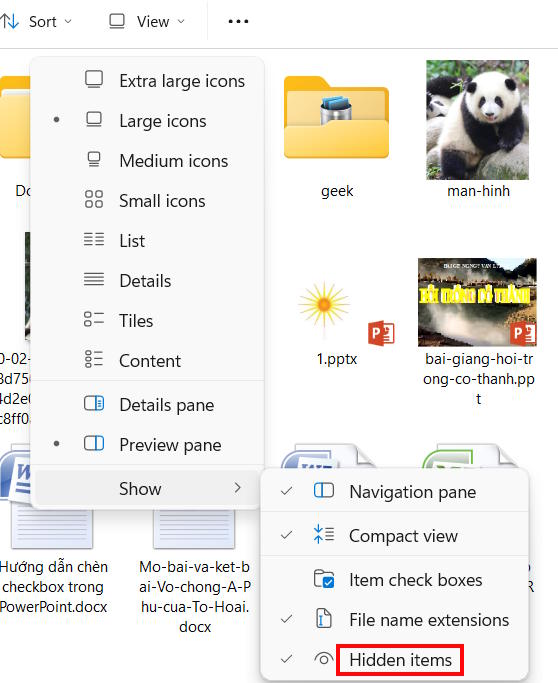
<p style="text-align: justify;">Bạn<strong>&nbsp;mở ổ C trên máy tính</strong>&nbsp;hoặc ổ đĩa cài đặt Windows, nhấn tiếp vào&nbsp;<strong>View</strong>&nbsp;rồi chọn&nbsp;<strong>Show &gt; Hidden Items</strong>.</p>

<p style="text-align: justify;"><img alt="Hiển thị items ẩn trên Windows" data-i="0" data-src="https://st.quantrimang.com/photos/image/2025/10/23/xoa-lich-su-bao-ve-Windows-Defender-1.jpg" data-was-processed="true" height="490" src="https://st.quantrimang.com/photos/image/2025/10/23/xoa-lich-su-bao-ve-Windows-Defender-1.jpg" width="400" /></p>

<p style="text-align: justify;"><strong>Bước 2:</strong></p>

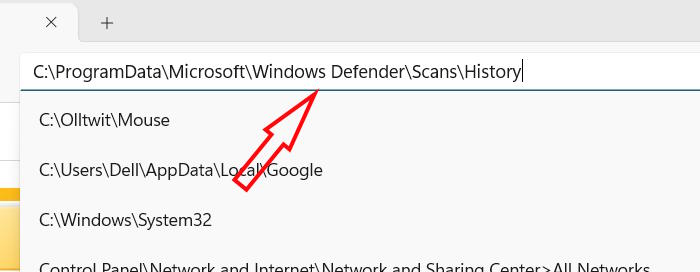
<p style="text-align: justify;">Tiếp đến nhập đường dẫn dưới đây vào thanh địa chỉ để truy cập.</p>

<p style="text-align: justify;"><code>C:\ProgramData\Microsoft\Windows Defender\Scans\History</code></p>

<p style="text-align: justify;"><img alt="Truy cập thư mục lịch sử Windows Defender" data-i="1" data-src="https://st.quantrimang.com/photos/image/2025/10/23/xoa-lich-su-bao-ve-Windows-Defender-2.jpg" data-was-processed="true" height="233" src="https://st.quantrimang.com/photos/image/2025/10/23/xoa-lich-su-bao-ve-Windows-Defender-2.jpg" width="600" /></p>

<p style="text-align: justify;"><strong>Bước 3:</strong></p>

<p style="text-align: justify;">Tiếp đến bạn<strong>&nbsp;click vào thư mục Service</strong>&nbsp;rồi nhấn&nbsp;<strong>chuột phải vào tệp History&nbsp;</strong>và&nbsp;<strong>chọn Delete</strong>&nbsp;là được.</p>

<h2 id="mcetoc_1j8aqu0nq2h" style="text-align: justify;">Xóa lịch sử bảo vệ Windows Defender qua Event Viewer</h2>

<p style="text-align: justify;"><strong>Bước 1:</strong></p>

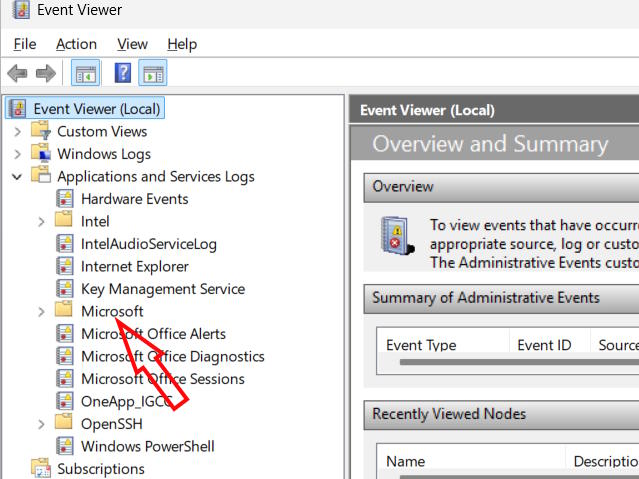
<p style="text-align: justify;">Bạn&nbsp;<strong>nhập Event Viewer trong thanh tìm kiếm</strong>&nbsp;để mở. Tiếp đến, bạn nhấn vào&nbsp;<strong>Event Viewer (Local)&nbsp;</strong>rồi&nbsp;<strong>mở rộng Applications and Services Logs</strong>.</p>

<p style="text-align: justify;">Trong danh sách hiển thị&nbsp;<strong>nhấn đúp chuột vào Microsoft&nbsp;</strong>để mở rộng.</p>

<p style="text-align: justify;"><img alt="Event Viewer" data-adbro-processed="true" data-i="2" data-src="https://st.quantrimang.com/photos/image/2025/10/23/xoa-lich-su-bao-ve-Windows-Defender-3.jpg" data-was-processed="true" height="375" src="https://st.quantrimang.com/photos/image/2025/10/23/xoa-lich-su-bao-ve-Windows-Defender-3.jpg" width="500" /></p>

<p style="text-align: justify;"><strong>Bước 2:</strong></p>

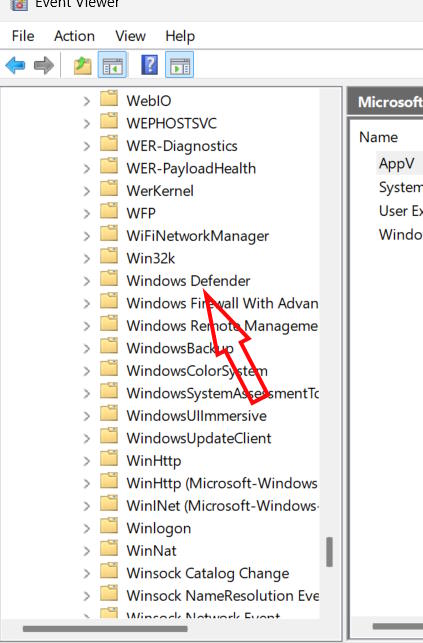
<p style="text-align: justify;">Sau đó nhấn tiếp vào Windows rồi chọn&nbsp;<strong>click đúp vào Windows Defender</strong>.</p>

<p style="text-align: justify;"><img alt="Windows Defender" data-i="3" data-src="https://st.quantrimang.com/photos/image/2025/10/23/xoa-lich-su-bao-ve-Windows-Defender-4.jpg" data-was-processed="true" height="578" src="https://st.quantrimang.com/photos/image/2025/10/23/xoa-lich-su-bao-ve-Windows-Defender-4.jpg" width="380" /></p>

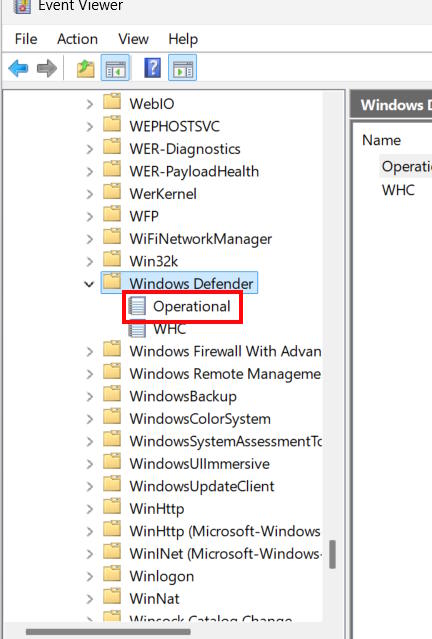
<p style="text-align: justify;"><strong>Nhấn đúp chuột vào Operational</strong>&nbsp;tại Windows Defender.</p>

<p style="text-align: justify;"><img alt="Tệp Operational Windows Defender" data-i="4" data-src="https://st.quantrimang.com/photos/image/2025/10/23/xoa-lich-su-bao-ve-Windows-Defender-5.jpg" data-was-processed="true" height="562" src="https://st.quantrimang.com/photos/image/2025/10/23/xoa-lich-su-bao-ve-Windows-Defender-5.jpg" width="380" /></p>

<p style="text-align: justify;"><strong>Bước 3:</strong></p>

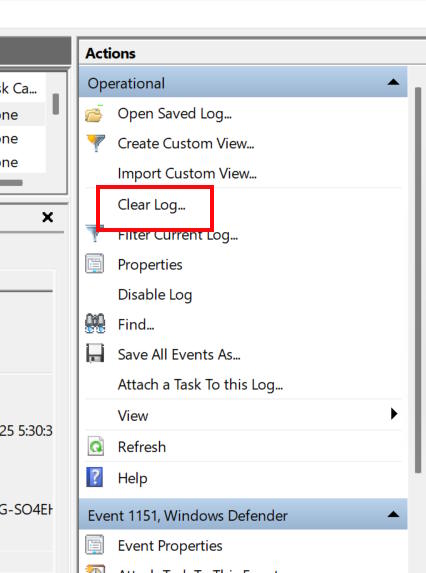
<p style="text-align: justify;">Lúc này người dùng&nbsp;<strong>nhấn vào Clear log</strong>&nbsp;để tiến hành xóa lịch sử bảo vệ Windows Defender. Cuối cùng bạn<strong>&nbsp;nhấn Save and Clear&nbsp;</strong>để xóa nhanh.</p>

<p style="text-align: justify;"><img alt="Xóa lịch sử bảo vệ Windows Defender qua Event Viewer" data-i="5" data-src="https://st.quantrimang.com/photos/image/2025/10/23/xoa-lich-su-bao-ve-Windows-Defender-6.jpg" data-was-processed="true" height="538" src="https://st.quantrimang.com/photos/image/2025/10/23/xoa-lich-su-bao-ve-Windows-Defender-6.jpg" width="400" /></p>

<h2 id="mcetoc_1j8aqu0nq2i" style="text-align: justify;">Xóa lịch sử bảo vệ Windows Defender qua Local Group Policy</h2>

<p style="text-align: justify;"><strong>Bước 1:</strong></p>

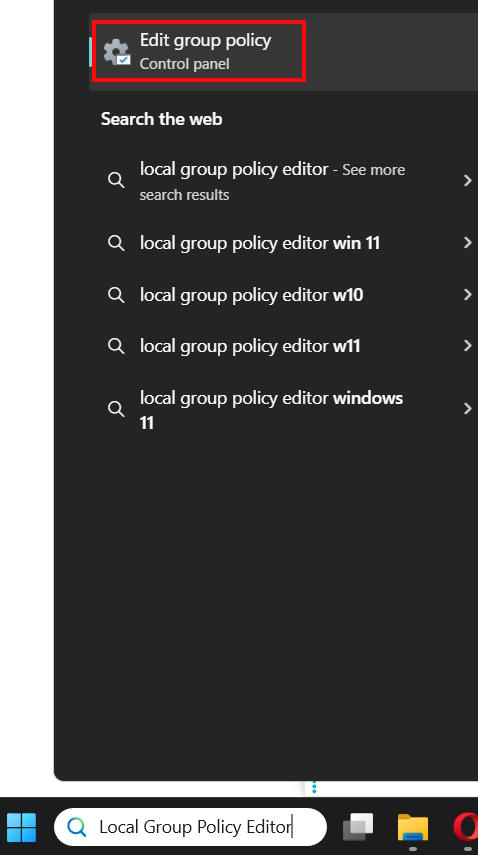
<p style="text-align: justify;">Bạn<strong>&nbsp;nhập từ khóa Local Group Policy Editor vào thanh tìm kiếm</strong>&nbsp;rồi nhấn vào kết quả bên trên.</p>

<p style="text-align: justify;"><img alt="Local Group Policy Editor" data-i="6" data-src="https://st.quantrimang.com/photos/image/2025/10/23/xoa-lich-su-bao-ve-Windows-Defender-7.jpg" data-was-processed="true" height="680" src="https://st.quantrimang.com/photos/image/2025/10/23/xoa-lich-su-bao-ve-Windows-Defender-7.jpg" width="380" /></p>

<p style="text-align: justify;"><strong>Bước 2:</strong></p>

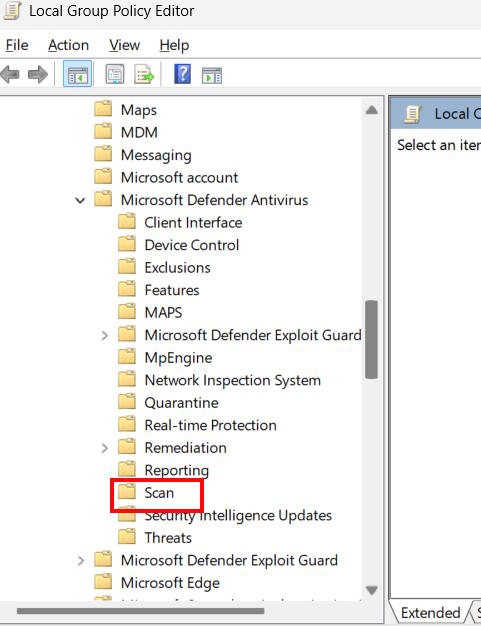
<p style="text-align: justify;">Lúc này bạn truy cập theo đường dẫn dưới đây.</p>

<p style="text-align: justify;"><code>Computer Configuration &gt; Administrative Templates &gt; Windows Components &gt; Microsoft Defender Antivirus &gt; Scan</code></p>

<p style="text-align: justify;"><img alt="Thư mục Local Group Policy Editor" data-i="7" data-src="https://st.quantrimang.com/photos/image/2025/10/23/xoa-lich-su-bao-ve-Windows-Defender-8.jpg" data-was-processed="true" height="521" src="https://st.quantrimang.com/photos/image/2025/10/23/xoa-lich-su-bao-ve-Windows-Defender-8.jpg" width="400" /></p>

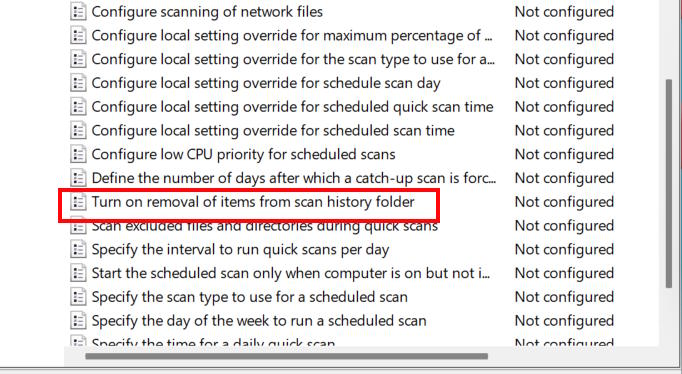
<p style="text-align: justify;">Bạn nhìn sang bên cạnh rồi&nbsp;<strong>click đúp vào Turn on removing items from scan history folder</strong>.</p>

<p style="text-align: justify;"><img alt="Turn on removing items from scan history folder" data-i="8" data-src="https://st.quantrimang.com/photos/image/2025/10/23/xoa-lich-su-bao-ve-Windows-Defender-9.jpg" data-was-processed="true" height="329" src="https://st.quantrimang.com/photos/image/2025/10/23/xoa-lich-su-bao-ve-Windows-Defender-9.jpg" width="600" /></p>

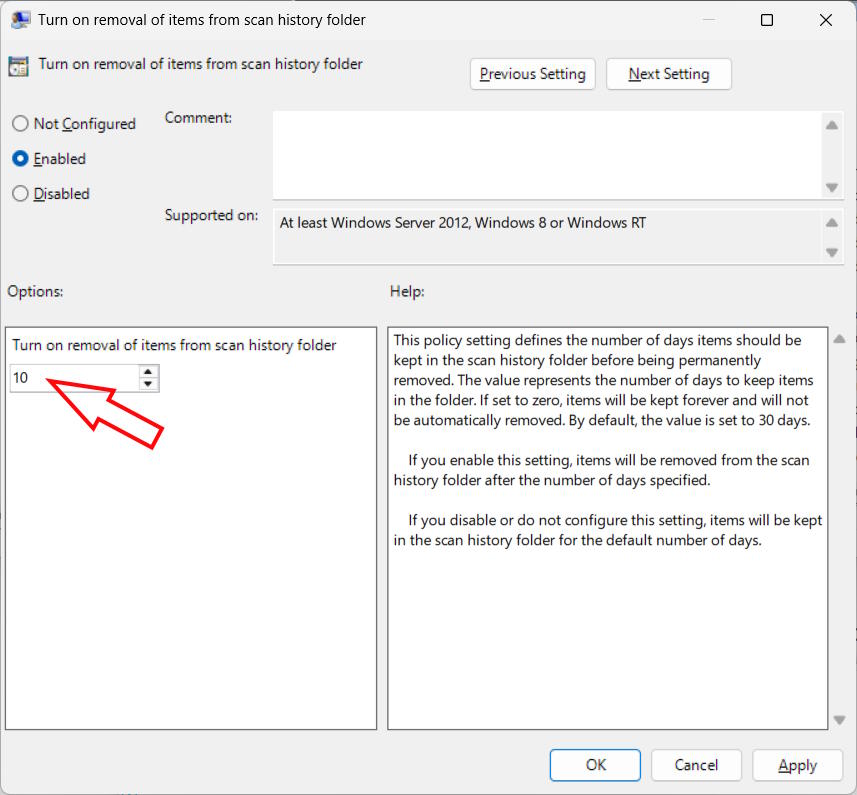
<p style="text-align: justify;"><strong>Bước 3:</strong></p>

<p style="text-align: justify;">Hiển thị giao diện mới, bạn<strong>&nbsp;tích chọn Enabled</strong>&nbsp;rồi&nbsp;<strong>nhập khung thời gian</strong>. Bạn phải nhập số ngày bạn muốn Windows Security xóa lịch sử bảo vệ. Sau khi hoàn tất, nhấp vào nút OK.</p>

<p style="text-align: justify;"><img alt="Xóa lịch sử bảo vệ Windows Defender qua Local Group Policy" data-i="9" data-src="https://st.quantrimang.com/photos/image/2025/10/23/xoa-lich-su-bao-ve-Windows-Defender-10.jpg" data-was-processed="true" height="464" src="https://st.quantrimang.com/photos/image/2025/10/23/xoa-lich-su-bao-ve-Windows-Defender-10.jpg" width="500" /></p>

<h2 id="mcetoc_1j8aqu0nq2j" style="text-align: justify;">Xóa lịch sử bảo vệ Microsoft Defender qua PowerShell</h2>

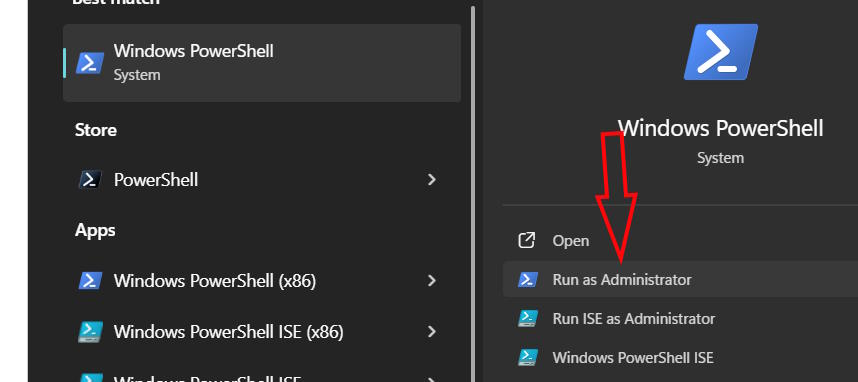
<p style="text-align: justify;"><strong>Bước 1:</strong></p>

<p style="text-align: justify;">Bạn&nbsp;<strong>nhập PowerShell vào thanh tìm kiếm</strong>&nbsp;rồi chọn&nbsp;<strong>Run as administrator</strong>.</p>

<p style="text-align: justify;"><img alt="Mở PowerShell Admin " data-i="10" data-src="https://st.quantrimang.com/photos/image/2025/10/23/xoa-lich-su-bao-ve-Windows-Defender-11.jpg" data-was-processed="true" height="267" src="https://st.quantrimang.com/photos/image/2025/10/23/xoa-lich-su-bao-ve-Windows-Defender-11.jpg" width="600" /></p>

<p style="text-align: justify;"><strong>Bước 2:</strong></p>

<p style="text-align: justify;">Dán lệnh sau và nhấn nút Enter để thực hiện lệnh.</p>

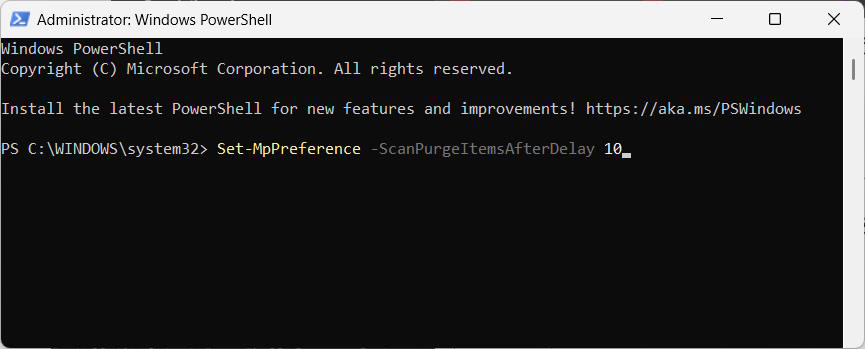
<p style="text-align: justify;"><code>Set-MpPreference -ScanPurgeItemsAfterDelay 5</code></p>

<p style="text-align: justify;">Số 5 ở cuối lệnh biểu thị số ngày sau khi Windows Security xóa nhật ký lịch sử bảo vệ. Bạn có thể thay đổi số ngày tùy ý.</p>

<p style="text-align: justify;"><img alt="Xóa lịch sử bảo vệ Microsoft Defender qua PowerShell" data-i="11" data-src="https://st.quantrimang.com/photos/image/2025/10/23/xoa-lich-su-bao-ve-Windows-Defender-12.jpg" data-was-processed="true" height="258" src="https://st.quantrimang.com/photos/image/2025/10/23/xoa-lich-su-bao-ve-Windows-Defender-12.jpg" width="640" /></p>

<div style="text-align: justify;">&nbsp;</div>
		</div>
				<div id="author">
						<p>
				<strong>Nguồn tin:</strong>
				Quantrimang.com:
			</p>
		</div>
	</div>
	<div id="footer" class="clearfix">
		<div id="url">
			<strong>URL của bản tin này: </strong><a href="https://www.nguoicodonvn2008.info/vi/news/savefile/kien-thuc-may-tinh/4-cach-xoa-lich-su-bao-ve-cua-windows-defender-11457.html" title="4 cách xóa lịch sử bảo vệ của Windows Defender">https://www.nguoicodonvn2008.info/vi/news/savefile/kien-thuc-may-tinh/4-cach-xoa-lich-su-bao-ve-cua-windows-defender-11457.html</a>

		</div>
		<div class="clear"></div>
		<div class="copyright">
			&copy; .&#x3A; Nguoicodonvn2008.info - Cõi lòng người cô đơn &#x3A;.
		</div>
		<div id="contact">
			<a href="mailto:admin@nguoicodonvn2008.info">admin@nguoicodonvn2008.info</a>
		</div>
	</div>
</div>
        <div id="timeoutsess" class="chromeframe">
            Bạn đã không sử dụng Site, <a onclick="timeoutsesscancel();" href="https://nguoicodonvn2008.info/#">Bấm vào đây để duy trì trạng thái đăng nhập</a>. Thời gian chờ: <span id="secField"> 60 </span> giây
        </div>
        <div id="openidResult" class="nv-alert" style="display:none"></div>
        <div id="openidBt" data-result="" data-redirect=""></div>
		</script>
		<div class="car-top">
  <span><img src="https://nguoicodonvn2008.info/themes/default/images/car.png" alt=""></span>
</div>
<script src="https://nguoicodonvn2008.info/assets/js/jquery/jquery.min.js"></script>
<script>var nv_base_siteurl="/",nv_lang_data="vi",nv_lang_interface="vi",nv_name_variable="nv",nv_fc_variable="op",nv_lang_variable="language",nv_module_name="news",nv_func_name="savefile",nv_is_user=0, nv_my_ofs=-4,nv_my_abbr="EDT",nv_cookie_prefix="nv4c_e856T",nv_check_pass_mstime=1738000,nv_area_admin=0,nv_safemode=0,theme_responsive=0,nv_recaptcha_ver=2,nv_recaptcha_sitekey="",nv_recaptcha_type="image",XSSsanitize=1;</script>
<script src="https://nguoicodonvn2008.info/assets/js/language/vi.js"></script>
<script src="https://nguoicodonvn2008.info/assets/js/DOMPurify/purify3.js"></script>
<script src="https://nguoicodonvn2008.info/assets/js/global.js"></script>
<script src="https://nguoicodonvn2008.info/assets/js/site.js"></script>
<script src="https://nguoicodonvn2008.info/themes/default/js/news.js"></script>
<script src="https://nguoicodonvn2008.info/themes/default/js/main.js"></script>
<script src="https://nguoicodonvn2008.info/themes/default/js/custom.js"></script>
<script type="application/ld+json">
        {
            "@context": "https://schema.org",
            "@type": "Organization",
            "url": "https://nguoicodonvn2008.info",
            "logo": "https://nguoicodonvn2008.info/uploads/angel.gif"
        }
        </script>
<script src="https://nguoicodonvn2008.info/themes/default/js/bootstrap.min.js"></script>
<script type="text/javascript">
var $scrolltop = $('.car-top');
$scrolltop.on('click', function () {
    $('html,body').animate({
        scrollTop: 0
    }, 800);
    $(this).addClass("car-run");
    setTimeout(function(){ $scrolltop.removeClass('car-run');}, 1000);
    return false;
});
$(window).on('scroll', function ()
{ 
    if($(window).scrollTop() >= 200)
    {
        $scrolltop.addClass("show");
        $scrolltop.addClass("car-down");
    }
    else
    {
       $scrolltop.removeClass("show");
       setTimeout(function(){ $scrolltop.removeClass('car-down');}, 300);
    }
});
</script>
</body>
</html>