<!DOCTYPE html>
    <html lang="vi" xmlns="http://www.w3.org/1999/xhtml" prefix="og: http://ogp.me/ns#">
    <head>
<title>4 cách tìm Product Key trên Windows 11</title>
<meta name="description" content="4 cách tìm Product Key trên Windows 11 - Savefile - Tin Tức -...">
<meta name="author" content=".: Nguoicodonvn2008.info - Cõi lòng người cô đơn :.">
<meta name="copyright" content=".: Nguoicodonvn2008.info - Cõi lòng người cô đơn :. [admin@nguoicodonvn2008.info]">
<meta name="robots" content="index, archive, follow, noodp">
<meta name="googlebot" content="index,archive,follow,noodp">
<meta name="msnbot" content="all,index,follow">
<meta name="generator" content="NukeViet v4.5">
<meta http-equiv="Content-Type" content="text/html; charset=utf-8">
<meta property="og:title" content="4 cách tìm Product Key trên Windows 11">
<meta property="og:type" content="website">
<meta property="og:description" content="Savefile - Tin Tức - https&#x3A;&#x002F;&#x002F;www.nguoicodonvn2008.info&#x002F;vi&#x002F;news&#x002F;savefile&#x002F;kien-thuc-may-tinh&#x002F;4-cach-tim-product-key-tren-windows-11-10660.html">
<meta property="og:site_name" content=".&#x3A; Nguoicodonvn2008.info - Cõi lòng người cô đơn &#x3A;.">
<meta property="og:url" content="https://www.nguoicodonvn2008.info/vi/news/savefile/kien-thuc-may-tinh/4-cach-tim-product-key-tren-windows-11-10660.html">
<link rel="shortcut icon" href="https://nguoicodonvn2008.info/favicon.ico">
<link rel="canonical" href="https://www.nguoicodonvn2008.info/vi/news/savefile/kien-thuc-may-tinh/4-cach-tim-product-key-tren-windows-11-10660.html">
<link rel="alternate" href="https://nguoicodonvn2008.info/vi/news/rss/" title="Tin Tức" type="application/rss+xml">
<link rel="alternate" href="https://nguoicodonvn2008.info/vi/news/rss/karaoke-dual/" title="Tin Tức - Karaoke Dual" type="application/rss+xml">
<link rel="alternate" href="https://nguoicodonvn2008.info/vi/news/rss/nhac-tre/" title="Tin Tức - Nhạc trẻ" type="application/rss+xml">
<link rel="alternate" href="https://nguoicodonvn2008.info/vi/news/rss/tru-tinh/" title="Tin Tức - Trữ tình" type="application/rss+xml">
<link rel="alternate" href="https://nguoicodonvn2008.info/vi/news/rss/nuoc-ngoai/" title="Tin Tức - Nước ngoài" type="application/rss+xml">
<link rel="alternate" href="https://nguoicodonvn2008.info/vi/news/rss/remix/" title="Tin Tức - Remix" type="application/rss+xml">
<link rel="alternate" href="https://nguoicodonvn2008.info/vi/news/rss/tam-su-tinh-yeu/" title="Tin Tức - Tâm sự tình yêu" type="application/rss+xml">
<link rel="alternate" href="https://nguoicodonvn2008.info/vi/news/rss/tho-suu-tam/" title="Tin Tức - Thơ sưu tầm" type="application/rss+xml">
<link rel="alternate" href="https://nguoicodonvn2008.info/vi/news/rss/cuoc-song/" title="Tin Tức - Cuộc sống" type="application/rss+xml">
<link rel="alternate" href="https://nguoicodonvn2008.info/vi/news/rss/phan-mem/" title="Tin Tức - Phần mềm" type="application/rss+xml">
<link rel="alternate" href="https://nguoicodonvn2008.info/vi/news/rss/kien-thuc-may-tinh/" title="Tin Tức - Kiến thức máy tính" type="application/rss+xml">
<link rel="alternate" href="https://nguoicodonvn2008.info/vi/news/rss/hoc-tap/" title="Tin Tức - Học tập" type="application/rss+xml">
<link rel="alternate" href="https://nguoicodonvn2008.info/vi/news/rss/tai-lieu/" title="Tin Tức - Tài liệu" type="application/rss+xml">
<link rel="alternate" href="https://nguoicodonvn2008.info/vi/news/rss/de-thi/" title="Tin Tức - Đề thi" type="application/rss+xml">
<link rel="preload" as="style" href="https://nguoicodonvn2008.info/assets/css/font-awesome.min.css" type="text/css">
<link rel="preload" as="style" href="https://nguoicodonvn2008.info/themes/default/css/bootstrap.non-responsive.css" type="text/css">
<link rel="preload" as="style" href="https://nguoicodonvn2008.info/themes/default/css/style.css" type="text/css">
<link rel="preload" as="style" href="https://nguoicodonvn2008.info/themes/default/css/style.non-responsive.css" type="text/css">
<link rel="preload" as="style" href="https://nguoicodonvn2008.info/themes/default/css/news.css" type="text/css">
<link rel="preload" as="style" href="https://nguoicodonvn2008.info/themes/default/css/custom.css" type="text/css">
<link rel="preload" as="script" href="https://nguoicodonvn2008.info/assets/js/jquery/jquery.min.js" type="text/javascript">
<link rel="preload" as="script" href="https://nguoicodonvn2008.info/assets/js/language/vi.js" type="text/javascript">
<link rel="preload" as="script" href="https://nguoicodonvn2008.info/assets/js/DOMPurify/purify3.js" type="text/javascript">
<link rel="preload" as="script" href="https://nguoicodonvn2008.info/assets/js/global.js" type="text/javascript">
<link rel="preload" as="script" href="https://nguoicodonvn2008.info/assets/js/site.js" type="text/javascript">
<link rel="preload" as="script" href="https://nguoicodonvn2008.info/themes/default/js/news.js" type="text/javascript">
<link rel="preload" as="script" href="https://nguoicodonvn2008.info/themes/default/js/main.js" type="text/javascript">
<link rel="preload" as="script" href="https://nguoicodonvn2008.info/themes/default/js/custom.js" type="text/javascript">
<link rel="preload" as="script" href="https://nguoicodonvn2008.info/themes/default/js/bootstrap.min.js" type="text/javascript">
<link rel="stylesheet" href="https://nguoicodonvn2008.info/assets/css/font-awesome.min.css">
<link rel="stylesheet" href="https://nguoicodonvn2008.info/themes/default/css/bootstrap.non-responsive.css">
<link rel="stylesheet" href="https://nguoicodonvn2008.info/themes/default/css/style.css">
<link rel="stylesheet" href="https://nguoicodonvn2008.info/themes/default/css/style.non-responsive.css">
<link rel="StyleSheet" href="https://nguoicodonvn2008.info/themes/default/css/news.css">
<link rel="stylesheet" href="https://nguoicodonvn2008.info/themes/default/css/custom.css">
<style type="text/css">
	body{background: #fff;}
</style>
    </head>
    <body>
<div id="print">
	<div id="hd_print">
		<h2 class="pull-left">.&#x3A; Nguoicodonvn2008.info - Cõi lòng người cô đơn &#x3A;.</h2>
		<p class="pull-right"><a title=".&#x3A; Nguoicodonvn2008.info - Cõi lòng người cô đơn &#x3A;." href="https://nguoicodonvn2008.info/">https://nguoicodonvn2008.info</a></p>
	</div>
	<div class="clear"></div>
	<hr />
	<div id="content">
		<h1>4 cách tìm Product Key trên Windows 11</h1>
		<ul class="list-inline">
			<li>Thứ năm - 26/06/2025 23:27</li>
			<li class="hidden-print txtrequired"><em class="fa fa-print">&nbsp;</em><a title="In ra" href="javascript:;" onclick="window.print()">In ra</a></li>
			<li class="hidden-print txtrequired"><em class="fa fa-power-off">&nbsp;</em><a title="Đóng cửa sổ này" href="javascript:;" onclick="window.close()">Đóng cửa sổ này</a></li>
		</ul>
		<div class="clear"></div>
		<div id="hometext">
		</div>
				<div class="imghome">
			<img alt="4 cách tìm Product Key trên Windows 11" src="https://st.quantrimang.com/photos/image/2022/02/17/tim-product-key-windows-114.jpg" width="460" class="img-thumbnail" />
		</div>
		<div class="clear"></div>
		<div id="bodytext" class="clearfix">
			<p>Product Key Windows là mã gồm 25 ký tự cần thiết để xác thực và kích hoạt hệ điều hành Windows. Product Key đảm bảo rằng hệ điều hành Windows đang sử dụng là chính hãng. Có nhiều loại Product Key, chẳng hạn như Retail Key, Key OEM,... Dưới đây là các cách tìm Product Key trên Windows 11.</p>

<h2>Sử dụng CMD (Command Prompt)</h2>

<p>Nếu bạn cũng muốn xem Product Key, chỉ cần chạy một lệnh ngắn trong Command Prompt để có được Product Key.</p>

<p><strong>Bước 1:</strong></p>

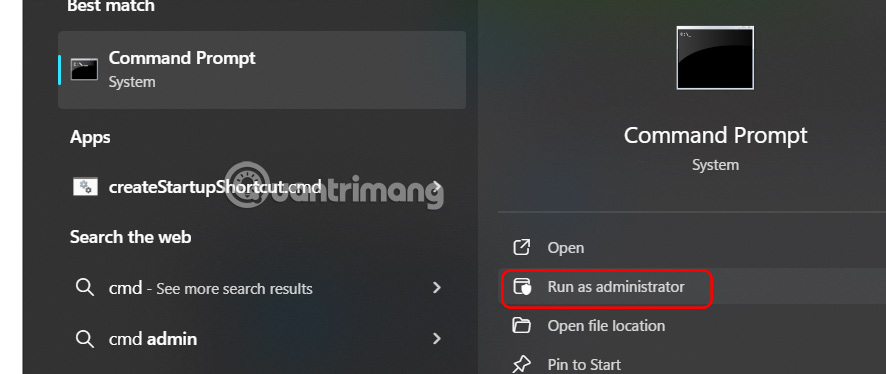
<p>Bạn&nbsp;<strong>nhập cmd vào thanh tìm kiếm</strong>&nbsp;rồi chọn&nbsp;<strong>Run as Administrator</strong>&nbsp;để chạy với tư cách quản trị viên.</p>

<p><img alt="Tìm cmd" data-i="0" data-src="https://st.quantrimang.com/photos/image/2025/06/25/tim-Product-Key-windows-1.jpg" data-was-processed="true" height="253" src="https://st.quantrimang.com/photos/image/2025/06/25/tim-Product-Key-windows-1.jpg" width="600" /></p>

<p><strong>Bước 2:</strong></p>

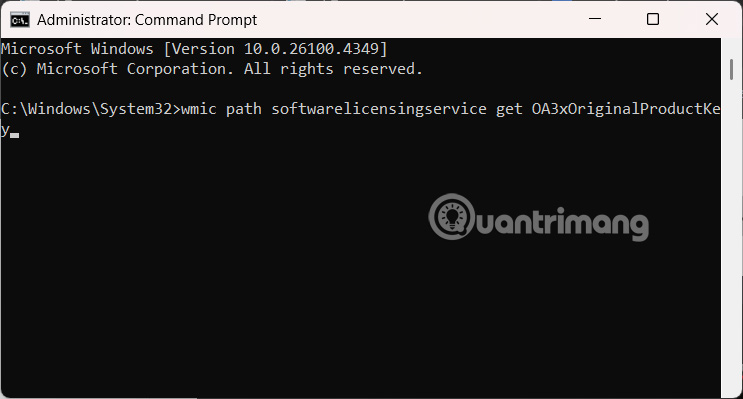
<p>Bạn&nbsp;<strong>nhập lệnh wmic path softwarelicensingservice get OA3xOriginalProductKey</strong>&nbsp;rồi nhấn Enter để tìm kiếm Product Key Windows.</p>

<p><img alt="Nhập lệnh Command Prompt" data-i="1" data-src="https://st.quantrimang.com/photos/image/2025/06/25/tim-Product-Key-windows-2.jpg" data-was-processed="true" height="322" src="https://st.quantrimang.com/photos/image/2025/06/25/tim-Product-Key-windows-2.jpg" width="600" /></p>

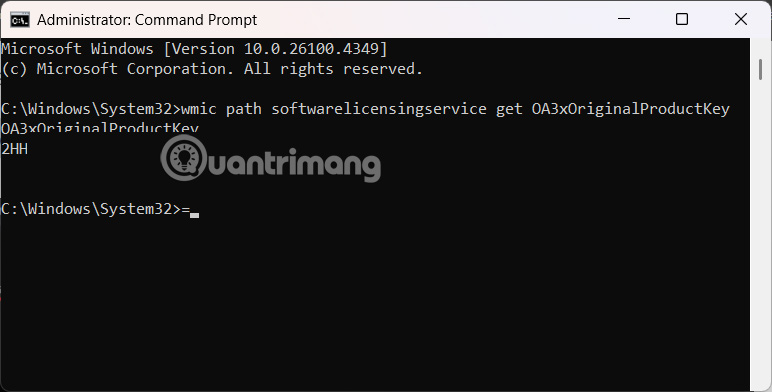
<p>Kết quả bạn sẽ thấy dãy Product Key Windows.</p>

<p><img alt="Tìm Product Key Windows bằng Command Prompt" data-i="2" data-src="https://st.quantrimang.com/photos/image/2025/06/25/tim-Product-Key-windows-3.jpg" data-was-processed="true" height="325" src="https://st.quantrimang.com/photos/image/2025/06/25/tim-Product-Key-windows-3.jpg" width="640" /></p>

<h2>Sử dụng PowerShell tìm Product Key</h2>

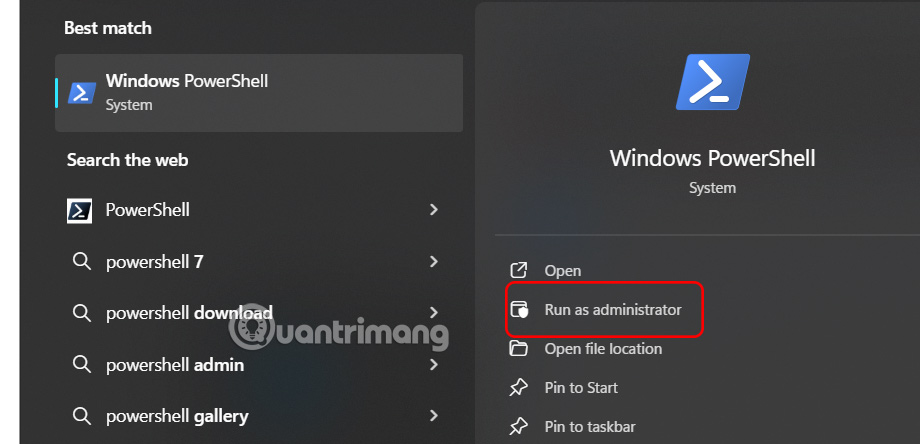
<p><strong>Bước 1:</strong></p>

<p>Chúng ta cũng&nbsp;<strong>nhập PowerShell</strong>&nbsp;vào thanh tìm kiếm rồi&nbsp;<strong>chọn Run as Administrator</strong>.</p>

<p><img alt="Tìm PowerShell" data-i="3" data-src="https://st.quantrimang.com/photos/image/2025/06/25/tim-Product-Key-windows-4.jpg" data-was-processed="true" height="290" src="https://st.quantrimang.com/photos/image/2025/06/25/tim-Product-Key-windows-4.jpg" width="600" /></p>

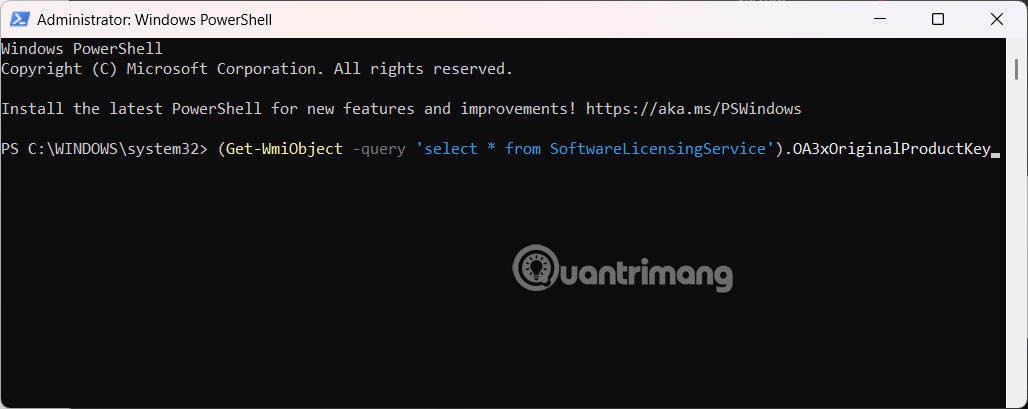
<p>Tại đây chúng ta nhập lệnh&nbsp;<strong>(Get-WmiObject -query &#039;select * from SoftwareLicensingService&#039;).OA3xOriginalProductKey&nbsp;</strong>và cũng nhấn Enter.</p>

<p><img alt="Nhập lệnh PowerShell" data-i="4" data-src="https://st.quantrimang.com/photos/image/2025/06/25/tim-Product-Key-windows-5.jpg" data-was-processed="true" height="239" src="https://st.quantrimang.com/photos/image/2025/06/25/tim-Product-Key-windows-5.jpg" width="600" /></p>

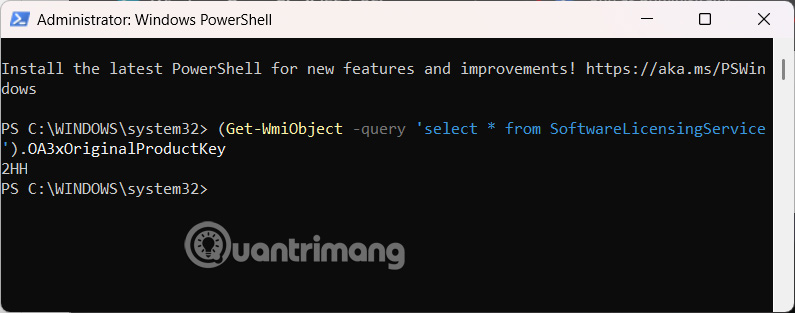
<p><strong>Bước 2:</strong></p>

<p>Kết quả bạn cũng thấy dãy số Product Key Windows.</p>

<p><img alt="Tìm Product Key Windows qua PowerShell" data-i="5" data-src="https://st.quantrimang.com/photos/image/2025/06/25/tim-Product-Key-windows-6.jpg" data-was-processed="true" height="252" src="https://st.quantrimang.com/photos/image/2025/06/25/tim-Product-Key-windows-6.jpg" width="640" /></p>

<h2>Sử dụng Registry Editor</h2>

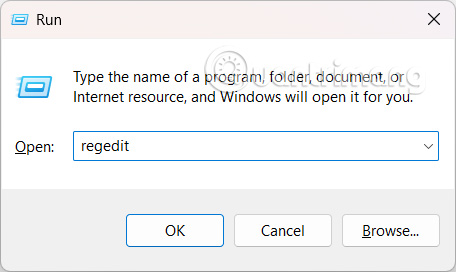
<p><strong>Bước 1:</strong></p>

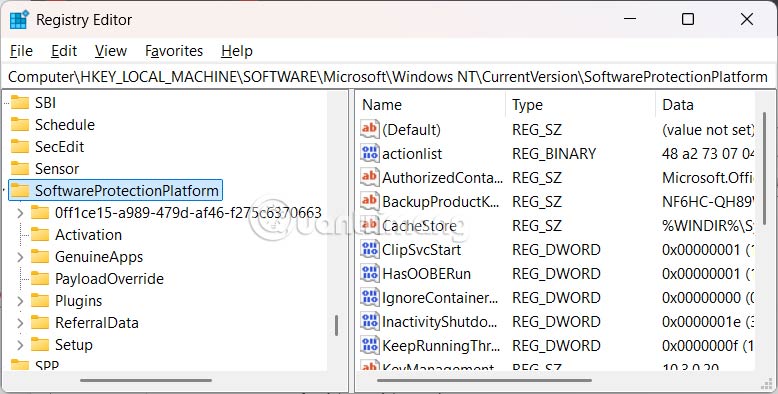
<p>Bạn cũng mở hộp thoại Run và<strong>&nbsp;nhập regedit</strong>&nbsp;vào hộp văn bản rồi nhấn Ok để truy cập.</p>

<p><img alt="Mở Registry Editor" data-i="6" data-src="https://st.quantrimang.com/photos/image/2025/06/25/tim-Product-Key-windows-7.jpg" data-was-processed="true" height="272" src="https://st.quantrimang.com/photos/image/2025/06/25/tim-Product-Key-windows-7.jpg" width="456" /></p>

<p>Tiếp đến bạn truy cập theo đường dẫn dưới đây.</p>

<pre id="pre0">
<code>Computer\HKEY_LOCAL_MACHINE\SOFTWARE\Microsoft\Windows NT\CurrentVersion\SoftwareProtectionPlatform</code></pre>

<p><img alt="Truy cập thư mục Registry Editor" data-i="7" data-src="https://st.quantrimang.com/photos/image/2025/06/25/tim-Product-Key-windows-8.jpg" data-was-processed="true" height="304" src="https://st.quantrimang.com/photos/image/2025/06/25/tim-Product-Key-windows-8.jpg" width="600" /></p>

<p><strong>Bước 2:</strong></p>

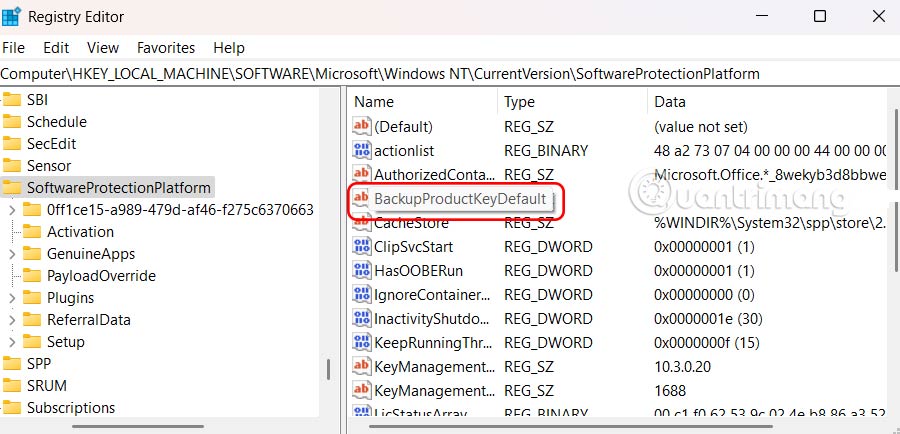
<p>Nhìn sang bên cạnh&nbsp;<strong>nhấn vào BackupProductKeyDefault để xem Product Key trên Windows</strong>.</p>

<p><img alt="Tìm Product Key trong Registry Editor" data-i="8" data-src="https://st.quantrimang.com/photos/image/2025/06/25/tim-Product-Key-windows-9.jpg" data-was-processed="true" height="289" src="https://st.quantrimang.com/photos/image/2025/06/25/tim-Product-Key-windows-9.jpg" width="600" /></p>

<p>https://quantrimang.com/cong-nghe/tim-product-key-windows-11-187894</p>

<h2>Sử dụng ShowKeyPlus</h2>

<p>Nếu bạn tự mua và&nbsp;cài đặt Windows, có thể sử dụng ShowKeyPlus để tìm product key. Đây là một ứng dụng miễn phí có sẵn trên Microsoft Store.</p>

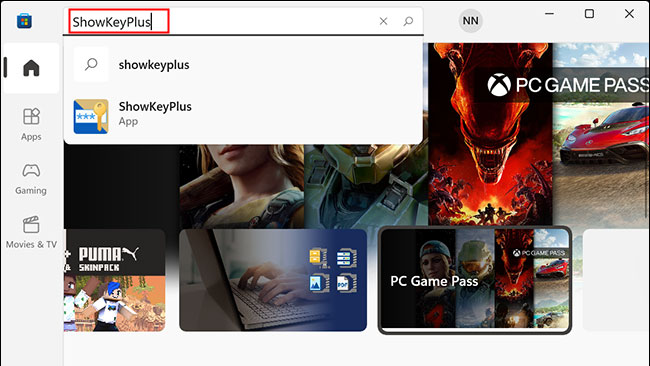
<p>Trước tiên,&nbsp;download&nbsp;ứng dụng bằng cách truy cập Microsoft Store, nhập từ khóa “<strong>ShowKeyPlus</strong>” vào thanh tìm kiếm và nhấn Enter.</p>

<p><img alt="Nhập từ khóa “ShowKeyPlus” " data-i="9" data-src="https://st.quantrimang.com/photos/image/2022/02/17/tim-product-key-windows-112.jpg" data-was-processed="true" height="366" src="https://st.quantrimang.com/photos/image/2022/02/17/tim-product-key-windows-112.jpg" width="650" /></p>

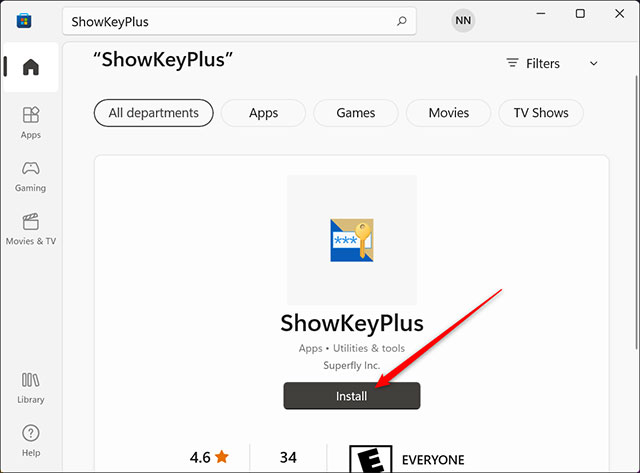
<p>Trên trang ứng dụng ShowKeyPlus, nhấp vào “<strong>Install</strong>”. Sau khi ứng dụng cài đặt xong, bạn sẽ thấy nút “<strong>Install</strong>” chuyển thành “<strong>Open</strong>”. Nhấp vào đó để mở ứng dụng.</p>

<p><img alt="Cài đặt ShowKeyPlus" data-i="10" data-src="https://st.quantrimang.com/photos/image/2022/02/17/tim-product-key-windows-113.jpg" data-was-processed="true" height="473" src="https://st.quantrimang.com/photos/image/2022/02/17/tim-product-key-windows-113.jpg" width="640" /></p>

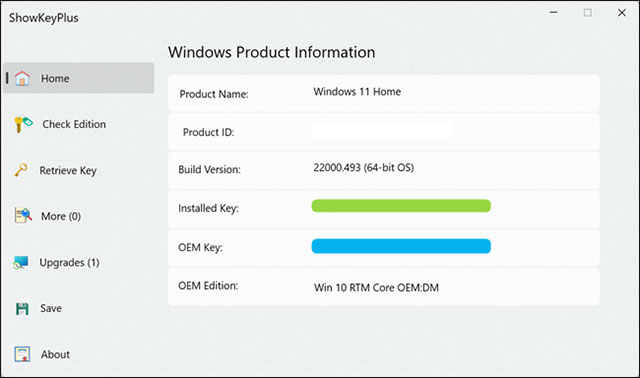
<p>ShowKeyPlus sẽ lập tức hiển thị cho bạn key hiện được cài đặt và OEM key.</p>

<p>Nếu bạn đang sử dụng bản sao OEM của Windows 11, cả mục màu xanh lục và xanh lam sẽ đều hiển thị product key của bạn. Nếu bạn đã cài đặt phiên bản Windows 11 mà mình tự mua, ô màu xanh lục sẽ hiển thị key hiện đang được sử dụng.</p>

<p><img alt="ShowKeyPlus sẽ hiển thị key hiện được cài đặt và OEM key" data-i="11" data-src="https://st.quantrimang.com/photos/image/2022/02/17/tim-product-key-windows-114.jpg" data-was-processed="true" height="378" src="https://st.quantrimang.com/photos/image/2022/02/17/tim-product-key-windows-114.jpg" width="640" /></p>

<p>Sau khi có được product key, bạn có thể ghi nó ra giấy hoặc lưu vào một tệp trên máy tính của mình. Hãy cẩn thận không chia sẻ trực tuyến để hạn chế mọi rủi ro.</p>
		</div>
				<div id="author">
						<p>
				<strong>Nguồn tin:</strong>
				Quantrimang.com:
			</p>
		</div>
	</div>
	<div id="footer" class="clearfix">
		<div id="url">
			<strong>URL của bản tin này: </strong><a href="https://www.nguoicodonvn2008.info/vi/news/savefile/kien-thuc-may-tinh/4-cach-tim-product-key-tren-windows-11-10660.html" title="4 cách tìm Product Key trên Windows 11">https://www.nguoicodonvn2008.info/vi/news/savefile/kien-thuc-may-tinh/4-cach-tim-product-key-tren-windows-11-10660.html</a>

		</div>
		<div class="clear"></div>
		<div class="copyright">
			&copy; .&#x3A; Nguoicodonvn2008.info - Cõi lòng người cô đơn &#x3A;.
		</div>
		<div id="contact">
			<a href="mailto:admin@nguoicodonvn2008.info">admin@nguoicodonvn2008.info</a>
		</div>
	</div>
</div>
        <div id="timeoutsess" class="chromeframe">
            Bạn đã không sử dụng Site, <a onclick="timeoutsesscancel();" href="https://nguoicodonvn2008.info/#">Bấm vào đây để duy trì trạng thái đăng nhập</a>. Thời gian chờ: <span id="secField"> 60 </span> giây
        </div>
        <div id="openidResult" class="nv-alert" style="display:none"></div>
        <div id="openidBt" data-result="" data-redirect=""></div>
		</script>
		<div class="car-top">
  <span><img src="https://nguoicodonvn2008.info/themes/default/images/car.png" alt=""></span>
</div>
<script src="https://nguoicodonvn2008.info/assets/js/jquery/jquery.min.js"></script>
<script>var nv_base_siteurl="/",nv_lang_data="vi",nv_lang_interface="vi",nv_name_variable="nv",nv_fc_variable="op",nv_lang_variable="language",nv_module_name="news",nv_func_name="savefile",nv_is_user=0, nv_my_ofs=-4,nv_my_abbr="EDT",nv_cookie_prefix="nv4c_e856T",nv_check_pass_mstime=1738000,nv_area_admin=0,nv_safemode=0,theme_responsive=0,nv_recaptcha_ver=2,nv_recaptcha_sitekey="",nv_recaptcha_type="image",XSSsanitize=1;</script>
<script src="https://nguoicodonvn2008.info/assets/js/language/vi.js"></script>
<script src="https://nguoicodonvn2008.info/assets/js/DOMPurify/purify3.js"></script>
<script src="https://nguoicodonvn2008.info/assets/js/global.js"></script>
<script src="https://nguoicodonvn2008.info/assets/js/site.js"></script>
<script src="https://nguoicodonvn2008.info/themes/default/js/news.js"></script>
<script src="https://nguoicodonvn2008.info/themes/default/js/main.js"></script>
<script src="https://nguoicodonvn2008.info/themes/default/js/custom.js"></script>
<script type="application/ld+json">
        {
            "@context": "https://schema.org",
            "@type": "Organization",
            "url": "https://nguoicodonvn2008.info",
            "logo": "https://nguoicodonvn2008.info/uploads/angel.gif"
        }
        </script>
<script src="https://nguoicodonvn2008.info/themes/default/js/bootstrap.min.js"></script>
<script type="text/javascript">
var $scrolltop = $('.car-top');
$scrolltop.on('click', function () {
    $('html,body').animate({
        scrollTop: 0
    }, 800);
    $(this).addClass("car-run");
    setTimeout(function(){ $scrolltop.removeClass('car-run');}, 1000);
    return false;
});
$(window).on('scroll', function ()
{ 
    if($(window).scrollTop() >= 200)
    {
        $scrolltop.addClass("show");
        $scrolltop.addClass("car-down");
    }
    else
    {
       $scrolltop.removeClass("show");
       setTimeout(function(){ $scrolltop.removeClass('car-down');}, 300);
    }
});
</script>
</body>
</html>