<!DOCTYPE html>
    <html lang="vi" xmlns="http://www.w3.org/1999/xhtml" prefix="og: http://ogp.me/ns#">
    <head>
<title>3 hàm Excel giúp bạn trở thành chuyên gia về bảng tính</title>
<meta name="description" content="3 hàm Excel giúp bạn trở thành chuyên gia về bảng tính - Savefile - Tin Tức -...">
<meta name="author" content=".: Nguoicodonvn2008.info - Cõi lòng người cô đơn :.">
<meta name="copyright" content=".: Nguoicodonvn2008.info - Cõi lòng người cô đơn :. [admin@nguoicodonvn2008.info]">
<meta name="robots" content="index, archive, follow, noodp">
<meta name="googlebot" content="index,archive,follow,noodp">
<meta name="msnbot" content="all,index,follow">
<meta name="generator" content="NukeViet v4.5">
<meta http-equiv="Content-Type" content="text/html; charset=utf-8">
<meta property="og:title" content="3 hàm Excel giúp bạn trở thành chuyên gia về bảng tính">
<meta property="og:type" content="website">
<meta property="og:description" content="Savefile - Tin Tức - https&#x3A;&#x002F;&#x002F;www.nguoicodonvn2008.info&#x002F;vi&#x002F;news&#x002F;savefile&#x002F;kien-thuc-may-tinh&#x002F;3-ham-excel-giup-ban-tro-thanh-chuyen-gia-ve-bang-tinh-11128.html">
<meta property="og:site_name" content=".&#x3A; Nguoicodonvn2008.info - Cõi lòng người cô đơn &#x3A;.">
<meta property="og:url" content="https://www.nguoicodonvn2008.info/vi/news/savefile/kien-thuc-may-tinh/3-ham-excel-giup-ban-tro-thanh-chuyen-gia-ve-bang-tinh-11128.html">
<link rel="shortcut icon" href="https://nguoicodonvn2008.info/favicon.ico">
<link rel="canonical" href="https://www.nguoicodonvn2008.info/vi/news/savefile/kien-thuc-may-tinh/3-ham-excel-giup-ban-tro-thanh-chuyen-gia-ve-bang-tinh-11128.html">
<link rel="alternate" href="https://nguoicodonvn2008.info/vi/news/rss/" title="Tin Tức" type="application/rss+xml">
<link rel="alternate" href="https://nguoicodonvn2008.info/vi/news/rss/karaoke-dual/" title="Tin Tức - Karaoke Dual" type="application/rss+xml">
<link rel="alternate" href="https://nguoicodonvn2008.info/vi/news/rss/nhac-tre/" title="Tin Tức - Nhạc trẻ" type="application/rss+xml">
<link rel="alternate" href="https://nguoicodonvn2008.info/vi/news/rss/tru-tinh/" title="Tin Tức - Trữ tình" type="application/rss+xml">
<link rel="alternate" href="https://nguoicodonvn2008.info/vi/news/rss/nuoc-ngoai/" title="Tin Tức - Nước ngoài" type="application/rss+xml">
<link rel="alternate" href="https://nguoicodonvn2008.info/vi/news/rss/remix/" title="Tin Tức - Remix" type="application/rss+xml">
<link rel="alternate" href="https://nguoicodonvn2008.info/vi/news/rss/tam-su-tinh-yeu/" title="Tin Tức - Tâm sự tình yêu" type="application/rss+xml">
<link rel="alternate" href="https://nguoicodonvn2008.info/vi/news/rss/tho-suu-tam/" title="Tin Tức - Thơ sưu tầm" type="application/rss+xml">
<link rel="alternate" href="https://nguoicodonvn2008.info/vi/news/rss/cuoc-song/" title="Tin Tức - Cuộc sống" type="application/rss+xml">
<link rel="alternate" href="https://nguoicodonvn2008.info/vi/news/rss/phan-mem/" title="Tin Tức - Phần mềm" type="application/rss+xml">
<link rel="alternate" href="https://nguoicodonvn2008.info/vi/news/rss/kien-thuc-may-tinh/" title="Tin Tức - Kiến thức máy tính" type="application/rss+xml">
<link rel="alternate" href="https://nguoicodonvn2008.info/vi/news/rss/hoc-tap/" title="Tin Tức - Học tập" type="application/rss+xml">
<link rel="alternate" href="https://nguoicodonvn2008.info/vi/news/rss/tai-lieu/" title="Tin Tức - Tài liệu" type="application/rss+xml">
<link rel="alternate" href="https://nguoicodonvn2008.info/vi/news/rss/de-thi/" title="Tin Tức - Đề thi" type="application/rss+xml">
<link rel="preload" as="style" href="https://nguoicodonvn2008.info/assets/css/font-awesome.min.css" type="text/css">
<link rel="preload" as="style" href="https://nguoicodonvn2008.info/themes/default/css/bootstrap.non-responsive.css" type="text/css">
<link rel="preload" as="style" href="https://nguoicodonvn2008.info/themes/default/css/style.css" type="text/css">
<link rel="preload" as="style" href="https://nguoicodonvn2008.info/themes/default/css/style.non-responsive.css" type="text/css">
<link rel="preload" as="style" href="https://nguoicodonvn2008.info/themes/default/css/news.css" type="text/css">
<link rel="preload" as="style" href="https://nguoicodonvn2008.info/themes/default/css/custom.css" type="text/css">
<link rel="preload" as="script" href="https://nguoicodonvn2008.info/assets/js/jquery/jquery.min.js" type="text/javascript">
<link rel="preload" as="script" href="https://nguoicodonvn2008.info/assets/js/language/vi.js" type="text/javascript">
<link rel="preload" as="script" href="https://nguoicodonvn2008.info/assets/js/DOMPurify/purify3.js" type="text/javascript">
<link rel="preload" as="script" href="https://nguoicodonvn2008.info/assets/js/global.js" type="text/javascript">
<link rel="preload" as="script" href="https://nguoicodonvn2008.info/assets/js/site.js" type="text/javascript">
<link rel="preload" as="script" href="https://nguoicodonvn2008.info/themes/default/js/news.js" type="text/javascript">
<link rel="preload" as="script" href="https://nguoicodonvn2008.info/themes/default/js/main.js" type="text/javascript">
<link rel="preload" as="script" href="https://nguoicodonvn2008.info/themes/default/js/custom.js" type="text/javascript">
<link rel="preload" as="script" href="https://nguoicodonvn2008.info/themes/default/js/bootstrap.min.js" type="text/javascript">
<link rel="stylesheet" href="https://nguoicodonvn2008.info/assets/css/font-awesome.min.css">
<link rel="stylesheet" href="https://nguoicodonvn2008.info/themes/default/css/bootstrap.non-responsive.css">
<link rel="stylesheet" href="https://nguoicodonvn2008.info/themes/default/css/style.css">
<link rel="stylesheet" href="https://nguoicodonvn2008.info/themes/default/css/style.non-responsive.css">
<link rel="StyleSheet" href="https://nguoicodonvn2008.info/themes/default/css/news.css">
<link rel="stylesheet" href="https://nguoicodonvn2008.info/themes/default/css/custom.css">
<style type="text/css">
	body{background: #fff;}
</style>
    </head>
    <body>
<div id="print">
	<div id="hd_print">
		<h2 class="pull-left">.&#x3A; Nguoicodonvn2008.info - Cõi lòng người cô đơn &#x3A;.</h2>
		<p class="pull-right"><a title=".&#x3A; Nguoicodonvn2008.info - Cõi lòng người cô đơn &#x3A;." href="https://nguoicodonvn2008.info/">https://nguoicodonvn2008.info</a></p>
	</div>
	<div class="clear"></div>
	<hr />
	<div id="content">
		<h1>3 hàm Excel giúp bạn trở thành chuyên gia về bảng tính</h1>
		<ul class="list-inline">
			<li>Thứ năm - 11/09/2025 22:55</li>
			<li class="hidden-print txtrequired"><em class="fa fa-print">&nbsp;</em><a title="In ra" href="javascript:;" onclick="window.print()">In ra</a></li>
			<li class="hidden-print txtrequired"><em class="fa fa-power-off">&nbsp;</em><a title="Đóng cửa sổ này" href="javascript:;" onclick="window.close()">Đóng cửa sổ này</a></li>
		</ul>
		<div class="clear"></div>
		<div id="hometext">
		</div>
				<div class="imghome">
			<img alt="3 hàm Excel giúp bạn trở thành chuyên gia về bảng tính" src="https://st.quantrimang.com/photos/image/2025/09/11/ham-excel-giup-ban-tro-thanh-chuyen-gia-bang-tinh-6.jpg" width="460" class="img-thumbnail" />
		</div>
		<div class="clear"></div>
		<div id="bodytext" class="clearfix">
			<p style="text-align: justify;">Microsoft Excel&nbsp;có hàng ngàn hàm, nhưng hầu hết mọi người đều tập trung vào những hàm cơ bản, chẳng hạn như&nbsp;SUM&nbsp;và&nbsp;AVERAGE. Mặc dù những hàm này hoạt động tốt với các tác vụ đơn giản, nhưng có 3 hàm xử lý các tình huống phức tạp với ít công sức hơn. SEQUENCE, LET và LAMBDA không được sử dụng phổ biến, nhưng chúng giải quyết các vấn đề cụ thể mà nếu không sẽ đòi hỏi những giải pháp thay thế phức tạp hoặc các công thức dài dòng khó xem xét.</p>

<h2 style="text-align: justify;">4. Hàm SEQUENCE tự động tạo dữ liệu</h2>

<h3 style="text-align: justify;">Tạo chuỗi số và ngày động</h3>

<figure>
<div style="text-align: justify;"><img alt="Hàm SEQUENCE trong bảng tính bán hàng để tạo số tham chiếu trong Excel." data-adbro-processed="true" data-i="0" data-src="https://st.quantrimang.com/photos/image/2025/09/11/ham-excel-giup-ban-tro-thanh-chuyen-gia-bang-tinh-1.jpg" data-was-processed="true" height="550" src="https://st.quantrimang.com/photos/image/2025/09/11/ham-excel-giup-ban-tro-thanh-chuyen-gia-bang-tinh-1.jpg" width="825" /></div>

<figcaption>
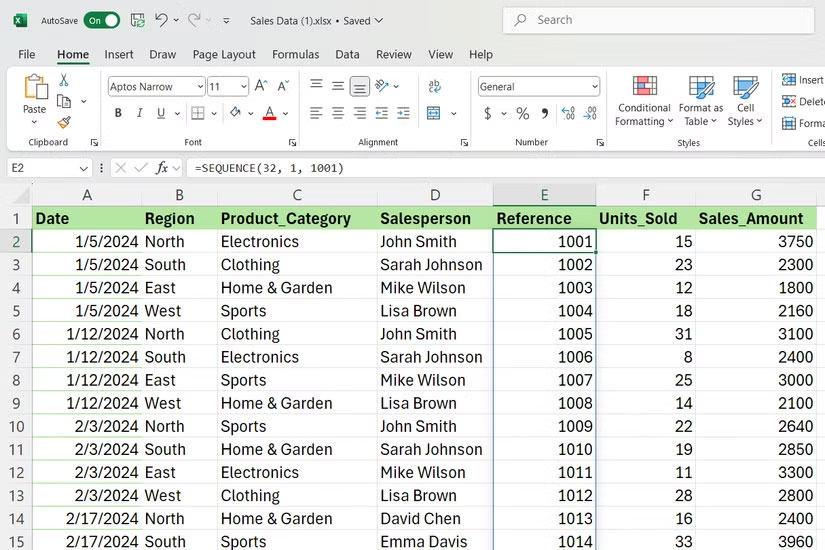
<div style="text-align: justify;">Hàm SEQUENCE trong bảng tính bán hàng để tạo số tham chiếu trong Excel.</div>
</figcaption>
</figure>

<p style="text-align: justify;">SEQUENCE tạo các mảng số tuần tự mà không cần nhập thủ công từng giá trị. Nếu bạn cần danh sách ID nhân viên, số hóa đơn hoặc phạm vi ngày, hàm này sẽ xử lý dễ dàng.</p>

<p style="text-align: justify;">Cú pháp rất đơn giản:</p>

<pre id="pre0">
<code>=SEQUENCE(rows, &#91;columns&#93;, &#91;start&#93;, &#91;step&#93;)</code></pre>

<p style="text-align: justify;">​​​​​Hãy cùng phân tích các tham số:</p>

<ul>
	<li style="text-align: justify;"><strong>rows</strong>: Xác định số lượng số bạn muốn theo chiều dọc.</li>
	<li style="text-align: justify;"><strong>columns</strong>: Kiểm soát độ phân bổ theo chiều ngang - để trống nếu chỉ có một cột.</li>
	<li style="text-align: justify;"><strong>start</strong>: Đặt số bắt đầu, mặc định là 1.</li>
	<li style="text-align: justify;"><strong>step</strong>: Xác định khoảng cách giữa các số, cũng mặc định là 1.</li>
</ul>

<p style="text-align: justify;">Xét về tập dữ liệu bán hàng, SEQUENCE tỏ ra hữu ích khi tạo số tham chiếu. Ví dụ, công thức sau tạo ra các số từ 1 đến 32.</p>

<pre id="pre1">
<code>=SEQUENCE(32)</code></pre>

<p style="text-align: justify;">Tương tự, nếu cần bắt đầu từ 1001, bạn có thể sử dụng:</p>

<pre id="pre2">
<code>=SEQUENCE(32, 1, 1001)</code></pre>

<p style="text-align: justify;">Công thức này rất hữu ích với các chuỗi ngày. Công thức sau sẽ tạo ra 12 ngày liên tiếp bắt đầu từ ngày 1 tháng 1. Điều này tốt hơn việc nhập ngày thủ công cho báo cáo hàng tháng hoặc mốc thời gian dự án.</p>

<pre id="pre3">
<code>=SEQUENCE(12, 1, DATE(2025, 1, 1), 1)</code></pre>

<p style="text-align: justify;">Bạn cũng có thể chỉ tạo ngày làm việc bằng cách kết hợp SEQUENCE với các&nbsp;hàm DATE&nbsp;khác trong Excel, chẳng hạn như WORKDAY, cho những tình huống lập lịch phức tạp hơn.</p>

<h2 style="text-align: justify;">3. Hàm LET giúp các công thức phức tạp dễ bảo trì</h2>

<h3 style="text-align: justify;">Loại bỏ các phép tính lặp lại và cải thiện khả năng đọc</h3>

<figure>
<div style="text-align: justify;"><img alt="Hàm LET trong bảng tính để tính hoa hồng trong Excel." data-i="1" data-src="https://st.quantrimang.com/photos/image/2025/09/11/ham-excel-giup-ban-tro-thanh-chuyen-gia-bang-tinh-2.jpg" data-was-processed="true" height="550" src="https://st.quantrimang.com/photos/image/2025/09/11/ham-excel-giup-ban-tro-thanh-chuyen-gia-bang-tinh-2.jpg" width="825" /></div>

<figcaption>
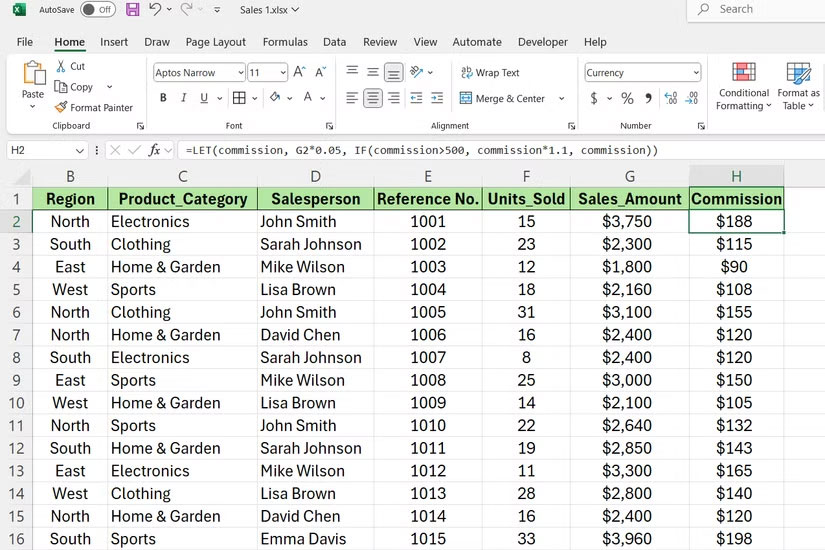
<div style="text-align: justify;">Hàm LET trong bảng tính để tính hoa hồng trong Excel.</div>
</figcaption>
</figure>

<p style="text-align: justify;">Hàm LET gán tên cho các giá trị trong công thức. Do đó, nó loại bỏ các phép tính lặp lại và giúp công việc dễ đọc hơn. Thay vì viết cùng một biểu thức nhiều lần, bạn định nghĩa nó một lần và tham chiếu theo tên.</p>

<div style="text-align: justify;">&nbsp;</div>

<p style="text-align: justify;">Cú pháp tuân theo mẫu sau:</p>

<pre id="pre4">
<code>=LET(name1, value1, &#91;name2, value2, ...&#93;, calculation)</code></pre>

<p style="text-align: justify;">Bạn có thể định nghĩa nhiều biến bằng cách thêm các cặp tên-giá trị. Phép tính ở cuối sẽ sử dụng những biến được đặt tên này để tạo ra kết quả.</p>

<p style="text-align: justify;">Nhìn vào tập dữ liệu bán hàng, giả sử bạn đang tính hoa hồng của một nhân viên bán hàng kèm theo tiền thưởng. Nếu không có LET, bạn sẽ viết:</p>

<pre id="pre5">
<code>=IF(G2*0.05&gt;500, G2*0.05*1.1, G2*0.05)</code></pre>

<p style="text-align: justify;">Phép tính hoa hồng B2*0.05 xuất hiện hai lần. Với LET, nó trở nên rõ ràng hơn:</p>

<pre id="pre6">
<code>=LET(commission, G2*0.05, IF(commission&gt;500, commission*1.1, commission))</code></pre>

<p style="text-align: justify;">Nó thực hiện cùng một phép tính nhưng định nghĩa &quot;commission&quot; một lần ở đầu. Bạn chỉ cần thay đổi tỷ lệ hoa hồng ở một nơi.</p>

<p style="text-align: justify;">Đối với các phân tích biên lợi nhuận phức tạp, LET thậm chí còn hữu ích hơn. Ví dụ sau đây định nghĩa rõ ràng từng thành phần.</p>

<pre id="pre7">
<code>=LET(revenue, G2, costs, L2, margin, (revenue-costs)/revenue, IF(margin&gt;0.3, &quot;High&quot;, IF(margin&gt;0.15, &quot;Medium&quot;, &quot;Low&quot;)))</code></pre>

<h2 style="text-align: justify;">2. Hàm LAMBDA tạo các hàm tùy chỉnh có thể tái sử dụng</h2>

<h3 style="text-align: justify;">Xây dựng các hàm tùy chỉnh cho logic nghiệp vụ lặp lại</h3>

<figure>
<div style="text-align: justify;"><img alt="" data-i="2" data-src="https://st.quantrimang.com/photos/image/2025/09/11/ham-excel-giup-ban-tro-thanh-chuyen-gia-bang-tinh-3.jpg" data-was-processed="true" height="422" src="https://st.quantrimang.com/photos/image/2025/09/11/ham-excel-giup-ban-tro-thanh-chuyen-gia-bang-tinh-3.jpg" width="750" /></div>
</figure>

<figure>
<div style="text-align: justify;"><img alt="" data-i="3" data-src="https://st.quantrimang.com/photos/image/2025/09/11/ham-excel-giup-ban-tro-thanh-chuyen-gia-bang-tinh-4.jpg" data-was-processed="true" height="422" src="https://st.quantrimang.com/photos/image/2025/09/11/ham-excel-giup-ban-tro-thanh-chuyen-gia-bang-tinh-4.jpg" width="750" /></div>
</figure>

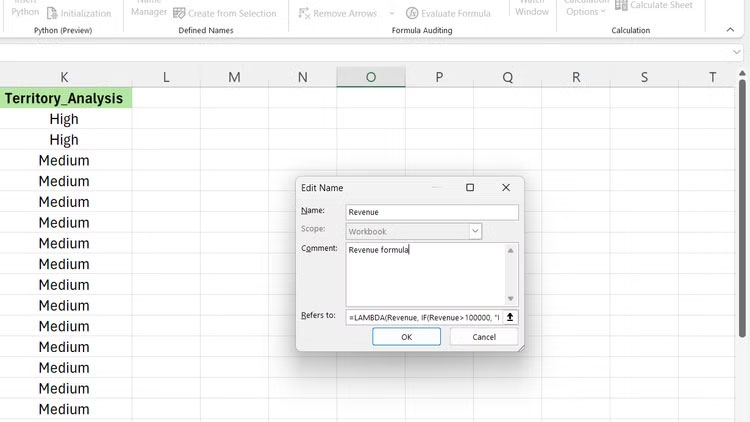
<p style="text-align: justify;">LAMBDA tạo các hàm tùy chỉnh mà bạn có thể sử dụng nhiều lần trong workbook của mình. Thay vì sao chép công thức khắp nơi, bạn tạo một hàm duy nhất chấp nhận đầu vào và trả về kết quả tính toán.</p>

<p style="text-align: justify;">Cú pháp là:</p>

<pre id="pre8">
<code>=LAMBDA(parameter1, &#91;parameter2, ...&#93;, calculation)</code></pre>

<p style="text-align: justify;">Các tham số hoạt động như những trình giữ chỗ - khi gọi hàm, bạn truyền các giá trị thực tế thay thế những trình giữ chỗ này. Phép tính sử dụng các tham số này để tạo đầu ra.</p>

<p style="text-align: justify;">Giả sử bạn thường xuyên tính điểm hiệu suất có trọng số. Bạn có thể tạo một hàm LAMBDA như sau:</p>

<pre id="pre9">
<code>=LAMBDA(sales, quota, weight, (sales/quota)*weight)</code></pre>

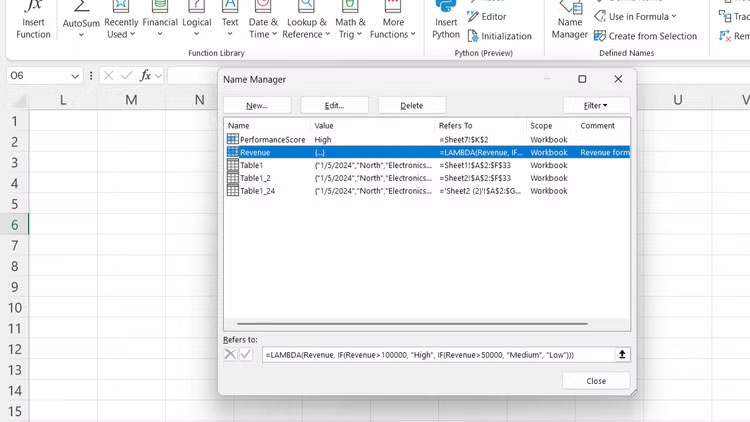
<p style="text-align: justify;">Nó tạo ra một hàm có thể tái sử dụng nhận 3 đầu vào: Doanh số thực tế, hạn ngạch bán hàng và một hệ số trọng số. Hàm trả về điểm hiệu suất có trọng số bằng cách chia doanh số cho hạn ngạch và nhân với trọng số. Đặt tên cho hàm này là &quot;PerformanceScore&quot; bằng Name Manager của Excel.</p>

<p style="text-align: justify;"><strong>Mẹo:</strong>&nbsp;Để đặt tên cho hàm LAMBDA, hãy vào&nbsp;<strong>Formulas &gt; Name Manager &gt; New</strong>.</p>

<p style="text-align: justify;">Giờ đây, bạn có thể gọi hàm này ở bất kỳ đâu trong workbook.</p>

<pre id="pre10">
<code>=PerformanceScore(B2, C2, 0.7)</code></pre>

<p style="text-align: justify;">Hàm này tính điểm hiệu suất bằng cách sử dụng doanh số, hạn ngạch và hệ số trọng số được cung cấp.</p>

<p style="text-align: justify;">Để phân tích khu vực, bạn có thể xây dựng một hàm phân loại khu vực dựa trên doanh thu:</p>

<pre id="pre11">
<code>=LAMBDA(revenue, IF(revenue&gt;100000, &quot;High&quot;, IF(revenue&gt;50000, &quot;Medium&quot;, &quot;Low&quot;)))</code></pre>

<p style="text-align: justify;">Hàm này phân loại doanh thu thành 3 mức:&nbsp;<strong>High</strong>&nbsp;cho doanh thu trên 100.000 USD, Medium cho doanh thu từ 50.000 đến 100.000 USD và Low cho doanh thu dưới 50.000 USD.</p>

<h2 style="text-align: justify;">1. Kết hợp các hàm này để tạo ra các giải pháp mạnh mẽ</h2>

<h3 style="text-align: justify;">Xây dựng các công cụ phân tích kinh doanh toàn diện</h3>

<figure>
<div style="text-align: justify;"><img alt="Công thức tính toán dự báo doanh số 12 tháng với sự kết hợp của các hàm LET, SEQUENCE và LAMBDA trong Excel." data-i="5" data-src="https://st.quantrimang.com/photos/image/2025/09/11/ham-excel-giup-ban-tro-thanh-chuyen-gia-bang-tinh-6.jpg" data-was-processed="true" height="550" src="https://st.quantrimang.com/photos/image/2025/09/11/ham-excel-giup-ban-tro-thanh-chuyen-gia-bang-tinh-6.jpg" width="825" /></div>

<figcaption>
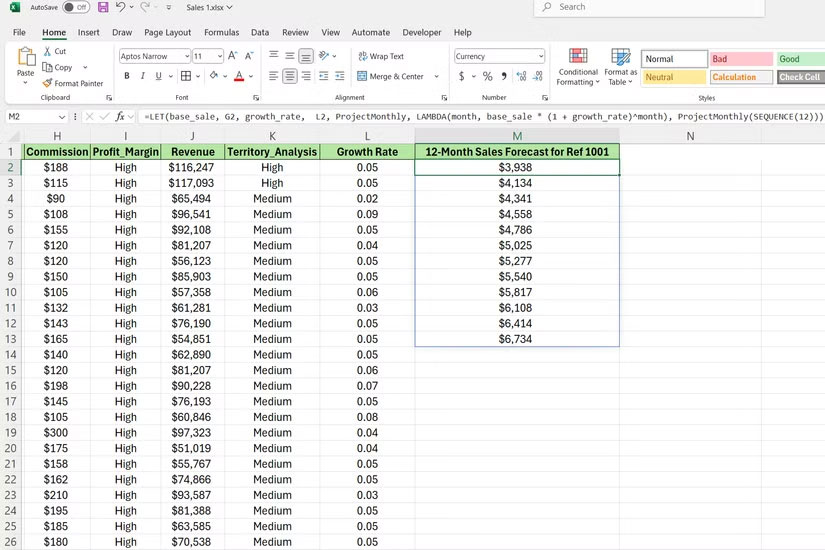
<div style="text-align: justify;">Công thức tính toán dự báo doanh số 12 tháng với sự kết hợp của các hàm LET, SEQUENCE và LAMBDA trong Excel.</div>
</figcaption>
</figure>

<p style="text-align: justify;">Khi bạn sử dụng SEQUENCE, LET và LAMBDA cùng nhau, chúng giải quyết các vấn đề mà nếu không sẽ cần nhiều cột hỗ trợ hoặc công thức mảng. Sự kết hợp này tạo ra các giải pháp linh hoạt, dễ bảo trì.</p>

<p style="text-align: justify;">Hãy cùng xem xét việc xây dựng một công cụ dự báo doanh số sử dụng dữ liệu bán hàng. Công thức sau đây tính toán dự báo doanh số 12 tháng cho một doanh số khởi điểm duy nhất. Công thức bắt đầu bằng cách định nghĩa hai biến chính với LET. Công thức lấy giá trị từ ô G2 làm điểm bán hàng cơ sở ban đầu.</p>

<pre id="pre12">
<code>=LET(base_sale, G2, growth_rate, L2, ProjectMonthly, LAMBDA(month, base_sale * (1 + growth_rate)^month), ProjectMonthly(SEQUENCE(12)))</code></pre>

<p style="text-align: justify;">Sau đó, công thức lấy tỷ lệ tăng trưởng hàng tháng từ L2 là 0,04 (4%). Bạn có thể thay đổi giá trị này để mô hình hóa các kịch bản khác nhau. Sau đó, công thức định nghĩa một hàm nhỏ có thể tái sử dụng được gọi là ProjectMonthly. Hàm này tính toán doanh số dự kiến ​​cho một tháng nhất định dựa trên doanh số cơ sở và tỷ lệ tăng trưởng.</p>

<p style="text-align: justify;">Hơn nữa, công thức này gọi hàm ProjectMonthly và truyền SEQUENCE(12) vào hàm. Thao tác này tạo ra một mảng các số từ 1 đến 12, và LAMBDA sẽ tự động áp dụng phép tính của nó cho mỗi số trong chuỗi đó.</p>

<p style="text-align: justify;">Đây là một công cụ tính tiền thưởng thực tế, tính toán tiền thưởng dựa trên việc đạt được mục tiêu.</p>

<pre id="pre13">
<code>=LAMBDA(sales, target, LET(ratio, sales/target, IF(ratio&gt;=1.2, sales*0.08, IF(ratio&gt;=1, sale</code></pre>

<div style="text-align: justify;">&nbsp;</div>
		</div>
				<div id="author">
						<p>
				<strong>Nguồn tin:</strong>
				Quantrimang.com:
			</p>
		</div>
	</div>
	<div id="footer" class="clearfix">
		<div id="url">
			<strong>URL của bản tin này: </strong><a href="https://www.nguoicodonvn2008.info/vi/news/savefile/kien-thuc-may-tinh/3-ham-excel-giup-ban-tro-thanh-chuyen-gia-ve-bang-tinh-11128.html" title="3 hàm Excel giúp bạn trở thành chuyên gia về bảng tính">https://www.nguoicodonvn2008.info/vi/news/savefile/kien-thuc-may-tinh/3-ham-excel-giup-ban-tro-thanh-chuyen-gia-ve-bang-tinh-11128.html</a>

		</div>
		<div class="clear"></div>
		<div class="copyright">
			&copy; .&#x3A; Nguoicodonvn2008.info - Cõi lòng người cô đơn &#x3A;.
		</div>
		<div id="contact">
			<a href="mailto:admin@nguoicodonvn2008.info">admin@nguoicodonvn2008.info</a>
		</div>
	</div>
</div>
        <div id="timeoutsess" class="chromeframe">
            Bạn đã không sử dụng Site, <a onclick="timeoutsesscancel();" href="https://nguoicodonvn2008.info/#">Bấm vào đây để duy trì trạng thái đăng nhập</a>. Thời gian chờ: <span id="secField"> 60 </span> giây
        </div>
        <div id="openidResult" class="nv-alert" style="display:none"></div>
        <div id="openidBt" data-result="" data-redirect=""></div>
		</script>
		<div class="car-top">
  <span><img src="https://nguoicodonvn2008.info/themes/default/images/car.png" alt=""></span>
</div>
<script src="https://nguoicodonvn2008.info/assets/js/jquery/jquery.min.js"></script>
<script>var nv_base_siteurl="/",nv_lang_data="vi",nv_lang_interface="vi",nv_name_variable="nv",nv_fc_variable="op",nv_lang_variable="language",nv_module_name="news",nv_func_name="savefile",nv_is_user=0, nv_my_ofs=-4,nv_my_abbr="EDT",nv_cookie_prefix="nv4c_e856T",nv_check_pass_mstime=1738000,nv_area_admin=0,nv_safemode=0,theme_responsive=0,nv_recaptcha_ver=2,nv_recaptcha_sitekey="",nv_recaptcha_type="image",XSSsanitize=1;</script>
<script src="https://nguoicodonvn2008.info/assets/js/language/vi.js"></script>
<script src="https://nguoicodonvn2008.info/assets/js/DOMPurify/purify3.js"></script>
<script src="https://nguoicodonvn2008.info/assets/js/global.js"></script>
<script src="https://nguoicodonvn2008.info/assets/js/site.js"></script>
<script src="https://nguoicodonvn2008.info/themes/default/js/news.js"></script>
<script src="https://nguoicodonvn2008.info/themes/default/js/main.js"></script>
<script src="https://nguoicodonvn2008.info/themes/default/js/custom.js"></script>
<script type="application/ld+json">
        {
            "@context": "https://schema.org",
            "@type": "Organization",
            "url": "https://nguoicodonvn2008.info",
            "logo": "https://nguoicodonvn2008.info/uploads/angel.gif"
        }
        </script>
<script src="https://nguoicodonvn2008.info/themes/default/js/bootstrap.min.js"></script>
<script type="text/javascript">
var $scrolltop = $('.car-top');
$scrolltop.on('click', function () {
    $('html,body').animate({
        scrollTop: 0
    }, 800);
    $(this).addClass("car-run");
    setTimeout(function(){ $scrolltop.removeClass('car-run');}, 1000);
    return false;
});
$(window).on('scroll', function ()
{ 
    if($(window).scrollTop() >= 200)
    {
        $scrolltop.addClass("show");
        $scrolltop.addClass("car-down");
    }
    else
    {
       $scrolltop.removeClass("show");
       setTimeout(function(){ $scrolltop.removeClass('car-down');}, 300);
    }
});
</script>
</body>
</html>