<!DOCTYPE html>
    <html lang="vi" xmlns="http://www.w3.org/1999/xhtml" prefix="og: http://ogp.me/ns#">
    <head>
<title>3 cách quét virus toàn hệ thống Windows 10 bằng Microsoft Defender</title>
<meta name="description" content="3 cách quét virus toàn hệ thống Windows 10 bằng Microsoft Defender - Savefile - Tin Tức -...">
<meta name="author" content=".: Nguoicodonvn2008.info - Cõi lòng người cô đơn :.">
<meta name="copyright" content=".: Nguoicodonvn2008.info - Cõi lòng người cô đơn :. [admin@nguoicodonvn2008.info]">
<meta name="robots" content="index, archive, follow, noodp">
<meta name="googlebot" content="index,archive,follow,noodp">
<meta name="msnbot" content="all,index,follow">
<meta name="generator" content="NukeViet v4.5">
<meta http-equiv="Content-Type" content="text/html; charset=utf-8">
<meta property="og:title" content="3 cách quét virus toàn hệ thống Windows 10 bằng Microsoft Defender">
<meta property="og:type" content="website">
<meta property="og:description" content="Savefile - Tin Tức - https&#x3A;&#x002F;&#x002F;www.nguoicodonvn2008.info&#x002F;vi&#x002F;news&#x002F;savefile&#x002F;kien-thuc-may-tinh&#x002F;3-cach-quet-virus-toan-he-thong-windows-10-bang-microsoft-defender-3434.html">
<meta property="og:site_name" content=".&#x3A; Nguoicodonvn2008.info - Cõi lòng người cô đơn &#x3A;.">
<meta property="og:url" content="https://www.nguoicodonvn2008.info/vi/news/savefile/kien-thuc-may-tinh/3-cach-quet-virus-toan-he-thong-windows-10-bang-microsoft-defender-3434.html">
<link rel="shortcut icon" href="https://nguoicodonvn2008.info/favicon.ico">
<link rel="canonical" href="https://www.nguoicodonvn2008.info/vi/news/savefile/kien-thuc-may-tinh/3-cach-quet-virus-toan-he-thong-windows-10-bang-microsoft-defender-3434.html">
<link rel="alternate" href="https://nguoicodonvn2008.info/vi/news/rss/" title="Tin Tức" type="application/rss+xml">
<link rel="alternate" href="https://nguoicodonvn2008.info/vi/news/rss/karaoke-dual/" title="Tin Tức - Karaoke Dual" type="application/rss+xml">
<link rel="alternate" href="https://nguoicodonvn2008.info/vi/news/rss/nhac-tre/" title="Tin Tức - Nhạc trẻ" type="application/rss+xml">
<link rel="alternate" href="https://nguoicodonvn2008.info/vi/news/rss/tru-tinh/" title="Tin Tức - Trữ tình" type="application/rss+xml">
<link rel="alternate" href="https://nguoicodonvn2008.info/vi/news/rss/nuoc-ngoai/" title="Tin Tức - Nước ngoài" type="application/rss+xml">
<link rel="alternate" href="https://nguoicodonvn2008.info/vi/news/rss/remix/" title="Tin Tức - Remix" type="application/rss+xml">
<link rel="alternate" href="https://nguoicodonvn2008.info/vi/news/rss/tam-su-tinh-yeu/" title="Tin Tức - Tâm sự tình yêu" type="application/rss+xml">
<link rel="alternate" href="https://nguoicodonvn2008.info/vi/news/rss/tho-suu-tam/" title="Tin Tức - Thơ sưu tầm" type="application/rss+xml">
<link rel="alternate" href="https://nguoicodonvn2008.info/vi/news/rss/cuoc-song/" title="Tin Tức - Cuộc sống" type="application/rss+xml">
<link rel="alternate" href="https://nguoicodonvn2008.info/vi/news/rss/phan-mem/" title="Tin Tức - Phần mềm" type="application/rss+xml">
<link rel="alternate" href="https://nguoicodonvn2008.info/vi/news/rss/kien-thuc-may-tinh/" title="Tin Tức - Kiến thức máy tính" type="application/rss+xml">
<link rel="alternate" href="https://nguoicodonvn2008.info/vi/news/rss/hoc-tap/" title="Tin Tức - Học tập" type="application/rss+xml">
<link rel="alternate" href="https://nguoicodonvn2008.info/vi/news/rss/tai-lieu/" title="Tin Tức - Tài liệu" type="application/rss+xml">
<link rel="alternate" href="https://nguoicodonvn2008.info/vi/news/rss/de-thi/" title="Tin Tức - Đề thi" type="application/rss+xml">
<link rel="preload" as="style" href="https://nguoicodonvn2008.info/assets/css/font-awesome.min.css" type="text/css">
<link rel="preload" as="style" href="https://nguoicodonvn2008.info/themes/default/css/bootstrap.non-responsive.css" type="text/css">
<link rel="preload" as="style" href="https://nguoicodonvn2008.info/themes/default/css/style.css" type="text/css">
<link rel="preload" as="style" href="https://nguoicodonvn2008.info/themes/default/css/style.non-responsive.css" type="text/css">
<link rel="preload" as="style" href="https://nguoicodonvn2008.info/themes/default/css/news.css" type="text/css">
<link rel="preload" as="style" href="https://nguoicodonvn2008.info/themes/default/css/custom.css" type="text/css">
<link rel="preload" as="script" href="https://nguoicodonvn2008.info/assets/js/jquery/jquery.min.js" type="text/javascript">
<link rel="preload" as="script" href="https://nguoicodonvn2008.info/assets/js/language/vi.js" type="text/javascript">
<link rel="preload" as="script" href="https://nguoicodonvn2008.info/assets/js/DOMPurify/purify3.js" type="text/javascript">
<link rel="preload" as="script" href="https://nguoicodonvn2008.info/assets/js/global.js" type="text/javascript">
<link rel="preload" as="script" href="https://nguoicodonvn2008.info/assets/js/site.js" type="text/javascript">
<link rel="preload" as="script" href="https://nguoicodonvn2008.info/themes/default/js/news.js" type="text/javascript">
<link rel="preload" as="script" href="https://nguoicodonvn2008.info/themes/default/js/main.js" type="text/javascript">
<link rel="preload" as="script" href="https://nguoicodonvn2008.info/themes/default/js/custom.js" type="text/javascript">
<link rel="preload" as="script" href="https://nguoicodonvn2008.info/themes/default/js/bootstrap.min.js" type="text/javascript">
<link rel="stylesheet" href="https://nguoicodonvn2008.info/assets/css/font-awesome.min.css">
<link rel="stylesheet" href="https://nguoicodonvn2008.info/themes/default/css/bootstrap.non-responsive.css">
<link rel="stylesheet" href="https://nguoicodonvn2008.info/themes/default/css/style.css">
<link rel="stylesheet" href="https://nguoicodonvn2008.info/themes/default/css/style.non-responsive.css">
<link rel="StyleSheet" href="https://nguoicodonvn2008.info/themes/default/css/news.css">
<link rel="stylesheet" href="https://nguoicodonvn2008.info/themes/default/css/custom.css">
<style type="text/css">
	body{background: #fff;}
</style>
    </head>
    <body>
<div id="print">
	<div id="hd_print">
		<h2 class="pull-left">.&#x3A; Nguoicodonvn2008.info - Cõi lòng người cô đơn &#x3A;.</h2>
		<p class="pull-right"><a title=".&#x3A; Nguoicodonvn2008.info - Cõi lòng người cô đơn &#x3A;." href="https://nguoicodonvn2008.info/">https://nguoicodonvn2008.info</a></p>
	</div>
	<div class="clear"></div>
	<hr />
	<div id="content">
		<h1>3 cách quét virus toàn hệ thống Windows 10 bằng Microsoft Defender</h1>
		<ul class="list-inline">
			<li>Chủ nhật - 10/01/2021 23:52</li>
			<li class="hidden-print txtrequired"><em class="fa fa-print">&nbsp;</em><a title="In ra" href="javascript:;" onclick="window.print()">In ra</a></li>
			<li class="hidden-print txtrequired"><em class="fa fa-power-off">&nbsp;</em><a title="Đóng cửa sổ này" href="javascript:;" onclick="window.close()">Đóng cửa sổ này</a></li>
		</ul>
		<div class="clear"></div>
		<div id="hometext">
		</div>
				<div class="imghome">
			<img alt="3 cách quét virus toàn hệ thống Windows 10 bằng Microsoft Defender" src="https://st.quantrimang.com/photos/image/2021/01/09/quet-virus-toan-he-thong-windows-10-bang-microsoft-defender-2.jpg" width="460" class="img-thumbnail" />
		</div>
		<div class="clear"></div>
		<div id="bodytext" class="clearfix">
			<p style="text-align: justify;">Windows 10 được tích hợp sẵn phần mềm bảo mật Microsoft Defender. Phần mềm này thường xuyên kiểm tra và quét định kỳ để phát hiện, ngăn chặn và tiêu diệt virus, malware... xâm nhập máy tính của anh em.</p>

<p style="text-align: justify;">Tuy nhiên, đôi lúc anh em vẫn cần quét virus toàn bộ hệ thống một cách thủ công để đảm bảo rằng mọi thứ được an toàn. Trong bài viết này, Quantrimang sẽ hướng dẫn anh em cách quét virus toàn bộ hệ thống Windows 10 bằng Microsoft Defender.</p>

<h2 style="text-align: justify;">3 cách quét virus toàn hệ thống Windows 10</h2>

<div style="text-align: justify;">&nbsp;</div>

<h2 id="mcetoc_1erih3uou0" style="text-align: justify;">1. Dùng Windows Security</h2>

<p style="text-align: justify;">Để thực hiện quét virus toàn bộ hệ thống Windows 10 bằng Microsoft Defender qua Windows Security anh em làm theo các bước sau:</p>

<ul>
	<li style="text-align: justify;">Nhấn nút&nbsp;<strong>Windows</strong>&nbsp;để mở&nbsp;<strong>Start menu</strong></li>
	<li style="text-align: justify;">Nhập&nbsp;<strong>Windows security</strong>&nbsp;và nhấn vào kết quả tìm kiếm đầu tiên</li>
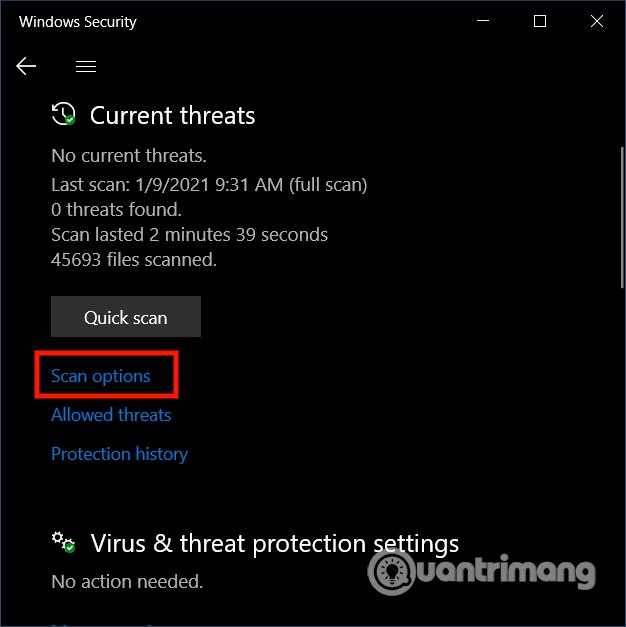
	<li style="text-align: justify;">Nhấp vào&nbsp;<strong>Virus &amp; threat protection</strong></li>
	<li style="text-align: justify;">Ở bên dưới phần&nbsp;<strong>Current threats</strong>, nhấp vào&nbsp;<strong>Scan Options</strong></li>
</ul>

<p style="text-align: justify;"><strong><img alt="" data-i="0" data-src="https://st.quantrimang.com/photos/image/2021/01/09/quet-virus-toan-he-thong-windows-10-bang-microsoft-defender.jpg" data-was-processed="true" height="627" src="https://st.quantrimang.com/photos/image/2021/01/09/quet-virus-toan-he-thong-windows-10-bang-microsoft-defender.jpg" width="626" /></strong></p>

<ul>
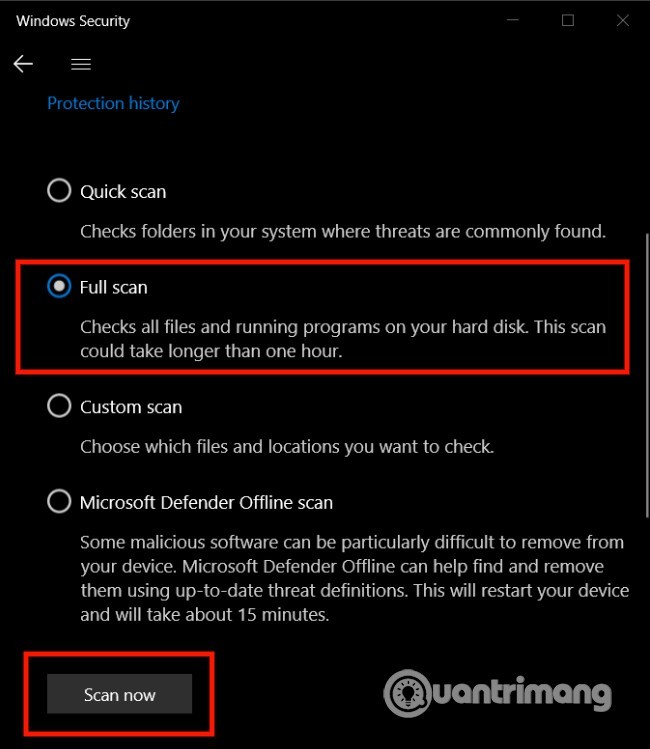
	<li style="text-align: justify;">Chọn&nbsp;<strong>Full scan</strong>&nbsp;để kiểm tra toàn bộ hệ thống</li>
	<li style="text-align: justify;">Nhấn nút&nbsp;<strong>Scan now</strong></li>
</ul>

<p style="text-align: justify;"><strong><img alt="" data-i="1" data-src="https://st.quantrimang.com/photos/image/2021/01/09/quet-virus-toan-he-thong-windows-10-bang-microsoft-defender-2.jpg" data-was-processed="true" height="749" src="https://st.quantrimang.com/photos/image/2021/01/09/quet-virus-toan-he-thong-windows-10-bang-microsoft-defender-2.jpg" width="650" /></strong></p>

<p style="text-align: justify;">Sau đó, Microsoft Defender sẽ tiến hành quét thiết bị của anh em để tìm virus hoặc malware... Nếu phát hiện ra các mối đe dọa phần mềm bảo mật này sẽ tự động loại bỏ hoặc đưa chúng vào trạng thái cô lập.</p>

<p style="text-align: justify;">Thời gian quét tùy theo lượng dữ liệu trên máy tính của anh em. Nếu có nhiều dữ liệu, anh em nên bắt đầu quét khi mình xong việc và để máy tính thực hiện quét virus xuyên đêm.</p>

<h2 id="mcetoc_1erih3uou1" style="text-align: justify;">2. Dùng Command Prompt</h2>

<p style="text-align: justify;">Để quét virus toàn bộ hệ thống với Command Prompt anh em làm theo các bước sau:</p>

<ul>
	<li style="text-align: justify;">Nhấn nút&nbsp;<strong>Windows</strong>&nbsp;để mở&nbsp;<strong>Start menu</strong></li>
	<li style="text-align: justify;">Nhập&nbsp;<strong>command prompt</strong>, nhấp chuột phải vào kết quả tìm kiếm đầu tiên và chọn&nbsp;<strong>Run as administrator</strong></li>
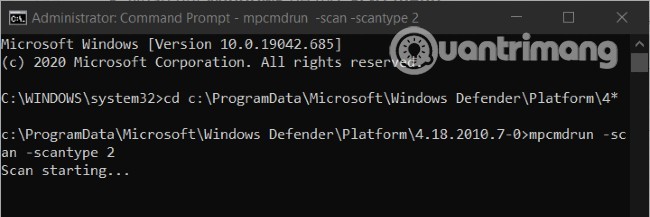
	<li style="text-align: justify;">Nhập dòng lệnh sau vào&nbsp;<strong>Command Prompt</strong>&nbsp;và nhấn&nbsp;<strong>Enter</strong>&nbsp;để truy cập tới phần mềm Microsoft Defender mới nhất:</li>
</ul>

<pre id="pre0">
<code>cd c:\ProgramData\Microsoft\Windows Defender\Platform\4*</code></pre>

<ul>
	<li style="text-align: justify;">Nhập tiếp dòng lệnh sau và nhấn&nbsp;<strong>Enter</strong>&nbsp;để tiến hành quét:</li>
</ul>

<pre id="pre1">
<code>mpcmdrun -scan -scantype 2</code></pre>

<p style="text-align: justify;"><img alt="" data-i="2" data-src="https://st.quantrimang.com/photos/image/2021/01/09/quet-virus-toan-he-thong-windows-10-bang-microsoft-defender-3.jpg" data-was-processed="true" height="217" src="https://st.quantrimang.com/photos/image/2021/01/09/quet-virus-toan-he-thong-windows-10-bang-microsoft-defender-3.jpg" width="650" /></p>

<p style="text-align: justify;">Sau khi anh em hoàn thành bước này, phần mềm diệt virus sẽ bắt đầu quét để tìm virus. Anh em sẽ thấy trạng thái&nbsp;<strong>Start scanning</strong>&nbsp;trong cửa sổ lệnh và khi quét xong anh em sẽ nhận được thông báo&nbsp;<strong>Scan finished</strong>.</p>

<h2 id="mcetoc_1erih3uou2" style="text-align: justify;">3. Dùng PowerShell</h2>

<p style="text-align: justify;">Anh em cũng có thể dùng PowerShell để kích hoạt tính năng quét virus toàn bộ hệ thống Windows 10.</p>

<ul>
	<li style="text-align: justify;">Nhấn nút&nbsp;<strong>Windows</strong>&nbsp;để mở&nbsp;<strong>Start menu</strong></li>
	<li style="text-align: justify;">Nhập&nbsp;<strong>powershell</strong>&nbsp;và nhấp chuột phải vào kết quả tìm kiếm đầu tiên rồi chọn&nbsp;<strong>Run as administrator</strong></li>
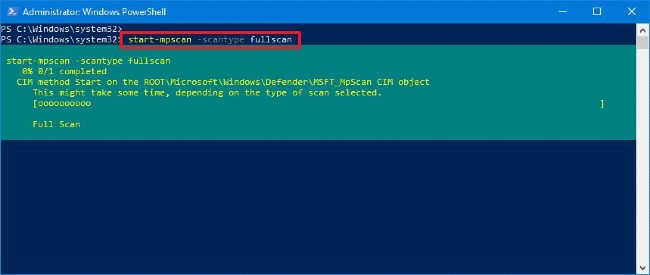
	<li style="text-align: justify;">Nhập dòng lệnh sau vào&nbsp;<strong>PowerShell</strong>&nbsp;và nhấn&nbsp;<strong>Enter</strong>:</li>
</ul>

<pre id="pre2">
<code>start-mpscan -scantype fullscan</code></pre>

<p style="text-align: justify;"><img alt="" data-i="3" data-src="https://st.quantrimang.com/photos/image/2021/01/09/quet-virus-toan-he-thong-windows-10-bang-microsoft-defender-1.jpg" data-was-processed="true" height="275" src="https://st.quantrimang.com/photos/image/2021/01/09/quet-virus-toan-he-thong-windows-10-bang-microsoft-defender-1.jpg" width="650" /></p>

<p style="text-align: justify;">Sau khi anh em hoàn thành bước này, Microsoft Defender sẽ tiến hành quét virus toàn bộ hệ thống Windows 10 để loại bỏ tất cả virus và malware mà nó phát hiện ra.</p>

<p style="text-align: justify;">Chúc anh em thành công</p>
		</div>
				<div id="author">
						<p>
				<strong>Nguồn tin:</strong>
				Quantrimang.com
			</p>
		</div>
	</div>
	<div id="footer" class="clearfix">
		<div id="url">
			<strong>URL của bản tin này: </strong><a href="https://www.nguoicodonvn2008.info/vi/news/savefile/kien-thuc-may-tinh/3-cach-quet-virus-toan-he-thong-windows-10-bang-microsoft-defender-3434.html" title="3 cách quét virus toàn hệ thống Windows 10 bằng Microsoft Defender">https://www.nguoicodonvn2008.info/vi/news/savefile/kien-thuc-may-tinh/3-cach-quet-virus-toan-he-thong-windows-10-bang-microsoft-defender-3434.html</a>

		</div>
		<div class="clear"></div>
		<div class="copyright">
			&copy; .&#x3A; Nguoicodonvn2008.info - Cõi lòng người cô đơn &#x3A;.
		</div>
		<div id="contact">
			<a href="mailto:admin@nguoicodonvn2008.info">admin@nguoicodonvn2008.info</a>
		</div>
	</div>
</div>
        <div id="timeoutsess" class="chromeframe">
            Bạn đã không sử dụng Site, <a onclick="timeoutsesscancel();" href="https://nguoicodonvn2008.info/#">Bấm vào đây để duy trì trạng thái đăng nhập</a>. Thời gian chờ: <span id="secField"> 60 </span> giây
        </div>
        <div id="openidResult" class="nv-alert" style="display:none"></div>
        <div id="openidBt" data-result="" data-redirect=""></div>
		</script>
		<div class="car-top">
  <span><img src="https://nguoicodonvn2008.info/themes/default/images/car.png" alt=""></span>
</div>
<script src="https://nguoicodonvn2008.info/assets/js/jquery/jquery.min.js"></script>
<script>var nv_base_siteurl="/",nv_lang_data="vi",nv_lang_interface="vi",nv_name_variable="nv",nv_fc_variable="op",nv_lang_variable="language",nv_module_name="news",nv_func_name="savefile",nv_is_user=0, nv_my_ofs=-4,nv_my_abbr="EDT",nv_cookie_prefix="nv4c_e856T",nv_check_pass_mstime=1738000,nv_area_admin=0,nv_safemode=0,theme_responsive=0,nv_recaptcha_ver=2,nv_recaptcha_sitekey="",nv_recaptcha_type="image",XSSsanitize=1;</script>
<script src="https://nguoicodonvn2008.info/assets/js/language/vi.js"></script>
<script src="https://nguoicodonvn2008.info/assets/js/DOMPurify/purify3.js"></script>
<script src="https://nguoicodonvn2008.info/assets/js/global.js"></script>
<script src="https://nguoicodonvn2008.info/assets/js/site.js"></script>
<script src="https://nguoicodonvn2008.info/themes/default/js/news.js"></script>
<script src="https://nguoicodonvn2008.info/themes/default/js/main.js"></script>
<script src="https://nguoicodonvn2008.info/themes/default/js/custom.js"></script>
<script type="application/ld+json">
        {
            "@context": "https://schema.org",
            "@type": "Organization",
            "url": "https://nguoicodonvn2008.info",
            "logo": "https://nguoicodonvn2008.info/uploads/angel.gif"
        }
        </script>
<script src="https://nguoicodonvn2008.info/themes/default/js/bootstrap.min.js"></script>
<script type="text/javascript">
var $scrolltop = $('.car-top');
$scrolltop.on('click', function () {
    $('html,body').animate({
        scrollTop: 0
    }, 800);
    $(this).addClass("car-run");
    setTimeout(function(){ $scrolltop.removeClass('car-run');}, 1000);
    return false;
});
$(window).on('scroll', function ()
{ 
    if($(window).scrollTop() >= 200)
    {
        $scrolltop.addClass("show");
        $scrolltop.addClass("car-down");
    }
    else
    {
       $scrolltop.removeClass("show");
       setTimeout(function(){ $scrolltop.removeClass('car-down');}, 300);
    }
});
</script>
</body>
</html>