<!DOCTYPE html>
    <html lang="vi" xmlns="http://www.w3.org/1999/xhtml" prefix="og: http://ogp.me/ns#">
    <head>
<title>Những rủi ro quyền riêng tư trên Chromebook mà người dùng dễ bỏ quên</title>
<meta name="description" content="Những rủi ro quyền riêng tư trên Chromebook mà người dùng dễ bỏ quên - Savefile - Tin Tức -...">
<meta name="author" content=".: Nguoicodonvn2008.info - Cõi lòng người cô đơn :.">
<meta name="copyright" content=".: Nguoicodonvn2008.info - Cõi lòng người cô đơn :. [admin@nguoicodonvn2008.info]">
<meta name="robots" content="index, archive, follow, noodp">
<meta name="googlebot" content="index,archive,follow,noodp">
<meta name="msnbot" content="all,index,follow">
<meta name="generator" content="NukeViet v4.5">
<meta http-equiv="Content-Type" content="text/html; charset=utf-8">
<meta property="og:title" content="Những rủi ro quyền riêng tư trên Chromebook mà người dùng dễ bỏ quên">
<meta property="og:type" content="website">
<meta property="og:description" content="Savefile - Tin Tức - https&#x3A;&#x002F;&#x002F;www.nguoicodonvn2008.info&#x002F;vi&#x002F;news&#x002F;savefile&#x002F;cuoc-song&#x002F;nhung-rui-ro-quyen-rieng-tu-tren-chromebook-ma-nguoi-dung-de-bo-quen-11893.html">
<meta property="og:site_name" content=".&#x3A; Nguoicodonvn2008.info - Cõi lòng người cô đơn &#x3A;.">
<meta property="og:url" content="https://www.nguoicodonvn2008.info/vi/news/savefile/cuoc-song/nhung-rui-ro-quyen-rieng-tu-tren-chromebook-ma-nguoi-dung-de-bo-quen-11893.html">
<link rel="shortcut icon" href="https://nguoicodonvn2008.info/favicon.ico">
<link rel="canonical" href="https://www.nguoicodonvn2008.info/vi/news/savefile/cuoc-song/nhung-rui-ro-quyen-rieng-tu-tren-chromebook-ma-nguoi-dung-de-bo-quen-11893.html">
<link rel="alternate" href="https://nguoicodonvn2008.info/vi/news/rss/" title="Tin Tức" type="application/rss+xml">
<link rel="alternate" href="https://nguoicodonvn2008.info/vi/news/rss/karaoke-dual/" title="Tin Tức - Karaoke Dual" type="application/rss+xml">
<link rel="alternate" href="https://nguoicodonvn2008.info/vi/news/rss/nhac-tre/" title="Tin Tức - Nhạc trẻ" type="application/rss+xml">
<link rel="alternate" href="https://nguoicodonvn2008.info/vi/news/rss/tru-tinh/" title="Tin Tức - Trữ tình" type="application/rss+xml">
<link rel="alternate" href="https://nguoicodonvn2008.info/vi/news/rss/nuoc-ngoai/" title="Tin Tức - Nước ngoài" type="application/rss+xml">
<link rel="alternate" href="https://nguoicodonvn2008.info/vi/news/rss/remix/" title="Tin Tức - Remix" type="application/rss+xml">
<link rel="alternate" href="https://nguoicodonvn2008.info/vi/news/rss/tam-su-tinh-yeu/" title="Tin Tức - Tâm sự tình yêu" type="application/rss+xml">
<link rel="alternate" href="https://nguoicodonvn2008.info/vi/news/rss/tho-suu-tam/" title="Tin Tức - Thơ sưu tầm" type="application/rss+xml">
<link rel="alternate" href="https://nguoicodonvn2008.info/vi/news/rss/cuoc-song/" title="Tin Tức - Cuộc sống" type="application/rss+xml">
<link rel="alternate" href="https://nguoicodonvn2008.info/vi/news/rss/phan-mem/" title="Tin Tức - Phần mềm" type="application/rss+xml">
<link rel="alternate" href="https://nguoicodonvn2008.info/vi/news/rss/kien-thuc-may-tinh/" title="Tin Tức - Kiến thức máy tính" type="application/rss+xml">
<link rel="alternate" href="https://nguoicodonvn2008.info/vi/news/rss/hoc-tap/" title="Tin Tức - Học tập" type="application/rss+xml">
<link rel="alternate" href="https://nguoicodonvn2008.info/vi/news/rss/tai-lieu/" title="Tin Tức - Tài liệu" type="application/rss+xml">
<link rel="alternate" href="https://nguoicodonvn2008.info/vi/news/rss/de-thi/" title="Tin Tức - Đề thi" type="application/rss+xml">
<link rel="preload" as="style" href="https://nguoicodonvn2008.info/assets/css/font-awesome.min.css" type="text/css">
<link rel="preload" as="style" href="https://nguoicodonvn2008.info/themes/default/css/bootstrap.non-responsive.css" type="text/css">
<link rel="preload" as="style" href="https://nguoicodonvn2008.info/themes/default/css/style.css" type="text/css">
<link rel="preload" as="style" href="https://nguoicodonvn2008.info/themes/default/css/style.non-responsive.css" type="text/css">
<link rel="preload" as="style" href="https://nguoicodonvn2008.info/themes/default/css/news.css" type="text/css">
<link rel="preload" as="style" href="https://nguoicodonvn2008.info/themes/default/css/custom.css" type="text/css">
<link rel="preload" as="script" href="https://nguoicodonvn2008.info/assets/js/jquery/jquery.min.js" type="text/javascript">
<link rel="preload" as="script" href="https://nguoicodonvn2008.info/assets/js/language/vi.js" type="text/javascript">
<link rel="preload" as="script" href="https://nguoicodonvn2008.info/assets/js/DOMPurify/purify3.js" type="text/javascript">
<link rel="preload" as="script" href="https://nguoicodonvn2008.info/assets/js/global.js" type="text/javascript">
<link rel="preload" as="script" href="https://nguoicodonvn2008.info/assets/js/site.js" type="text/javascript">
<link rel="preload" as="script" href="https://nguoicodonvn2008.info/themes/default/js/news.js" type="text/javascript">
<link rel="preload" as="script" href="https://nguoicodonvn2008.info/themes/default/js/main.js" type="text/javascript">
<link rel="preload" as="script" href="https://nguoicodonvn2008.info/themes/default/js/custom.js" type="text/javascript">
<link rel="preload" as="script" href="https://nguoicodonvn2008.info/themes/default/js/bootstrap.min.js" type="text/javascript">
<link rel="stylesheet" href="https://nguoicodonvn2008.info/assets/css/font-awesome.min.css">
<link rel="stylesheet" href="https://nguoicodonvn2008.info/themes/default/css/bootstrap.non-responsive.css">
<link rel="stylesheet" href="https://nguoicodonvn2008.info/themes/default/css/style.css">
<link rel="stylesheet" href="https://nguoicodonvn2008.info/themes/default/css/style.non-responsive.css">
<link rel="StyleSheet" href="https://nguoicodonvn2008.info/themes/default/css/news.css">
<link rel="stylesheet" href="https://nguoicodonvn2008.info/themes/default/css/custom.css">
<style type="text/css">
	body{background: #fff;}
</style>
    </head>
    <body>
<div id="print">
	<div id="hd_print">
		<h2 class="pull-left">.&#x3A; Nguoicodonvn2008.info - Cõi lòng người cô đơn &#x3A;.</h2>
		<p class="pull-right"><a title=".&#x3A; Nguoicodonvn2008.info - Cõi lòng người cô đơn &#x3A;." href="https://nguoicodonvn2008.info/">https://nguoicodonvn2008.info</a></p>
	</div>
	<div class="clear"></div>
	<hr />
	<div id="content">
		<h1>Những rủi ro quyền riêng tư trên Chromebook mà người dùng dễ bỏ quên</h1>
		<ul class="list-inline">
			<li>Thứ ba - 16/12/2025 21:55</li>
			<li class="hidden-print txtrequired"><em class="fa fa-print">&nbsp;</em><a title="In ra" href="javascript:;" onclick="window.print()">In ra</a></li>
			<li class="hidden-print txtrequired"><em class="fa fa-power-off">&nbsp;</em><a title="Đóng cửa sổ này" href="javascript:;" onclick="window.close()">Đóng cửa sổ này</a></li>
		</ul>
		<div class="clear"></div>
		<div id="hometext">
		</div>
				<div class="imghome">
			<img alt="Những rủi ro quyền riêng tư trên Chromebook mà người dùng dễ bỏ quên" src="https://st.quantrimang.com/photos/image/2025/12/07/nhung-rui-ro-quyen-rieng-tu-tren-chromebook4.jpg" width="460" class="img-thumbnail" />
		</div>
		<div class="clear"></div>
		<div id="bodytext" class="clearfix">
			<div class="ckeditor-html5-audio" style="text-align: center;">
<audio controls="controls" controlslist="nodownload" src="https://st.quantrimang.com/photos/media/2025/12/16/212470-20251216168.mp3">&nbsp;</audio>
</div>

<p style="text-align: justify;">Chromebook từ lâu được xem là dòng máy tính gọn nhẹ, dễ dùng, lại có khả năng bảo mật khá tốt. Vì vậy, chúng thường được lựa chọn cho học sinh, sinh viên hoặc những người chỉ cần một thiết bị cơ bản. Tuy nhiên, không có nền tảng nào hoàn hảo tuyệt đối về quyền riêng tư và ChromeOS cũng tồn tại vài rủi ro âm thầm mà người dùng rất dễ bỏ sót.</p>

<div style="text-align: justify;">&nbsp;</div>

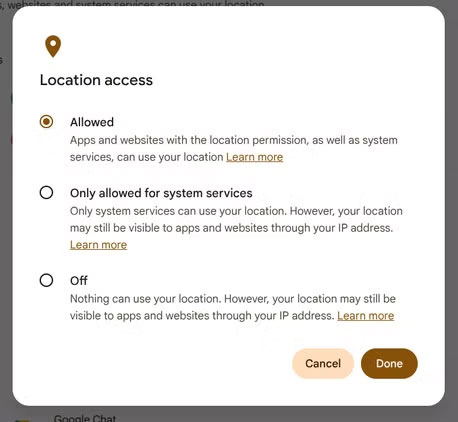
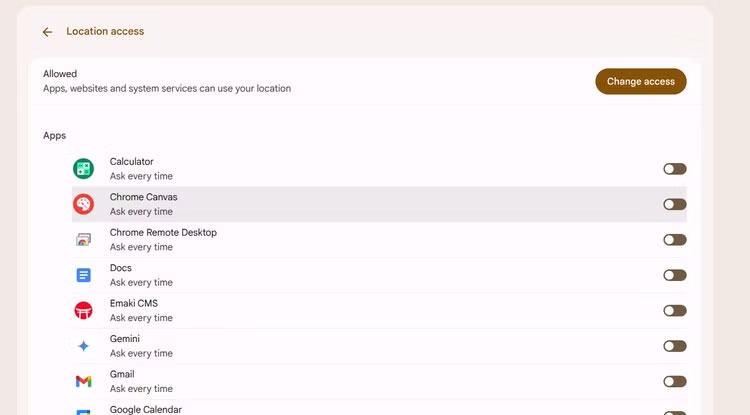
<p style="text-align: justify;">Một trong những vấn đề phổ biến nhất nằm ở quyền truy cập vị trí. Trước đây, ChromeOS gần như chỉ cho phép bật hoặc tắt hoàn toàn dịch vụ định vị, rất khác so với Android – nơi mỗi ứng dụng đều có quyền riêng biệt. Nếu đang dùng một chiếc Chromebook đã ngừng hỗ trợ cập nhật, ngay cả khi bạn tắt định vị toàn hệ thống thì vẫn có khả năng một số ứng dụng vẫn âm thầm thu thập vị trí. Trường hợp này, bạn buộc phải kiểm tra từng ứng dụng và tự bật tắt tùy theo nhu cầu, dù kết quả không phải lúc nào cũng đảm bảo tuyệt đối. Ở phiên bản ChromeOS mới nhất, người dùng đã có thể quản lý quyền vị trí theo từng app, nhưng vẫn cần dành thời gian rà soát toàn bộ danh sách ứng dụng để thiết lập cho phù hợp.</p>

<figure>
<div style="text-align: justify;"><img alt="nhung rui ro quyen rieng tu tren chromebook1*406077" data-i="0" data-src="https://st.quantrimang.com/photos/image/2025/12/07/nhung-rui-ro-quyen-rieng-tu-tren-chromebook1.jpg" data-was-processed="true" height="422" src="https://st.quantrimang.com/photos/image/2025/12/07/nhung-rui-ro-quyen-rieng-tu-tren-chromebook1.jpg" width="458" /></div>
</figure>

<figure>
<div style="text-align: justify;"><img alt="nhung rui ro quyen rieng tu tren chromebook2*406080" data-i="1" data-src="https://st.quantrimang.com/photos/image/2025/12/07/nhung-rui-ro-quyen-rieng-tu-tren-chromebook2.jpg" data-was-processed="true" height="415" src="https://st.quantrimang.com/photos/image/2025/12/07/nhung-rui-ro-quyen-rieng-tu-tren-chromebook2.jpg" width="750" /></div>
</figure>

<div style="text-align: justify;">&nbsp;</div>

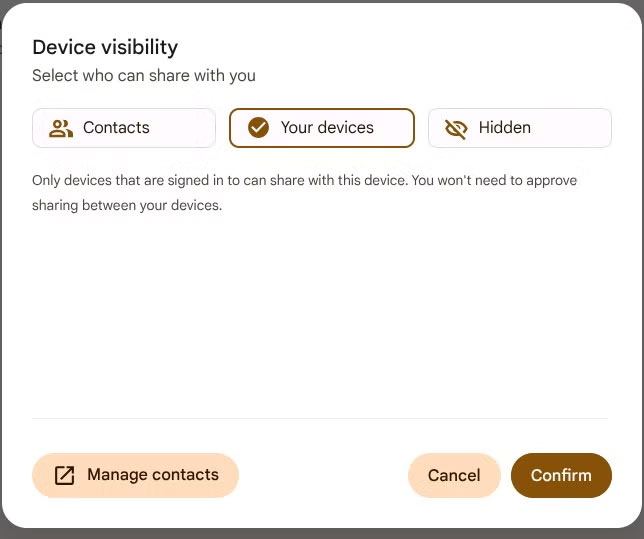
<p style="text-align: justify;">Một tính năng khác cần chú ý là Nearby Share (Quick Share) – công cụ chuyển file tương tự AirDrop. Dù rất tiện lợi, nó cũng tiềm ẩn rủi ro nếu chế độ hiển thị thiết bị để nhận file không được đặt đúng cách. Một số máy mặc định để trạng thái “Liên hệ”, nhưng nhiều máy lại để “Mọi người”, khiến Chromebook trở nên thấy được bởi bất kỳ ai ở gần. Một số mẫu mới đã loại bỏ tùy chọn “Mọi người”, chỉ còn “Thiết bị của tôi”, “Liên hệ” và “Ẩn”. Trong thực tế, chế độ “Thiết bị của tôi” thường an toàn và phù hợp nhất. Còn “Liên hệ” nghe có vẻ ổn, nhưng danh bạ Google của nhiều người lại chứa vô số địa chỉ đã tích lũy qua nhiều năm, dẫn đến rủi ro lộ thông tin ngoài ý muốn.</p>

<figure>
<div style="text-align: justify;"><img alt="" data-adbro-processed="true" data-i="2" data-src="https://st.quantrimang.com/photos/image/2025/12/07/nhung-rui-ro-quyen-rieng-tu-tren-chromebook3.jpg" data-was-processed="true" height="539" src="https://st.quantrimang.com/photos/image/2025/12/07/nhung-rui-ro-quyen-rieng-tu-tren-chromebook3.jpg" width="644" /></div>
</figure>

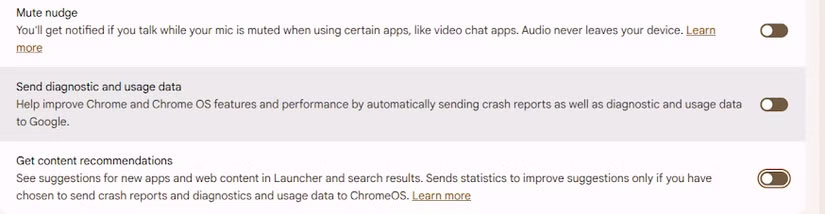
<p style="text-align: justify;">Bên cạnh đó, việc đồng bộ hóa dữ liệu nền và các hoạt động liên quan đến tài khoản Google cũng là một phần khó tránh khi sử dụng Chromebook. Ngay khi đăng nhập, thiết bị sẽ kích hoạt hàng loạt tác vụ như Web &amp; App Activity, lịch sử vị trí, hoạt động YouTube và nhiều dạng thu thập dữ liệu khác. Người dùng không thể tắt hoàn toàn, nhưng có thể giảm bớt bằng cách vào mục “Privacy controls” trong phần Cài đặt, nơi có tùy chọn ngừng gửi dữ liệu chẩn đoán và tắt gợi ý nội dung. Ngoài ra, việc quản lý quyền cho từng ứng dụng – nhất là các quyền liên quan đến theo dõi và đồng bộ – cũng rất quan trọng.</p>

<figure>
<div style="text-align: justify;"><img alt="" data-i="3" data-src="https://st.quantrimang.com/photos/image/2025/12/07/nhung-rui-ro-quyen-rieng-tu-tren-chromebook4.jpg" data-was-processed="true" height="214" src="https://st.quantrimang.com/photos/image/2025/12/07/nhung-rui-ro-quyen-rieng-tu-tren-chromebook4.jpg" width="825" /></div>
</figure>

<p style="text-align: justify;">Một số Chromebook còn có tính năng theo dõi bằng camera để tự động khóa màn hình khi bạn rời đi – rất hữu ích cho học sinh hoặc người hay quên. Tuy nhiên, nếu bạn có thể tự khóa máy (bằng phím Search/Launcher + L) thì việc tắt tính năng này sẽ an toàn hơn. Đồng thời, nếu máy có nắp che webcam thì bạn cũng nên sử dụng. Tương tự, việc bật “Hey Google” để gọi Assistant bằng giọng nói đồng nghĩa với việc micro luôn hoạt động. Trên laptop, điều này không cần thiết như trên smartphone, bởi bạn luôn có sẵn phím tắt để mở menu chức năng nhanh.</p>

<p style="text-align: justify;">Cuối cùng là tình trạng “quyền truy cập bị nới rộng theo thời gian”. Việc thiết lập quyền một lần không đủ; mỗi bản cập nhật ứng dụng hoặc hệ điều hành đều có thể thay đổi quyền cài đặt. Vì vậy, bạn nên định kỳ kiểm tra xem ứng dụng nào đang dùng camera, micro, vị trí hoặc các quyền nhạy cảm khác. Nếu một app không cần tới những quyền này mà vẫn tự ý bật lại, tốt nhất là xóa hẳn ứng dụng khỏi máy. Quyền riêng tư không phải là thứ thiết lập một lần rồi thôi – nó là thói quen sống, và bắt đầu từ chiếc Chromebook ngay trước mặt bạn sẽ là một bước khởi đầu tốt.</p>

<div style="text-align: justify;">&nbsp;</div>
		</div>
				<div id="author">
						<p>
				<strong>Nguồn tin:</strong>
				Quantrimang.com:
			</p>
		</div>
	</div>
	<div id="footer" class="clearfix">
		<div id="url">
			<strong>URL của bản tin này: </strong><a href="https://www.nguoicodonvn2008.info/vi/news/savefile/cuoc-song/nhung-rui-ro-quyen-rieng-tu-tren-chromebook-ma-nguoi-dung-de-bo-quen-11893.html" title="Những rủi ro quyền riêng tư trên Chromebook mà người dùng dễ bỏ quên">https://www.nguoicodonvn2008.info/vi/news/savefile/cuoc-song/nhung-rui-ro-quyen-rieng-tu-tren-chromebook-ma-nguoi-dung-de-bo-quen-11893.html</a>

		</div>
		<div class="clear"></div>
		<div class="copyright">
			&copy; .&#x3A; Nguoicodonvn2008.info - Cõi lòng người cô đơn &#x3A;.
		</div>
		<div id="contact">
			<a href="mailto:admin@nguoicodonvn2008.info">admin@nguoicodonvn2008.info</a>
		</div>
	</div>
</div>
        <div id="timeoutsess" class="chromeframe">
            Bạn đã không sử dụng Site, <a onclick="timeoutsesscancel();" href="https://nguoicodonvn2008.info/#">Bấm vào đây để duy trì trạng thái đăng nhập</a>. Thời gian chờ: <span id="secField"> 60 </span> giây
        </div>
        <div id="openidResult" class="nv-alert" style="display:none"></div>
        <div id="openidBt" data-result="" data-redirect=""></div>
		</script>
		<div class="car-top">
  <span><img src="https://nguoicodonvn2008.info/themes/default/images/car.png" alt=""></span>
</div>
<script src="https://nguoicodonvn2008.info/assets/js/jquery/jquery.min.js"></script>
<script>var nv_base_siteurl="/",nv_lang_data="vi",nv_lang_interface="vi",nv_name_variable="nv",nv_fc_variable="op",nv_lang_variable="language",nv_module_name="news",nv_func_name="savefile",nv_is_user=0, nv_my_ofs=-4,nv_my_abbr="EDT",nv_cookie_prefix="nv4c_e856T",nv_check_pass_mstime=1738000,nv_area_admin=0,nv_safemode=0,theme_responsive=0,nv_recaptcha_ver=2,nv_recaptcha_sitekey="",nv_recaptcha_type="image",XSSsanitize=1;</script>
<script src="https://nguoicodonvn2008.info/assets/js/language/vi.js"></script>
<script src="https://nguoicodonvn2008.info/assets/js/DOMPurify/purify3.js"></script>
<script src="https://nguoicodonvn2008.info/assets/js/global.js"></script>
<script src="https://nguoicodonvn2008.info/assets/js/site.js"></script>
<script src="https://nguoicodonvn2008.info/themes/default/js/news.js"></script>
<script src="https://nguoicodonvn2008.info/themes/default/js/main.js"></script>
<script src="https://nguoicodonvn2008.info/themes/default/js/custom.js"></script>
<script type="application/ld+json">
        {
            "@context": "https://schema.org",
            "@type": "Organization",
            "url": "https://nguoicodonvn2008.info",
            "logo": "https://nguoicodonvn2008.info/uploads/angel.gif"
        }
        </script>
<script src="https://nguoicodonvn2008.info/themes/default/js/bootstrap.min.js"></script>
<script type="text/javascript">
var $scrolltop = $('.car-top');
$scrolltop.on('click', function () {
    $('html,body').animate({
        scrollTop: 0
    }, 800);
    $(this).addClass("car-run");
    setTimeout(function(){ $scrolltop.removeClass('car-run');}, 1000);
    return false;
});
$(window).on('scroll', function ()
{ 
    if($(window).scrollTop() >= 200)
    {
        $scrolltop.addClass("show");
        $scrolltop.addClass("car-down");
    }
    else
    {
       $scrolltop.removeClass("show");
       setTimeout(function(){ $scrolltop.removeClass('car-down');}, 300);
    }
});
</script>
</body>
</html>