<!DOCTYPE html>
    <html lang="vi" xmlns="http://www.w3.org/1999/xhtml" prefix="og: http://ogp.me/ns#">
    <head>
<title>4 cách để tận dụng tốt Windows Remote Desktop</title>
<meta name="description" content="4 cách để tận dụng tốt Windows Remote Desktop - Savefile - Tin Tức -...">
<meta name="author" content=".: Nguoicodonvn2008.info - Cõi lòng người cô đơn :.">
<meta name="copyright" content=".: Nguoicodonvn2008.info - Cõi lòng người cô đơn :. [admin@nguoicodonvn2008.info]">
<meta name="robots" content="index, archive, follow, noodp">
<meta name="googlebot" content="index,archive,follow,noodp">
<meta name="msnbot" content="all,index,follow">
<meta name="generator" content="NukeViet v4.5">
<meta http-equiv="Content-Type" content="text/html; charset=utf-8">
<meta property="og:title" content="4 cách để tận dụng tốt Windows Remote Desktop">
<meta property="og:type" content="website">
<meta property="og:description" content="Savefile - Tin Tức - https&#x3A;&#x002F;&#x002F;www.nguoicodonvn2008.info&#x002F;vi&#x002F;news&#x002F;savefile&#x002F;cuoc-song&#x002F;4-cach-de-tan-dung-tot-windows-remote-desktop-2492.html">
<meta property="og:site_name" content=".&#x3A; Nguoicodonvn2008.info - Cõi lòng người cô đơn &#x3A;.">
<meta property="og:url" content="https://www.nguoicodonvn2008.info/vi/news/savefile/cuoc-song/4-cach-de-tan-dung-tot-windows-remote-desktop-2492.html">
<link rel="shortcut icon" href="https://nguoicodonvn2008.info/favicon.ico">
<link rel="canonical" href="https://www.nguoicodonvn2008.info/vi/news/savefile/cuoc-song/4-cach-de-tan-dung-tot-windows-remote-desktop-2492.html">
<link rel="alternate" href="https://nguoicodonvn2008.info/vi/news/rss/" title="Tin Tức" type="application/rss+xml">
<link rel="alternate" href="https://nguoicodonvn2008.info/vi/news/rss/karaoke-dual/" title="Tin Tức - Karaoke Dual" type="application/rss+xml">
<link rel="alternate" href="https://nguoicodonvn2008.info/vi/news/rss/nhac-tre/" title="Tin Tức - Nhạc trẻ" type="application/rss+xml">
<link rel="alternate" href="https://nguoicodonvn2008.info/vi/news/rss/tru-tinh/" title="Tin Tức - Trữ tình" type="application/rss+xml">
<link rel="alternate" href="https://nguoicodonvn2008.info/vi/news/rss/nuoc-ngoai/" title="Tin Tức - Nước ngoài" type="application/rss+xml">
<link rel="alternate" href="https://nguoicodonvn2008.info/vi/news/rss/remix/" title="Tin Tức - Remix" type="application/rss+xml">
<link rel="alternate" href="https://nguoicodonvn2008.info/vi/news/rss/tam-su-tinh-yeu/" title="Tin Tức - Tâm sự tình yêu" type="application/rss+xml">
<link rel="alternate" href="https://nguoicodonvn2008.info/vi/news/rss/tho-suu-tam/" title="Tin Tức - Thơ sưu tầm" type="application/rss+xml">
<link rel="alternate" href="https://nguoicodonvn2008.info/vi/news/rss/cuoc-song/" title="Tin Tức - Cuộc sống" type="application/rss+xml">
<link rel="alternate" href="https://nguoicodonvn2008.info/vi/news/rss/phan-mem/" title="Tin Tức - Phần mềm" type="application/rss+xml">
<link rel="alternate" href="https://nguoicodonvn2008.info/vi/news/rss/kien-thuc-may-tinh/" title="Tin Tức - Kiến thức máy tính" type="application/rss+xml">
<link rel="alternate" href="https://nguoicodonvn2008.info/vi/news/rss/hoc-tap/" title="Tin Tức - Học tập" type="application/rss+xml">
<link rel="alternate" href="https://nguoicodonvn2008.info/vi/news/rss/tai-lieu/" title="Tin Tức - Tài liệu" type="application/rss+xml">
<link rel="alternate" href="https://nguoicodonvn2008.info/vi/news/rss/de-thi/" title="Tin Tức - Đề thi" type="application/rss+xml">
<link rel="preload" as="style" href="https://nguoicodonvn2008.info/assets/css/font-awesome.min.css" type="text/css">
<link rel="preload" as="style" href="https://nguoicodonvn2008.info/themes/default/css/bootstrap.non-responsive.css" type="text/css">
<link rel="preload" as="style" href="https://nguoicodonvn2008.info/themes/default/css/style.css" type="text/css">
<link rel="preload" as="style" href="https://nguoicodonvn2008.info/themes/default/css/style.non-responsive.css" type="text/css">
<link rel="preload" as="style" href="https://nguoicodonvn2008.info/themes/default/css/news.css" type="text/css">
<link rel="preload" as="style" href="https://nguoicodonvn2008.info/themes/default/css/custom.css" type="text/css">
<link rel="preload" as="script" href="https://nguoicodonvn2008.info/assets/js/jquery/jquery.min.js" type="text/javascript">
<link rel="preload" as="script" href="https://nguoicodonvn2008.info/assets/js/language/vi.js" type="text/javascript">
<link rel="preload" as="script" href="https://nguoicodonvn2008.info/assets/js/DOMPurify/purify3.js" type="text/javascript">
<link rel="preload" as="script" href="https://nguoicodonvn2008.info/assets/js/global.js" type="text/javascript">
<link rel="preload" as="script" href="https://nguoicodonvn2008.info/assets/js/site.js" type="text/javascript">
<link rel="preload" as="script" href="https://nguoicodonvn2008.info/themes/default/js/news.js" type="text/javascript">
<link rel="preload" as="script" href="https://nguoicodonvn2008.info/themes/default/js/main.js" type="text/javascript">
<link rel="preload" as="script" href="https://nguoicodonvn2008.info/themes/default/js/custom.js" type="text/javascript">
<link rel="preload" as="script" href="https://nguoicodonvn2008.info/themes/default/js/bootstrap.min.js" type="text/javascript">
<link rel="stylesheet" href="https://nguoicodonvn2008.info/assets/css/font-awesome.min.css">
<link rel="stylesheet" href="https://nguoicodonvn2008.info/themes/default/css/bootstrap.non-responsive.css">
<link rel="stylesheet" href="https://nguoicodonvn2008.info/themes/default/css/style.css">
<link rel="stylesheet" href="https://nguoicodonvn2008.info/themes/default/css/style.non-responsive.css">
<link rel="StyleSheet" href="https://nguoicodonvn2008.info/themes/default/css/news.css">
<link rel="stylesheet" href="https://nguoicodonvn2008.info/themes/default/css/custom.css">
<style type="text/css">
	body{background: #fff;}
</style>
    </head>
    <body>
<div id="print">
	<div id="hd_print">
		<h2 class="pull-left">.&#x3A; Nguoicodonvn2008.info - Cõi lòng người cô đơn &#x3A;.</h2>
		<p class="pull-right"><a title=".&#x3A; Nguoicodonvn2008.info - Cõi lòng người cô đơn &#x3A;." href="https://nguoicodonvn2008.info/">https://nguoicodonvn2008.info</a></p>
	</div>
	<div class="clear"></div>
	<hr />
	<div id="content">
		<h1>4 cách để tận dụng tốt Windows Remote Desktop</h1>
		<ul class="list-inline">
			<li>Thứ hai - 10/08/2020 00:47</li>
			<li class="hidden-print txtrequired"><em class="fa fa-print">&nbsp;</em><a title="In ra" href="javascript:;" onclick="window.print()">In ra</a></li>
			<li class="hidden-print txtrequired"><em class="fa fa-power-off">&nbsp;</em><a title="Đóng cửa sổ này" href="javascript:;" onclick="window.close()">Đóng cửa sổ này</a></li>
		</ul>
		<div class="clear"></div>
		<div id="hometext">
		</div>
				<div class="imghome">
			<img alt="4 cách để tận dụng tốt Windows Remote Desktop" src="https://st.quantrimang.com/photos/image/2020/08/04/tan-dung-windows-remote-desktop-1.jpg" width="460" class="img-thumbnail" />
		</div>
		<div class="clear"></div>
		<div id="bodytext" class="clearfix">
			<p style="text-align: justify;">Khả năng điều khiển máy tính ở nhà từ một hệ thống khác giúp bạn truy cập tài nguyên hệ thống, file và nhiều thứ khác. Remote Desktop Protocol (RDP) của Microsoft được sử dụng cho các kết nối này và là cách an toàn nhất để kết nối với PC Windows từ xa.</p>

<p style="text-align: justify;">Sau đây,&nbsp;<strong>Quantrimang.com</strong>&nbsp;sẽ chỉ cho bạn những cách hàng đầu để tận dụng tốt nhất Windows Remote Desktop.</p>

<h2 style="text-align: justify;">1. Kết nối PC Windows từ xa</h2>

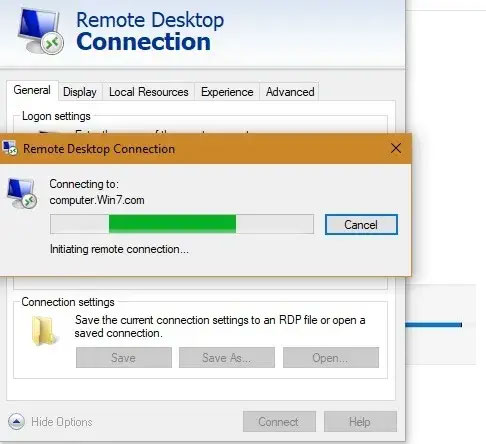
<p style="text-align: justify;">Công dụng Microsoft Remote Desktop phổ biến và hữu ích nhất là truy cập laptop và PC Windows từ xa bằng một hệ thống Windows khác. Bạn nên cài đặt tối thiểu Windows 7 SP1, 8.1, 10 hoặc Windows Server và phiên bản Windows 64-bit ở cả hai phía. Bạn cần phiên bản Windows 10 Professional hoặc Enterprise để truy cập hệ thống.</p>

<figure>
<div style="text-align: justify;"><img alt="Kết nối PC Windows từ xa" data-i="0" data-src="https://st.quantrimang.com/photos/image/2020/08/04/tan-dung-windows-remote-desktop-1.jpg" data-was-processed="true" height="444" src="https://st.quantrimang.com/photos/image/2020/08/04/tan-dung-windows-remote-desktop-1.jpg" width="486" /></div>

<figcaption>
<div style="text-align: justify;">Kết nối PC Windows từ xa</div>
</figcaption>
</figure>

<p style="text-align: justify;">Có hai cách để bắt đầu: Bạn có thể thiết lập kết nối qua ứng dụng Remote Desktop cho Windows 10 hoặc chạy ứng dụng từ Microsoft Store. Trước đây, bạn có thể mở chương trình từ menu Start ở chế độ Administrator.</p>

<p style="text-align: justify;">Đối với người dùng Windows 10 Professional và Enterprise, bạn cũng có thể kết nối từ Microsoft Store, nơi cung cấp giao diện người dùng hấp dẫn hơn.</p>

<p style="text-align: justify;">&nbsp;</p>

<p style="text-align: justify;">Khi kết nối từ xa được thiết lập, bạn có thể có được cái nhìn tổng quan về tất cả các PC từ xa thông qua những bản preview trên desktop.</p>

<div style="text-align: justify;">&nbsp;</div>

<h2 style="text-align: justify;">2. Kết nối từ Android/iOS</h2>

<figure>
<div style="text-align: justify;"><img alt="Truy cập PC Windows bằng ứng dụng iOS và Android" data-i="1" data-src="https://st.quantrimang.com/photos/image/2020/08/04/tan-dung-windows-remote-desktop-2.jpg" data-was-processed="true" height="500" src="https://st.quantrimang.com/photos/image/2020/08/04/tan-dung-windows-remote-desktop-2.jpg" width="281" /></div>

<figcaption>
<div style="text-align: justify;">Truy cập PC Windows bằng ứng dụng iOS và Android</div>
</figcaption>
</figure>

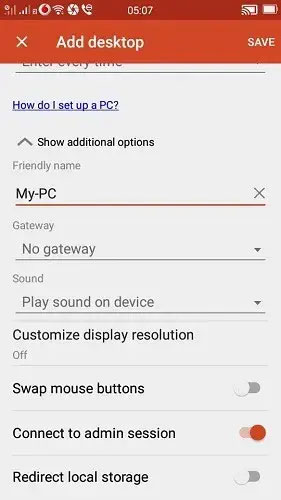
<p style="text-align: justify;">Ngoài việc truy cập PC Windows từ xa trên một thiết bị Windows khác, bạn cũng có thể truy cập nó bằng ứng dụng iOS và Android.</p>

<p style="text-align: justify;">Trước khi tải xuống các ứng dụng trên điện thoại, hãy đảm bảo rằng bạn đã kích hoạt tùy chọn&nbsp;<strong>“Remote connections to the target computer”</strong>&nbsp;từ menu Start. Bạn cũng có thể làm điều đó từ&nbsp;<strong>Remote Desktop Settings</strong>.</p>

<p style="text-align: justify;">&nbsp;</p>

<h2 style="text-align: justify;">3. Cấu hình Remote Desktop (RD) Gateway</h2>

<p style="text-align: justify;">Service Windows Remote Desktop có thể được sử dụng để cấu hình Remote Desktop (RD) Gateway. Nó cho phép mọi người đăng nhập an toàn vào máy tính Windows của công ty từ bất kỳ thiết bị hỗ trợ Internet nào chạy chạy ứng dụng khách Remote Desktop.</p>

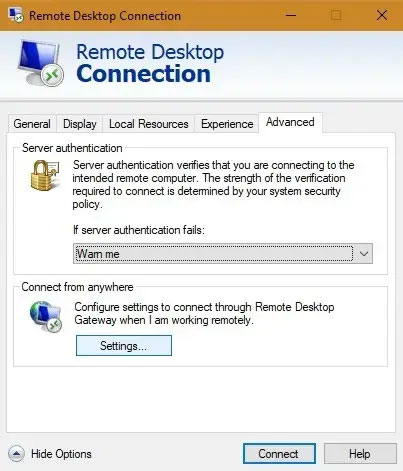
<p style="text-align: justify;">Để cấu hình Remote Desktop Gateway trên máy khách, hãy chuyển đến cài đặt RD Gateway server.</p>

<figure>
<div style="text-align: justify;"><img alt="Chuyển đến cài đặt RD Gateway server" data-i="2" data-src="https://st.quantrimang.com/photos/image/2020/08/04/tan-dung-windows-remote-desktop-3.jpg" data-was-processed="true" height="471" src="https://st.quantrimang.com/photos/image/2020/08/04/tan-dung-windows-remote-desktop-3.jpg" width="403" /></div>

<figcaption>
<div style="text-align: justify;">Chuyển đến cài đặt RD Gateway server</div>
</figcaption>
</figure>

<p style="text-align: justify;">Chọn cài đặt tự động để thiết lập kết nối. Mặt khác, nếu admin mạng đã cung cấp cho bạn tên server hoặc thông tin đăng nhập khác, hãy nhập các chi tiết đó. Trong trường hợp này, hãy chọn&nbsp;<strong>“Use my RD Gateway credentials for the remote computer”</strong>.</p>

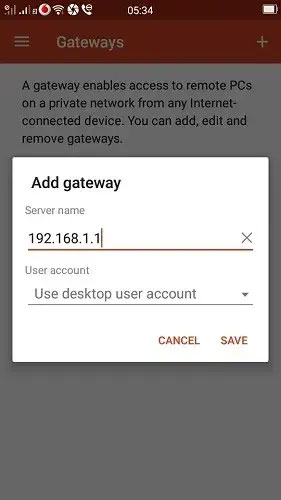
<p style="text-align: justify;">Nếu bạn đã cài đặt Remote Desktop trên thiết bị di động của mình, bạn có thể truy cập&nbsp;<strong>Gateways</strong>&nbsp;trong bảng điều khiển bên.</p>

<p style="text-align: justify;">Thêm địa chỉ IP gateway được yêu cầu và các chi tiết khác để thiết lập kết nối.</p>

<figure>
<div style="text-align: justify;"><img alt="Thêm địa chỉ IP gateway được yêu cầu và các chi tiết khác để thiết lập kết nối" data-i="3" data-src="https://st.quantrimang.com/photos/image/2020/08/04/tan-dung-windows-remote-desktop-4.jpg" data-was-processed="true" height="500" src="https://st.quantrimang.com/photos/image/2020/08/04/tan-dung-windows-remote-desktop-4.jpg" width="281" /></div>

<figcaption>
<div style="text-align: justify;">Thêm địa chỉ IP gateway được yêu cầu và các chi tiết khác để thiết lập kết nối</div>
</figcaption>
</figure>

<div style="text-align: justify;">&nbsp;</div>

<h2 style="text-align: justify;">4. Kết nối các thiết bị và tài nguyên cục bộ</h2>

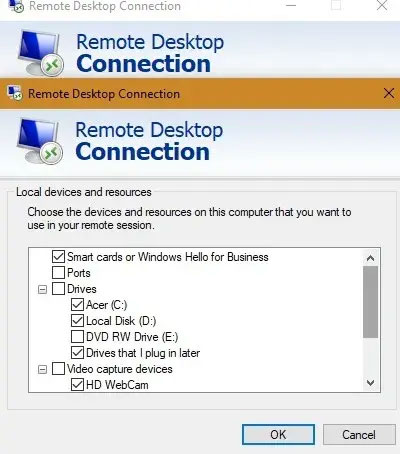
<p style="text-align: justify;">Bạn có thể muốn truy cập các tài nguyên cục bộ cụ thể trên một máy tính từ xa. Điều này có thể được thực hiện từ tab&nbsp;<strong>Local devices and resources</strong>&nbsp;của ứng dụng Microsoft Remote Desktop (cũng từ Microsoft Store).</p>

<p style="text-align: justify;">Những lựa chọn bạn có bao gồm phần cứng cụ thể, máy in, smart card, webcam, ổ cứng, v.v...</p>

<figure>
<div style="text-align: justify;"><img alt="Kết nối các thiết bị và tài nguyên cục bộ" data-i="4" data-src="https://st.quantrimang.com/photos/image/2020/08/04/tan-dung-windows-remote-desktop-5.jpg" data-was-processed="true" height="454" src="https://st.quantrimang.com/photos/image/2020/08/04/tan-dung-windows-remote-desktop-5.jpg" width="400" /></div>

<figcaption>
<div style="text-align: justify;">Kết nối các thiết bị và tài nguyên cục bộ</div>
</figcaption>
</figure>

<p style="text-align: justify;">Nếu không hài lòng với Microsoft Remote Desktop, bạn có thể sử dụng các ứng dụng truy cập từ xa khác như&nbsp;TeamViewer,&nbsp;Chrome Remote Desktop&nbsp;hoặc&nbsp;AnyDesk.</p>

<p style="text-align: justify;">Bạn có cách nào khác để sử dụng Microsoft Remote Desktop không? Để lại ý kiến trong phần bình luận bên dưới nhé!</p>
		</div>
				<div id="author">
						<p>
				<strong>Nguồn tin:</strong>
				Quantrimang.com
			</p>
		</div>
	</div>
	<div id="footer" class="clearfix">
		<div id="url">
			<strong>URL của bản tin này: </strong><a href="https://www.nguoicodonvn2008.info/vi/news/savefile/cuoc-song/4-cach-de-tan-dung-tot-windows-remote-desktop-2492.html" title="4 cách để tận dụng tốt Windows Remote Desktop">https://www.nguoicodonvn2008.info/vi/news/savefile/cuoc-song/4-cach-de-tan-dung-tot-windows-remote-desktop-2492.html</a>

		</div>
		<div class="clear"></div>
		<div class="copyright">
			&copy; .&#x3A; Nguoicodonvn2008.info - Cõi lòng người cô đơn &#x3A;.
		</div>
		<div id="contact">
			<a href="mailto:admin@nguoicodonvn2008.info">admin@nguoicodonvn2008.info</a>
		</div>
	</div>
</div>
        <div id="timeoutsess" class="chromeframe">
            Bạn đã không sử dụng Site, <a onclick="timeoutsesscancel();" href="https://nguoicodonvn2008.info/#">Bấm vào đây để duy trì trạng thái đăng nhập</a>. Thời gian chờ: <span id="secField"> 60 </span> giây
        </div>
        <div id="openidResult" class="nv-alert" style="display:none"></div>
        <div id="openidBt" data-result="" data-redirect=""></div>
		</script>
		<div class="car-top">
  <span><img src="https://nguoicodonvn2008.info/themes/default/images/car.png" alt=""></span>
</div>
<script src="https://nguoicodonvn2008.info/assets/js/jquery/jquery.min.js"></script>
<script>var nv_base_siteurl="/",nv_lang_data="vi",nv_lang_interface="vi",nv_name_variable="nv",nv_fc_variable="op",nv_lang_variable="language",nv_module_name="news",nv_func_name="savefile",nv_is_user=0, nv_my_ofs=-4,nv_my_abbr="EDT",nv_cookie_prefix="nv4c_e856T",nv_check_pass_mstime=1738000,nv_area_admin=0,nv_safemode=0,theme_responsive=0,nv_recaptcha_ver=2,nv_recaptcha_sitekey="",nv_recaptcha_type="image",XSSsanitize=1;</script>
<script src="https://nguoicodonvn2008.info/assets/js/language/vi.js"></script>
<script src="https://nguoicodonvn2008.info/assets/js/DOMPurify/purify3.js"></script>
<script src="https://nguoicodonvn2008.info/assets/js/global.js"></script>
<script src="https://nguoicodonvn2008.info/assets/js/site.js"></script>
<script src="https://nguoicodonvn2008.info/themes/default/js/news.js"></script>
<script src="https://nguoicodonvn2008.info/themes/default/js/main.js"></script>
<script src="https://nguoicodonvn2008.info/themes/default/js/custom.js"></script>
<script type="application/ld+json">
        {
            "@context": "https://schema.org",
            "@type": "Organization",
            "url": "https://nguoicodonvn2008.info",
            "logo": "https://nguoicodonvn2008.info/uploads/angel.gif"
        }
        </script>
<script src="https://nguoicodonvn2008.info/themes/default/js/bootstrap.min.js"></script>
<script type="text/javascript">
var $scrolltop = $('.car-top');
$scrolltop.on('click', function () {
    $('html,body').animate({
        scrollTop: 0
    }, 800);
    $(this).addClass("car-run");
    setTimeout(function(){ $scrolltop.removeClass('car-run');}, 1000);
    return false;
});
$(window).on('scroll', function ()
{ 
    if($(window).scrollTop() >= 200)
    {
        $scrolltop.addClass("show");
        $scrolltop.addClass("car-down");
    }
    else
    {
       $scrolltop.removeClass("show");
       setTimeout(function(){ $scrolltop.removeClass('car-down');}, 300);
    }
});
</script>
</body>
</html>